

POST /flux/videos to complete video generation, keyframe image-to-video, video continuation, and draft enhancement. action=generate (default), and mode selects the generation mode; existing POST /flux/tasks is uniformly used to query results.
Currently in Beta. Text-to-video, image-to-video, video continuation, and draft enhancement are available. HTTP 200 and a task ID only indicate that the task has been accepted; you must continue querying for the final result.
1. Obtain an API Token
- Register or log in to the Ace Data Cloud Console, create an application, and obtain an API Token. A general API Token can call platform services; please confirm that the application has permission to call the Flux service and has an available balance.
- View plans and pricing for each operation on the Flux service page. When the balance is insufficient, recharge on the console balance page.
- Requests use
Authorization: Bearer <your Token>. The Token should be stored in server-side environment variables; do not write it into frontend pages, public repositories, screenshots, or callback URLs.
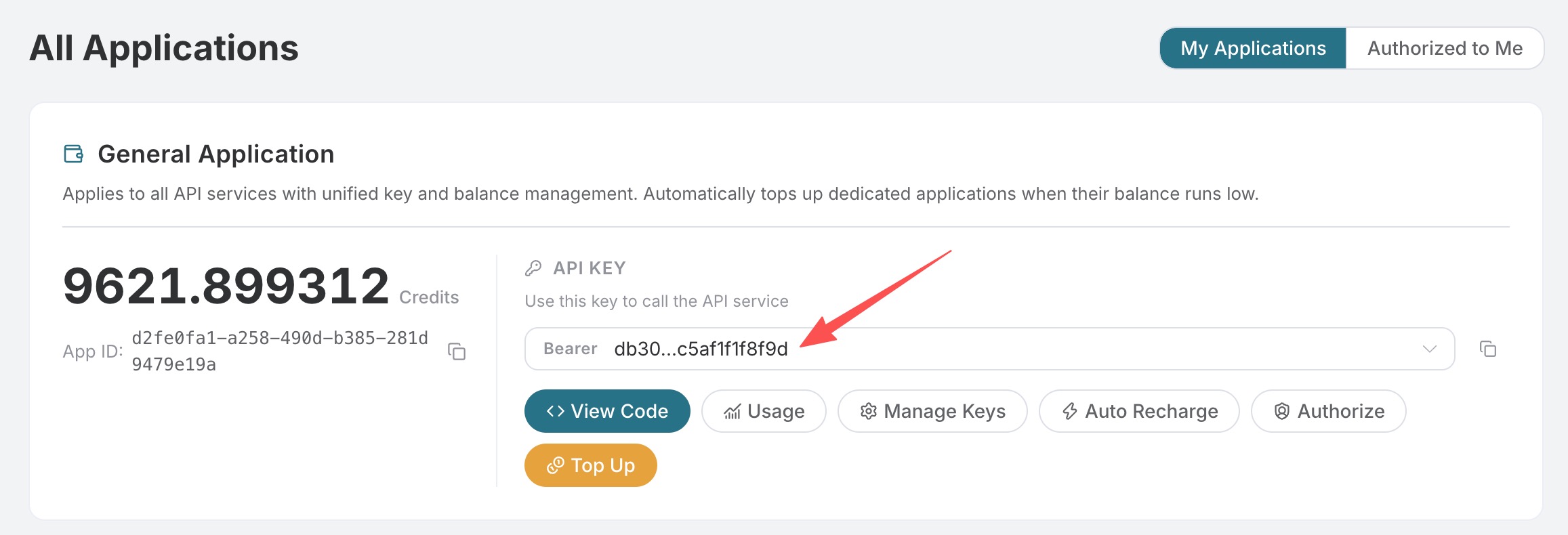 The code in this article uniformly reads the environment variable:
For complete fields and online debugging, see Flux Videos API; for task queries, see Flux Tasks API.
2. Choose an Operation and Input
The generation model is
flux-3, and action is generate (default). Use mode to select text-to-video, image-to-video, video continuation, or draft enhancement.
Common Generation Parameters
Asset URLs must be readable by the service. If using temporary signed URLs, reserve sufficient validity time for downloading and processing. Do not use webpage URLs as image or video file URLs.
3. Text-to-Video: Complete Tested Request and Result
The following request was successfully executed on the production API before the price adjustment on 2026-10-02. Omittingaction verified the default generation behavior; async=true avoids waiting for a long HTTP connection.
task_id in your own response and continue querying; do not use the task ID from the documentation example to query results from other accounts.
response field returned by the task query contains the final business result. The following is the successfully tested response from this test, with the outer task metadata omitted. The video URL in the documentation has been replaced with a copy of the same file on a long-term example CDN (SHA-256 consistent); actual calls will return the result URL for the current task:
This is a historical test before the price adjustment:
list_amount=2.9871876975 Credits, and the account had a 10% consumption discount at the time, resulting in an actual amount=2.68846892775 Credits. The new price on 2026-10-02 has been reduced by approximately 6.33%; the same 5.041667-second draft costs 2.798125185 Credits at the current price (before the consumption discount), or 2.5183126665 Credits if a 10% consumption discount still applies. Historical task billing is not recalculated. Plans and discounts for other accounts may differ; this is not a fixed USD price for all users.
4. Image-to-Video: Standard and Timed Keyframes
The following are parameter examples. You need to replace the asset URLs; they are not a declaration that this example has already been successfully executed. After generation is complete, query it following the process above; the result structure is the same. Use a standard array for one or two images:[seconds, image URL] pairs:
Image-to-Video Test Output
The matching input for this test is as follows (only the complete base64 is replaced with descriptive text; all other fields are from the actual request): After downloading this PNG keyframe, you can use Python’s
base64.b64encode(image_bytes).decode("ascii") to obtain the raw string and place it in the keyframes array. Do not use the descriptive text in the documentation as image input.
The following is the real final response for the production task on 2026-10-01 (not a simulated response); only the video URL has been replaced with a long-term example copy with the same hash. The test input used the raw base64 string of a 1280×720 PNG as a single keyframe; the URL input above is an independent parameter example.
5. Video Continuation
Pass the address of an existing video file instart_video, use mode=v2v, with a maximum duration of 15 seconds.
Actual Video Continuation Test Output
The complete actual test input for this run is as follows; when reproducing draft enhancement, you must replace it with your own draft ID. The material URL uses a long-term example copy of the same file:start_video is the completed draft video, and the other parameters are duration=5, resolution=hd, generate_audio=false.
6. Draft First, Then Enhance
- Generate a draft with
draft=true,resolution=hd, and wait for success. - Retrieve the platform draft ID from the final
data[0].draft_task_id. - Submit an enhancement request using application credentials under the same ownership:
prompt, duration, aspect_ratio, version, generate_audio, draft, keyframes, or start_video to override the original content. Draft cache is a temporary resource, so please enhance it promptly; permanent storage or a fixed retention period is not guaranteed. Drafts not belonging to you/the current application, incomplete drafts, and expired caches cannot be reused. The draft and enhancement are two separate tasks and are billed separately upon success.
Actual Draft Enhancement Test Output
The complete actual test input for this run is as follows; when reproducing draft enhancement, you must replace it with your own draft ID. The material URL uses a long-term example copy of the same file:7. Python End-to-End Call
Installrequests, set your own Token, and run the script below to complete “submit once → poll → output video URL”. Both querying and network retries should use the original task_id to avoid repeatedly submitting billable tasks.
8. Using Callbacks
Addcallback_url when submitting. After the task is completed, the final JSON result will be POSTed to that address. The success structure is consistent with the aforementioned response; failures include error.
9. Current Billing and Pricing Table
Updated 2026-10-02: Unit prices for all tiers of this video API have been reduced by approximately 6.33%. The metering method, plans, and consumption discount rules remain unchanged. The cost in the historical measured response above is the bill at task completion and does not represent the current quotation. Video generation is billed based on actual output seconds. Below are the current Credits unit prices before account consumption discounts are applied, consistent with the rules on the Flux pricing page.
USD conversion:
actual cost (USD) = cost.amount (Credits) × plan price / plan amount. Top-up tiers and consumption discounts affect the actual price; Credits cannot be directly treated as USD. Failed tasks are not charged generation fees; the final amount is subject to the completion result and console call records.
10. Frequently Asked Questions and Troubleshooting
When providing feedback, include the task_id, trace_id, request time, and redacted parameters. Do not send the API Token. For more methods, see the Flux MCP Integration Guide.