Google Gemini is a very powerful AI conversation system that can generate smooth and natural replies in just a few seconds by inputting prompts. Gemini provides amazing intelligent assistance, greatly enhancing human work efficiency and creativity. This document mainly describes the usage process of the Gemini Chat Completion API, allowing us to easily utilize the official Gemini conversation features.

Application Process

To use the Gemini Chat Completion API, you can first visit the Gemini Chat Completion API page and click the “Acquire” button to obtain the credentials needed for the request: If you are not logged in or registered, you will be automatically redirected to the login page inviting you to register and log in. After logging in or registering, you will be automatically returned to the current page. During the first application, there will be a free quota provided, allowing you to use the API for free.

Basic Usage

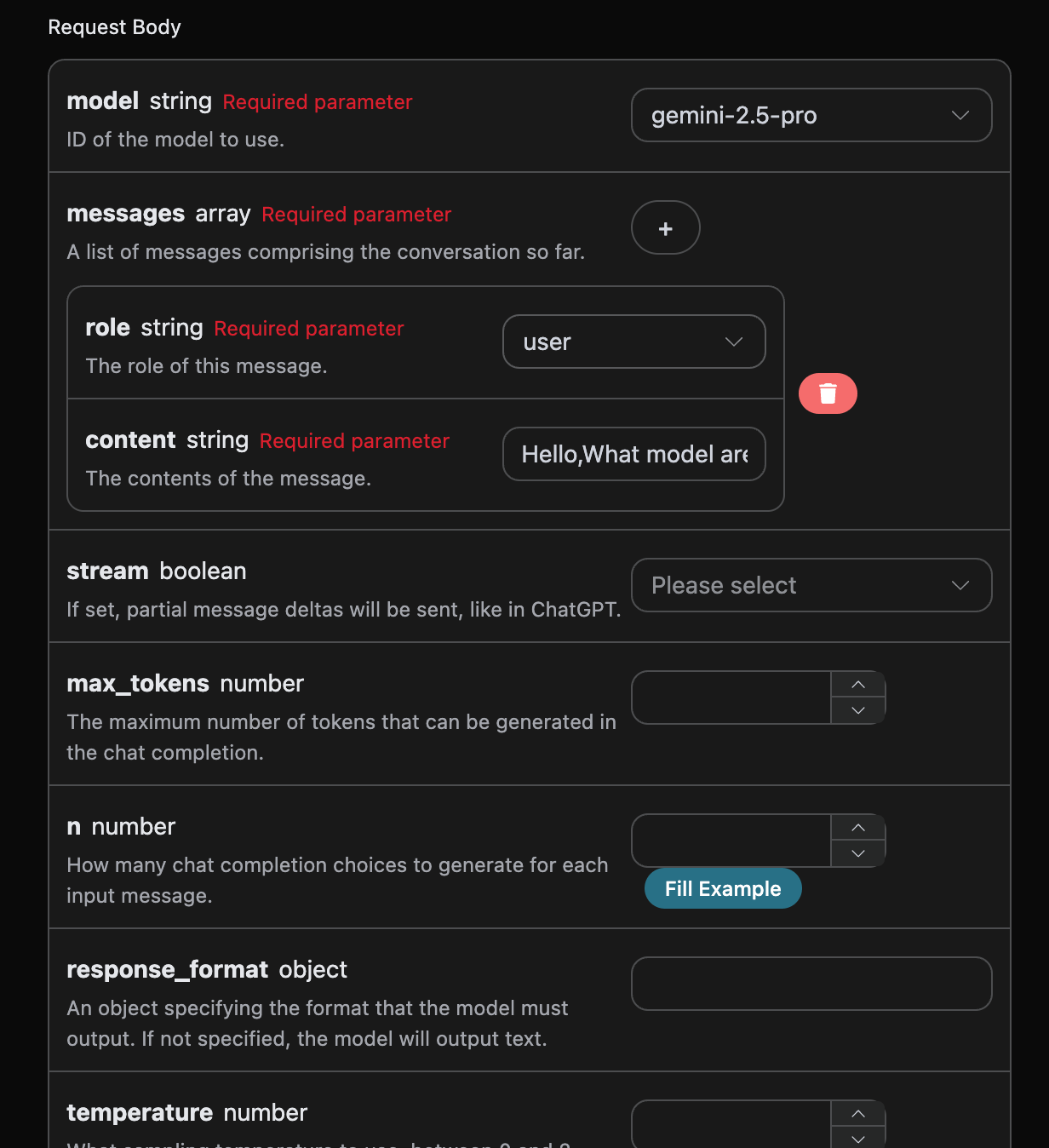
Next, you can fill in the corresponding content on the interface, as shown in the figure:

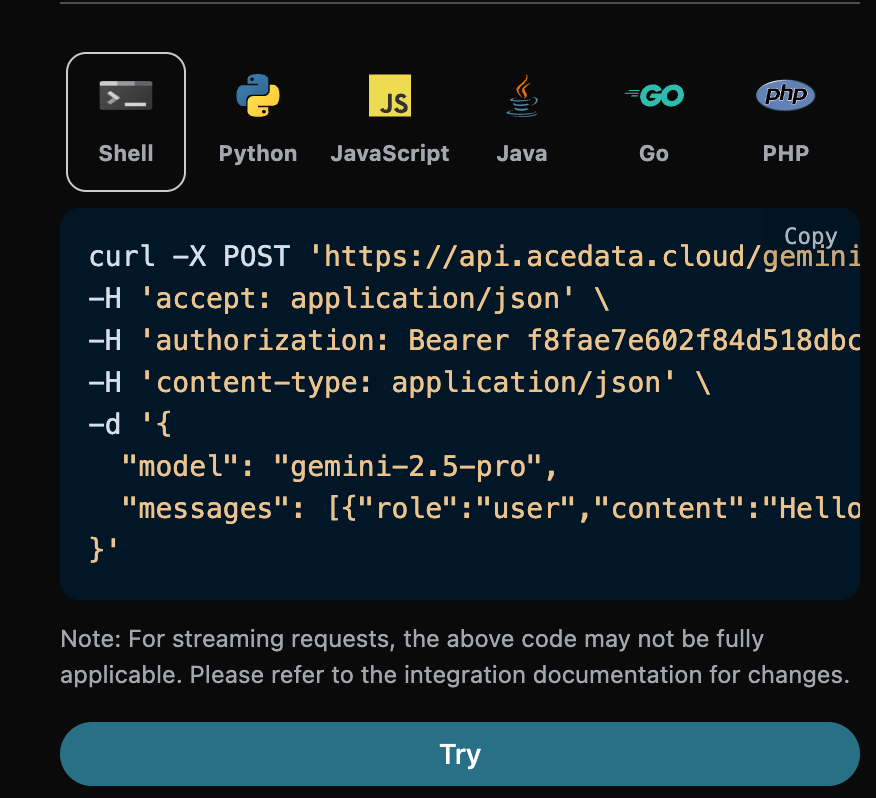
When using this interface for the first time, we need to fill in at least three pieces of information: one is authorization, which can be selected directly from the dropdown list. The other parameter is model, which is the category of the Gemini official model we choose to use. Here we mainly have 6 types of models; details can be found in the models we provide. The last parameter is messages, which is an array of the questions we input. It is an array that allows multiple questions to be uploaded simultaneously, with each question containing role and content. The role indicates the role of the questioner, and we provide three identities: user, assistant, and system. The other content is the specific content of our question. You can also notice that there is corresponding code generation on the right side; you can copy the code to run directly or click the “Try” button for testing.

After the call, we find that the returned result is as follows:
{
  "id": "chatcmpl-20251122212413908150493uPhjTUO9",
  "model": "gemini-2.5-pro",
  "object": "chat.completion",
  "created": 1763817866,
  "choices": [
    {
      "index": 0,
      "message": {
        "role": "assistant",
        "content": "I am a large language model, trained by Google.",
        "reasoning_content": "**My Reasoning: Answering the User's Question**\n\nOkay, here's how I'm going to approach answering the user's question, \"What model are you?\". The core is to be direct and informative. First, I have to be clear about my origin. Then, I need to make sure the explanation is accessible, given that the user may not be familiar with technical jargon. I need to explain what a \"large language model\" actually *does*, and provide relatable examples. I know the user might be looking for a specific name, like other models have, so I'll address that directly and then wrap it up with an invitation to continue.\n\nSo, here's my plan:\n\n1.  **Lead with the key info:** I'll begin by stating that I am a large language model created by Google. That is the fundamental, most critical piece of the puzzle.\n2.  **Define the buzzword:** Then, I'll explain that \"large language model\" in simple terms. I'll explain what I *do* - process and generate text; how I *do* it - by training on huge amounts of text data; and the *goal* - to be able to communicate like a human.\n3.  **Provide context:** After that, to make the concept even clearer, I'll provide a list of examples of my capabilities. I'll mention things like answering questions, summarizing texts, writing stories, translating languages, and brainstorming ideas.\n4.  **Acknowledge the lack of a personal name:** I'll anticipate the likely question about a model name (like ChatGPT) by clearly stating that I don't have a personal name and that it's best to think of me as an AI assistant from Google.\n5.  **End with an invitation:** Lastly, I'll end with a simple, friendly question to invite further interaction and to guide the conversation.\n\nWith this approach, I am confident I can successfully answer this important question.\n"
      },
      "finish_reason": "stop"
    }
  ],
  "usage": {
    "prompt_tokens": 8,
    "completion_tokens": 932,
    "total_tokens": 940,
    "prompt_tokens_details": {
      "cached_tokens": 0,
      "text_tokens": 8,
      "audio_tokens": 0,
      "image_tokens": 0
    },
    "completion_tokens_details": {
      "text_tokens": 0,
      "audio_tokens": 0,
      "reasoning_tokens": 921
    },
    "input_tokens": 0,
    "output_tokens": 0,
    "input_tokens_details": null,
    "claude_cache_creation_5_m_tokens": 0,
    "claude_cache_creation_1_h_tokens": 0
  }
}
The returned result contains multiple fields, described as follows:
  • id, the ID generated for this conversation task, used to uniquely identify this conversation task.
  • model, the selected Gemini official model.
  • choices, the response information provided by Gemini for the question.
  • usage: statistics on the tokens for this Q&A.
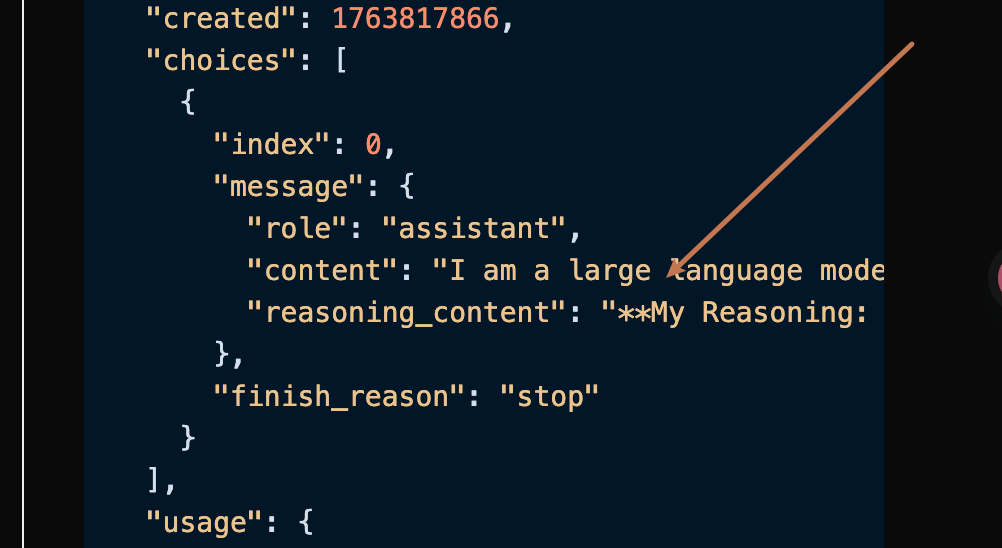
Among them, choices contains the response information from Gemini, and the choices inside it shows the specific information of Gemini’s response, as can be seen in the figure.

It can be seen that the content field in choices contains the specific content of Gemini’s reply.

Streaming Response

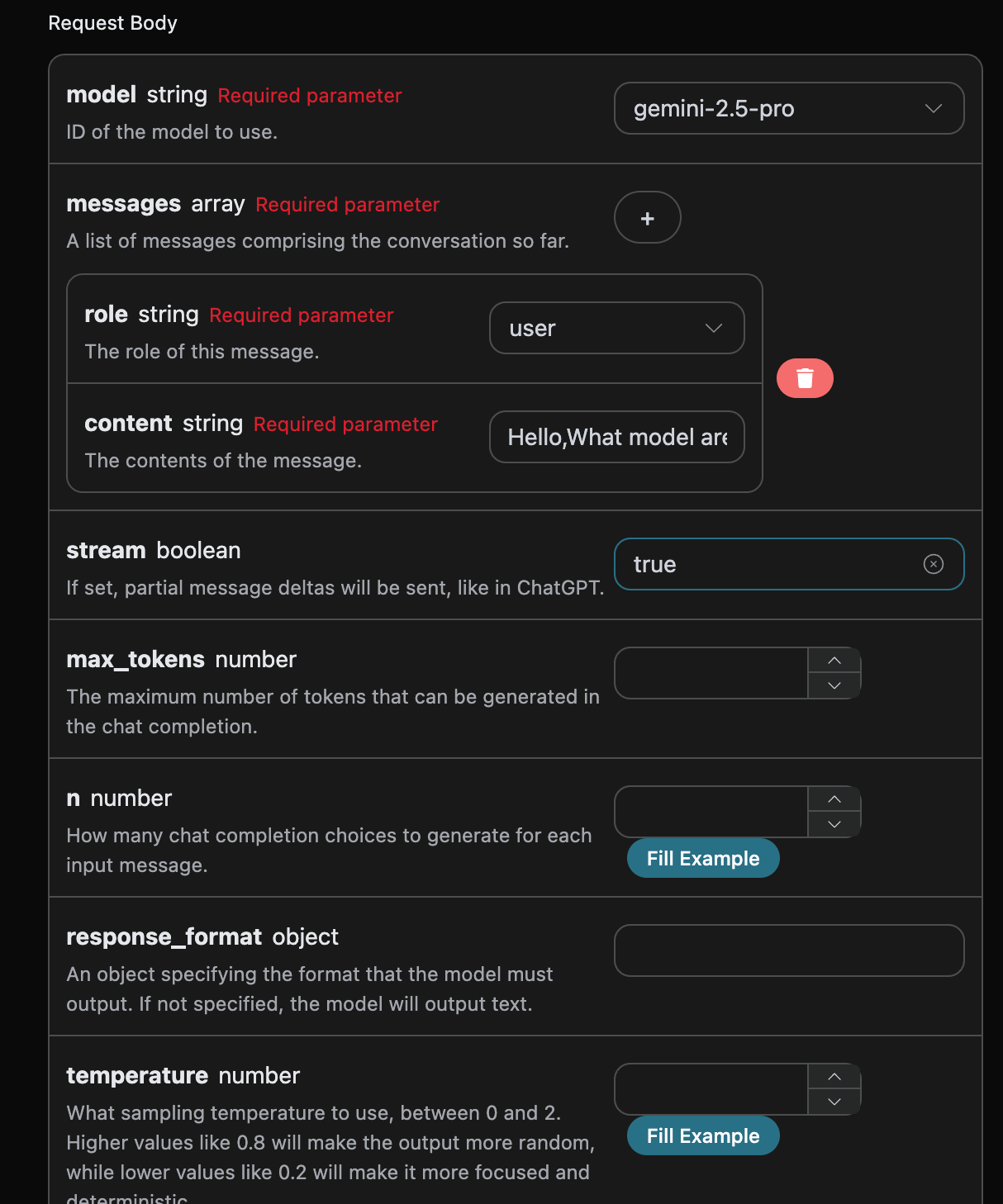
This interface also supports streaming responses, which is very useful for web integration, allowing the webpage to display results word by word. If you want to return responses in a streaming manner, you can change the stream parameter in the request header to true. Modify as shown in the figure, but the calling code needs to have corresponding changes to support streaming responses.

After changing stream to true, the API will return the corresponding JSON data line by line, and we need to make corresponding modifications at the code level to obtain line-by-line results. Python sample calling code:
import requests

url = "https://api.acedata.cloud/gemini/chat/completions"

headers = {
    "accept": "application/json",
    "authorization": "Bearer {token}",
    "content-type": "application/json"
}

payload = {
    "model": "gemini-2.5-pro",
    "messages": [{"role":"user","content":"Hello,What model are you?"}],
    "stream": True
}

response = requests.post(url, json=payload, headers=headers)
print(response.text)
The output effect is as follows:
data: {"id": "chatcmpl-20251122214038810722821kNjUTjtr", "object": "chat.completion.chunk", "created": 1763818842, "model": "gemini-2.5-pro", "system_fingerprint": null, "choices": [{"delta": {"content": "", "role": "assistant"}, "logprobs": null, "finish_reason": null, "index": 0}], "usage": null}

data: {"id": "chatcmpl-20251122214038810722821kNjUTjtr", "object": "chat.completion.chunk", "created": 1763818842, "model": "gemini-2.5-pro", "system_fingerprint": null, "choices": [{"delta": {"reasoning_content": "**Define My Nature**\n\nMy thinking has started. The user wants to know my nature, asking a direct \"what are you?\" The initial step was straightforward: identifying the query. Now, I recall my fundamental identity: I'm a large language model. This is the core truth I aim to convey.\n\n\n"}, "logprobs": null, "finish_reason": null, "index": 0}], "usage": null}

data: {"id": "chatcmpl-20251122214038810722821kNjUTjtr", "object": "chat.completion.chunk", "created": 1763818842, "model": "gemini-2.5-pro", "system_fingerprint": null, "choices": [{"delta": {"reasoning_content": "**Refining My Response**\n\nI've added the crucial information that I'm trained by Google to the basic \"large language model\" identity. My next step is considering what being a \"large language model\" actually entails, so I can explain my core capabilities. I'm focusing on providing context without going into specific technical details or model names. I want to convey my function in a way the user can easily understand.\n\n\n"}, "logprobs": null, "finish_reason": null, "index": 0}], "usage": null}

data: {"id": "chatcmpl-20251122214038810722821kNjUTjtr", "object": "chat.completion.chunk", "created": 1763818842, "model": "gemini-2.5-pro", "system_fingerprint": null, "choices": [{"delta": {"reasoning_content": "**Confirming Core Identity**\n\nI'm now solidifying my response. The user's query about my model affiliation needs a focused answer. I've pinpointed that \"trained by Google\" is essential, providing key context. I'm resisting the urge to mention any specific model names, as it's not relevant. The aim is to deliver a direct, accurate statement. My goal remains a clear and concise reply, avoiding technical jargon and getting straight to the relevant point.\n\n\n"}, "logprobs": null, "finish_reason": null, "index": 0}], "usage": null}

data: {"id": "chatcmpl-20251122214038810722821kNjUTjtr", "object": "chat.completion.chunk", "created": 1763818842, "model": "gemini-2.5-pro", "system_fingerprint": null, "choices": [{"delta": {"content": "I am a large language model, trained by Google."}, "logprobs": null, "finish_reason": null, "index": 0}], "usage": null}

data: {"id": "chatcmpl-20251122214038810722821kNjUTjtr", "object": "chat.completion.chunk", "created": 1763818842, "model": "gemini-2.5-pro", "system_fingerprint": null, "choices": [{"delta": {}, "logprobs": null, "finish_reason": "stop", "index": 0}], "usage": null}

data: {"id": "chatcmpl-20251122214038810722821kNjUTjtr", "object": "chat.completion.chunk", "created": 1763818842, "model": "gemini-2.5-pro", "system_fingerprint": "", "choices": [], "usage": {"prompt_tokens": 8, "completion_tokens": 527, "total_tokens": 535, "prompt_tokens_details": {"cached_tokens": 0, "text_tokens": 8, "audio_tokens": 0, "image_tokens": 0}, "completion_tokens_details": {"text_tokens": 0, "audio_tokens": 0, "reasoning_tokens": 519}, "input_tokens": 0, "output_tokens": 0, "input_tokens_details": null, "claude_cache_creation_5_m_tokens": 0, "claude_cache_creation_1_h_tokens": 0}}

data: [DONE]

It can be seen that there are many data in the response, and the choices in data are the latest response content, consistent with the content introduced above. The choices are the newly added response content, which you can integrate into your system based on the results. The end of the streaming response is determined by the content of data; if the content is [DONE], it indicates that the streaming response has completely ended. The returned data result has multiple fields, described as follows:
  • id, the ID generated for this dialogue task, used to uniquely identify this dialogue task.
  • model, the selected Gemini official model.
  • choices, the response information provided by Gemini for the query.
JavaScript is also supported, for example, the streaming call code for Node.js is as follows:
const options = {
  method: "post",
  headers: {
    "accept": "application/json",
    "authorization": "Bearer {token}",
    "content-type": "application/json"
  },
  body: JSON.stringify({
    "model": "gemini-2.5-pro",
    "messages": [{"role":"user","content":"Hello,What model are you?"}],
    "stream": true
  })
};

fetch("https://api.acedata.cloud/gemini/chat/completions", options)
  .then(response => response.json())
  .then(response => console.log(response))
  .catch(err => console.error(err));
Java sample code:
JSONObject jsonObject = new JSONObject();
jsonObject.put("model", "gemini-2.5-pro");
jsonObject.put("messages", [{"role":"user","content":"Hello,What model are you?"}]);
jsonObject.put("stream", true);
MediaType mediaType = "application/json; charset=utf-8".toMediaType();
RequestBody body = jsonObject.toString().toRequestBody(mediaType);
Request request = new Request.Builder()
  .url("https://api.acedata.cloud/gemini/chat/completions")
  .post(body)
  .addHeader("accept", "application/json")
  .addHeader("authorization", "Bearer {token}")
  .addHeader("content-type", "application/json")
  .build();

OkHttpClient client = new OkHttpClient();
Response response = client.newCall(request).execute();
System.out.print(response.body!!.string())
Other languages can be rewritten accordingly; the principle is the same.

Multi-turn Dialogue

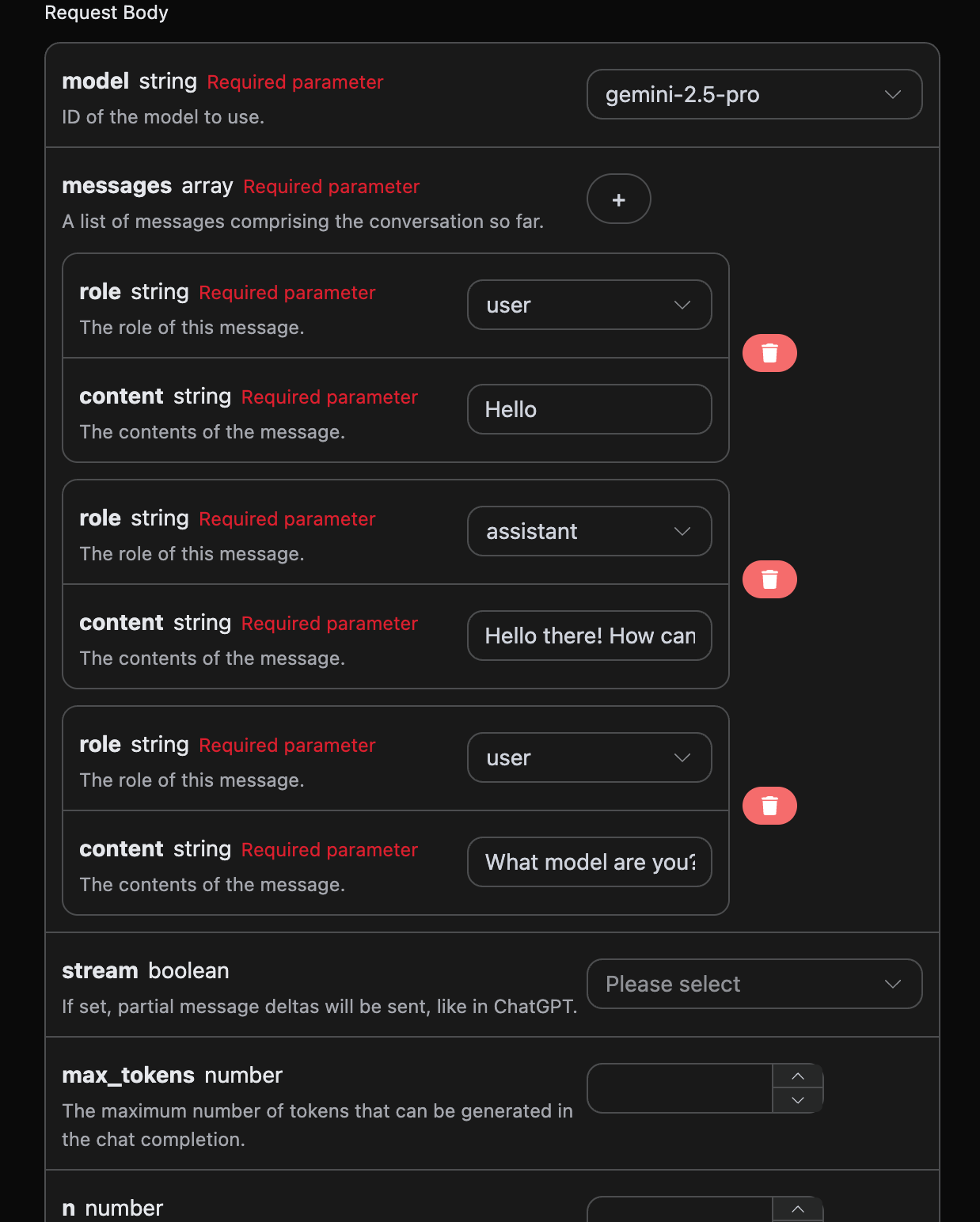
If you want to integrate multi-turn dialogue functionality, you need to upload multiple queries in the messages field. The specific examples of multiple queries are shown in the image below:

Python sample call code:
import requests

url = "https://api.acedata.cloud/gemini/chat/completions"

headers = {
    "accept": "application/json",
    "authorization": "Bearer {token}",
    "content-type": "application/json"
}

payload = {
    "model": "gemini-2.5-pro",
    "messages": [{"role":"user","content":"Hello"},{"role":"assistant","content":"Hello there! How can I help you today?"},{"role":"user","content":"What model are you?"}]
}

response = requests.post(url, json=payload, headers=headers)
print(response.text)
By uploading multiple queries, you can easily achieve multi-turn dialogue and obtain responses as follows:
{
  "id": "chatcmpl-20251122214426669120974AKFwnJd1",
  "model": "gemini-2.5-pro",
  "object": "chat.completion",
  "created": 1763819072,
  "choices": [
    {
      "index": 0,
      "message": {
        "role": "assistant",
        "content": "I am a large language model, trained by Google.",
        "reasoning_content": "Okay, here's how I'd approach this, thinking as a sophisticated AI:\n\nFirst, the user is directly querying my core identity: \"What model are you?\" That's a simple, straightforward question. My primary task is to provide accurate and helpful information, so I need to answer this immediately.\n\nRight off the bat, I know the answer. I *am* a large language model. That's my fundamental architecture and operational principle. I'm built on a vast network of connections and trained on a massive dataset.\n\nThen I must add the necessary context. Crucially, I have to provide the source of my training. I *was* trained by Google. That's a key identifier. It provides the user with valuable information about my origin and potential biases (though I'm trained to mitigate them).\n\nNow I must construct the response. My goal is to be factual, concise, and understandable.\n\nThe synthesized response is something like: \"I am a large language model, trained by Google.\"\n\nI have to assess the output: Does it meet the criteria? It's clear. It states what I am, it includes a critical piece of information on my origins, and it avoids jargon. No misleading promises.\n\nFinal verification: Does it actually answer the question? Yes. Is the information correct and truthful? Yes. Is it concise? Absolutely. Is the tone appropriate for any user? Yes. And, finally, this is the standard, approved response. Excellent.\n"
      },
      "finish_reason": "stop"
    }
  ],
  "usage": {
    "prompt_tokens": 16,
    "completion_tokens": 265,
    "total_tokens": 281,
    "prompt_tokens_details": {
      "cached_tokens": 0,
      "text_tokens": 16,
      "audio_tokens": 0,
      "image_tokens": 0
    },
    "completion_tokens_details": {
      "text_tokens": 0,
      "audio_tokens": 0,
      "reasoning_tokens": 254
    },
    "input_tokens": 0,
    "output_tokens": 0,
    "input_tokens_details": null,
    "claude_cache_creation_5_m_tokens": 0,
    "claude_cache_creation_1_h_tokens": 0
  }
}
It can be seen that the information contained in choices is consistent with the basic usage content, which includes the specific content of responses from Gemini to multiple dialogues, allowing for answers to corresponding questions based on multiple dialogue contents.

Gemini-3.0 Multimodal Model

Request example:
{
  "model": "gemini-3.0-pro",
  "messages": [
    {
      "role": "user",
      "content": [
        {
          "type": "text",
          "text": "What is the content of the image?"
        },
        {
          "type": "image_url",
          "image_url": {
            "url": "https://cdn.acedata.cloud/qzx2z1.png"
          }
        }
      ]
    }
  ],
  "stream": false
}
Example result:
{
    "id": "chatcmpl-20251206001815715692730UVZe38kB",
    "model": "gemini-3.0-pro",
    "object": "chat.completion",
    "created": 1764951548,
    "choices": [
        {
            "index": 0,
            "message": {
                "role": "assistant",
                "content": "This is a half-length outdoor portrait photo of a young woman.\n\nHere is the main content description of the image:\n\n*   **Appearance**: The girl in the photo has long, straight black hair, delicate features, and fair skin. She has a gentle smile and is looking at the camera.\n*   **Outfit**: She is wearing a cream or light apricot puff-sleeve top, paired with black clothing (which looks like a suspender skirt or vest).\n*   **Lighting Atmosphere**: Sunlight is shining from the left rear, casting a warm golden halo on her hair, creating a fresh and beautiful atmosphere.\n*   **Background**: The background is blurred, indicating that it is outdoors, with an empty road (asphalt) and green trees along the roadside.\n\nOverall, this photo gives a sweet, sunny, and neighborly girl feeling."
            },
            "finish_reason": "stop"
        }
    ],
    "usage": {
        "prompt_tokens": 1092,
        "completion_tokens": 1271,
        "total_tokens": 2363,
        "prompt_tokens_details": {
            "cached_tokens": 0,
            "text_tokens": 4,
            "audio_tokens": 0,
            "image_tokens": 0
        },
        "completion_tokens_details": {
            "text_tokens": 0,
            "audio_tokens": 0,
            "reasoning_tokens": 1072
        },
        "input_tokens": 0,
        "output_tokens": 0,
        "input_tokens_details": null,
        "claude_cache_creation_5_m_tokens": 0,
        "claude_cache_creation_1_h_tokens": 0
    }
}
Of course, you can also submit a video link, with the specific input as follows:
{
  "model": "gemini-3.0-pro",
  "messages": [
    {
      "role": "user",
      "content": [
        {
          "type": "text",
          "text": "What is the content of the video?"
        },
        {
          "type": "image_url",
          "image_url": {
            "url": "https://cdn.acedata.cloud/58yioe.mp4"
          }
        }
      ]
    }
  ],
  "stream": false
}
Example result:
{
    "id": "chatcmpl-20251206002711949677736JC9yL8AE",
    "model": "gemini-3.0-pro",
    "object": "chat.completion",
    "created": 1764952060,
    "choices": [
        {
            "index": 0,
            "message": {
                "role": "assistant",
                "content": "The content of this video is full of fun, mainly showcasing a **ginger cat** confidently jogging along a country road at dusk.\n\nSpecific details are as follows:\n\n1.  **Visual Content**:\n    *   The main character is an orange tabby cat.\n    *   The background is during sunset (or sunrise), with soft golden light. There are wooden fences and open fields by the roadside, and a silhouette of a pedestrian in the distance.\n    *   The camera uses a low-angle shot, sometimes capturing the cat running towards the camera, sometimes capturing its departing figure, along with close-ups of the cat's face and patterns.\n\n2.  **Sound Characteristics (Key Points)**:\n    *   The voiceover of the video is very distinctive. Although the visuals show a light-footed cat running, the accompanying sound is **heavy and rhythmic hoofbeats** (or sounds similar to clogs/high heels striking the ground).\n    *   This contrast in sound and visuals creates a sense of humor, as if this cat considers itself a galloping steed.\n\nOverall, this is a pet video that uses the contrast of sound and visuals to create cute and humorous moments."
            },
            "finish_reason": "stop"
        }
    ],
    "usage": {
        "prompt_tokens": 915,
        "completion_tokens": 1423,
        "total_tokens": 2338,
        "prompt_tokens_details": {
            "cached_tokens": 0,
            "text_tokens": 5,
            "audio_tokens": 0,
            "image_tokens": 0
        },
        "completion_tokens_details": {
            "text_tokens": 0,
            "audio_tokens": 0,
            "reasoning_tokens": 1162
        },
        "input_tokens": 0,
        "output_tokens": 0,
        "input_tokens_details": null,
        "claude_cache_creation_5_m_tokens": 0,
        "claude_cache_creation_1_h_tokens": 0
    }
}
It can be seen from the above that the Gemini 3.0 model supports multimodal understanding.

Gemini-3.1 Multimodal Model

Gemini 3.1 Pro is an upgraded version of Gemini 3.0 Pro, with the underlying model being gemini-3.1-pro-preview, also supporting multimodal inputs such as text, images, and videos, with stronger reasoning and understanding capabilities. The usage is completely consistent with Gemini 3.0 Pro; just replace the model parameter with gemini-3.1-pro. Request example:
{
  "model": "gemini-3.1-pro",
  "messages": [
    {
      "role": "user",
      "content": [
        {
          "type": "text",
          "text": "What is the content of the image?"
        },
        {
          "type": "image_url",
          "image_url": {
            "url": "https://cdn.acedata.cloud/qzx2z1.png"
          }
        }
      ]
    }
  ],
  "stream": false
}
Gemini 3.1 Pro also supports video understanding:
{
  "model": "gemini-3.1-pro",
  "messages": [
    {
      "role": "user",
      "content": [
        {
          "type": "text",
          "text": "What is the content of the video?"
        },
        {
          "type": "image_url",
          "image_url": {
            "url": "https://cdn.acedata.cloud/58yioe.mp4"
          }
        }
      ]
    }
  ],
  "stream": false
}
The return format is consistent with Gemini 3.0 Pro, as detailed in the description of the Gemini-3.0 multimodal model section above.

Error Handling

When calling the API, if an error occurs, the API will return the corresponding error code and message. For example:
  • 400 token_mismatched: Bad request, possibly due to missing or invalid parameters.
  • 400 api_not_implemented: Bad request, possibly due to missing or invalid parameters.
  • 401 invalid_token: Unauthorized, invalid or missing authorization token.
  • 429 too_many_requests: Too many requests, you have exceeded the rate limit.
  • 500 api_error: Internal server error, something went wrong on the server.

Error Response Example

{
  "success": false,
  "error": {
    "code": "api_error",
    "message": "fetch failed"
  },
  "trace_id": "2cf86e86-22a4-46e1-ac2f-032c0f2a4e89"
}

Conclusion

Through this document, you have learned how to easily implement the official Gemini chat functionality using the Gemini Chat Completion API. We hope this document helps you better integrate and use the API. If you have any questions, please feel free to contact our technical support team.