

prompt로 원하는 비디오를 설명하고(선택적으로 file_urls를 사용해 참고 이미지 / 비디오 / 오디오를 첨부), 헤드리스 「AI 감독」이 자동으로 주제 선정, 스크립트 작성, 화면 생성, 더빙, 배경음악, 합성 및 렌더링을 완료하여 최종적으로 자막이 포함된 완성본을 제작하고 CDN에 업로드합니다.
이 문서에서는 Maestro 비디오 생성 API의 연동 안내를 자세히 소개하여, 빠르게 통합하고 해당 API의 기능을 충분히 활용할 수 있도록 도와드립니다.
이것은 비동기 작업 인터페이스입니다. 제출 후 즉시 task_id가 반환되며, 이후 Maestro 작업 조회 API(POST /maestro/tasks)를 통해 결과를 폴링하여 가져옵니다(폴링은 무료이며 과금되지 않음). 기존 비디오에서 계속 반복 작업하려면 action: remix / edit / extend와 ref_task_id를 함께 사용할 수 있습니다.
신청 절차
Maestro 비디오 생성 API를 사용하려면 먼저 Ace Data Cloud 콘솔에서 API Token을 발급받아 보관해 두세요.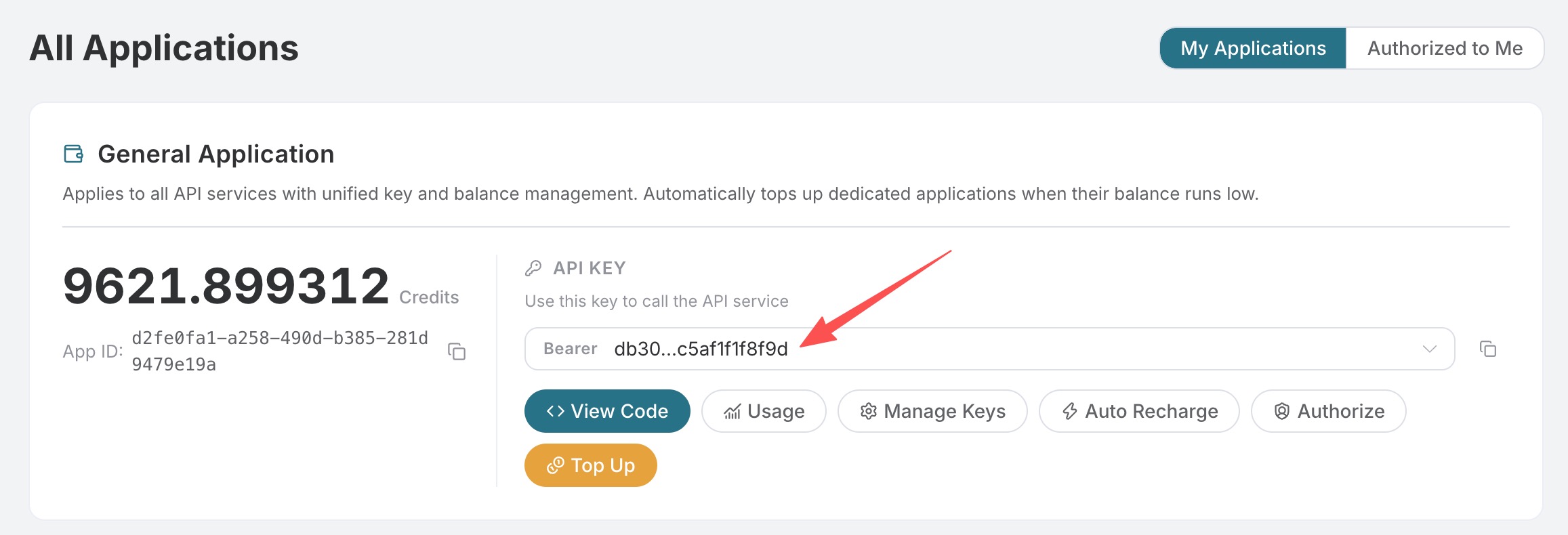 아직 로그인하거나 가입하지 않은 경우 로그인 페이지로 자동 이동하여 가입 및 로그인을 안내하며, 완료 후 현재 페이지로 자동 돌아옵니다.
하나의 API Token으로 플랫폼의 모든 서비스를 호출할 수 있으며, 서비스별로 별도 신청할 필요가 없습니다. 최초 신청 시 무료 크레딧이 제공되어 무료로 체험할 수 있으며, 크레딧이 부족할 경우 콘솔에서 공용 잔액을 충전할 수 있습니다.
📘 전체 문서: Maestro 비디오 생성 API →
기본 사용법
POST https://api.acedata.cloud/maestro/videos
가장 기본적인 사용법에서는 자연어 prompt 하나만 전달하면 됩니다. AI 디렉터가 스크립트, 화면, 음성 및 편집을 자동으로 결정합니다. 먼저 설정해야 하는 요청 헤더와 요청 본문을 알아보겠습니다.
Request Headers에는 다음이 포함됩니다:
accept: 수신할 응답 결과의 형식을 지정합니다. 여기에는 JSON 형식인application/json를 입력합니다.authorization: API 호출 키입니다. 신청 후 드롭다운에서 바로 선택할 수 있습니다.content-type: 요청 본문의 형식입니다. 여기에는application/json를 입력합니다.
prompt: 만들고자 하는 동영상(주제, 표시할 내용, 스타일, 대상)을 자연어로 설명합니다.langs: 완성 동영상 언어 배열입니다. 한 번에 하나의 언어만 전달할 수 있으며, 예:["zh-cn"], 기본값은["zh-cn"]입니다.aspect: 화면 비율입니다.9:16(기본값) /16:9/1:1.duration: 목표 길이(초)이며, 기본값은 30입니다.
아래에서 구체적인 예시를 통해 설명합니다. 중국어, 세로 화면, 20초 분량의 과학 교양 숏폼 동영상을 생성한다고 가정하면 해당 CURL 코드는 다음과 같습니다:
success: 이번 작업이 성공적으로 제출되었는지 여부입니다.task_id: 이번 동영상 생성 작업의 ID입니다. 이후 Maestro 작업 조회 API를 사용하여 결과를 폴링합니다.trace_id: 이번 요청의 추적 ID입니다. 문제가 발생하면 기술 지원팀에 제공하여 원인을 파악할 수 있습니다.
task_id를 반환하며 동영상 렌더링이 완료될 때까지 기다리지 않습니다. 이후 task_id를 사용하여 결과를 폴링해야 합니다. 자세한 내용은 「결과 조회」 섹션을 참고하세요.
Specify Video Type and Style (scenario / style)
Whenscenario is not provided, it is automatically determined by AI (equivalent to auto); if you want to lock the video to a certain type, explicitly provide it. For example, to create a vertical short drama, you can specify the following:
scenario: Video type, set todramahere (a short drama with characters + dialogue).style: Visual style, set tocinematichere (a cinematic texture).
- Narrated short video:
scenario: "narrated". - Automatic subtitles:
scenario: "captions", requiring the source video to be passed throughfile_urls. - Digital human / talking-head video:
scenario: "avatar", requiring a portrait image to be passed throughfile_urls. - Short drama:
scenario: "drama"(characters + dialogue). styleis a visual style preset (such asmodern/neon/luxury), which does not change the type and only affects the visual appearance.voiceis used to specify the narration voice (such aswarm-female/deep-male), which is language-independent and universal across languages.
task_id is also returned immediately.
Final Video Language
A task delivers only one final video in one language.langs can contain only one language code, such as ["zh-cn"] or ["en"]; passing multiple languages will return 400. If you need videos in different languages, please create tasks separately. Language selection does not change the per-second price.
Iterate on an Existing Video (remix / edit / extend)
Passaction and the ref_task_id of the previous task to make incremental modifications based on the original project (such as “change the title of Scene 2”, “change the voice-over”, or “make the overall video darker”). Minor changes are fast, while major changes will be redone:
remix: Reinterpret based on the original video structure (retain the theme while adjusting the presentation).edit: Fine-tune specified parts (such as changing titles, voice-overs, or color grading).extend: Extend content based on the original video.
task_id; use it for polling to obtain the iterated final video.
Get Results
Since video production takes a relatively long time, this API immediately returnstask_id after submission. You need to use it to poll results through the Maestro Task Query API:
variants array). status progresses through pending → planning → producing → succeeded (or failed), and polling is free and does not consume credits. For the complete response format and historical list queries, please refer to the Maestro Task Query API Integration Guide.
Billing
Billing is based on the actual duration of the delivered final video after the task succeeds; failed tasks are not charged. The billable duration is calculated in whole seconds and does not exceed the requested duration; when the final video duration cannot be read, it falls back to the requested duration. Task submission itself is not billed separately, and/maestro/tasks polling is free.
Error Handling
When calling the API, if an error occurs, the API returns the corresponding error code and message. For example:400 invalid_request: Bad request, possibly due to a missingpromptor invalid parameters.401 invalid_token: Unauthorized, invalid or missing authorization token.403 forbidden: Forbidden, insufficient balance or access.429 too_many_requests: Too many requests, you have exceeded the rate limit.500 api_error: Internal server error, something went wrong on the server.
Error Response Example
Conclusion
Through this document, you have learned how to use the Maestro Video Generation API: with just one natural-languageprompt, you can automatically complete scriptwriting, asset selection, voice-over, background music, editing, subtitles, and final video rendering. It also supports specifying video types, styles, voice tones, final video languages, and iteration on existing videos. We hope this document helps you better integrate and use this API. If you have any questions, please feel free to contact our technical support team.
Related APIs
- Maestro Task Query API Integration Guide: Use the
task_idreturned byPOST /maestro/videosto query task status and results, or retrieve the historical task list (polling is free).