메인 콘텐츠로 건너뛰기
Kimi는 매우 강력한 AI 대화 시스템으로, 입력한 프롬프트에 따라 몇 초 만에 유창하고 자연스러운 응답을 생성할 수 있습니다. Kimi는 놀라운 지능적 지원을 제공하여 인간의 작업 효율성과 창의성을 크게 향상시킵니다. 이 문서는 Kimi Chat Completion API 작업의 사용 프로세스를 주로 소개하며, 이를 통해 공식 Kimi의 대화 기능을 쉽게 사용할 수 있습니다.

신청 프로세스

Gemini Chat Completion API를 사용하려면 먼저 Kimi Chat Completion API 페이지에서 “Acquire” 버튼을 클릭하여 요청에 필요한 자격 증명을 얻을 수 있습니다: 로그인 또는 등록이 되어 있지 않으면 자동으로 로그인 페이지로 리디렉션되어 등록 및 로그인을 초대합니다. 로그인 및 등록 후에는 자동으로 현재 페이지로 돌아옵니다. 첫 신청 시 무료 한도가 제공되어 해당 API를 무료로 사용할 수 있습니다.

기본 사용

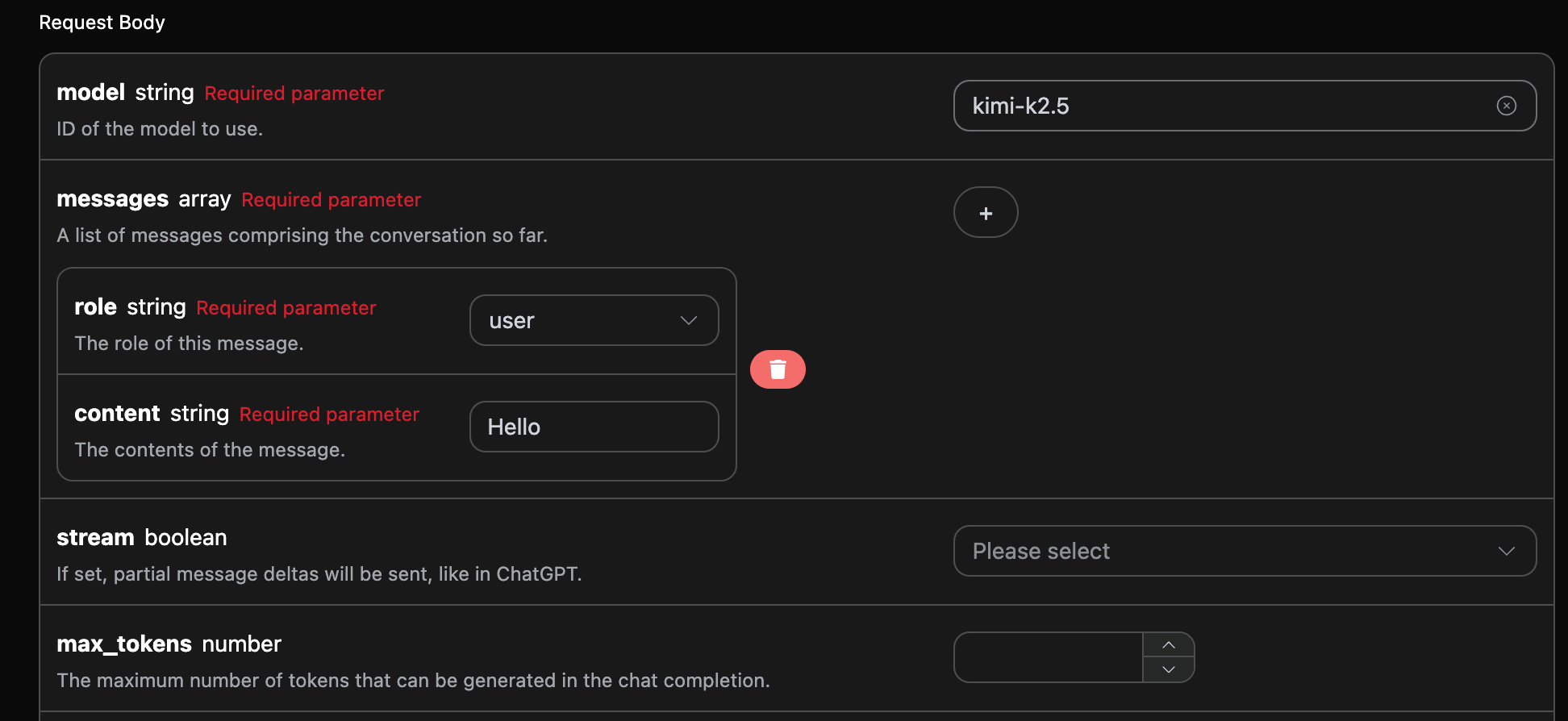
다음으로 인터페이스에 해당 내용을 입력할 수 있습니다. 아래 그림과 같이:

이 인터페이스를 처음 사용할 때는 최소한 세 가지 내용을 입력해야 합니다. 하나는 authorization으로, 드롭다운 목록에서 선택하면 됩니다. 또 다른 매개변수는 model로, model은 Kimi 공식 웹사이트 모델 카테고리를 선택하는 것입니다. 여기에는 주로 7가지 모델이 있으며, 자세한 내용은 제공된 모델을 참조할 수 있습니다. 마지막 매개변수는 messages로, messages는 우리가 입력한 질문어 배열입니다. 이는 여러 질문어를 동시에 업로드할 수 있는 배열로, 각 질문어는 rolecontent를 포함합니다. 여기서 role은 질문자의 역할을 나타내며, 우리는 user, assistant, system의 세 가지 신원을 제공합니다. 또 다른 content는 우리가 질문하는 구체적인 내용입니다. 또한 오른쪽에 해당 호출 코드 생성이 있으며, 코드를 복사하여 직접 실행할 수도 있고, “Try” 버튼을 클릭하여 테스트할 수도 있습니다.
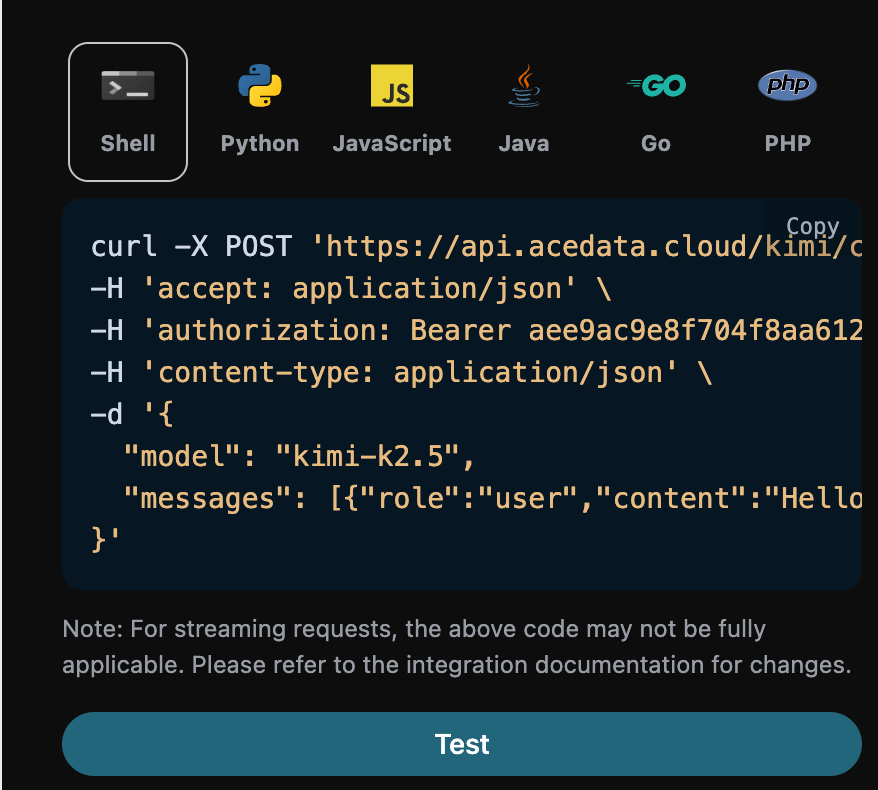
호출 후, 반환 결과는 다음과 같습니다:
{
  "id": "chatcmpl-b5d9e1b799c137e3",
  "object": "chat.completion",
  "created": 1770991864,
  "model": "kimi-k2.5",
  "choices": [
    {
      "index": 0,
      "message": {
        "role": "assistant",
        "content": " Hello! How can I help you today?",
        "refusal": null,
        "reasoning_content": " The user has simply said \"Hello\". This is a straightforward greeting. I should respond in a friendly, helpful manner while being ready to assist with whatever they need next. Since there's no specific question or task yet, I'll acknowledge their greeting and ask how I can help.\n\nI should keep it:\n- Friendly and welcoming\n- Professional but warm\n- Open-ended to invite them to share what they need help with\n- Concise but not too brief\n\nPossible responses:\n1. \"Hello! How can I help you today?\"\n2. \"Hi there! What can I do for you?\"\n3. \"Hello! I'm ready to assist. What would you like to know or work on?\"\n4. \"Hey! Great to meet you. How can I be of service?\"\n\nI'll go with something warm and professional that invites them to share what they need. ",
        "reasoning": " The user has simply said \"Hello\". This is a straightforward greeting. I should respond in a friendly, helpful manner while being ready to assist with whatever they need next. Since there's no specific question or task yet, I'll acknowledge their greeting and ask how I can help.\n\nI should keep it:\n- Friendly and welcoming\n- Professional but warm\n- Open-ended to invite them to share what they need help with\n- Concise but not too brief\n\nPossible responses:\n1. \"Hello! How can I help you today?\"\n2. \"Hi there! What can I do for you?\"\n3. \"Hello! I'm ready to assist. What would you like to know or work on?\"\n4. \"Hey! Great to meet you. How can I be of service?\"\n\nI'll go with something warm and professional that invites them to share what they need. ",
        "tool_calls": []
      },
      "logprobs": null,
      "finish_reason": "stop"
    }
  ],
  "usage": {
    "prompt_tokens": 9,
    "completion_tokens": 184,
    "total_tokens": 193,
    "prompt_tokens_details": {
      "cached_tokens_details": {}
    },
    "completion_tokens_details": {}
  }
}
반환 결과는 여러 필드를 포함하며, 다음과 같이 설명됩니다:
  • id, 이번 대화 작업을 생성한 ID로, 이번 대화 작업을 고유하게 식별하는 데 사용됩니다.
  • model, 선택한 Kimi 공식 모델입니다.
  • choices, Kimi가 질문어에 대해 제공한 응답 정보입니다.
  • usage: 이번 질문-응답 쌍에 대한 토큰 통계 정보입니다.
그중 choices는 Kimi의 응답 정보를 포함하고 있으며, 그 안의 choices는 Kimi가 응답한 구체적인 정보를 포함하고 있습니다. 아래 그림과 같이 확인할 수 있습니다.
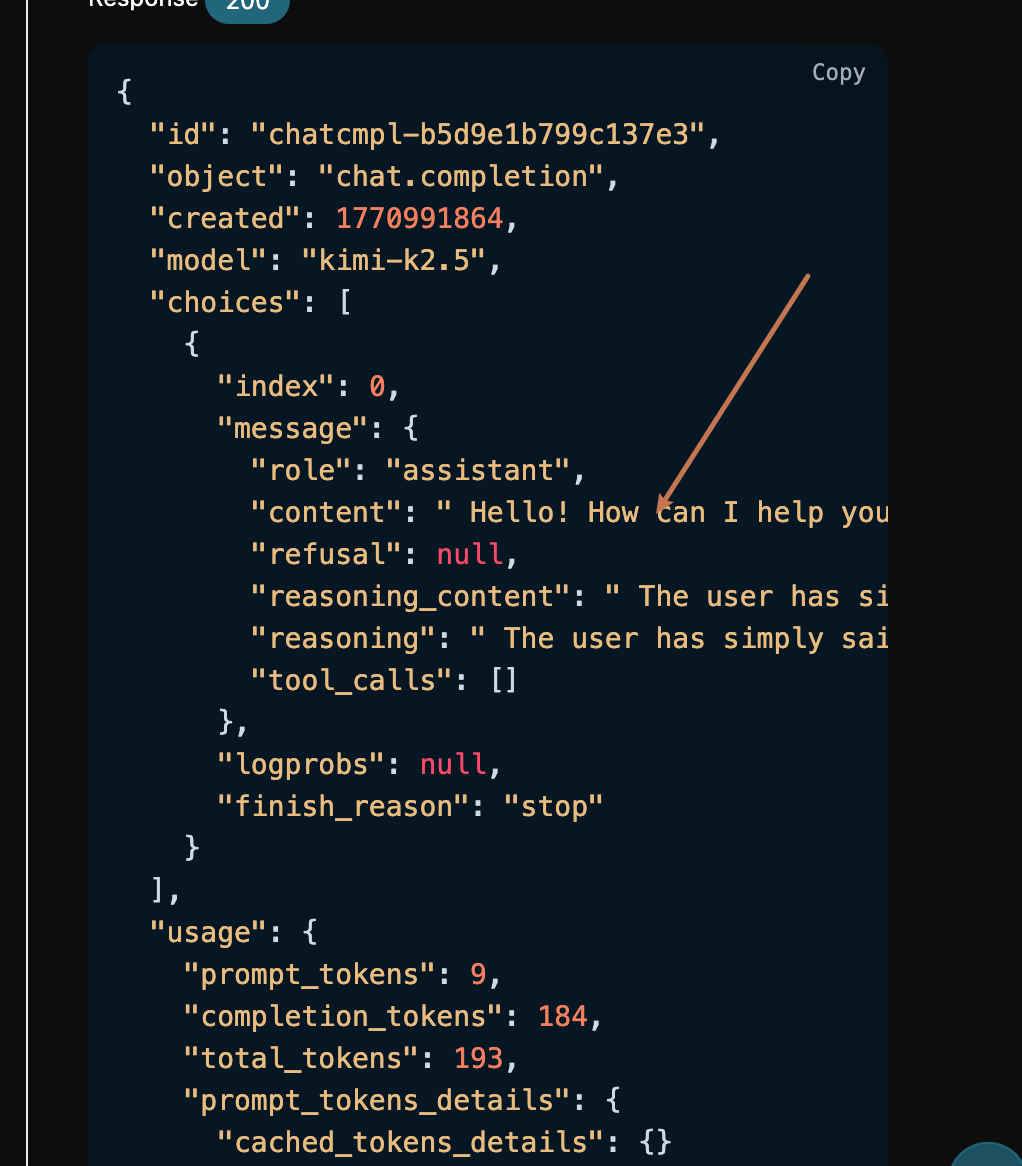
choices 안의 content 필드에는 Gemini의 응답 내용이 포함되어 있습니다.

스트리밍 응답

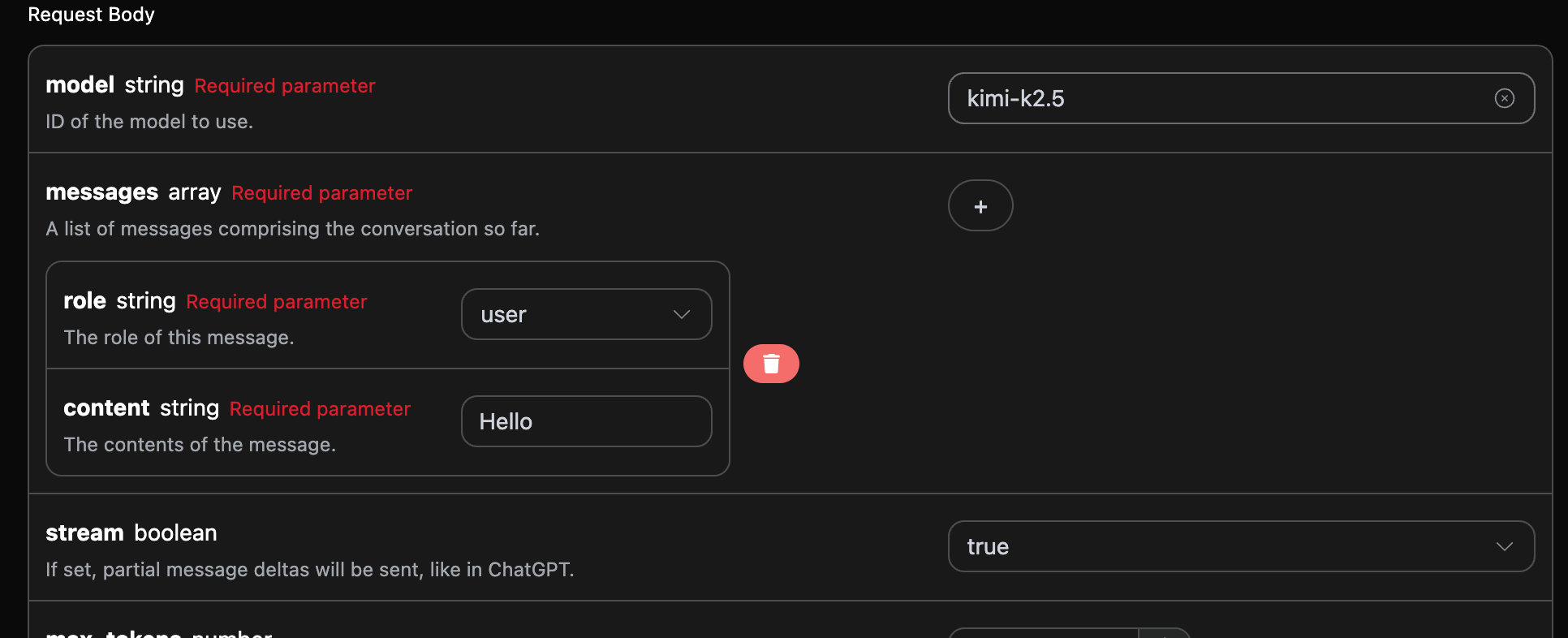
이 인터페이스는 스트리밍 응답도 지원하며, 이는 웹 페이지 통합에 매우 유용하여 웹 페이지에서 글자 단위로 표시하는 효과를 구현할 수 있습니다. 스트리밍 응답을 원하면 요청 헤더의 stream 매개변수를 true로 변경하면 됩니다. 변경 사항은 아래 그림과 같으며, 호출 코드도 스트리밍 응답을 지원하도록 적절한 변경이 필요합니다.

streamtrue로 변경한 후, API는 해당 JSON 데이터를 줄 단위로 반환하며, 코드 측면에서 우리는 줄 단위 결과를 얻기 위해 적절한 수정을 해야 합니다. Python 샘플 호출 코드:
import requests

url = "https://api.acedata.cloud/kimi/chat/completions"

headers = {
    "accept": "application/json",
    "authorization": "Bearer {token}",
    "content-type": "application/json"
}

payload = {
    "model": "kimi-k2.5",
    "messages": [{"role":"user","content":"Hello"}],
    "stream": True
}

response = requests.post(url, json=payload, headers=headers)
print(response.text)
출력 효과는 다음과 같습니다:
data: {"id": "chatcmpl-952dd5e75583c4d1", "object": "chat.completion.chunk", "created": 1770992031, "model": "kimi-k2.5", "system_fingerprint": null, "choices": [{"index": 0, "delta": {"content": "", "role": "assistant"}, "logprobs": null, "finish_reason": null}], "usage": null}

data: {"id": "chatcmpl-952dd5e75583c4d1", "object": "chat.completion.chunk", "created": 1770992031, "model": "kimi-k2.5", "system_fingerprint": null, "choices": [{"index": 0, "delta": {"reasoning_content": " 그", "reasoning": " 그"}, "logprobs": null, "finish_reason": null}], "usage": null}

data: {"id": "chatcmpl-952dd5e75583c4d1", "object": "chat.completion.chunk", "created": 1770992031, "model": "kimi-k2.5", "system_fingerprint": null, "choices": [{"index": 0, "delta": {"reasoning_content": " 사용자가 \"안녕하세요\"라고 말했습니다. 이것은 간단한 인사입니다", "reasoning": " 사용자가 \"안녕하세요\"라고 말했습니다. 이것은 간단한 인사입니다"}, "logprobs": null, "finish_reason": null}], "usage": null}

data: {"id": "chatcmpl-952dd5e75583c4d1", "object": "chat.completion.chunk", "created": 1770992031, "model": "kimi-k2.5", "system_fingerprint": null, "choices": [{"index": 0, "delta": {"reasoning_content": ". 나는 친근하고 환영하는 방식으로 응답해야 합니다", "reasoning": ". 나는 친근하고 환영하는 방식으로 응답해야 합니다"}, "logprobs": null, "finish_reason": null}], "usage": null}

data: {"id": "chatcmpl-952dd5e75583c4d1", "object": "chat.completion.chunk", "created": 1770992031, "model": "kimi-k2.5", "system_fingerprint": null, "choices": [{"index": 0, "delta": {"reasoning_content": ". 이것이 대화의 시작이기 때문에,", "reasoning": ". 이것이 대화의 시작이기 때문에,"}, "logprobs": null, "finish_reason": null}], "usage": null}

data: {"id": "chatcmpl-952dd5e75583c4d1", "object": "chat.completion.chunk", "created": 1770992031, "model": "kimi-k2.5", "system_fingerprint": null, "choices": [{"index": 0, "delta": {"reasoning_content": " 나는 오늘 그들에게 어떻게 도와줄 수 있는지 물어봐야 합니다.\n\n", "reasoning": " 나는 오늘 그들에게 어떻게 도와줄 수 있는지 물어봐야 합니다.\n\n"}, "logprobs": null, "finish_reason": null}], "usage": null}

data: {"id": "chatcmpl-952dd5e75583c4d1", "object": "chat.completion.chunk", "created": 1770992031, "model": "kimi-k2.5", "system_fingerprint": null, "choices": [{"index": 0, "delta": {"reasoning_content": "응답을 작성해 보겠습니다:\n- 인사를 인정하고", "reasoning": "응답을 작성해 보겠습니다:\n- 인사를 인정하고"}, "logprobs": null, "finish_reason": null}], "usage": null}

data: {"id": "chatcmpl-952dd5e75583c4d1", "object": "chat.completion.chunk", "created": 1770992031, "model": "kimi-k2.5", "system_fingerprint": null, "choices": [{"index": 0, "delta": {"reasoning_content": " 도움을 제공하고\n- 따뜻하게 유지하기", "reasoning": " 도움을 제공하고\n- 따뜻하게 유지하기"}, "logprobs": null, "finish_reason": null}], "usage": null}

data: {"id": "chatcmpl-952dd5e75583c4d1", "object": "chat.completion.chunk", "created": 1770992031, "model": "kimi-k2.5", "system_fingerprint": null, "choices": [{"index": 0, "delta": {"reasoning_content": " 그리고 전문적으로\n\n예를 들어: \"안녕하세요! 어떻게", "reasoning": " 그리고 전문적으로\n\n예를 들어: \"안녕하세요! 어떻게"}, "logprobs": null, "finish_reason": null}], "usage": null}

data: {"id": "chatcmpl-952dd5e75583c4d1", "object": "chat.completion.chunk", "created": 1770992031, "model": "kimi-k2.5", "system_fingerprint": null, "choices": [{"index": 0, "delta": {"reasoning_content": " 도와드릴까요?\" 또는 \"안녕하세요", "reasoning": " 도와드릴까요?\" 또는 \"안녕하세요"}, "logprobs": null, "finish_reason": null}], "usage": null}

data: {"id": "chatcmpl-952dd5e75583c4d1", "object": "chat.completion.chunk", "created": 1770992031, "model": "kimi-k2.5", "system_fingerprint": null, "choices": [{"index": 0, "delta": {"reasoning_content": "! 무엇을 도와드릴까요?\"\n\n사실", "reasoning": "! 무엇을 도와드릴까요?\"\n\n사실"}, "logprobs": null, "finish_reason": null}], "usage": null}

data: {"id": "chatcmpl-952dd5e75583c4d1", "object": "chat.completion.chunk", "created": 1770992031, "model": "kimi-k2.5", "system_fingerprint": null, "choices": [{"index": 0, "delta": {"reasoning_content": ", 맥락을 보면, 이것은", "reasoning": ", 맥락을 보면, 이것은"}, "logprobs": null, "finish_reason": null}], "usage": null}

data: {"id": "chatcmpl-952dd5e75583c4d1", "object": "chat.completion.chunk", "created": 1770992031, "model": "kimi-k2.5", "system_fingerprint": null, "choices": [{"index": 0, "delta": {"reasoning_content": " 일반적인 대화 시작인 것 같습니다. 나는 간단하게 유지하고", "reasoning": " 일반적인 대화 시작인 것 같습니다. 나는 간단하게 유지하고"}, "logprobs": null, "finish_reason": null}], "usage": null}

data: {"id": "chatcmpl-952dd5e75583c4d1", "object": "chat.completion.chunk", "created": 1770992031, "model": "kimi-k2.5", "system_fingerprint": null, "choices": [{"index": 0, "delta": {"reasoning_content": " 그들이 필요로 하는 것을 공유하도록 유도하기 위해 개방형으로", "reasoning": " 그들이 필요로 하는 것을 공유하도록 유도하기 위해 개방형으로"}, "logprobs": null, "finish_reason": null}], "usage": null}

data: {"id": "chatcmpl-952dd5e75583c4d1", "object": "chat.completion.chunk", "created": 1770992031, "model": "kimi-k2.5", "system_fingerprint": null, "choices": [{"index": 0, "delta": {"content": " 안녕하세요! 어떻게 도와드릴까요", "reasoning_content": " 도와드릴까요. ", "reasoning": " 도와드릴까요. "}, "logprobs": null, "finish_reason": null}], "usage": null}

data: {"id": "chatcmpl-952dd5e75583c4d1", "object": "chat.completion.chunk", "created": 1770992031, "model": "kimi-k2.5", "system_fingerprint": null, "choices": [{"index": 0, "delta": {"content": " 오늘?"}, "logprobs": null, "finish_reason": "stop"}], "usage": null}

data: {"id": "chatcmpl-952dd5e75583c4d1", "object": "chat.completion.chunk", "created": 1770992031, "model": "kimi-k2.5", "system_fingerprint": null, "choices": [], "usage": {"prompt_tokens": 9, "completion_tokens": 135, "total_tokens": 144, "prompt_tokens_details": {"cached_tokens_details": {}}, "completion_tokens_details": {}}}

data: [DONE]
응답 안에는 많은 data가 있으며, data 안의 choices가 최신의 답변 내용입니다. 이는 위에서 소개한 내용과 일치합니다. choices는 추가된 답변 내용으로, 결과에 따라 시스템에 연동할 수 있습니다. 또한 스트리밍 응답의 종료는 data의 내용을 기준으로 판단하며, 내용이 [DONE]이면 스트리밍 응답이 모두 종료되었음을 나타냅니다. 반환된 data 결과는 여러 필드를 포함하며, 아래와 같이 설명됩니다:
  • id는 이번 대화 작업의 ID로, 이번 대화 작업을 고유하게 식별하는 데 사용됩니다.
  • model은 선택한 Kimi 공식 모델입니다.
  • choices는 Kimi가 질문에 대한 답변 정보를 제공합니다.
JavaScript도 지원되며, 예를 들어 Node.js의 스트리밍 호출 코드는 다음과 같습니다:
const options = {
  method: "post",
  headers: {
    "accept": "application/json",
    "authorization": "Bearer {token}",
    "content-type": "application/json"
  },
  body: JSON.stringify({
    "model": "kimi-k2.5",
    "messages": [{"role":"user","content":"Hello"}],
    "stream": true
  })
};

fetch("https://api.acedata.cloud/kimi/chat/completions", options)
  .then(response => response.json())
  .then(response => console.log(response))
  .catch(err => console.error(err));
Java 샘플 코드:
JSONObject jsonObject = new JSONObject();
jsonObject.put("model", "kimi-k2.5");
jsonObject.put("messages", [{"role":"user","content":"Hello"}]);
jsonObject.put("stream", true);
MediaType mediaType = "application/json; charset=utf-8".toMediaType();
RequestBody body = jsonObject.toString().toRequestBody(mediaType);
Request request = new Request.Builder()
  .url("https://api.acedata.cloud/kimi/chat/completions")
  .post(body)
  .addHeader("accept", "application/json")
  .addHeader("authorization", "Bearer {token}")
  .addHeader("content-type", "application/json")
  .build();

OkHttpClient client = new OkHttpClient();
Response response = client.newCall(request).execute();
System.out.print(response.body!!.string())
다른 언어는 별도로 수정할 수 있으며, 원리는 모두 동일합니다.

다중 회화

다중 회화 기능을 연동하려면 messages 필드에 여러 질문을 업로드해야 하며, 여러 질문의 구체적인 예시는 아래 그림과 같습니다:
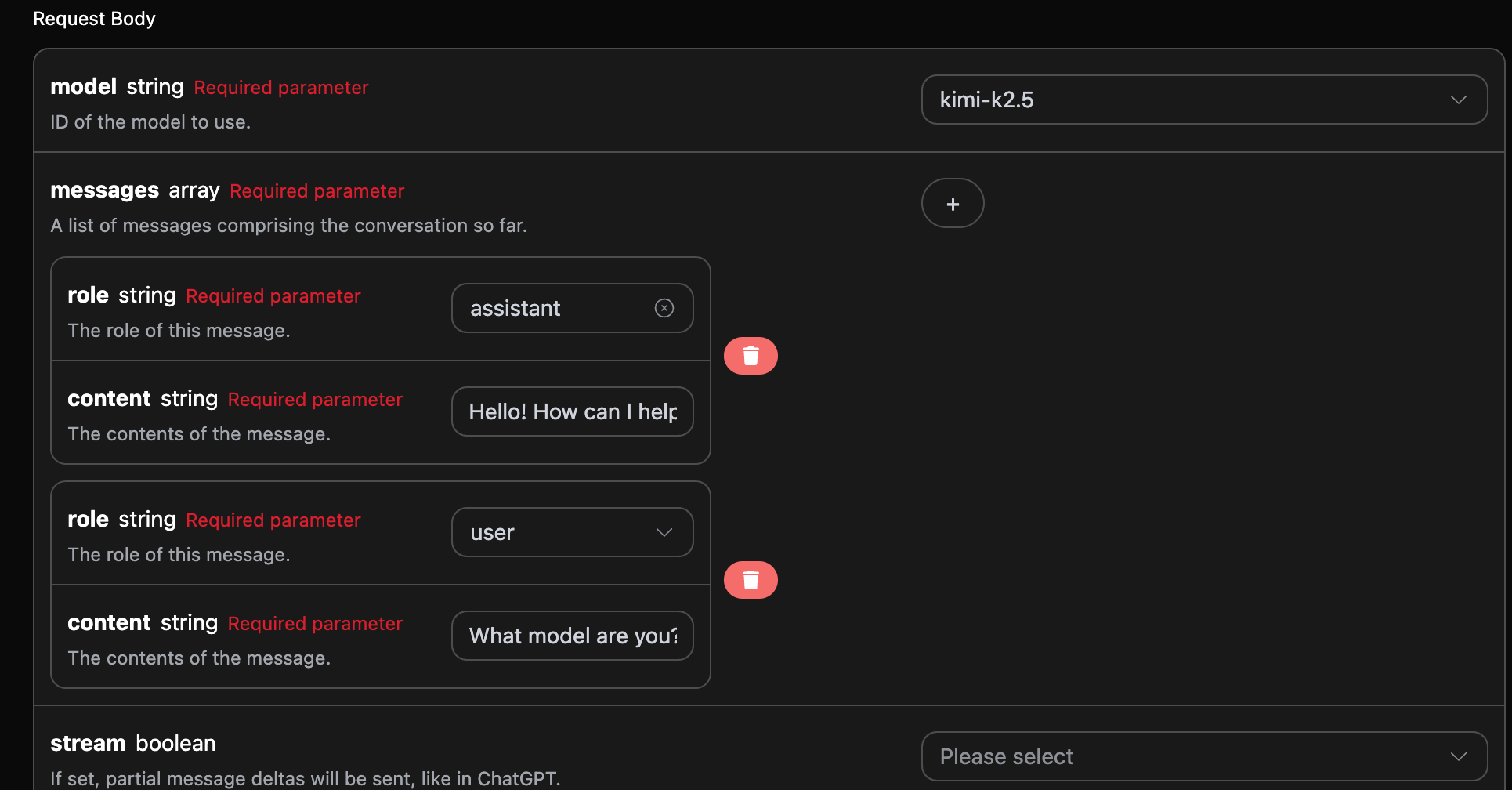
Python 샘플 호출 코드:
import requests

url = "https://api.acedata.cloud/kimi/chat/completions"

headers = {
    "accept": "application/json",
    "authorization": "Bearer {token}",
    "content-type": "application/json"
}

payload = {
    "model": "kimi-k2.5",
    "messages": [{"role":"assistant","content":"Hello! How can I help you today?"},{"role":"user","content":"What model are you?"}]
}

response = requests.post(url, json=payload, headers=headers)
print(response.text)
여러 질문을 업로드함으로써 쉽게 다중 회화를 구현할 수 있으며, 다음과 같은 답변을 얻을 수 있습니다:
{
  "id": "chatcmpl-81e5f161ea077f5e",
  "object": "chat.completion",
  "created": 1770992310,
  "model": "kimi-k2.5",
  "choices": [
    {
      "index": 0,
      "message": {
        "role": "assistant",
        "content": " I'm Kimi, an AI assistant made by Moonshot AI. I'm from the **K2.5** series.",
        "refusal": null,
        "reasoning_content": " The user is asking \"What model are you?\" They want to know which AI model I am.\n\n I should identify myself as Kimi, an AI assistant made by Moonshot AI. I should mention that I'm Kimi from the K2.5 series specifically, as that's the model currently deployed.\n\n Key points:\n - I am Kimi\n - Made by Moonshot AI\n - Currently Kimi K2.5 (or just say I'm part of the K2.5 series)\n - I should be helpful and direct\n\n I should not:\n - Claim to be a different model (like GPT-4, Gemini, etc.)\n - Be evasive about my identity\n - Make up version numbers that aren't correct\n\n The current model identity is Kimi K2.5 (though sometimes the exact series designation might vary by deployment, but K2.5 is the current flagship). I'll identify myself as Kimi, an AI assistant by Moonshot AI, and mention I'm from the K2.5 series.\n\n Simple, direct, accurate. ",
        "reasoning": " The user is asking \"What model are you?\" They want to know which AI model I am.\n\n I should identify myself as Kimi, an AI assistant made by Moonshot AI. I should mention that I'm Kimi from the K2.5 series specifically, as that's the model currently deployed.\n\n Key points:\n - I am Kimi\n - Made by Moonshot AI\n - Currently Kimi K2.5 (or just say I'm part of the K2.5 series)\n - I should be helpful and direct\n\n I should not:\n - Claim to be a different model (like GPT-4, Gemini, etc.)\n - Be evasive about my identity\n - Make up version numbers that aren't correct\n\n The current model identity is Kimi K2.5 (though sometimes the exact series designation might vary by deployment, but K2.5 is the current flagship). I'll identify myself as Kimi, an AI assistant by Moonshot AI, and mention I'm from the K2.5 series.\n\n Simple, direct, accurate. ",
        "tool_calls": []
      },
      "logprobs": null,
      "finish_reason": "stop"
    }
  ],
  "usage": {
    "prompt_tokens": 28,
    "completion_tokens": 235,
    "total_tokens": 263,
    "prompt_tokens_details": {
      "cached_tokens_details": {}
    },
    "completion_tokens_details": {}
  }
}
choices에 포함된 정보는 기본 사용 내용과 일치하며, Kimi가 여러 대화에 대한 답변을 제공하는 구체적인 내용을 포함하고 있습니다. 이를 통해 여러 대화 내용을 바탕으로 해당 질문에 대한 답변을 할 수 있습니다.

오류 처리

API를 호출할 때 오류가 발생하면, API는 해당 오류 코드와 정보를 반환합니다. 예를 들어:
  • 400 token_mismatched: 잘못된 요청, 누락되거나 잘못된 매개변수 때문일 수 있습니다.
  • 400 api_not_implemented: 잘못된 요청, 누락되거나 잘못된 매개변수 때문일 수 있습니다.
  • 401 invalid_token: 인증되지 않음, 잘못되었거나 누락된 인증 토큰입니다.
  • 429 too_many_requests: 너무 많은 요청, 비율 제한을 초과했습니다.
  • 500 api_error: 내부 서버 오류, 서버에서 문제가 발생했습니다.

오류 응답 예시

{
  "success": false,
  "error": {
    "code": "api_error",
    "message": "fetch failed"
  },
  "trace_id": "2cf86e86-22a4-46e1-ac2f-032c0f2a4e89"
}

결론

이 문서를 통해 Gemini Chat Completion API를 사용하여 공식 Gemini의 대화 기능을 쉽게 구현하는 방법을 이해하셨습니다. 이 문서가 API를 더 잘 연동하고 사용하는 데 도움이 되기를 바랍니다. 질문이 있으시면 언제든지 기술 지원 팀에 문의해 주십시오.