메인 콘텐츠로 건너뛰기
Midjourney Tasks API의 주요 기능은 Midjourney Imagine API 또는 Midjourney Describe API로 생성된 작업 ID를 입력하여 해당 작업의 실행 상태를 조회하는 것입니다. 본 문서는 Midjourney Tasks API의 연동 설명을 자세히 소개하여, 여러분이 이 API의 강력한 기능을 쉽게 통합하고 활용할 수 있도록 돕습니다. Midjourney Tasks API를 통해 Midjourney Imagine API 또는 Midjourney Describe API의 작업 실행 상태를 쉽게 조회할 수 있습니다.

신청 절차

Midjourney Tasks API를 사용하려면 먼저 신청 페이지 Midjourney Imagine API에서 해당 서비스를 신청한 후, Imagine API의 작업 ID를 복사합니다. 아래 그림과 같이:

마지막으로 Tasks API 페이지 Midjourney Tasks API에서 해당 서비스를 신청하고, 페이지에 들어가면 「Acquire」 버튼을 클릭합니다. 아래 그림과 같이: 신청 페이지 로그인 또는 등록이 되어 있지 않으면 자동으로 로그인 페이지로 이동하여 등록 및 로그인을 요청합니다. 로그인 및 등록 후에는 자동으로 현재 페이지로 돌아옵니다. 첫 신청 시 무료 사용량이 제공되어, 해당 API를 무료로 사용할 수 있습니다.

요청 예시

Midjourney Tasks API는 Midjourney Imagine API와 Midjourney Describe API 두 개의 API 결과를 조회하는 데 사용할 수 있습니다. Midjourney Imagine API 사용 방법에 대한 자세한 내용은 문서 Midjourney Imagine API를 참조하십시오. Midjourney Describe 사용 방법에 대한 내용은 Midjourney Describe API를 참조하십시오. Midjourney Imagine API 서비스에서 반환된 작업 ID를 예로 들어, 해당 API를 사용하는 방법을 시연합니다. 가정해 보겠습니다. 작업 ID가 7489df4c-ef03-4de0-b598-e9a590793434인 경우, 다음과 같이 작업 ID를 전달하여 사용합니다.

작업 예시 이미지

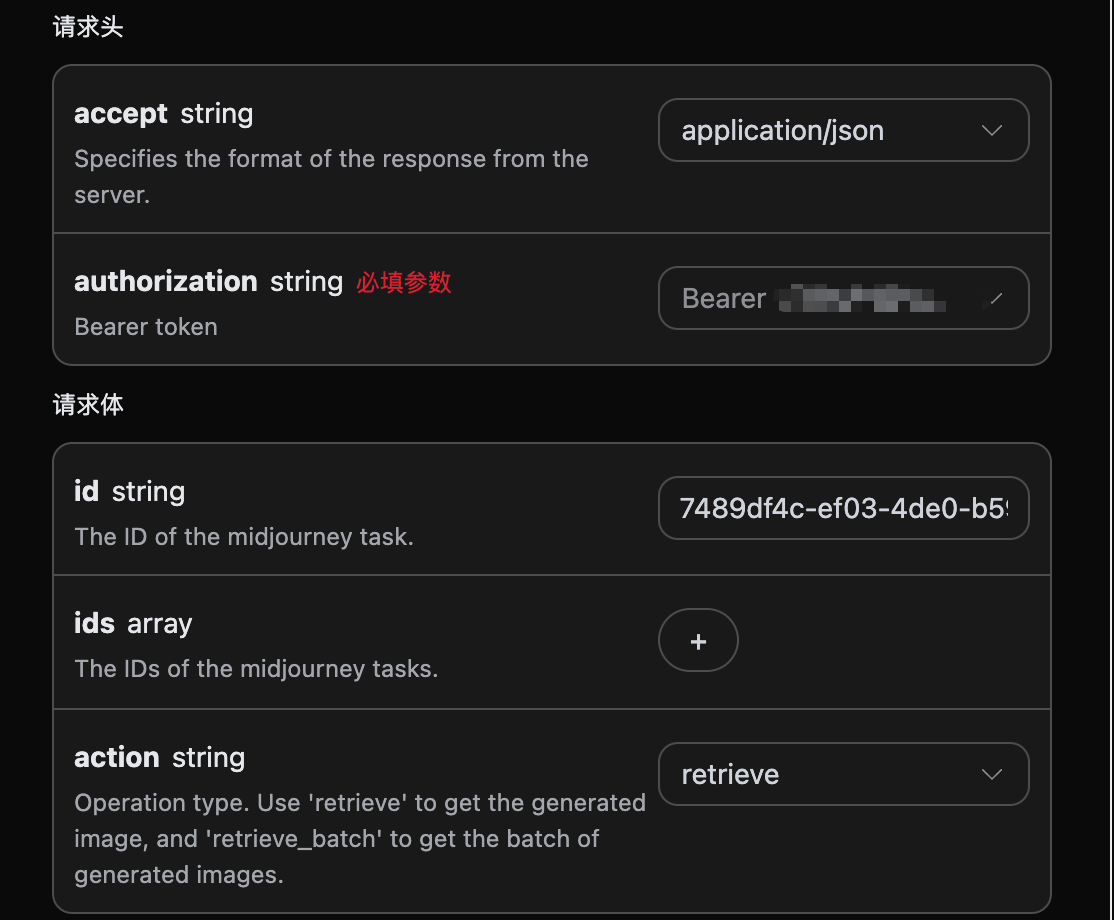
요청 헤더 및 요청 본문 설정

Request Headers에는 다음이 포함됩니다:
  • accept: JSON 형식의 응답 결과를 수신하도록 지정하며, 여기서는 application/json으로 입력합니다.
  • authorization: API 호출에 필요한 키로, 신청 후 직접 드롭다운에서 선택할 수 있습니다.
Request Body에는 다음이 포함됩니다:
  • id: 업로드된 작업 ID.
  • ids: 배치 조회 시의 작업 ID 배열.
  • action: 작업의 조작 방식으로, retrieve(단일 조회)와 retrieve_batch(배치 조회)를 지원합니다.
아래 그림과 같이 설정합니다:

코드 예시

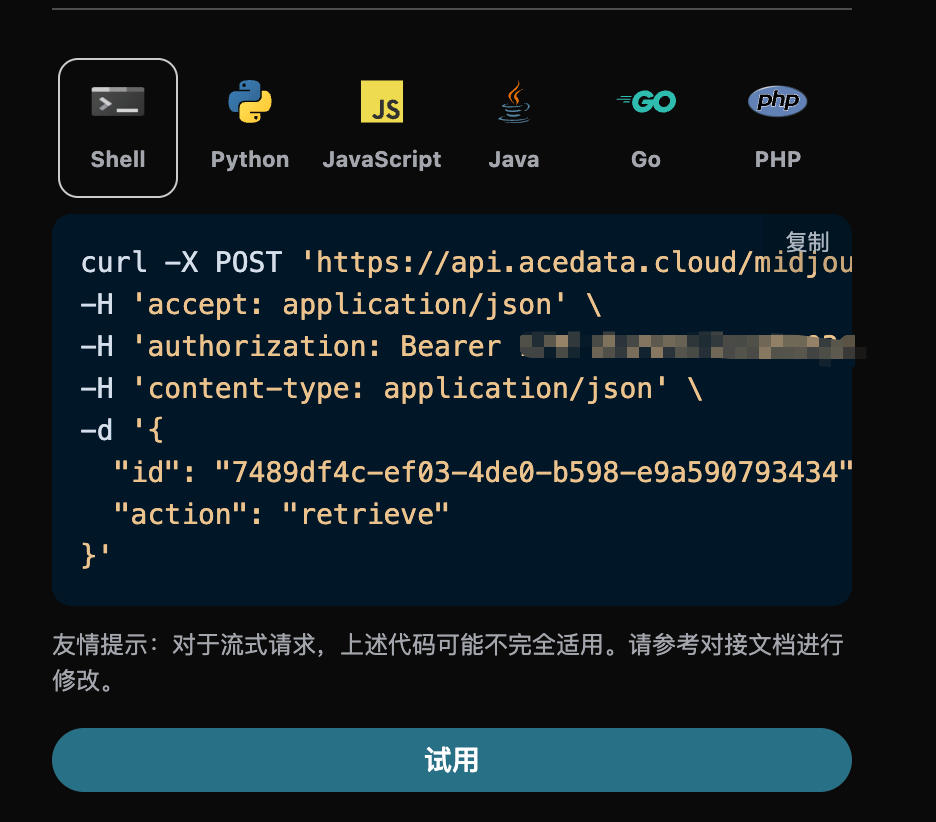
페이지 오른쪽에는 다양한 언어의 코드가 자동으로 생성된 것을 확인할 수 있습니다. 아래 그림과 같이:

일부 코드 예시는 다음과 같습니다:

CURL

curl -X POST 'https://api.acedata.cloud/midjourney/tasks' \
-H 'accept: application/json' \
-H 'authorization: Bearer {token}' \
-H 'content-type: application/json' \
-d '{
  "id": "7489df4c-ef03-4de0-b598-e9a590793434",
  "action": "retrieve"
}'

Python

import requests

url = "https://api.acedata.cloud/midjourney/tasks"

headers = {
    "accept": "application/json",
    "authorization": "Bearer {token}",
    "content-type": "application/json"
}

payload = {
    "id": "7489df4c-ef03-4de0-b598-e9a590793434",
    "action": "retrieve"
}

response = requests.post(url, json=payload, headers=headers)
print(response.text)

응답 예시

요청이 성공하면 API는 이곳 이미지 작업의 세부 정보를 반환합니다. 예를 들어:
{
  "_id": "668aae3f550a4144a540803b",
  "id": "7489df4c-ef03-4de0-b598-e9a590793434",
  "application_id": "9dec7b2a-1cad-41ff-8536-d4ddaf2525d4",
  "created_at": 1720364607.967,
  "credential_id": "68253cc8-505d-47f4-97ad-0050a62e4975",
  "request": {
    "mode": "fast",
    "prompt": "A cat sitting on a table",
    "action": "generate"
  },
  "type": "imagine",
  "hold": false,
  "image_id": "1259525319472185344",
  "job_id": "da317da6-f500-48e6-bf32-dd48b3e6f84f",
  "response": {
    "image_url": "https://platform.cdn.acedata.cloud/midjourney/7489df4c-ef03-4de0-b598-e9a590793434.png?imageMogr2/thumbnail/!50p",
    "image_width": 1024,
    "image_height": 1024,
    "actions": [
      "upscale1",
      "upscale2",
      "upscale3",
      "upscale4",
      "reroll",
      "variation1",
      "variation2",
      "variation3",
      "variation4"
    ],
    "raw_image_url": "https://platform.cdn.acedata.cloud/midjourney/7489df4c-ef03-4de0-b598-e9a590793434.png",
    "raw_image_width": 2048,
    "raw_image_height": 2048,
    "progress": 100,
    "image_id": "1259525319472185344",
    "task_id": "7489df4c-ef03-4de0-b598-e9a590793434",
    "success": true,
    "job_id": "da317da6-f500-48e6-bf32-dd48b3e6f84f",
    "hold": false
  },
  "duration": 29.437000036239624,
  "finished_at": 1720364637.404
}
반환 결과는 여러 필드로 구성되어 있으며, request 필드는 작업을 시작할 때의 request body를 나타내고, response 필드는 작업 완료 후 반환된 response body입니다. type이 imagine인 경우, 그 결과는 Midjourney Imagine API의 요청 및 반환과 일치하며, type이 describe인 경우, 그 결과는 Midjourney Describe API의 요청 및 반환과 일치합니다. 필드 설명은 다음과 같습니다.
  • id: 이 이미지를 생성하는 작업의 ID로, 이번 이미지 생성 작업을 고유하게 식별하는 데 사용됩니다.
  • type: type이 imagine이면 Midjourney Imagine API의 결과를 나타내고, type이 describe이면 Midjourney Describe API의 결과를 나타냅니다.
  • job_id: 이번 조회 이미지 작업의 ID로, 이번 조회 이미지 작업을 고유하게 식별하는 데 사용됩니다.
  • image_id: 이곳에서 조회하는 이미지 작업의 고유 식별자로, 다음 번에 이미지를 변환 작업을 수행할 때 이 매개변수를 전달해야 합니다.
  • request: 이미지 작업의 요청 정보를 조회합니다.
  • response: 이미지 작업의 반환 정보를 조회합니다.

배치 조회 작업

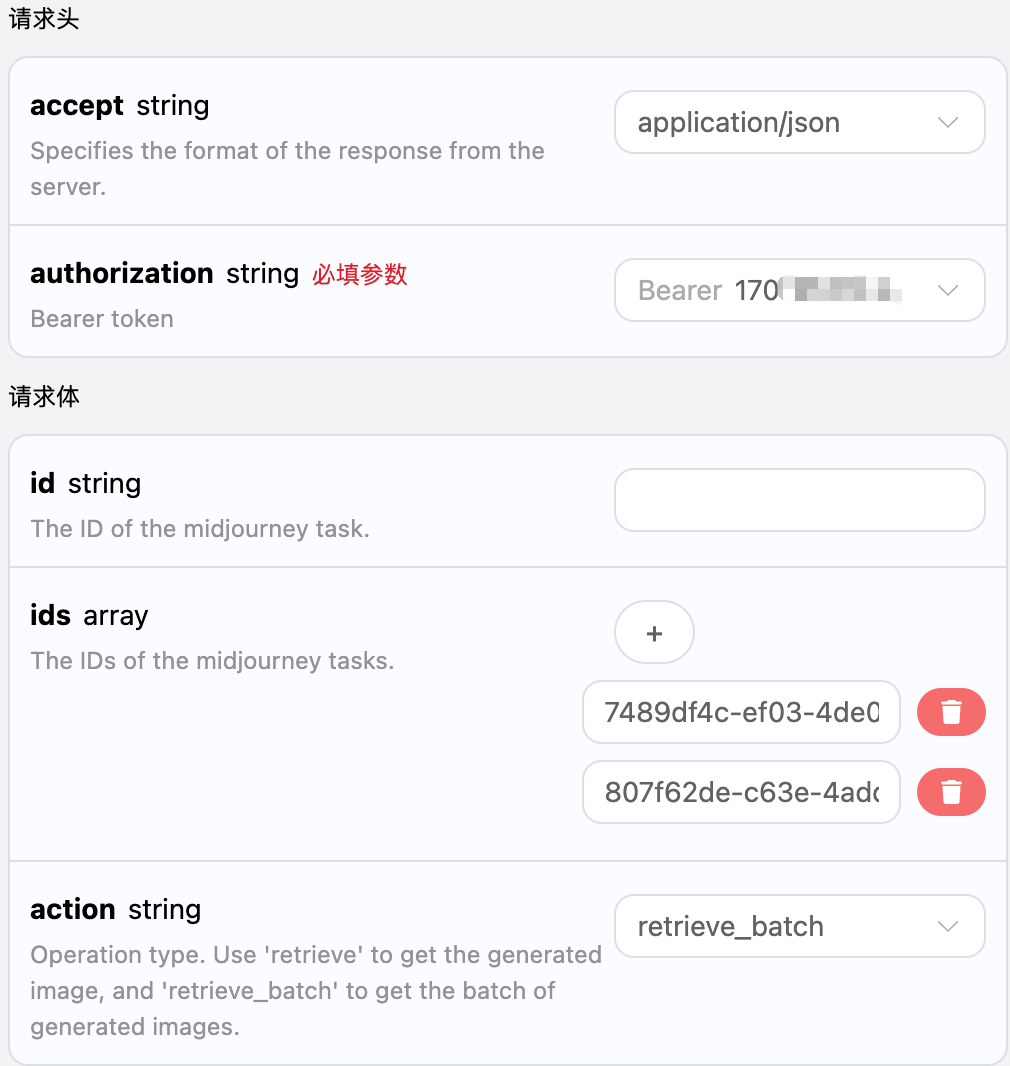
이는 여러 작업 ID에 대해 이미지 작업 세부 정보를 조회하는 것으로, 위와 다른 점은 action을 retrieve_batch로 선택해야 한다는 것입니다. Request Body에는 다음이 포함됩니다:
  • ids: 업로드된 작업 ID 배열.
  • action: 작업의 조작 방식.
아래 그림과 같이 설정합니다:

코드 예시

페이지 오른쪽에 다양한 언어의 코드가 자동으로 생성된 것을 확인할 수 있습니다. 아래 그림과 같습니다:

일부 코드 예시는 다음과 같습니다:

응답 예시

요청이 성공하면, API는 모든 배치 이미지 작업의 구체적인 세부 정보를 반환합니다. 예를 들어:
{
  "items": [
    {
      "_id": "668aae3f550a4144a540803b",
      "id": "7489df4c-ef03-4de0-b598-e9a590793434",
      "application_id": "9dec7b2a-1cad-41ff-8536-d4ddaf2525d4",
      "created_at": 1720364607.967,
      "credential_id": "68253cc8-505d-47f4-97ad-0050a62e4975",
      "request": {
        "mode": "fast",
        "prompt": "A cat sitting on a table",
        "action": "generate"
      },
      "type": "imagine",
      "hold": false,
      "image_id": "1259525319472185344",
      "job_id": "da317da6-f500-48e6-bf32-dd48b3e6f84f",
      "response": {
        "image_url": "https://platform.cdn.acedata.cloud/midjourney/7489df4c-ef03-4de0-b598-e9a590793434.png?imageMogr2/thumbnail/!50p",
        "image_width": 1024,
        "image_height": 1024,
        "actions": [
          "upscale1",
          "upscale2",
          "upscale3",
          "upscale4",
          "reroll",
          "variation1",
          "variation2",
          "variation3",
          "variation4"
        ],
        "raw_image_url": "https://platform.cdn.acedata.cloud/midjourney/7489df4c-ef03-4de0-b598-e9a590793434.png",
        "raw_image_width": 2048,
        "raw_image_height": 2048,
        "progress": 100,
        "image_id": "1259525319472185344",
        "task_id": "7489df4c-ef03-4de0-b598-e9a590793434",
        "success": true,
        "job_id": "da317da6-f500-48e6-bf32-dd48b3e6f84f",
        "hold": false
      },
      "duration": 29.437000036239624,
      "finished_at": 1720364637.404
    },
    {
      "_id": "668b41d6550a4144a551d996",
      "id": "807f62de-c63e-4add-8345-7f0ae6dd18e7",
      "application_id": "9dec7b2a-1cad-41ff-8536-d4ddaf2525d4",
      "created_at": 1720402390.341,
      "credential_id": "6fd3e1d5-4bd6-47e8-8872-fab89a183b53",
      "request": {
        "mode": "fast",
        "prompt": "A beautiful girl",
        "action": "generate"
      },
      "type": "imagine",
      "hold": false,
      "image_id": "1259683790612070400",
      "job_id": "ede5c805-e231-498c-8f74-3aa76d5d6d12",
      "response": {
        "image_url": "https://platform.cdn.acedata.cloud/midjourney/807f62de-c63e-4add-8345-7f0ae6dd18e7.png?imageMogr2/thumbnail/!50p",
        "image_width": 1024,
        "image_height": 1024,
        "actions": [
          "upscale1",
          "upscale2",
          "upscale3",
          "upscale4",
          "reroll",
          "variation1",
          "variation2",
          "variation3",
          "variation4"
        ],
        "raw_image_url": "https://platform.cdn.acedata.cloud/midjourney/807f62de-c63e-4add-8345-7f0ae6dd18e7.png",
        "raw_image_width": 2048,
        "raw_image_height": 2048,
        "progress": 100,
        "image_id": "1259683790612070400",
        "task_id": "807f62de-c63e-4add-8345-7f0ae6dd18e7",
        "success": true,
        "job_id": "ede5c805-e231-498c-8f74-3aa76d5d6d12",
        "hold": false
      },
      "duration": 29.471999883651733,
      "finished_at": 1720402419.813
    }
  ],
  "count": 2
}
반환 결과에는 여러 필드가 있으며, 그 중 items는 배치 이미지 작업의 구체적인 세부 정보를 포함하고 있습니다. 각 이미지 작업의 구체적인 정보는 위의 필드와 동일하며, 필드 정보는 다음과 같습니다.
  • items, 배치 이미지 작업의 모든 구체적인 세부 정보. 이는 배열이며, 각 배열의 요소는 위에서 단일 작업의 반환 결과 형식과 동일합니다.
  • count, 여기서 배치 쿼리 이미지 작업의 개수입니다.

CURL

curl -X POST 'https://api.acedata.cloud/midjourney/tasks' \
-H 'accept: application/json' \
-H 'authorization: Bearer {token}' \
-H 'content-type: application/json' \
-d '{
  "action": "retrieve_batch",
  "id": "",
  "ids": ["7489df4c-ef03-4de0-b598-e9a590793434","807f62de-c63e-4add-8345-7f0ae6dd18e7"]
}'

Python

import requests

url = "https://api.acedata.cloud/midjourney/tasks"

headers = {
    "accept": "application/json",
    "authorization": "Bearer {token}",
    "content-type": "application/json"
}

payload = {
    "action": "retrieve_batch",
    "id": "",
    "ids": ["7489df4c-ef03-4de0-b598-e9a590793434","807f62de-c63e-4add-8345-7f0ae6dd18e7"]
}

response = requests.post(url, json=payload, headers=headers)
print(response.text)

오류 처리

API를 호출할 때 오류가 발생하면, API는 해당 오류 코드와 정보를 반환합니다. 예를 들어:
  • 400 token_mismatched: 잘못된 요청, 누락되었거나 잘못된 매개변수 때문일 수 있습니다.
  • 400 api_not_implemented: 잘못된 요청, 누락되었거나 잘못된 매개변수 때문일 수 있습니다.
  • 401 invalid_token: 인증되지 않음, 잘못되었거나 누락된 인증 토큰입니다.
  • 429 too_many_requests: 너무 많은 요청, 비율 제한을 초과했습니다.
  • 500 api_error: 내부 서버 오류, 서버에서 문제가 발생했습니다.

오류 응답 예시

{
  "success": false,
  "error": {
    "code": "api_error",
    "message": "fetch failed"
  },
  "trace_id": "2cf86e86-22a4-46e1-ac2f-032c0f2a4e89"
}

결론

이 문서를 통해 Midjourney Tasks API를 사용하여 단일 또는 배치 이미지 작업의 모든 구체적인 세부 정보를 조회하는 방법을 이해하셨습니다. 이 문서가 API를 더 잘 연결하고 사용하는 데 도움이 되기를 바랍니다. 질문이 있으시면 언제든지 기술 지원 팀에 문의해 주십시오.