

Application Process
To use the Kling Videos Generation API, first go to the Ace Data Cloud Console to obtain your API Token and keep it for later use. If you have not logged in or registered yet, you will be automatically redirected to the login page and invited to register and log in. After completion, you will automatically return to the current page.
One API Token can call all services on the platform; there is no need to apply separately for each service. The first application comes with free credits for a free trial; when credits are insufficient, you can top up the general balance in the Console.
If you have not logged in or registered yet, you will be automatically redirected to the login page and invited to register and log in. After completion, you will automatically return to the current page.
One API Token can call all services on the platform; there is no need to apply separately for each service. The first application comes with free credits for a free trial; when credits are insufficient, you can top up the general balance in the Console.
📘 Full documentation: Kling Videos Generation API →
Basic Usage
First, let’s understand the basic usage method: by entering the promptprompt, generation action action, first-frame reference image start_image_url, and model model, you can obtain the processed result. First, you need to simply pass an action field with the value text2video. It mainly includes three actions: text-to-video (text2video), image-to-video (image2video), and extend video (extend). Then we also need to enter the model model. Currently, the main models include kling-v1, kling-v1-6, kling-v2-master, kling-v2-1-master, kling-v2-5-turbo, kling-v2-6, kling-v3, kling-v3-omni, and kling-o1. The specific content is as follows:
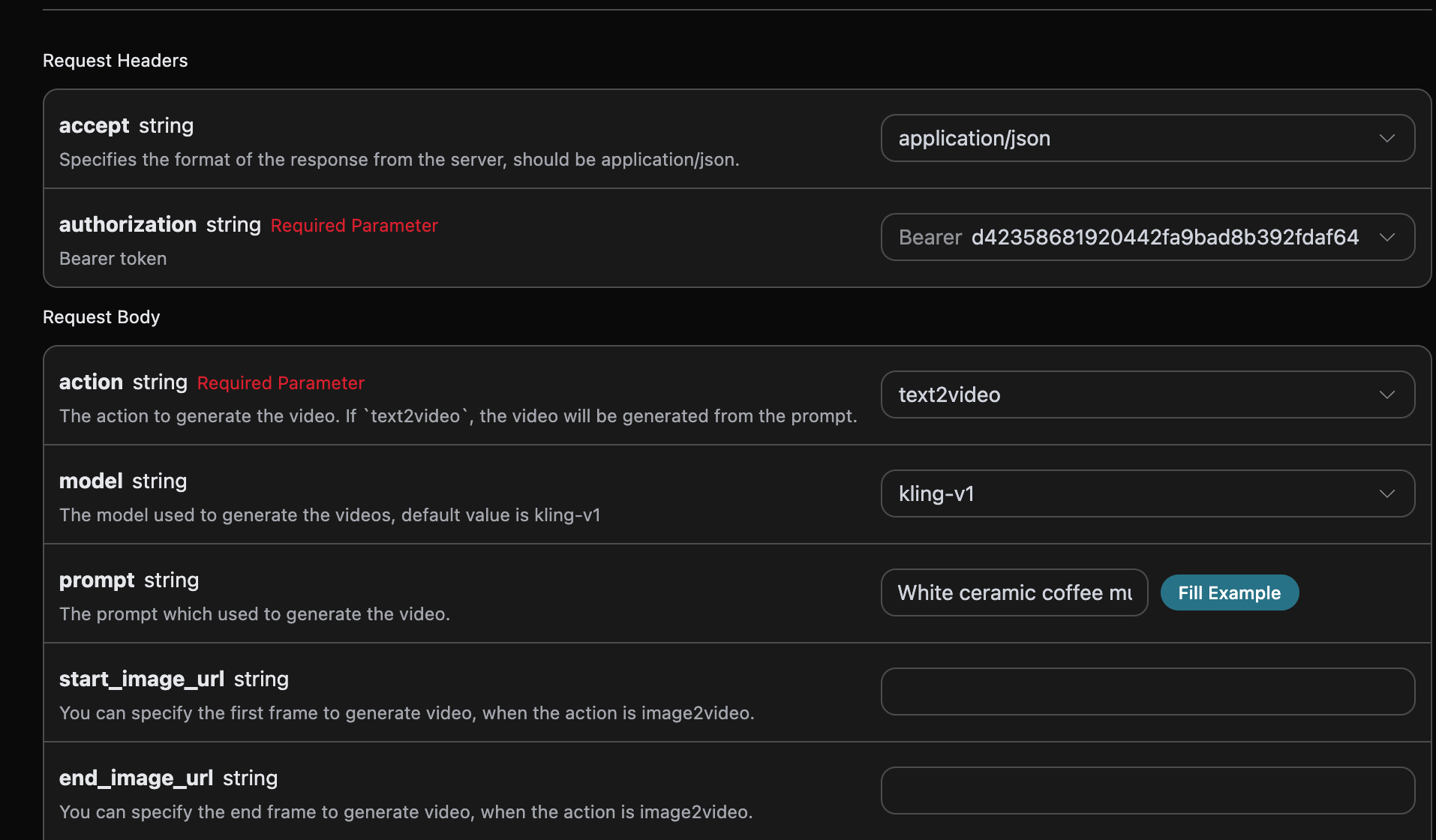
accept: The format of the response result you want to receive. Fill inapplication/jsonhere, which is JSON format.authorization: The key for calling the API. After applying, you can directly select it from the dropdown.
model: The model for generating videos, mainly includingkling-v1,kling-v1-6,kling-v2-master,kling-v2-1-master,kling-v2-5-turbo,kling-v2-6,kling-v3,kling-v3-omni, andkling-o1.mode: The mode for generating videos. Optional values are standard modestd, fast modepro, and native 4K mode4k. Among them,4konly supportskling-v3andkling-v3-omni, and is incompatible withcamera_control(camera movement control).action: The action of this video generation task, mainly including three actions: text-to-video (text2video), image-to-video (image2video), and extend video (extend).start_image_url: When selecting the image-to-video actionimage2video, the link to the first-frame reference image that must be uploaded.end_image_url: Optional for image-to-video, specifies the last frame.duration: Video duration, in seconds.kling-v3andkling-v3-omnisupport integer durations from 3 to 15 seconds;kling-o1only supports 5 seconds; other models support 5 or 10 seconds.generate_audio: Whether to generate audio simultaneously, optional, Boolean value. Supported bykling-v3,kling-v3-omni, andkling-v2-6(pro mode only). Defaults tofalse.aspect_ratio: Video aspect ratio, optional, supports16:9,9:16, and1:1, default is16:9.cfg_scale: Relevance strength, range [0,1]; the larger the value, the more closely it matches the prompt.camera_control: Optional, object parameters for controlling camera movement, supporting type/simple presets and configurations such as horizontal, vertical, pan, tilt, roll, and zoom.negative_prompt: Optional, negative prompts that you do not want to appear, up to 200 characters.image_list: Omni reference image list, applicable to thekling-o1andkling-v3-omnimodels. For usage, see “Omni Universal Reference” below.video_list: Omni reference video list (supports video editing), applicable to thekling-o1andkling-v3-omnimodels. For usage, see “Omni Universal Reference” below.prompt: Prompt.callback_url: The URL that needs callback results.async: Optional. When set totrue, the API immediately returnstask_id; there is no need to providecallback_url, and then the result can be obtained by polling through the corresponding task query API.
success, the status of the video generation task at this time.task_id, the ID of the video generation task at this time.video_id, the video ID of the video generation task at this time.video_url, the video link of the video generation task at this time.duration, the video link duration of the video generation task at this time.state, the status of the video generation task at this time.
data in the result.
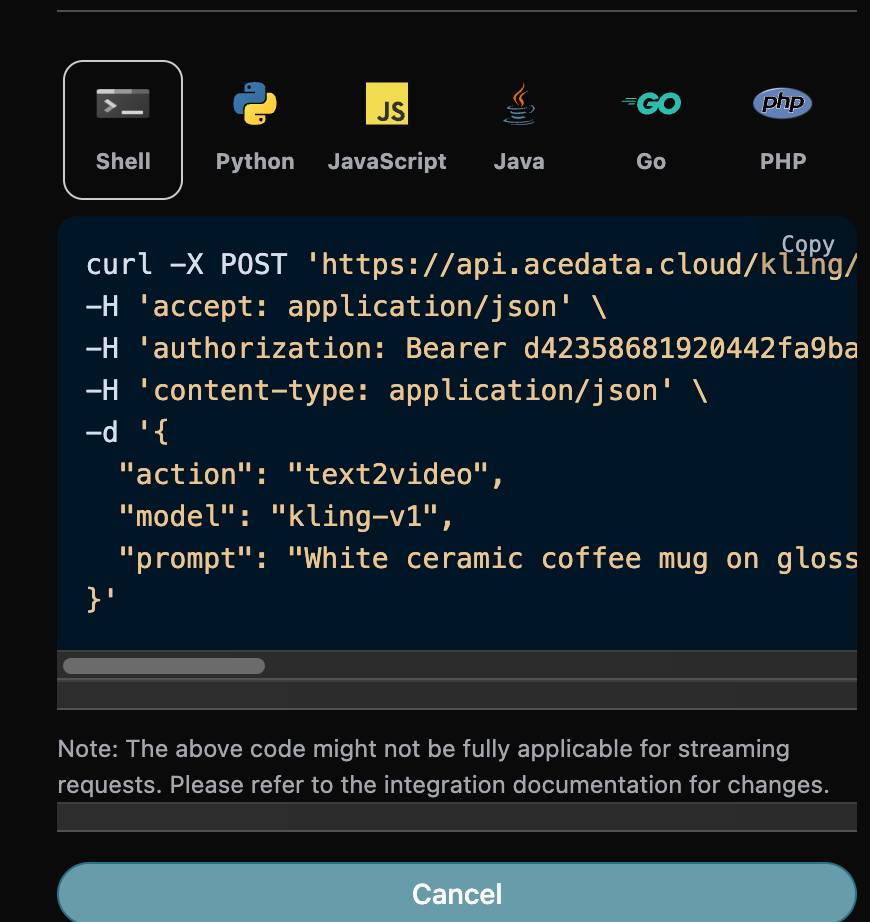
Additionally, if you want to generate the corresponding integration code, you can directly copy the generated code. For example, the CURL code is as follows:
Model Capability Matrix
Different models vary greatly in their support for parameters. The following matrix is compiled from the Kling official video models documentation. Before calling, please first verify whether the currentmodel / mode / duration combination supports the functionality you need; otherwise, errors such as model/mode/duration(...) is not supported with image_tail will be returned.
Notes:
mode=4kis supported only bykling-v3andkling-v3-omni; it is mutually exclusive withcamera_control(camera movement).end_image_urlcan only be used together withstart_image_urlwhenaction=image2video. Passing onlyend_image_url(withoutstart_image_url) will be rejected.kling-v3/kling-v3-omniaccept any integerdurationfrom 3–15 seconds;kling-o1only accepts 5; all other models only accept 5 or 10.generate_audiodefaults tofalse. Onlykling-v3,kling-v3-omni, andkling-v2-6(pro mode) support it.
Video Extension Feature
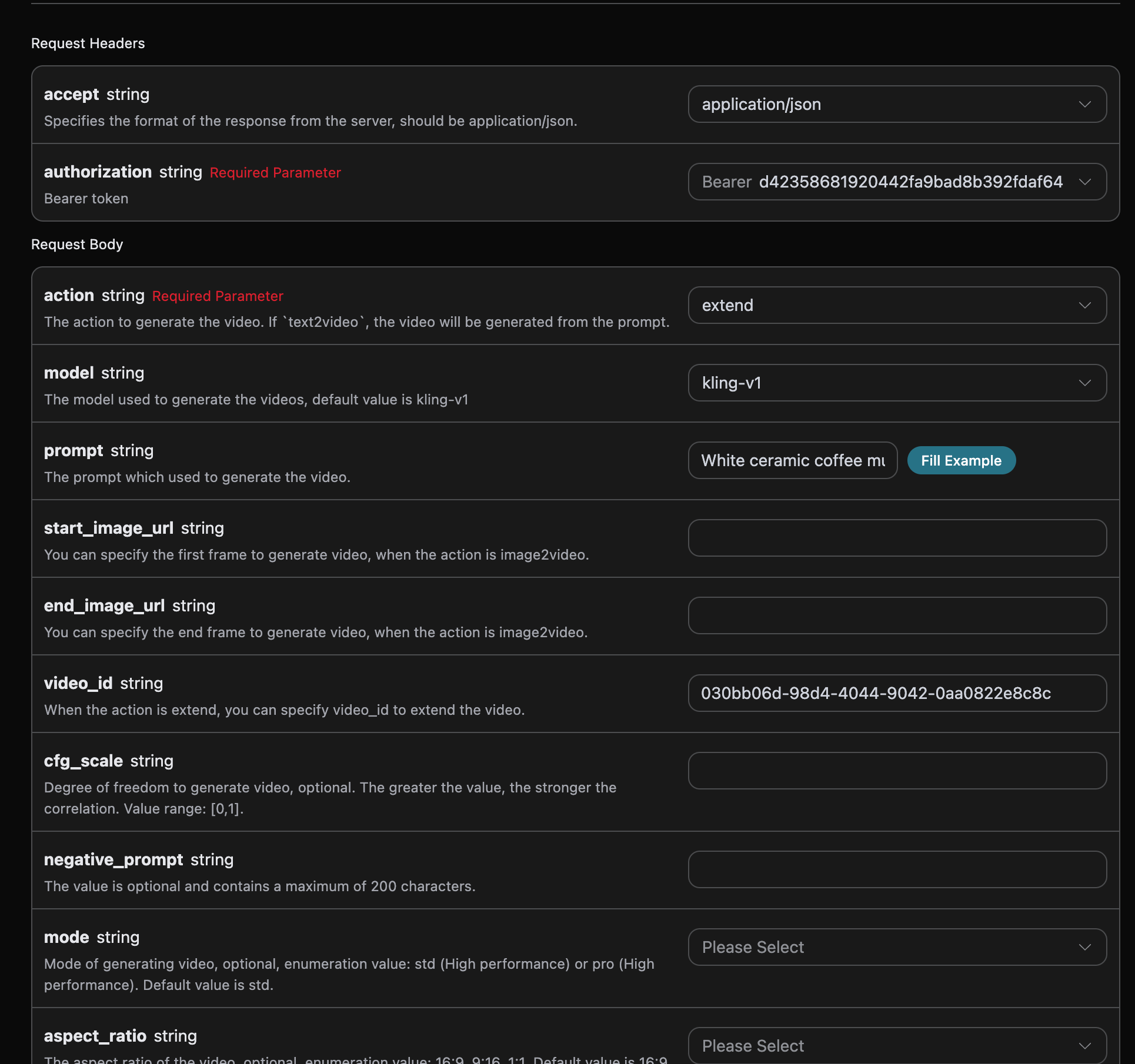
If you want to continue generating an already generated Kling video, you can set the parameteraction to extend, and input the ID of the video that needs to be continued. The video ID can be obtained based on the basic usage, as shown in the image below:

Note that the video_id in this video is the ID of the generated video. If you do not know how to generate a video, you can refer to the basic usage above to generate a video.
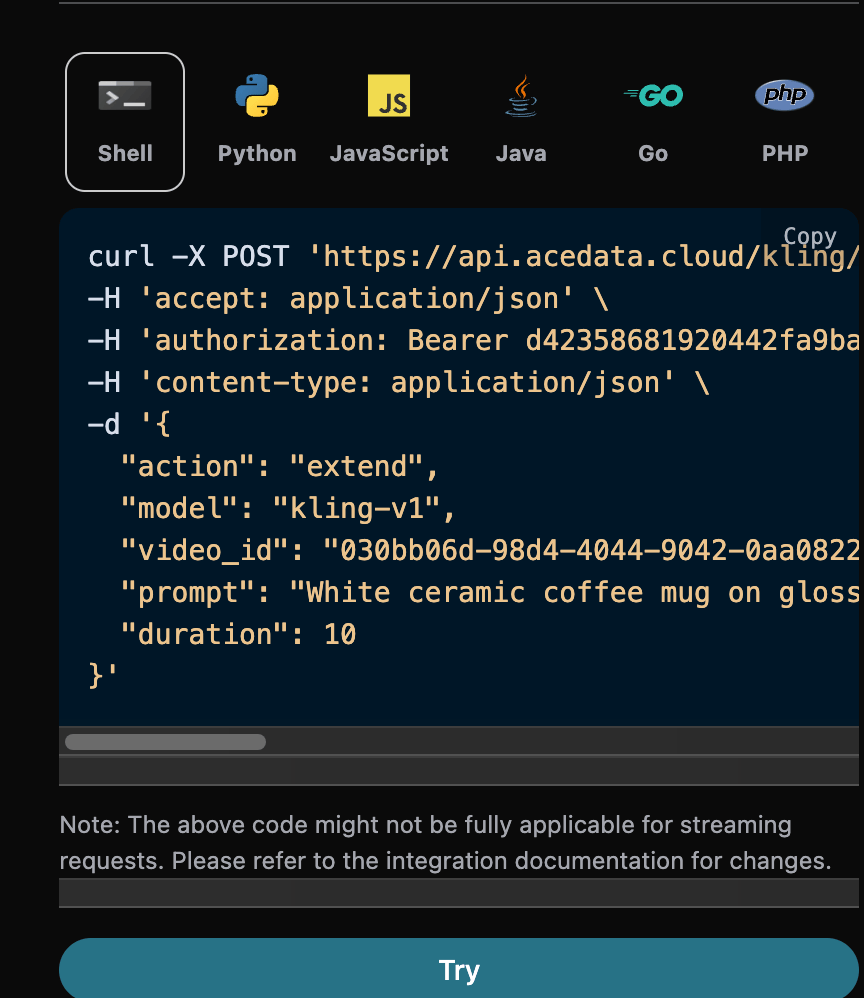
Next, we must fill in the prompt for the next step of extension to customize the generated video, and can specify the following content:
model: The model for generating videos, mainly includingkling-v1,kling-v1-5, andkling-v1-6models.mode: The mode for generating videos. Optional values are standard modestd, fast modepro, and native 4K mode4k(supported only bykling-v3andkling-v3-omni, incompatible with camera movement control).duration: The video duration for this video generation task, mainly including 5s and 10s.start_image_url: When selecting the image-to-video behaviorimage2video, the link to the first-frame reference image that must be uploaded.prompt: Prompt.
Omni Universal Reference (Video Editing / Reference Video / Multi-Image Reference)
kling-o1 and kling-v3-omni are two independent models, both supporting the “universal reference” capability. Based on text-to-video (action=text2video), you can additionally pass in reference images or reference videos to achieve multi-image reference, reference videos, and direct editing of existing videos.
Core convention: Reference materials must be cited in prompt in the form of <<<image_1>>>, <<<video_1>>> (numbering starts from 1), referring to the material at the corresponding position in image_list / video_list, for the model to apply these references. If materials are passed without being cited in the prompt, the materials will be ignored.
Security note: The current API does not exposeOmni requests do not supportelement_list. The IDs in the Kling Element Library are not tenant-isolated. Before an Element Management API that provides tenant isolation is available, please useimage_listto pass subject reference images.
negative_prompt, cfg_scale, or camera_control, and cannot use mode=4k. When a reference video is included, generate_audio must be false.
Reference Video and Video Editing (video_list)
video_list is used to pass reference videos and is the most commonly used scenario for this capability. The array element fields are as follows:
video_url: Reference video link, cannot be empty. At most 1 MP4/MOV video, file size ≤200MB, frame rate 24–60fps.kling-o1requires a duration of 3–10 seconds and both width and height of 700–2160px;kling-v3-omnirequires a duration of 3–15.5 seconds, both width and height of 700–4553px, total pixels ≤8,294,400, and an aspect ratio of 0.4–2.refer_type: Reference type, optionalbase(default, the base video to be edited, i.e., “directly edit the video”, where elements can be added/removed/modified, composition changed, style changed, colors changed, weather changed, etc.) orfeature(feature reference, referencing its style / camera movement / continuation for the next shot).keep_original_sound: Whether to retain the original video audio, optionalyes(retain) orno(remove).
Note: When a reference video exists,The CURL example for editing an existing video (changing the video to an anime style) is as follows:generate_audiomust befalse. A video withrefer_type=basecannot additionally specify a first frame / last frame.
Multi-image Reference (image_list)
image_list is used to pass reference images (elements / scenes / styles, etc.). The array element fields are as follows:
image_url: Reference image link, cannot be empty. Requirements: .jpg/.jpeg/.png format; file size ≤10MB; shortest side ≥300px; aspect ratio 1:2.5 ~ 2.5:1.type: Optional. When not provided, it is used as a pure reference image; whenfirst_frame/end_frameis provided, it is used as the first frame / last frame respectively (equivalent tostart_image_url/end_image_url).
prompt as <<<image_1>>>, <<<image_2>>>. Quantity limits: reference images ≤ 7 when no reference video exists; reference images ≤ 4 when a reference video exists. When only passing the first / last frame, you can also directly use start_image_url / end_image_url, but the last frame must be used together with the first frame.
Note: IfCURL example for generating a video with multi-image reference:start_image_url/end_image_urlandimage_listare passed at the same time, the first / last frames will be placed beforeimage_list, which may affect the index correspondence of<<<image_N>>>. It is recommended to choose one: when first / last frames are needed, specify them directly withtypeinimage_list, and do not mix them withstart_image_url/end_image_url.
Asynchronous Callback
Since the Kling Videos Generation API takes a relatively long time to generate, approximately 1–2 minutes, if the API does not respond for a long time, the HTTP request will remain connected, causing additional system resource consumption. Therefore, this API also provides support for asynchronous callbacks. The overall process is: when the client initiates a request, it additionally specifies acallback_url field. After the client initiates the API request, the API immediately returns a result containing a task_id field, representing the current task ID. When the task is completed, the generated video result will be sent in POST JSON format to the callback_url specified by the client, which also includes the task_id field, so that the task result can be associated through the ID.
Below, we will learn how to operate it specifically through an example.
First, a Webhook callback is a service that can receive HTTP requests. Developers should replace it with the URL of their own deployed HTTP server. For the convenience of demonstration, a public Webhook example website https://webhook.site/ is used here. Open this website to obtain a Webhook URL, as shown in the figure:
 Copy this URL, and it can be used as a Webhook. The example here is
 https://webhook.site/624b2c78-6dbd-4618-9d2b-b32eade6d8c3.
Next, we can set the callback_url field to the above Webhook URL and fill in the corresponding parameters. The specific content is shown in the figure:
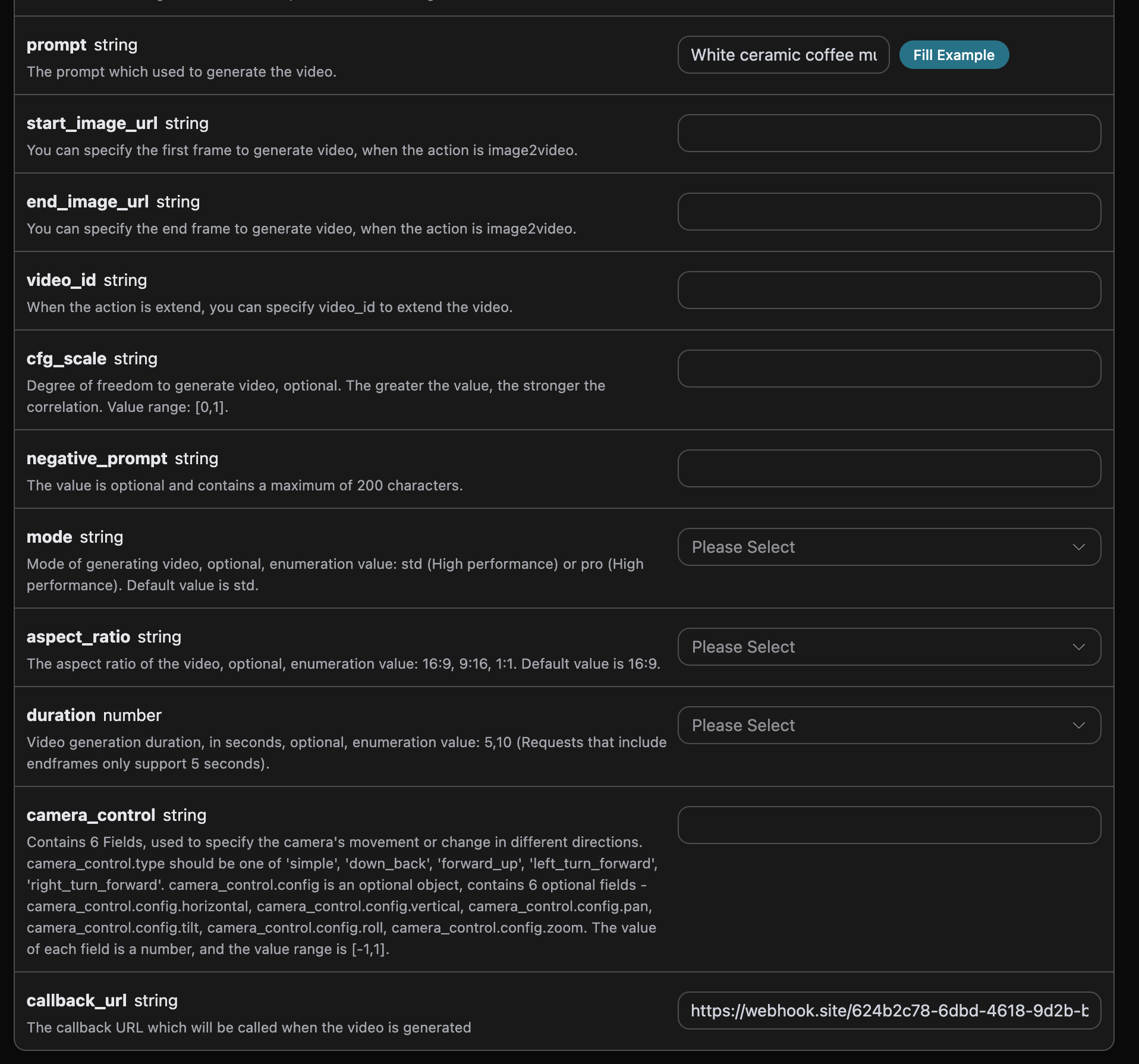
https://webhook.site/624b2c78-6dbd-4618-9d2b-b32eade6d8c3, as shown in the figure:
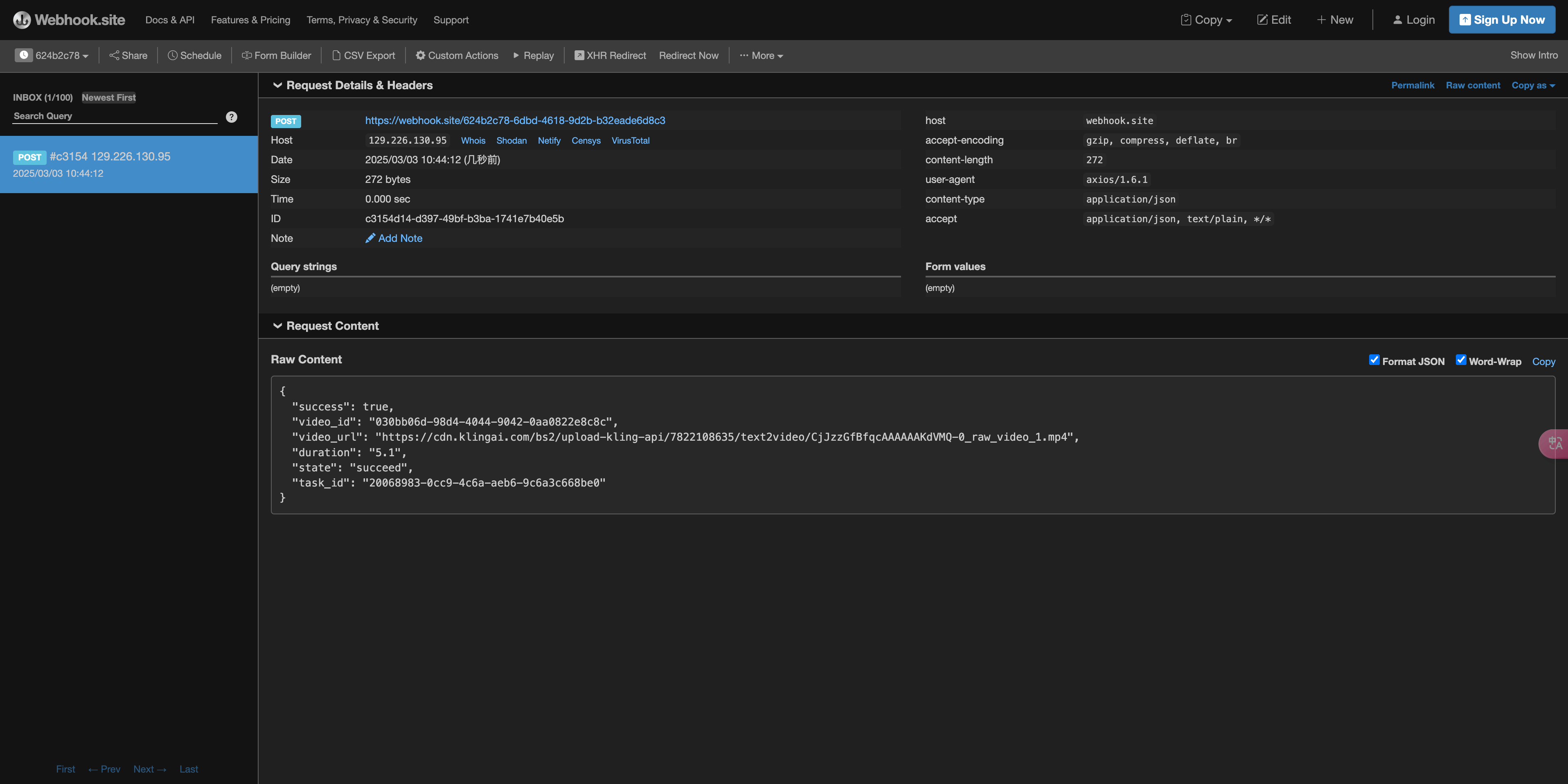 The content is as follows:
task_id field in the result. The other fields are similar to those above, and task association can be achieved through this field.
Error Handling
When calling the API, if an error occurs, the API will return the corresponding error code and information. For example:400 token_mismatched: Bad request, possibly due to missing or invalid parameters.400 api_not_implemented: Bad request, possibly due to missing or invalid parameters.401 invalid_token: Unauthorized, invalid or missing authorization token.429 too_many_requests: Too many requests, you have exceeded the rate limit.500 api_error: Internal server error, something went wrong on the server.
Error Response Example
Conclusion
Through this document, you have learned how to use the Kling Videos Generation API to generate videos by entering prompts and first-frame reference images. We hope this document can help you better integrate with and use this API. If you have any questions, please feel free to contact our technical support team.Kling 3.0 Turbo
model="kling-v3-turbo" supports text-to-video and first-frame image-to-video, with integer durations from 3–15 seconds. mode="std" outputs 720p, and mode="pro" outputs 1080p. This model includes native audio and does not provide an option to disable it; omit generate_audio or set it to true. This model does not support end frames, camera movement objects, independent negative prompts, or cfg_scale. Please directly describe the content you need or want to avoid in prompt.
Multi-Shot Videos
kling-v3 and kling-v3-omni support multi_shot=true. shot_type="intelligence" automatically creates shots based on prompt; shot_type="customize" provides 1–6 shots through multi_prompt, with each item containing an index that increases consecutively from 1, a prompt of up to 512 characters, and an integer duration of at least 1 second. The sum of all shot durations must equal the total duration. Custom shots do not use the global prompt. Multi-shot videos are billed according to the selected model, quality, audio configuration, and total duration.