This article will introduce the integration instructions for the Fish Voices Generation API, which allows you to create your own voice by inputting an audio link.

Application Process

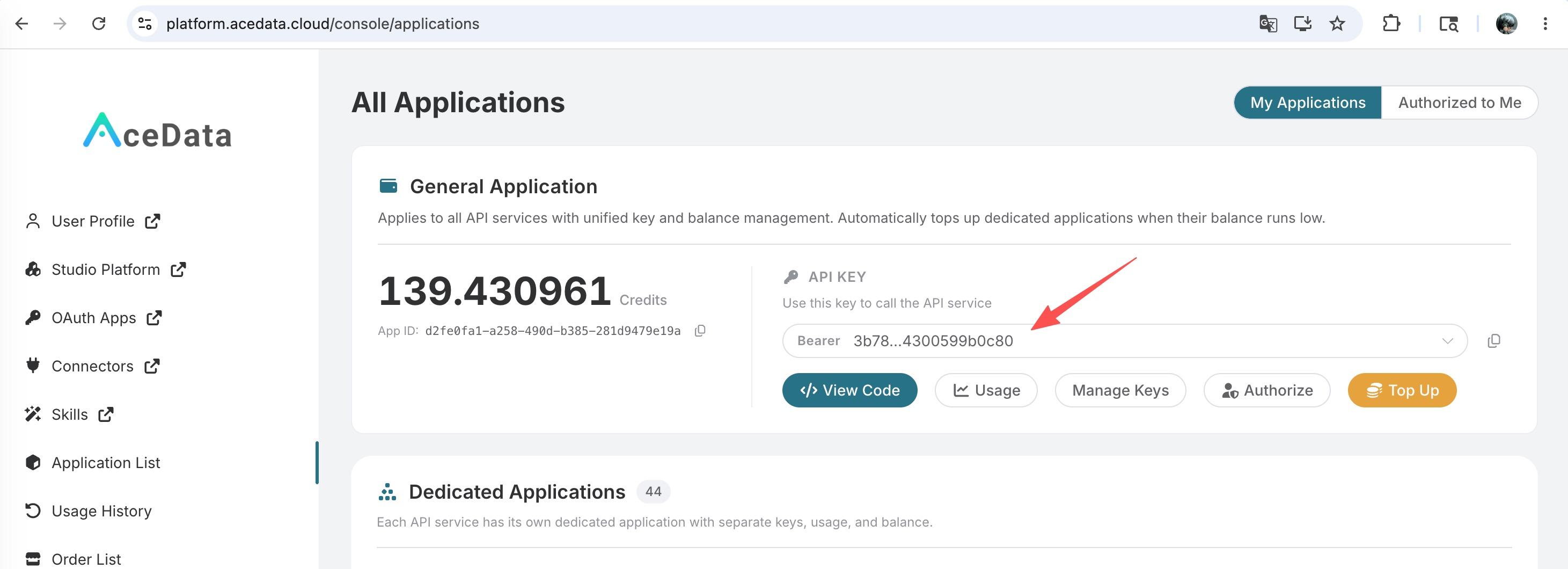
To use the API, you need to first apply for the corresponding service on the Fish Voices Generation API page. After entering the page, click the “Acquire” button, as shown in the image below: If you are not logged in or registered, you will be automatically redirected to the login page inviting you to register and log in. After logging in or registering, you will be automatically returned to the current page. Upon your first application, there will be a free quota available for you to use the API for free.

Basic Usage

First, understand the basic usage method, which is to input the audio link of the voice voice_url, and you can obtain the processed result. The specific content is as follows:
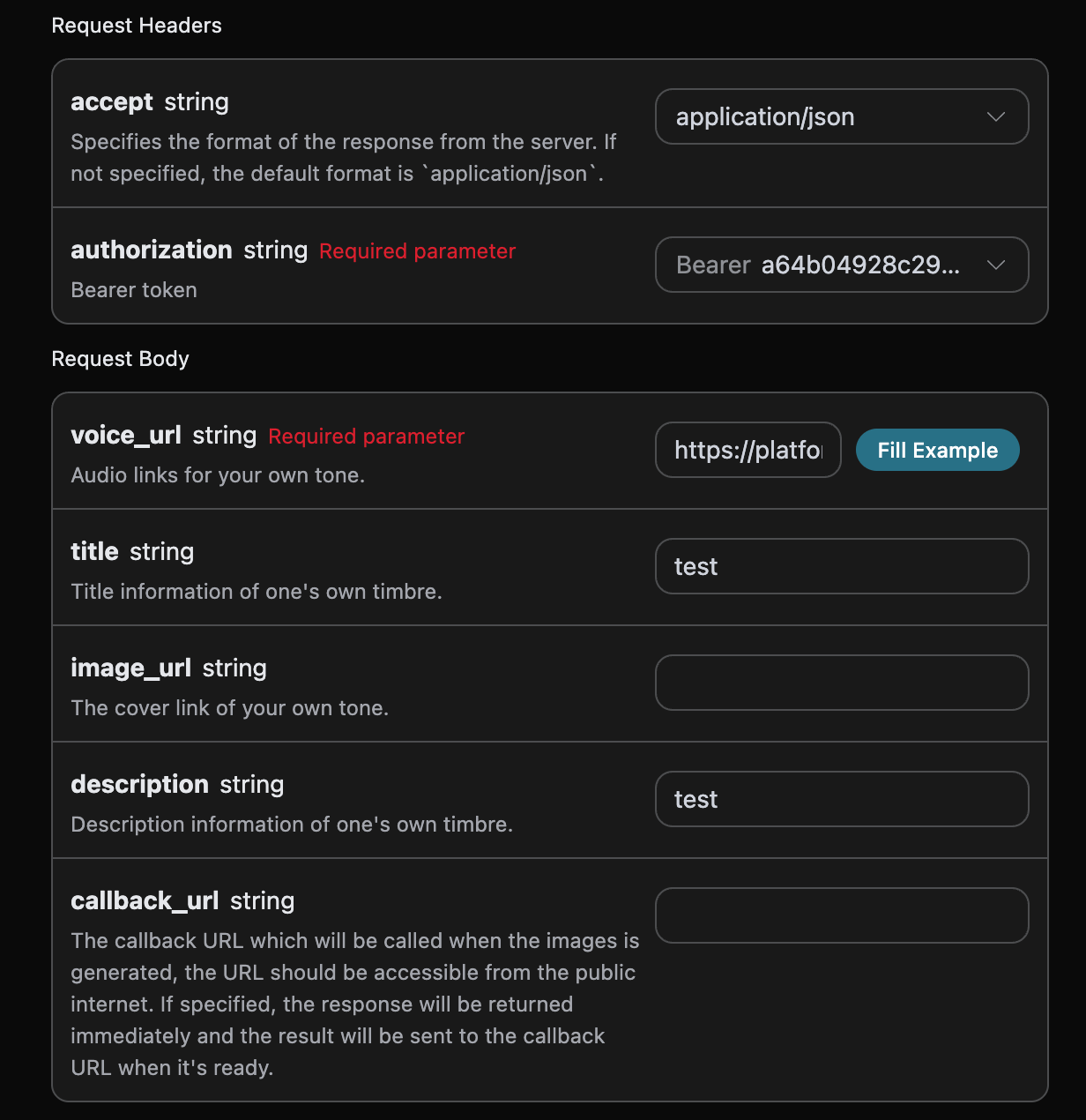
Here, we have set the Request Headers, including:
  • accept: the format of the response you want to receive, filled in as application/json, which means JSON format.
  • authorization: the key to call the API, which can be selected directly after application.
Additionally, the Request Body is set, including:
  • voice_url: the uploaded audio link of the voice.
  • title: the title information of the voice.
  • image_urls: the cover image of the voice.
  • description: the description information of the voice.
  • callback_url: the URL to receive the callback result.
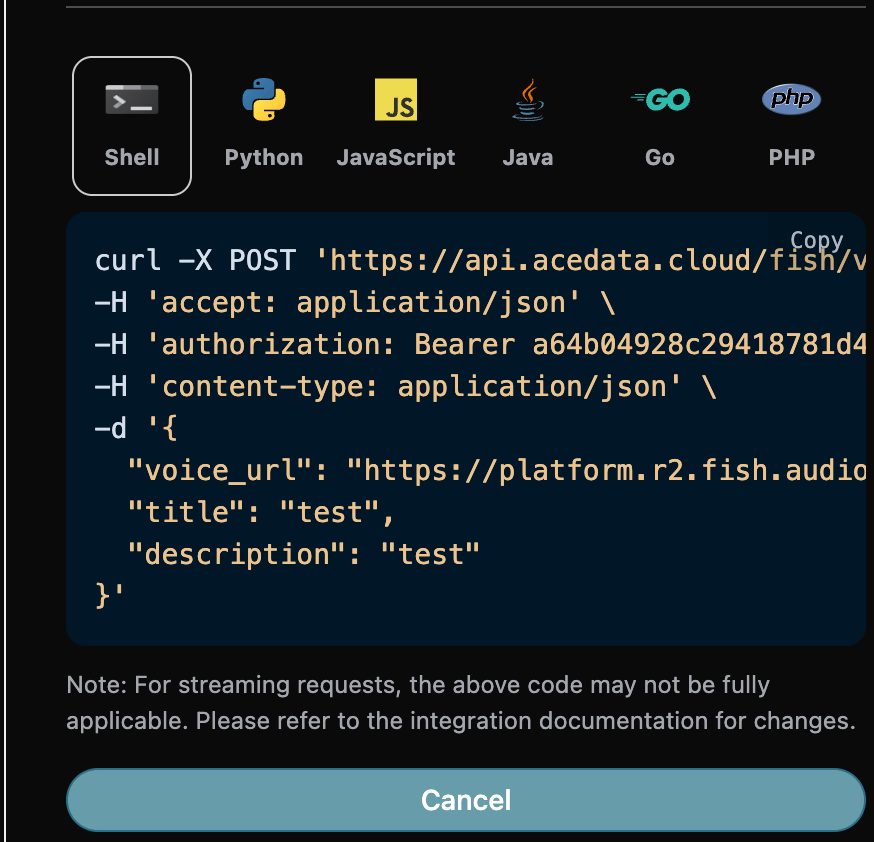
After selection, you can see that the corresponding code is also generated on the right side, as shown in the image below:

Click the “Try” button to test, as shown in the above image, and we obtained the following result:
{
  "success": true,
  "task_id": "b01db503-dd9e-4f92-861a-344f14756217",
  "trace_id": "8731a2f1-7736-4a47-98e7-da942f9346a7",
  "data": {
    "_id": "d5d21261512b4852b9ccd709facf93f3",
    "type": "tts",
    "title": "test",
    "description": "test",
    "cover_image": "coverimage/d5d21261512b4852b9ccd709facf93f3",
    "train_mode": "fast",
    "state": "trained",
    "tags": [],
    "samples": [
      {
        "title": "Default Sample",
        "text": "Through long-term observation, it has been found that fish in coral reef ecosystems exhibit complex group behavior patterns. They use color changes and specific swimming postures to convey information, and this sophisticated non-verbal communication system demonstrates the adaptive intelligence of marine organisms.",
        "task_id": "4ae961828fc94c07b2103dc039a8466b",
        "audio": "task/4ae961828fc94c07b2103dc039a8466b.mp3"
      }
    ],
    "created_at": "2025-09-21T07:29:41.058506Z",
    "updated_at": "2025-09-21T07:29:41.057917Z",
    "languages": [
      "zh"
    ],
    "visibility": "public",
    "lock_visibility": false,
    "default_text": "Through long-term observation, it has been found that fish in coral reef ecosystems exhibit complex group behavior patterns. They use color changes and specific swimming postures to convey information, and this sophisticated non-verbal communication system demonstrates the adaptive intelligence of marine organisms.",
    "like_count": 0,
    "mark_count": 0,
    "shared_count": 0,
    "task_count": 0,
    "unliked": false,
    "liked": false,
    "marked": false,
    "author": {
      "_id": "7ecad23df62a4174acd6a2a6cb5201ee",
      "nickname": "Matthew Garcia",
      "avatar": "avatars/7ecad23df62a4174acd6a2a6cb5201ee.jpg"
    }
  }
}
The returned result contains multiple fields, described as follows:
  • success, the status of the voice creation task at this time.
    • data, the result of the music task
      • _id, the ID of the voice generation task at this time, which will be used for cloning the voice in the future.
      • title, the title of the voice.
      • image_url, the cover information of the voice.
      • description, the description information of the voice.
      • train_mode, the mode used for the voice generation task at this time.
      • tags, the style of the voice.
      • default_text, the voice text information of the voice generation task at this time.
We can see that we have obtained satisfactory voice information, and we only need to perform the voice cloning task based on the data’s _id in the result. Additionally, if you want to generate the corresponding integration code, you can directly copy the generated code, for example, the CURL code is as follows:
curl -X POST 'https://api.acedata.cloud/fish/voices' \
-H 'accept: application/json' \
-H 'authorization: Bearer {token}' \
-H 'content-type: application/json' \
-d '{
  "voice_url": "https://platform.r2.fish.audio/task/604133d7b3c7430385382470f67770e8.mp3",
  "title": "test",
  "description": "test"
}'

Asynchronous Callback

Since the time taken by the Fish Voices Generation API to generate is relatively long, approximately 1-2 minutes, if the API does not respond for a long time, the HTTP request will keep the connection open, leading to additional system resource consumption. Therefore, this API also provides support for asynchronous callbacks. The overall process is: when the client initiates a request, an additional callback_url field is specified. After the client initiates the API request, the API will immediately return a result containing a task_id field, representing the current task ID. When the task is completed, the result of the generation task will be sent to the client-specified callback_url in the form of a POST JSON, which also includes the task_id field, allowing the task result to be associated by ID. Let’s understand how to operate specifically through an example. First, the Webhook callback is a service that can receive HTTP requests, and developers should replace it with the URL of their own HTTP server. For demonstration purposes, we will use a public Webhook sample site https://webhook.site/, where you can open the site to get a Webhook URL, as shown in the image below: Copy this URL, and it can be used as a Webhook. The sample here is https://webhook.site/4815f79f-a40f-4078-ac85-1cc126b6bb34. Next, we can set the callback_url field to the above Webhook URL, while filling in the corresponding parameters, as shown in the image below:

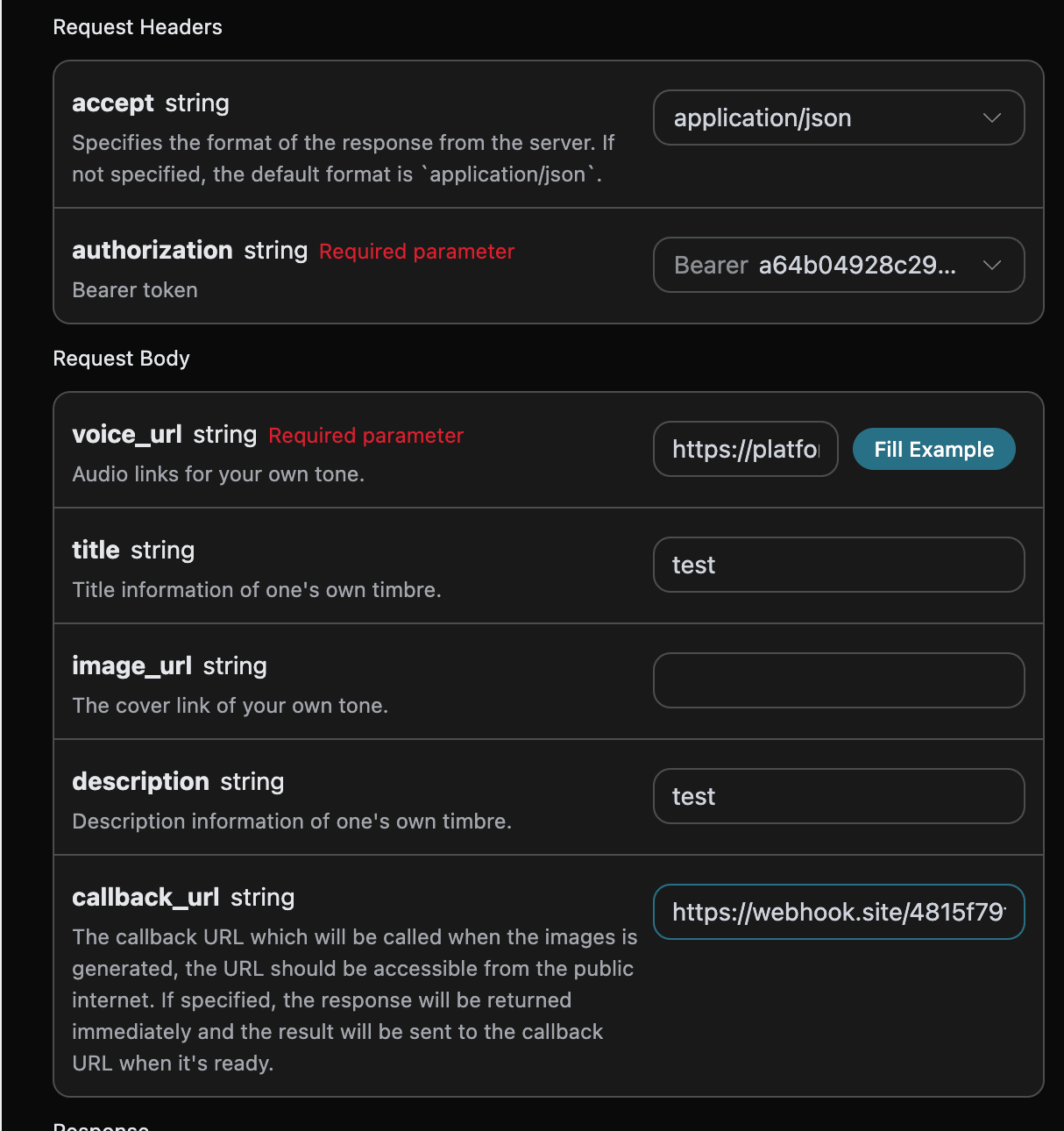
Clicking run, you can find that an immediate result is obtained, as follows:
{
  "task_id": "9f626a13-96ec-4dec-8846-dc5aab7362a8"
}
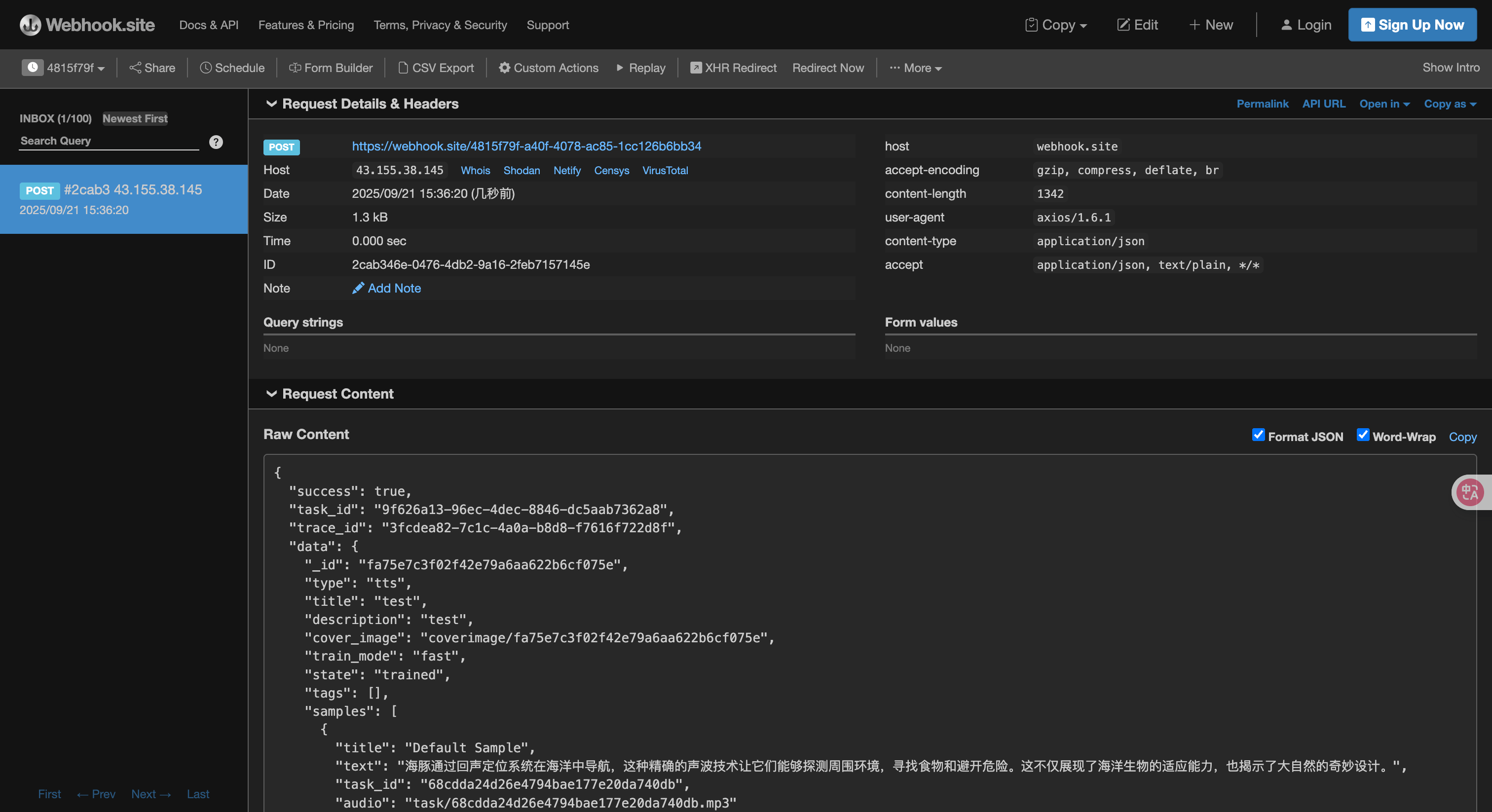
Please wait a moment, we can observe the results of the generated task at https://webhook.site/4815f79f-a40f-4078-ac85-1cc126b6bb34, as shown in the image: The content is as follows:
{
    "success": true,
    "task_id": "9f626a13-96ec-4dec-8846-dc5aab7362a8",
    "trace_id": "3fcdea82-7c1c-4a0a-b8d8-f7616f722d8f",
    "data": {
        "_id": "fa75e7c3f02f42e79a6aa622b6cf075e",
        "type": "tts",
        "title": "test",
        "description": "test",
        "cover_image": "coverimage/fa75e7c3f02f42e79a6aa622b6cf075e",
        "train_mode": "fast",
        "state": "trained",
        "tags": [],
        "samples": [
            {
                "title": "Default Sample",
                "text": "Dolphins navigate the ocean using echolocation, a precise sound wave technology that allows them to detect their surroundings, find food, and avoid danger. This not only showcases the adaptability of marine life but also reveals the wonderful design of nature.",
                "task_id": "68cdda24d26e4794bae177e20da740db",
                "audio": "task/68cdda24d26e4794bae177e20da740db.mp3"
            }
        ],
        "created_at": "2025-09-21T07:36:20.200865Z",
        "updated_at": "2025-09-21T07:36:20.200353Z",
        "languages": [
            "zh"
        ],
        "visibility": "public",
        "lock_visibility": false,
        "default_text": "Dolphins navigate the ocean using echolocation, a precise sound wave technology that allows them to detect their surroundings, find food, and avoid danger. This not only showcases the adaptability of marine life but also reveals the wonderful design of nature.",
        "like_count": 0,
        "mark_count": 0,
        "shared_count": 0,
        "task_count": 0,
        "unliked": false,
        "liked": false,
        "marked": false,
        "author": {
            "_id": "7ecad23df62a4174acd6a2a6cb5201ee",
            "nickname": "Matthew Garcia",
            "avatar": "avatars/7ecad23df62a4174acd6a2a6cb5201ee.jpg"
        }
    }
}
It can be seen that there is a task_id field in the result, and other fields are similar to the above text. This field can be used to associate tasks.

Error Handling

When calling the API, if an error occurs, the API will return the corresponding error code and message. For example:
  • 400 token_mismatched: Bad request, possibly due to missing or invalid parameters.
  • 400 api_not_implemented: Bad request, possibly due to missing or invalid parameters.
  • 401 invalid_token: Unauthorized, invalid or missing authorization token.
  • 429 too_many_requests: Too many requests, you have exceeded the rate limit.
  • 500 api_error: Internal server error, something went wrong on the server.

Error Response Example

{
  "success": false,
  "error": {
    "code": "api_error",
    "message": "fetch failed"
  },
  "trace_id": "2cf86e86-22a4-46e1-ac2f-032c0f2a4e89"
}

Conclusion

Through this document, you have learned how to use the Fish Voices Generation API to create your own voice by connecting to the audio of the input tone. We hope this document helps you better integrate and use the API. If you have any questions, please feel free to contact our technical support team.