Anthropic Claude is a very powerful AI dialogue system that can generate smooth and natural responses in just a few seconds by inputting prompts. Claude stands out in the industry with its excellent language understanding and generation capabilities, and today, Claude has been widely applied across various industries and fields, with its influence becoming increasingly significant. Whether for daily conversations, creative writing, or professional consulting and code programming, Claude can provide astonishing intelligent assistance, greatly enhancing human work efficiency and creativity. This document mainly introduces the usage process of the Claude Chat Completion API, allowing us to easily utilize the official Claude dialogue functionality.

Application Process

To use the Claude Chat Completion API, you can first visit the Claude Chat Completion API page and click the “Acquire” button to obtain the credentials needed for the request: If you are not logged in or registered, you will be automatically redirected to the login page inviting you to register and log in. After logging in or registering, you will be automatically returned to the current page. When applying for the first time, there will be a free quota provided, allowing you to use the API for free.

Basic Usage

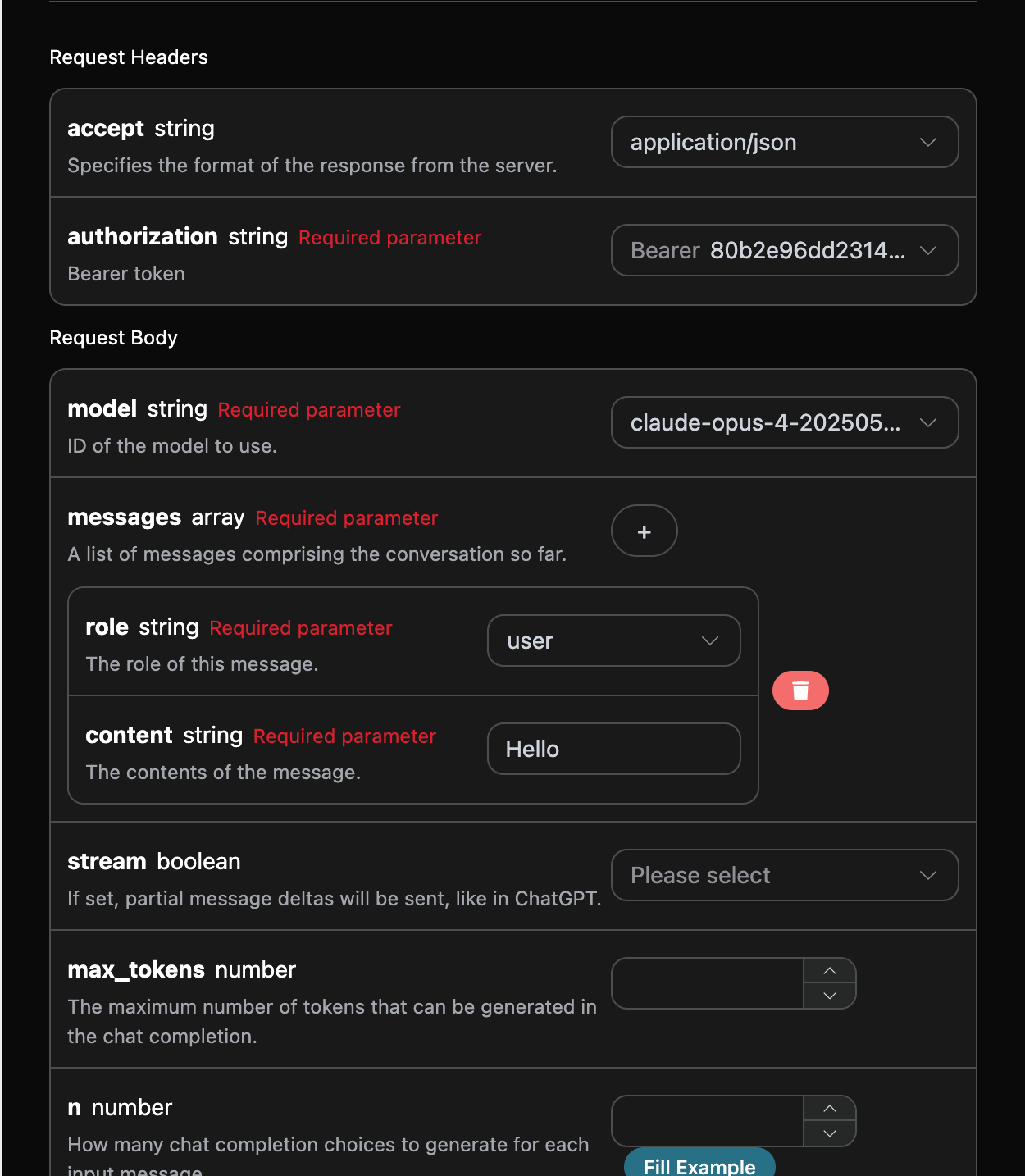
Next, you can fill in the corresponding content on the interface, as shown in the figure:

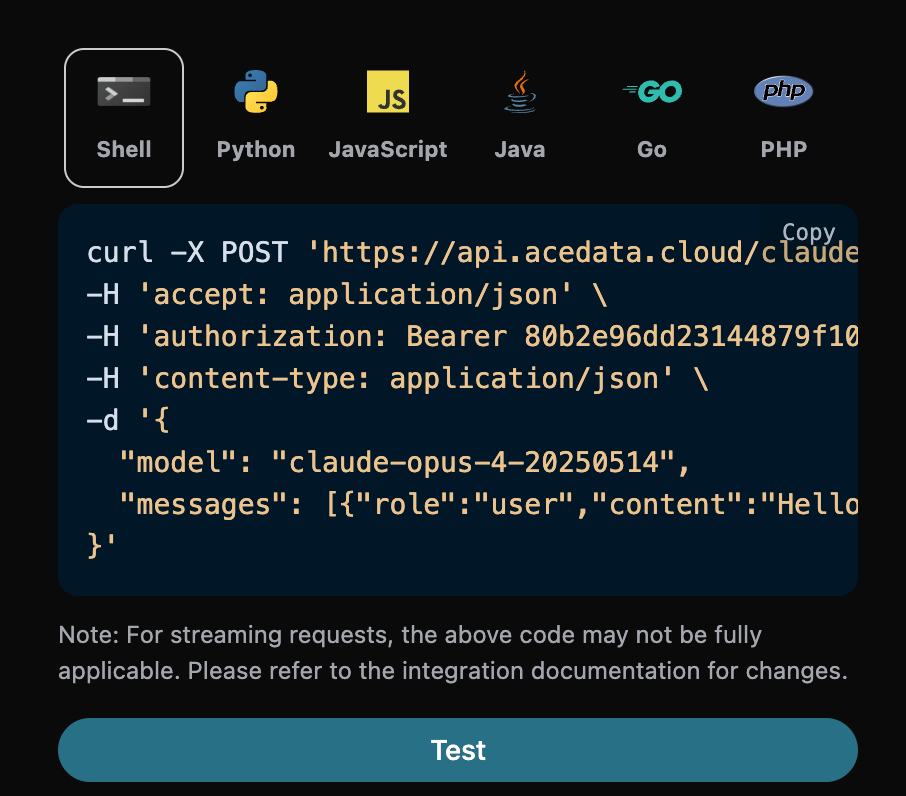
When using this interface for the first time, we need to fill in at least three pieces of information: one is authorization, which can be selected directly from the dropdown list. The other parameter is model, which is the model category we choose to use from the Claude official website. Here we mainly have 20 types of models; details can be found in the models we provide. The last parameter is messages, which is an array of our input questions. It is an array that allows multiple questions to be uploaded simultaneously, with each question containing role and content. The role indicates the role of the questioner, and we provide three identities: user, assistant, and system. The other content is the specific content of our question. You can also notice that there is corresponding code generation on the right side; you can copy the code to run directly or click the “Try” button for testing. Common optional parameters:
  • max_tokens: Limits the maximum number of tokens for a single response.
  • temperature: Generates randomness, between 0-2, with larger values being more divergent.
  • n: How many candidate responses to generate at once.
  • response_format: Sets the return format.

After the call, we find that the return result is as follows:
{
  "id": "msg_bdrk_01Q6WN27v95ypCa1kbanAQ6K",
  "model": "claude-opus-4-20250514",
  "object": "chat.completion",
  "created": 1768619365,
  "choices": [
    {
      "index": 0,
      "message": {
        "role": "assistant",
        "content": "Hello! How can I help you today?"
      },
      "finish_reason": "stop"
    }
  ],
  "usage": {
    "prompt_tokens": 8,
    "completion_tokens": 12,
    "total_tokens": 20,
    "prompt_tokens_details": {
      "cached_tokens": 0,
      "text_tokens": 0,
      "audio_tokens": 0,
      "image_tokens": 0
    },
    "completion_tokens_details": {
      "text_tokens": 0,
      "audio_tokens": 0,
      "reasoning_tokens": 0
    },
    "input_tokens": 0,
    "output_tokens": 0,
    "input_tokens_details": null,
    "claude_cache_creation_5_m_tokens": 0,
    "claude_cache_creation_1_h_tokens": 0
  }
}
The return result contains multiple fields, described as follows:
  • id: The ID generated for this dialogue task, used to uniquely identify this dialogue task.
  • model: The selected Claude official model.
  • choices: The response information provided by Claude for the question.
  • usage: Statistics on the tokens used for this Q&A.
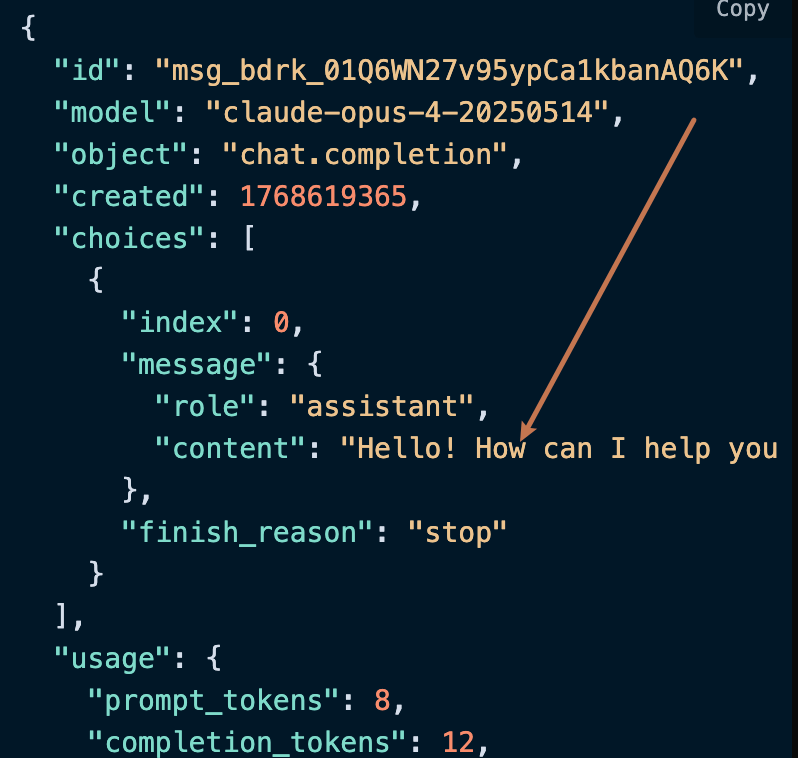
Among them, choices contains Claude’s response information, and the choices inside it provides the specific information of Claude’s answer, as shown in the figure.

As can be seen, the content field inside choices contains the specific content of Claude’s reply.

Streaming Response

This interface also supports streaming responses, which is very useful for web integration, allowing the webpage to achieve a character-by-character display effect. If you want to return responses in a streaming manner, you can change the stream parameter in the request header to true. Modify as shown in the figure, but the calling code needs to have corresponding changes to support streaming responses.
After changing stream to true, the API will return the corresponding JSON data line by line, and we need to make corresponding modifications at the code level to obtain the line-by-line results. Python sample calling code:
import requests

url = "https://api.acedata.cloud/v1/chat/completions"

headers = {
    "accept": "application/json",
    "authorization": "Bearer {token}",
    "content-type": "application/json"
}

payload = {
    "model": "claude-opus-4-20250514",
    "messages": [{"role":"user","content":"Hello"}],
    "stream": True
}

response = requests.post(url, json=payload, headers=headers)
print(response.text)
The output effect is as follows:
data: {"id": "msg_bdrk_01LPPqDjLKMgfSwTRMRty9VT", "object": "chat.completion.chunk", "created": 1768619445, "model": "claude-opus-4-20250514", "system_fingerprint": null, "choices": [{"delta": {"content": "", "role": "assistant"}, "logprobs": null, "finish_reason": null, "index": 0}], "usage": null}

data: {"id": "msg_bdrk_01LPPqDjLKMgfSwTRMRty9VT", "object": "chat.completion.chunk", "created": 1768619445, "model": "claude-opus-4-20250514", "system_fingerprint": null, "choices": [{"delta": {"content": ""}, "logprobs": null, "finish_reason": null, "index": 0}], "usage": null}

data: {"id": "msg_bdrk_01LPPqDjLKMgfSwTRMRty9VT", "object": "chat.completion.chunk", "created": 1768619445, "model": "claude-opus-4-20250514", "system_fingerprint": null, "choices": [{"delta": {"content": "Hello!"}, "logprobs": null, "finish_reason": null, "index": 0}], "usage": null}

data: {"id": "msg_bdrk_01LPPqDjLKMgfSwTRMRty9VT", "object": "chat.completion.chunk", "created": 1768619445, "model": "claude-opus-4-20250514", "system_fingerprint": null, "choices": [{"delta": {"content": " How can I help you"}, "logprobs": null, "finish_reason": null, "index": 0}], "usage": null}

data: {"id": "msg_bdrk_01LPPqDjLKMgfSwTRMRty9VT", "object": "chat.completion.chunk", "created": 1768619445, "model": "claude-opus-4-20250514", "system_fingerprint": null, "choices": [{"delta": {"content": " today?"}, "logprobs": null, "finish_reason": null, "index": 0}], "usage": null}

data: {"id": "msg_bdrk_01LPPqDjLKMgfSwTRMRty9VT", "object": "chat.completion.chunk", "created": 1768619445, "model": "claude-opus-4-20250514", "system_fingerprint": null, "choices": [{"delta": {}, "logprobs": null, "finish_reason": "stop", "index": 0}], "usage": null}

data: {"id": "msg_bdrk_01LPPqDjLKMgfSwTRMRty9VT", "object": "chat.completion.chunk", "created": 1768619445, "model": "claude-opus-4-20250514", "system_fingerprint": null, "choices": [], "usage": {"prompt_tokens": 8, "completion_tokens": 12, "total_tokens": 20, "prompt_tokens_details": {"cached_tokens": 0, "text_tokens": 0, "audio_tokens": 0, "image_tokens": 0}, "completion_tokens_details": {"text_tokens": 0, "audio_tokens": 0, "reasoning_tokens": 0}, "input_tokens": 0, "output_tokens": 0, "input_tokens_details": null, "claude_cache_creation_5_m_tokens": 0, "claude_cache_creation_1_h_tokens": 0}}

data: [DONE]
It can be seen that there are many data in the response, and the choices in data are the latest response content, consistent with the content introduced above. The choices are the newly added response content, which you can use to connect to your system. At the same time, the end of the streaming response is determined based on the content of data. If the content is [DONE], it indicates that the streaming response has completely ended. The returned data result has multiple fields, described as follows:
  • id, the ID generated for this dialogue task, used to uniquely identify this dialogue task.
  • model, the Claude model selected from the official website.
  • choices, the response information provided by Claude for the question.
JavaScript is also supported, for example, the streaming call code for Node.js is as follows:
const options = {
  method: "post",
  headers: {
    accept: "application/json",
    authorization: "Bearer {token}",
    "content-type": "application/json",
  },
  body: JSON.stringify({
    model: "claude-opus-4-20250514",
    messages: [{ role: "user", content: "Hello" }],
    stream: true,
  }),
};

fetch("https://api.acedata.cloud/v1/chat/completions", options)
  .then((response) => response.json())
  .then((response) => console.log(response))
  .catch((err) => console.error(err));
Java sample code:
JSONObject jsonObject = new JSONObject();
jsonObject.put("model", "claude-opus-4-20250514");
jsonObject.put("messages", [{"role":"user","content":"Hello"}]);
jsonObject.put("stream", true);
MediaType mediaType = "application/json; charset=utf-8".toMediaType();
RequestBody body = jsonObject.toString().toRequestBody(mediaType);
Request request = new Request.Builder()
  .url("https://api.acedata.cloud/v1/chat/completions")
  .post(body)
  .addHeader("accept", "application/json")
  .addHeader("authorization", "Bearer {token}")
  .addHeader("content-type", "application/json")
  .build();

OkHttpClient client = new OkHttpClient();
Response response = client.newCall(request).execute();
System.out.print(response.body!!.string())
Other languages can be rewritten accordingly; the principle is the same.

Multi-turn Dialogue

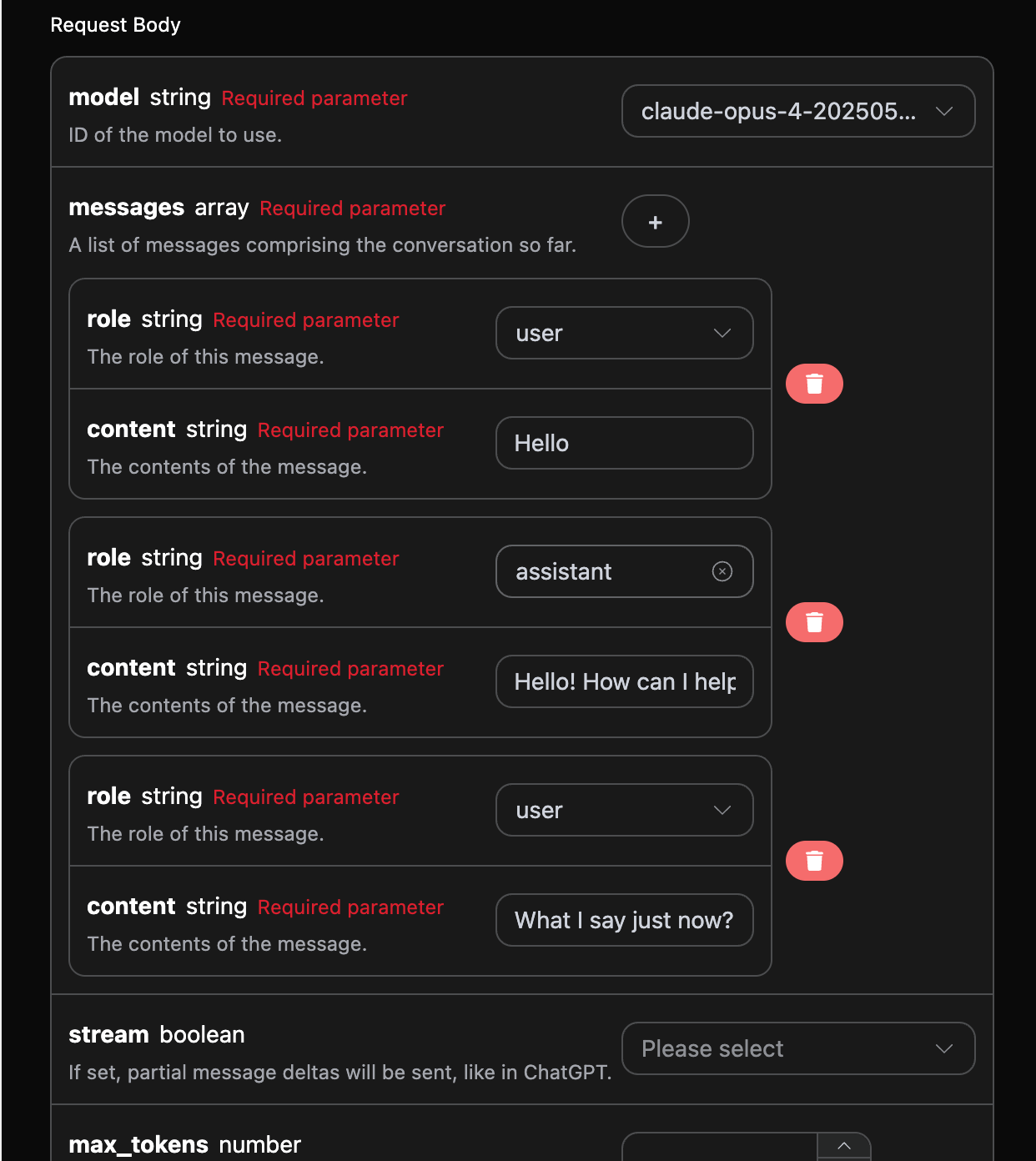
If you want to integrate multi-turn dialogue functionality, you need to upload multiple question words in the messages field. The specific examples of multiple question words are shown in the image below:

Python sample call code:
import requests

url = "https://api.acedata.cloud/v1/chat/completions"

headers = {
    "accept": "application/json",
    "authorization": "Bearer {token}",
    "content-type": "application/json"
}

payload = {
    "model": "claude-opus-4-20250514",
    "messages": [{"role":"user","content":"Hello"},{"role":"assistant","content":"Hello! How can I help you today?"},{"role":"user","content":"What I say just now?"}]
}

response = requests.post(url, json=payload, headers=headers)
print(response.text)
By uploading multiple question words, you can easily achieve multi-turn dialogue and receive the following response:
{
  "id": "msg_bdrk_01Y1wfQmd89g968TVbFu57Yc",
  "model": "claude-opus-4-20250514",
  "object": "chat.completion",
  "created": 1768619674,
  "choices": [
    {
      "index": 0,
      "message": {
        "role": "assistant",
        "content": "You said \"Hello\" - that was your first message to me in our conversation."
      },
      "finish_reason": "stop"
    }
  ],
  "usage": {
    "prompt_tokens": 29,
    "completion_tokens": 20,
    "total_tokens": 49,
    "prompt_tokens_details": {
      "cached_tokens": 0,
      "text_tokens": 0,
      "audio_tokens": 0,
      "image_tokens": 0
    },
    "completion_tokens_details": {
      "text_tokens": 0,
      "audio_tokens": 0,
      "reasoning_tokens": 0
    },
    "input_tokens": 0,
    "output_tokens": 0,
    "input_tokens_details": null,
    "claude_cache_creation_5_m_tokens": 0,
    "claude_cache_creation_1_h_tokens": 0
  }
}
It can be seen that the information contained in choices is consistent with the basic usage content, which includes the specific content of Claude’s responses to multiple dialogues, allowing for answers to corresponding questions based on multiple dialogue contents.

Deep Thinking Model

The claude-opus-4-20250514-thinking and claude-sonnet-4-20250514-thinking models are different from other models in that they can perform deep thinking based on the question words to provide answers, and return the results of the thinking process to you. This article will demonstrate the deep thinking functionality through a specific example. Next, you can fill in the corresponding content on the Claude Chat Completion API interface, as shown in the figure:

At the same time, you can notice that there is corresponding code generation on the right side. You can copy the code to run directly or click the “Try” button for testing.

After the call, we find that the returned result is as follows:
{
  "id": "msg_018J4YaRoGHtbsTVb4Vvz7oH",
  "object": "chat.completion",
  "created": 1755444014,
  "model": "claude-sonnet-4-20250514-thinking",
  "choices": [
    {
      "index": 0,
      "message": {
        "role": "assistant",
        "content": "The sine of 30 degrees is **1/2** or **0.5**.\n\nThis is one of the fundamental trigonometric values. In a 30-60-90 triangle, the sides are in the ratio 1:√3:2, where the side opposite to the 30° angle has length 1 and the hypotenuse has length 2, giving us sin(30°) = 1/2.",
        "reasoning_content": "The user is asking for the sine of 30 degrees. This is a basic trigonometry question.\n\nThe sine of 30 degrees is a well-known value. In a 30-60-90 triangle, the sides are in the ratio 1:√3:2. \n\nFor a 30° angle:\n- The opposite side is 1\n- The hypotenuse is 2\n- So sin(30°) = opposite/hypotenuse = 1/2 = 0.5\n\nThis is one of the standard trigonometric values that's commonly memorized."
      },
      "logprobs": null,
      "finish_reason": "stop"
    }
  ],
  "usage": {
    "prompt_tokens": 60,
    "completion_tokens": 239,
    "total_tokens": 299,
    "prompt_tokens_details": {
      "cached_tokens_details": {}
    },
    "completion_tokens_details": {}
  }
}
It can be seen that the response information in choices is obtained after deep thinking, and it also provides relevant reasoning process content, where reasoning_content in content indicates the model’s thinking process. The response information in choices needs to be rendered using markdown syntax to achieve the best experience, which also reflects the powerful advantages of our model’s networking capabilities.

Visual Model

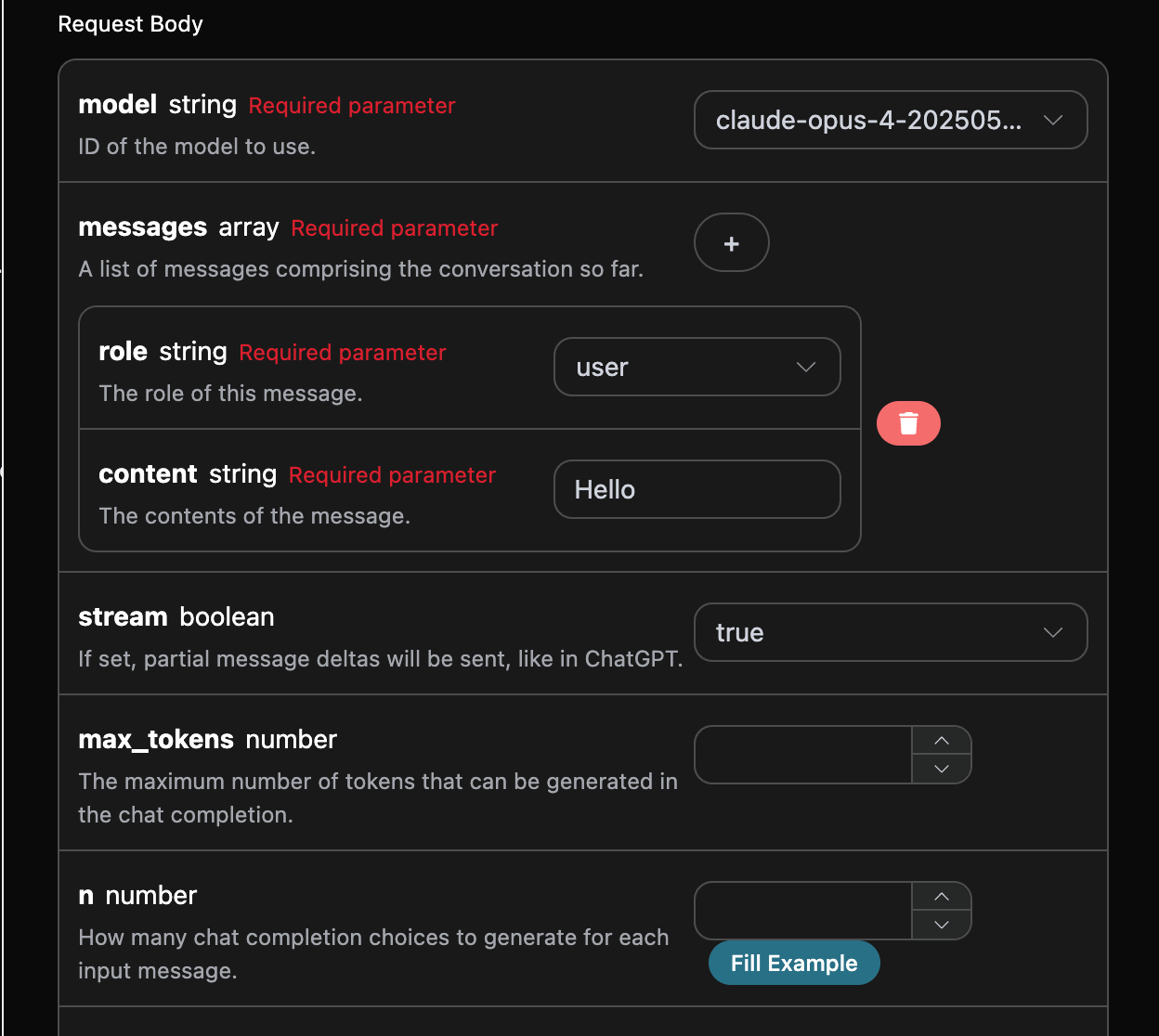
The claude-sonnet-4-20250514 is a multimodal large language model developed by Claude, which adds visual understanding capabilities based on claude-4. This model can process both text and image inputs simultaneously, achieving cross-modal understanding and generation. The text processing using the claude-sonnet-4-20250514 model is consistent with the basic usage content mentioned above. Below is a brief introduction on how to use the model’s image processing capabilities. The image processing capability of the claude-sonnet-4-20250514 model is mainly achieved by adding a type field to the original content, which indicates whether the uploaded content is text or an image, thus utilizing the image processing capabilities of the claude-sonnet-4-20250514 model. The following mainly discusses how to call this functionality using Curl and Python.
  • Curl Script Method
curl -X POST 'https://api.acedata.cloud/v1/chat/completions' \
-H 'accept: application/json' \
-H 'authorization: Bearer {token}' \
-H 'content-type: application/json' \
-d '{
    "model": "claude-sonnet-4-20250514",
    "messages": [
      {
        "role": "user",
        "content": [
          {
            "type": "text",
            "text": "What'\''s in this image?"
          },
          {
            "type": "image_url",
            "image_url": {
              "url": "https://cdn.acedata.cloud/ueugot.png"
            }
          }
        ]
      }
    ]
  }'
  • Python Script Method
import requests

url = "https://api.acedata.cloud/v1/chat/completions"

headers = {
    "accept": "application/json",
    "authorization": "Bearer {token}",
    "content-type": "application/json"
}

payload = {
    "model": "claude-sonnet-4-20250514",
    "messages": [
        {
            "role": "user",
            "content": [
                {
                    "type": "text", "text": "What's in this image?"
                },
                {
                    "type": "image_url",
                    "image_url": {
                        "url": "https://cdn.acedata.cloud/ueugot.png"
                    }
                },
            ],
        }
    ]
}

response = requests.post(url, json=payload, headers=headers)
print(response.text)
Then you can obtain the following result, where the field information in the result is consistent with the above:
{
  "id": "msg_bdrk_01NCrxpZmV17bhQJJRQEFEb9",
  "model": "claude-sonnet-4-20250514",
  "object": "chat.completion",
  "created": 1768628904,
  "choices": [
    {
      "index": 0,
      "message": {
        "role": "assistant",
        "content": "This image shows an API request configuration interface for what appears to be an AI chat completion service. Here are the key elements:\n\n**Request Body Parameters:**\n\n1. **model** (required string) - Set to \"claude-opus-4-202505...\" - specifies which AI model to use\n\n2. **messages** (required array) - Contains the conversation history with:\n   - **role** (required string) - Set to \"user\" \n   - **content** (required string) - Contains \"Hello\" as the message content\n\n3. **stream** (boolean) - Set to \"true\" - enables partial message deltas like in ChatGPT\n\n4. **max_tokens** (number) - Field for setting maximum tokens that can be generated in the response\n\n5. **n** (number) - Specifies how many chat completion choices to generate for each input\n\nThe interface has a dark theme with white text on black/dark gray backgrounds. There's a \"Fill Example\" button at the bottom right and various dropdown menus and input fields for configuring the API request parameters. A red trash/delete icon is visible, likely for removing message entries."
      },
      "finish_reason": "stop"
    }
  ],
  "usage": {
    "prompt_tokens": 1570,
    "completion_tokens": 252,
    "total_tokens": 1822,
    "prompt_tokens_details": {
      "cached_tokens": 0,
      "text_tokens": 0,
      "audio_tokens": 0,
      "image_tokens": 0
    },
    "completion_tokens_details": {
      "text_tokens": 0,
      "audio_tokens": 0,
      "reasoning_tokens": 0
    },
    "input_tokens": 0,
    "output_tokens": 0,
    "input_tokens_details": null,
    "claude_cache_creation_5_m_tokens": 0,
    "claude_cache_creation_1_h_tokens": 0
  }
}
The content of the response can be seen as based on images, so the text and image processing capabilities of the claude-3-7-sonnet-20250219 model can be easily utilized through the above two methods.

Error Handling

When calling the API, if an error occurs, the API will return the corresponding error code and message. For example:
  • 400 token_mismatched: Bad request, possibly due to missing or invalid parameters.
  • 400 api_not_implemented: Bad request, possibly due to missing or invalid parameters.
  • 401 invalid_token: Unauthorized, invalid or missing authorization token.
  • 429 too_many_requests: Too many requests, you have exceeded the rate limit.
  • 500 api_error: Internal server error, something went wrong on the server.

Error Response Example

{
  "success": false,
  "error": {
    "code": "api_error",
    "message": "fetch failed"
  },
  "trace_id": "2cf86e86-22a4-46e1-ac2f-032c0f2a4e89"
}

Conclusion

Through this document, you have learned how to easily implement the conversational features of the official Claude using the Claude Chat Completion API. We hope this document helps you better integrate and use the API. If you have any questions, please feel free to contact our technical support team.