

/shorten (Prompt Analysis) command, analyze a given prompt, identify the highest-weighted keywords, and generate 5 more concise candidate prompts. This API is especially suitable for:
- Slimming down long prompts before calling
imagineto improve image relevance; - Reverse-engineering Midjourney’s token weighting through candidate prompts, facilitating prompt engineering;
- Integrating with automated pipelines to merge and simplify keywords from user input prompts.
Application Process
To use Midjourney Shorten API, first open the Ace Data Cloud Console and copy your API Token.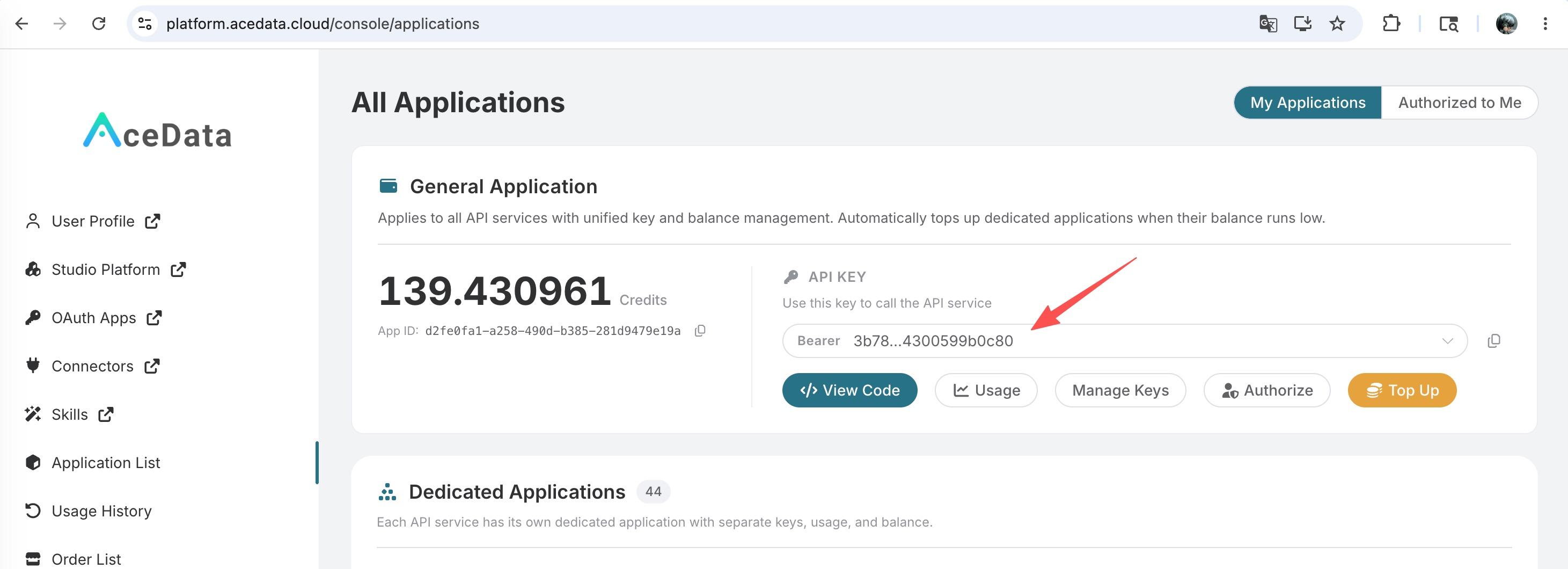 If you are not logged in, you will be redirected to sign in and brought back to this page automatically.
A single API Token works across every service on the platform — no need to subscribe per service. New accounts receive free starter credit; when it runs low you can top up your shared balance in the console.
If you are not logged in, you will be redirected to sign in and brought back to this page automatically.
A single API Token works across every service on the platform — no need to subscribe per service. New accounts receive free starter credit; when it runs low you can top up your shared balance in the console.
📘 Full documentation: Midjourney Shorten API →
Request Example
We will demonstrate how to analyze and simplify a relatively long prompt using this API.Setting Request Headers and Body
Request Headers include:accept: specifies that the response should be in JSON format, set toapplication/json.authorization: the API key for calling the API, selectable after application.
prompt: the prompt text to be analyzed and simplified; English input is recommended.
Code Examples
CURL
Python
Response Example
Upon a successful request, the API returns up to 5 simplified candidate prompts. For example:prompts field with several simplified candidate prompts, each retaining the highest-weighted keywords from Midjourney’s internal analysis while removing duplicate or redundant descriptions.
Error Handling
When calling the API, if an error occurs, the API returns corresponding error codes and messages. For example:400 token_mismatched: Bad request, possibly due to missing or invalid parameters.400 api_not_implemented: Bad request, possibly due to missing or invalid parameters.401 invalid_token: Unauthorized, invalid or missing authorization token.429 too_many_requests: Too many requests, you have exceeded the rate limit.500 api_error: Internal server error, something went wrong on the server.