跳轉到主要內容
AI 證件照 Task API 的主要功能是通過輸入 AI 證件照製作 API 生成的任務 ID 來查詢該任務的執行情況。 本文檔將詳細介紹 AI 證件照 Task API 的對接說明,幫助您輕鬆集成並充分利用該 API 的強大功能。通過 AI 證件照 Task API,您可以輕鬆實現查詢 AI 證件照製作 API 的任務執行情況。

申請流程

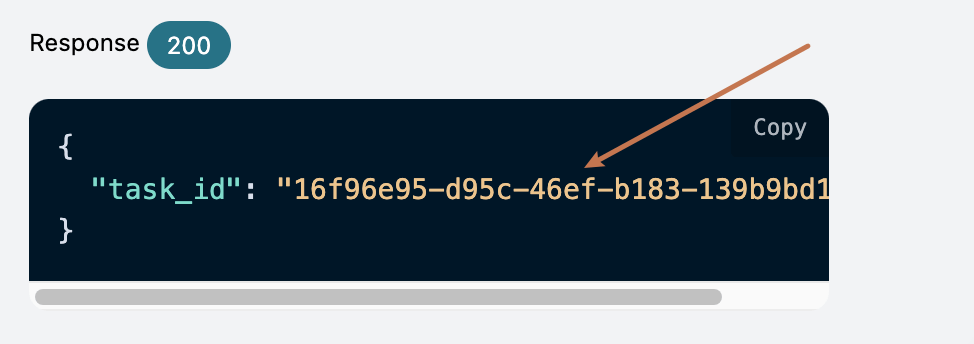
要使用 AI 證件照 Task API,需要先到 申請頁面 AI 證件照製作 API 申請相應的服務,然後複製 AI 證件照製作 API 的任務 ID,如圖所示:

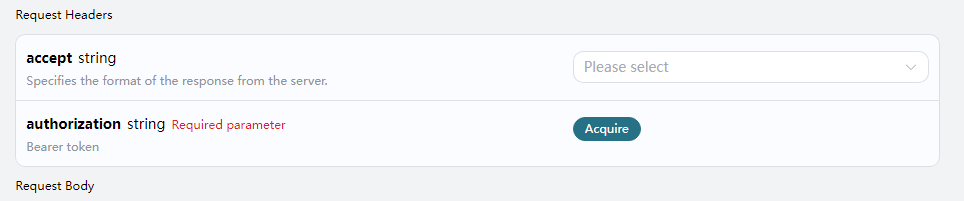
最後進入 Tasks API 頁面 AI 證件照 Task API 申請相應的服務,進入頁面之後,點擊「Acquire」按鈕,如圖所示: 申請頁面 如果您尚未登錄或註冊,會自動跳轉到 登錄頁面 邀請您來註冊和登錄,登錄註冊之後會自動返回當前頁面。 首次申請時會有免費額度贈送,可以免費使用該 API。

請求示例

AI 證件照 Task API 可以用於查詢 AI 證件照製作 API 的結果。關於怎樣使用 AI 證件照製作 API,請參考文檔 AI 證件照製作 API 我們以 AI 證件照製作 API 服務返回的任務 ID 一個為例,演示如何使用該 API。假設我們有一個任務 ID:16f96e95-d95c-46ef-b183-139b9bd1aebd,接下來演示如何通過傳入一個任務 ID 來。

任務示例圖

設置請求頭和請求體

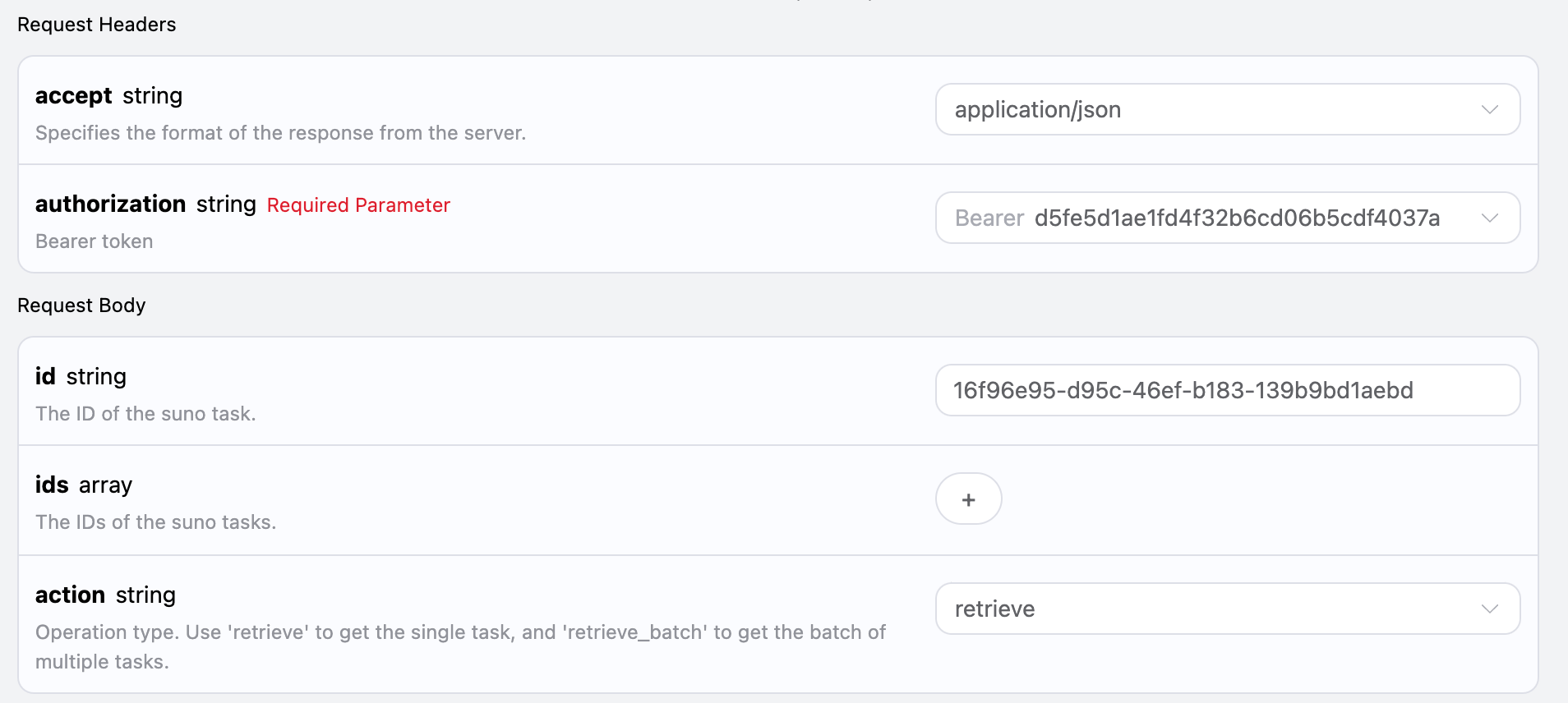
Request Headers 包括:
  • accept:指定接收 JSON 格式的響應結果,這裡填寫為 application/json
  • authorization:調用 API 的密鑰,申請之後可以直接下拉選擇。
Request Body 包括:
  • id:上傳的任務 ID。
  • action:對任務的操作方式。
設置如下圖所示:

代碼示例

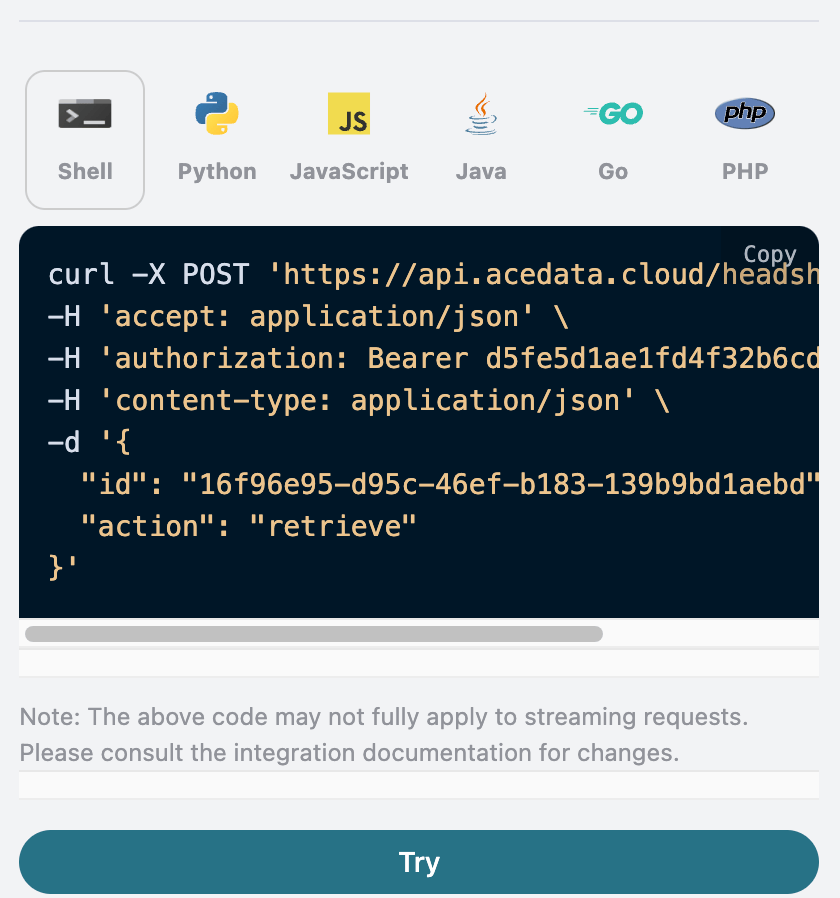
可以發現,在頁面右側已經自動生成了各種語言的代碼,如圖所示:

部分代碼示例如下:

CURL

curl -X POST 'https://api.acedata.cloud/headshots/tasks' \
-H 'accept: application/json' \
-H 'authorization: Bearer {token}' \
-H 'content-type: application/json' \
-d '{
  "id": "16f96e95-d95c-46ef-b183-139b9bd1aebd",
  "action": "retrieve"
}'

Python

import requests

url = "https://api.acedata.cloud/headshots/tasks"

headers = {
    "accept": "application/json",
    "authorization": "Bearer {token}",
    "content-type": "application/json"
}

payload = {
    "id": "16f96e95-d95c-46ef-b183-139b9bd1aebd",
    "action": "retrieve"
}

response = requests.post(url, json=payload, headers=headers)
print(response.text)

響應示例

請求成功後,API 將返回此處證件照任務的詳情信息。例如:
{
  "_id": "67276ab6550a4144a53b6036",
  "id": "16f96e95-d95c-46ef-b183-139b9bd1aebd",
  "api_id": "53bcc3f7-12ec-4f04-8ca4-20f150dcde2a",
  "application_id": "1af53f80-c166-4f54-a8ea-0ffc24d8e2cd",
  "created_at": 1730636470.402,
  "credential_id": "3c253880-21ef-478a-9389-c09fa837ac7c",
  "request": {
    "mode": "relax",
    "template": "male_portrait",
    "image_urls": [
      "https://cdn.zhishuyun.com/2024-11-03-d23744954ca4819503469f04f2268aa0.jpg"
    ],
    "callback_url": "https://webhook.site/00f38b26-4289-4899-83d6-0cea7308850a"
  },
  "trace_id": "6eded0e2-274d-4cde-a567-d6b0decb9a97",
  "user_id": "ad7afe47-cea9-4cda-980f-2ad8810e51cf",
  "response": {
    "success": true,
    "task_id": "16f96e95-d95c-46ef-b183-139b9bd1aebd",
    "data": [
      {
        "id": "202411032022077381",
        "image_url": "https://platform.cdn.acedata.cloud/headshots/16f96e95-d95c-46ef-b183-139b9bd1aebd.png",
        "template": "男形象照"
      },
      {
        "id": "202411032022079194",
        "image_url": "https://platform.cdn.acedata.cloud/headshots/16f96e95-d95c-46ef-b183-139b9bd1aebd.png",
        "template": "男形象照"
      }
    ]
  }
}
返回結果一共有多個字段,request 字段就是發起任務時的 request body,同時 response 字段是任務完成後返回的 response body。字段介紹如下。
  • id,生成此證件照任務的 ID,用於唯一標識此次證件照生成任務。
  • request,查詢證件照任務中的請求信息。
  • response,查詢證件照任務中的返回信息。

批量查詢操作

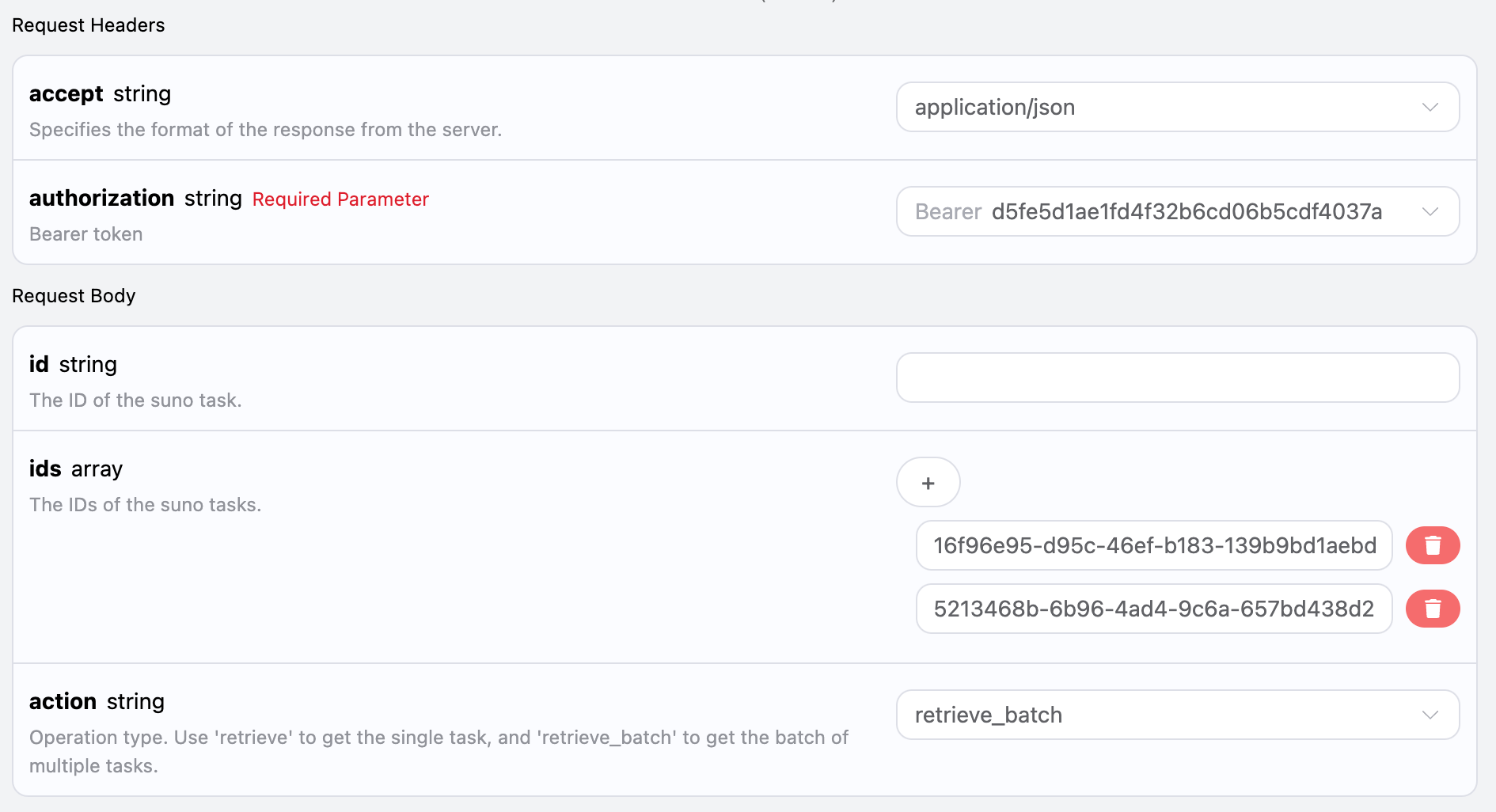
這是針對多個任務 ID 來進行查詢證件照任務詳情,與上面不同的是需要將 action 選中為 retrieve_batch。 Request Body 包括:
  • ids:上傳的任務 ID 陣列。
  • action:對任務的操作方式。
設置如下圖所示:

代碼示例

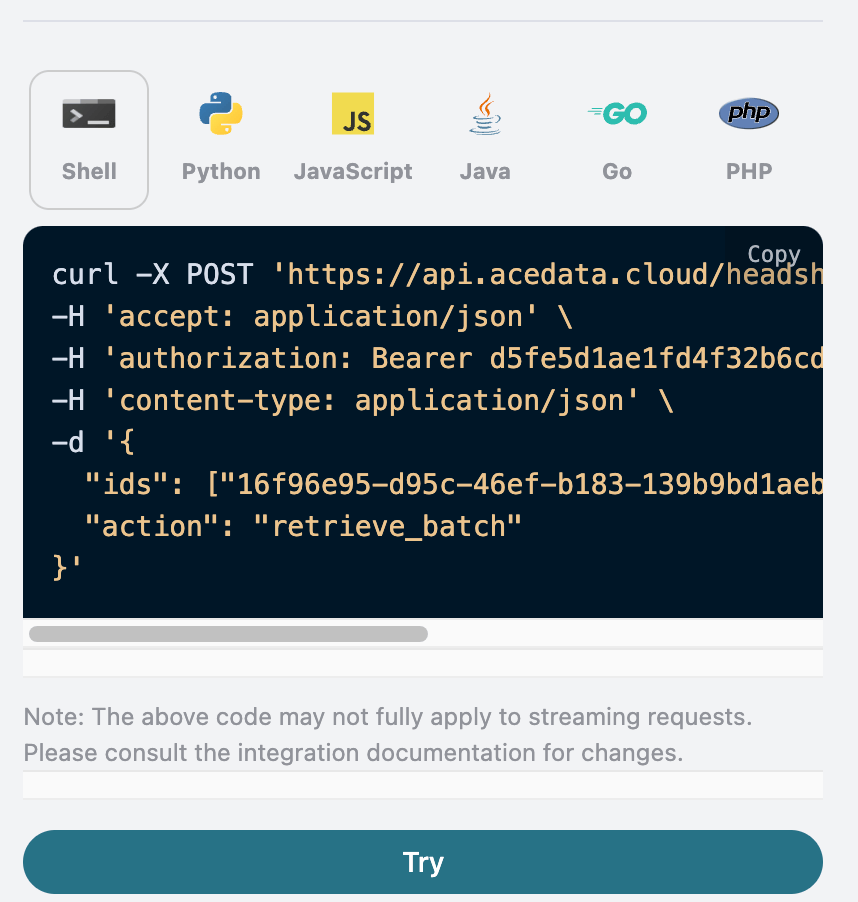
可以發現,在頁面右側已經自動生成了各種語言的代碼,如圖所示:

部分代碼示例如下:

響應示例

請求成功後,API 將返回此次所有批量證件照任務的具體詳情信息。例如:
{
  "items": [
    {
      "_id": "67276ab6550a4144a53b6036",
      "id": "16f96e95-d95c-46ef-b183-139b9bd1aebd",
      "api_id": "53bcc3f7-12ec-4f04-8ca4-20f150dcde2a",
      "application_id": "1af53f80-c166-4f54-a8ea-0ffc24d8e2cd",
      "created_at": 1730636470.402,
      "credential_id": "3c253880-21ef-478a-9389-c09fa837ac7c",
      "request": {
        "mode": "relax",
        "template": "male_portrait",
        "image_urls": [
          "https://cdn.zhishuyun.com/2024-11-03-d23744954ca4819503469f04f2268aa0.jpg"
        ],
        "callback_url": "https://webhook.site/00f38b26-4289-4899-83d6-0cea7308850a"
      },
      "trace_id": "6eded0e2-274d-4cde-a567-d6b0decb9a97",
      "user_id": "ad7afe47-cea9-4cda-980f-2ad8810e51cf",
      "response": {
        "success": true,
        "task_id": "16f96e95-d95c-46ef-b183-139b9bd1aebd",
        "data": [
          {
            "id": "202411032022077381",
            "image_url": "https://platform.cdn.acedata.cloud/headshots/16f96e95-d95c-46ef-b183-139b9bd1aebd.png",
            "template": "男形象照"
          },
          {
            "id": "202411032022079194",
            "image_url": "https://platform.cdn.acedata.cloud/headshots/16f96e95-d95c-46ef-b183-139b9bd1aebd.png",
            "template": "男形象照"
          }
        ]
      }
    },
    {
      "_id": "67276c52550a4144a53b995b",
      "id": "5213468b-6b96-4ad4-9c6a-657bd438d299",
      "api_id": "53bcc3f7-12ec-4f04-8ca4-20f150dcde2a",
      "application_id": "1af53f80-c166-4f54-a8ea-0ffc24d8e2cd",
      "created_at": 1730636882.359,
      "credential_id": "3c253880-21ef-478a-9389-c09fa837ac7c",
      "request": {
        "mode": "relax",
        "template": "male_portrait",
        "image_urls": [
          "https://cdn.zhishuyun.com/2024-11-03-d23744954ca4819503469f04f2268aa0.jpg"
        ],
        "callback_url": "https://webhook.site/00f38b26-4289-4899-83d6-0cea7308850a"
      },
      "trace_id": "50b2b4a8-6c1c-4b95-ac0b-46e5b97c7b18",
      "user_id": "ad7afe47-cea9-4cda-980f-2ad8810e51cf",
      "response": {
        "task_id": "5213468b-6b96-4ad4-9c6a-657bd438d299",
        "status": "unknown",
        "data": []
      }
    }
  ],
  "count": 2
}

返回結果一共有多個字段,其中items是包含了批量證件照任務的具體詳情信息,每個證件照任務的具體信息與上文的字段一樣,字段信息如下。
  • items,批量證件照任務的所有具體詳情信息。它是一個數組,每個數組的元素和上文查詢單個任務的返回結果格式是一樣的。
  • count,此處批量查詢證件照任務的個數。

CURL

curl -X POST 'https://api.acedata.cloud/headshots/tasks' \
-H 'accept: application/json' \
-H 'authorization: Bearer {token}' \
-H 'content-type: application/json' \
-d '{
  "ids": ["16f96e95-d95c-46ef-b183-139b9bd1aebd","5213468b-6b96-4ad4-9c6a-657bd438d299"],
  "action": "retrieve_batch"
}'

Python

import requests

url = "https://api.acedata.cloud/headshots/tasks"

headers = {
    "accept": "application/json",
    "authorization": "Bearer {token}",
    "content-type": "application/json"
}

payload = {
    "ids": ["16f96e95-d95c-46ef-b183-139b9bd1aebd","5213468b-6b96-4ad4-9c6a-657bd438d299"],
    "action": "retrieve_batch"
}

response = requests.post(url, json=payload, headers=headers)
print(response.text)

錯誤處理

在調用 API 時,如果遇到錯誤,API 會返回相應的錯誤代碼和信息。例如:
  • 400 token_mismatched:Bad request, possibly due to missing or invalid parameters.
  • 400 api_not_implemented:Bad request, possibly due to missing or invalid parameters.
  • 401 invalid_token:Unauthorized, invalid or missing authorization token.
  • 429 too_many_requests:Too many requests, you have exceeded the rate limit.
  • 500 api_error:Internal server error, something went wrong on the server.

錯誤響應示例

{
  "success": false,
  "error": {
    "code": "api_error",
    "message": "fetch failed"
  },
  "trace_id": "2cf86e86-22a4-46e1-ac2f-032c0f2a4e89"
}

結論

通過本文檔,您已經了解了如何使用 AI 證件照 Task API 進行查詢單個或批量證件照任務的所有具體詳情信息。希望本文檔能幫助您更好地對接和使用該 API。如有任何問題,請隨時聯繫我們的技術支持團隊。