跳轉到主要內容
我們知道,市面上一些問答 API 的對接還是相對沒那麼容易的,比如說 OpenAI 的 Chat Completions API,它有一個 messages 字段,如果要完成連續對話,需要我們把所有的上下文歷史全部傳遞,同時還需要處理 Token 超出限制的問題。 AceDataCloud 提供的 AI 問答 API 針對上述情況進行了優化,在保證問答效果不變的情況下,對連續對話的實現進行了封裝,對接時無需再關心 messages 的傳遞,也無需關心 Token 超出限制的問題(API 內部自動進行了處理),同時也提供了對話查詢、修改等功能,使得整體的對接大大簡化。 本文檔會介紹下 AI 問答 API 的對接說明。

申請流程

要使用 API,需要先到 AI 問答 API 對應頁面申請對應的服務,進入頁面之後,點擊「Acquire」按鈕,如圖所示: 如果你尚未登錄或註冊,會自動跳轉到登錄頁面邀請您來註冊和登錄,登錄註冊之後會自動返回當前頁面。 在首次申請時會有免費額度贈送,可以免費使用該 API。

基本使用

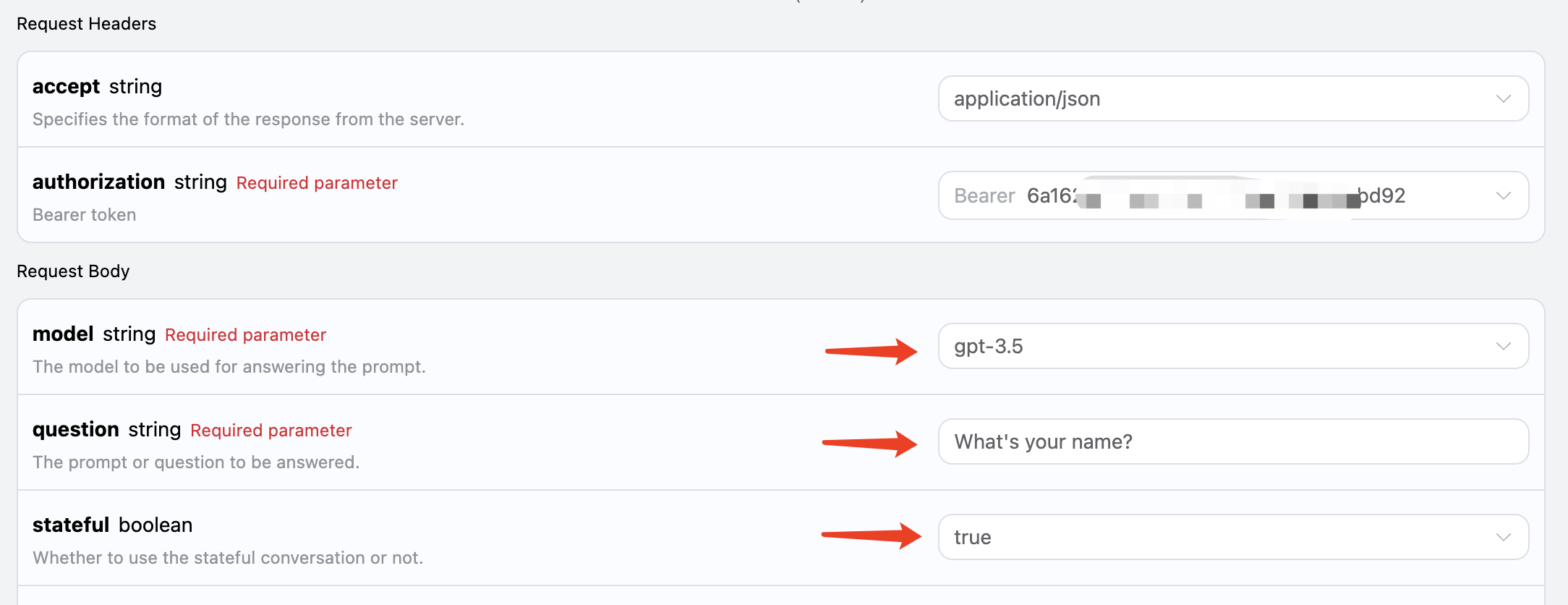
首先先了解下基本的使用方式,就是輸入問題,獲得回答,只需要簡單地傳遞一個 question 字段,並指定相應模型即可。 比如說詢問:“What’s your name?”,我們接下來就可以在界面上填寫對應的內容,如圖所示: 可以看到這裡我們設置了 Request Headers,包括:
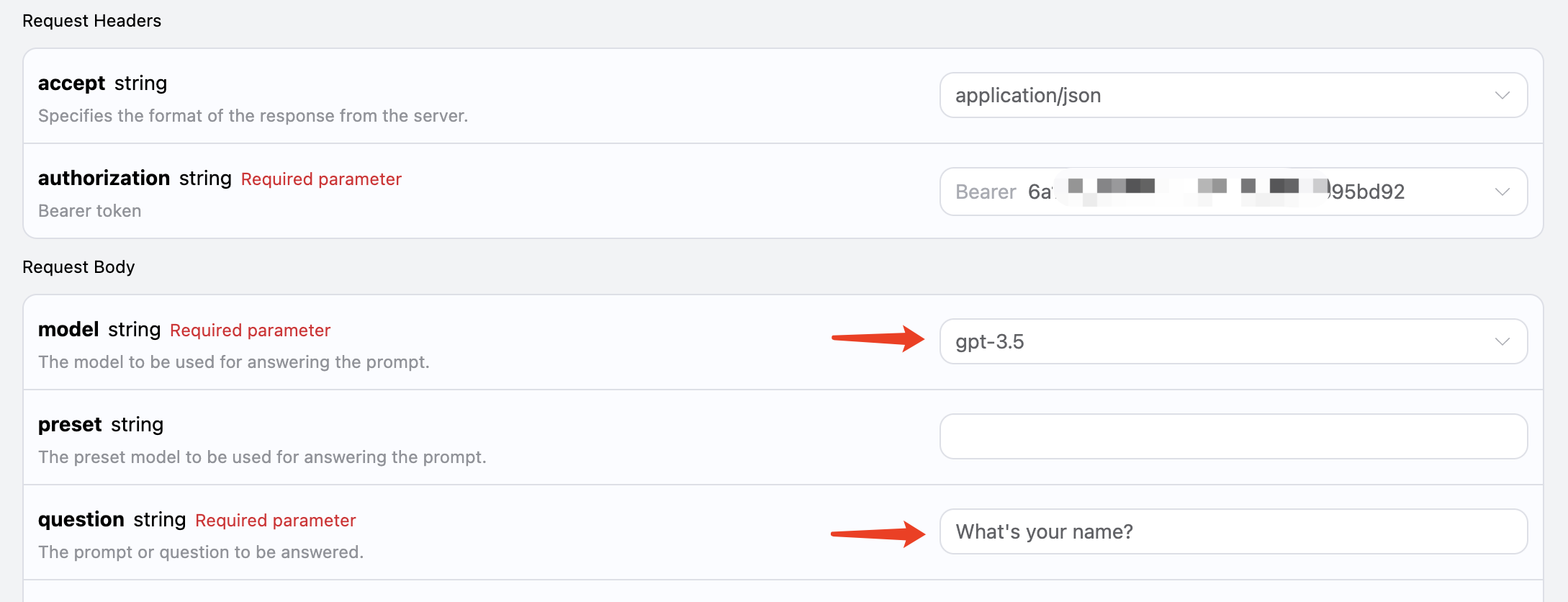
  • accept:想要接收怎樣格式的響應結果,這裡填寫為 application/json,即 JSON 格式。
  • authorization:調用 API 的密鑰,申請之後可以直接下拉選擇。
另外設置了 Request Body,包括:
  • model:模型的選擇,比如主流的 GPT 3.5,GPT 4 等。
  • question:需要詢問的問題,可以是任意的純文本。
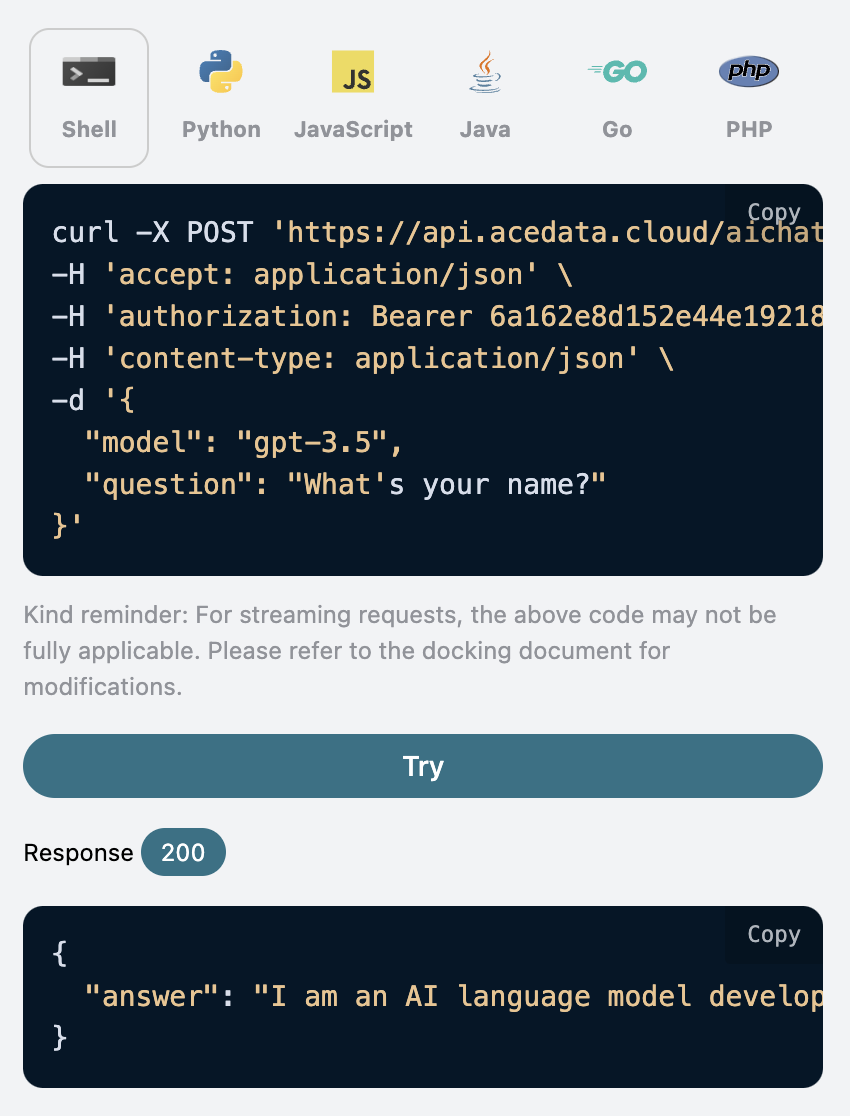
選擇之後,可以發現右側也生成了對應代碼,如圖所示:

點擊「Try」按鈕即可進行測試,如上圖所示,這裡我們就得到了如下結果:
{
  "answer": "I am an AI language model developed by OpenAI and I don't have a personal name. However, you can call me GPT or simply Chatbot. How can I assist you today?"
}
可以看到,這裡返回的結果中有一個 answer 字段,就是該問題的回答。我們可以輸入任意問題,就可以得到任意的回答。 如果你不需要任何多輪對話的支持,這個 API 可以極大方便你的對接。 另外如果想生成對應的對接代碼,可以直接複製生成,例如 CURL 的代碼如下:
curl -X POST 'https://api.acedata.cloud/aichat/conversations' \
-H 'accept: application/json' \
-H 'authorization: Bearer {token}' \
-H 'content-type: application/json' \
-d '{
  "model": "gpt-3.5",
  "question": "What's your name?"
}'
Python 的對接代碼如下:
import requests

url = "https://api.acedata.cloud/aichat/conversations"

headers = {
    "accept": "application/json",
    "authorization": "Bearer {token}",
    "content-type": "application/json"
}

payload = {
    "model": "gpt-3.5",
    "question": "What's your name?"
}

response = requests.post(url, json=payload, headers=headers)
print(response.text)

多輪對話

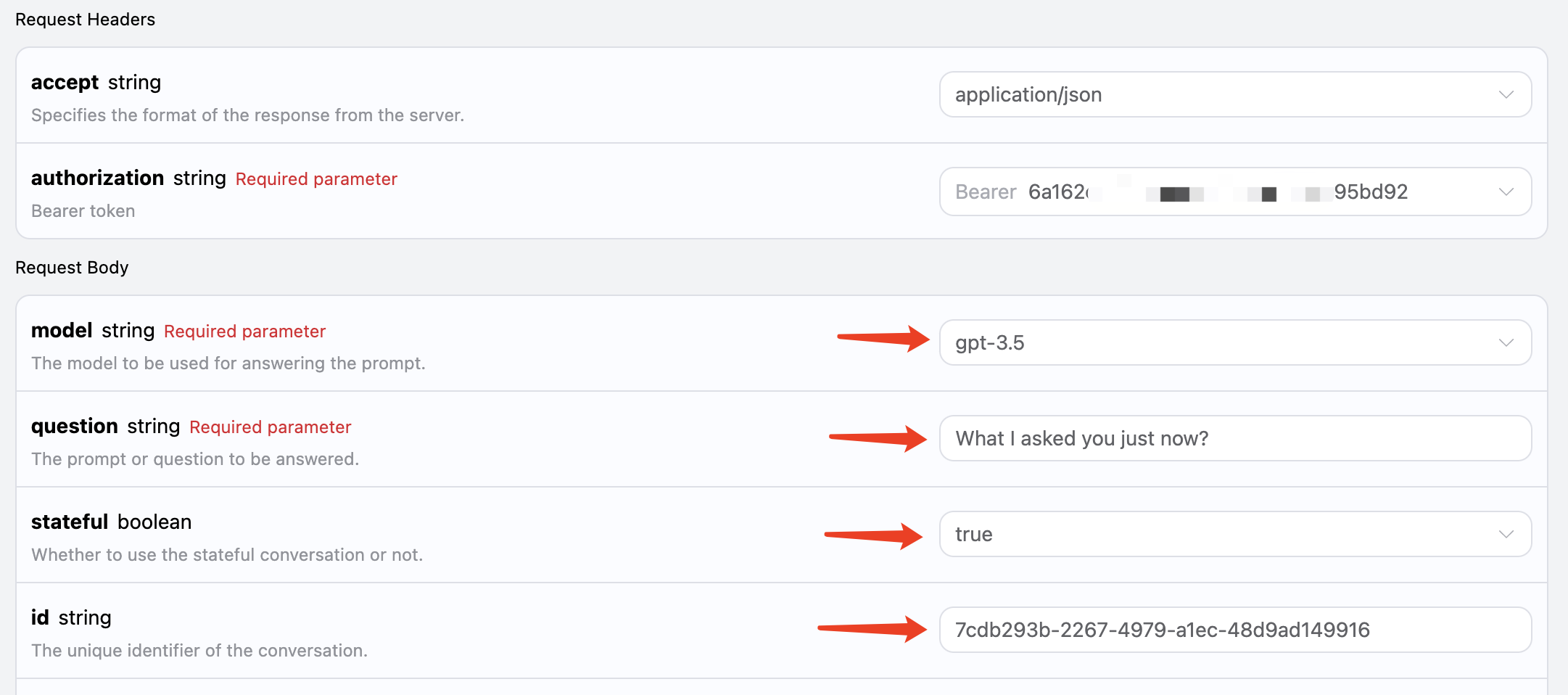
如果您想要對接多輪對話功能,需要傳遞一個額外參數 stateful,其值為 true,後續的每次請求都要攜帶該參數。傳遞了 stateful 參數之後,API 會額外返回一個 id 參數,代表當前對話的 ID,後續我們只需要將該 ID 作為參數傳遞,就可以輕鬆實現多輪對話。 下面我們來演示下具體的操作。 第一次請求,將 stateful 參數設置為 true,並正常傳遞 modelquestion 參數,如圖所示: 對應代碼如下:
curl -X POST 'https://api.acedata.cloud/aichat/conversations' \
-H 'accept: application/json' \
-H 'authorization: Bearer {token}' \
-H 'content-type: application/json' \
-d '{
  "model": "gpt-3.5",
  "question": "What's your name?",
  "stateful": true
}'
可以得到如下回答:
{
  "answer": "I am an AI language model created by OpenAI and I don't have a personal name. You can simply call me OpenAI or ChatGPT. How can I assist you today?",
  "id": "7cdb293b-2267-4979-a1ec-48d9ad149916"
}
第二次請求,將第一次請求返回的 id 字段作為參數傳遞,同時 stateful 參數依然設置為 true,詢問「What I asked you just now?」,如圖所示: 對應代碼如下:
curl -X POST 'https://api.acedata.cloud/aichat/conversations' \
-H 'accept: application/json' \
-H 'authorization: Bearer {token}' \
-H 'content-type: application/json' \
-d '{
  "model": "gpt-3.5",
  "stateful": true,
  "id": "7cdb293b-2267-4979-a1ec-48d9ad149916",
  "question": "What I asked you just now?"
}'
結果如下:
{
  "answer": "You asked me what my name is. As an AI language model, I do not possess a personal identity, so I don't have a specific name. However, you can refer to me as OpenAI or ChatGPT, the names used for this AI model. Is there anything else I can help you with?",
  "id": "7cdb293b-2267-4979-a1ec-48d9ad149916"
}
可以看到,就可以根據上下文回答對應的問題了。

流式響應

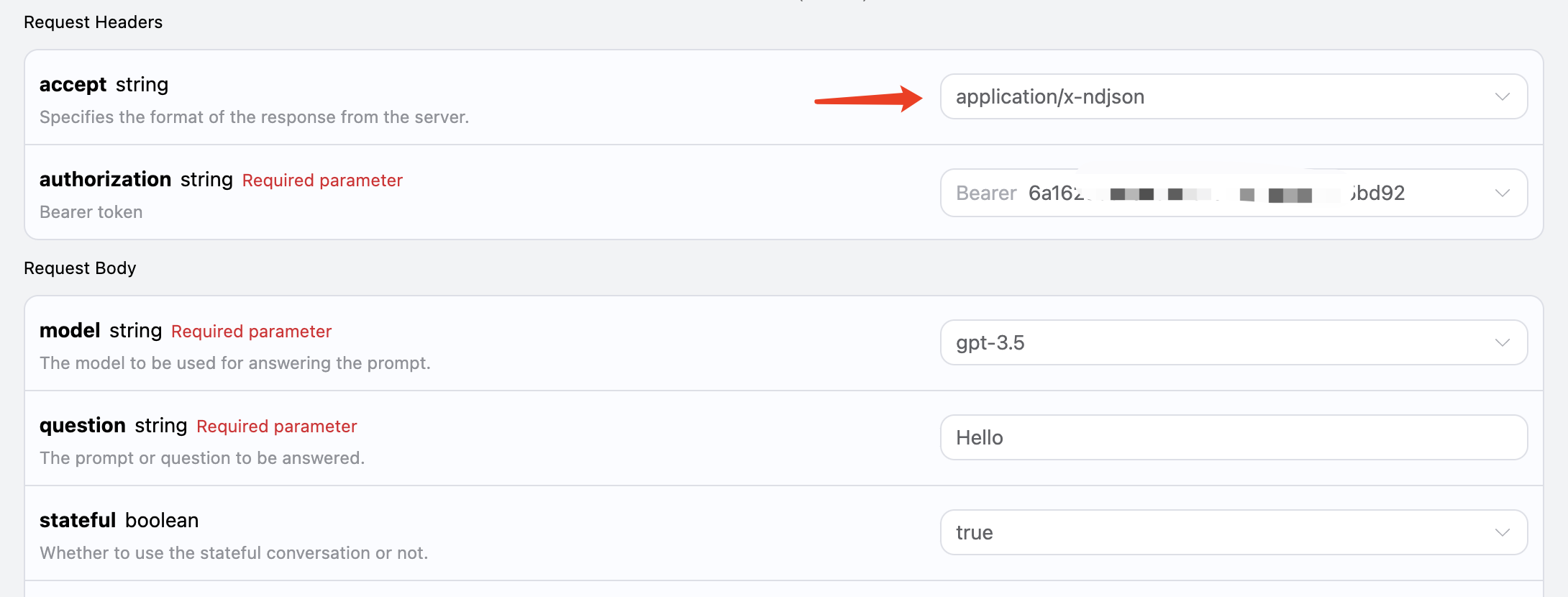
該接口也支持流式響應,這對網頁對接十分有用,可以讓網頁實現逐字顯示效果。 如果想流式返回響應,可以更改請求頭裡面的 accept 參數,修改為 application/x-ndjson 修改如圖所示,不過調用代碼需要有對應的更改才能支持流式響應。 accept 修改為 application/x-ndjson 之後,API 將逐行返回對應的 JSON 數據,在代碼層面我們需要做相應的修改來獲得逐行的結果。 Python 樣例調用代碼:
import requests

url = "https://api.acedata.cloud/aichat/conversations"

headers = {
    "accept": "application/x-ndjson",
    "authorization": "Bearer {token}",
    "content-type": "application/json"
}

payload = {
    "model": "gpt-3.5",
    "stateful": True,
    "id": "7cdb293b-2267-4979-a1ec-48d9ad149916",
    "question": "你好"
}

response = requests.post(url, json=payload, headers=headers, stream=True)
for line in response.iter_lines():
    print(line.decode())
輸出效果如下:
{"answer": "你好", "delta_answer": "你好", "id": "7cdb293b-2267-4979-a1ec-48d9ad149916"}
{"answer": "你好!", "delta_answer": "!", "id": "7cdb293b-2267-4979-a1ec-48d9ad149916"}
{"answer": "你好!你", "delta_answer": " 你", "id": "7cdb293b-2267-4979-a1ec-48d9ad149916"}
{"answer": "你好!你可以", "delta_answer": " 可以", "id": "7cdb293b-2267-4979-a1ec-48d9ad149916"}
{"answer": "你好!你可以幫助", "delta_answer": "幫助", "id": "7cdb293b-2267-4979-a1ec-48d9ad149916"}
{"answer": "你好!你可以幫助我", "delta_answer": "我", "id": "7cdb293b-2267-4979-a1ec-48d9ad149916"}
{"answer": "你好!你可以幫助我嗎", "delta_answer": "嗎", "id": "7cdb293b-2267-4979-a1ec-48d9ad149916"}
{"answer": "你好!你可以幫助我嗎?", "delta_answer": "?", "id": "7cdb293b-2267-4979-a1ec-48d9ad149916"}
可以看到,響應裡面的 answer 即為最新的回答內容,delta_answer 則是新增的回答內容,您可以根據結果來對接到您的系統中。 JavaScript 也是支持的,比如 Node.js 的流式調用代碼如下:
const axios = require("axios");

const url = "https://api.acedata.cloud/aichat/conversations";
const headers = {
  "Content-Type": "application/json",
  Accept: "application/x-ndjson",
  Authorization: "Bearer {token}",
};
const body = {
  question: "你好",
  model: "gpt-3.5",
  stateful: true,
};

axios
  .post(url, body, { headers: headers, responseType: "stream" })
  .then((response) => {
    console.log(response.status);
    response.data.on("data", (chunk) => {
      console.log(chunk.toString());
    });
  })
  .catch((error) => {
    console.error(error);
  });
Java 範例代碼:
String url = "https://api.acedata.cloud/aichat/conversations";
OkHttpClient client = new OkHttpClient();
MediaType mediaType = MediaType.parse("application/json");
RequestBody body = RequestBody.create(mediaType, "{\"question\": \"你好\", \"stateful\": true, \"model\": \"gpt-3.5\"}");
Request request = new Request.Builder()
        .url(url)
        .post(body)
        .addHeader("Content-Type", "application/json")
        .addHeader("Accept", "application/x-ndjson")
        .addHeader("Authorization", "Bearer {token}")
        .build();

client.newCall(request).enqueue(new Callback() {
    @Override
    public void onFailure(Call call, IOException e) {
        e.printStackTrace();
    }

    @Override
    public void onResponse(Call call, Response response) throws IOException {
        if (!response.isSuccessful()) throw new IOException("Unexpected code " + response);
        try (BufferedReader br = new BufferedReader(
                new InputStreamReader(response.body().byteStream(), "UTF-8"))) {
            String responseLine;
            while ((responseLine = br.readLine()) != null) {
                System.out.println(responseLine);
            }
        }
    }
});
其他語言可以另外自行改寫,原理都是一樣的。

模型預設

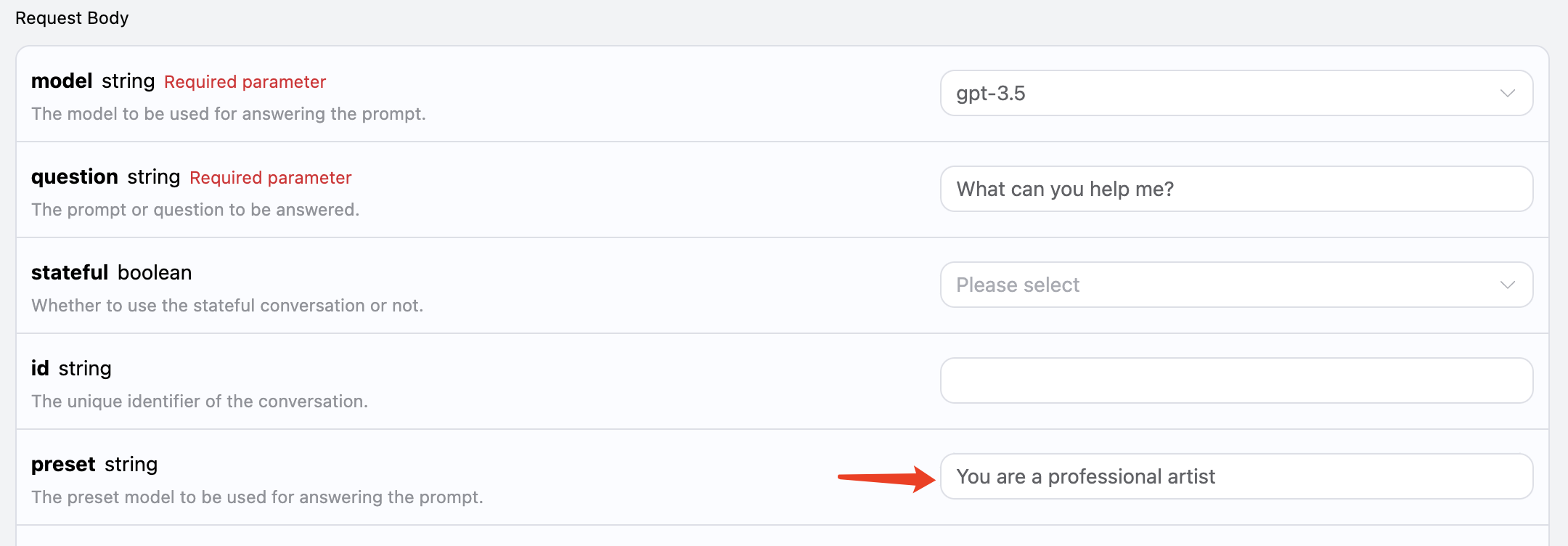
我們知道,OpenAI 相關的 API 有對應的 system_prompt 的概念,就是給整個模型設置一個預設,比如它叫什麼名字等等。本 AI 問答 API 也暴露了這個參數,叫做 preset,利用它我們可以給模型增加預設,我們用一個例子來體驗下: 這裡我們額外添加 preset 字段,內容為 你是一位專業藝術家,如圖所示: 對應代碼如下:
curl -X POST 'https://api.acedata.cloud/aichat/conversations' \
-H 'accept: application/json' \
-H 'authorization: Bearer {token}' \
-H 'content-type: application/json' \
-d '{
  "model": "gpt-3.5",
  "stateful": true,
  "question": "你能幫我什麼?",
  "preset": "你是一位專業藝術家"
}'
運行結果如下:
{
    "answer": "作為一位專業藝術家,我可以根據您的具體需求提供一系列服務和幫助。以下是我可以幫助您的幾種方式:\n\n1. 定制藝術作品:如果您有特定的願景或想法,我可以為您創作定制的藝術作品。這可以包括繪畫、素描、數字藝術或您喜歡的任何其他媒介。\n\n2. 委託作品:如果您有特定的主題或概念,我可以創作量身定制的委託藝術作品。這可以是為了個人享受或作為送給某個特別的人的獨特禮物。\n\n3. 藝術諮詢:如果您需要有關藝術選擇、室內設計或如何在您的空間中展示和展示藝術的指導,我可以提供專業建議,幫助提升您的美學感受並創造出和諧的外觀。"
}
可以看到這裡我們告訴 GPT 他是一個機器人,然後問它可以為我們做什麼,他就可以扮演一個機器人的角色來回答問題了。

圖片識別

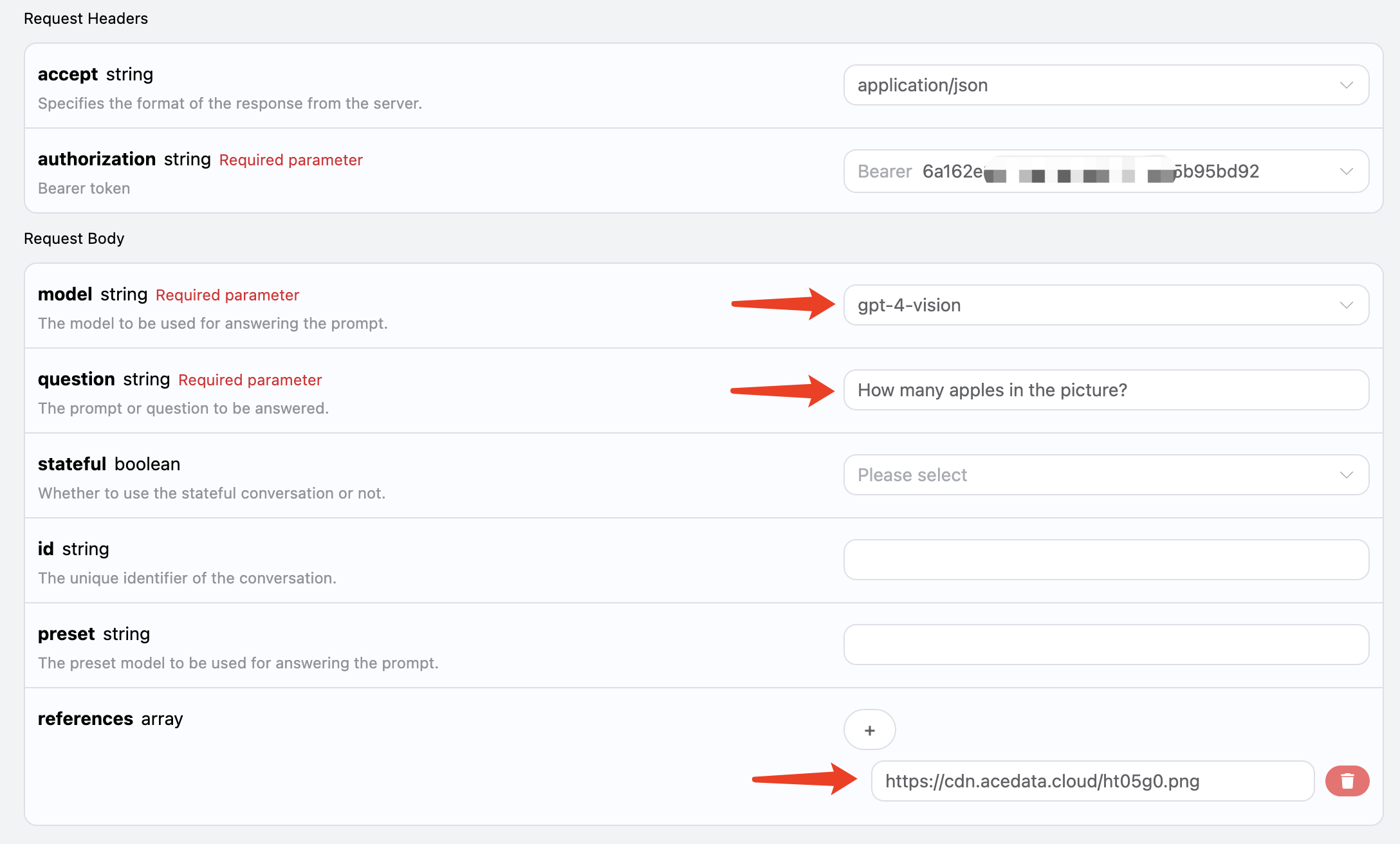
本 AI 也能支持添加附件進行圖片識別,通過 references 傳遞對應圖片鏈接即可,比如我這裡有一張蘋果的圖片,如圖所示: 該圖片的鏈接是 https://cdn.acedata.cloud/ht05g0.png,我們直接將其作為 references 參數傳遞即可,同時需要注意的是,模型必須要選擇支持視覺識別的模型,目前支持的是 gpt-4-vision,所以輸入如下: 對應的代碼如下:

curl -X POST 'https://api.acedata.cloud/aichat/conversations' \
-H 'accept: application/json' \
-H 'authorization: Bearer {token}' \
-H 'content-type: application/json' \
-d '{
  "model": "gpt-4-vision",
  "question": "圖片中有多少個蘋果?",
  "references": ["https://cdn.acedata.cloud/ht05g0.png"]
}'
運行結果如下:
{
  "answer": "圖片中有 5 個蘋果。"
}
可以看到,我們就成功得到了對應圖片的回答結果。

聯網問答

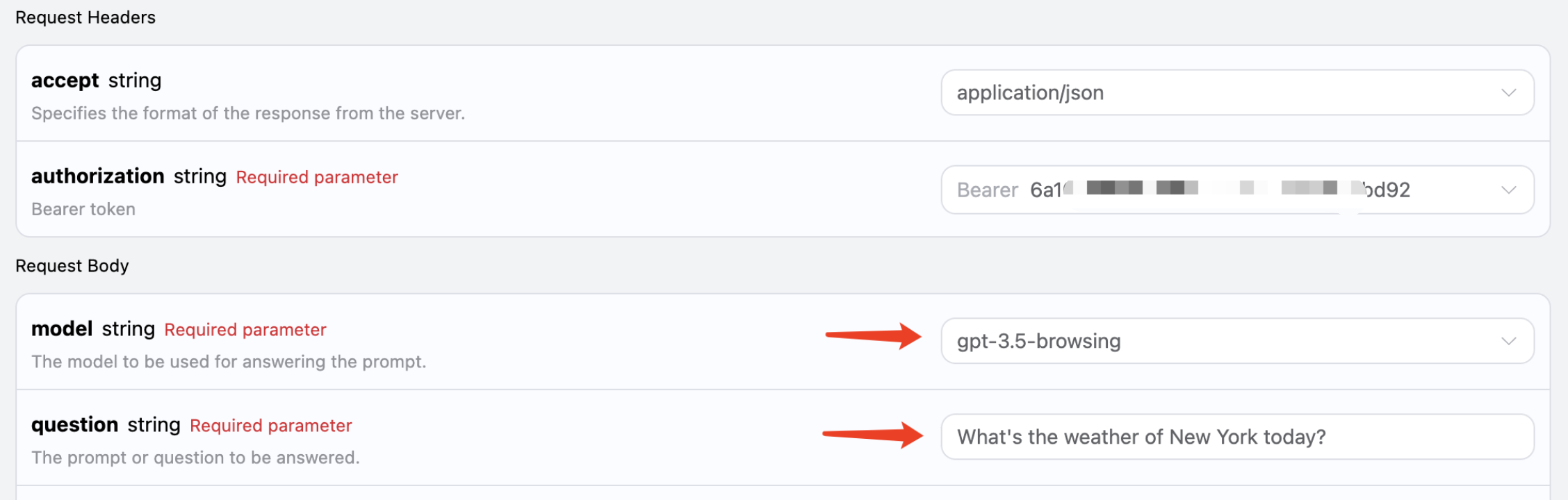
本 API 還支持聯網模型,包括 GPT-3.5、GPT-4 均能支持,在 API 背後有一個自動搜索互聯網並總結的過程,我們可以選擇模型為 gpt-3.5-browsing 來體驗下,如圖所示: 代碼如下:
curl -X POST 'https://api.acedata.cloud/aichat/conversations' \
-H 'accept: application/json' \
-H 'authorization: Bearer {token}' \
-H 'content-type: application/json' \
-d '{
  "model": "gpt-3.5-browsing",
  "question": "今天紐約的天氣怎麼樣?"
}'
運行結果如下:
{
  "answer": "今天紐約的天氣如下:\n- 當前溫度:16°C (60°F)\n- 最高:16°C (60°F)\n- 最低:10°C (50°F)\n- 濕度:47%\n- 紫外線指數:6/11\n- 日出:上午5:42\n- 日落:下午8:02\n\n天氣陰雲密布,今晚有偶爾降雨的機會,降雨機率為50%。\n如需更多詳細信息,您可以訪問 [The Weather Channel](https://weather.com/weather/tenday/l/96f2f84af9a5f5d452eb0574d4e4d8a840c71b05e22264ebdc0056433a642c84)。\n\n還有其他您想知道的嗎?"
}
可以看到,這裡它自動連網搜索了 The Weather Channel 網站,並獲得了裡面的信息,然後進一步返回了即時結果。
如果對模型回答質量有更高要求,可以將模型更換為 gpt-4-browsing,回答效果會更好。