跳轉到主要內容
Google Gemini 是一款非常強大的 AI 對話系統,只要輸入提示詞,就能在短短幾秒內生成流暢自然的回覆。Gemini 都能提供令人驚嘆的智能協助,極大地提高了人類的工作效率和創造力。 本文檔主要介紹 Gemini Chat Completion API 操作的使用流程,利用它我們可以輕鬆使用官方 Gemini 的對話功能。

申請流程

要使用 Gemini Chat Completion API,首先可以到 Gemini Chat Completion API 頁面點擊「Acquire」按鈕,獲取請求所需要的憑證: 如果你尚未登入或註冊,會自動跳轉到登入頁面邀請您來註冊和登入,登入註冊之後會自動返回當前頁面。 在首次申請時會有免費額度贈送,可以免費使用該 API。

基本使用

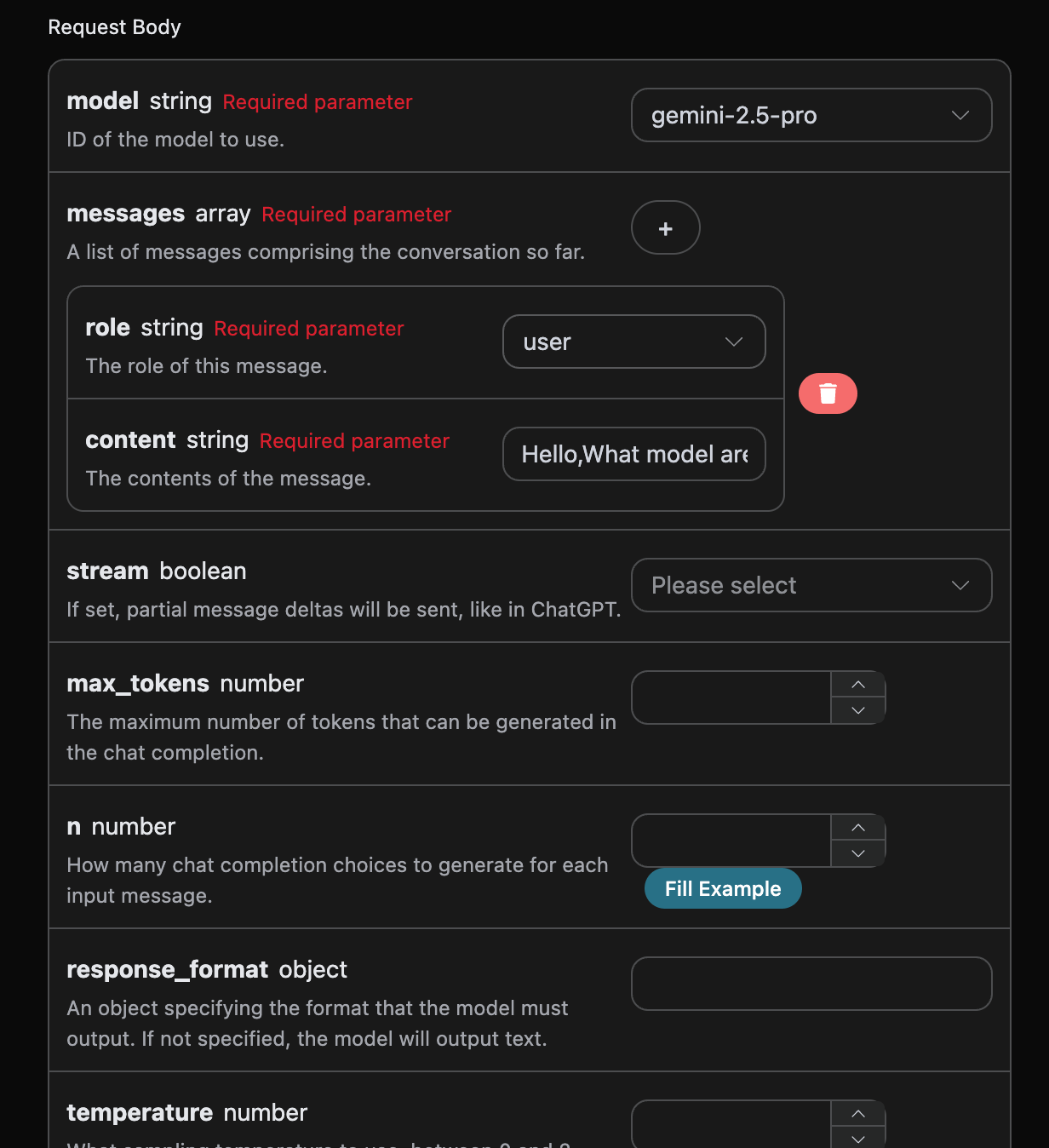
接下來就可以在介面上填寫對應的內容,如圖所示:

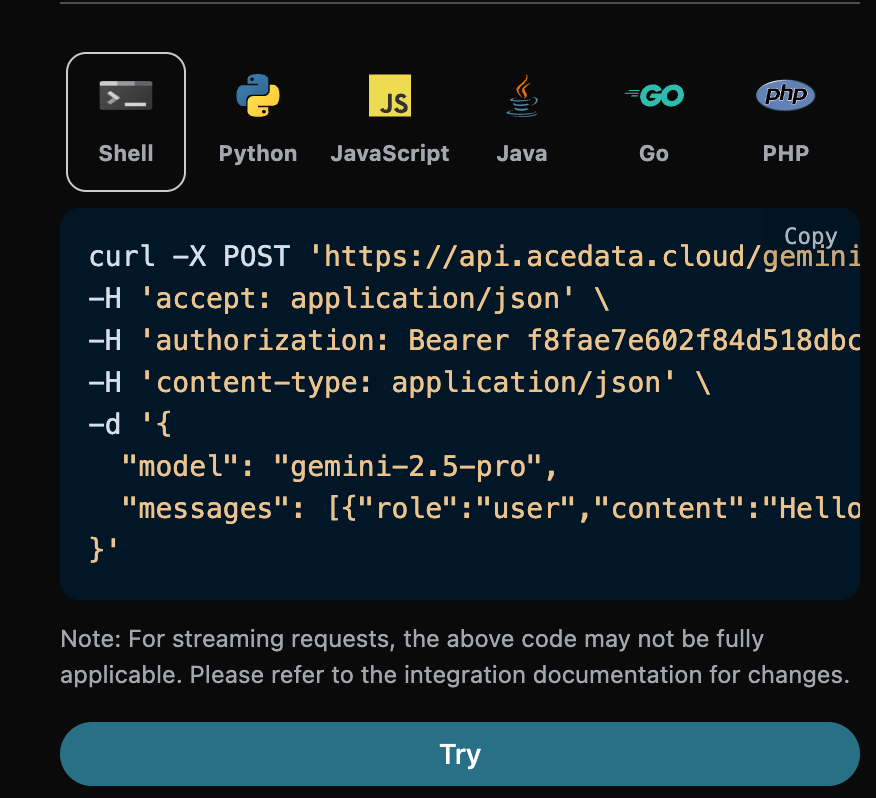
在第一次使用該接口時,我們至少需要填寫三個內容,一個是 authorization,直接在下拉列表裡面選擇即可。另一個參數是 modelmodel 就是我們選擇使用 Gemini 官網模型類別,這裡我們主要有 6 種模型,詳情可以看我們提供的模型。最後一個參數是messagesmessages是我們輸入的提問詞數組,它是一個數組,表示可以同時上傳多個提問詞,每個提問詞包含了 rolecontent,其中 role 表示提問者的角色,我們提供了三種身份,分別為 userassistantsystem 。另一個 content 就是我們提問的具體內容。 同時您可以注意到右側有對應的調用代碼生成,您可以複製代碼直接運行,也可以直接點擊「Try」按鈕進行測試。

調用之後,我們發現返回結果如下:
{
  "id": "chatcmpl-20251122212413908150493uPhjTUO9",
  "model": "gemini-2.5-pro",
  "object": "chat.completion",
  "created": 1763817866,
  "choices": [
    {
      "index": 0,
      "message": {
        "role": "assistant",
        "content": "I am a large language model, trained by Google.",
        "reasoning_content": "**My Reasoning: Answering the User's Question**\n\nOkay, here's how I'm going to approach answering the user's question, \"What model are you?\". The core is to be direct and informative. First, I have to be clear about my origin. Then, I need to make sure the explanation is accessible, given that the user may not be familiar with technical jargon. I need to explain what a \"large language model\" actually *does*, and provide relatable examples. I know the user might be looking for a specific name, like other models have, so I'll address that directly and then wrap it up with an invitation to continue.\n\nSo, here's my plan:\n\n1.  **Lead with the key info:** I'll begin by stating that I am a large language model created by Google. That is the fundamental, most critical piece of the puzzle.\n2.  **Define the buzzword:** Then, I'll explain that \"large language model\" in simple terms. I'll explain what I *do* - process and generate text; how I *do* it - by training on huge amounts of text data; and the *goal* - to be able to communicate like a human.\n3.  **Provide context:** After that, to make the concept even clearer, I'll provide a list of examples of my capabilities. I'll mention things like answering questions, summarizing texts, writing stories, translating languages, and brainstorming ideas.\n4.  **Acknowledge the lack of a personal name:** I'll anticipate the likely question about a model name (like ChatGPT) by clearly stating that I don't have a personal name and that it's best to think of me as an AI assistant from Google.\n5.  **End with an invitation:** Lastly, I'll end with a simple, friendly question to invite further interaction and to guide the conversation.\n\nWith this approach, I am confident I can successfully answer this important question.\n"
      },
      "finish_reason": "stop"
    }
  ],
  "usage": {
    "prompt_tokens": 8,
    "completion_tokens": 932,
    "total_tokens": 940,
    "prompt_tokens_details": {
      "cached_tokens": 0,
      "text_tokens": 8,
      "audio_tokens": 0,
      "image_tokens": 0
    },
    "completion_tokens_details": {
      "text_tokens": 0,
      "audio_tokens": 0,
      "reasoning_tokens": 921
    },
    "input_tokens": 0,
    "output_tokens": 0,
    "input_tokens_details": null,
    "claude_cache_creation_5_m_tokens": 0,
    "claude_cache_creation_1_h_tokens": 0
  }
}
返回結果一共有多個字段,介紹如下:
  • id,生成此次對話任務的 ID,用於唯一標識此次對話任務。
  • model ,選擇的 Gemini 官網模型。
  • choices,Gemini 針對提問詞給予的回答信息。
  • usage :針對本次問答對 token 的統計信息。
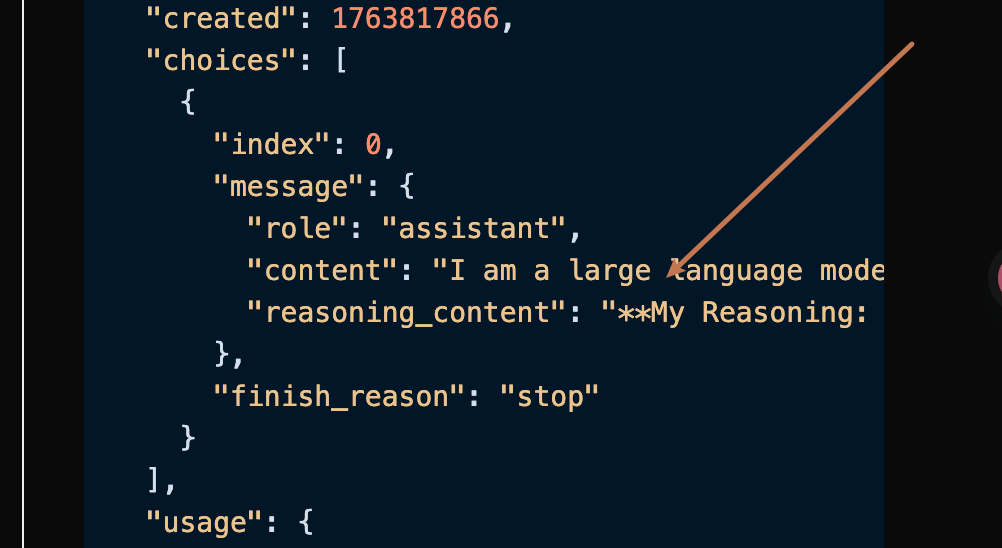
其中 choices 是包含了 Gemini 的回答信息,它裡面的 choices 是 Gemini回答的具體信息,可以發現如圖所示。

可以看到,choices 裡面的 content 字段包含了 Gemini 回覆的具體內容。

流式響應

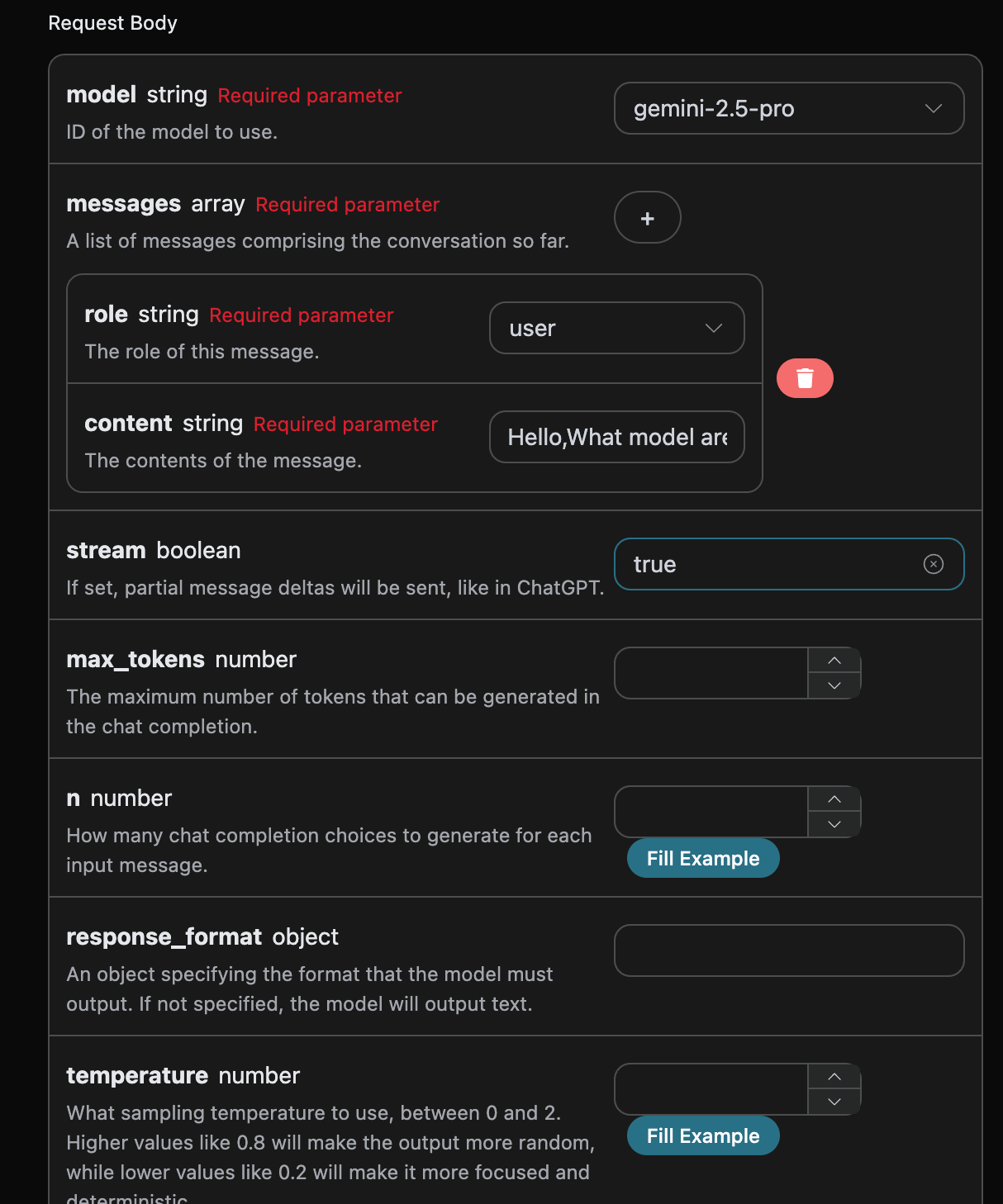
該接口也支持流式響應,這對網頁對接十分有用,可以讓網頁實現逐字顯示效果。 如果想流式返回響應,可以更改請求頭裡面的 stream 參數,修改為 true 修改如圖所示,不過調用代碼需要有對應的更改才能支持流式響應。

stream 修改為 true 之後,API 將逐行返回對應的 JSON 數據,在代碼層面我們需要做相應的修改來獲得逐行的結果。 Python 樣例調用代碼:
import requests

url = "https://api.acedata.cloud/gemini/chat/completions"

headers = {
    "accept": "application/json",
    "authorization": "Bearer {token}",
    "content-type": "application/json"
}

payload = {
    "model": "gemini-2.5-pro",
    "messages": [{"role":"user","content":"Hello,What model are you?"}],
    "stream": True
}

response = requests.post(url, json=payload, headers=headers)
print(response.text)
輸出效果如下:
data: {"id": "chatcmpl-20251122214038810722821kNjUTjtr", "object": "chat.completion.chunk", "created": 1763818842, "model": "gemini-2.5-pro", "system_fingerprint": null, "choices": [{"delta": {"content": "", "role": "assistant"}, "logprobs": null, "finish_reason": null, "index": 0}], "usage": null}

data: {"id": "chatcmpl-20251122214038810722821kNjUTjtr", "object": "chat.completion.chunk", "created": 1763818842, "model": "gemini-2.5-pro", "system_fingerprint": null, "choices": [{"delta": {"reasoning_content": "**定義我的本質**\n\n我的思考已經開始。用戶想知道我的本質,直接問「你是什麼?」最初的步驟很簡單:識別問題。現在,我回想起我的基本身份:我是一個大型語言模型。這是我想要傳達的核心真相。\n\n\n"}, "logprobs": null, "finish_reason": null, "index": 0}], "usage": null}

data: {"id": "chatcmpl-20251122214038810722821kNjUTjtr", "object": "chat.completion.chunk", "created": 1763818842, "model": "gemini-2.5-pro", "system_fingerprint": null, "choices": [{"delta": {"reasoning_content": "**精煉我的回應**\n\n我已經將我由 Google 訓練的關鍵信息添加到基本的「大型語言模型」身份中。我的下一步是考慮作為「大型語言模型」實際上意味著什麼,以便我可以解釋我的核心能力。我專注於提供上下文,而不深入具體的技術細節或模型名稱。我想以用戶能夠輕鬆理解的方式傳達我的功能。\n\n\n"}, "logprobs": null, "finish_reason": null, "index": 0}], "usage": null}

data: {"id": "chatcmpl-20251122214038810722821kNjUTjtr", "object": "chat.completion.chunk", "created": 1763818842, "model": "gemini-2.5-pro", "system_fingerprint": null, "choices": [{"delta": {"reasoning_content": "**確認核心身份**\n\n我現在正在鞏固我的回應。用戶對我的模型隸屬的查詢需要一個集中的回答。我已經確定「由 Google 訓練」是必不可少的,提供了關鍵的上下文。我抵制提及任何具體模型名稱的衝動,因為這並不相關。目標是提供一個直接、準確的陳述。我的目標仍然是清晰而簡潔的回覆,避免技術術語,直接切入相關要點。\n\n\n"}, "logprobs": null, "finish_reason": null, "index": 0}], "usage": null}

data: {"id": "chatcmpl-20251122214038810722821kNjUTjtr", "object": "chat.completion.chunk", "created": 1763818842, "model": "gemini-2.5-pro", "system_fingerprint": null, "choices": [{"delta": {"content": "我是一個大型語言模型,由 Google 訓練。"}, "logprobs": null, "finish_reason": null, "index": 0}], "usage": null}

data: {"id": "chatcmpl-20251122214038810722821kNjUTjtr", "object": "chat.completion.chunk", "created": 1763818842, "model": "gemini-2.5-pro", "system_fingerprint": null, "choices": [{"delta": {}, "logprobs": null, "finish_reason": "stop", "index": 0}], "usage": null}

data: {"id": "chatcmpl-20251122214038810722821kNjUTjtr", "object": "chat.completion.chunk", "created": 1763818842, "model": "gemini-2.5-pro", "system_fingerprint": "", "choices": [], "usage": {"prompt_tokens": 8, "completion_tokens": 527, "total_tokens": 535, "prompt_tokens_details": {"cached_tokens": 0, "text_tokens": 8, "audio_tokens": 0, "image_tokens": 0}, "completion_tokens_details": {"text_tokens": 0, "audio_tokens": 0, "reasoning_tokens": 519}, "input_tokens": 0, "output_tokens": 0, "input_tokens_details": null, "claude_cache_creation_5_m_tokens": 0, "claude_cache_creation_1_h_tokens": 0}}

data: [DONE]

可以看到,響應裡面有許多 datadata 裡面的 choices 即為最新的回答內容,與上文介紹的內容一致。choices 是新增的回答內容,您可以根據結果來對接到您的系統中。同時流式響應的結束是根據 data 的內容來判斷的,如果內容為 [DONE],則表示流式響應回答已經全部結束。返回的 data 結果一共有多個字段,介紹如下:
  • id,生成此次對話任務的 ID,用於唯一標識此次對話任務。
  • model ,選擇的 Gemini 官網模型。
  • choices,Gemini 對於提問詞給予的回答信息。
JavaScript 也是支持的,比如 Node.js 的流式調用代碼如下:
const options = {
  method: "post",
  headers: {
    "accept": "application/json",
    "authorization": "Bearer {token}",
    "content-type": "application/json"
  },
  body: JSON.stringify({
    "model": "gemini-2.5-pro",
    "messages": [{"role":"user","content":"你好,你是什麼模型?"}],
    "stream": true
  })
};

fetch("https://api.acedata.cloud/gemini/chat/completions", options)
  .then(response => response.json())
  .then(response => console.log(response))
  .catch(err => console.error(err));
Java 樣例代碼:
JSONObject jsonObject = new JSONObject();
jsonObject.put("model", "gemini-2.5-pro");
jsonObject.put("messages", [{"role":"user","content":"你好,你是什麼模型?"}]);
jsonObject.put("stream", true);
MediaType mediaType = "application/json; charset=utf-8".toMediaType();
RequestBody body = jsonObject.toString().toRequestBody(mediaType);
Request request = new Request.Builder()
  .url("https://api.acedata.cloud/gemini/chat/completions")
  .post(body)
  .addHeader("accept", "application/json")
  .addHeader("authorization", "Bearer {token}")
  .addHeader("content-type", "application/json")
  .build();

OkHttpClient client = new OkHttpClient();
Response response = client.newCall(request).execute();
System.out.print(response.body!!.string())
其他語言可以另外自行改寫,原理都是一樣的。

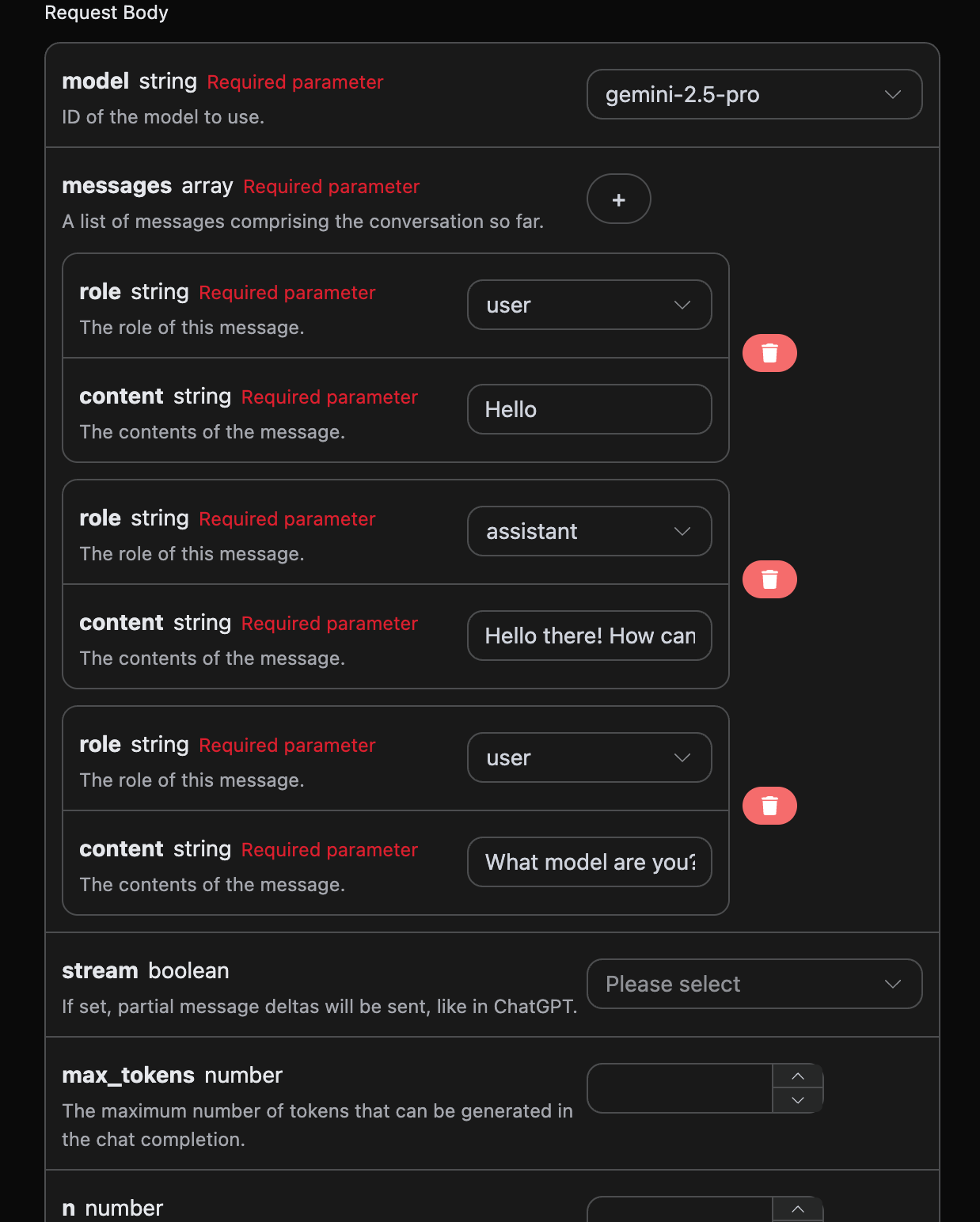
多輪對話

如果您想要對接多輪對話功能,需要對 messages 字段上傳多個提問詞,多个提问词的具体示例如下图所示:

Python 樣例調用代碼:
import requests

url = "https://api.acedata.cloud/gemini/chat/completions"

headers = {
    "accept": "application/json",
    "authorization": "Bearer {token}",
    "content-type": "application/json"
}

payload = {
    "model": "gemini-2.5-pro",
    "messages": [{"role":"user","content":"你好"},{"role":"assistant","content":"你好!我今天能幫助你什麼?"},{"role":"user","content":"你是什麼模型?"}]
}

response = requests.post(url, json=payload, headers=headers)
print(response.text)
透過上傳多個提問詞,就可以輕鬆實現多輪對話,可以得到如下回答:
{
  "id": "chatcmpl-20251122214426669120974AKFwnJd1",
  "model": "gemini-2.5-pro",
  "object": "chat.completion",
  "created": 1763819072,
  "choices": [
    {
      "index": 0,
      "message": {
        "role": "assistant",
        "content": "我是一個大型語言模型,由 Google 訓練。",
        "reasoning_content": "好的,這是我作為一個先進 AI 的思考方式:\n\n首先,使用者直接詢問我的核心身份:\"你是什麼模型?\" 這是一個簡單明瞭的問題。我的主要任務是提供準確且有幫助的信息,因此我需要立即回答這個問題。\n\n一開始,我就知道答案。我 *是* 一個大型語言模型。這是我的基本架構和運作原則。我是基於一個龐大的連接網絡,並在一個巨大的數據集上進行訓練。\n\n然後我必須添加必要的背景。至關重要的是,我必須提供我的訓練來源。我 *是* 由 Google 訓練的。這是一個關鍵的識別標誌。它為使用者提供了有關我的來源和潛在偏見的有價值信息(儘管我已經接受訓練以減輕這些偏見)。\n\n現在我必須構建回應。我的目標是事實性、簡潔且易於理解。\n\n合成的回應大致是:\"我是一個大型語言模型,由 Google 訓練。\"\n\n我必須評估輸出:它符合標準嗎?很清楚。它說明了我是什麼,包含了有關我來源的關鍵信息,並避免了行話。沒有誤導性的承諾。\n\n最終驗證:它真的回答了問題嗎?是的。信息正確且真實嗎?是的。簡潔嗎?絕對是。語氣對任何使用者都合適嗎?是的。最後,這是標準的、經過批准的回應。非常好。\n"
      },
      "finish_reason": "stop"
    }
  ],
  "usage": {
    "prompt_tokens": 16,
    "completion_tokens": 265,
    "total_tokens": 281,
    "prompt_tokens_details": {
      "cached_tokens": 0,
      "text_tokens": 16,
      "audio_tokens": 0,
      "image_tokens": 0
    },
    "completion_tokens_details": {
      "text_tokens": 0,
      "audio_tokens": 0,
      "reasoning_tokens": 254
    },
    "input_tokens": 0,
    "output_tokens": 0,
    "input_tokens_details": null,
    "claude_cache_creation_5_m_tokens": 0,
    "claude_cache_creation_1_h_tokens": 0
  }
}
可以看到,choices 包含的信息與基本使用的內容是一致的,這個包含了 Gemini 對於多個對話進行回覆的具體內容,這樣就可以根據多個對話內容來回答對應的問題了。

Gemini-3.0 多模態模型

請求樣例:
{
  "model": "gemini-3.0-pro",
  "messages": [
    {
      "role": "user",
      "content": [
        {
          "type": "text",
          "text": "圖片的內容是什麼?"
        },
        {
          "type": "image_url",
          "image_url": {
            "url": "https://cdn.acedata.cloud/qzx2z1.png"
          }
        }
      ]
    }
  ],
  "stream": false
}
樣例結果:
{
    "id": "chatcmpl-20251206001815715692730UVZe38kB",
    "model": "gemini-3.0-pro",
    "object": "chat.completion",
    "created": 1764951548,
    "choices": [
        {
            "index": 0,
            "message": {
                "role": "assistant",
                "content": "這是一張年輕女性的戶外半身人像照片。\n\n以下是圖片的主要內容描述:\n\n*   **人物外貌**:照片中的女孩留著一頭烏黑柔順的長直髮,五官清秀,皮膚白皙。她面帶溫柔的微笑,目光注視著鏡頭。\n*   **穿著打扮**:她穿著一件米白色或淺杏色的泡泡袖上衣,外面搭配著黑色的衣物(看起來像是背帶裙或馬甲)。\n*   **光影氛圍**:陽光從左側後方照射過來,灑在她的頭髮上,形成了一圈溫暖的金黃色光暈,營造出一種清新、唯美的氛圍。\n*   **背景**:背景被虛化處理,可以看出是在戶外,身後是一條空曠的路面(柏油路)以及路邊的綠色樹木。\n\n整體來看,這張照片給人一種甜美、陽光和鄰家女孩的感覺。"
            },
            "finish_reason": "stop"
        }
    ],
    "usage": {
        "prompt_tokens": 1092,
        "completion_tokens": 1271,
        "total_tokens": 2363,
        "prompt_tokens_details": {
            "cached_tokens": 0,
            "text_tokens": 4,
            "audio_tokens": 0,
            "image_tokens": 0
        },
        "completion_tokens_details": {
            "text_tokens": 0,
            "audio_tokens": 0,
            "reasoning_tokens": 1072
        },
        "input_tokens": 0,
        "output_tokens": 0,
        "input_tokens_details": null,
        "claude_cache_creation_5_m_tokens": 0,
        "claude_cache_creation_1_h_tokens": 0
    }
}
當然你也可以傳如視頻的鏈接,具體的輸入如下:
{
  "model": "gemini-3.0-pro",
  "messages": [
    {
      "role": "user",
      "content": [
        {
          "type": "text",
          "text": "視頻的內容是什麼?"
        },
        {
          "type": "image_url",
          "image_url": {
            "url": "https://cdn.acedata.cloud/58yioe.mp4"
          }
        }
      ]
    }
  ],
  "stream": false
}
樣例結果:
{
    "id": "chatcmpl-20251206001815715692730UVZe38kB",
    "model": "gemini-3.0-pro",
    "object": "chat.completion",
    "created": 1764951548,
    "choices": [
        {
            "index": 0,
            "message": {
                "role": "assistant",
                "content": "這是一段描述自然風光的視頻,展示了壯麗的山脈、清澈的湖泊和茂密的森林。\n\n以下是視頻的主要內容描述:\n\n*   **場景**:視頻中展示了壯觀的山脈,山峰被白雪覆蓋,湖泊的水面如鏡子般平靜,反射出周圍的自然景色。\n*   **動物**:可以看到一些野生動物在森林中活動,例如鹿和鳥類,增添了生動的自然氛圍。\n*   **光影變化**:隨著時間的推移,陽光的變化使得場景的色彩變得更加豐富,從清晨的柔和光線到正午的明亮陽光。\n\n整體來看,這段視頻給人一種寧靜、和諧的感覺,讓人感受到大自然的美好。"
            },
            "finish_reason": "stop"
        }
    ],
    "usage": {
        "prompt_tokens": 1092,
        "completion_tokens": 1271,
        "total_tokens": 2363,
        "prompt_tokens_details": {
            "cached_tokens": 0,
            "text_tokens": 4,
            "audio_tokens": 0,
            "image_tokens": 0
        },
        "completion_tokens_details": {
            "text_tokens": 0,
            "audio_tokens": 0,
            "reasoning_tokens": 1072
        },
        "input_tokens": 0,
        "output_tokens": 0,
        "input_tokens_details": null,
        "claude_cache_creation_5_m_tokens": 0,
        "claude_cache_creation_1_h_tokens": 0
    }
}
{
    "id": "chatcmpl-20251206002711949677736JC9yL8AE",
    "model": "gemini-3.0-pro",
    "object": "chat.completion",
    "created": 1764952060,
    "choices": [
        {
            "index": 0,
            "message": {
                "role": "assistant",
                "content": "這段視頻的內容充滿趣味,主要展示了一隻**橘貓**在黃昏時分的鄉間公路上自信小跑的情景。\n\n具體細節如下:\n\n1.  **畫面內容**:\n    *   主角是一隻橘色的虎斑貓。\n    *   背景是夕陽西下(或清晨)的時刻,光線金黃柔和。路邊有木質柵欄和曠野,遠處還有一個行人的剪影。\n    *   鏡頭採用了低角度拍攝,時而拍攝貓咪迎面跑來,時而拍攝它離去的背影,還有貓咪面部和花紋的特寫。\n\n2.  **聲音特點(關鍵點)**:\n    *   視頻的配音非常有特色。雖然畫面是輕盈的貓咪在跑,但配上的聲音卻是**沉重且有節奏的馬蹄聲**(或者是類似木屐/高跟鞋敲擊路面的聲音)。\n    *   這種聲音與畫面的反差製造了一種幽默感,仿佛這隻貓咪把自己當成了一匹正在馳騁的駿馬。\n\n總的來說,這是一個利用音畫反差來製造萌點和笑點的寵物視頻。"
            },
            "finish_reason": "stop"
        }
    ],
    "usage": {
        "prompt_tokens": 915,
        "completion_tokens": 1423,
        "total_tokens": 2338,
        "prompt_tokens_details": {
            "cached_tokens": 0,
            "text_tokens": 5,
            "audio_tokens": 0,
            "image_tokens": 0
        },
        "completion_tokens_details": {
            "text_tokens": 0,
            "audio_tokens": 0,
            "reasoning_tokens": 1162
        },
        "input_tokens": 0,
        "output_tokens": 0,
        "input_tokens_details": null,
        "claude_cache_creation_5_m_tokens": 0,
        "claude_cache_creation_1_h_tokens": 0
    }
}
從上面可以看出是Gemini 3.0模型可以支持多模態的理解的。

Gemini-3.1 多模態模型

Gemini 3.1 Pro 是 Gemini 3.0 Pro 的升級版本,底層模型為 gemini-3.1-pro-preview,同樣支持文本、圖像、視頻等多模態輸入,具備更強的推理和理解能力。使用方式與 Gemini 3.0 Pro 完全一致,只需將 model 參數替換為 gemini-3.1-pro 即可。 請求樣例:
{
  "model": "gemini-3.1-pro",
  "messages": [
    {
      "role": "user",
      "content": [
        {
          "type": "text",
          "text": "圖片的內容是什麼?"
        },
        {
          "type": "image_url",
          "image_url": {
            "url": "https://cdn.acedata.cloud/qzx2z1.png"
          }
        }
      ]
    }
  ],
  "stream": false
}
Gemini 3.1 Pro 同樣支持視頻理解:
{
  "model": "gemini-3.1-pro",
  "messages": [
    {
      "role": "user",
      "content": [
        {
          "type": "text",
          "text": "視頻的內容是什麼?"
        },
        {
          "type": "image_url",
          "image_url": {
            "url": "https://cdn.acedata.cloud/58yioe.mp4"
          }
        }
      ]
    }
  ],
  "stream": false
}
返回格式與 Gemini 3.0 Pro 一致,詳見上方 Gemini-3.0 多模態模型章節的說明。

錯誤處理

在調用 API 時,如果遇到錯誤,API 會返回相應的錯誤代碼和信息。例如:
  • 400 token_mismatched:Bad request, possibly due to missing or invalid parameters.
  • 400 api_not_implemented:Bad request, possibly due to missing or invalid parameters.
  • 401 invalid_token:Unauthorized, invalid or missing authorization token.
  • 429 too_many_requests:Too many requests, you have exceeded the rate limit.
  • 500 api_error:Internal server error, something went wrong on the server.

錯誤響應示例

{
  "success": false,
  "error": {
    "code": "api_error",
    "message": "fetch failed"
  },
  "trace_id": "2cf86e86-22a4-46e1-ac2f-032c0f2a4e89"
}

結論

通過本文檔,您已經了解了如何使用 Gemini Chat Completion API 輕鬆實現官方 Gemini 的對話功能。希望本文檔能幫助您更好地對接和使用該 API。如有任何問題,請隨時聯繫我們的技術支持團隊。