申請流程
要使用 OpenAI Responses API,首先到 Ace Data Cloud 控制台 取得您的 API Token,留作備用。
如果你尚未登入或註冊,會自動跳轉到登入頁面邀請你註冊和登入,完成後會自動返回目前頁面。
一個 API Token 即可呼叫平台所有服務,無需為每個服務個別申請。 首次申請會贈送免費額度,可免費體驗;額度不足時可在 控制台 儲值通用餘額。
📘 完整文件:OpenAI Responses API →
基本使用
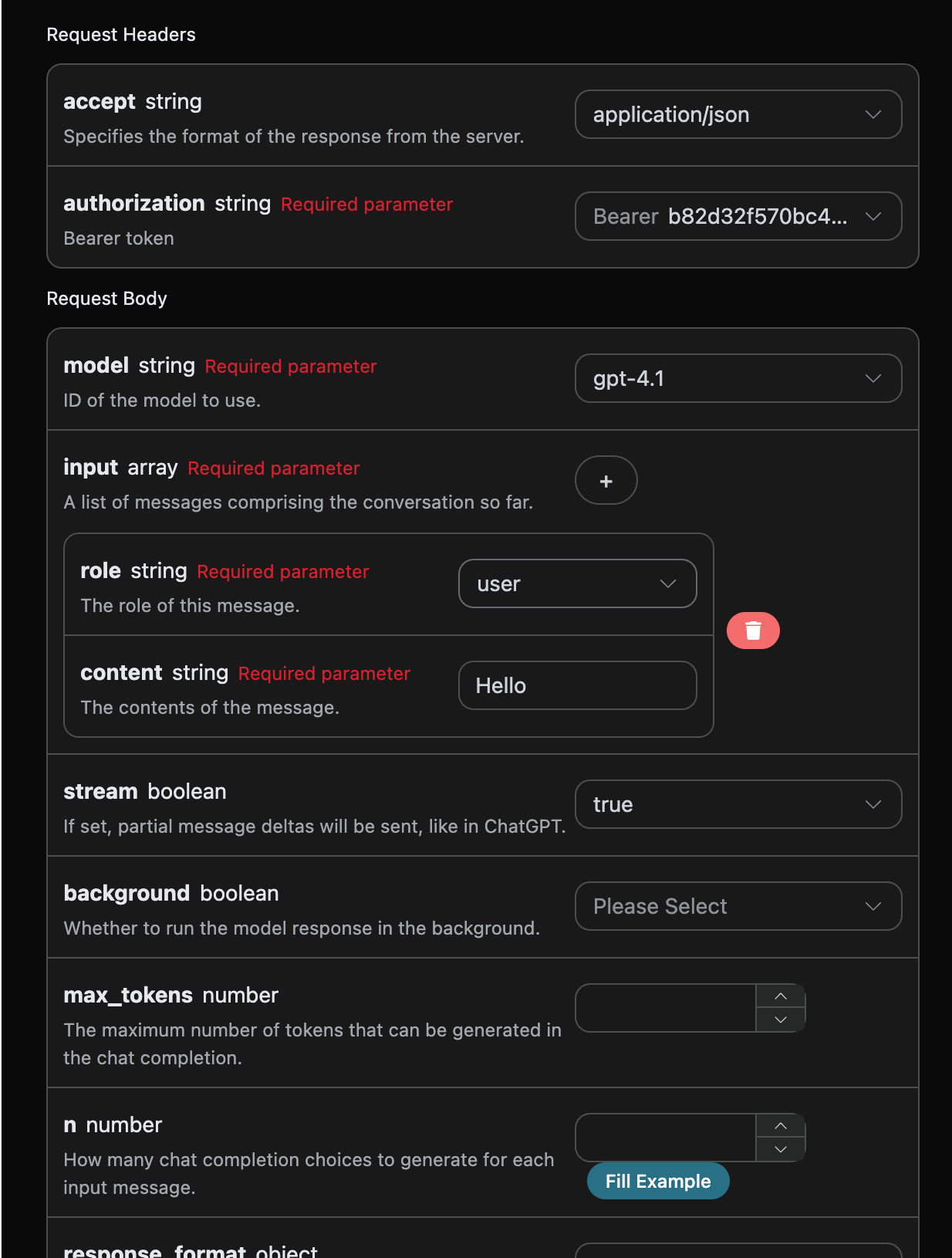
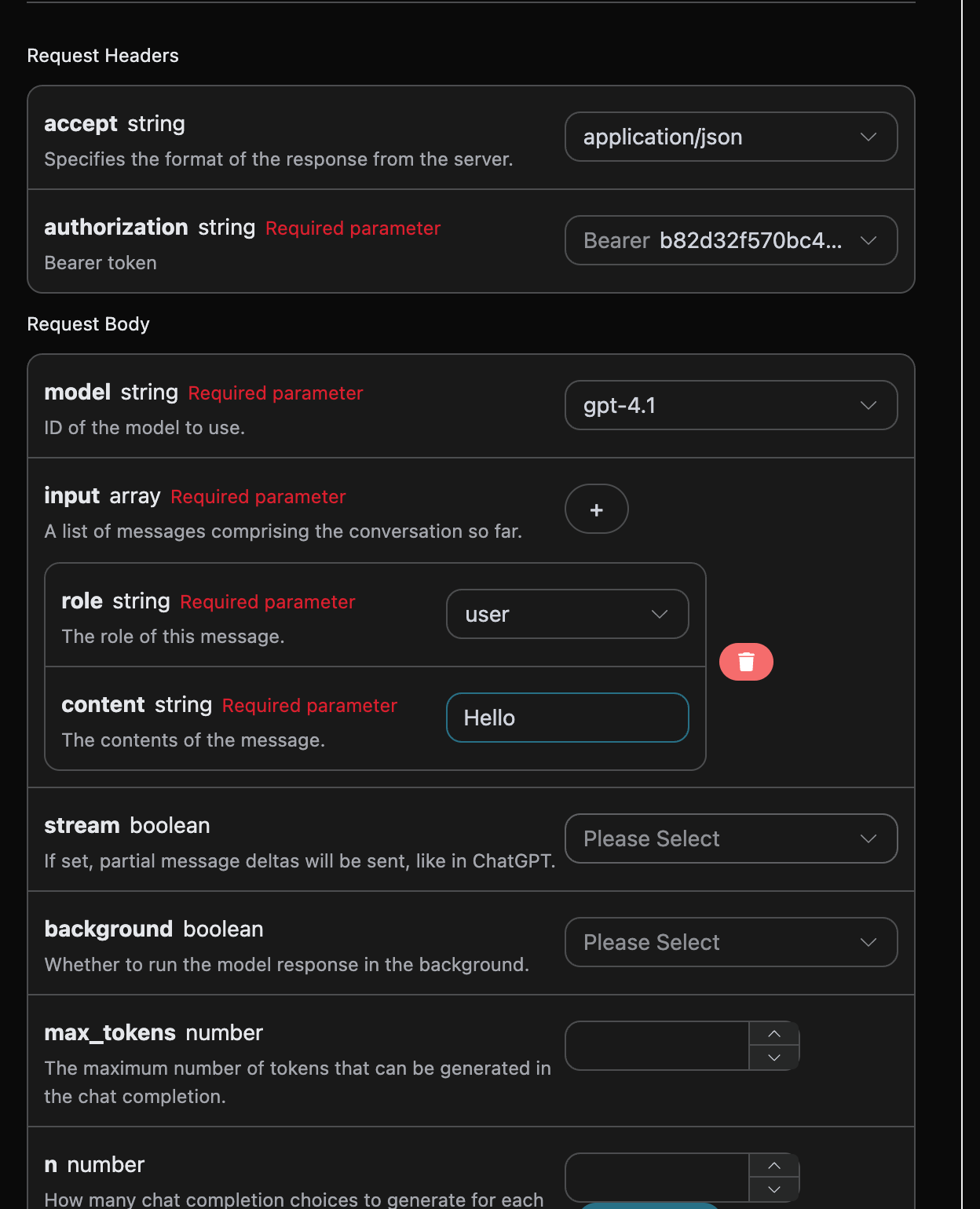
接下來就可以在介面上填寫對應的內容,如圖所示:
authorization,直接在下拉式清單裡面選擇即可。另一個參數是 model, model 就是我們選擇使用 OpenAI ChatGPT 官網模型類別,這裡我們主要有 20 種模型,詳情可以看我們提供的模型。最後一個參數是input,input是我們輸入的提問詞陣列,它是一個陣列,表示可以同時上傳多個提問詞,每個提問詞包含了 role 和 content,其中 role 表示提問者的角色,我們提供了三種身分,分別為 user 、assistant、system 。另一個 content 就是我們提問的具體內容。
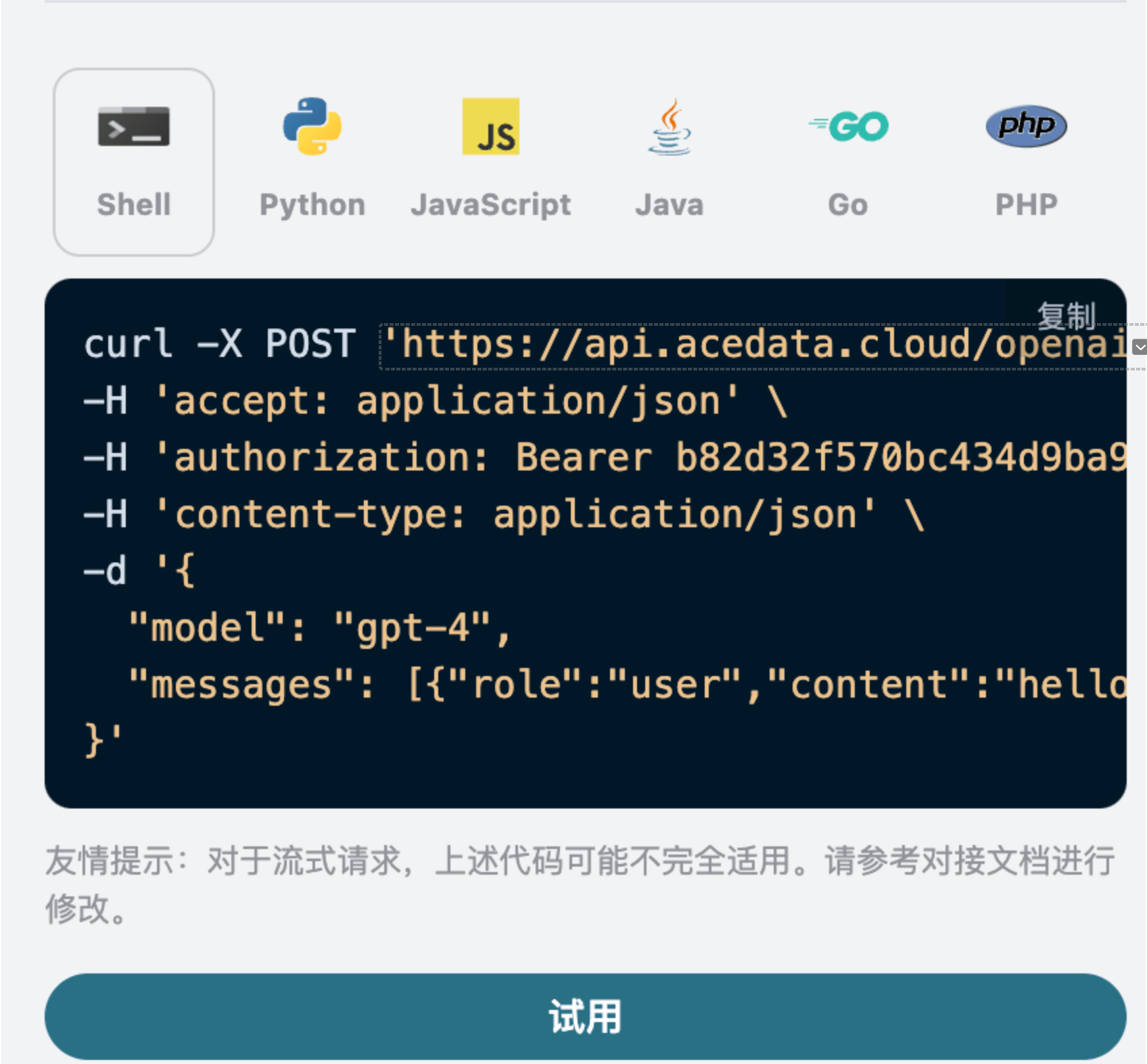
同時您可以注意到右側有對應的呼叫程式碼產生,您可以複製程式碼直接執行,也可以直接點擊「Try」按鈕進行測試。
常用可選參數:
max_tokens:限制單次回覆的最大 token 數。temperature:產生隨機性,0-2 之間,值越大越發散。n:一次產生多少條候選回覆。response_format:回傳格式設定。tools:函式/工具呼叫定義。background:是否背景非同步執行。

{
"id": "resp_68a98322e3c88191a027de2711a02a490554cad0b36c0400",
"object": "response",
"created_at": 1755939618,
"status": "completed",
"background": false,
"content_filters": null,
"error": null,
"incomplete_details": null,
"instructions": null,
"max_output_tokens": null,
"max_tool_calls": null,
"model": "gpt-5.5",
"output": [
{
"id": "msg_68a98323422c8191a7f383eea48ba5160554cad0b36c0400",
"type": "message",
"status": "completed",
"content": [
{
"type": "output_text",
"annotations": [],
"text": "Hello! How can I assist you today?"
}
],
"role": "assistant"
}
],
"parallel_tool_calls": true,
"previous_response_id": null,
"prompt_cache_key": null,
"reasoning": {
"effort": null,
"summary": null
},
"safety_identifier": null,
"service_tier": "default",
"store": true,
"temperature": 1,
"text": {
"format": {
"type": "text"
}
},
"tool_choice": "auto",
"tools": [],
"top_p": 1,
"truncation": "disabled",
"usage": {
"input_tokens": 8,
"input_tokens_details": {
"cached_tokens": 0
},
"output_tokens": 10,
"output_tokens_details": {
"reasoning_tokens": 0
},
"total_tokens": 18
},
"user": null,
"metadata": {}
}
id,產生此次對話任務的 ID,用於唯一識別此次對話任務。model,選擇的 OpenAI ChatGPT 官網模型。output,ChatGPT 針對提問詞給予的回答資訊。usage:針對本次問答對 token 的統計資訊。
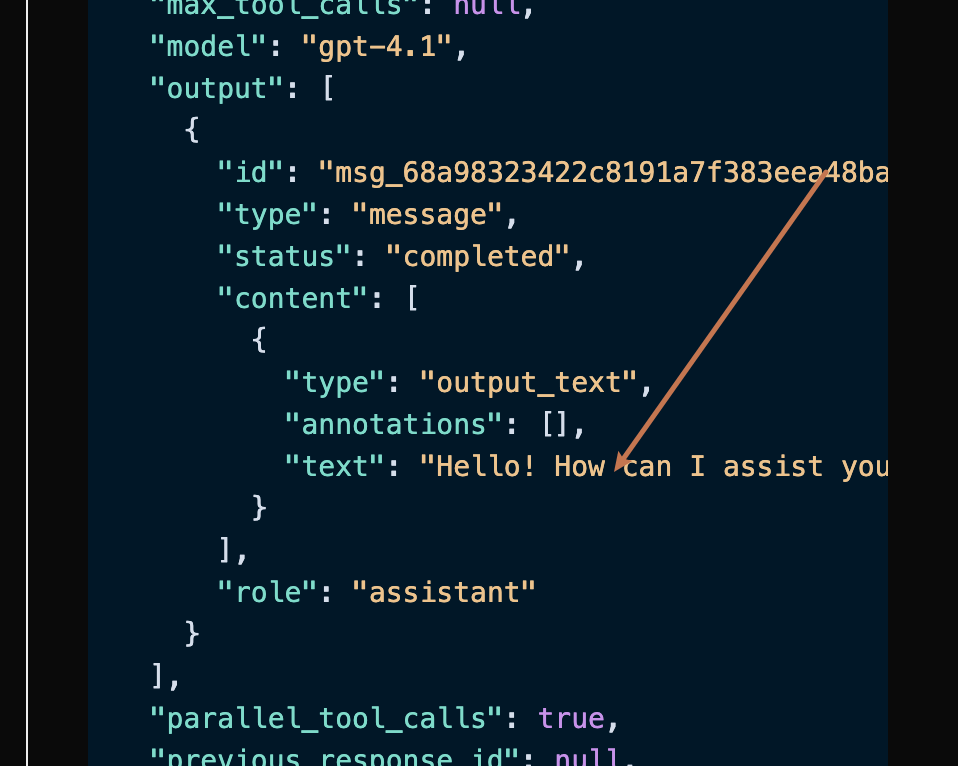
output 是包含了 ChatGPT 的回答資訊,它裡面的 output 是 ChatGPT,可以發現如圖所示。

output 裡面的 content 欄位包含了 ChatGPT 回覆的具體內容。
串流回應
該介面也支援串流回應,這對網頁串接十分有用,可以讓網頁實現逐字顯示效果。 如果想串流回傳回應,可以更改請求標頭裡面的stream 參數,修改為 true。
修改如圖所示,不過呼叫程式碼需要有對應的更改才能支援串流回應。

stream 修改為 true 之後,API 將逐行回傳對應的 JSON 資料,在程式碼層面我們需要做相應的修改來取得逐行的結果。
Python 範例呼叫程式碼:
import requests
url = "https://api.acedata.cloud/openai/responses"
headers = {
"accept": "application/json",
"authorization": "Bearer {token}",
"content-type": "application/json"
}
payload = {
"model": "gpt-4.1",
"input": [{"role":"user","content":"Hello"}],
"stream": True
}
response = requests.post(url, json=payload, headers=headers)
print(response.text)
data: {"type": "response.created", "sequence_number": 0, "response":
{"id": "resp_68a9837bb9bc8190b403947311db6faa0721186e8fbb89d0", "object": "response", "created_at": 1755939707, "status": "in_progress", "background": false, "content_filters": null, "error": null, "incomplete_details": null, "instructions": null, "max_output_tokens": null, "max_tool_calls": null, "model": "gpt-4.1-data", "output": [], "parallel_tool_calls": true, "previous_response_id": null, "prompt_cache_key": null, "reasoning": {"effort": null, "summary": null}, "safety_identifier": null, "service_tier": "auto", "store": true, "temperature": 1.0, "text": {"format": {"type": "text"}}, "tool_choice": "auto", "tools": [], "top_p": 1.0, "truncation": "disabled", "usage": null, "user": null, "metadata": {}}, "model": "gpt-4.1"}
data: {"type": "response.in_progress", "sequence_number": 1, "response": {"id": "resp_68a9837bb9bc8190b403947311db6faa0721186e8fbb89d0", "object": "response", "created_at": 1755939707, "status": "in_progress", "background": false, "content_filters": null, "error": null, "incomplete_details": null, "instructions": null, "max_output_tokens": null, "max_tool_calls": null, "model": "gpt-4.1-data", "output": [], "parallel_tool_calls": true, "previous_response_id": null, "prompt_cache_key": null, "reasoning": {"effort": null, "summary": null}, "safety_identifier": null, "service_tier": "auto", "store": true, "temperature": 1.0, "text": {"format": {"type": "text"}}, "tool_choice": "auto", "tools": [], "top_p": 1.0, "truncation": "disabled", "usage": null, "user": null, "metadata": {}}, "model": "gpt-4.1"}
data: {"type": "response.output_item.added", "sequence_number": 2, "output_index": 0, "item": {"id": "msg_68a9837c49f081908f568bf9c6065c620721186e8fbb89d0", "type": "message", "status": "in_progress", "content": [], "role": "assistant"}, "model": "gpt-4.1"}
data: {"type": "response.content_part.added", "sequence_number": 3, "item_id": "msg_68a9837c49f081908f568bf9c6065c620721186e8fbb89d0", "output_index": 0, "content_index": 0, "part": {"type": "output_text", "annotations": [], "text": ""}, "model": "gpt-4.1"}
data: {"type": "response.output_text.delta", "sequence_number": 4, "item_id": "msg_68a9837c49f081908f568bf9c6065c620721186e8fbb89d0", "output_index": 0, "content_index": 0, "delta": "您好", "model": "gpt-4.1"}
data: {"type": "response.output_text.delta", "sequence_number": 5, "item_id": "msg_68a9837c49f081908f568bf9c6065c620721186e8fbb89d0", "output_index": 0, "content_index": 0, "delta": "!", "model": "gpt-4.1"}
data: {"type": "response.output_text.delta", "sequence_number": 6, "item_id": "msg_68a9837c49f081908f568bf9c6065c620721186e8fbb89d0", "output_index": 0, "content_index": 0, "delta": " 今天", "model": "gpt-4.1"}
data: {"type": "response.output_text.delta", "sequence_number": 7, "item_id": "msg_68a9837c49f081908f568bf9c6065c620721186e8fbb89d0", "output_index": 0, "content_index": 0, "delta": " 我", "model": "gpt-4.1"}
data: {"type": "response.output_text.delta", "sequence_number": 8, "item_id": "msg_68a9837c49f081908f568bf9c6065c620721186e8fbb89d0", "output_index": 0, "content_index": 0, "delta": " 可以", "model": "gpt-4.1"}
data: {"type": "response.output_text.delta", "sequence_number": 9, "item_id": "msg_68a9837c49f081908f568bf9c6065c620721186e8fbb89d0", "output_index": 0, "content_index": 0, "delta": " 如何", "model": "gpt-4.1"}
data: {"type": "response.output_text.delta", "sequence_number": 10, "item_id": "msg_68a9837c49f081908f568bf9c6065c620721186e8fbb89d0", "output_index": 0, "content_index": 0, "delta": " 協助", "model": "gpt-4.1"}
data: {"type": "response.output_text.delta", "sequence_number": 11, "item_id": "msg_68a9837c49f081908f568bf9c6065c620721186e8fbb89d0", "output_index": 0, "content_index": 0, "delta": " 您", "model": "gpt-4.1"}
data: {"type": "response.output_text.delta", "sequence_number": 12, "item_id": "msg_68a9837c49f081908f568bf9c6065c620721186e8fbb89d0", "output_index": 0, "content_index": 0, "delta": "?", "model": "gpt-4.1"}
data: {"type": "response.output_text.delta", "sequence_number": 13, "item_id": "msg_68a9837c49f081908f568bf9c6065c620721186e8fbb89d0", "output_index": 0, "content_index": 0, "delta": " 😊", "model": "gpt-4.1"}
data: {"type": "response.output_text.done", "sequence_number": 14, "item_id": "msg_68a9837c49f081908f568bf9c6065c620721186e8fbb89d0", "output_index": 0, "content_index": 0, "text": "您好!今天我可以如何協助您?😊", "model": "gpt-4.1"}
data: {"type": "response.content_part.done", "sequence_number": 15, "item_id": "msg_68a9837c49f081908f568bf9c6065c620721186e8fbb89d0", "output_index": 0, "content_index": 0, "part": {"type": "output_text", "annotations": [], "text": "您好!今天我可以如何協助您?😊"}, "model": "gpt-4.1"}
data: {"type": "response.output_item.done", "sequence_number": 16, "output_index": 0, "item": {"id": "msg_68a9837c49f081908f568bf9c6065c620721186e8fbb89d0", "type": "message", "status": "completed", "content": [{"type": "output_text", "annotations": [], "text": "您好!今天我可以如何協助您?😊"}], "role": "assistant"}, "model": "gpt-4.1"}
data: {"type": "response.completed", "sequence_number": 17, "response":
{"id": "resp_68a9837bb9bc8190b403947311db6faa0721186e8fbb89d0", "object": "response", "created_at": 1755939707, "status": "completed", "background": false, "content_filters": null, "error": null, "incomplete_details": null, "instructions": null, "max_output_tokens": null, "max_tool_calls": null, "model": "gpt-4.1-data", "output": [{"id": "msg_68a9837c49f081908f568bf9c6065c620721186e8fbb89d0", "type": "message", "status": "completed", "content": [{"type": "output_text", "annotations": [], "text": "您好!今天我能如何協助您?😊"}], "role": "assistant"}], "parallel_tool_calls": true, "previous_response_id": null, "prompt_cache_key": null, "reasoning": {"effort": null, "summary": null}, "safety_identifier": null, "service_tier": "default", "store": true, "temperature": 1.0, "text": {"format": {"type": "text"}}, "tool_choice": "auto", "tools": [], "top_p": 1.0, "truncation": "disabled", "usage": {"input_tokens": 8, "input_tokens_details": {"cached_tokens": 0}, "output_tokens": 11, "output_tokens_details": {"reasoning_tokens": 0}, "total_tokens": 19}, "user": null, "metadata": {}}, "model": "gpt-4.1"}
data,data 裡面的 delta 即為最新的回答內容,與上文介紹的內容一致。delta 是新增的回答內容,您可以根據結果來串接到您的系統中。串流回應以 response.completed 或 response.incomplete 作為終態;終態中的 usage 是本次請求的最終 token 用量,也是計費依據。
如果用戶端在終態到達前中斷連線,本次請求記錄為用戶端已關閉(499),不會使用本機預估 token 計費;如果連線正常結束但沒有收到終態及最終 usage,本次請求記錄為回應不完整(502),同樣不會使用預估 token 計費。遇到這兩種情況時,請重新發起請求。
回傳的 data 結果一共有多個欄位,介紹如下:
item_id,產生此次對話任務的 ID,用於唯一識別此次對話任務。type,產生此次對話 Responses 任務的類型。model,選擇的 OpenAI ChatGPT 官網模型。delta,ChatGPT 針對提問詞給予的回答資訊。
const options = {
method: "post",
headers: {
accept: "application/json",
authorization: "Bearer b82d32f570bc434d9ba9923aa0e7dce0",
"content-type": "application/json",
},
body: JSON.stringify({
model: "gpt-4.1",
input: [{ role: "user", content: "Hello" }],
stream: true,
}),
};
fetch("https://api.acedata.cloud/openai/responses", options)
.then((response) => response.json())
.then((response) => console.log(response))
.catch((err) => console.error(err));
JSONObject jsonObject = new JSONObject();
jsonObject.put("model", "gpt-4.1");
jsonObject.put("input", [{"role":"user","content":"Hello"}]);
jsonObject.put("stream", true);
MediaType mediaType = "application/json; charset=utf-8".toMediaType();
RequestBody body = jsonObject.toString().toRequestBody(mediaType);
Request request = new Request.Builder()
.url("https://api.acedata.cloud/openai/responses")
.post(body)
.addHeader("accept", "application/json")
.addHeader("authorization", "Bearer b82d32f570bc434d9ba9923aa0e7dce0")
.addHeader("content-type", "application/json")
.build();
OkHttpClient client = new OkHttpClient();
Response response = client.newCall(request).execute();
System.out.print(response.body!!.string())
多輪對話
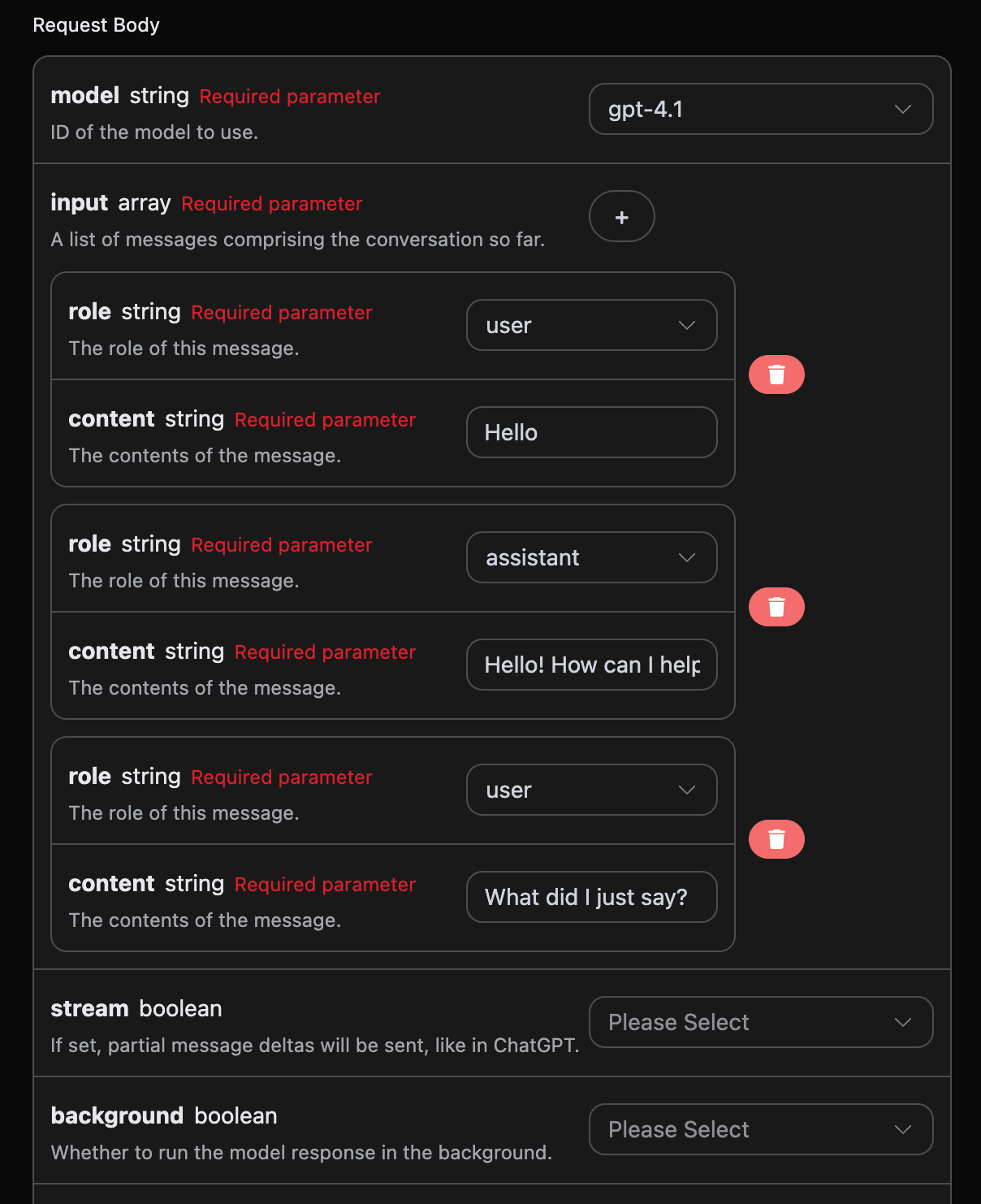
如果您想要串接多輪對話功能,需要對input 欄位上傳多個提問詞,多個提問詞的具體範例如下圖所示:

import requests
url = "https://api.acedata.cloud/openai/responses"
headers = {
"accept": "application/json",
"authorization": "Bearer {token}",
"content-type": "application/json"
}
payload = {
"model": "gpt-4.1",
"input": [{"role":"user","content":"Hello"},{"role":"assistant","content":"Hello! How can I help you today? 😊"},{"role":"user","content":"What did I just say?"}]
}
response = requests.post(url, json=payload, headers=headers)
print(response.text)
{
"id": "resp_68a989c03c508191a1dd82ce2e37e88a0932a4328c0a5d5b",
"object": "response",
"created_at": 1755941312,
"status": "completed",
"background": false,
"content_filters": null,
"error": null,
"incomplete_details": null,
"instructions": null,
"max_output_tokens": null,
"max_tool_calls": null,
"model": "gpt-4.1",
"output": [
{
"id": "msg_68a989c092e4819189821a9eb8247e1e0932a4328c0a5d5b",
"type": "message",
"status": "completed",
"content": [
{
"type": "output_text",
"annotations": [],
"text": "You just said \"Hello.\" \n\nWould you like to continue the conversation or ask a question?"
}
],
"role": "assistant"
}
],
"parallel_tool_calls": true,
"previous_response_id": null,
"prompt_cache_key": null,
"reasoning": {
"effort": null,
"summary": null
},
"safety_identifier": null,
"service_tier": "default",
"store": true,
"temperature": 1,
"text": {
"format": {
"type": "text"
}
},
"tool_choice": "auto",
"tools": [],
"top_p": 1,
"truncation": "disabled",
"usage": {
"input_tokens": 32,
"input_tokens_details": {
"cached_tokens": 0
},
"output_tokens": 20,
"output_tokens_details": {
"reasoning_tokens": 0
},
"total_tokens": 52
},
"user": null,
"metadata": {}
}
output 包含的資訊與基本使用的內容是一致的,這個包含了 ChatGPT 針對多個對話進行回覆的具體內容,這樣就可以根據多個對話內容來回答對應的問題了。
視覺模型
gpt-4o 是 OpenAI 開發的多模態大型語言模型,它在 GPT-4 的基礎上增加了視覺理解能力。這個模型可以同時處理文字和圖像輸入,實現了跨模態的理解和生成。 使用 gpt-4o 模型的文字處理與上文的基本使用內容一致,下面將簡要介紹一下如何使用模型的圖像處理能力。 使用 gpt-4o 模型的圖像處理能力,主要是透過在原有的content 內容基礎上新增一個 type 欄位,透過該欄位可以知道上傳的是文字還是圖片,從而使用 gpt-4o 模型的圖像處理能力,下面主要講述採用 Curl 和 Python 兩種方式來呼叫該功能。
- Curl 指令稿方式
curl -X POST 'https://api.acedata.cloud/openai/responses' \
-H 'accept: application/json' \
-H 'authorization: Bearer {token}' \
-H 'content-type: application/json' \
-d '{
"model": "gpt-4.1",
"input": [
{
"role": "user",
"content": [
{"type": "input_text", "text": "what is in this image?"},
{
"type": "input_image",
"image_url": "https://cdn.acedata.cloud/e724d7f13d.png"
}
]
}
]
}'
- Python 指令稿方式
import requests
url = "https://api.acedata.cloud/openai/chat/completions"
headers = {
"accept": "application/json",
"authorization": "Bearer {token}",
"content-type": "application/json"
}
payload = {
"model": "gpt-4.1",
"input": [
{
"role": "user",
"content": [
{"type": "input_text", "text": "what is in this image?"},
{
"type": "input_image",
"image_url": "https://cdn.acedata.cloud/e724d7f13d.png"
}
]
}
]
}
response = requests.post(url, json=payload, headers=headers)
print(response.text)
{
"id": "resp_68a98c1bb784819e9b9f622007a2d37602483949012d2193",
"object": "response",
"created_at": 1755941915,
"status": "completed",
"background": false,
"content_filters": null,
"error": null,
"incomplete_details": null,
"instructions": null,
"max_output_tokens": null,
"max_tool_calls": null,
"model": "gpt-4.1",
"output": [
{
"id": "msg_68a98c1dd030819e97fb71e6ee33f5a902483949012d2193",
"type": "message",
"status": "completed",
"content": [
{
"type": "output_text",
"annotations": [],
"text": "This image shows a scenic path, possibly a boardwalk, running through a lush green field or meadow. The sky above is bright blue with some white clouds, and there are green trees and bushes in the background. It looks like a peaceful nature scene, possibly in a park, wetland, or prairie area. The image conveys a sense of tranquility and natural beauty."
}
],
"role": "assistant"
}
],
"parallel_tool_calls": true,
"previous_response_id": null,
"prompt_cache_key": null,
"reasoning": {
"effort": null,
"summary": null
},
"safety_identifier": null,
"service_tier": "default",
"store": true,
"temperature": 1,
"text": {
"format": {
"type": "text"
}
},
"tool_choice": "auto",
"tools": [],
"top_p": 1,
"truncation": "disabled",
"usage": {
"input_tokens": 1118,
"input_tokens_details": {
"cached_tokens": 0
},
"output_tokens": 75,
"output_tokens_details": {
"reasoning_tokens": 0
},
"total_tokens": 1193
},
"user": null,
"metadata": {}
}
檔案處理模型的建立
請求範例:{
"model": "gpt-4.1",
"input": [
{
"role": "user",
"content": [
{ "type": "input_text", "text": "what is in this file?" },
{
"type": "input_file",
"file_url": "https://platform2.cdn.acedata.cloud/fish/64adc04b-c196-4a0f-9070-222ba101ce6c.wav"
}
]
}
]
}
{
"id": "resp_68a98d7bb57c819ba25424f5f50a29a300a1af2af822e88a",
"object": "response",
"created_at": 1755942267,
"status": "completed",
"background": false,
"content_filters": null,
"error": null,
"incomplete_details": null,
"instructions": null,
"max_output_tokens": null,
"max_tool_calls": null,
"model": "gpt-4.1",
"output": [
{
"id": "msg_68a98d7d9b80819b9b0f09b7bcd00bf900a1af2af822e88a",
"type": "message",
"status": "completed",
"content": [
{
"type": "output_text",
"annotations": [],
"text": "The file you posted contains the **2024 annual letter to shareholders from Berkshire Hathaway Inc.**, written by Warren E. Buffett, Chairman of the Board. This document is a comprehensive communication that is typically included in Berkshire's annual report to shareholders.\n\n### What's Inside the File:\n\n#### 1. **Chairman's Letter to Shareholders**\n - **Introduction & Philosophy:** Warren Buffett discusses the purpose of the annual report, Berkshire Hathaway’s communication style, and his philosophy for transparency and candid discussion of both successes and failures.\n - **Discussion of Mistakes:** He talks openly about the mistakes made in capital allocation and personnel decisions, emphasizing the importance of admitting errors and acting promptly to correct them.\n - **Succession Comments:** Buffett references his eventual retirement, and that Greg Abel will succeed him as CEO and writer of these letters.\n - **Anecdotal Story:** The story of Pete Liegl, founder of Forest River (an RV manufacturer acquired by Berkshire), is told to illustrate management philosophy and business decision-making.\n\n#### 2. **2024 Business and Financial Performance**\n - **Key Results:** Summary of how Berkshire performed financially in 2024 vs. 2023, including operating earnings breakdown by business segments such as insurance, BNSF railroad, and energy.\n - **Insurance Business:** GEICO and the property-casualty insurance division had a standout year, with commentary on the industry and how Berkshire approaches insurance risk, pricing, and investment of insurance \"float.\"\n - **Investments:** Discussion on Berkshire’s strategy of owning both full businesses and partial stakes (marketable securities) in large companies (e.g., Apple, American Express, Coca-Cola), and its deployment of cash.\n - **Taxes:** Reference to Berkshire breaking records in corporate tax payments ($26.8 billion to the IRS in 2024).\n\n#### 3. **Long-term Philosophy & Capitalism Commentary**\n - **On Equities:** Buffett explains why Berkshire prioritizes ownership of businesses (equities) over cash or bonds, and why the company favors long-term investments.\n - **On Capitalism:** There’s a reflection on America’s growth, the role of capitalism, savings, and capital allocation in the nation’s success, and a nod to the importance of maintaining a stable currency.\n\n#### 4. **Japanese Investments**\n - **Update on Japanese Holdings:** Berkshire’s growing investments in five Japanese trading companies, and the positive view of their management and governance.\n\n#### 5. **Berkshire Hathaway Annual Meeting**\n - **Annual Gathering Info:** Details about the annual meeting in Omaha, including social events, book sales, and charitable initiatives related to the meeting.\n - **Personal Stories:** Personal anecdotes involving Buffett’s family, (including his sister Bertie), to add a human touch to the letter.\n\n#### 6. **Performance Tables**\n - **Berkshire vs S&P 500 (1965-2024):** Two detailed tables showing annual percentage change in Berkshire’s share price vs. total return for the S&P 500, as well as long-term compounded and overall gains.\n\n---\n\n### In Summary\n\nThis file is the **2024 Berkshire Hathaway annual letter to shareholders**, primarily written by Warren Buffett. It covers business performance, management philosophy, investment strategy, earnings and taxes, insurance operations, significant holdings, capital allocation, succession updates, and more. Tables show a remarkable outperformance of Berkshire Hathaway vs. the S&P 500 over nearly six decades – a central point of pride in the letter.\n\nIf you want specifics from any particular section, let me know!"
}
],
"role": "assistant"
}
],
"parallel_tool_calls": true,
"previous_response_id": null,
"prompt_cache_key": null,
"reasoning": {
"effort": null,
"summary": null
},
"safety_identifier": null,
"service_tier": "default",
"store": true,
"temperature": 1,
"text": {
"format": {
"type": "text"
}
},
"tool_choice": "auto",
"tools": [],
"top_p": 1,
"truncation": "disabled",
"usage": {
"input_tokens": 8438,
"input_tokens_details": {
"cached_tokens": 0
},
"output_tokens": 731,
"output_tokens_details": {
"reasoning_tokens": 0
},
"total_tokens": 9169
},
"user": null,
"metadata": {}
}
錯誤處理
在呼叫 API 時,如果遇到錯誤,API 會回傳相應的錯誤代碼和資訊。例如:400 token_mismatched:錯誤的請求,可能是由於缺少或無效的參數。400 api_not_implemented:錯誤的請求,可能是由於缺少或無效的參數。401 invalid_token:未授權,授權權杖無效或缺失。429 too_many_requests:請求過多,您已超過速率限制。500 api_error:內部伺服器錯誤,伺服器上發生了某些問題。
錯誤回應範例
{
"success": false,
"error": {
"code": "api_error",
"message": "fetch failed"
},
"trace_id": "2cf86e86-22a4-46e1-ac2f-032c0f2a4e89"
}