跳轉到主要內容
本文將介紹一種 Producer Audios Generation API 對接說明,它是可以透過輸入自定義參數來生成 Producer 官方的音樂。

申請流程

要使用 API,需要先到 Producer Audios Generation API 對應頁面申請對應的服務,進入頁面之後,點擊「Acquire」按鈕,如圖所示: 如果你尚未登入或註冊,會自動跳轉到登入頁面邀請您來註冊和登入,登入註冊之後會自動返回當前頁面。 在首次申請時會有免費額度贈送,可以免費使用該 API。

基本使用

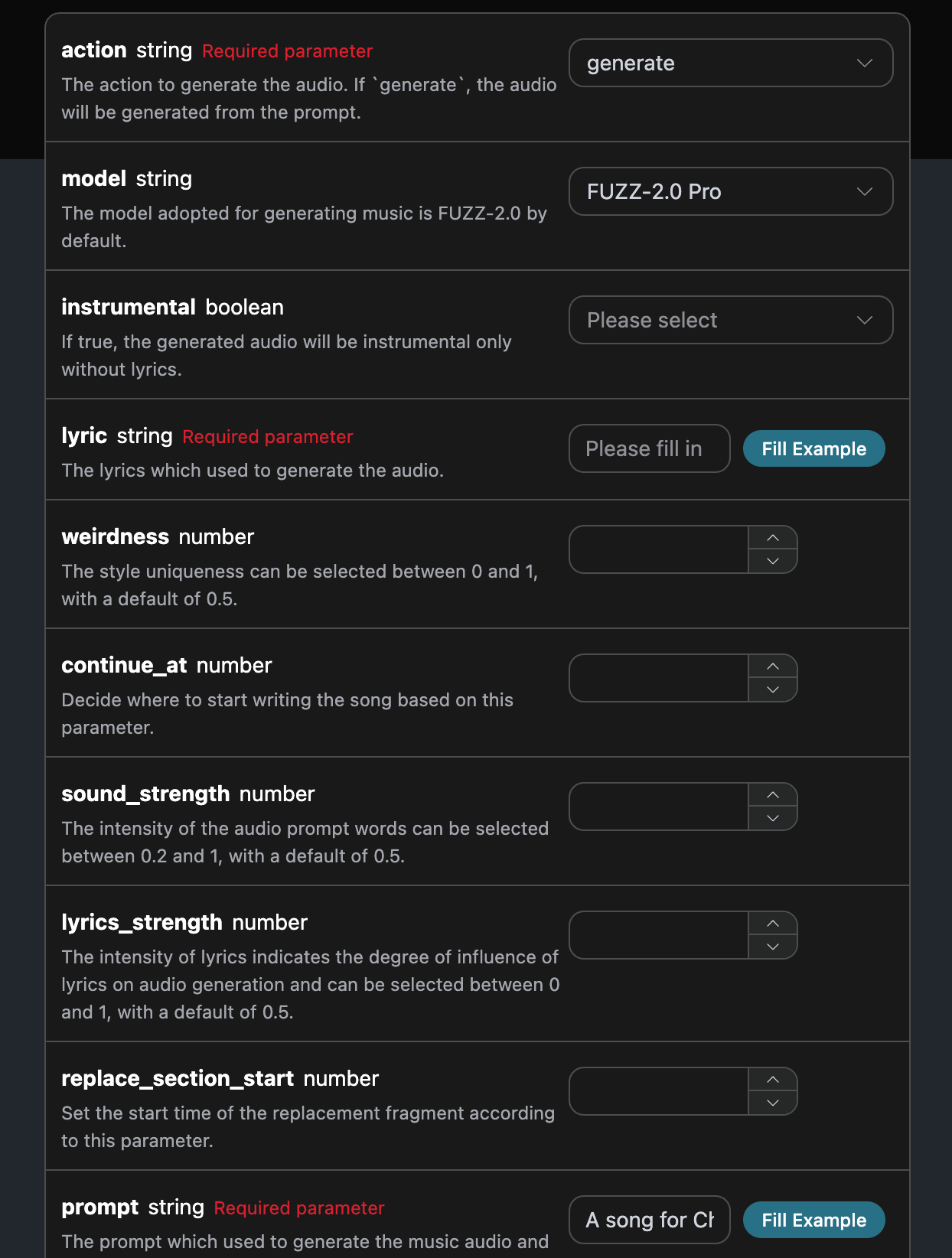
想些什麼歌曲,可以任意輸入一段文字,比如我想生成一個關於聖誕的歌曲,就可以輸入 a song for Christmas,如圖所示:

可以看到這裡我們設定了 Request Headers,包括:
  • accept:想要接收怎樣格式的響應結果,這裡填寫為 application/json,即 JSON 格式。
  • authorization:調用 API 的密鑰,申請之後可以直接下拉選擇。
另外 Request Body 的參數包括:
  • action:此次音樂生成任務的行為,生成歌曲是 generate
  • model:創建歌曲採用的模型,目前主要有: FUZZ-2.0 ProFUZZ-2.0FUZZ-2.0 Raw,FUZZ-1.1 ProFUZZ-1.0 ProFUZZ-1.0FUZZ-1.1FUZZ-0.8
  • lyric:歌曲的歌詞內容。
  • custom:是否採用自定義方式生成歌曲。
  • prompt:靈感模式下的提示詞。
  • title:歌曲標題信息。
  • audio_id:參考歌曲 ID,用於續寫/翻版等操作。
  • continue_at:從指定秒數開始續寫歌曲。
  • replace_section_start/replace_section_end:替換片段的起止時間,單位秒。
  • lyrics_strength:歌詞強度,表示歌詞在音頻生成中的影響程度,可選0-1之間,默認0.7。
  • sound_strength:音頻提示詞強度,可選0.2-1之間,默認0.7。
  • cover_strength:翻唱強度 0.2-1之間,默認1。
  • weirdness:風格奇特度,可選 0-1之間,默認0.5
  • callback_url:需要回調結果的 URL。
  • instrumental:是否為無歌詞模式。
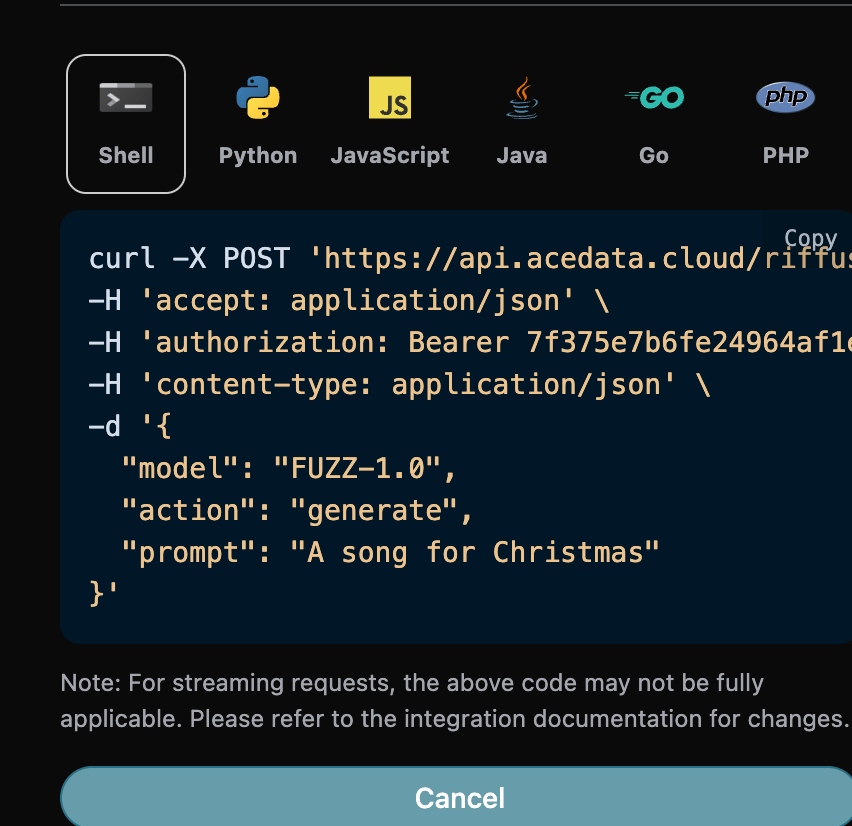
選擇之後,可以發現右側也生成了對應代碼,如圖所示:

點擊「Try」按鈕即可進行測試,如上圖所示,這裡我們就得到了如下結果:
{
  "success": true,
  "task_id": "82fd443a-903a-4f18-8028-12d2f8a0a4be",
  "trace_id": "d85839fa-0bb1-42da-a9fc-cd582c29027d",
  "data": [
    {
      "id": "6c947f13-a3c5-4b9c-8609-5639c37cdc2d",
      "title": "Untitled",
      "image_url": "https://storage.googleapis.com/corpusant-app-public/riffs/a853673e-615c-42ae-bdff-16b1add94861/image/6c947f13-a3c5-4b9c-8609-5639c37cdc2d.jpg",
      "lyric": "[Instrumental]",
      "audio_url": "https://storage.googleapis.com/corpusant-app-public/riffs/a853673e-615c-42ae-bdff-16b1add94861/audio/6c947f13-a3c5-4b9c-8609-5639c37cdc2d.m4a",
      "video_url": null,
      "image_id": "6c947f13-a3c5-4b9c-8609-5639c37cdc2d",
      "topic": null,
      "seed": "2450882164",
      "sound": "A song for Christmas",
      "created_at": "2025-12-30T17:18:23.232911Z",
      "model": "FUZZ-2.0 Pro",
      "progress": "100%",
      "state": "succeeded",
      "duration": "181.3014058956916"
    }
  ]
}
返回結果一共有多個字段,介紹如下:
  • success,此時音樂生成任務的狀態情況。
    • data,此次音樂任務的結果
      • id,此時音樂生成任務的 ID。
      • sound,此時音樂生成任務的提示詞。
      • seed,此時音樂生成任務的種子值。
      • audio_url,此時音樂生成任務的音頻鏈接。
      • image_url,此時音樂生成任務的封面鏈接。
      • image_id,此時音樂生成任務的封面ID。
      • state,此時音樂生成任務的狀態。
      • duration,此時音樂的時長信息。
      • progress,此時音樂任務的進度值。
      • model,此時音樂生成任務採用的模型信息。
      • lyric,此時音樂生成任務的歌詞信息。
可以看到我們得到了想生成的音樂信息,我們只需要根據結果中 data 的音樂鏈接地址獲取生成的 Producer 音樂即可。 另外如果想生成對應的對接代碼,可以直接複製生成,例如 CURL 的代碼如下:
curl -X POST 'https://api.acedata.cloud/producer/audios' \
-H 'accept: application/json' \
-H 'authorization: Bearer {token}' \
-H 'content-type: application/json' \
-d '{
  "action": "generate",
  "model": "FUZZ-2.0 Pro",
  "prompt": "A song for Christmas"
}'

自定義生成

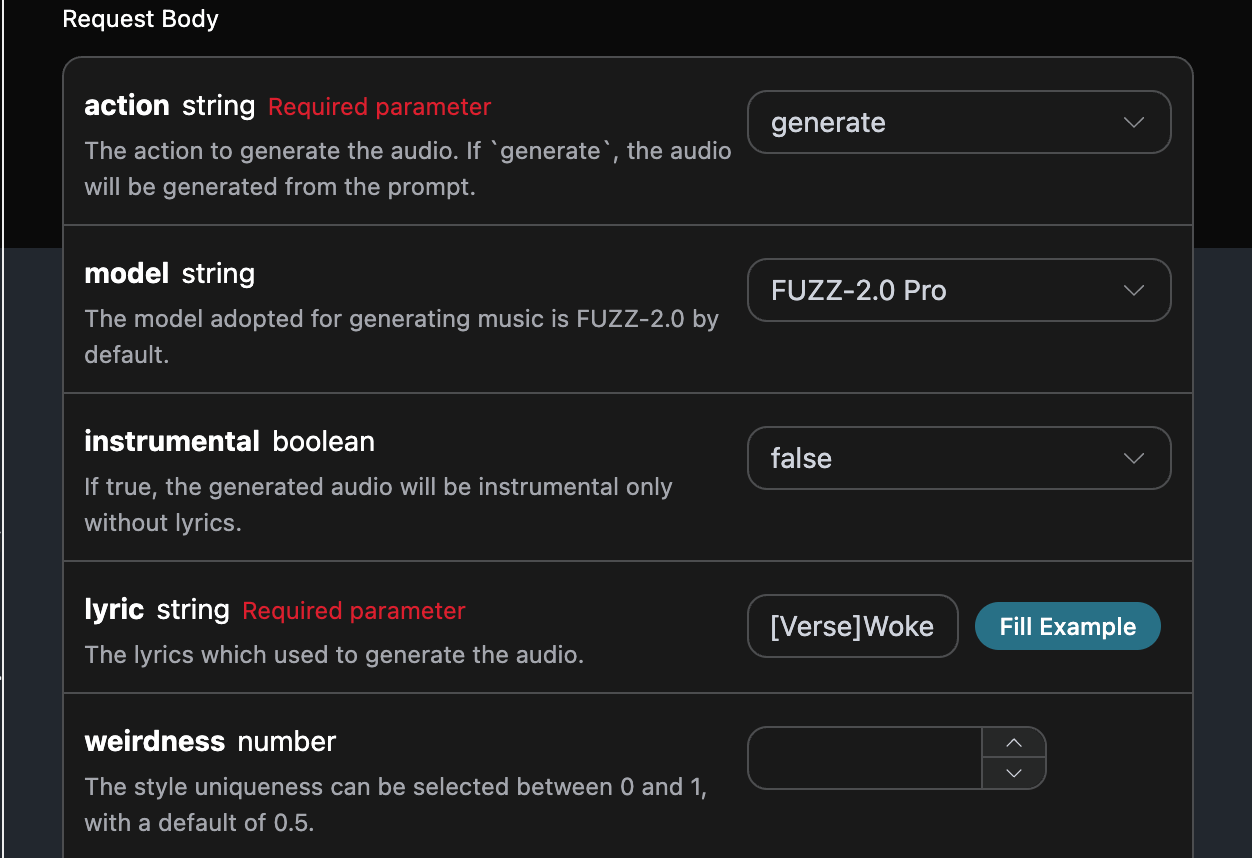
如果想自定義生成歌詞,可以輸入歌詞: 這時候 lyric 字段可以傳入類似如下內容:
[Verse]Woke up with the sun in my eyesNo clouds above just blue in the skiesShoes on my feet I’m ready to runEvery step feels like a loaded gun[Chorus]Happy days are rolling inLet the joy beneath my skinNo more shadows no more liesJust the truth that lifts me high[Verse 2]Dancing through the city streetsA rhythm pounding in my heartbeatStrangers smile it’s catching onThis world’s a stage we’re all a song[Chorus]Happy days are rolling inLet the joy beneath my skinNo more shadows no more liesJust the truth that lifts me high[Bridge]Throw your worries out the doorLet them sink to the ocean floorWe’re alive and it’s enoughLife is messy but it’s love[Chorus]Happy days are rolling inLet the joy beneath my skinNo more shadows no more liesJust the truth that lifts me high
接下來我們要根據歌詞、標題、風格自定義生成歌曲,就可以指定如下內容:
  • lyric:歌詞文本
  • custom:填寫為 true,代表自定義生成,該參數默認為 false,代表使用 prompt 生成。
  • title:歌曲的標題。 填写样例如下:

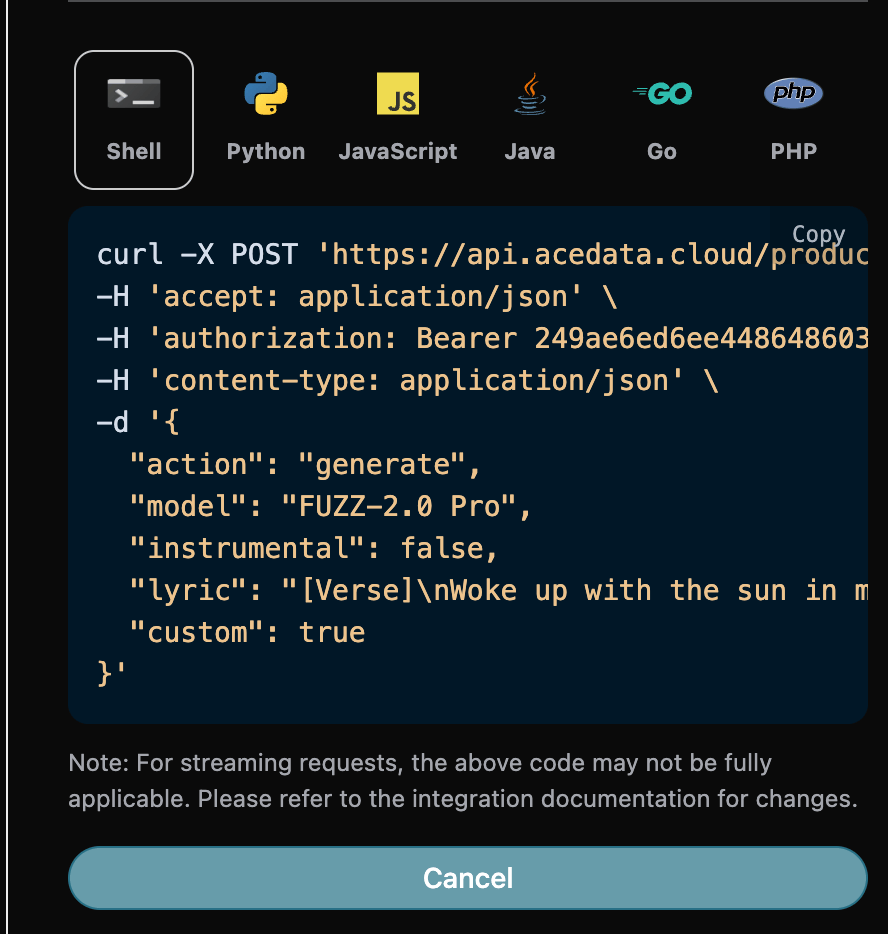
填写完毕之后自動生成了代碼如下:

對應的代碼:
curl -X POST 'https://api.acedata.cloud/producer/audios' \
-H 'accept: application/json' \
-H 'authorization: Bearer {token}' \
-H 'content-type: application/json' \
-d '{
  "action": "generate",
  "model": "FUZZ-2.0 Pro",
  "instrumental": false,
  "lyric": "[Verse]\nWoke up with the sun in my eyes\nNo clouds above just blue in the skies\nShoes on my feet I’m ready to run\nEvery step feels like a loaded gun\n[Chorus]\nHappy days are rolling in\nLet the joy beneath my skin\nNo more shadows no more lies\nJust the truth that lifts me high\n[Verse 2]\nDancing through the city streets\nA rhythm pounding in my heartbeat\nStrangers smile it’s catching on\nThis world’s a stage we’re all a song\n[Chorus]\nHappy days are rolling in\nLet the joy beneath my skin\nNo more shadows no more lies\nJust the truth that lifts me high\n[Bridge]\nThrow your worries out the door\nLet them sink to the ocean floor\nWe’re alive and it’s enough\nLife is messy but it’s love\n[Chorus]\nHappy days are rolling in\nLet the joy beneath my skin\nNo more shadows no more lies\nJust the truth that lifts me high",
  "custom": true
}'
測試允許,生成的效果是類似的。
{
  "success": true,
  "task_id": "9f58bbd4-855a-4233-ac45-b63bf9168e02",
  "trace_id": "145ad117-6ce7-42dd-af12-70751c5284fc",
  "data": [
    {
      "id": "38d3b9e2-0dfb-4338-b2a7-15e45656ed32",
      "title": "Woke up with the sun in my eyes",
      "image_url": "https://storage.googleapis.com/corpusant-app-public/riffs/7ce2b11a-179f-4b87-b5ff-397613c62c93/image/38d3b9e2-0dfb-4338-b2a7-15e45656ed32.jpg",
      "lyric": "[Verse]\nWoke up with the sun in my eyes\nNo clouds above just blue in the skies\nShoes on my feet I’m ready to run\nEvery step feels like a loaded gun\n[Chorus]\nHappy days are rolling in\nLet the joy beneath my skin\nNo more shadows no more lies\nJust the truth that lifts me high\n[Verse 2]\nDancing through the city streets\nA rhythm pounding in my heartbeat\nStrangers smile it’s catching on\nThis world’s a stage we’re all a song\n[Chorus]\nHappy days are rolling in\nLet the joy beneath my skin\nNo more shadows no more lies\nJust the truth that lifts me high\n[Bridge]\nThrow your worries out the door\nLet them sink to the ocean floor\nWe’re alive and it’s enough\nLife is messy but it’s love\n[Chorus]\nHappy days are rolling in\nLet the joy beneath my skin\nNo more shadows no more lies\nJust the truth that lifts me high",
      "audio_url": "https://storage.googleapis.com/corpusant-app-public/riffs/7ce2b11a-179f-4b87-b5ff-397613c62c93/audio/38d3b9e2-0dfb-4338-b2a7-15e45656ed32.m4a",
      "video_url": null,
      "image_id": "38d3b9e2-0dfb-4338-b2a7-15e45656ed32",
      "topic": null,
      "seed": "3789209121",
      "sound": "",
      "created_at": "2025-12-30T17:26:46.357055Z",
      "model": "FUZZ-2.0 Pro",
      "progress": "100%",
      "state": "succeeded",
      "duration": "153.80897959183673"
    }
  ]
}

翻唱歌曲

如果想對已經生成的歌曲進行翻唱操作的操作,可以輸入上文生成的歌曲進行翻唱,接下來我們要根據歌詞、標題自定義生成歌曲。 如果想對自己上傳的歌曲進行繼續翻唱的話,可以將參數 action 設置為 upload_cover ,並且輸入需要繼續翻唱自定義上傳的歌曲 ID,歌曲 ID 的獲取是使用 Producer Upload API來獲取,如下圖所示:
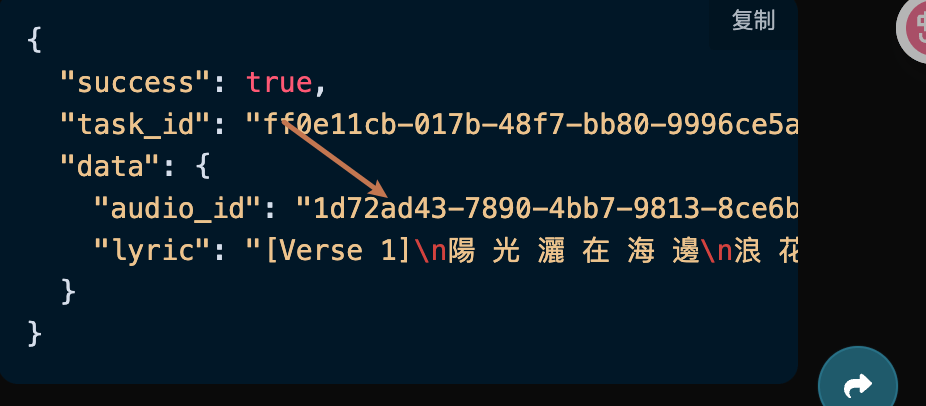
就可以指定如下內容:
  • action:此次歌曲任務的行為,目前支持:generate、cover、extend、upload_cover、upload_extend、replace_section、swap_vocals、swap_instrumentals、variation,此次翻唱使用cover參數。
  • lyric:歌詞文本
  • title:歌曲的標題。
  • custom:是否採用自定義模式生成,默認是false。
  • audio_id:需要翻唱歌曲的歌曲ID。
填寫樣例如下:

填寫完畢之後自動生成了代碼如下:

對應的代碼:
curl -X POST 'https://api.acedata.cloud/producer/audios' \
-H 'accept: application/json' \
-H 'authorization: Bearer {token}' \
-H 'content-type: application/json' \
-d '{
  "action": "cover",
  "model": "FUZZ-2.0 Pro",
  "lyric": "[Verse]\nWoke up with the sun in my eyes\nNo clouds above just blue in the skies\nShoes on my feet I’m ready to run\nEvery step feels like a loaded gun\n[Chorus]\nHappy days are rolling in\nLet the joy beneath my skin\nNo more shadows no more lies\nJust the truth that lifts me high\n[Verse 2]\nDancing through the city streets\nA rhythm pounding in my heartbeat\nStrangers smile it’s catching on\nThis world’s a stage we’re all a song\n[Chorus]\nHappy days are rolling in\nLet the joy beneath my skin\nNo more shadows no more lies\nJust the truth that lifts me high\n[Bridge]\nThrow your worries out the door\nLet them sink to the ocean floor\nWe’re alive and it’s enough\nLife is messy but it’s love\n[Chorus]\nHappy days are rolling in\nLet the joy beneath my skin\nNo more shadows no more lies\nJust the truth that lifts me high",
  "audio_id": "38d3b9e2-0dfb-4338-b2a7-15e45656ed32",
  "instrumental": false,
  "custom": true,
  "title": "Cover"
}'
測試允許,生成的效果是類似的。
{
  "success": true,
  "task_id": "dbca350e-6fb9-46ca-9c7e-4c1a9080806f",
  "trace_id": "a39e0fff-ced8-4b31-ae23-aef3badd90fa",
  "data": [
    {
      "id": "e52dd729-38b4-4c2f-9031-59eb7953c593",
      "title": "封面",
      "image_url": "https://storage.googleapis.com/corpusant-app-public/riffs/7ce2b11a-179f-4b87-b5ff-397613c62c93/image/e52dd729-38b4-4c2f-9031-59eb7953c593.jpg",
      "lyric": "[段落]\n在阳光照耀下醒来\n天空中没有云彩,只有蓝天\n脚上穿着鞋子,我准备出发\n每一步都像是上膛的枪\n[副歌]\n快乐的日子正在到来\n让快乐在我肌肤下流淌\n不再有阴影,不再有谎言\n只有真相让我高飞\n[段落 2]\n在城市街道上舞动\n心跳中有节奏的脉动\n陌生人微笑,感染着我\n这个世界是个舞台,我们都是一首歌\n[副歌]\n快乐的日子正在到来\n让快乐在我肌肤下流淌\n不再有阴影,不再有谎言\n只有真相让我高飞\n[桥段]\n把你的烦恼扔出门外\n让它们沉入海底\n我们活着,这就足够了\n生活是混乱的,但它是爱\n[副歌]\n快乐的日子正在到来\n让快乐在我肌肤下流淌\n不再有阴影,不再有谎言\n只有真相让我高飞",
      "audio_url": "https://storage.googleapis.com/corpusant-app-public/riffs/7ce2b11a-179f-4b87-b5ff-397613c62c93/audio/e52dd729-38b4-4c2f-9031-59eb7953c593.m4a",
      "video_url": null,
      "image_id": "e52dd729-38b4-4c2f-9031-59eb7953c593",
      "topic": null,
      "seed": "358803418",
      "sound": "",
      "created_at": "2025-12-30T17:32:32.951948Z",
      "model": "FUZZ-2.0 Pro",
      "progress": "100%",
      "state": "成功",
      "duration": "153.0659410430839"
    }
  ]
}

续写歌曲

如果想续写歌曲的话,我们需要传入action参数值为:extend,接下来我们要根据歌词、标题、风格自定义生成歌曲。 如果想对自己上传的歌曲进行继续续写的话,可以将参数 action 设置为 upload_extend ,并且输入需要继续续写自定义上传的歌曲 ID,歌曲 ID 的获取是使用 Producer Upload API来获取,如下图所示:
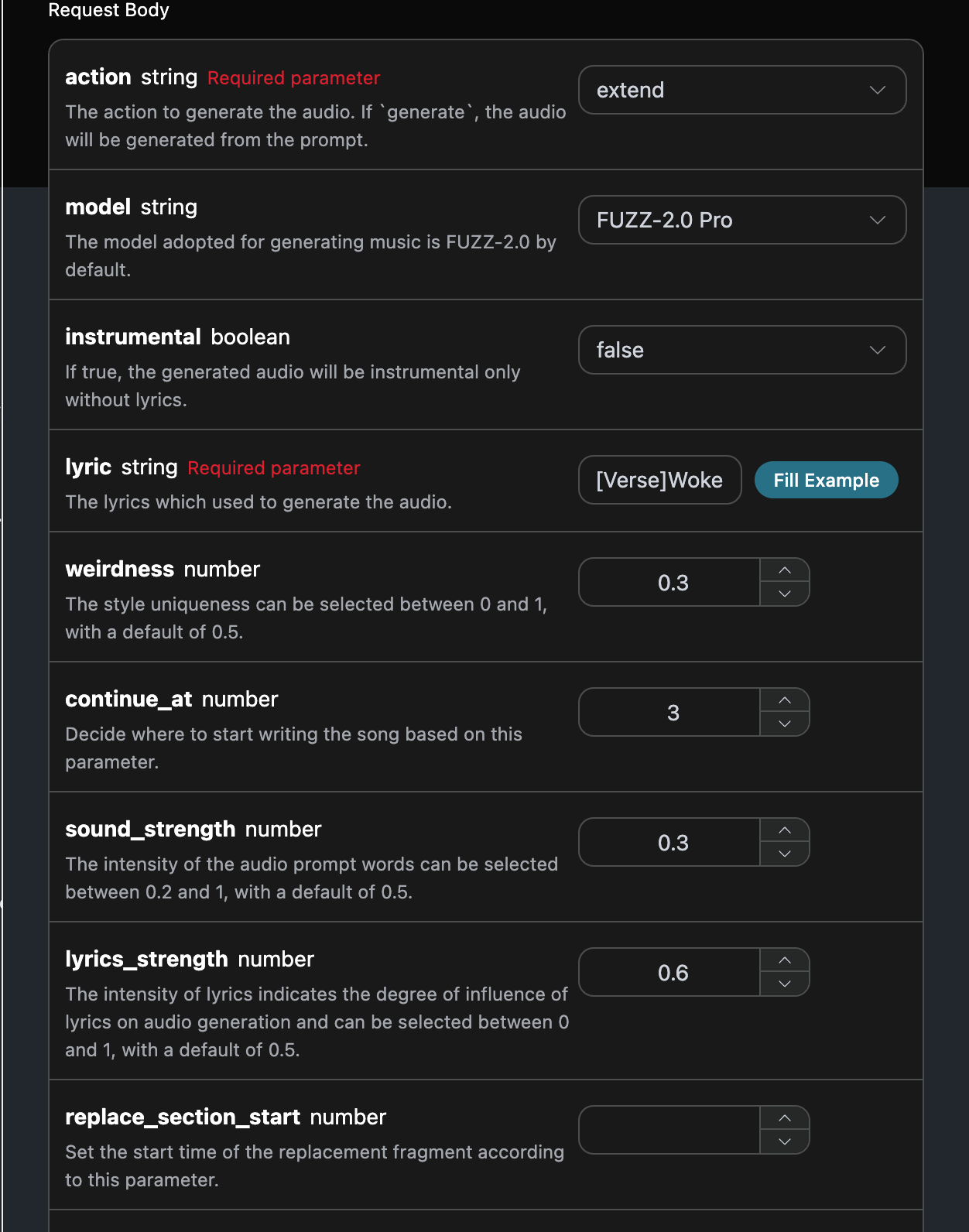
填写样例如下:

填写完毕之后自动生成了代码如下:

对应的代码:
curl -X POST 'https://api.acedata.cloud/producer/audios' \
-H 'accept: application/json' \
-H 'authorization: Bearer {token}' \
-H 'content-type: application/json' \
-d '{
  "action": "extend",
  "model": "FUZZ-2.0 Pro",
  "instrumental": false,
  "lyric": "[段落]\n在阳光照耀下醒来\n天空中没有云彩,只有蓝天\n脚上穿着鞋子,我准备出发\n每一步都像是上膛的枪\n[副歌]\n快乐的日子正在到来\n让快乐在我肌肤下流淌\n不再有阴影,不再有谎言\n只有真相让我高飞\n[段落 2]\n在城市街道上舞动\n心跳中有节奏的脉动\n陌生人微笑,感染着我\n这个世界是个舞台,我们都是一首歌\n[副歌]\n快乐的日子正在到来\n让快乐在我肌肤下流淌\n不再有阴影,不再有谎言\n只有真相让我高飞\n[桥段]\n把你的烦恼扔出门外\n让它们沉入海底\n我们活着,这就足够了\n生活是混乱的,但它是爱\n[副歌]\n快乐的日子正在到来\n让快乐在我肌肤下流淌\n不再有阴影,不再有谎言\n只有真相让我高飞",
  "continue_at": 3,
  "audio_id": "38d3b9e2-0dfb-4338-b2a7-15e45656ed32",
  "custom": true,
  "title": "续写",
  "weirdness": 0.3,
  "sound_strength": 0.3,
  "lyrics_strength": 0.6
}'
测试允许,生成的效果是类似的。
{
  "success": true,
  "task_id": "834983cb-d62d-4750-b1aa-461da137e51f",
  "trace_id": "6923eee2-7403-432c-8bd1-e471086385b0",
  "data": [
    {
      "id": "d9ebc609-fb65-4a23-b914-c074747af6a4",
      "title": "续写",
      "image_url": "https://storage.googleapis.com/corpusant-app-public/riffs/7ce2b11a-179f-4b87-b5ff-397613c62c93/image/d9ebc609-fb65-4a23-b914-c074747af6a4.jpg",
      "lyric": "[段落]\n[段落]\n在阳光照耀下醒来\n天空中没有云彩,只有蓝天\n脚上穿着鞋子,我准备出发\n每一步都像是上膛的枪\n[副歌]\n快乐的日子正在到来\n让快乐在我肌肤下流淌\n不再有阴影,不再有谎言\n只有真相让我高飞\n[段落 2]\n在城市街道上舞动\n心跳中有节奏的脉动\n陌生人微笑,感染着我\n这个世界是个舞台,我们都是一首歌\n[副歌]\n快乐的日子正在到来\n让快乐在我肌肤下流淌\n不再有阴影,不再有谎言\n只有真相让我高飞\n[桥段]\n把你的烦恼扔出门外\n让它们沉入海底\n我们活着,这就足够了\n生活是混乱的,但它是爱\n[副歌]\n快乐的日子正在到来\n让快乐在我肌肤下流淌\n不再有阴影,不再有谎言\n只有真相让我高飞",
      "audio_url": "https://storage.googleapis.com/corpusant-app-public/riffs/7ce2b11a-179f-4b87-b5ff-397613c62c93/audio/d9ebc609-fb65-4a23-b914-c074747af6a4.m4a",
      "video_url": null,
      "image_id": "d9ebc609-fb65-4a23-b914-c074747af6a4",
      "topic": null,
      "seed": "4294469624",
      "sound": "",
      "created_at": "2025-12-30T17:36:14.520928Z",
      "model": "FUZZ-2.0 Pro",
      "progress": "100%",
      "state": "成功",
      "duration": "173.87102040816328"
    }
  ]
}

音乐变换

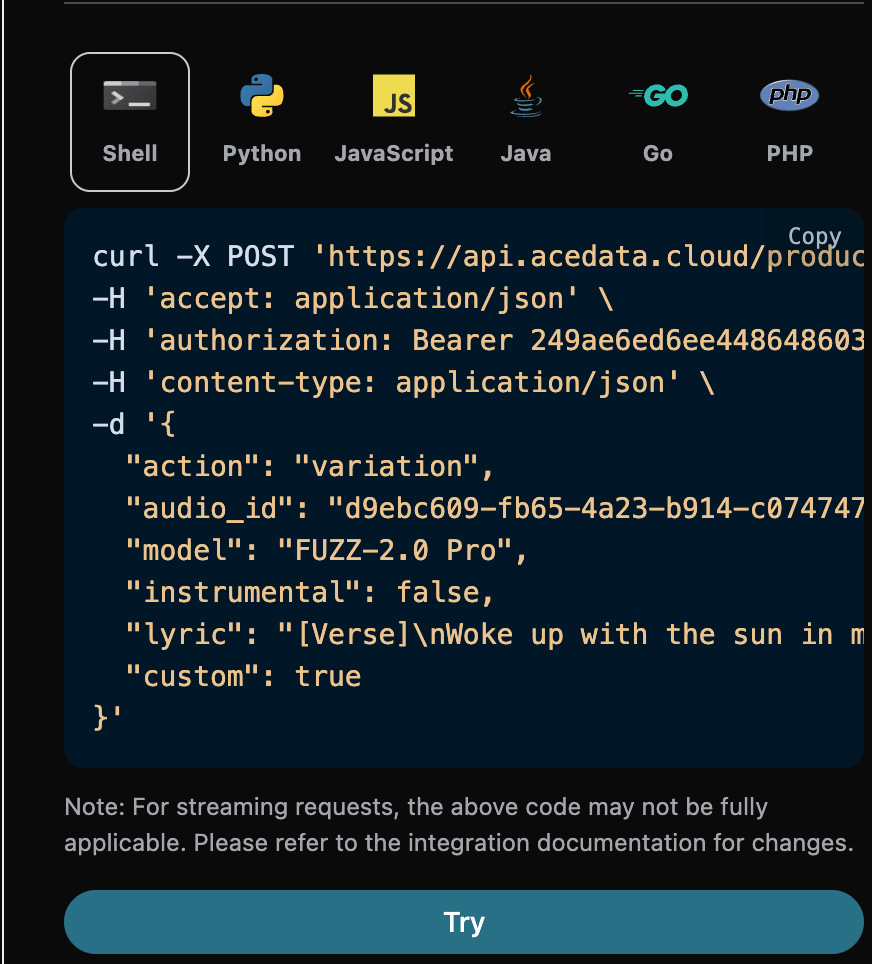
如果想根据上一首音乐的seed值生成一首类似效果的新音乐的话,我们需要传入action参数值为:variation,接下来就可以自定义生成一首类似效果的新音乐。 填写样例如下:
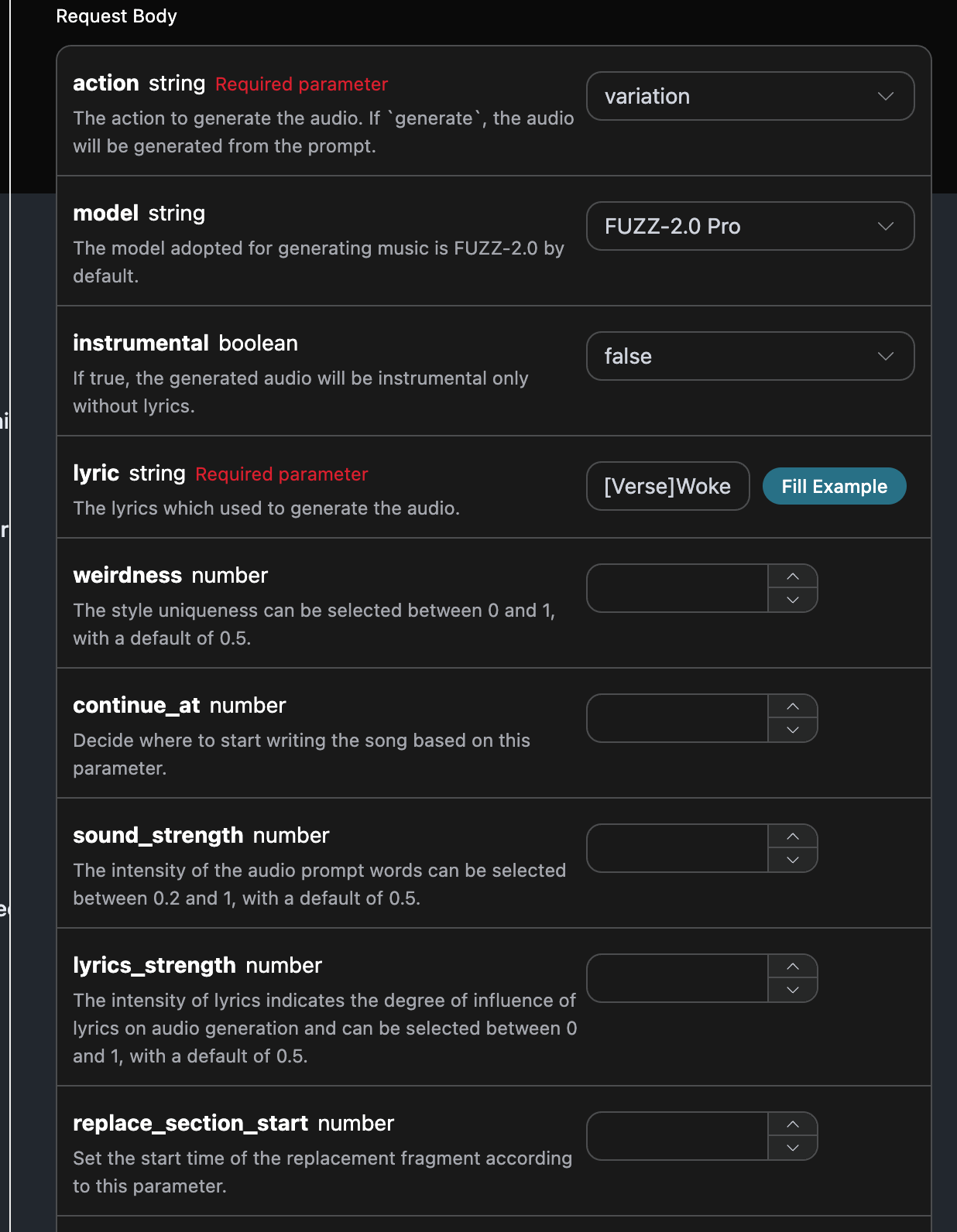
填写完毕之後自動生成的代碼如下:

對應的代碼:
curl -X POST 'https://api.acedata.cloud/producer/audios' \
-H 'accept: application/json' \
-H 'authorization: Bearer {token}' \
-H 'content-type: application/json' \
-d '{
  "action": "variation",
  "audio_id": "d9ebc609-fb65-4a23-b914-c074747af6a4",
  "model": "FUZZ-2.0 Pro",
  "instrumental": false,
  "lyric": "[Verse]\nWoke up with the sun in my eyes\nNo clouds above just blue in the skies\nShoes on my feet I’m ready to run\nEvery step feels like a loaded gun\n[Chorus]\nHappy days are rolling in\nLet the joy beneath my skin\nNo more shadows no more lies\nJust the truth that lifts me high\n[Verse 2]\nDancing through the city streets\nA rhythm pounding in my heartbeat\nStrangers smile it’s catching on\nThis world’s a stage we’re all a song\n[Chorus]\nHappy days are rolling in\nLet the joy beneath my skin\nNo more shadows no more lies\nJust the truth that lifts me high\n[Bridge]\nThrow your worries out the door\nLet them sink to the ocean floor\nWe’re alive and it’s enough\nLife is messy but it’s love\n[Chorus]\nHappy days are rolling in\nLet the joy beneath my skin\nNo more shadows no more lies\nJust the truth that lifts me high",
  "custom": true
}'
測試允許,生成的效果是類似的。
{
    "success": true,
    "task_id": "3a74da6d-a37d-4b5d-b116-821f455bce39",
    "trace_id": "8e28cce0-0400-4bfd-83db-6d27f97422c7",
    "data": [
        {
            "id": "c14ca458-cd5a-4700-83d4-5249e15f2707",
            "title": "Woke up with the sun in my eyes",
            "image_url": "https://storage.googleapis.com/corpusant-app-public/riffs/7ce2b11a-179f-4b87-b5ff-397613c62c93/image/c14ca458-cd5a-4700-83d4-5249e15f2707.jpg",
            "lyric": "[Verse]\nWoke up with the sun in my eyes\nNo clouds above just blue in the skies\nShoes on my feet I’m ready to run\nEvery step feels like a loaded gun\n[Chorus]\nHappy days are rolling in\nLet the joy beneath my skin\nNo more shadows no more lies\nJust the truth that lifts me high\n[Verse 2]\nDancing through the city streets\nA rhythm pounding in my heartbeat\nStrangers smile it’s catching on\nThis world’s a stage we’re all a song\n[Chorus]\nHappy days are rolling in\nLet the joy beneath my skin\nNo more shadows no more lies\nJust the truth that lifts me high\n[Bridge]\nThrow your worries out the door\nLet them sink to the ocean floor\nWe’re alive and it’s enough\nLife is messy but it’s love\n[Chorus]\nHappy days are rolling in\nLet the joy beneath my skin\nNo more shadows no more lies\nJust the truth that lifts me high",
            "audio_url": "https://storage.googleapis.com/corpusant-app-public/riffs/7ce2b11a-179f-4b87-b5ff-397613c62c93/audio/c14ca458-cd5a-4700-83d4-5249e15f2707.m4a",
            "video_url": null,
            "image_id": "c14ca458-cd5a-4700-83d4-5249e15f2707",
            "topic": null,
            "seed": "2082104582",
            "sound": "",
            "created_at": "2025-12-30T17:48:40.135187Z",
            "model": "FUZZ-2.0",
            "progress": "100%",
            "state": "succeeded",
            "duration": "173.12798185941043"
        }
    ]
}

替換片段

如果想對歌曲進行替換片段的話,我們需要傳入action參數值為:replace_section,接下來我們要根據歌詞、標題自定義生成歌曲。 如果想對自己上傳的歌曲進行繼續替換片段的話,可以將參數 action 設置為 upload_replace_section ,並且輸入需要繼續續寫自定義上傳的歌曲 ID,歌曲 ID 的獲取是使用 Producer Upload API來獲取,如下圖所示:
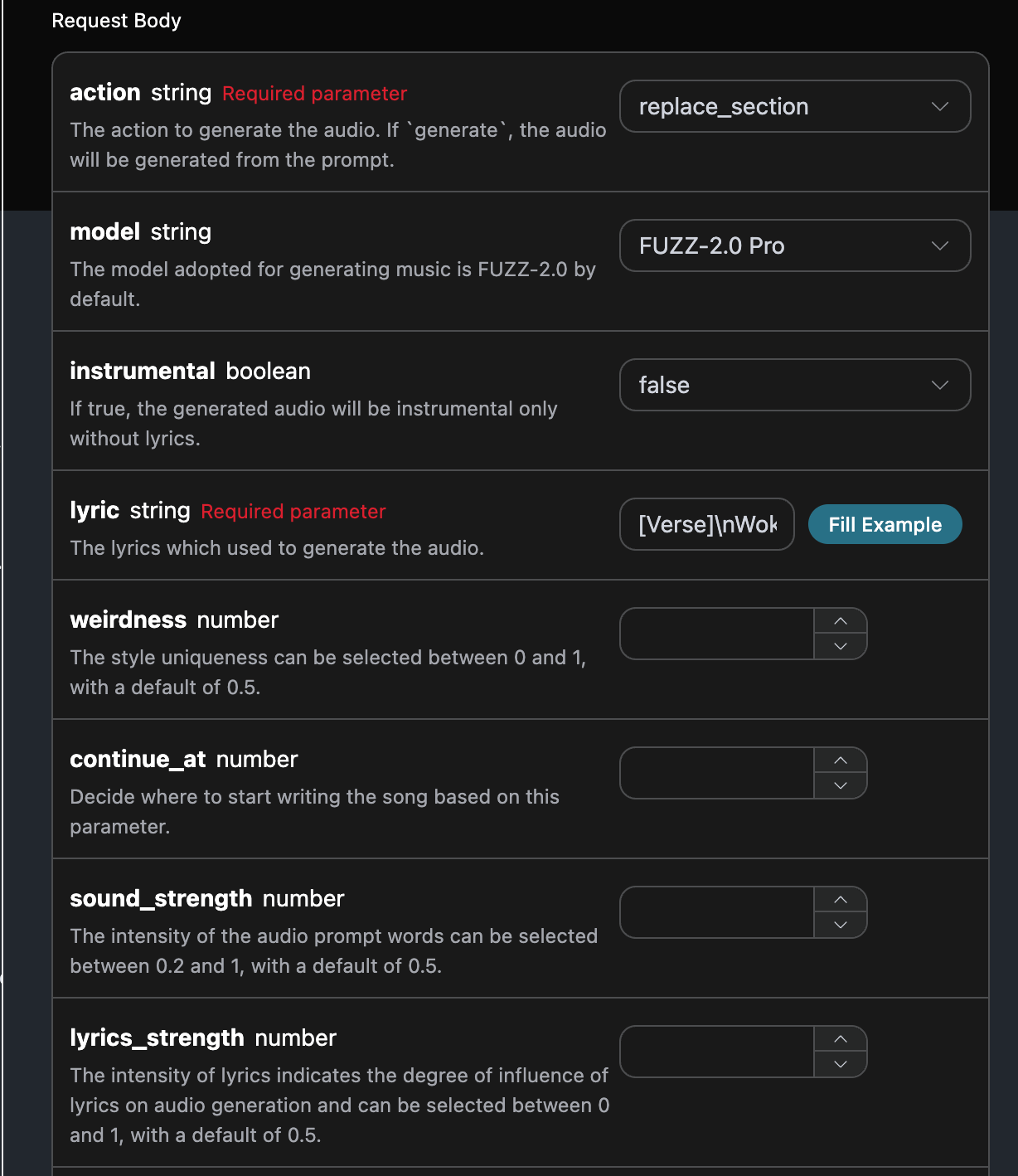
填寫樣例如下:

填寫完畢之後自動生成的代碼如下:

對應的代碼:
curl -X POST 'https://api.acedata.cloud/producer/audios' \
-H 'accept: application/json' \
-H 'authorization: Bearer {token}' \
-H 'content-type: application/json' \
-d '{
  "action": "replace_section",
  "model": "FUZZ-2.0 Pro",
  "instrumental": false,
  "lyric": "[Verse]\\nWoke up with the sun in my eyes\\nNo clouds above just blue in the skies\\nShoes on my feet I’m ready to run\\nEvery step feels like a loaded gun\\n[Chorus]\\nHappy days are rolling in\\nLet the joy beneath my skin\\nNo more shadows no more lies\\nJust the truth that lifts me high\\n[Verse 2]\\nDancing through the city streets\\nA rhythm pounding in my heartbeat\\nStrangers smile it’s catching on\\nThis world’s a stage we’re all a song\\n[Chorus]\\nHappy days are rolling in\\nLet the joy beneath my skin\\nNo more shadows no more lies\\nJust the truth that lifts me high\\n[Bridge]\\nThrow your worries out the door\\nLet them sink to the ocean floor\\nWe’re alive and it’s enough\\nLife is messy but it’s love\\n[Chorus]\\nHappy days are rolling in\\nLet the joy beneath my skin\\nNo more shadows no more lies\\nJust the truth that lifts me high",
  "audio_id": "d9ebc609-fb65-4a23-b914-c074747af6a4",
  "replace_section_start": 3,
  "replace_section_end": 70,
  "custom": true
}'
測試允許,生成的效果是類似的。
{
    "success": true,
    "task_id": "3cb5ae96-01b0-4a37-afb0-e582608af56f",
    "trace_id": "3ebc6f63-5093-4499-bf9b-95c239e0da4f",
    "data": [
        {
            "id": "a54609c6-13e2-4176-be0f-4d7eebc68e1f",
            "title": "在陽光下醒來",
            "image_url": "https://storage.googleapis.com/corpusant-app-public/riffs/7ce2b11a-179f-4b87-b5ff-397613c62c93/image/a54609c6-13e2-4176-be0f-4d7eebc68e1f.jpg",
            "lyric": "[Verse]\\n在陽光下醒來\\n天空中沒有雲彩,只有藍天\\n鞋子穿在腳上,我準備出發\\n每一步都像是上膛的槍\\n[Chorus]\\n快樂的日子正在來臨\\n讓快樂在我肌膚下流淌\\n不再有陰影,不再有謊言\\n只有真相讓我高飛\\n[Verse 2]\\n在城市街道上舞動\\n心跳中有著節奏的敲擊\\n陌生人微笑,這種感覺在蔓延\\n這個世界是一個舞台,我們都是一首歌\\n[Chorus]\\n快樂的日子正在來臨\\n讓快樂在我肌膚下流淌\\n不再有陰影,不再有謊言\\n只有真相讓我高飛\\n[Bridge]\\n把你的煩惱扔出門外\\n讓它們沉入海洋的深處\\n我們活著,這就足夠了\\n生活雜亂,但這就是愛\\n[Chorus]\\n快樂的日子正在來臨\\n讓快樂在我肌膚下流淌\\n不再有陰影,不再有謊言\\n只有真相讓我高飛",
            "audio_url": "https://storage.googleapis.com/corpusant-app-public/riffs/7ce2b11a-179f-4b87-b5ff-397613c62c93/audio/a54609c6-13e2-4176-be0f-4d7eebc68e1f.m4a",
            "video_url": null,
            "image_id": "a54609c6-13e2-4176-be0f-4d7eebc68e1f",
            "topic": null,
            "seed": "14887454",
            "sound": "",
            "created_at": "2025-12-30T18:01:19.907443Z",
            "model": "FUZZ-2.0 Pro",
            "progress": "100%",
            "state": "succeeded",
            "duration": "174.6140589569161"
        }
    ]
}

伴奏翻版

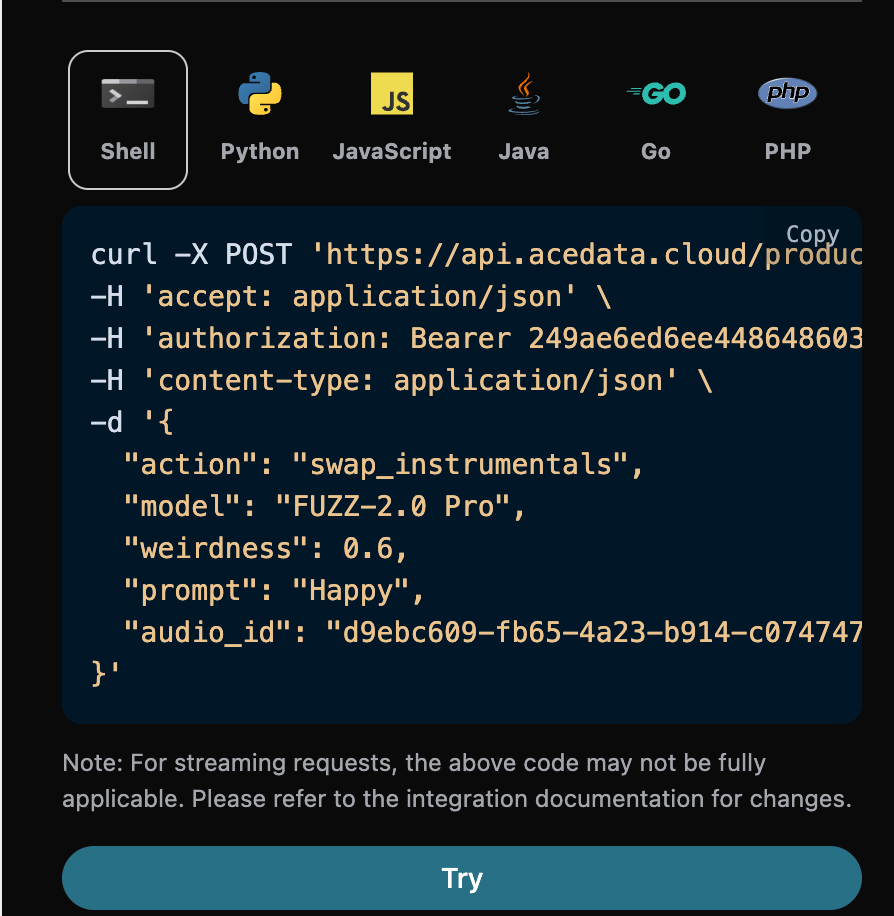
如果想使用官方的伴奏翻版操作,可以将action参数值设为:swap_instrumentals,接下来我们要根据歌词、标题自定义生成歌曲。 填写样例如下:
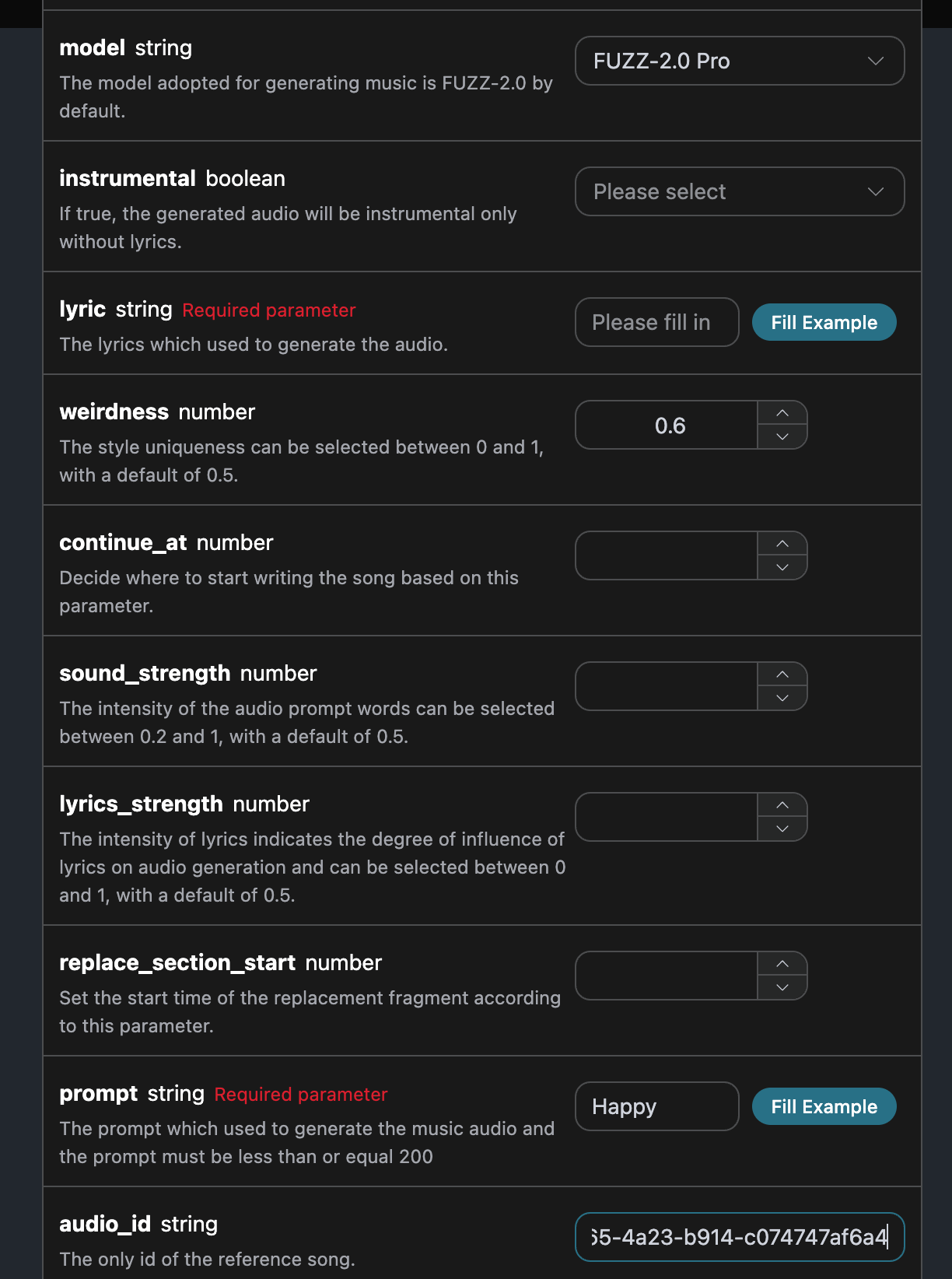
填写完毕之后自动生成了代码如下:

对应的代码:
curl -X POST 'https://api.acedata.cloud/producer/audios' \
-H 'accept: application/json' \
-H 'authorization: Bearer {token}' \
-H 'content-type: application/json' \
-d '{
  "action": "swap_instrumentals",
  "model": "FUZZ-2.0 Pro",
  "weirdness": 0.6,
  "prompt": "快樂",
  "audio_id": "d9ebc609-fb65-4a23-b914-c074747af6a4"
}'
測試允許,生成的效果是類似的。
{
  "success": true,
  "task_id": "d17d8376-3a58-451d-a976-404719bac11d",
  "trace_id": "ab596807-910a-4e30-bae2-4647895f7d0b",
  "data": [
    {
      "id": "22d7d75c-9e0a-47a8-b22b-eea55eaa0c4b",
      "title": "延伸(聲音交換)",
      "image_url": "https://storage.googleapis.com/corpusant-app-public/riffs/7ce2b11a-179f-4b87-b5ff-397613c62c93/image/22d7d75c-9e0a-47a8-b22b-eea55eaa0c4b.jpg",
      "lyric": "[Verse]\n在陽光下醒來\n天空中沒有雲彩,只有藍天\n鞋子穿在腳上,我準備出發\n每一步都像是上膛的槍\n[Chorus]\n快樂的日子正在來臨\n讓快樂在我肌膚下流淌\n不再有陰影,不再有謊言\n只有真相讓我高飛\n[Verse 2]\n在城市街道上舞動\n心跳中有著節奏的敲擊\n陌生人微笑,這種感覺在蔓延\n這個世界是一個舞台,我們都是一首歌\n[Chorus]\n快樂的日子正在來臨\n讓快樂在我肌膚下流淌\n不再有陰影,不再有謊言\n只有真相讓我高飛\n[Bridge]\n把你的煩惱扔出門外\n讓它們沉入海洋的深處\n我們活著,這就足夠了\n生活雜亂,但這就是愛\n[Chorus]\n快樂的日子正在來臨\n讓快樂在我肌膚下流淌\n不再有陰影,不再有謊言\n只有真相讓我高飛",
      "audio_url": "https://storage.googleapis.com/corpusant-app-public/riffs/7ce2b11a-179f-4b87-b5ff-397613c62c93/audio/22d7d75c-9e0a-47a8-b22b-eea55eaa0c4b.m4a",
      "video_url": null,
      "image_id": "22d7d75c-9e0a-47a8-b22b-eea55eaa0c4b",
      "topic": null,
      "seed": "2157878068",
      "sound": "快樂",
      "created_at": "2025-12-30T18:09:49.594800Z",
      "model": "FUZZ-2.0 Pro",
      "progress": "100%",
      "state": "succeeded",
      "duration": "172.3849433106576"
    }
  ]
}

人声翻版

如果想使用官方的人声翻版操作,可以将action参数值设为:swap_vocals,接下来我们要根据歌词、标题、风格自定义生成歌曲。 填写样例如下:
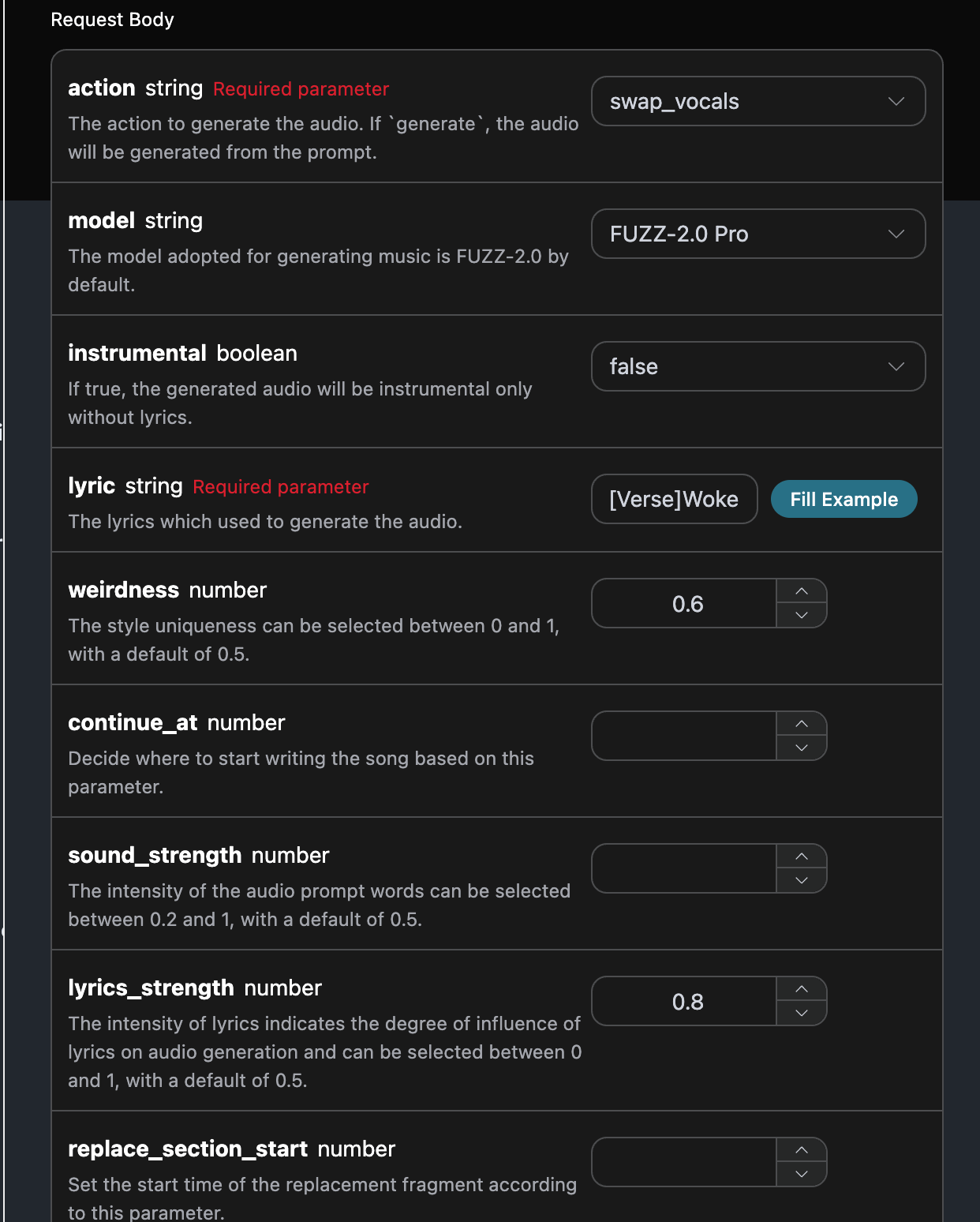
填写完毕之后自动生成了代码如下:

对应的代码:
curl -X POST 'https://api.acedata.cloud/producer/audios' \
-H 'accept: application/json' \
-H 'authorization: Bearer {token}' \
-H 'content-type: application/json' \
-d '{
  "action": "swap_vocals",
  "model": "FUZZ-2.0 Pro",
  "instrumental": false,
  "lyric": "[Verse]\n在陽光下醒來\n天空中沒有雲,只有藍天\n鞋子穿在腳上,我準備好奔跑\n每一步都像是一把上膛的槍\n[Chorus]\n快樂的日子正在來臨\n讓快樂在我肌膚下流淌\n不再有陰影,不再有謊言\n只有真相讓我高飛\n[Verse 2]\n在城市街道上舞動\n心跳中有節奏的敲擊\n陌生人微笑,這是會傳染的\n這個世界是一個舞台,我們都是一首歌\n[Chorus]\n快樂的日子正在來臨\n讓快樂在我肌膚下流淌\n不再有陰影,不再有謊言\n只有真相讓我高飛\n[Bridge]\n把你的煩惱扔出門外\n讓它們沉入海洋底\n我們活著,這就足夠了\n生活雜亂,但這就是愛\n[Chorus]\n快樂的日子正在來臨\n讓快樂在我肌膚下流淌\n不再有陰影,不再有謊言\n只有真相讓我高飛",
  "weirdness": 0.6,
  "lyrics_strength": 0.8,
  "audio_id": "d9ebc609-fb65-4a23-b914-c074747af6a4",
  "custom": true
}'
測試允許,生成的效果是類似的。
{
  "success": true,
  "task_id": "a903ac38-f129-4f85-9181-b1dc5579bd32",
  "trace_id": "9953af52-45e0-4808-bf13-88f0b21262c1",
  "data": [
    {
      "id": "7b2d653b-aaaa-41b0-b737-aee4c4c5693b",
      "title": "在陽光下醒來",
      "image_url": "https://storage.googleapis.com/corpusant-app-public/riffs/7ce2b11a-179f-4b87-b5ff-397613c62c93/image/7b2d653b-aaaa-41b0-b737-aee4c4c5693b.jpg",
      "lyric": "[Verse]\n在陽光下醒來\n天空中沒有雲,只有藍天\n鞋子穿在腳上,我準備好奔跑\n每一步都像是一把上膛的槍\n[Chorus]\n快樂的日子正在來臨\n讓快樂在我肌膚下流淌\n不再有陰影,不再有謊言\n只有真相讓我高飛\n[Verse 2]\n在城市街道上舞動\n心跳中有節奏的敲擊\n陌生人微笑,這是會傳染的\n這個世界是一個舞台,我們都是一首歌\n[Chorus]\n快樂的日子正在來臨\n讓快樂在我肌膚下流淌\n不再有陰影,不再有謊言\n只有真相讓我高飛\n[Bridge]\n把你的煩惱扔出門外\n讓它們沉入海洋底\n我們活著,這就足夠了\n生活雜亂,但這就是愛\n[Chorus]\n快樂的日子正在來臨\n讓快樂在我肌膚下流淌\n不再有陰影,不再有謊言\n只有真相讓我高飛",
      "audio_url": "https://storage.googleapis.com/corpusant-app-public/riffs/7ce2b11a-179f-4b87-b5ff-397613c62c93/audio/7b2d653b-aaaa-41b0-b737-aee4c4c5693b.m4a",
      "video_url": null,
      "image_id": "7b2d653b-aaaa-41b0-b737-aee4c4c5693b",
      "topic": null,
      "seed": "2484735707",
      "sound": "",
      "created_at": "2025-12-30T18:13:01.349875Z",
      "model": "FUZZ-2.0 Pro",
      "progress": "100%",
      "state": "succeeded",
      "duration": "173.12798185941043"
    }
  ]
}

詞曲分離

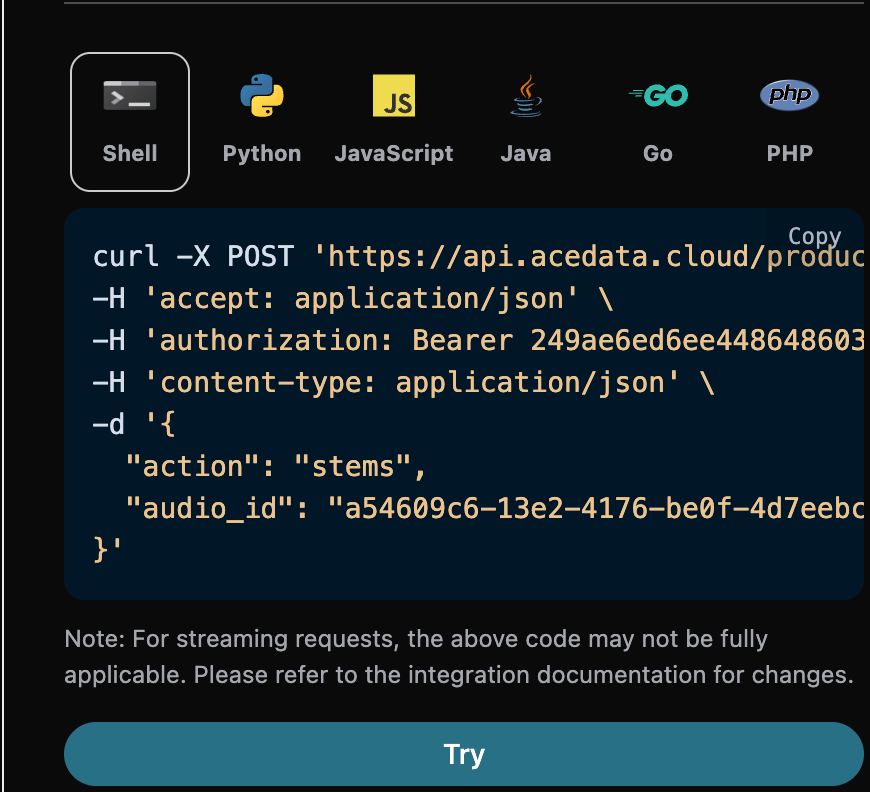
如果想使用官方的詞曲分離操作,可以將action參數值設為:stems,接下來我們要根據歌曲ID進行詞曲分離。 填寫樣例如下:
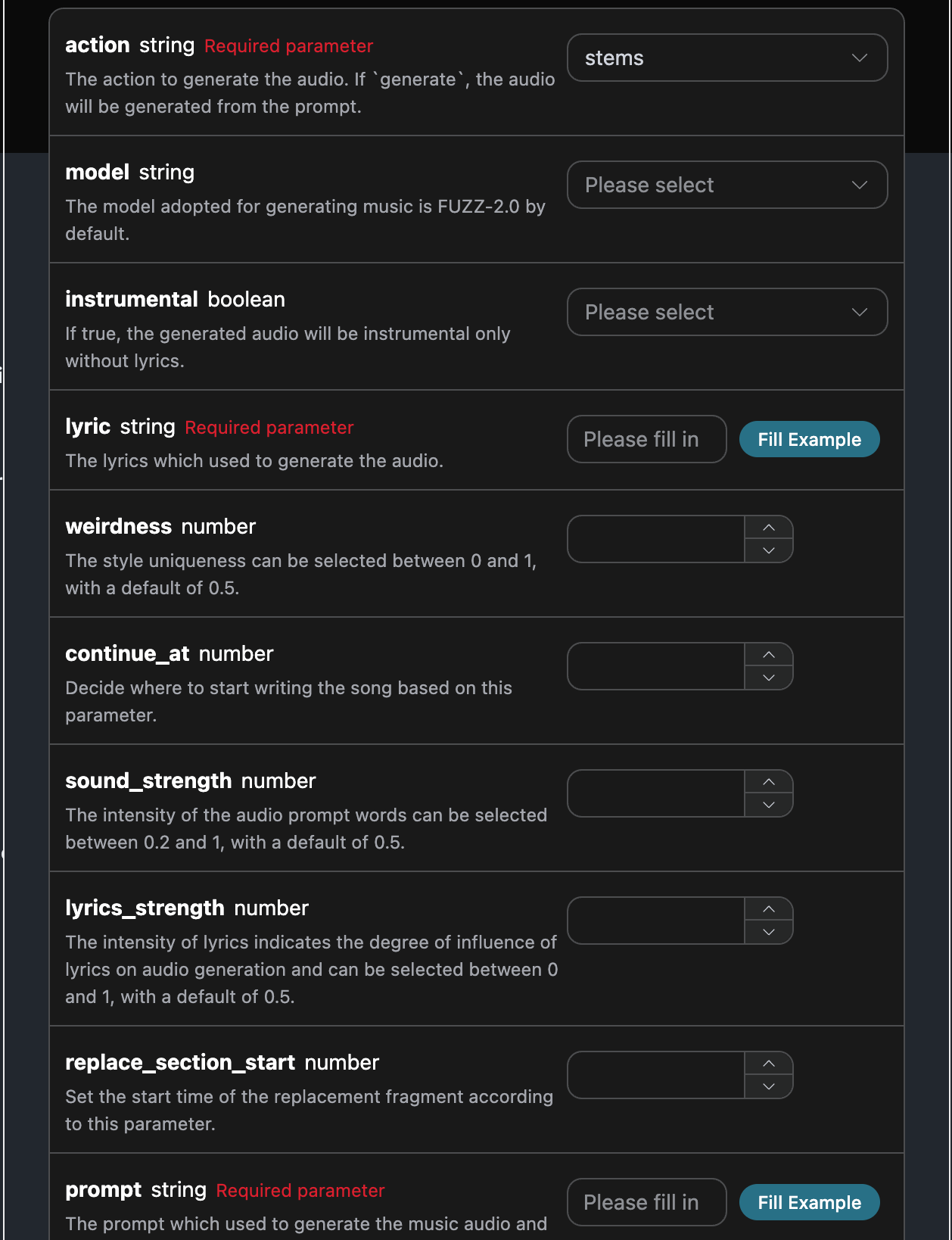
填寫完畢之後自動生成了代碼如下:

對應的代碼:
curl -X POST 'https://api.acedata.cloud/producer/audios' \
-H 'accept: application/json' \
-H 'authorization: Bearer {token}' \
-H 'content-type: application/json' \
-d '{
  "action": "stems",
  "audio_id": "a54609c6-13e2-4176-be0f-4d7eebc68e1f"
}'
測試允許,生成的效果是類似的。
{
    "success": true,
    "task_id": "561ac695-b4aa-47cf-978d-fb7be2b9ebfc",
    "trace_id": "66d0d397-2987-4bde-84fb-a60d0023b217",
    "data": [
        {
            "title": "在陽光下醒來",
            "lyric": "",
            "stems_url": "https://platform.cdn.acedata.cloud/producer/561ac695-b4aa-47cf-978d-fb7be2b9ebfc.zip",
            "model": "",
            "progress": "100%",
            "state": "succeeded"
        }
    ]
}

異步回調

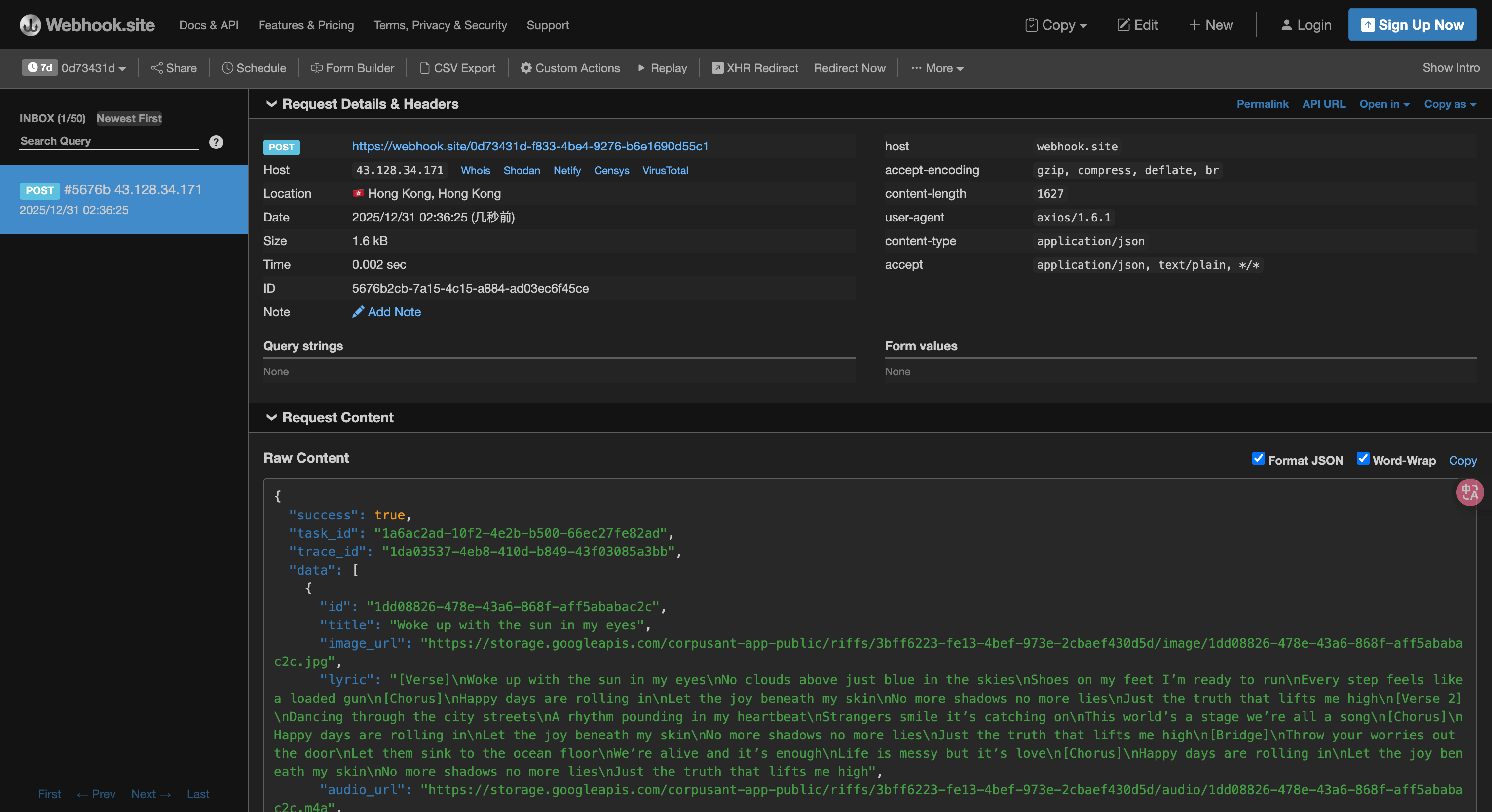
由於 Producer Audios Generation API 生成的時間有時候會相對較長,如果 API 長時間無響應,HTTP 請求會一直保持連接,導致額外的系統資源消耗,所以本 API 也提供了異步回調的支持。 整體流程是:客戶端發起請求的時候,額外指定一個 callback_url 字段,客戶端發起 API 請求之後,API 會立馬返回一個結果,包含一個 task_id 的字段信息,代表當前的任務 ID。當任務完成之後,生成任務的結果會通過 POST JSON 的形式發送到客戶端指定的 callback_url,其中也包括了 task_id 字段,這樣任務結果就可以通過 ID 關聯起來了。 下面我們通過示例來了解下具體怎樣操作。 首先,Webhook 回調是一個可以接收 HTTP 請求的服務,開發者應該替換為自己搭建的 HTTP 伺服器的 URL。此處為了方便演示,使用一個公開的 Webhook 樣例網站 https://webhook.site/,打開該網站即可得到一個 Webhook URL,如圖所示: 將此 URL 複製下來,就可以作為 Webhook 來使用,此處的樣例為 https://webhook.site/#!/view/0d73431d-f833-4be4-9276-b6e1690d55c1 接下來,我們可以設置字段 callback_url 為上述 Webhook URL,同時填入相應的參數,具體的內容如圖所示:

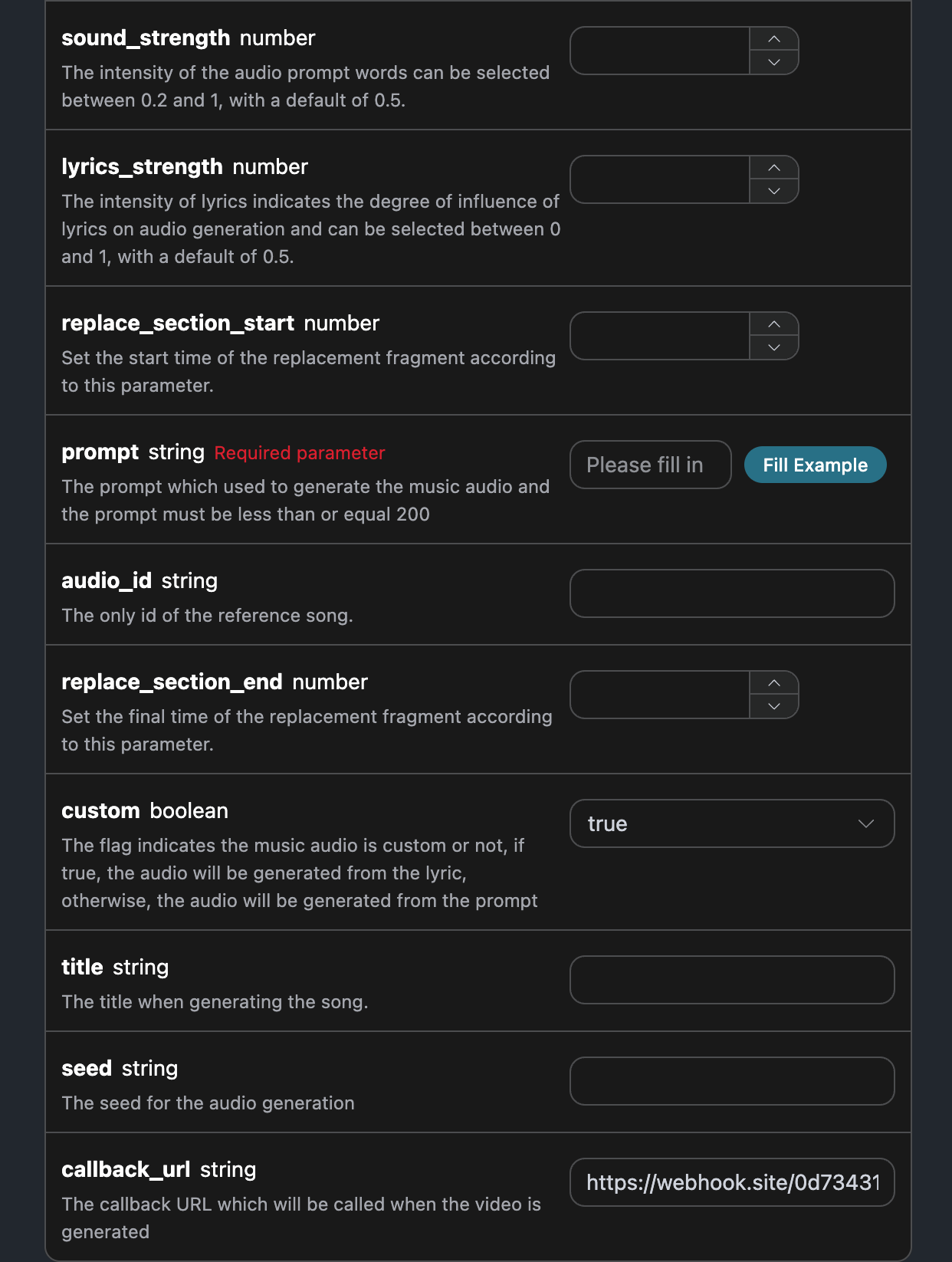
點擊運行,可以發現會立即得到一個結果,如下:
{
  "task_id": "1a6ac2ad-10f2-4e2b-b500-66ec27fe82ad"
}
稍等片刻,我們可以在 https://webhook.site/#!/view/0d73431d-f833-4be4-9276-b6e1690d55c1 上觀察到生成任務的結果,如圖所示: 內容如下:
{
    "success": true,
    "task_id": "1a6ac2ad-10f2-4e2b-b500-66ec27fe82ad",
    "trace_id": "1da03537-4eb8-410d-b849-43f03085a3bb",
    "data": [
        {
            "id": "1dd08826-478e-43a6-868f-aff5ababac2c",
            "title": "在陽光下醒來",
            "image_url": "https://storage.googleapis.com/corpusant-app-public/riffs/3bff6223-fe13-4bef-973e-2cbaef430d5d/image/1dd08826-478e-43a6-868f-aff5ababac2c.jpg",
            "lyric": "[Verse]\n在陽光下醒來\n天空中沒有雲彩,只有藍天\n鞋子穿在腳上,我準備好奔跑\n每一步都像是上膛的槍\n[Chorus]\n快樂的日子正在來臨\n讓快樂在我肌膚下流淌\n不再有陰影,不再有謊言\n只有真相讓我高飛\n[Verse 2]\n在城市街道上舞動\n心跳中有節奏的敲擊\n陌生人微笑,這是傳染\n這個世界是一個舞台,我們都是一首歌\n[Chorus]\n快樂的日子正在來臨\n讓快樂在我肌膚下流淌\n不再有陰影,不再有謊言\n只有真相讓我高飛\n[Bridge]\n把你的煩惱扔出門外\n讓它們沉入海洋底\n我們活著,這就足夠\n生活雜亂,但這是愛\n[Chorus]\n快樂的日子正在來臨\n讓快樂在我肌膚下流淌\n不再有陰影,不再有謊言\n只有真相讓我高飛",
            "audio_url": "https://storage.googleapis.com/corpusant-app-public/riffs/3bff6223-fe13-4bef-973e-2cbaef430d5d/audio/1dd08826-478e-43a6-868f-aff5ababac2c.m4a",
            "video_url": null,
            "image_id": "1dd08826-478e-43a6-868f-aff5ababac2c",
            "topic": null,
            "seed": "1490770667",
            "sound": "",
            "created_at": "2025-12-30T18:36:00.994141Z",
            "model": "FUZZ-2.0 Pro",
            "progress": "100%",
            "state": "succeeded",
            "duration": "135.2330158730159"
        }
    ]
}
可以看到結果中有一個 task_id 欄位,其他的欄位都和上文類似,通過該欄位即可實現任務的關聯。

錯誤處理

在調用 API 時,如果遇到錯誤,API 會返回相應的錯誤代碼和信息。例如:
  • 400 token_mismatched:錯誤的請求,可能是因為缺少或無效的參數。
  • 400 api_not_implemented:錯誤的請求,可能是因為缺少或無效的參數。
  • 401 invalid_token:未授權,無效或缺少授權令牌。
  • 429 too_many_requests:請求過多,您已超過速率限制。
  • 500 api_error:內部伺服器錯誤,伺服器出現問題。

錯誤響應示例

{
  "success": false,
  "error": {
    "code": "api_error",
    "message": "獲取失敗"
  },
  "trace_id": "2cf86e86-22a4-46e1-ac2f-032c0f2a4e89"
}

結論

通過本文檔,您已經了解了如何使用 Producer Audios Generation API 可通過輸入提示詞來生成音樂。希望本文檔能幫助您更好地對接和使用該 API。如有任何問題,請隨時聯繫我們的技術支持團隊。