跳轉到主要內容
Midjourney Describe API 的主要功能是透過上傳圖片,獲取對圖片的描述。使用該 API,只需要傳遞圖片文件地址,API 會返回圖片的詳細描述。無需繁瑣的參數設置,即可獲得高質量的圖片描述。 支持多種圖片格式:無論是 JPEG、PNG 還是 GIF 等主流圖片格式,均能被輕鬆識別和處理。 本文檔將詳細介紹 Midjourney Describe API 的對接說明,幫助您輕鬆集成並充分利用該 API 的強大功能。透過 Midjourney Describe API,您可以輕鬆實現圖片描述的自動化,提高業務效率。

申請流程

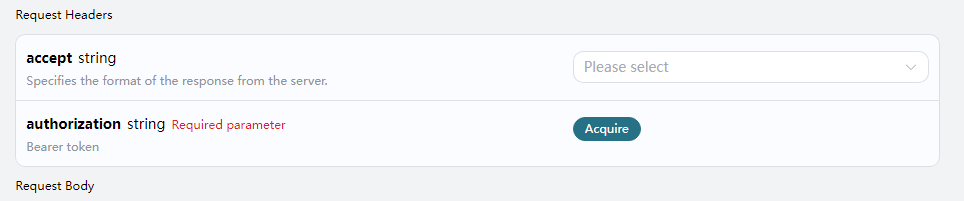
要使用 Midjourney Describe API,需要先到 申請頁面 Midjourney Describe API 申請相應的服務,進入頁面之後,點擊「Acquire」按鈕,如圖所示: 申請頁面 如果您尚未登錄或註冊,會自動跳轉到登錄頁面邀請您來註冊和登錄,登錄註冊之後會自動返回當前頁面。 首次申請時會有免費額度贈送,可以免費使用該 API。
請求示例

我們以一張圖片為例,演示如何使用該 API。假設我們有一張風景圖片,接下來演示如何上傳該圖片並獲取描述。

請求示例圖

示例圖片

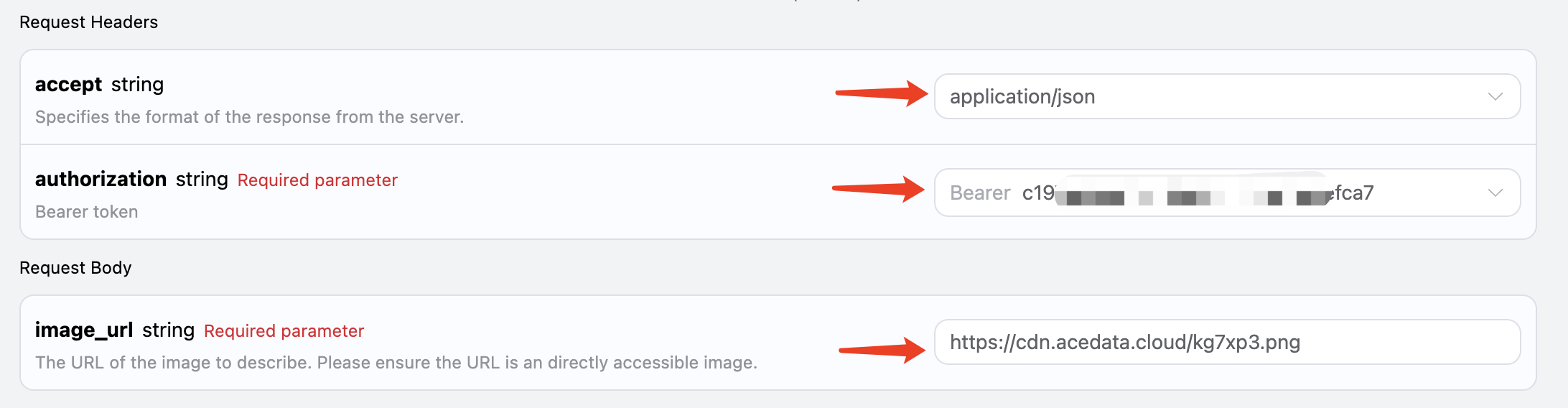
設置請求頭和請求體

Request Headers 包括:
  • accept:指定接收 JSON 格式的響應結果,這裡填寫為 application/json
  • authorization:調用 API 的密鑰,申請之後可以直接下拉選擇。
Request Body 包括:
  • image_url:上傳的圖片文件地址。
設置如下圖所示:

代碼示例

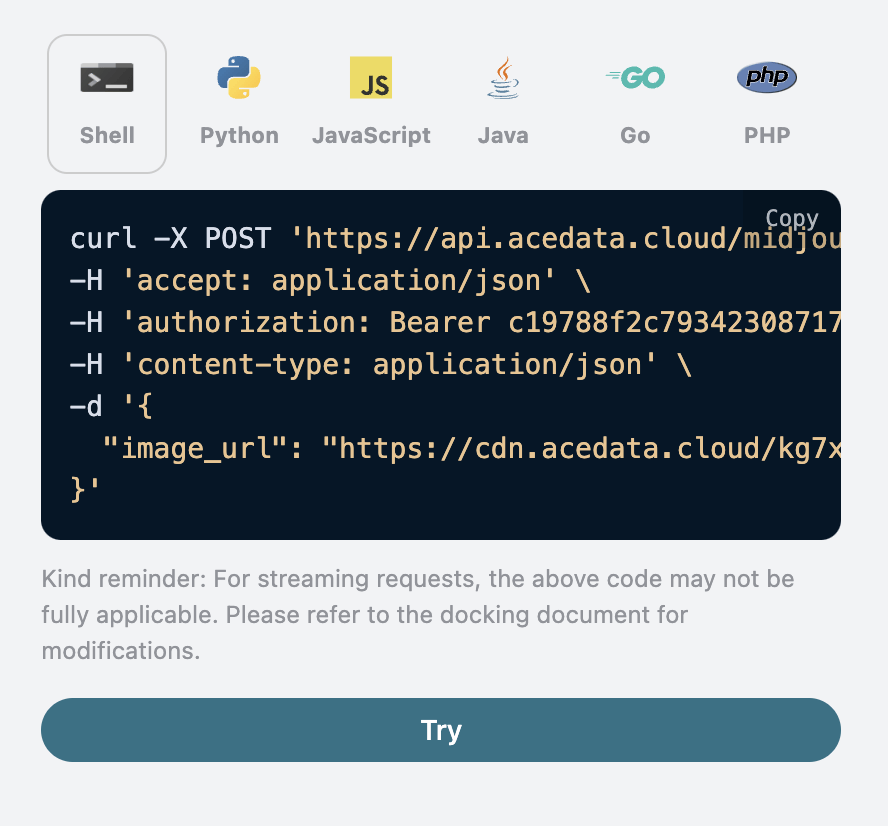
可以發現,在頁面右側已經自動生成了各種語言的代碼,如圖所示:

部分代碼示例如下:

CURL

curl -X POST 'https://api.acedata.cloud/midjourney/describe' \
-H 'accept: application/json' \
-H 'authorization: Bearer {token}' \
-H 'content-type: application/json' \
-d '{
  "image_url": "https://cdn.acedata.cloud/kg7xp3.png"
}'

Python

import requests

url = "https://api.acedata.cloud/midjourney/describe"

headers = {
    "accept": "application/json",
    "authorization": "Bearer {token}",
    "content-type": "application/json"
}

payload = {
    "image_url": "https://cdn.acedata.cloud/kg7xp3.png"
}

response = requests.post(url, json=payload, headers=headers)
print(response.json())

響應示例

請求成功後,API 將返回圖片的 4 條描述信息。例如:
{
  "descriptions": [
    "A cross-shaped road sign stands in the middle of an outdoor park, surrounded by trees and grasslands. The background is sunny with warm colors. There is sunlight shining through the leaves onto part of it. On one side of that street post there was also another sign with the lettering \"Kunming Park\", which looked very beautiful. This photo shows how wonderful nature can be. It gives people feelings like relaxation or tranquility in the style of nature. --ar 75:44",
    "A photo of a \"K鬥\" road sign in the park, with trees and grass on both sides. In front is a light yellow metal pole with two signs attached to it. The background features sunlight shining through green leaves onto one side of the street, creating a warm atmosphere. There is also water mist floating around. It was taken in the style of Sony A7R IV camera using Leica M lens. This scene conveys tranquility and harmony between nature and human creation. --ar 75:44",
    "A cross-shaped street sign stands in the middle of an open park, surrounded by trees and grassland. The sun shines through the leaves on part of it, creating a warm light effect. In front is a road leading to another green space. There's also some information about \"Inside Shilin Park\" on one side of that post. This scene gives people feelings of tranquility and harmony with nature. Natural lighting, 3D rendering in the style of Unreal Engine, Realistic photography style. --ar 75:44",
    "A cross-shaped signpost stands in the park, surrounded by lush trees and vibrant green grass under sunlight. Signs say \"VIDEO ANNattacks\" in an unknown language, creating an atmosphere of mystery and intrigue. The scene is captured with high-definition photography using Canon EOS R5 cameras, presenting a stunning visual effect that showcases intricate details in the style of modern photography. --ar 75:44"
  ]
}
可以看到,結果中有一個 descriptions 字段,裡面包含了四個結果,每個結果都是一個候選的描述內容。

錯誤處理

在調用 API 時,如果遇到錯誤,API 會返回相應的錯誤代碼和信息。例如:
  • 400 token_mismatched:Bad request, possibly due to missing or invalid parameters.
  • 400 api_not_implemented:Bad request, possibly due to missing or invalid parameters.
  • 401 invalid_token:Unauthorized, invalid or missing authorization token.
  • 429 too_many_requests:Too many requests, you have exceeded the rate limit.
  • 500 api_error:Internal server error, something went wrong on the server.

錯誤響應示例

{
  "success": false,
  "error": {
    "code": "api_error",
    "message": "fetch failed"
  },
  "trace_id": "2cf86e86-22a4-46e1-ac2f-032c0f2a4e89"
}

結論

透過本文檔,您已經了解了如何使用 Midjourney Describe API 進行圖片描述。希望本文檔能幫助您更好地對接和使用該 API。如有任何問題,請隨時聯繫我們的技術支持團隊。