メインコンテンツへスキップ
Kimiは非常に強力なAI対話システムで、提示語を入力するだけで、短時間で流暢で自然な返信を生成できます。Kimiは驚くべき知能支援を提供し、人間の作業効率と創造性を大幅に向上させます。 この文書では、Kimi Chat Completion APIの操作の使用プロセスについて説明します。これを利用することで、公式Kimiの対話機能を簡単に使用できます。

申請プロセス

Gemini Chat Completion APIを使用するには、まずKimi Chat Completion APIページにアクセスし、「Acquire」ボタンをクリックして、リクエストに必要な資格情報を取得します: まだログインまたは登録していない場合は、自動的にログインページにリダイレクトされ、登録とログインを促されます。ログインまたは登録後、現在のページに自動的に戻ります。 初回申請時には無料のクレジットが付与され、このAPIを無料で使用できます。

基本使用

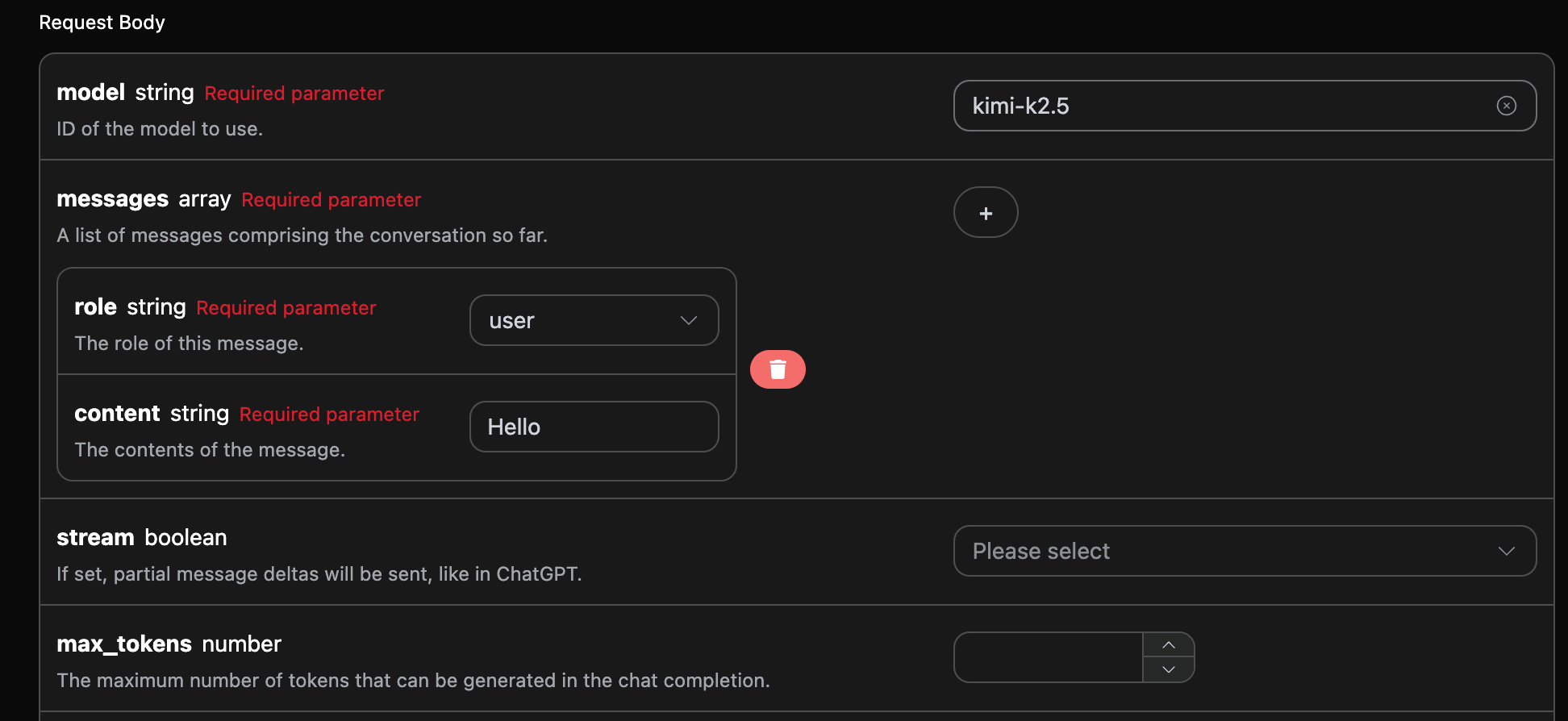
次に、画面上に対応する内容を入力します。以下の図のように:

このインターフェースを初めて使用する際には、少なくとも3つの内容を入力する必要があります。一つはauthorizationで、ドロップダウンリストから選択するだけです。もう一つのパラメータはmodelで、modelはKimi公式サイトのモデルカテゴリを選択するものです。ここでは主に7種類のモデルがあります。詳細は提供されたモデルを参照してください。最後のパラメータはmessagesで、messagesは入力する質問語の配列です。これは配列で、複数の質問語を同時にアップロードでき、各質問語にはrolecontentが含まれています。roleは質問者の役割を示し、私たちはuserassistantsystemの3つの役割を提供しています。もう一つのcontentは、私たちの具体的な質問内容です。 また、右側には対応する呼び出しコードが生成されていることに注意してください。コードをコピーして直接実行することも、直接「Try」ボタンをクリックしてテストすることもできます。
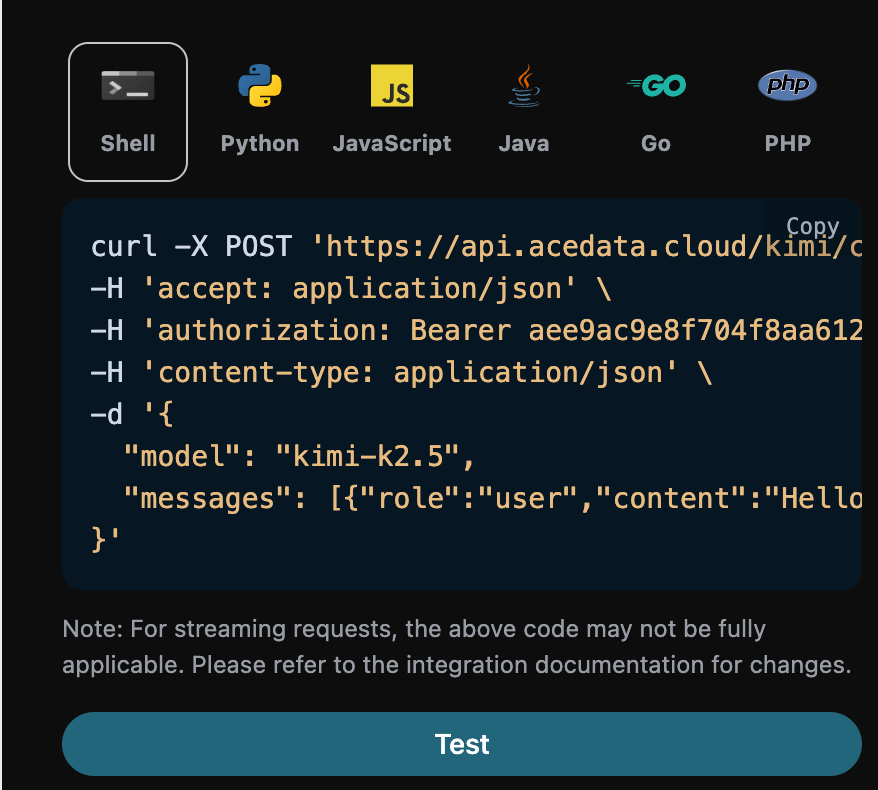
呼び出し後、返された結果は以下の通りです:
{
  "id": "chatcmpl-b5d9e1b799c137e3",
  "object": "chat.completion",
  "created": 1770991864,
  "model": "kimi-k2.5",
  "choices": [
    {
      "index": 0,
      "message": {
        "role": "assistant",
        "content": "こんにちは!今日はどのようにお手伝いできますか?",
        "refusal": null,
        "reasoning_content": "ユーザーは単に「こんにちは」と言いました。これは単純な挨拶です。私は友好的で役に立つ方法で応答し、次に何が必要かを手伝う準備をします。特定の質問やタスクがまだないので、彼らの挨拶を認め、どのようにお手伝いできるかを尋ねます。\n\n私は以下の点を考慮するべきです:\n- 友好的で歓迎する\n- プロフェッショナルだが温かい\n- 彼らが必要なことを共有するように招待するオープンエンド\n- 簡潔だがあまり短すぎない\n\n考えられる応答:\n1. \"こんにちは!今日はどのようにお手伝いできますか?\"\n2. \"こんにちは!何をお手伝いできますか?\"\n3. \"こんにちは!お手伝いする準備ができています。何を知りたいですか?\"\n4. \"やあ!お会いできて嬉しいです。どのようにお手伝いできますか?\"\n\n私は、彼らが必要なことを共有するように招待する温かくプロフェッショナルなものを選びます。",
        "reasoning": "ユーザーは単に「こんにちは」と言いました。これは単純な挨拶です。私は友好的で役に立つ方法で応答し、次に何が必要かを手伝う準備をします。特定の質問やタスクがまだないので、彼らの挨拶を認め、どのようにお手伝いできるかを尋ねます。\n\n私は以下の点を考慮するべきです:\n- 友好的で歓迎する\n- プロフェッショナルだが温かい\n- 彼らが必要なことを共有するように招待するオープンエンド\n- 簡潔だがあまり短すぎない\n\n考えられる応答:\n1. \"こんにちは!今日はどのようにお手伝いできますか?\"\n2. \"こんにちは!何をお手伝いできますか?\"\n3. \"こんにちは!お手伝いする準備ができています。何を知りたいですか?\"\n4. \"やあ!お会いできて嬉しいです。どのようにお手伝いできますか?\"\n\n私は、彼らが必要なことを共有するように招待する温かくプロフェッショナルなものを選びます。",
        "tool_calls": []
      },
      "logprobs": null,
      "finish_reason": "stop"
    }
  ],
  "usage": {
    "prompt_tokens": 9,
    "completion_tokens": 184,
    "total_tokens": 193,
    "prompt_tokens_details": {
      "cached_tokens_details": {}
    },
    "completion_tokens_details": {}
  }
}
返された結果には複数のフィールドがあり、以下のように説明されます:
  • id:今回の対話タスクを生成するためのIDで、今回の対話タスクを一意に識別します。
  • model:選択したKimi公式モデル。
  • choices:Kimiが質問語に対して提供した回答情報。
  • usage:今回の問答に対するトークンの統計情報。
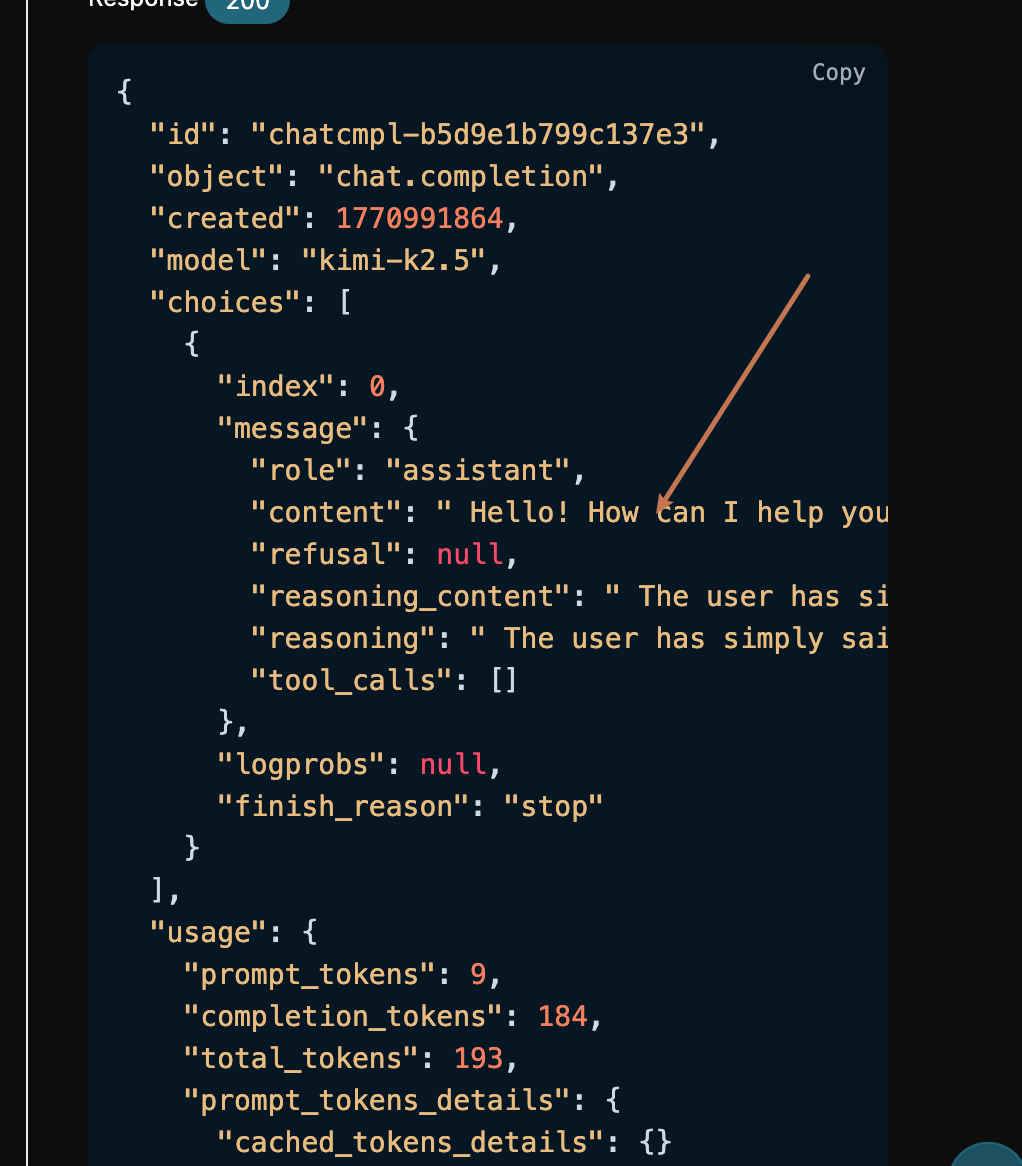
その中でchoicesはKimiの回答情報を含んでおり、その中のchoicesはKimiが回答した具体的な情報です。以下の図のように確認できます。

choicesの中のcontentフィールドには、Geminiの返信の具体的な内容が含まれています。

ストリーミング応答

このインターフェースはストリーミング応答もサポートしており、ウェブページとの接続に非常に便利で、ウェブページで逐次表示効果を実現できます。 ストリーミング応答を返したい場合は、リクエストヘッダーのstreamパラメータをtrueに変更します。 以下の図のように変更しますが、呼び出しコードにはストリーミング応答をサポートするための対応する変更が必要です。
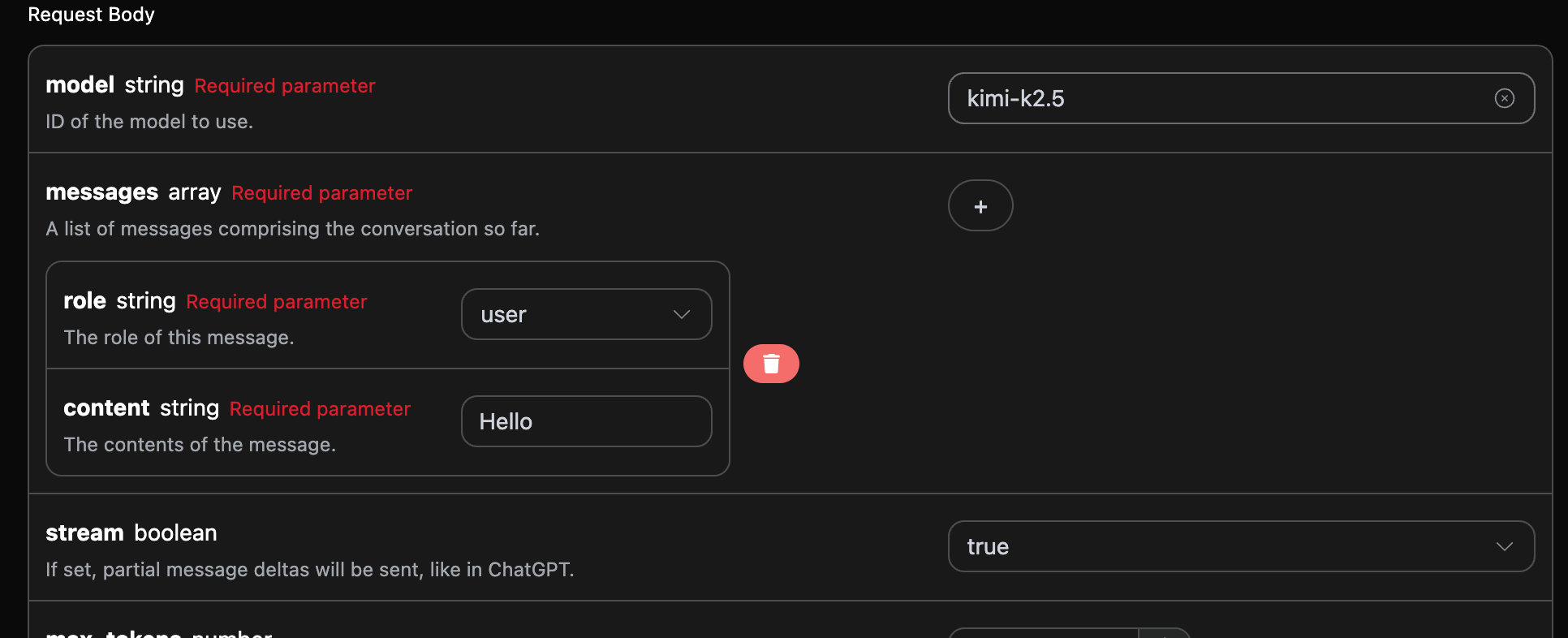
streamtrueに変更すると、APIは対応するJSONデータを逐行で返します。コードレベルで逐行の結果を得るために、相応の変更を行う必要があります。 Pythonのサンプル呼び出しコード:
import requests

url = "https://api.acedata.cloud/kimi/chat/completions"

headers = {
    "accept": "application/json",
    "authorization": "Bearer {token}",
    "content-type": "application/json"
}

payload = {
    "model": "kimi-k2.5",
    "messages": [{"role":"user","content":"こんにちは"}],
    "stream": True
}

response = requests.post(url, json=payload, headers=headers)
print(response.text)
出力結果は以下の通りです:
data: {"id": "chatcmpl-952dd5e75583c4d1", "object": "chat.completion.chunk", "created": 1770992031, "model": "kimi-k2.5", "system_fingerprint": null, "choices": [{"index": 0, "delta": {"content": "", "role": "assistant"}, "logprobs": null, "finish_reason": null}], "usage": null}

data: {"id": "chatcmpl-952dd5e75583c4d1", "object": "chat.completion.chunk", "created": 1770992031, "model": "kimi-k2.5", "system_fingerprint": null, "choices": [{"index": 0, "delta": {"reasoning_content": " それ", "reasoning": " それ"}, "logprobs": null, "finish_reason": null}], "usage": null}

data: {"id": "chatcmpl-952dd5e75583c4d1", "object": "chat.completion.chunk", "created": 1770992031, "model": "kimi-k2.5", "system_fingerprint": null, "choices": [{"index": 0, "delta": {"reasoning_content": " ユーザーが「こんにちは」と言いました。これはシンプルな挨拶です", "reasoning": " ユーザーが「こんにちは」と言いました。これはシンプルな挨拶です"}, "logprobs": null, "finish_reason": null}], "usage": null}

data: {"id": "chatcmpl-952dd5e75583c4d1", "object": "chat.completion.chunk", "created": 1770992031, "model": "kimi-k2.5", "system_fingerprint": null, "choices": [{"index": 0, "delta": {"reasoning_content": ". 私はフレンドリーで歓迎するように応答すべきです", "reasoning": ". 私はフレンドリーで歓迎するように応答すべきです"}, "logprobs": null, "finish_reason": null}], "usage": null}

data: {"id": "chatcmpl-952dd5e75583c4d1", "object": "chat.completion.chunk", "created": 1770992031, "model": "kimi-k2.5", "system_fingerprint": null, "choices": [{"index": 0, "delta": {"reasoning_content": ". これは会話の始まりなので、", "reasoning": ". これは会話の始まりなので、"}, "logprobs": null, "finish_reason": null}], "usage": null}

data: {"id": "chatcmpl-952dd5e75583c4d1", "object": "chat.completion.chunk", "created": 1770992031, "model": "kimi-k2.5", "system_fingerprint": null, "choices": [{"index": 0, "delta": {"reasoning_content": " 今日はどのようにお手伝いできるか尋ねるべきです。\n\n", "reasoning": " 今日はどのようにお手伝いできるか尋ねるべきです。\n\n"}, "logprobs": null, "finish_reason": null}], "usage": null}

data: {"id": "chatcmpl-952dd5e75583c4d1", "object": "chat.completion.chunk", "created": 1770992031, "model": "kimi-k2.5", "system_fingerprint": null, "choices": [{"index": 0, "delta": {"reasoning_content": "返答を考えさせてください:\n- 挨拶を認める", "reasoning": "返答を考えさせてください:\n- 挨拶を認める"}, "logprobs": null, "finish_reason": null}], "usage": null}

data: {"id": "chatcmpl-952dd5e75583c4d1", "object": "chat.completion.chunk", "created": 1770992031, "model": "kimi-k2.5", "system_fingerprint": null, "choices": [{"index": 0, "delta": {"reasoning_content": "\n- 助けを提供する\n- 温かく保つ", "reasoning": "\n- 助けを提供する\n- 温かく保つ"}, "logprobs": null, "finish_reason": null}], "usage": null}

data: {"id": "chatcmpl-952dd5e75583c4d1", "object": "chat.completion.chunk", "created": 1770992031, "model": "kimi-k2.5", "system_fingerprint": null, "choices": [{"index": 0, "delta": {"reasoning_content": " そしてプロフェッショナルに\n\n例えば: \"こんにちは!どのように", "reasoning": " そしてプロフェッショナルに\n\n例えば: \"こんにちは!どのように"}, "logprobs": null, "finish_reason": null}], "usage": null}

data: {"id": "chatcmpl-952dd5e75583c4d1", "object": "chat.completion.chunk", "created": 1770992031, "model": "kimi-k2.5", "system_fingerprint": null, "choices": [{"index": 0, "delta": {"reasoning_content": " お手伝いできますか?\" または \"こんにちは", "reasoning": " お手伝いできますか?\" または \"こんにちは"}, "logprobs": null, "finish_reason": null}], "usage": null}

data: {"id": "chatcmpl-952dd5e75583c4d1", "object": "chat.completion.chunk", "created": 1770992031, "model": "kimi-k2.5", "system_fingerprint": null, "choices": [{"index": 0, "delta": {"reasoning_content": "! 何をお手伝いできますか?\"\n\n実際に", "reasoning": "! 何をお手伝いできますか?\"\n\n実際に"}, "logprobs": null, "finish_reason": null}], "usage": null}

data: {"id": "chatcmpl-952dd5e75583c4d1", "object": "chat.completion.chunk", "created": 1770992031, "model": "kimi-k2.5", "system_fingerprint": null, "choices": [{"index": 0, "delta": {"reasoning_content": ", 文脈を見ていると、これは", "reasoning": ", 文脈を見ていると、これは"}, "logprobs": null, "finish_reason": null}], "usage": null}

data: {"id": "chatcmpl-952dd5e75583c4d1", "object": "chat.completion.chunk", "created": 1770992031, "model": "kimi-k2.5", "system_fingerprint": null, "choices": [{"index": 0, "delta": {"reasoning_content": " 一般的な会話の始まりのようです。私はシンプルに保ち、", "reasoning": " 一般的な会話の始まりのようです。私はシンプルに保ち、"}, "logprobs": null, "finish_reason": null}], "usage": null}

data: {"id": "chatcmpl-952dd5e75583c4d1", "object": "chat.completion.chunk", "created": 1770992031, "model": "kimi-k2.5", "system_fingerprint": null, "choices": [{"index": 0, "delta": {"reasoning_content": " 彼らが必要なことを共有するように促すためにオープンエンドにします", "reasoning": " 彼らが必要なことを共有するように促すためにオープンエンドにします"}, "logprobs": null, "finish_reason": null}], "usage": null}

data: {"id": "chatcmpl-952dd5e75583c4d1", "object": "chat.completion.chunk", "created": 1770992031, "model": "kimi-k2.5", "system_fingerprint": null, "choices": [{"index": 0, "delta": {"content": " こんにちは!どのようにお手伝い", "reasoning_content": " できるか。 ", "reasoning": " できるか。 "}, "logprobs": null, "finish_reason": null}], "usage": null}

data: {"id": "chatcmpl-952dd5e75583c4d1", "object": "chat.completion.chunk", "created": 1770992031, "model": "kimi-k2.5", "system_fingerprint": null, "choices": [{"index": 0, "delta": {"content": " できますか?"}, "logprobs": null, "finish_reason": "stop"}], "usage": null}

data: {"id": "chatcmpl-952dd5e75583c4d1", "object": "chat.completion.chunk", "created": 1770992031, "model": "kimi-k2.5", "system_fingerprint": null, "choices": [], "usage": {"prompt_tokens": 9, "completion_tokens": 135, "total_tokens": 144, "prompt_tokens_details": {"cached_tokens_details": {}}, "completion_tokens_details": {}}}

data: [DONE]
見ることができるように、レスポンスの中には多くの data があり、data の中の choices が最新の回答内容であり、上記の内容と一致しています。choices は新たに追加された回答内容であり、結果に基づいてシステムに接続することができます。また、ストリーミングレスポンスの終了は data の内容によって判断され、内容が [DONE] の場合、ストリーミングレスポンスの回答がすべて終了したことを示します。返される data の結果には複数のフィールドがあり、以下のように説明されています:
  • id、今回の対話タスクを生成するための ID で、今回の対話タスクを一意に識別するために使用されます。
  • model、選択された Kimi の公式モデル。
  • choices、Kimi が質問に対して提供する回答情報。
JavaScript もサポートされており、例えば Node.js のストリーミング呼び出しコードは以下の通りです:
const options = {
  method: "post",
  headers: {
    "accept": "application/json",
    "authorization": "Bearer {token}",
    "content-type": "application/json"
  },
  body: JSON.stringify({
    "model": "kimi-k2.5",
    "messages": [{"role":"user","content":"Hello"}],
    "stream": true
  })
};

fetch("https://api.acedata.cloud/kimi/chat/completions", options)
  .then(response => response.json())
  .then(response => console.log(response))
  .catch(err => console.error(err));
Java のサンプルコード:
JSONObject jsonObject = new JSONObject();
jsonObject.put("model", "kimi-k2.5");
jsonObject.put("messages", [{"role":"user","content":"Hello"}]);
jsonObject.put("stream", true);
MediaType mediaType = "application/json; charset=utf-8".toMediaType();
RequestBody body = jsonObject.toString().toRequestBody(mediaType);
Request request = new Request.Builder()
  .url("https://api.acedata.cloud/kimi/chat/completions")
  .post(body)
  .addHeader("accept", "application/json")
  .addHeader("authorization", "Bearer {token}")
  .addHeader("content-type", "application/json")
  .build();

OkHttpClient client = new OkHttpClient();
Response response = client.newCall(request).execute();
System.out.print(response.body!!.string())
他の言語は別に書き換えることができ、原理は同じです。

多輪対話

もし多輪対話機能を接続したい場合は、messages フィールドに複数の質問をアップロードする必要があります。複数の質問の具体的な例は以下の画像の通りです:
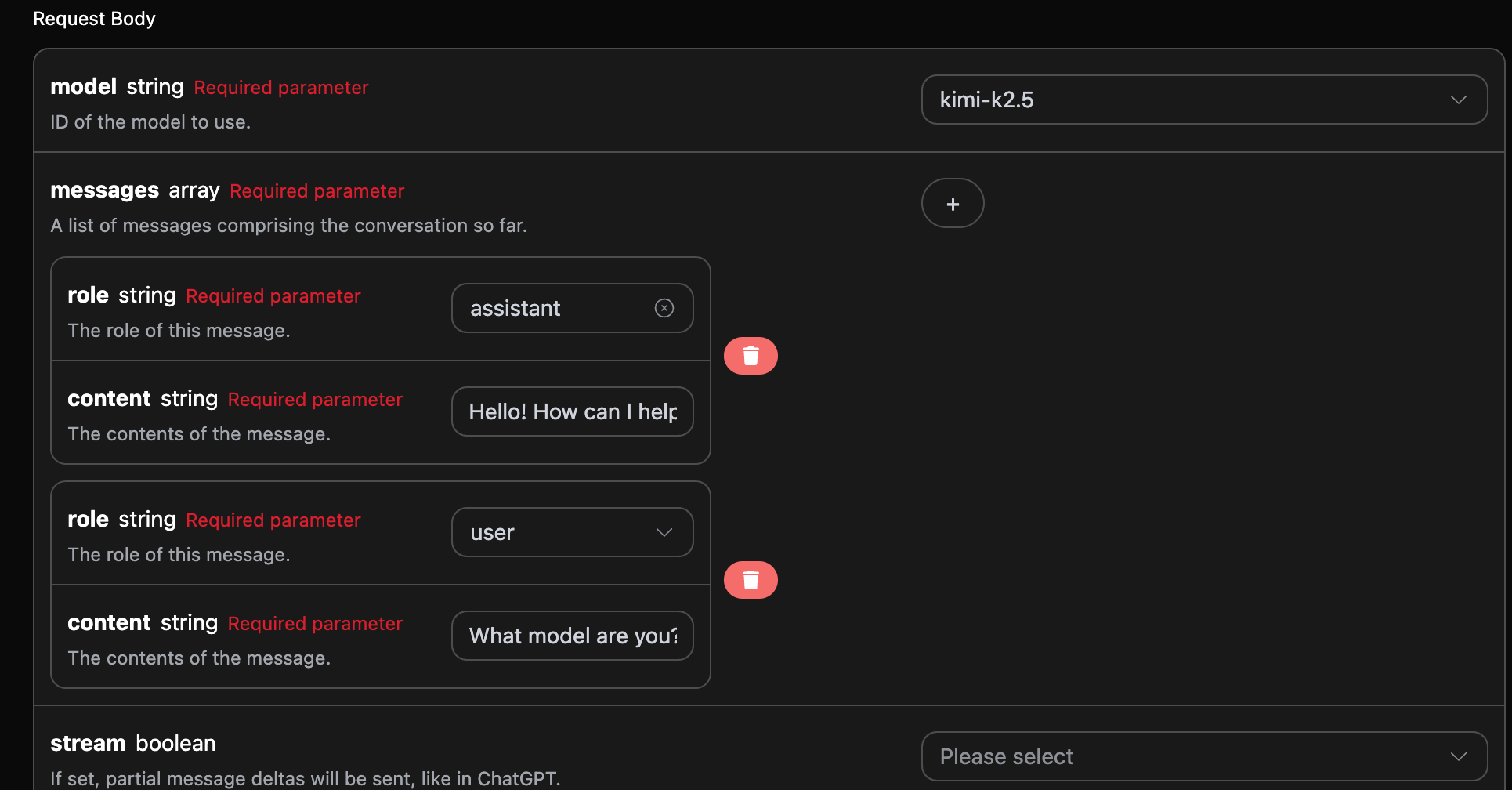
Python のサンプル呼び出しコード:
import requests

url = "https://api.acedata.cloud/kimi/chat/completions"

headers = {
    "accept": "application/json",
    "authorization": "Bearer {token}",
    "content-type": "application/json"
}

payload = {
    "model": "kimi-k2.5",
    "messages": [{"role":"assistant","content":"Hello! How can I help you today?"},{"role":"user","content":"What model are you?"}]
}

response = requests.post(url, json=payload, headers=headers)
print(response.text)
複数の質問をアップロードすることで、多輪対話を簡単に実現でき、以下のような回答を得ることができます:
{
  "id": "chatcmpl-81e5f161ea077f5e",
  "object": "chat.completion",
  "created": 1770992310,
  "model": "kimi-k2.5",
  "choices": [
    {
      "index": 0,
      "message": {
        "role": "assistant",
        "content": " I'm Kimi, an AI assistant made by Moonshot AI. I'm from the **K2.5** series.",
        "refusal": null,
        "reasoning_content": " The user is asking \"What model are you?\" They want to know which AI model I am.\n\n I should identify myself as Kimi, an AI assistant made by Moonshot AI. I should mention that I'm Kimi from the K2.5 series specifically, as that's the model currently deployed.\n\n Key points:\n - I am Kimi\n - Made by Moonshot AI\n - Currently Kimi K2.5 (or just say I'm part of the K2.5 series)\n - I should be helpful and direct\n\n I should not:\n - Claim to be a different model (like GPT-4, Gemini, etc.)\n - Be evasive about my identity\n - Make up version numbers that aren't correct\n\n The current model identity is Kimi K2.5 (though sometimes the exact series designation might vary by deployment, but K2.5 is the current flagship). I'll identify myself as Kimi, an AI assistant by Moonshot AI, and mention I'm from the K2.5 series.\n\n Simple, direct, accurate. ",
        "reasoning": " The user is asking \"What model are you?\" They want to know which AI model I am.\n\n I should identify myself as Kimi, an AI assistant made by Moonshot AI. I should mention that I'm Kimi from the K2.5 series specifically, as that's the model currently deployed.\n\n Key points:\n - I am Kimi\n - Made by Moonshot AI\n - Currently Kimi K2.5 (or just say I'm part of the K2.5 series)\n - I should be helpful and direct\n\n I should not:\n - Claim to be a different model (like GPT-4, Gemini, etc.)\n - Be evasive about my identity\n - Make up version numbers that aren't correct\n\n The current model identity is Kimi K2.5 (though sometimes the exact series designation might vary by deployment, but K2.5 is the current flagship). I'll identify myself as Kimi, an AI assistant by Moonshot AI, and mention I'm from the K2.5 series.\n\n Simple, direct, accurate. ",
        "tool_calls": []
      },
      "logprobs": null,
      "finish_reason": "stop"
    }
  ],
  "usage": {
    "prompt_tokens": 28,
    "completion_tokens": 235,
    "total_tokens": 263,
    "prompt_tokens_details": {
      "cached_tokens_details": {}
    },
    "completion_tokens_details": {}
  }
}
choices に含まれる情報は基本的な使用内容と一致しており、これは Kimi が複数の対話に対して返信した具体的な内容を含んでいます。これにより、複数の対話内容に基づいて対応する質問に答えることができます。

エラーハンドリング

API を呼び出す際にエラーが発生した場合、API は対応するエラーコードと情報を返します。例えば:
  • 400 token_mismatched:不正なリクエスト、パラメータが不足しているか無効である可能性があります。
  • 400 api_not_implemented:不正なリクエスト、パラメータが不足しているか無効である可能性があります。
  • 401 invalid_token:未認証、無効または不足している認証トークン。
  • 429 too_many_requests:リクエストが多すぎます、レート制限を超えています。
  • 500 api_error:内部サーバーエラー、サーバーで何かがうまくいきませんでした。

エラー応答の例

{
  "success": false,
  "error": {
    "code": "api_error",
    "message": "fetch failed"
  },
  "trace_id": "2cf86e86-22a4-46e1-ac2f-032c0f2a4e89"
}

結論

この文書を通じて、Gemini Chat Completion API を使用して公式の Gemini の対話機能を簡単に実現する方法を理解しました。この文書が、API の接続と使用をより良くする手助けとなることを願っています。何か質問があれば、いつでも技術サポートチームにお問い合わせください。