跳转到主要内容
本文将介绍一种 SeeDance Videos Generation API 对接说明,它是可以通过输入自定义参数来生成SeeDance官方的视频。

申请流程

要使用 API,需要先到 SeeDance Videos Generation API 对应页面申请对应的服务,进入页面之后,点击「Acquire」按钮,如图所示: 如果你尚未登录或注册,会自动跳转到登录页面邀请您来注册和登录,登录注册之后会自动返回当前页面。 在首次申请时会有免费额度赠送,可以免费使用该 API。

基本使用

首先先了解下基本的使用方式,就是输入提示词 content.text、类型content.type=text 以及模型 model,便可获得处理后的结果,具体的内容如下:

可以看到这里我们设置了 Request Headers,包括:
  • accept:想要接收怎样格式的响应结果,这里填写为 application/json,即 JSON 格式。
  • authorization:调用 API 的密钥,申请之后可以直接下拉选择。
另外设置了 Request Body,包括:
  • model:生成视频的模型,可选值:doubao-seedance-1-0-pro-250528doubao-seedance-1-0-pro-fast-251015doubao-seedance-1-5-pro-251215doubao-seedance-1-0-lite-t2v-250428doubao-seedance-1-0-lite-i2v-250428
  • content:输入内容数组,type 可以是 textimage_url
  • resolution:输出分辨率,可选 480p / 720p / 1080p
  • ratio:宽高比,可选 16:9 / 4:3 / 1:1 / 3:4 / 9:16 / 21:9 / adaptive
  • duration:视频时长(秒),范围 2–12。
  • seed:随机种子,整数,-1 到 4294967295。
  • camerafixed:是否固定摄像头,true / false
  • watermark:是否添加水印,true / false
  • generate_audio:是否生成有声视频,true / falsedoubao-seedance-1-5-pro-251215 支持
  • service_tier:推理模式,default(在线)或 flex(离线,价格为在线的 50%)。
  • return_last_frame:是否在结果中返回视频最后一帧图片 URL。
  • execution_expires_after:任务超时时间(秒),范围 3600–259200。
  • callback_url:异步回调地址,设置后 API 立即返回 task_id,任务完成时将结果 POST 到该地址。
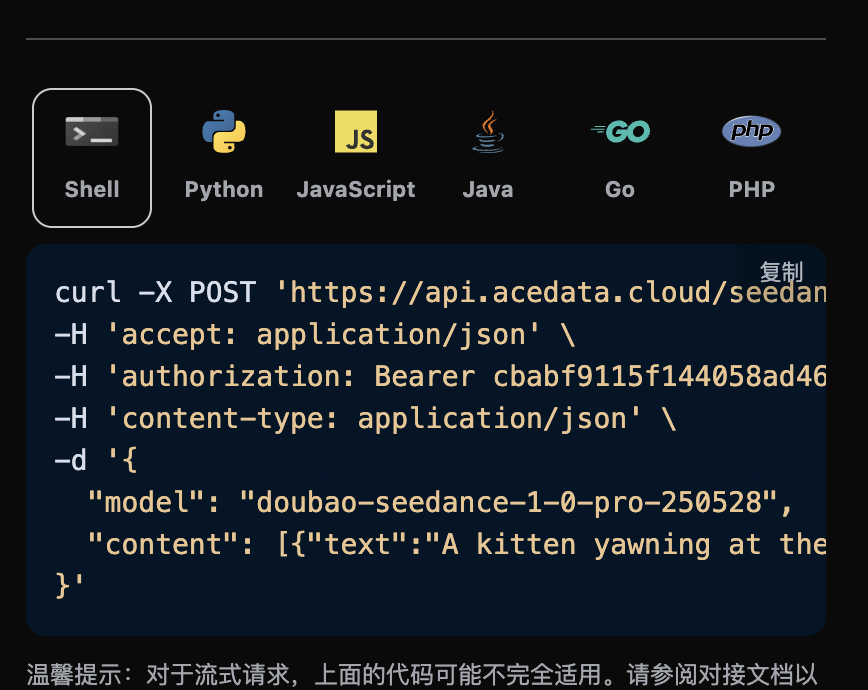
选择之后,可以发现右侧也生成了对应代码,如图所示:

点击「Try」按钮即可进行测试,如上图所示,这里我们就得到了如下结果:
{
  "success": true,
  "task_id": "ec22ae22-0140-4033-8c86-a48b536da595",
  "trace_id": "1cc87db0-8ee5-4436-969b-35cc571a9fd5",
  "data": {
    "task_id": "cgt-20251222005129-62fhb",
    "status": "succeeded",
    "video_url": "https://platform.cdn.acedata.cloud/seedance/f592800a-b87c-4705-8796-cbb8018cae35.mp4",
    "model": "doubao-seedance-1-0-pro-250528"
  }
}
返回结果一共有多个字段,介绍如下:
  • success,此时视频生成任务的状态情况。
  • task_id,此时视频生成任务ID。
  • trace_id,此时视频生成跟踪ID。
  • data,此时视频生成任务的结果列表。
    • task_id,此时视频生成任务的服务器端ID。
    • video_url,此时视频生成任务的视频链接。
    • status,此时视频生成任务的状态。
      • model,生成视频使用的模型。
可以看到我们得到了满意的视频信息,我们只需要根据结果中 data 的视频链接地址获取生成的SeeDance视频即可。 另外如果想生成对应的对接代码,可以直接复制生成,例如 CURL 的代码如下:
curl -X POST 'https://api.acedata.cloud/seedance/videos' \
-H 'authorization: Bearer ${bearer_token}' \
-H 'accept: application/json' \
-H 'content-type: application/json' \
-d '{
  "content": [{"text":"A kitten yawning at the camera. --rs 720p --rt 16:9 --dur 5 --fps 24 --wm true --seed 11 --cf false","type":"text"}],
  "model": "doubao-seedance-1-0-pro-250528"
}'

内联参数说明

content[].text 提示词末尾,可以通过追加 --parameter value 的形式传入生成参数(旧方式,弱校验,填写有误时自动使用默认值)。完整参数列表如下:
内联参数对应字段说明取值范围
--rsresolution输出分辨率480p / 720p / 1080p
--rtratio宽高比16:9 / 4:3 / 1:1 / 3:4 / 9:16 / 21:9 / adaptive
--durduration视频时长(秒)2–12
--framesframes视频帧数[29, 289] 中满足 25+4n 的整数
--fpsframespersecond帧率仅支持 24
--seedseed随机种子-1 到 4294967295
--cfcamerafixed是否固定摄像头true / false
--wmwatermark是否添加水印true / false
推荐做法:直接在 Request Body 中使用对应的顶层字段(如 resolutionratio 等),为强校验模式,参数填写有误时会返回明确错误提示,更易于排查问题。

生成有声视频

doubao-seedance-1-5-pro-251215 支持通过 generate_audio 参数生成带音频的视频:
{
  "model": "doubao-seedance-1-5-pro-251215",
  "content": [
    {
      "type": "text",
      "text": "A girl holds a fox, the wind blows her hair, you can hear the sound of the wind"
    }
  ],
  "generate_audio": true,
  "ratio": "16:9",
  "duration": 5
}
其他模型不支持此参数,传入后会被忽略。

图生视频首帧

如果想图生视频任务,首先 content 参数需要包含 typeimage_url 的项,image_url 字段必须为对象格式:{"url": "https://..."} 或 Base64 格式 {"url": "data:image/png;base64,..."}
注意image_url 不支持直接传入字符串格式(如 "image_url": "https://..."),必须使用对象格式 "image_url": {"url": "https://..."},否则会返回 400 错误。
对应的代码:
import requests

url = "https://api.acedata.cloud/seedance/videos"

headers = {
    "accept": "application/json",
    "authorization": "Bearer {token}",
    "content-type": "application/json"
}

payload = {
    "content": [
        {
            "type": "image_url",
            "image_url": {
                "url": "https://ark-project.tos-cn-beijing.volces.com/doc_image/i2v_foxrgirl.png"
            }
        },
        {
            "type": "text",
            "text": "A girl holds a fox in her arms. She opens her eyes and gazes tenderly at the camera, while the fox affectionately holds her back. As the camera slowly pulls away, her hair is gently blown by the wind. --ratio adaptive  --dur 5"
        }
    ],
    "model": "doubao-seedance-1-0-pro-250528"
}

response = requests.post(url, json=payload, headers=headers)
print(response.text)
点击运行,可以发现会立即得到一个结果,如下:
{
    "success": true,
    "task_id": "dc7cceb5-3c12-4de7-a5f4-abcbba3e8e39",
    "trace_id": "b3b09de3-b7fa-4bb0-88b5-aad4b4a96fd4",
    "data": {
        "task_id": "cgt-20251222072003-x2259",
        "status": "succeeded",
        "video_url": "https://platform.cdn.acedata.cloud/seedance/6afb78b8-5ba8-424f-adcd-69423a700b50.mp4",
        "model": "doubao-seedance-1-0-pro-250528"
    }
}
可以看到,生成的效果是图生建视频的,结果与上文类似。

图生视频首尾帧

如果想图生视频首尾帧, 首先参数content必须传入类型image_url,并且分别设置rolefirst_framelast_frame,就可以指定如下内容:
  • role:指定首帧或者尾帧。
  • image_url
    • url 图片链接 同时 content 还需要输入类型text作为prompt提示词
对应的代码:
import requests

url = "https://api.acedata.cloud/seedance/videos"

headers = {
    "accept": "application/json",
    "authorization": "Bearer {token}",
    "content-type": "application/json"
}

payload = {
   "model": "doubao-seedance-1-0-pro-250528",
    "content": [
         {
            "type": "text",
            "text": "360-degree shot"
        },
        {
            "type": "image_url",
            "image_url": {
                "url": "https://ark-project.tos-cn-beijing.volces.com/doc_image/seepro_first_frame.jpeg"
            },
            "role": "first_frame"
        },
        {
            "type": "image_url",
            "image_url": {
                "url": "https://ark-project.tos-cn-beijing.volces.com/doc_image/seepro_last_frame.jpeg"
            },
            "role": "last_frame"
        }
    ]
}

response = requests.post(url, json=payload, headers=headers)
print(response.text)
点击运行,可以发现会立即得到一个结果,如下:
{
    "success": true,
    "task_id": "f7096c6c-9430-4392-8201-d259632d7afd",
    "trace_id": "4a4a3721-00fb-43d2-aff2-3b516ac01a8a",
    "data": {
        "task_id": "cgt-20251222073134-54qcw",
        "status": "succeeded",
        "video_url": "https://platform.cdn.acedata.cloud/seedance/95f9f5f0-fc50-4c71-bc6f-e154582c141e.mp4",
        "model": "doubao-seedance-1-0-pro-250528"
    }
}
可以看到,生成的效果是角色生成视频,结果与上文类似。

异步回调

由于 SeeDance Videos Generation API 生成时间较长(约 1-2 分钟),可通过 callback_url 字段使用异步模式,避免 HTTP 连接长时间占用。 整体流程:客户端发起请求时指定 callback_url,API 立即返回包含 task_id 的响应;任务完成后,平台将生成结果以 POST JSON 的形式发送到 callback_url,结果中同样包含 task_id 以便关联。
{
  "task_id": "f7096c6c-9430-4392-8201-d259632d7afd"
}
任务完成时,平台推送到 callback_url 的内容如下:
{
  "success": true,
  "task_id": "f7096c6c-9430-4392-8201-d259632d7afd",
  "trace_id": "4a4a3721-00fb-43d2-aff2-3b516ac01a8a",
  "data": {
    "task_id": "cgt-20251222073134-54qcw",
    "status": "succeeded",
    "video_url": "https://platform.cdn.acedata.cloud/seedance/95f9f5f0-fc50-4c71-bc6f-e154582c141e.mp4",
    "model": "doubao-seedance-1-0-pro-250528"
  }
}
结果中的 task_id 字段与请求时返回的一致,通过该字段即可实现任务的关联。

错误处理

在调用 API 时,如果遇到错误,API 会返回相应的错误代码和信息。例如:
  • 400 token_mismatched:Bad request, possibly due to missing or invalid parameters.
  • 400 api_not_implemented:Bad request, possibly due to missing or invalid parameters.
  • 401 invalid_token:Unauthorized, invalid or missing authorization token.
  • 429 too_many_requests:Too many requests, you have exceeded the rate limit.
  • 500 api_error:Internal server error, something went wrong on the server.

错误响应示例

{
  "success": false,
  "error": {
    "code": "api_error",
    "message": "fetch failed"
  },
  "trace_id": "2cf86e86-22a4-46e1-ac2f-032c0f2a4e89"
}

结论

通过本文档,您已经了解了如何使用 SeeDance Videos Generation API 可通过输入提示词以及参考图片来生成视频。希望本文档能帮助您更好地对接和使用该 API。如有任何问题,请随时联系我们的技术支持团队。