跳转到主要内容
Anthropic Claude 是一款非常强大的 AI 对话系统,只要输入提示词,就能在短短几秒内生成流畅自然的回复。Claude 以其出色的语言理解和生成能力在业界独树一帜,如今,Claude 早已在各个行业和领域广泛应用,其影响力愈发显著。无论是日常对话、创意写作,还是专业咨询、代码编程,Claude 都能提供令人惊叹的智能协助,极大地提高了人类的工作效率和创造力。 本文档主要介绍 Claude Chat Completion API 操作的使用流程,利用它我们可以轻松使用官方 Claude 的对话功能。

申请流程

要使用 Claude Chat Completion API,首先可以到 Claude Chat Completion API 页面点击「Acquire」按钮,获取请求所需要的凭证: 如果你尚未登录或注册,会自动跳转到登录页面邀请您来注册和登录,登录注册之后会自动返回当前页面。 在首次申请时会有免费额度赠送,可以免费使用该 API。

基本使用

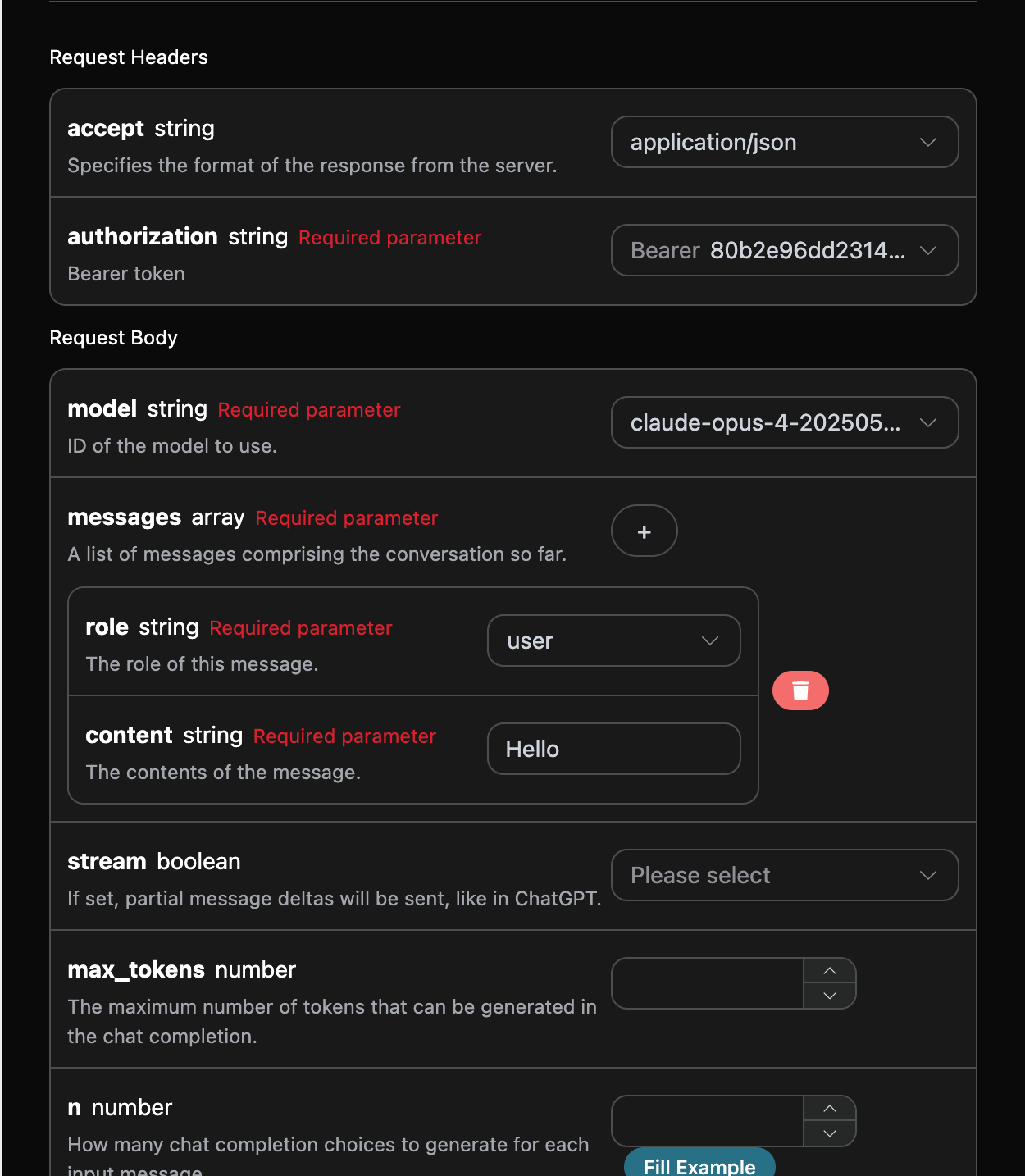
接下来就可以在界面上填写对应的内容,如图所示:

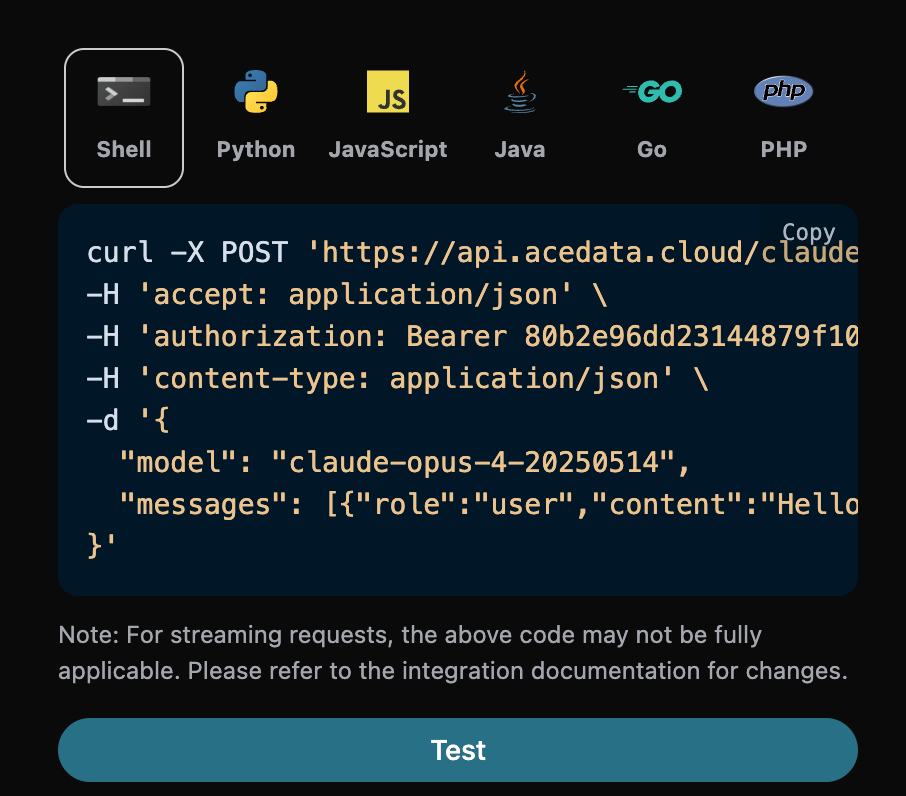
在第一次使用该接口时,我们至少需要填写三个内容,一个是 authorization,直接在下拉列表里面选择即可。另一个参数是 modelmodel 就是我们选择使用 Claude 官网模型类别,这里我们主要有 20 种模型,详情可以看我们提供的模型。最后一个参数是messagesmessages是我们输入的提问词数组,它是一个数组,表示可以同时上传多个提问词,每个提问词包含了 rolecontent,其中 role 表示提问者的角色,我们提供了三种身份,分别为 userassistantsystem 。另一个 content 就是我们提问的具体内容。 同时您可以注意到右侧有对应的调用代码生成,您可以复制代码直接运行,也可以直接点击「Try」按钮进行测试。 常用可选参数:
  • max_tokens:限制单次回复的最大 token 数。
  • temperature:生成随机性,0-2 之间,值越大越发散。
  • n:一次生成多少条候选回复。
  • response_format:返回格式设置。

调用之后,我们发现返回结果如下:
{
  "id": "msg_bdrk_01Q6WN27v95ypCa1kbanAQ6K",
  "model": "claude-opus-4-20250514",
  "object": "chat.completion",
  "created": 1768619365,
  "choices": [
    {
      "index": 0,
      "message": {
        "role": "assistant",
        "content": "Hello! How can I help you today?"
      },
      "finish_reason": "stop"
    }
  ],
  "usage": {
    "prompt_tokens": 8,
    "completion_tokens": 12,
    "total_tokens": 20,
    "prompt_tokens_details": {
      "cached_tokens": 0,
      "text_tokens": 0,
      "audio_tokens": 0,
      "image_tokens": 0
    },
    "completion_tokens_details": {
      "text_tokens": 0,
      "audio_tokens": 0,
      "reasoning_tokens": 0
    },
    "input_tokens": 0,
    "output_tokens": 0,
    "input_tokens_details": null,
    "claude_cache_creation_5_m_tokens": 0,
    "claude_cache_creation_1_h_tokens": 0
  }
}
返回结果一共有多个字段,介绍如下:
  • id,生成此次对话任务的 ID,用于唯一标识此次对话任务。
  • model ,选择的 Claude 官网模型。
  • choices,Claude 针对提问词给于的回答信息。
  • usage :针对本次问答对 token 的统计信息。
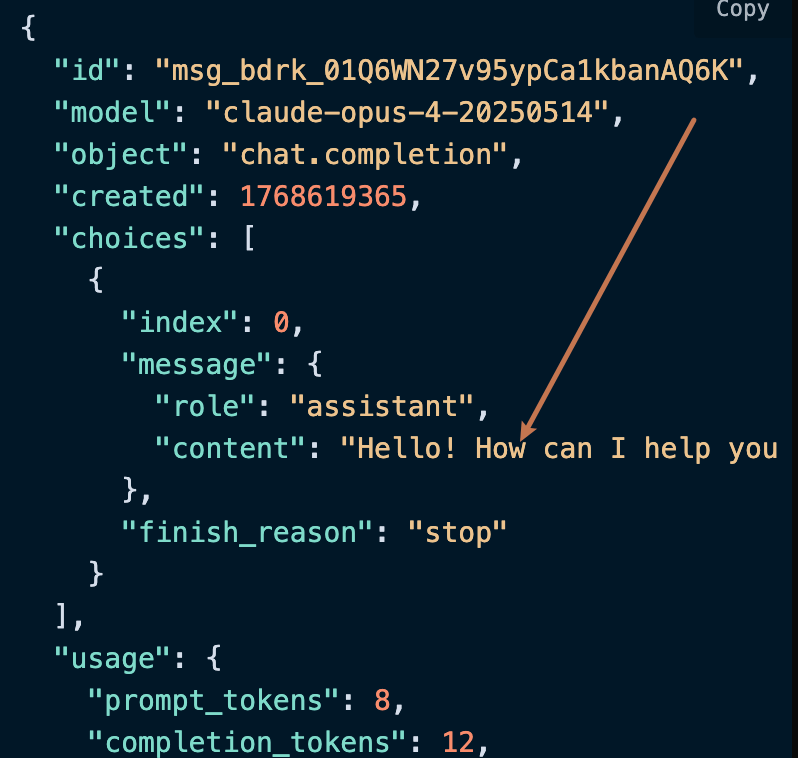
其中 choices 是包含了 Claude 的回答信息,它里面的 choices 是 Claude回答的具体信息,可以发现如图所示。

可以看到,choices 里面的 content 字段包含了 Claude 回复的具体内容。

流式响应

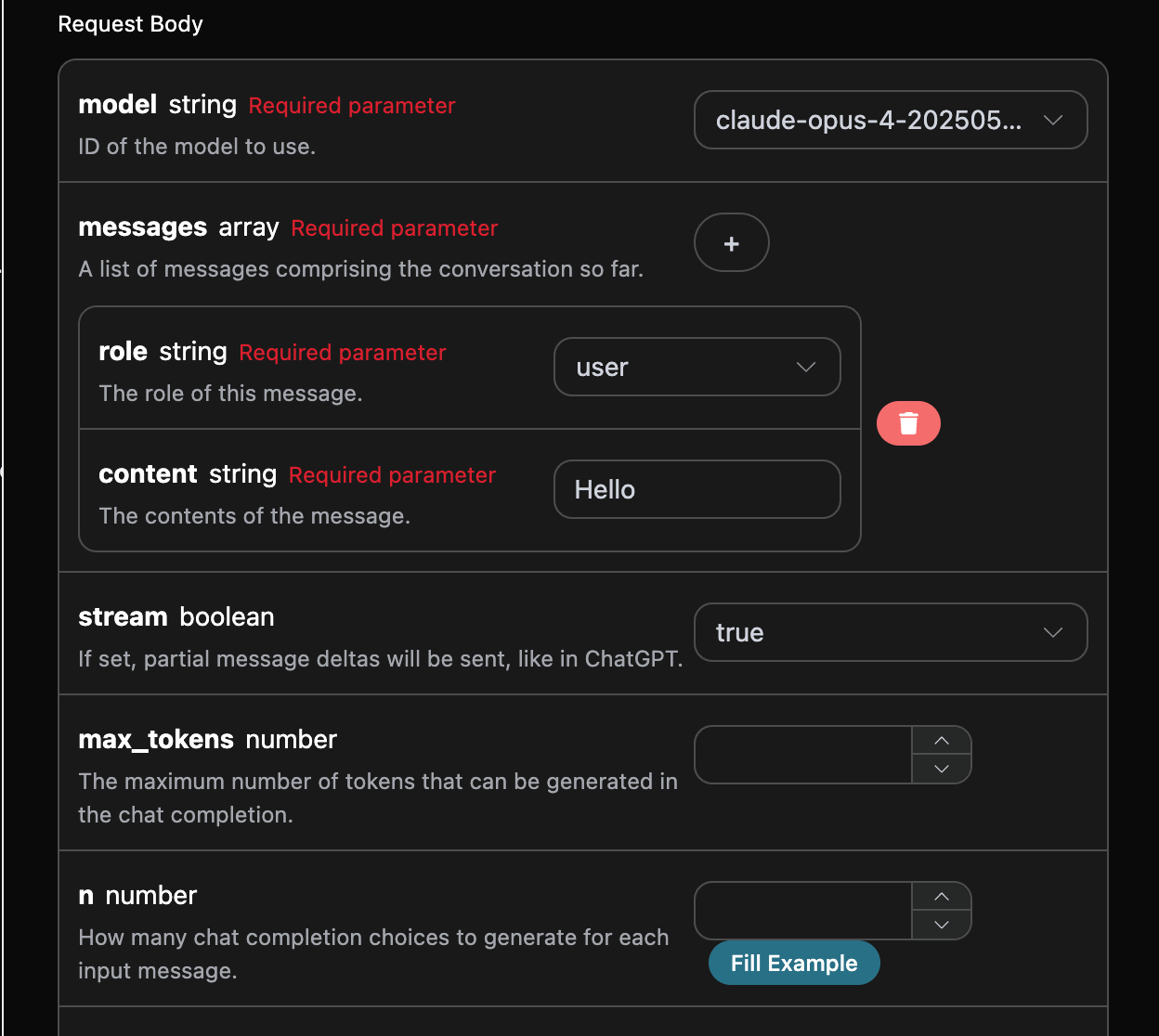
该接口也支持流式响应,这对网页对接十分有用,可以让网页实现逐字显示效果。 如果想流式返回响应,可以更改请求头里面的 stream 参数,修改为 true 修改如图所示,不过调用代码需要有对应的更改才能支持流式响应。

stream 修改为 true 之后,API 将逐行返回对应的 JSON 数据,在代码层面我们需要做相应的修改来获得逐行的结果。 Python 样例调用代码:
import requests

url = "https://api.acedata.cloud/v1/chat/completions"

headers = {
    "accept": "application/json",
    "authorization": "Bearer {token}",
    "content-type": "application/json"
}

payload = {
    "model": "claude-opus-4-20250514",
    "messages": [{"role":"user","content":"Hello"}],
    "stream": True
}

response = requests.post(url, json=payload, headers=headers)
print(response.text)
输出效果如下:
data: {"id": "msg_bdrk_01LPPqDjLKMgfSwTRMRty9VT", "object": "chat.completion.chunk", "created": 1768619445, "model": "claude-opus-4-20250514", "system_fingerprint": null, "choices": [{"delta": {"content": "", "role": "assistant"}, "logprobs": null, "finish_reason": null, "index": 0}], "usage": null}

data: {"id": "msg_bdrk_01LPPqDjLKMgfSwTRMRty9VT", "object": "chat.completion.chunk", "created": 1768619445, "model": "claude-opus-4-20250514", "system_fingerprint": null, "choices": [{"delta": {"content": ""}, "logprobs": null, "finish_reason": null, "index": 0}], "usage": null}

data: {"id": "msg_bdrk_01LPPqDjLKMgfSwTRMRty9VT", "object": "chat.completion.chunk", "created": 1768619445, "model": "claude-opus-4-20250514", "system_fingerprint": null, "choices": [{"delta": {"content": "Hello!"}, "logprobs": null, "finish_reason": null, "index": 0}], "usage": null}

data: {"id": "msg_bdrk_01LPPqDjLKMgfSwTRMRty9VT", "object": "chat.completion.chunk", "created": 1768619445, "model": "claude-opus-4-20250514", "system_fingerprint": null, "choices": [{"delta": {"content": " How can I help you"}, "logprobs": null, "finish_reason": null, "index": 0}], "usage": null}

data: {"id": "msg_bdrk_01LPPqDjLKMgfSwTRMRty9VT", "object": "chat.completion.chunk", "created": 1768619445, "model": "claude-opus-4-20250514", "system_fingerprint": null, "choices": [{"delta": {"content": " today?"}, "logprobs": null, "finish_reason": null, "index": 0}], "usage": null}

data: {"id": "msg_bdrk_01LPPqDjLKMgfSwTRMRty9VT", "object": "chat.completion.chunk", "created": 1768619445, "model": "claude-opus-4-20250514", "system_fingerprint": null, "choices": [{"delta": {}, "logprobs": null, "finish_reason": "stop", "index": 0}], "usage": null}

data: {"id": "msg_bdrk_01LPPqDjLKMgfSwTRMRty9VT", "object": "chat.completion.chunk", "created": 1768619445, "model": "claude-opus-4-20250514", "system_fingerprint": null, "choices": [], "usage": {"prompt_tokens": 8, "completion_tokens": 12, "total_tokens": 20, "prompt_tokens_details": {"cached_tokens": 0, "text_tokens": 0, "audio_tokens": 0, "image_tokens": 0}, "completion_tokens_details": {"text_tokens": 0, "audio_tokens": 0, "reasoning_tokens": 0}, "input_tokens": 0, "output_tokens": 0, "input_tokens_details": null, "claude_cache_creation_5_m_tokens": 0, "claude_cache_creation_1_h_tokens": 0}}

data: [DONE]

可以看到,响应里面有许多 datadata 里面的 choices 即为最新的回答内容,与上文介绍的内容一致。choices 是新增的回答内容,您可以根据结果来对接到您的系统中。同时流式响应的结束是根据 data 的内容来判断的,如果内容为 [DONE],则表示流式响应回答已经全部结束。返回的 data 结果一共有多个字段,介绍如下:
  • id,生成此次对话任务的 ID,用于唯一标识此次对话任务。
  • model ,选择的 Claude 官网模型。
  • choices,Claude 针对提问词给于的回答信息。
JavaScript 也是支持的,比如 Node.js 的流式调用代码如下:
const options = {
  method: "post",
  headers: {
    accept: "application/json",
    authorization: "Bearer {token}",
    "content-type": "application/json",
  },
  body: JSON.stringify({
    model: "claude-opus-4-20250514",
    messages: [{ role: "user", content: "Hello" }],
    stream: true,
  }),
};

fetch("https://api.acedata.cloud/v1/chat/completions", options)
  .then((response) => response.json())
  .then((response) => console.log(response))
  .catch((err) => console.error(err));
Java 样例代码:
JSONObject jsonObject = new JSONObject();
jsonObject.put("model", "claude-opus-4-20250514");
jsonObject.put("messages", [{"role":"user","content":"Hello"}]);
jsonObject.put("stream", true);
MediaType mediaType = "application/json; charset=utf-8".toMediaType();
RequestBody body = jsonObject.toString().toRequestBody(mediaType);
Request request = new Request.Builder()
  .url("https://api.acedata.cloud/v1/chat/completions")
  .post(body)
  .addHeader("accept", "application/json")
  .addHeader("authorization", "Bearer {token}")
  .addHeader("content-type", "application/json")
  .build();

OkHttpClient client = new OkHttpClient();
Response response = client.newCall(request).execute();
System.out.print(response.body!!.string())
其他语言可以另外自行改写,原理都是一样的。

多轮对话

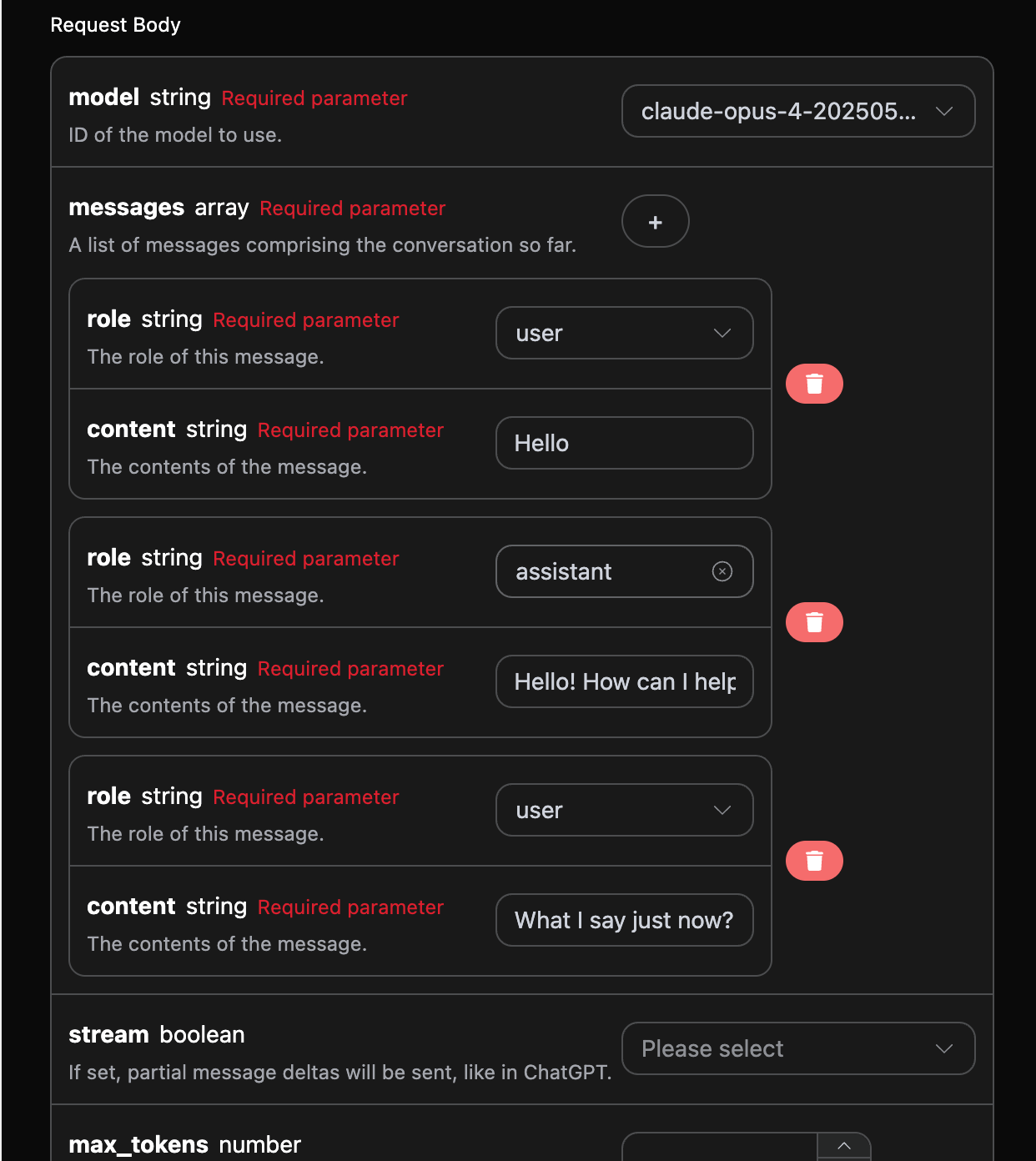
如果您想要对接多轮对话功能,需要对 messages 字段上传多个提问词,多个提问词的具体示例如下图所示:

Python 样例调用代码:
import requests

url = "https://api.acedata.cloud/v1/chat/completions"

headers = {
    "accept": "application/json",
    "authorization": "Bearer {token}",
    "content-type": "application/json"
}

payload = {
    "model": "claude-opus-4-20250514",
    "messages": [{"role":"user","content":"Hello"},{"role":"assistant","content":"Hello! How can I help you today?"},{"role":"user","content":"What I say just now?"}]
}

response = requests.post(url, json=payload, headers=headers)
print(response.text)
通过上传多个提问词,就可以轻松实现多轮对话,可以得到如下回答:
{
  "id": "msg_bdrk_01Y1wfQmd89g968TVbFu57Yc",
  "model": "claude-opus-4-20250514",
  "object": "chat.completion",
  "created": 1768619674,
  "choices": [
    {
      "index": 0,
      "message": {
        "role": "assistant",
        "content": "You said \"Hello\" - that was your first message to me in our conversation."
      },
      "finish_reason": "stop"
    }
  ],
  "usage": {
    "prompt_tokens": 29,
    "completion_tokens": 20,
    "total_tokens": 49,
    "prompt_tokens_details": {
      "cached_tokens": 0,
      "text_tokens": 0,
      "audio_tokens": 0,
      "image_tokens": 0
    },
    "completion_tokens_details": {
      "text_tokens": 0,
      "audio_tokens": 0,
      "reasoning_tokens": 0
    },
    "input_tokens": 0,
    "output_tokens": 0,
    "input_tokens_details": null,
    "claude_cache_creation_5_m_tokens": 0,
    "claude_cache_creation_1_h_tokens": 0
  }
}
可以看到,choices 包含的信息与基本使用的内容是一致的,这个包含了 Claude 针对多个对话进行回复的具体内容,这样就可以根据多个对话内容来回答对应的问题了。

深度思考模型

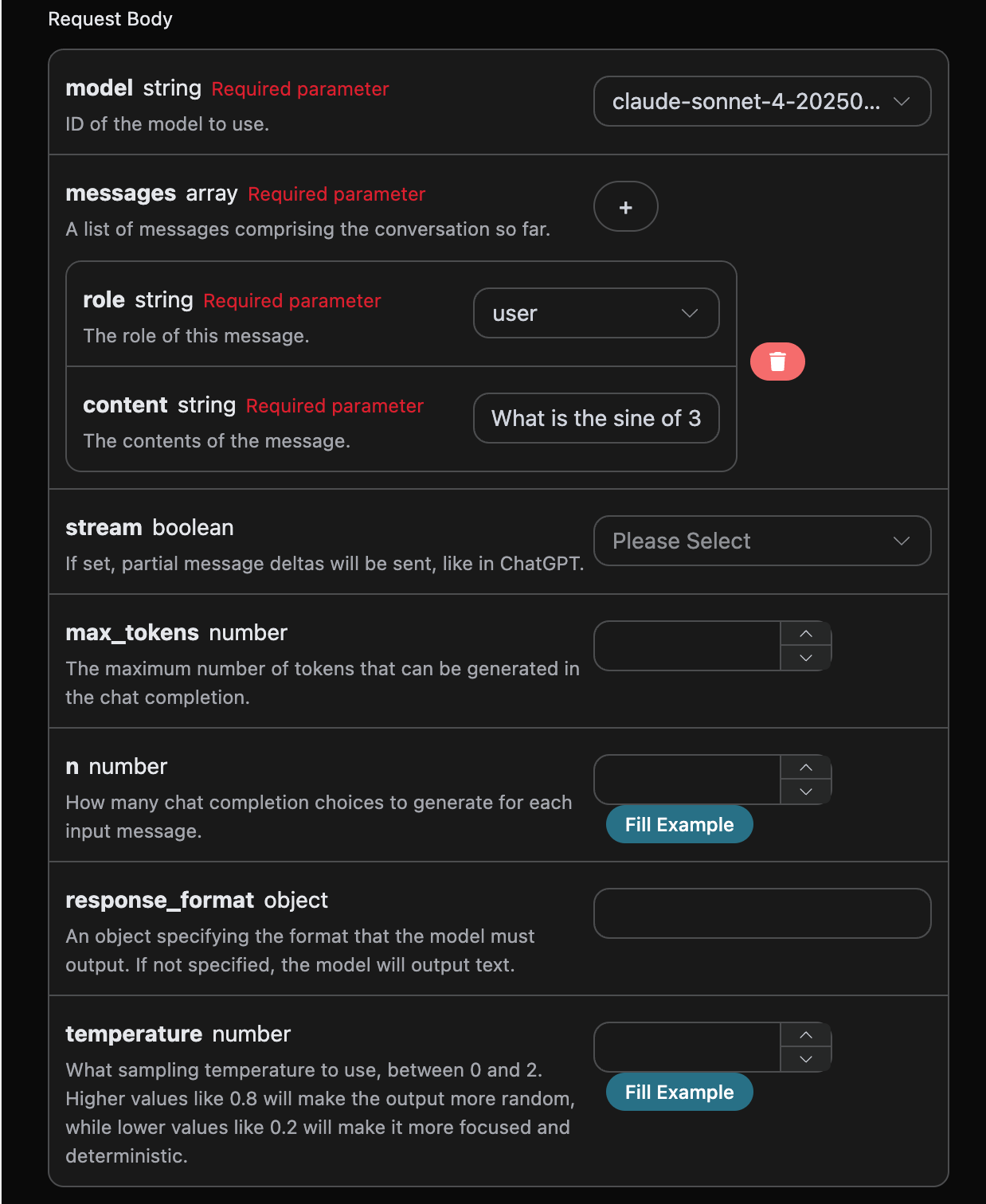
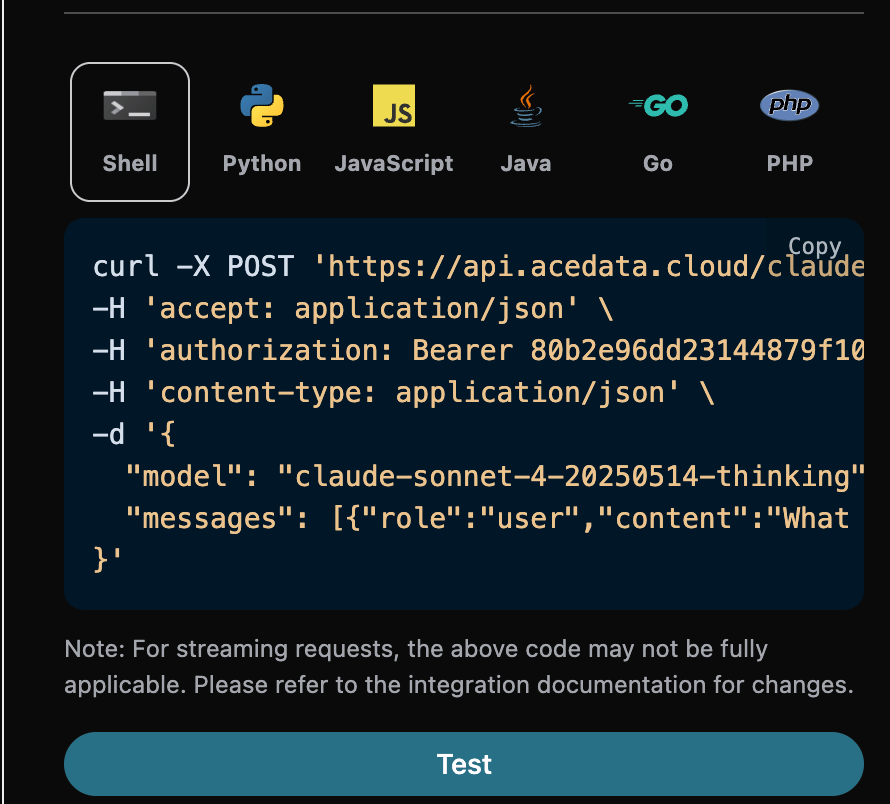
claude-opus-4-20250514-thinking 和 claude-sonnet-4-20250514-thinking 模型与其它模型不同,它可以根据提问词来进行深度思考来回答,并且将思考过程的结果返回给你,本文将通过一个具体示例来演示深度思考功能,接下来就可以在 Claude Chat Completion API 界面上填写对应的内容,如图所示:

同时您可以注意到右侧有对应的调用代码生成,您可以复制代码直接运行,也可以直接点击「Try」按钮进行测试。

调用之后,我们发现返回结果如下:
{
  "id": "msg_018J4YaRoGHtbsTVb4Vvz7oH",
  "object": "chat.completion",
  "created": 1755444014,
  "model": "claude-sonnet-4-20250514-thinking",
  "choices": [
    {
      "index": 0,
      "message": {
        "role": "assistant",
        "content": "The sine of 30 degrees is **1/2** or **0.5**.\n\nThis is one of the fundamental trigonometric values. In a 30-60-90 triangle, the sides are in the ratio 1:√3:2, where the side opposite to the 30° angle has length 1 and the hypotenuse has length 2, giving us sin(30°) = 1/2.",
        "reasoning_content": "The user is asking for the sine of 30 degrees. This is a basic trigonometry question.\n\nThe sine of 30 degrees is a well-known value. In a 30-60-90 triangle, the sides are in the ratio 1:√3:2. \n\nFor a 30° angle:\n- The opposite side is 1\n- The hypotenuse is 2\n- So sin(30°) = opposite/hypotenuse = 1/2 = 0.5\n\nThis is one of the standard trigonometric values that's commonly memorized."
      },
      "logprobs": null,
      "finish_reason": "stop"
    }
  ],
  "usage": {
    "prompt_tokens": 60,
    "completion_tokens": 239,
    "total_tokens": 299,
    "prompt_tokens_details": {
      "cached_tokens_details": {}
    },
    "completion_tokens_details": {}
  }
}
可以看到,choices 里面的回答信息是经过深度思考后得到的,并且也给出了相关的思考过程内容,其中在contentreasoning_content表示模型的思考过程。choices 里面的回答信息是要通过 markdown 语法进行渲染,这样才能获得最佳的体验,最后这也体现出我们模型的联网功能的强大优势。

视觉模型

claude-sonnet-4-20250514 是 Claude 开发的多模态大型语言模型,它在 claude-4 的基础上增加了视觉理解能力。这个模型可以同时处理文本和图像输入,实现了跨模态的理解和生成。 使用 claude-sonnet-4-20250514 模型的文本处理是与上文的基本使用内容一致的,下面将简要介绍一下如果使用模型的图像处理能力。 使用 claude-sonnet-4-20250514 模型的图像处理能力主要是通过在原有的 content 内容基础上添加一个 type 字段,通过该字段可以知道上传的是文本还是图片,从而使用 claude-sonnet-4-20250514 模型的图像处理能力,下面主要讲述采用 Curl 和 Python 俩种方式来调用该功能。
  • Curl 脚本方式
curl -X POST 'https://api.acedata.cloud/v1/chat/completions' \
-H 'accept: application/json' \
-H 'authorization: Bearer {token}' \
-H 'content-type: application/json' \
-d '{
    "model": "claude-sonnet-4-20250514",
    "messages": [
      {
        "role": "user",
        "content": [
          {
            "type": "text",
            "text": "What'\''s in this image?"
          },
          {
            "type": "image_url",
            "image_url": {
              "url": "https://cdn.acedata.cloud/ueugot.png"
            }
          }
        ]
      }
    ]
  }'
  • Python 脚本方式
import requests

url = "https://api.acedata.cloud/v1/chat/completions"

headers = {
    "accept": "application/json",
    "authorization": "Bearer {token}",
    "content-type": "application/json"
}

payload = {
    "model": "claude-sonnet-4-20250514",
    "messages": [
        {
            "role": "user",
            "content": [
                {
                    "type": "text", "text": "What's in this image?"
                },
                {
                    "type": "image_url",
                    "image_url": {
                        "url": "https://cdn.acedata.cloud/ueugot.png"
                    }
                },
            ],
        }
    ]
}

response = requests.post(url, json=payload, headers=headers)
print(response.text)
然后可以得到下面的结果,结果里面的字段信息是与上文一致的,具体的如下:
{
  "id": "msg_bdrk_01NCrxpZmV17bhQJJRQEFEb9",
  "model": "claude-sonnet-4-20250514",
  "object": "chat.completion",
  "created": 1768628904,
  "choices": [
    {
      "index": 0,
      "message": {
        "role": "assistant",
        "content": "This image shows an API request configuration interface for what appears to be an AI chat completion service. Here are the key elements:\n\n**Request Body Parameters:**\n\n1. **model** (required string) - Set to \"claude-opus-4-202505...\" - specifies which AI model to use\n\n2. **messages** (required array) - Contains the conversation history with:\n   - **role** (required string) - Set to \"user\" \n   - **content** (required string) - Contains \"Hello\" as the message content\n\n3. **stream** (boolean) - Set to \"true\" - enables partial message deltas like in ChatGPT\n\n4. **max_tokens** (number) - Field for setting maximum tokens that can be generated in the response\n\n5. **n** (number) - Specifies how many chat completion choices to generate for each input\n\nThe interface has a dark theme with white text on black/dark gray backgrounds. There's a \"Fill Example\" button at the bottom right and various dropdown menus and input fields for configuring the API request parameters. A red trash/delete icon is visible, likely for removing message entries."
      },
      "finish_reason": "stop"
    }
  ],
  "usage": {
    "prompt_tokens": 1570,
    "completion_tokens": 252,
    "total_tokens": 1822,
    "prompt_tokens_details": {
      "cached_tokens": 0,
      "text_tokens": 0,
      "audio_tokens": 0,
      "image_tokens": 0
    },
    "completion_tokens_details": {
      "text_tokens": 0,
      "audio_tokens": 0,
      "reasoning_tokens": 0
    },
    "input_tokens": 0,
    "output_tokens": 0,
    "input_tokens_details": null,
    "claude_cache_creation_5_m_tokens": 0,
    "claude_cache_creation_1_h_tokens": 0
  }
}
可以看到回答的内容是基于图片进行回答的,因此通过上述俩种方式可以轻松使用 claude-3-7-sonnet-20250219 模型的文本和图像处理能力。

错误处理

在调用 API 时,如果遇到错误,API 会返回相应的错误代码和信息。例如:
  • 400 token_mismatched:Bad request, possibly due to missing or invalid parameters.
  • 400 api_not_implemented:Bad request, possibly due to missing or invalid parameters.
  • 401 invalid_token:Unauthorized, invalid or missing authorization token.
  • 429 too_many_requests:Too many requests, you have exceeded the rate limit.
  • 500 api_error:Internal server error, something went wrong on the server.

错误响应示例

{
  "success": false,
  "error": {
    "code": "api_error",
    "message": "fetch failed"
  },
  "trace_id": "2cf86e86-22a4-46e1-ac2f-032c0f2a4e89"
}

结论

通过本文档,您已经了解了如何使用 Claude Chat Completion API 轻松实现官方 Claude 的对话功能。希望本文档能帮助您更好地对接和使用该 API。如有任何问题,请随时联系我们的技术支持团队。