> ## Documentation Index
> Fetch the complete documentation index at: https://docs.acedata.cloud/llms.txt
> Use this file to discover all available pages before exploring further.
# Suno 歌曲生成 API 串接說明
> Suno Music Generation 整合指南 - Ace Data Cloud
隨著 AI 的應用變廣,各類 AI 程式已逐漸普及。AI 已逐漸深入到人們的工作生活方方面面。而 AI 涉及的行業也越來越多,從最初的寫作,到醫療教育,再到現在的音樂。
Suno 是一個專業高品質的 AI 歌曲和音樂創作平台,使用者只需輸入簡單的文字提示詞,即可根據流派風格和歌詞生成帶有人聲的歌曲。該 AI 音樂生成器由來自 Meta、TikTok、Kensho 等知名科技公司的團隊成員開發,目標是不需要任何樂器工具,讓所有人都可以創造美妙的音樂。
以下是模型更新的進度:
| 版本 | model | 上線時間 | lyric 限制 | style 限制 | 歌曲最長時長 |
| ------- | --------------- | ---------- | -------- | -------- | ------ |
| v6 | chirp-v6 | 2026.09.09 | — | — | — |
| v6 Wild | chirp-v6-wild | 2026.09.09 | — | — | — |
| v6 Mini | chirp-v6-mini | 2026.09.09 | — | — | — |
| v5.5 | chirp-v5-5 | 2026.03.27 | 5000 | 1000 | 8 分鐘 |
| v5 | chirp-v5 | 2025.09.23 | 5000 | 1000 | 8 分鐘 |
| v4.5+ | chirp-v4-5-plus | 2025.07.17 | 5000 | 1000 | 8 分鐘 |
| v4.5 | chirp-v4-5 | 2025.05.03 | 5000 | 1000 | 4 分鐘 |
| v4 | chirp-v4 | 2024.12.17 | 3000 | 200 | 150 秒 |
| v3.5 | chirp-v3-5 | --- | 3000 | 200 | 120 秒 |
> 上表的 `lyric` 與 `style` 限制為自訂模式(`custom` 為 `true`)下的上限。非自訂的靈感模式(`custom` 為 `false`)只填 `prompt`,其長度上限為 500 字元(各模型一致)。
Suno 現已支援 `chirp-v6`、`chirp-v6-wild` 和 `chirp-v6-mini`。推薦使用 `chirp-v6`;舊模型名稱繼續相容。
然而 Suno 官方並沒有提供 API,AceDataCloud 提供了一套 Suno 的 API,模擬串接了 Suno 官方,可以方便快捷地生成想要的音樂。
## 申請和使用
要使用 Suno Audios Generation API,首先到 [Ace Data Cloud 控制台](https://platform.acedata.cloud/console/applications) 取得您的 API Token,留作備用。

如果你尚未登入或註冊,會自動跳轉到登入頁面邀請你註冊和登入,完成後會自動返回目前頁面。
**一個 API Token 即可呼叫平台所有服務,無需為每個服務單獨申請。** 首次申請會贈送免費額度,可免費體驗;額度不足時可在 [控制台](https://platform.acedata.cloud/console/coin) 儲值通用餘額。
> 📘 完整文件:[Suno Audios Generation API →](https://platform.acedata.cloud/documents/suno-audios)
## 基本使用
想什麼歌曲,可以任意輸入一段文字,比如我想生成一首關於聖誕的歌曲,就可以輸入 `a song for Christmas`,如圖所示:
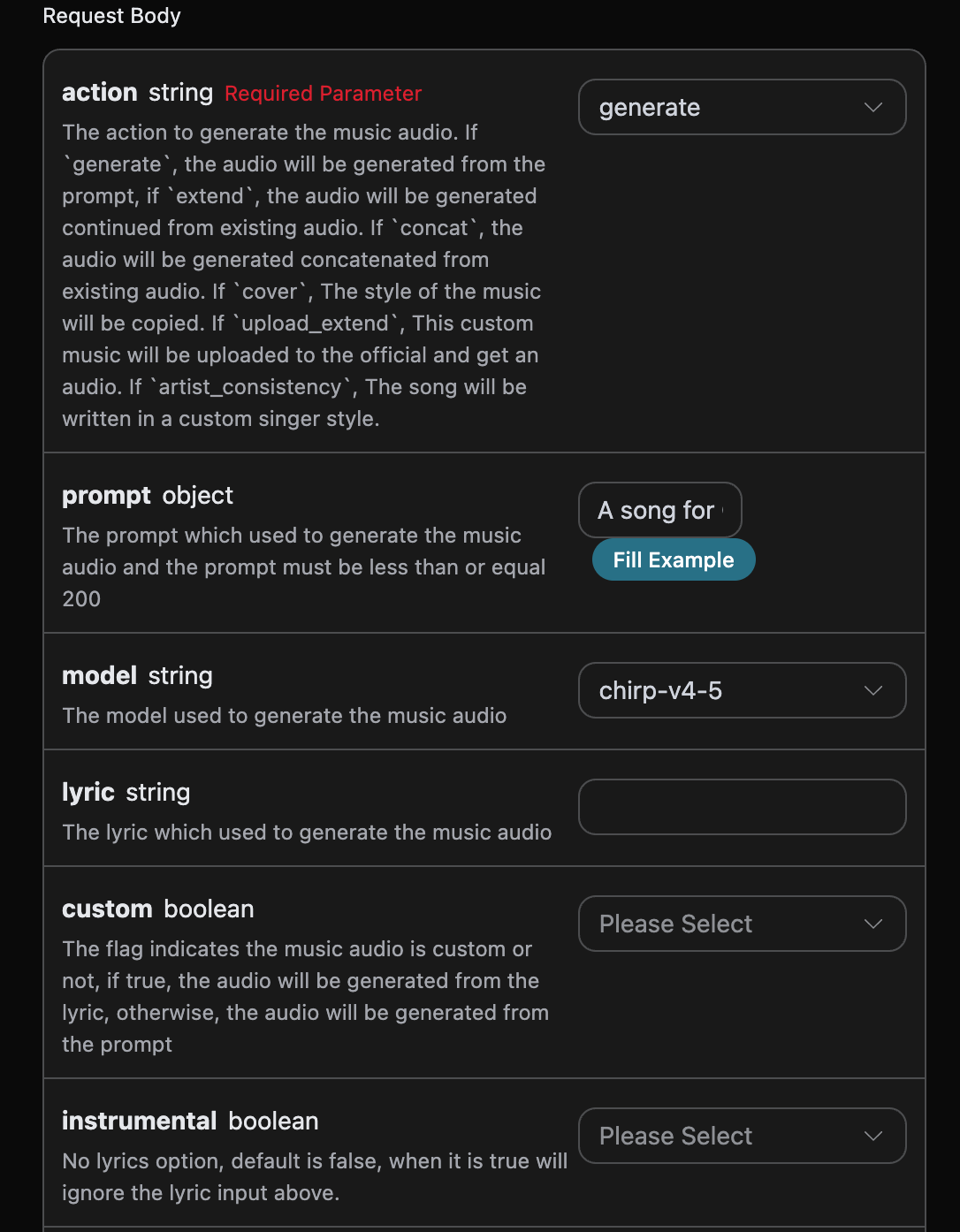
可以看到這裡我們設定了 Request Headers,包括:
* `accept`:想要接收怎樣格式的回應結果,這裡填寫為 `application/json`,即 JSON 格式。
* `authorization`:呼叫 API 的金鑰,申請之後可以直接下拉選擇。
另外設定了 Request Body,包括:
* `action`:此次音樂生成任務的行為,預設是 `generate`,主要包含:`extend`、`upload_extend`、`cover`、`upload_cover`、`replace_section`、`replace_section`、`concat`、`stems`、`all_stems`、`remaster`。
* `prompt`:Suno 官方的靈感模式提示詞(`custom` 為 `false` 時生效),最大 500 字元。
* `model`:此次音樂生成任務的模型。v6 系列包含 `chirp-v6`、`chirp-v6-wild` 和 `chirp-v6-mini`;舊模型名稱繼續相容。
* `lyric`:Suno 官方的自訂模式的歌詞內容。`chirp-v3-5` 與 `chirp-v4` 最大 3000 字元;`chirp-v4-5` 及以上(含 `chirp-v5`、`chirp-v5-5`)最大 5000 字元。
* `custom`:是否採用自訂模式,預設是:`false`。
* `instrumental`:Suno 官方的靈感模式的純音樂選項。
* `title`:Suno 官方的自訂模式的音樂標題。`chirp-v3-5`、`chirp-v4` 最大 80 字元;`chirp-v4-5` 及以上最大 100 字元。
* `style`:Suno 官方的自訂模式音樂風格。`chirp-v3-5` 與 `chirp-v4` 最大 200 字元;`chirp-v4-5` 及以上(含 `chirp-v5`、`chirp-v5-5`)最大 1000 字元。
* `negative_tags`:自訂模式(`custom` 為 `true`)下希望從生成結果中排除的音樂風格或流派。
* `audio_weight`:上傳的參考音訊占比,範圍 0-1,越大越依賴參考音訊。
* `audio_id`:參考音樂的 ID。
* `overpainting_start`/`overpainting_end`:為已有純音樂補充人聲的起止時間,單位秒。
* `underpainting_start`/`underpainting_end`:為清唱加伴奏的起止時間,單位秒。
* `persona_id`:藝術家的歌曲 ID。
* `continue_at`:續寫邊界,單位為秒。例如,213.5 表示從第 3 分 33.5 秒處開始生成後續片段。`lyric` 和 `style` 只引導邊界之後的新內容,不會取代來源音訊中邊界之前的歌詞或演唱。
* `style_influence`:自訂模式下的「Style Influence」進階參數,範圍 0-1,越大越貼合所選風格。
* `replace_section_end`:替換片段的最終時間。
* `replace_section_start`:替換片段的起始時間。
* `vocal_gender`:控制男女聲偏好,女聲 `f`,男聲 `m`,4.5 及以上模型有效;為偏好項,不保證嚴格遵循。
* `weirdness`:自訂模式下的「Weirdness」進階參數,範圍 0-1,越大越有創意和實驗性。
* `duration`:期望的歌曲時長,單位秒,需為整數,取值範圍 10 到 360。該參數用於自訂模式(`custom` 為 `true`)的歌曲生成。它是一個傾向性提示而非硬性約束:模型會參考它,但不保證達到,實際成品時長以回應中的 `duration` 欄位為準,通常短於期望值。
* `lyric_prompt`:生成歌詞的 prompt,當且僅當 `custom` 為 `true` 並且 `lyric` 沒有傳入時生效。
* `callback_url`:需要回呼結果的 URL。
* `async`:可選,設為 `true` 時介面立即回傳 `task_id`,無需提供 `callback_url`,隨後透過對應的任務查詢介面輪詢取得結果。
生成的程式碼如下:
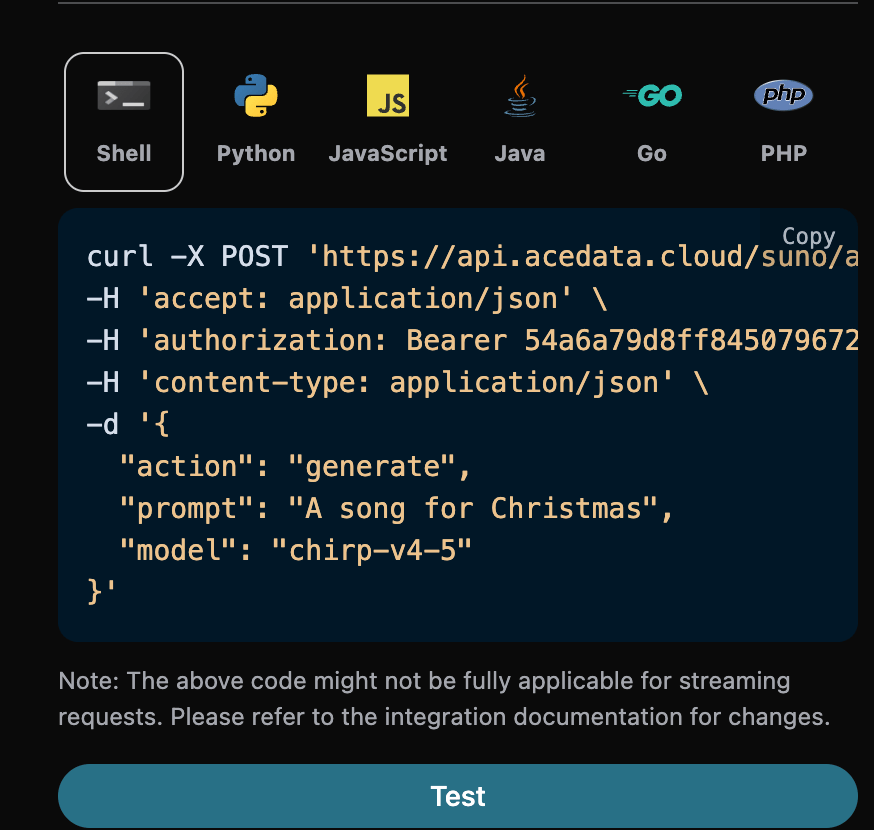
可以點擊「Try」按鈕直接測試 API,稍等 1-2 分鐘,結果如下:
```json theme={null}
{
"success": true,
"task_id": "e72fb249-bd5b-4e2a-b20c-8a06fea5ac14",
"trace_id": "7dbc5b6a-b2c0-4d85-9d39-fa8a8a785ccf",
"data": [
{
"id": "b481b17a-bf50-4e10-8adc-4d5635050893",
"title": "Under the Mistletoe",
"image_url": "https://cdn.acedata.cloud/e724d7f13d.png?example=image-001",
"lyric": "[Verse]\nSnowflakes falling on the ground\nTwinkling lights all around\nThe scent of pine fills the air\nChristmas magic everywhere\n[Chorus]\nUnder the mistletoe tonight\nHearts aglow in the soft moonlight\nLaughter echoes\nSpirits bright\nIt’s Christmas time\nIt feels so right\n[Verse 2]\nStockings hung by the fire’s glow\nWarmth inside while the cold winds blow\nCookies baking\nSweet delight\nA season of joy shining bright\n[Chorus]\nUnder the mistletoe tonight\nHearts aglow in the soft moonlight\nLaughter echoes\nSpirits bright\nIt’s Christmas time\nIt feels so right\n[Bridge]\nCarols sung by candlelight\nStars above make the world feel tight\nPeace and love\nA season’s creed\nFilling hearts with all we need\n[Chorus]\nUnder the mistletoe tonight\nHearts aglow in the soft moonlight\nLaughter echoes\nSpirits bright\nIt’s Christmas time\nIt feels so right",
"audio_url": "https://platform2.cdn.acedata.cloud/fish/5ade0339-5f11-487e-aacc-06a908271706.mp3",
"video_url": "",
"created_at": "2025-06-17T15:59:32.468Z",
"model": "chirp-auk",
"state": "succeeded",
"prompt": "A song for Christmas",
"style": "holiday, cheerful, male vocals",
"duration": 154.92
},
{
"id": "fbf22dab-5e2b-4e02-84c0-6d7605f14c3d",
"title": "Under the Mistletoe",
"image_url": "https://cdn.acedata.cloud/e724d7f13d.png?example=image-002",
"lyric": "[Verse]\nSnowflakes falling on the ground\nTwinkling lights all around\nThe scent of pine fills the air\nChristmas magic everywhere\n[Chorus]\nUnder the mistletoe tonight\nHearts aglow in the soft moonlight\nLaughter echoes\nSpirits bright\nIt’s Christmas time\nIt feels so right\n[Verse 2]\nStockings hung by the fire’s glow\nWarmth inside while the cold winds blow\nCookies baking\nSweet delight\nA season of joy shining bright\n[Chorus]\nUnder the mistletoe tonight\nHearts aglow in the soft moonlight\nLaughter echoes\nSpirits bright\nIt’s Christmas time\nIt feels so right\n[Bridge]\nCarols sung by candlelight\nStars above make the world feel tight\nPeace and love\nA season’s creed\nFilling hearts with all we need\n[Chorus]\nUnder the mistletoe tonight\nHearts aglow in the soft moonlight\nLaughter echoes\nSpirits bright\nIt’s Christmas time\nIt feels so right",
"audio_url": "https://platform2.cdn.acedata.cloud/fish/5ade0339-5f11-487e-aacc-06a908271706.mp3",
"video_url": "",
"created_at": "2025-06-17T15:59:32.468Z",
"model": "chirp-auk",
"state": "succeeded",
"prompt": "A song for Christmas",
"style": "holiday, cheerful, male vocals",
"duration": 158.48
}
]
}
```
可以看到這時候我們就得到了兩首歌的內容,包括標題、預覽圖、歌詞、音訊、影片等內容。
欄位說明如下:
* success:生成是否成功,如果成功則為 `true`,否則為 `false`
* data:是一個列表,包含了生成歌曲的詳細資訊。
* state:歌曲生成狀態,主要包含四種,具體如下:
* succeeded:生成成功
* pending:佇列中
* running:執行中
* error:失敗
* id:歌曲 ID
* title:歌曲的標題
* image\_url:歌曲的封面圖片
* lyric:歌曲的歌詞
* audio\_url:歌曲的最終音訊位址。平台會優先回傳 Ace Data Cloud CDN 位址;若持久化失敗,可能回傳原始媒體位址,請及時下載。
* video\_url:歌曲的影片檔案,開啟就是一個 mp4 影片。
* created\_at:建立的時間
* model:使用的模型,一般是最新的 v3 模型
* style:風格
## 自訂生成
如果想自訂生成歌詞,可以輸入歌詞:
這時候 `lyric` 欄位可以傳入類似如下內容:
```
[Verse]\nSnowflakes falling all around\nGlistening white\nCovering the ground\nChildren laughing\nFull of delight\nIn this winter wonderland tonight\nSanta's sleigh\nUp in the sky\nRudolph's nose shining bright\nOh my\nHear the jingle bells\nRinging so clear\nBringing joy and holiday cheer\n[Verse 2]\nRoasting chestnuts by the fire's glow\nChristmas lights\nThey twinkle and show\nFamilies gathering with love and cheer\nSpreading warmth to everyone near
```
> 注意,這裡的歌詞中 `\n` 是換行符號,如果你不知道如何生成歌詞,可以使用 AceDataCloud 提供的歌詞生成 API 來透過 prompt 生成歌詞,API 是 [Suno Lyrics Generation API](https://platform.acedata.cloud/documents/suno-lyrics)。
接下來我們要根據歌詞、標題、風格自訂生成歌曲,就可以指定如下內容:
* lyric:歌詞文字
* custom:填寫為 `true`,代表自訂生成,該參數預設為 false,代表使用 `prompt` 生成。
* title:歌曲的標題。
* style:歌曲的風格,選填。
填寫範例如下:
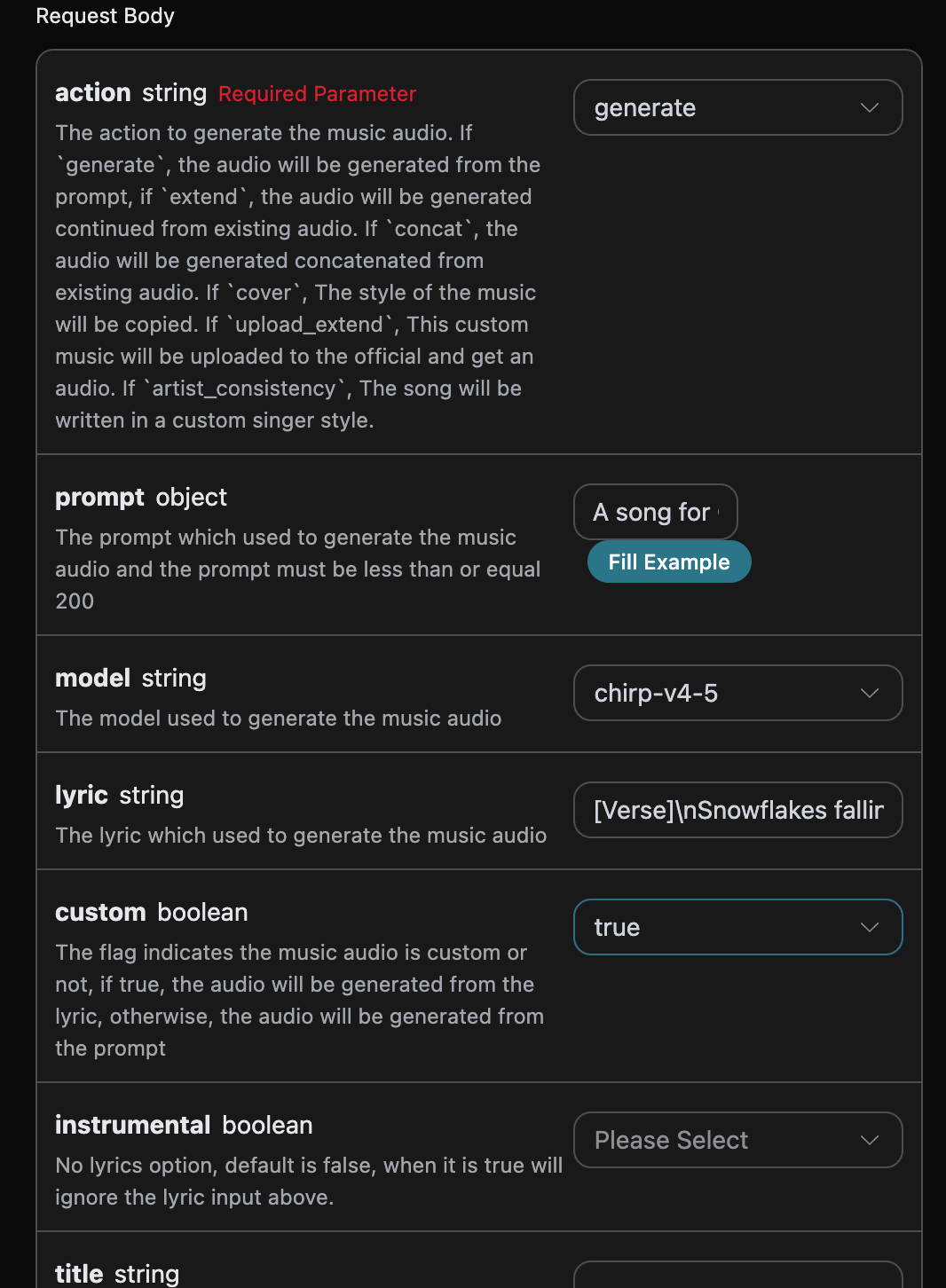
填寫完畢之後自動生成了程式碼如下:
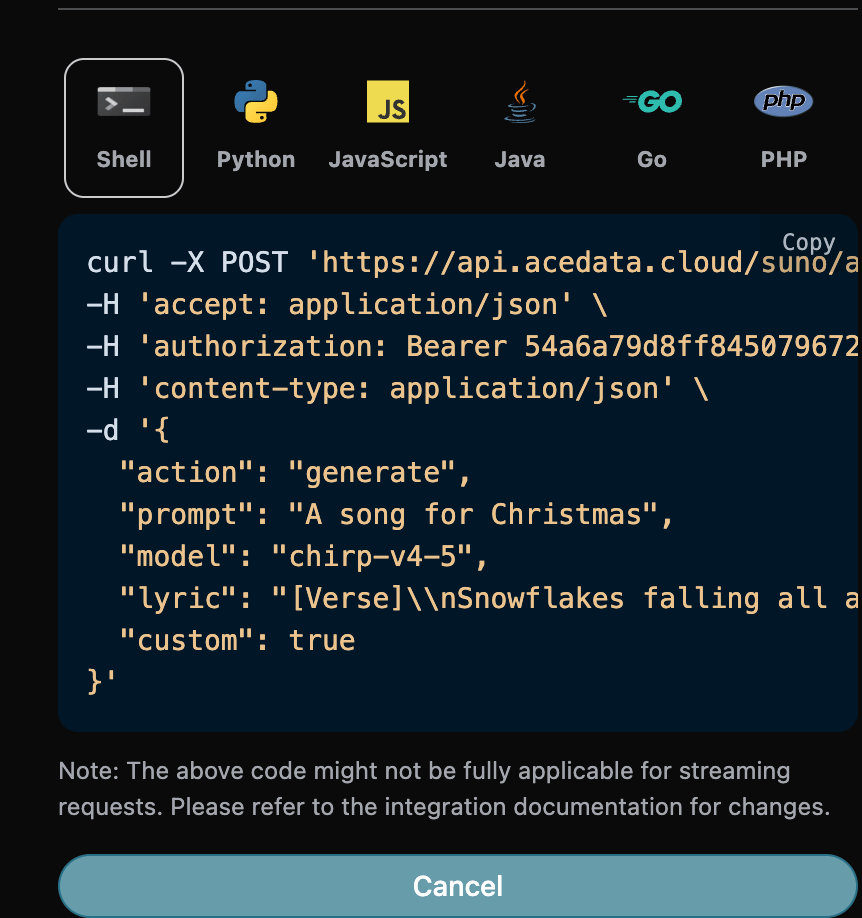
對應的程式碼:
```shell theme={null}
curl -X POST 'https://api.acedata.cloud/suno/audios' \
-H 'accept: application/json' \
-H 'authorization: Bearer {token}' \
-H 'content-type: application/json' \
-d '{
"action": "generate",
"prompt": "A song for Christmas",
"model": "chirp-v4-5",
"lyric": "[Verse]\\nSnowflakes falling all around\\nGlistening white\\nCovering the ground\\nChildren laughing\\nFull of delight\\nIn this winter wonderland tonight\\nSanta's sleigh\\nUp in the sky\\nRudolph's nose shining bright\\nOh my\\nHear the jingle bells\\nRinging so clear\\nBringing joy and holiday cheer\\n[Verse 2]\\nRoasting chestnuts by the fire's glow\\nChristmas lights\\nThey twinkle and show\\nFamilies gathering with love and cheer\\nSpreading warmth to everyone near",
"custom": true
}'
```
測試允許,生成的效果是類似的。
## 自訂歌手風格生成功能
如果想使用歌手風格來生成歌曲的話,首先透過上文的基本使用生成一首歌曲,
最後得到需要設定這個歌曲為歌手風格,然後需要進入[Suno Persona API](https://platform.acedata.cloud/documents/suno-persona)根據官方生成的音樂 ID `audio_id` 來生成一個歌手風格的 id 參數 `persona_id`,具體的參數如下圖所示:
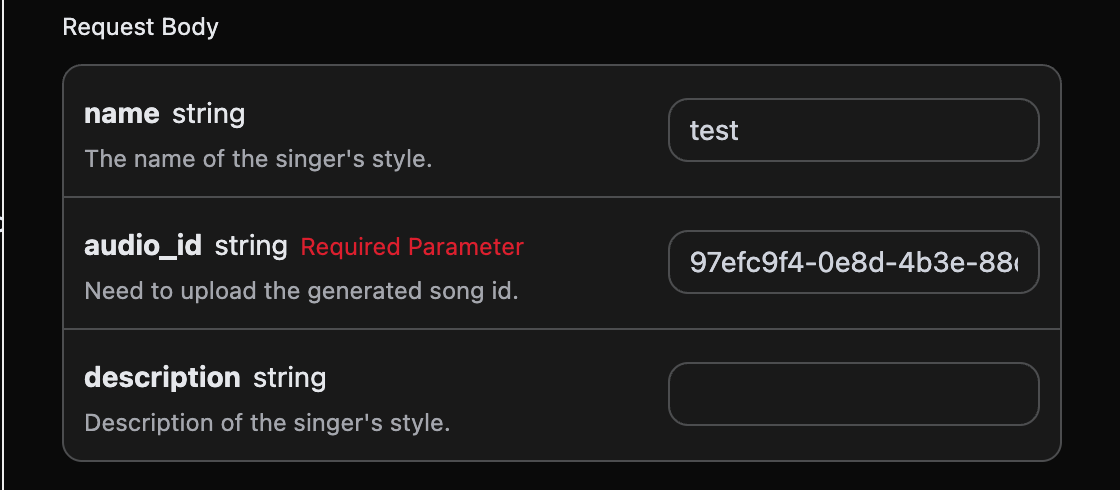
填寫完畢之後自動生成了程式碼如下:
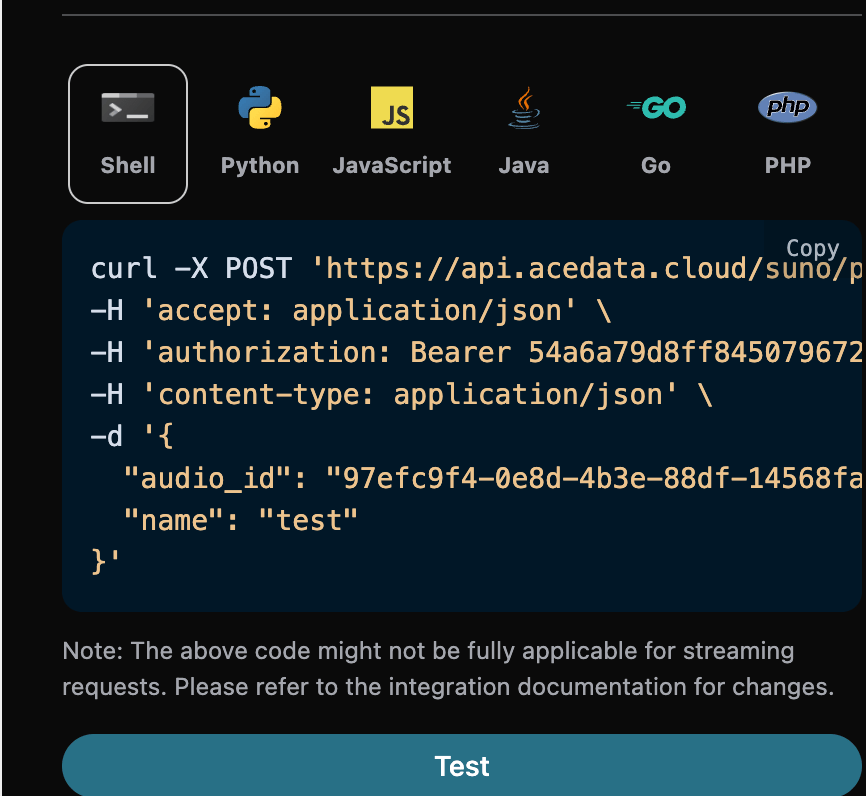
對應的 Python 程式碼:
```python theme={null}
import requests
url = "https://api.acedata.cloud/suno/persona"
headers = {
"accept": "application/json",
"authorization": "Bearer {token}",
"content-type": "application/json"
}
payload = {
"audio_id": "97efc9f4-0e8d-4b3e-88df-14568fa1b11f",
"name": "test"
}
response = requests.post(url, json=payload, headers=headers)
print(response.text)
```
點擊執行,可以發現會得到一個結果,如下:
```json theme={null}
{
"success": true,
"task_id": "7628b754-4fe7-4e79-bda4-806d0dd8bf6e",
"data": {
"persona_id": "e0d7319e-aa2a-44cb-b00a-916218d7cb0b"
}
}
```
我們以上面的 `audio_id` 和 `persona_id` 分別為 `97efc9f4-0e8d-4b3e-88df-14568fa1b11f`、`e0d7319e-aa2a-44cb-b00a-916218d7cb0b` 作為此次的範例資料。 然後可以將參數 `action` 設定為 `artist_consistency` (如果是新版的歌手風格Persona-v2-vox,`action` 必須設定為 `artist_consistency_vox`),並且輸入需要繼續生成歌曲的 ID、歌手風格 ID,填寫範例如下:
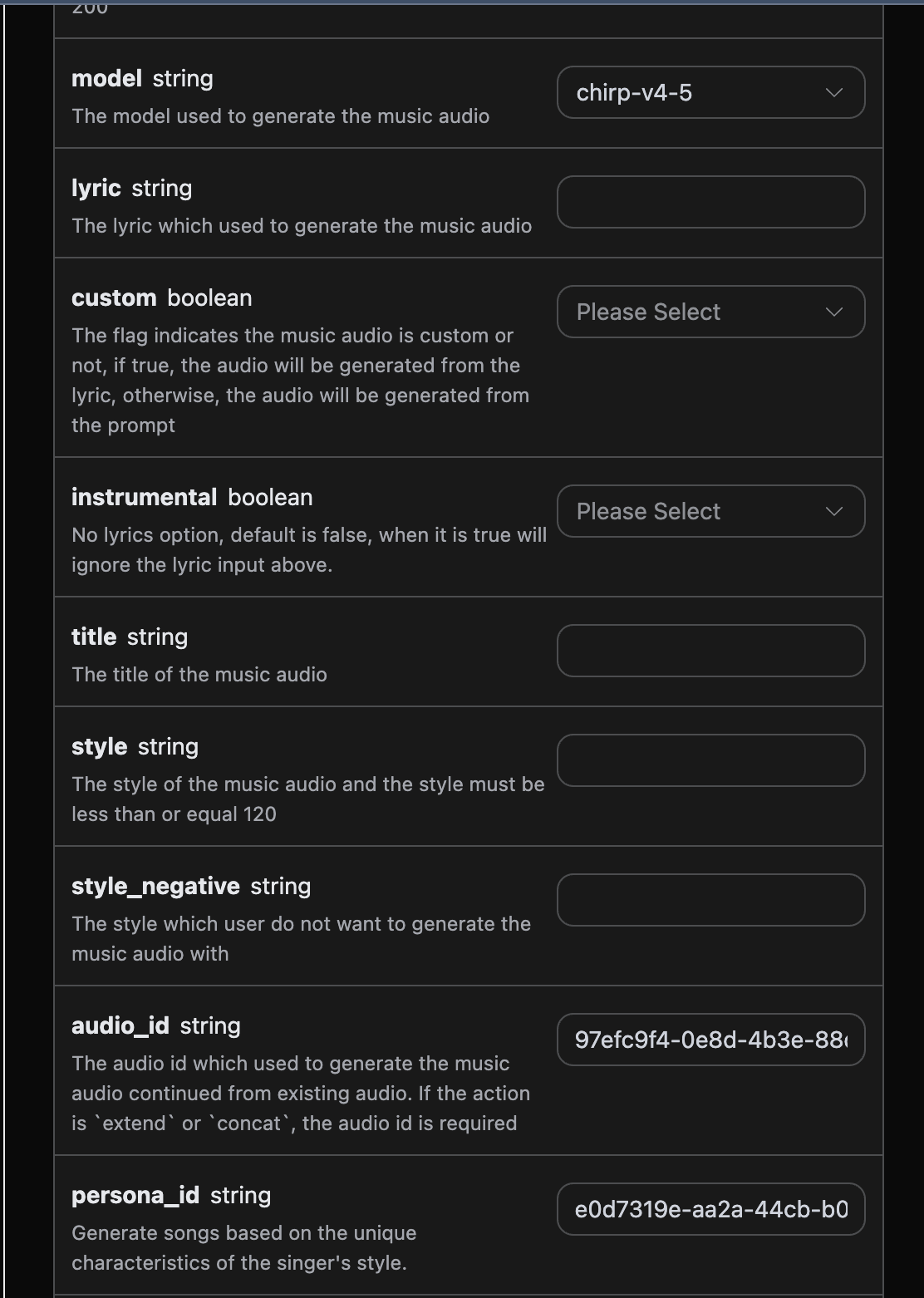
填寫完畢之後自動生成了程式碼如下:
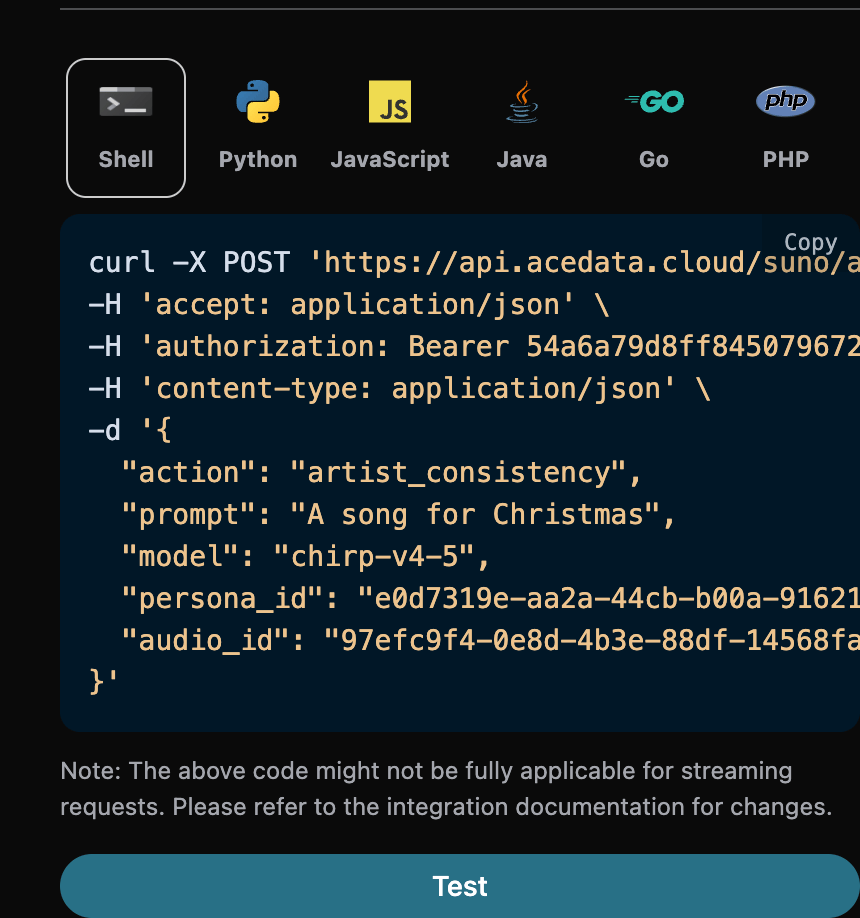
對應的 Python 程式碼:
```python theme={null}
import requests
url = "https://api.acedata.cloud/suno/audios"
headers = {
"accept": "application/json",
"authorization": "Bearer {token}",
"content-type": "application/json"
}
payload = {
"action": "artist_consistency",
"prompt": "A song for Christmas",
"model": "chirp-v4-5",
"persona_id": "e0d7319e-aa2a-44cb-b00a-916218d7cb0b",
"audio_id": "97efc9f4-0e8d-4b3e-88df-14568fa1b11f"
}
response = requests.post(url, json=payload, headers=headers)
print(response.text)
```
點擊執行,可以發現會得到一個結果,如下:
```json theme={null}
{
"success": true,
"task_id": "9b732b1a-bd67-48bc-95e4-90140e06836f",
"trace_id": "30fcd88e-7687-4137-92d7-913b58115204",
"data": [
{
"id": "727a36e2-8dce-4df7-99e5-14e44635c80f",
"title": "",
"image_url": "https://cdn.acedata.cloud/e724d7f13d.png?example=image-003",
"lyric": "",
"audio_url": "https://platform2.cdn.acedata.cloud/fish/5ade0339-5f11-487e-aacc-06a908271706.mp3",
"video_url": "",
"created_at": "2025-06-17T16:27:33.979Z",
"model": "chirp-auk",
"state": "succeeded",
"style": "",
"duration": 244.4
},
{
"id": "3b33301a-b17e-4b25-8842-09b46dab1a36",
"title": "",
"image_url": "https://cdn.acedata.cloud/e724d7f13d.png?example=image-004",
"lyric": "",
"audio_url": "https://platform2.cdn.acedata.cloud/fish/5ade0339-5f11-487e-aacc-06a908271706.mp3",
"video_url": "",
"created_at": "2025-06-17T16:27:33.979Z",
"model": "chirp-auk",
"state": "succeeded",
"style": "",
"duration": 229.88
}
]
}
```
可以看出,結果內容與上文的是一致的,這也就實現使用歌手風格來生成歌曲的功能。
## 繼續生成功能
如果想對已經生成的 Suno 歌曲進行繼續生成的話,可以將參數 `action` 設定為 `extend`,並且輸入需要繼續生成歌曲的 ID,歌曲 ID 的取得是根據基本使用來取得,透過上文可知,這時候可以看到歌曲的 ID 為:
```
"id": "97efc9f4-0e8d-4b3e-88df-14568fa1b11f"
```
> 注意,這裡的歌詞中 `id` 是生成後歌曲的 ID,如果你不知道如何生成歌曲,可以參考上文的基本使用來生成歌曲。
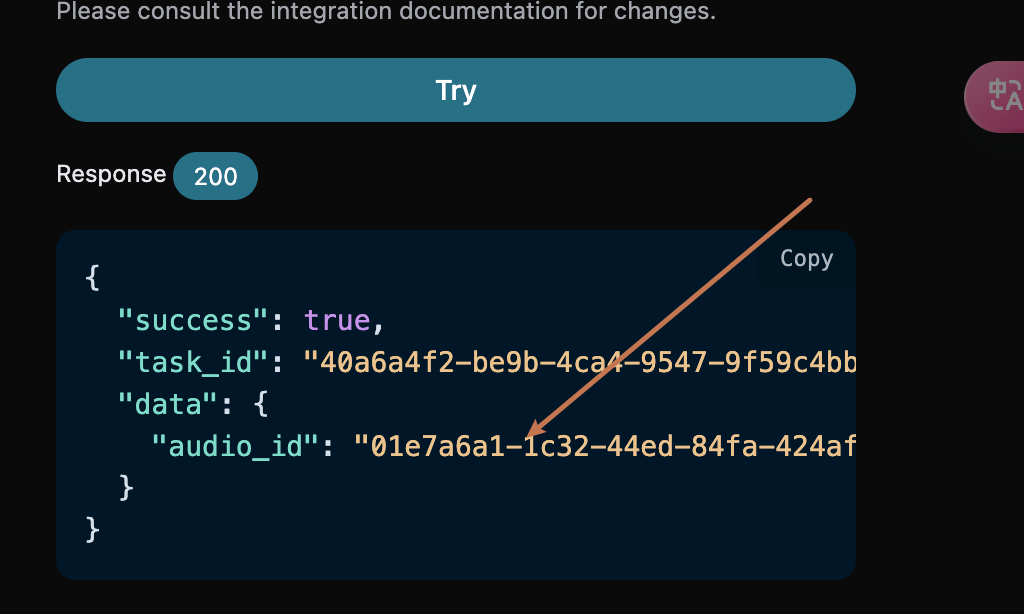
如果想對自己上傳的歌曲進行繼續生成的話,可以將參數 `action` 設定為 `upload_extend`,並且輸入需要繼續生成自訂上傳的歌曲 ID,歌曲 ID 的取得是使用 [Suno Upload Generation API](https://platform.acedata.cloud/documents/suno-upload)來取得,如下圖所示:
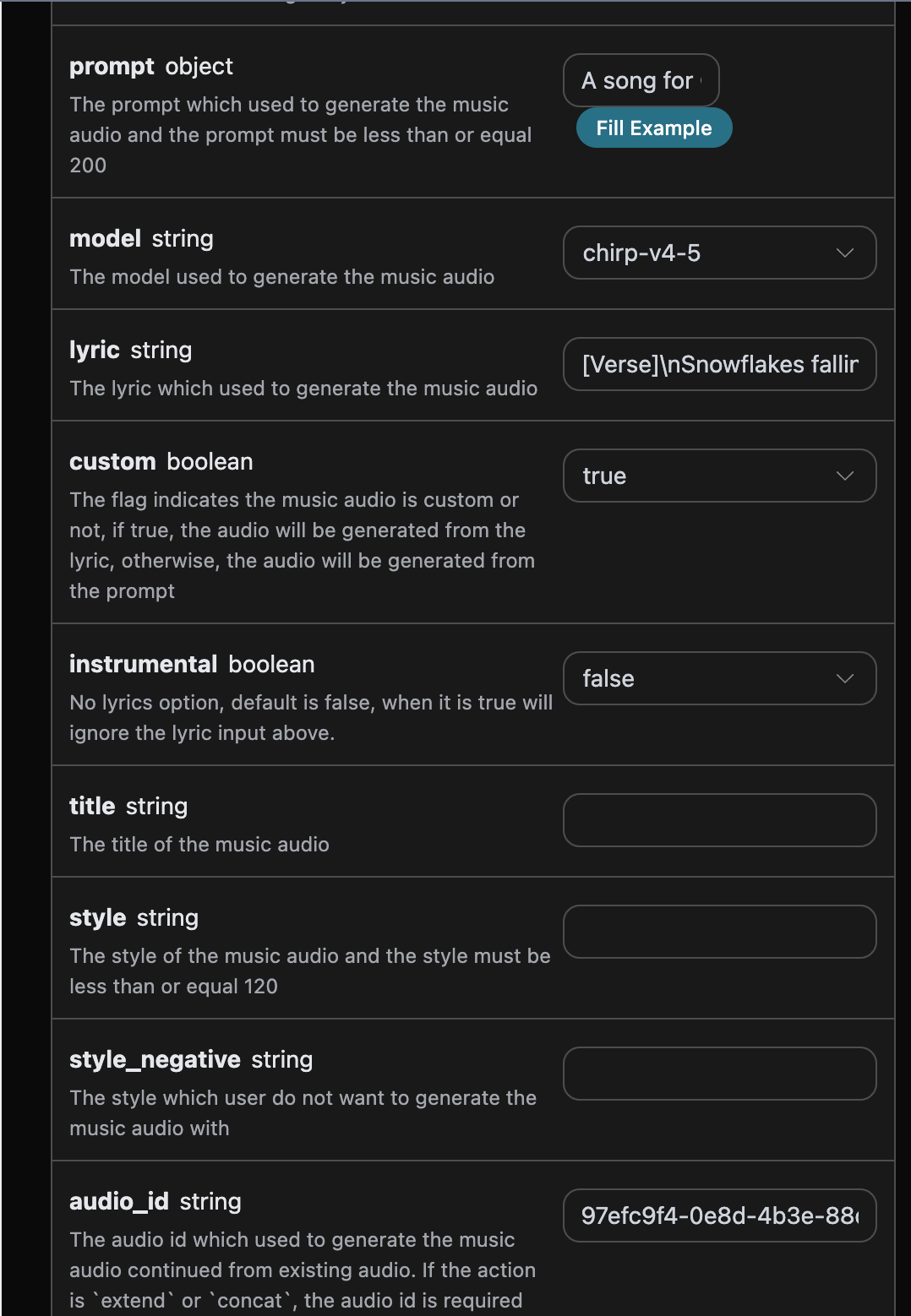
接下來必須填寫續寫片段的歌詞,並可以指定風格:
* lyric:只用於引導 `continue_at` 之後新生成片段的歌詞,不會取代來源音訊中該時間點之前的歌詞。
* custom:填寫為 `true`,代表自訂生成,該參數預設為 false,代表使用 `prompt` 生成。
* style:續寫片段的歌曲風格,選填。
* continue\_at:續寫邊界,單位為秒。例如,213.5 表示從第 3 分 33.5 秒處開始生成後續片段。
> `extend` 用於接著已有歌曲往後創作,不是給整首歌曲換詞。若希望整首歌曲從頭使用新歌詞,請使用 `generate` 重新生成;若希望參考已有歌曲重新演繹,可使用 `cover`。傳入一整首新歌詞時,`continue_at` 之前的原歌詞仍不會被取代。
填寫範例如下:
填寫完畢之後自動生成了程式碼如下:
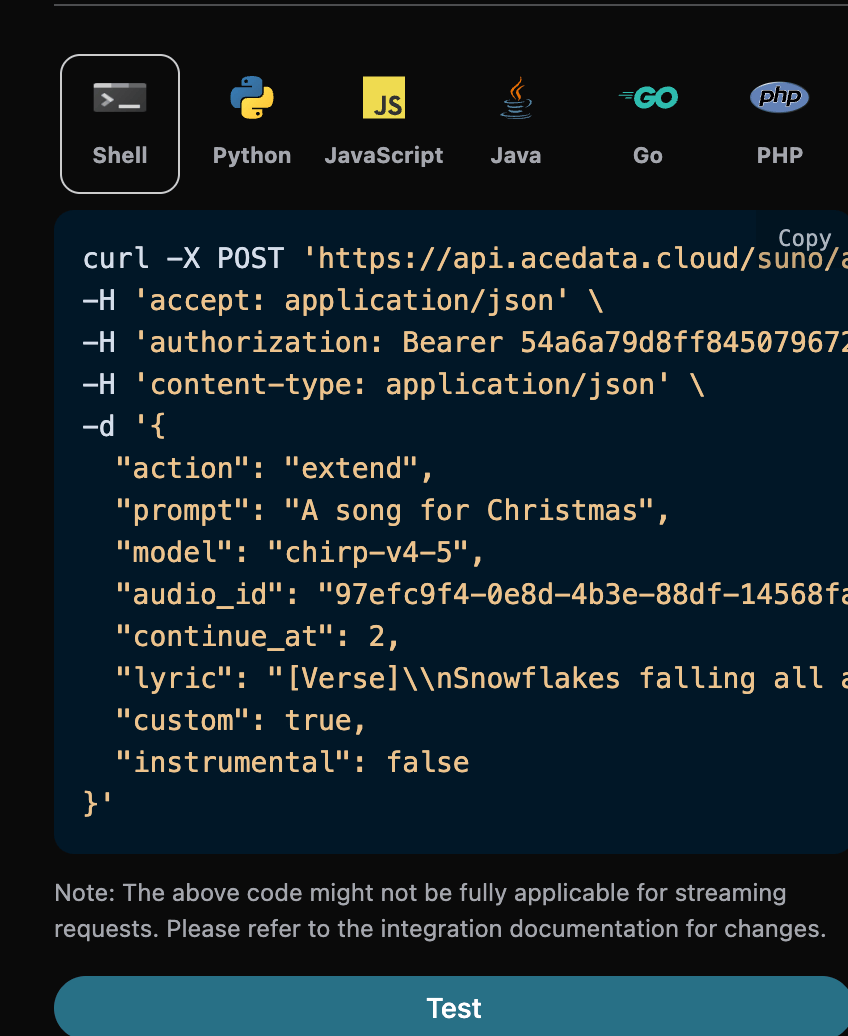
下面保留的是一次真實歷史呼叫快照,其中 `continue_at` 為 2 秒,因此只有前 2 秒屬於續寫邊界之前的原內容。實際接近歌曲結尾續寫時,應將該值設為預期開始續寫的秒數,並僅在 `lyric` 中提供邊界之後要唱的新段落。
對應的 Python 程式碼:
```python theme={null}
import requests
url = "https://api.acedata.cloud/suno/audios"
headers = {
"accept": "application/json",
"authorization": "Bearer {token}",
"content-type": "application/json"
}
payload = {
"action": "extend",
"prompt": "A song for Christmas",
"model": "chirp-v4-5",
"audio_id": "97efc9f4-0e8d-4b3e-88df-14568fa1b11f",
"continue_at": 2,
"lyric": "[Verse]\\nSnowflakes falling all around\\nGlistening white\\nCovering the ground\\nChildren laughing\\nFull of delight\\nIn this winter wonderland tonight\\nSanta's sleigh\\nUp in the sky\\nRudolph's nose shining bright\\nOh my\\nHear the jingle bells\\nRinging so clear\\nBringing joy and holiday cheer\\n[Verse 2]\\nRoasting chestnuts by the fire's glow\\nChristmas lights\\nThey twinkle and show\\nFamilies gathering with love and cheer\\nSpreading warmth to everyone near",
"custom": True,
"instrumental": False
}
response = requests.post(url, json=payload, headers=headers)
print(response.text)
```
點擊執行,可以發現會得到一個結果,如下:
```json theme={null}
{
"success": true,
"task_id": "75b835d9-30d1-4641-8524-0aeedbdc9e1a",
"trace_id": "44c41045-a2e1-4d19-aafc-7abd239d0d5c",
"data": [
{
"id": "0a1e1b10-c36a-41c9-9bfb-b26d9d25db98",
"title": "",
"image_url": "https://cdn.acedata.cloud/e724d7f13d.png?example=image-005",
"lyric": "[Verse]\\nSnowflakes falling all around\\nGlistening white\\nCovering the ground\\nChildren laughing\\nFull of delight\\nIn this winter wonderland tonight\\nSanta's sleigh\\nUp in the sky\\nRudolph's nose shining bright\\nOh my\\nHear the jingle bells\\nRinging so clear\\nBringing joy and holiday cheer\\n[Verse 2]\\nRoasting chestnuts by the fire's glow\\nChristmas lights\\nThey twinkle and show\\nFamilies gathering with love and cheer\\nSpreading warmth to everyone near",
"audio_url": "https://platform2.cdn.acedata.cloud/fish/5ade0339-5f11-487e-aacc-06a908271706.mp3",
"video_url": "",
"created_at": "2025-06-17T16:38:35.509Z",
"model": "chirp-auk",
"state": "succeeded",
"style": "",
"duration": 165.92
},
{
"id": "4334c5b4-0a44-4b26-a8f6-66cc4dbb8fc3",
"title": "",
"image_url": "https://cdn.acedata.cloud/e724d7f13d.png?example=image-006",
"lyric": "[Verse]\\nSnowflakes falling all around\\nGlistening white\\nCovering the ground\\nChildren laughing\\nFull of delight\\nIn this winter wonderland tonight\\nSanta's sleigh\\nUp in the sky\\nRudolph's nose shining bright\\nOh my\\nHear the jingle bells\\nRinging so clear\\nBringing joy and holiday cheer\\n[Verse 2]\\nRoasting chestnuts by the fire's glow\\nChristmas lights\\nThey twinkle and show\\nFamilies gathering with love and cheer\\nSpreading warmth to everyone near",
"audio_url": "https://platform2.cdn.acedata.cloud/fish/5ade0339-5f11-487e-aacc-06a908271706.mp3",
"video_url": "",
"created_at": "2025-06-17T16:38:35.509Z",
"model": "chirp-auk",
"state": "succeeded",
"style": "",
"duration": 158.84
}
]
}
```
可以看出,結果中 `lyric` 會回傳此次續寫任務使用的歌詞文字。該欄位不是完整成品音訊的逐字轉寫;對於 `extend`,`continue_at` 之前的來源音訊仍使用原歌詞,新歌詞只用於引導續寫片段。
## 取得完整歌曲
目前模型的 `extend` 結果通常已包含 `continue_at` 之前的來源音訊和邊界之後的新內容,請先根據回傳音訊的實際時長與內容判斷是否已經是完整歌曲。若回傳的是獨立續寫片段,或者需要將多次續寫歷史明確合併為一首歌,再使用拼接功能:
* action:內容為 `concat`。
* audio\_id:最後一個續寫片段的 ID。
例如擴展後的歌曲 ID 是:0a1e1b10-c36a-41c9-9bfb-b26d9d25db98,那麼可以設定參數如下:
```json theme={null}
{
"action": "concat",
"audio_id": "0a1e1b10-c36a-41c9-9bfb-b26d9d25db98"
}
```
其他參數不變,回傳的就是一首完整的歌曲,就是所有歌曲片段的拼接結果,但結果只有一首歌,範例如下:
```json theme={null}
{
"success": true,
"task_id": "0f794915-8418-4124-93f5-b7eb3a417167",
"trace_id": "62afcce0-e7e5-44b8-8c2e-4bba12a4f414",
"data": [
{
"id": "0efec7e0-11bf-4313-9981-2c0e7218d7dd",
"title": "",
"image_url": "https://cdn.acedata.cloud/e724d7f13d.png?example=image-007",
"lyric": "[Verse]\\nSnowflakes falling all around\\nGlistening white\\nCovering the ground\\nChildren laughing\\nFull of delight\\nIn this winter wonderland tonight\\nSanta's sleigh\\nUp in the sky\\nRudolph's nose shining bright\\nOh my\\nHear the jingle bells\\nRinging so clear\\nBringing joy and holiday cheer\\n[Verse 2]\\nRoasting chestnuts by the fire's glow\\nChristmas lights\\nThey twinkle and show\\nFamilies gathering with love and cheer\\nSpreading warmth to everyone near\n[Verse]\\nSnowflakes falling all around\\nGlistening white\\nCovering the ground\\nChildren laughing\\nFull of delight\\nIn this winter wonderland tonight\\nSanta's sleigh\\nUp in the sky\\nRudolph's nose shining bright\\nOh my\\nHear the jingle bells\\nRinging so clear\\nBringing joy and holiday cheer\\n[Verse 2]\\nRoasting chestnuts by the fire's glow\\nChristmas lights\\nThey twinkle and show\\nFamilies gathering with love and cheer\\nSpreading warmth to everyone near",
"audio_url": "https://platform2.cdn.acedata.cloud/fish/5ade0339-5f11-487e-aacc-06a908271706.mp3",
"video_url": "",
"created_at": "2025-06-17T16:43:06.718Z",
"model": "chirp-auk",
"state": "succeeded",
"style": "",
"duration": 167.91997916666668,
"concat_history": [
{
"continue_at": 2,
"id": "97efc9f4-0e8d-4b3e-88df-14568fa1b11f",
"infill": false,
"source": "web",
"type": "gen"
},
{
"id": "0a1e1b10-c36a-41c9-9bfb-b26d9d25db98"
}
]
}
]
}
```
## 音樂翻版
當基於原有的歌曲繼續生成歌曲之後,回傳的歌曲風格可能不太合適。如果要對原先生成的歌曲(若是自訂上傳的音樂也支援)進行翻版,需要使用音樂翻版方法,就可以指定如下內容:
* action:內容為 `cover`,當是對自訂上傳的音樂進行翻版操作的時候,必須指定內容為:`upload_cover`。
* audio\_id:之前生成歌曲的 ID。
例如原先生成後的歌曲 ID 是:0a1e1b10-c36a-41c9-9bfb-b26d9d25db98,那麼可以設定參數如下:
```json theme={null}
{
"action": "cover",
"audio_id": "0a1e1b10-c36a-41c9-9bfb-b26d9d25db98",
"prompt": "A song for Christmas",
"model": "chirp-v4-5"
}
```
其他參數不變,回傳的就是一首翻版後的歌曲,也就是對原先生成的歌曲進行翻版後的結果,範例如下:
```json theme={null}
{
"success": true,
"task_id": "b9d43d06-2e0a-4b5e-9e0d-7dfab32e00ab",
"trace_id": "6c5e567d-0fdc-4c44-9b36-4090d9a75ff5",
"data": [
{
"id": "6988fa57-f810-41cf-afab-7838db2c77dc",
"title": "",
"image_url": "https://cdn.acedata.cloud/e724d7f13d.png?example=image-008",
"lyric": "",
"audio_url": "https://platform2.cdn.acedata.cloud/fish/5ade0339-5f11-487e-aacc-06a908271706.mp3",
"video_url": "",
"created_at": "2025-06-17T16:44:13.007Z",
"model": "chirp-auk",
"state": "succeeded",
"style": "",
"duration": 182.4
},
{
"id": "ce98b991-0258-4f05-8245-e43d4efa8fb8",
"title": "",
"image_url": "https://cdn.acedata.cloud/e724d7f13d.png?example=image-009",
"lyric": "",
"audio_url": "https://platform2.cdn.acedata.cloud/fish/5ade0339-5f11-487e-aacc-06a908271706.mp3",
"video_url": "",
"created_at": "2025-06-17T16:44:13.007Z",
"model": "chirp-auk",
"state": "succeeded",
"style": "",
"duration": 179.72
}
]
}
```
生成的結果與上文類似,這就完成了對原先生成的歌曲進行翻版生成的過程。
## 替換片段
當生成歌曲之後需要進行替換歌曲片段的單獨操作來進行二次創作時,可以對歌曲的某個片段進行替換操作。
> ⚠️ **注意**:`replace_section_result_mode` 預設為 `full_song`:系統會分別拼接 2 個新生成的候選,並回傳 2 首完整歌曲。若只需要尚未拼接的替換片段候選,請明確設定為 `candidates`,然後選取候選呼叫[音樂拼接](#音樂拼接)。
參數說明如下:
* action:內容為 `replace_section`。
* audio\_id:原始歌曲(被替換的來源歌曲)的 ID。
* model: 歌曲生成模型。
* lyric: 替換後的完整歌詞(包含被替換段及其上下文,與 `prompt` 中的內容保持一致)。
* prompt:需要替換的那一段新歌詞。
* style:歌曲的風格,選填。
* replace\_section\_start:被替換片段在原曲中的起始時間(秒)。
* replace\_section\_end:被替換片段在原曲中的結束時間(秒)。
* replace\_section\_result\_mode:回傳模式,預設為 `full_song`。`full_song` 分別拼接 2 個候選並回傳 2 首完整歌曲;`candidates` 回傳 2 個尚未拼接的候選片段。
### 步驟一:發起替換片段任務
例如原先生成後的歌曲 ID 是:18db7ed0-2b8a-41db-91c1-b0781dcca0d4(時長 94.12 秒),希望把第 30 秒到第 60 秒處的副歌替換為新的歌詞,那麼可以設定參數如下:
```json theme={null}
{
"action": "replace_section",
"audio_id": "18db7ed0-2b8a-41db-91c1-b0781dcca0d4",
"model": "chirp-v5-5",
"custom": false,
"instrumental": false,
"lyric": "[Intro]\n锣鼓喧天 红灯高挂\n[Verse 1]\n爆竹声声辞旧岁\n春风暖暖入万家\n红包压岁笑开颜\n金蛇起舞贺新春\n[Chorus]\n梅花绽放春意洋溢满地\n梅花绽放春意洋溢满地\n梅花绽放春意洋溢满地\n梅花绽放春意洋溢满地\n[Verse 2]\n饺子飘香年夜饭\n灯笼摇曳照团圆",
"prompt": "梅花绽放春意洋溢满地\n梅花绽放春意洋溢满地\n梅花绽放春意洋溢满地\n梅花绽放春意洋溢满地",
"replace_section_start": 30.0,
"replace_section_end": 60.0,
"replace_section_result_mode": "full_song"
}
```
預設回傳 2 首分別由兩個候選拼接完成的完整歌曲。若將 `replace_section_result_mode` 設為 `candidates`,則回傳 2 個尚未拼接的替換片段,結構與下方範例一致:
```json theme={null}
{
"success": true,
"task_id": "dd067075-a295-4160-8375-d5504327d55b",
"trace_id": "c34f589b-9195-4d0b-af78-9c890e77609c",
"data": [
{
"id": "364f9d8b-ca25-463b-9a5e-d0b7139e2d6a",
"title": "",
"image_url": "https://cdn.acedata.cloud/e724d7f13d.png?example=image-010",
"image_large_url": "https://cdn.acedata.cloud/e724d7f13d.png?example=image-011",
"lyric": "[Intro]\n锣鼓喧天 红灯高挂\n[Verse 1]\n爆竹声声辞旧岁\n春风暖暖入万家\n红包压岁笑开颜\n金蛇起舞贺新春\n[Chorus]\n梅花绽放春意洋溢满地\n梅花绽放春意洋溢满地\n梅花绽放春意洋溢满地\n梅花绽放春意洋溢满地\n[Verse 2]\n饺子飘香年夜饭\n灯笼摇曳照团圆",
"audio_url": "https://platform2.cdn.acedata.cloud/fish/5ade0339-5f11-487e-aacc-06a908271706.mp3",
"video_url": "",
"created_at": "2026-05-06T06:55:00.000Z",
"model": "chirp-v5-5",
"state": "succeeded",
"style": "",
"duration": 45.16
},
{
"id": "fae966ea-5f7f-4e80-9962-1c57963c7f8a",
"title": "",
"audio_url": "https://platform2.cdn.acedata.cloud/fish/5ade0339-5f11-487e-aacc-06a908271706.mp3",
"model": "chirp-v5-5",
"state": "succeeded",
"duration": 33.8
}
]
}
```
在 `candidates` 模式下,回傳的兩段音訊時長(45.16 秒、33.8 秒)遠短於原曲(94.12 秒),它們是包含少量上下文的替換片段,並**不是**整首歌曲。可以挑選滿意的候選繼續手動拼接。預設 `full_song` 模式則會完成兩次拼接,直接回傳 2 首完整歌曲。
### 直接回傳完整歌曲
如果不需要比較兩個候選,可以在步驟一將 `replace_section_result_mode` 設為 `full_song`。介面會自動選擇第一個候選完成拼接,並直接回傳包含 1 首完整歌曲的 `data` 陣列;此時無需再呼叫 `concat`,費用中會包含自動拼接步驟。
### 步驟二:將替換片段拼接回原曲
針對上面挑選的片段(例如 `364f9d8b-ca25-463b-9a5e-d0b7139e2d6a`),依照 [音樂拼接](#音樂拼接) 一節的方法發起 `concat` 任務:
```json theme={null}
{
"action": "concat",
"audio_id": "364f9d8b-ca25-463b-9a5e-d0b7139e2d6a",
"model": "chirp-v5-5"
}
```
回傳的是拼接好的整首完整歌曲,範例如下:
```json theme={null}
{
"success": true,
"task_id": "5dbd4a78-0197-4ef3-9c16-8bddaf4f0c94",
"trace_id": "580bd1da-2ad3-4d75-be1f-6c14bd4b489d",
"data": [
{
"id": "365a9640-0452-4567-80f0-4f5a2a17ddd5",
"title": "新年快乐",
"image_url": "https://cdn.acedata.cloud/e724d7f13d.png?example=image-012",
"lyric": "[Intro]\n锣鼓喧天 红灯高挂\n[Verse 1]\n爆竹声声辞旧岁\n春风暖暖入万家\n红包压岁笑开颜\n金蛇起舞贺新春\n[Chorus]\n梅花绽放春意洋溢满地\n梅花绽放春意洋溢满地\n梅花绽放春意洋溢满地\n梅花绽放春意洋溢满地\n[Verse 2]\n饺子飘香年夜饭\n灯笼摇曳照团圆",
"audio_url": "https://platform2.cdn.acedata.cloud/fish/5ade0339-5f11-487e-aacc-06a908271706.mp3",
"video_url": "",
"created_at": "2026-05-06T06:56:46.057Z",
"model": "chirp-v5-5",
"state": "succeeded",
"style": "traditional Chinese new year, festive, female vocals, upbeat",
"duration": 105.28
}
]
}
```
此時 `duration` 已恢復成完整歌曲長度(105.28 秒,約等於原曲長度),`audio_url` 指向的就是替換完成後的整首歌。這就完成了「生成 → 替換片段 → 拼接整曲」的二次創作流程。
## 人聲與音樂分離
當生成歌曲之後需要進行伴奏和人聲單獨操作的二次創作時,可以分離純音樂伴奏和清唱人聲。就可以指定如下內容:
* action:內容為 `stems`。
* audio\_id:之前生成歌曲的 ID。
例如原先生成後的歌曲 ID 是:ec13e502-d043-4eb2-92ee-e900c6da69d1,那麼可以設定參數如下:
```json theme={null}
{
"action": "stems",
"audio_id": "ec13e502-d043-4eb2-92ee-e900c6da69d1"
}
```
透過以上參數即可得到人聲與音樂分離的結果,結果如下:
```json theme={null}
{
"success": true,
"task_id": "4050affc-f8a6-4cba-a86c-bf201eed053d",
"trace_id": "5107ee58-687d-422f-9195-fa0e82e1fcc8",
"data": [
{
"id": "e3de0928-085a-42c4-b982-3b24738d1989",
"title": "Deck the Sky - Vocals",
"image_url": "https://cdn.acedata.cloud/e724d7f13d.png?example=image-013",
"lyric": "[Verse]\nSnowflakes dance on rooftops high\nChildren's laughter fills the sky\nCarols ring from church bells loud\nHolidays a joyful crowd\n[Verse 2]\nCandy canes and cocoa warm\nWrapped up tight in our own storm\nStockings hung with dreams and cheer\nMagic growing every year\n[Chorus]\nDeck the sky with twinkling stars\nHoliday joy feels ours and ours\nSing the songs of love and light\nChristmas glows so pure and bright\n[Verse 3]\nFireside tales of long ago\nReindeer prance in icy glow\nEvergreen and tinsel’s gleam\nChristmas time a lovely dream\n[Bridge]\nHearts are full with friends and kin\nMistletoe for love to win\nGifts of love and hope we share\nChristmas spirit everywhere\n[Chorus]\nDeck the sky with twinkling stars\nHoliday joy feels ours and ours\nSing the songs of love and light\nChristmas glows so pure and bright",
"audio_url": "https://platform2.cdn.acedata.cloud/fish/5ade0339-5f11-487e-aacc-06a908271706.mp3",
"video_url": "https://platform2.cdn.acedata.cloud/gemini/04a043bd-6b23-4b4e-945c-ce48158c3eee.mp4?example=video-001",
"created_at": "2025-01-05T07:49:16.881Z",
"model": "",
"state": "succeeded",
"style": "holiday, jolly",
"duration": 174.16
},
{
"id": "ad5d7c89-709c-4eb4-a5a6-72f9f5e57fdb",
"title": "Deck the Sky - Instrumental",
"image_url": "https://cdn.acedata.cloud/e724d7f13d.png?example=image-014",
"lyric": "",
"audio_url": "https://platform2.cdn.acedata.cloud/fish/5ade0339-5f11-487e-aacc-06a908271706.mp3",
"video_url": "https://platform2.cdn.acedata.cloud/gemini/04a043bd-6b23-4b4e-945c-ce48158c3eee.mp4?example=video-002",
"created_at": "2025-01-05T07:49:16.892Z",
"model": "",
"state": "succeeded",
"style": "holiday, jolly",
"duration": 174.16
}
]
}
```
生成的結果與上文類似,這就完成了對原先生成的歌曲進行人聲與音樂分離的過程。
## 全軌道人聲與音樂分離
當生成歌曲之後需要進行全軌道人聲與音樂分離操作時,就可以指定如下內容:
* action:內容為 `all_stems`。
* audio\_id:之前生成歌曲的 ID。
例如原先生成後的歌曲 ID 是:bdf23a5a-59f5-4103-b452-054a824a7f9f,那麼可以設定參數如下:
```json theme={null}
{
"action": "all_stems",
"audio_id": "bdf23a5a-59f5-4103-b452-054a824a7f9f"
}
```
透過以上參數即可得到全軌道人聲與音樂分離的結果,結果如下:
```json { theme={null}
"success": true,
"task_id": "f4b16fb9-8478-4857-88c7-b9a1f0bb9518",
"trace_id": "9c560ebd-4fc6-4bdb-988a-8890160a92fb",
"data": [
{
"id": "f86ca64a-9519-4ea7-a592-52438e001412",
"title": "安全之弦 (Vocals)",
"image_url": "https://cdn.acedata.cloud/e724d7f13d.png?example=image-015",
"lyric": "",
"audio_url": "https://platform2.cdn.acedata.cloud/fish/5ade0339-5f11-487e-aacc-06a908271706.mp3",
"video_url": "",
"created_at": "2025-06-11T02:40:30.770Z",
"model": "chirp-ahi-stem-12-t1",
"state": "succeeded",
"duration": 154.92
}, {
"id": "99e649a7-a394-47b9-a915-d7f847285a36",
"title": "安全之弦 (Backing Vocals)",
"image_url": "https://cdn.acedata.cloud/e724d7f13d.png?example=image-016",
"lyric": "",
"audio_url": "https://platform2.cdn.acedata.cloud/fish/5ade0339-5f11-487e-aacc-06a908271706.mp3",
"video_url": "",
"created_at": "2025-06-11T02:40:30.770Z",
"model": "chirp-ahi-stem-12-t1",
"state": "succeeded",
"duration": 154.92
}, {
"id": "6d710bf7-809f-4fdc-bb63-b8cb3a456d42",
"title": "安全之弦 (Drums)",
"image_url": "https://cdn.acedata.cloud/e724d7f13d.png?example=image-017",
"lyric": "",
"audio_url": "https://platform2.cdn.acedata.cloud/fish/5ade0339-5f11-487e-aacc-06a908271706.mp3",
"video_url": "",
"created_at": "2025-06-11T02:40:30.770Z",
"model": "chirp-ahi-stem-12-t1",
"state": "succeeded",
"duration": 154.92
},
{
"id": "e05f07e3-7d80-4713-8e51-7f176c733543",
"title": "安全之弦 (貝斯)",
"image_url": "https://cdn.acedata.cloud/e724d7f13d.png?example=image-018",
"lyric": "",
"audio_url": "https://platform2.cdn.acedata.cloud/fish/5ade0339-5f11-487e-aacc-06a908271706.mp3",
"video_url": "",
"created_at": "2025-06-11T02:40:30.770Z",
"model": "chirp-ahi-stem-12-t1",
"state": "succeeded",
"duration": 154.92
}, {
"id": "93fe7cd8-62fd-4739-b78e-142c7e0b8562",
"title": "安全之弦 (吉他)",
"image_url": "https://cdn.acedata.cloud/e724d7f13d.png?example=image-019",
"lyric": "",
"audio_url": "https://platform2.cdn.acedata.cloud/fish/5ade0339-5f11-487e-aacc-06a908271706.mp3",
"video_url": "",
"created_at": "2025-06-11T02:40:30.770Z",
"model": "chirp-ahi-stem-12-t1",
"state": "succeeded",
"duration": 154.92
}, {
"id": "8367d71c-fdd3-441c-8ebe-70c33cca821b",
"title": "安全之弦 (鍵盤)",
"image_url": "https://cdn.acedata.cloud/e724d7f13d.png?example=image-020",
"lyric": "",
"audio_url": "https://platform2.cdn.acedata.cloud/fish/5ade0339-5f11-487e-aacc-06a908271706.mp3",
"video_url": "",
"created_at": "2025-06-11T02:40:30.770Z",
"model": "chirp-ahi-stem-12-t1",
"state": "succeeded",
"duration": 154.92
}, {
"id": "28c03590-731c-416e-8fd3-95cdb3d75043",
"title": "安全之弦 (打擊樂器)",
"image_url": "https://cdn.acedata.cloud/e724d7f13d.png?example=image-021",
"lyric": "",
"audio_url": "https://platform2.cdn.acedata.cloud/fish/5ade0339-5f11-487e-aacc-06a908271706.mp3",
"video_url": "",
"created_at": "2025-06-11T02:40:30.770Z",
"model": "chirp-ahi-stem-12-t1",
"state": "succeeded",
"duration": 154.92
}, {
"id": "3d4c1a28-4e1c-485a-8201-d21bb93aca2f",
"title": "安全之弦 (弦樂)",
"image_url": "https://cdn.acedata.cloud/e724d7f13d.png?example=image-022",
"lyric": "",
"audio_url": "https://platform2.cdn.acedata.cloud/fish/5ade0339-5f11-487e-aacc-06a908271706.mp3",
"video_url": "",
"created_at": "2025-06-11T02:40:30.770Z",
"model": "chirp-ahi-stem-12-t1",
"state": "succeeded",
"duration": 154.92
}, {
"id": "b9db8ded-01ec-4e37-b8a5-64aab3a814c2",
"title": "安全之弦 (合成器)",
"image_url": "https://cdn.acedata.cloud/e724d7f13d.png?example=image-023",
"lyric": "",
"audio_url": "https://platform2.cdn.acedata.cloud/fish/5ade0339-5f11-487e-aacc-06a908271706.mp3",
"video_url": "",
"created_at": "2025-06-11T02:40:30.770Z",
"model": "chirp-ahi-stem-12-t1",
"state": "succeeded",
"duration": 154.92
}, {
"id": "10a5248e-32e6-42b9-8da1-678a8a392aef",
"title": "安全之弦 (音效)",
"image_url": "https://cdn.acedata.cloud/e724d7f13d.png?example=image-024",
"lyric": "",
"audio_url": "https://platform2.cdn.acedata.cloud/fish/5ade0339-5f11-487e-aacc-06a908271706.mp3",
"video_url": "",
"created_at": "2025-06-11T02:40:30.770Z",
"model": "chirp-ahi-stem-12-t1",
"state": "succeeded",
"duration": 154.92
}, {
"id": "2d272128-111f-4901-8f62-5ae1eb43095a",
"title": "安全之弦 (銅管樂器)",
"image_url": "https://cdn.acedata.cloud/e724d7f13d.png?example=image-025",
"lyric": "",
"audio_url": "https://platform2.cdn.acedata.cloud/fish/5ade0339-5f11-487e-aacc-06a908271706.mp3",
"video_url": "",
"created_at": "2025-06-11T02:40:30.770Z",
"model": "chirp-ahi-stem-12-t1",
"state": "succeeded",
"duration": 154.92
}, {
"id": "4a7c19a5-f8d4-4e4a-add9-aa0bad9307cc",
"title": "安全之弦 (木管樂器)",
"image_url": "https://cdn.acedata.cloud/e724d7f13d.png?example=image-026",
"lyric": "",
"audio_url": "https://platform2.cdn.acedata.cloud/fish/5ade0339-5f11-487e-aacc-06a908271706.mp3",
"video_url": "",
"created_at": "2025-06-11T02:40:30.770Z",
"model": "chirp-ahi-stem-12-t1",
"state": "succeeded",
"duration": 154.92
}, {
"id": "1ca774f9-3e75-48a6-941b-808875eadcd2",
"title": "安全之弦 (人聲)",
"image_url": "https://cdn.acedata.cloud/e724d7f13d.png?example=image-027",
"lyric": "",
"audio_url": "https://platform2.cdn.acedata.cloud/fish/5ade0339-5f11-487e-aacc-06a908271706.mp3",
"video_url": "",
"created_at": "2025-06-11T02:40:30.770Z",
"model": "chirp-ahi-stem-12-t1",
"state": "succeeded",
"duration": 154.92
},
{
"id": "14c5ffc7-addf-4fee-afd2-4b8b3e7ee470",
"title": "安全之弦 (和聲)",
"image_url": "https://cdn.acedata.cloud/e724d7f13d.png?example=image-028",
"lyric": "",
"audio_url": "https://platform2.cdn.acedata.cloud/fish/5ade0339-5f11-487e-aacc-06a908271706.mp3",
"video_url": "",
"created_at": "2025-06-11T02:40:30.771Z",
"model": "chirp-ahi-stem-12-t1",
"state": "succeeded",
"duration": 154.92
}, {
"id": "9d044557-450d-48ab-90dc-8eaf6f1cdb6c",
"title": "安全之弦 (鼓)",
"image_url": "https://cdn.acedata.cloud/e724d7f13d.png?example=image-029",
"lyric": "",
"audio_url": "https://platform2.cdn.acedata.cloud/fish/5ade0339-5f11-487e-aacc-06a908271706.mp3",
"video_url": "",
"created_at": "2025-06-11T02:40:30.771Z",
"model": "chirp-ahi-stem-12-t1",
"state": "succeeded",
"duration": 154.92
}, {
"id": "efd052d0-c12f-47b3-8282-1f3ef7610e1f",
"title": "安全之弦 (貝斯)",
"image_url": "https://cdn.acedata.cloud/e724d7f13d.png?example=image-030",
"lyric": "",
"audio_url": "https://platform2.cdn.acedata.cloud/fish/5ade0339-5f11-487e-aacc-06a908271706.mp3",
"video_url": "",
"created_at": "2025-06-11T02:40:30.771Z",
"model": "chirp-ahi-stem-12-t1",
"state": "succeeded",
"duration": 154.92
}, {
"id": "5775372b-292e-4420-96ef-60e57a60cc1f",
"title": "安全之弦 (吉他)",
"image_url": "https://cdn.acedata.cloud/e724d7f13d.png?example=image-031",
"lyric": "",
"audio_url": "https://platform2.cdn.acedata.cloud/fish/5ade0339-5f11-487e-aacc-06a908271706.mp3",
"video_url": "",
"created_at": "2025-06-11T02:40:30.771Z",
"model": "chirp-ahi-stem-12-t1",
"state": "succeeded",
"duration": 154.92
}, {
"id": "dab3f220-19cd-408e-9b96-30ec18f5b049",
"title": "安全之弦 (鍵盤)",
"image_url": "https://cdn.acedata.cloud/e724d7f13d.png?example=image-032",
"lyric": "",
"audio_url": "https://platform2.cdn.acedata.cloud/fish/5ade0339-5f11-487e-aacc-06a908271706.mp3",
"video_url": "",
"created_at": "2025-06-11T02:40:30.771Z",
"model": "chirp-ahi-stem-12-t1",
"state": "succeeded",
"duration": 154.92
}, {
"id": "2d0cd6d4-af82-4bb5-86fe-d92bdb367157",
"title": "安全之弦 (打擊樂器)",
"image_url": "https://cdn.acedata.cloud/e724d7f13d.png?example=image-033",
"lyric": "",
"audio_url": "https://platform2.cdn.acedata.cloud/fish/5ade0339-5f11-487e-aacc-06a908271706.mp3",
"video_url": "",
"created_at": "2025-06-11T02:40:30.771Z",
"model": "chirp-ahi-stem-12-t1",
"state": "succeeded",
"duration": 154.92
}, {
"id": "f3191a1a-5e8d-4afe-b638-3add222d52cd",
"title": "安全之弦 (弦樂)",
"image_url": "https://cdn.acedata.cloud/e724d7f13d.png?example=image-034",
"lyric": "",
"audio_url": "https://platform2.cdn.acedata.cloud/fish/5ade0339-5f11-487e-aacc-06a908271706.mp3",
"video_url": "",
"created_at": "2025-06-11T02:40:30.771Z",
"model": "chirp-ahi-stem-12-t1",
"state": "succeeded",
"duration": 154.92
}, {
"id": "a8834ea5-200b-4206-a812-9780ef336660",
"title": "安全之弦 (合成器)",
"image_url": "https://cdn.acedata.cloud/e724d7f13d.png?example=image-035",
"lyric": "",
"audio_url": "https://platform2.cdn.acedata.cloud/fish/5ade0339-5f11-487e-aacc-06a908271706.mp3",
"video_url": "",
"created_at": "2025-06-11T02:40:30.771Z",
"model": "chirp-ahi-stem-12-t1",
"state": "succeeded",
"duration": 154.92
}, {
"id": "f50d1a31-ef72-400a-b8ae-0367849d007d",
"title": "安全之弦 (效果)",
"image_url": "https://cdn.acedata.cloud/e724d7f13d.png?example=image-036",
"lyric": "",
"audio_url": "https://platform2.cdn.acedata.cloud/fish/5ade0339-5f11-487e-aacc-06a908271706.mp3",
"video_url": "",
"created_at": "2025-06-11T02:40:30.771Z",
"model": "chirp-ahi-stem-12-t1",
"state": "succeeded",
"duration": 154.92
}, {
"id": "cb581673-23cc-40d6-9f9b-0f76720f0d18",
"title": "安全之弦 (銅管)",
"image_url": "https://cdn.acedata.cloud/e724d7f13d.png?example=image-037",
"lyric": "",
"audio_url": "https://platform2.cdn.acedata.cloud/fish/5ade0339-5f11-487e-aacc-06a908271706.mp3",
"video_url": "",
"created_at": "2025-06-11T02:40:30.771Z",
"model": "chirp-ahi-stem-12-t1",
"state": "succeeded",
"duration": 154.92
},
{
"id": "d91cfb52-f0a3-4546-bf8a-2ad14c3775a5",
"title": "安全之弦 (Woodwinds)",
"image_url": "https://cdn.acedata.cloud/e724d7f13d.png?example=image-038",
"lyric": "",
"audio_url": "https://platform2.cdn.acedata.cloud/fish/5ade0339-5f11-487e-aacc-06a908271706.mp3",
"video_url": "",
"created_at": "2025-06-11T02:40:30.771Z",
"model": "chirp-ahi-stem-12-t1",
"state": "succeeded",
"duration": 154.92
}
]
}
```
生成的結果與上文類似,這就完成了對原先生成的歌曲進行人聲與樂曲分離的過程。
## 自訂生成的進階參數
官方允許在自訂模式下使用進階參數 `weirdness`==>`Weirdness`、`style_influence`==>`Style Influence`、`audio_weight`==>`Audio Influence`來進行生成,對應如下的官方範例:
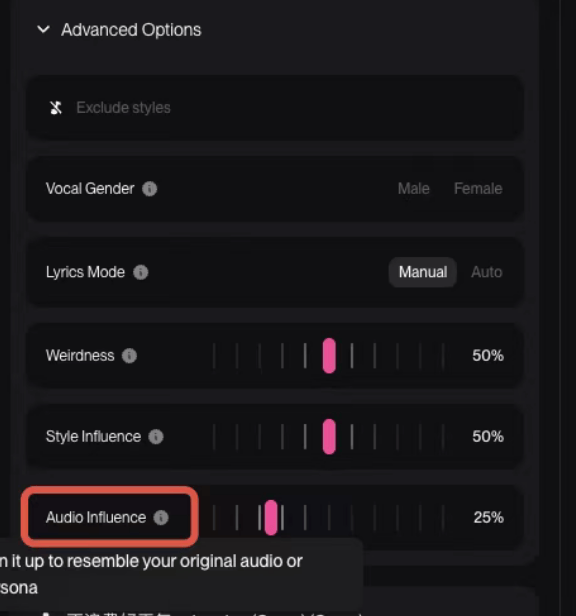
其中進階參數的範圍都在 0-1 之間,具體的參數如下圖所示:
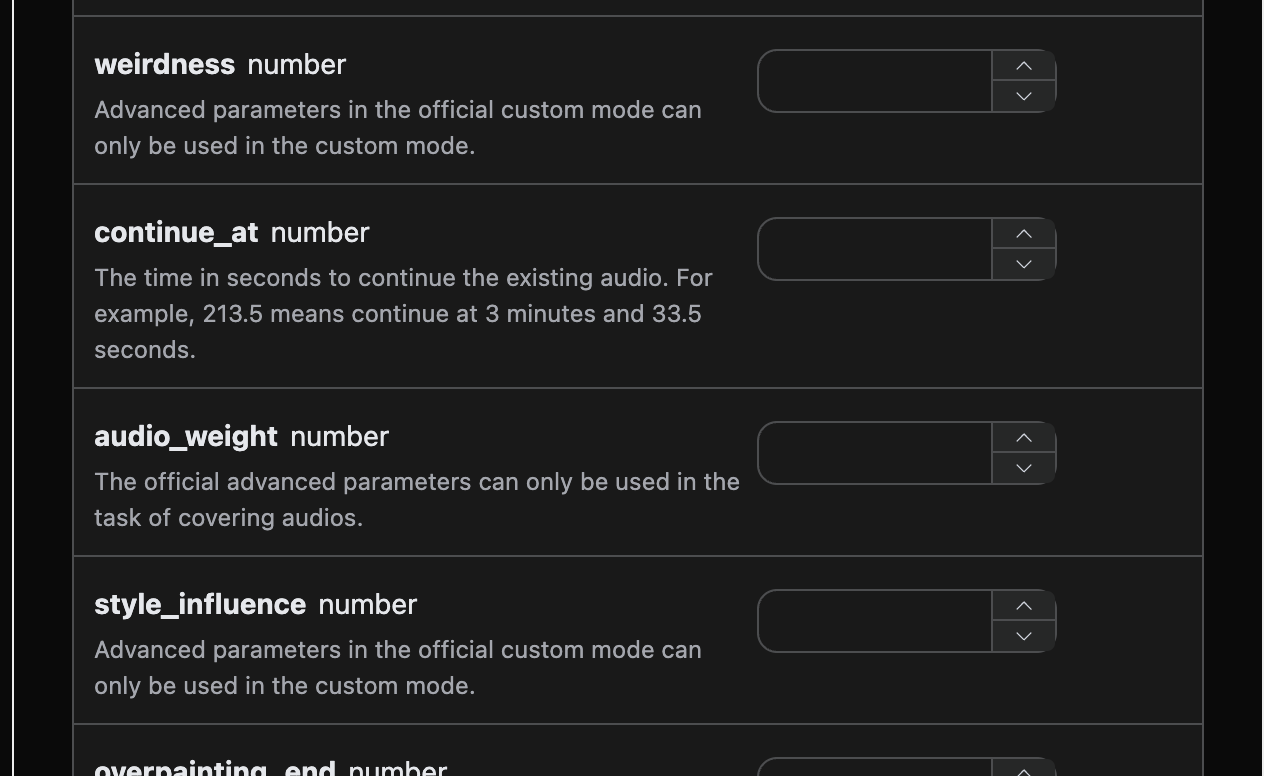
填寫完畢之後自動生成的程式碼如下:
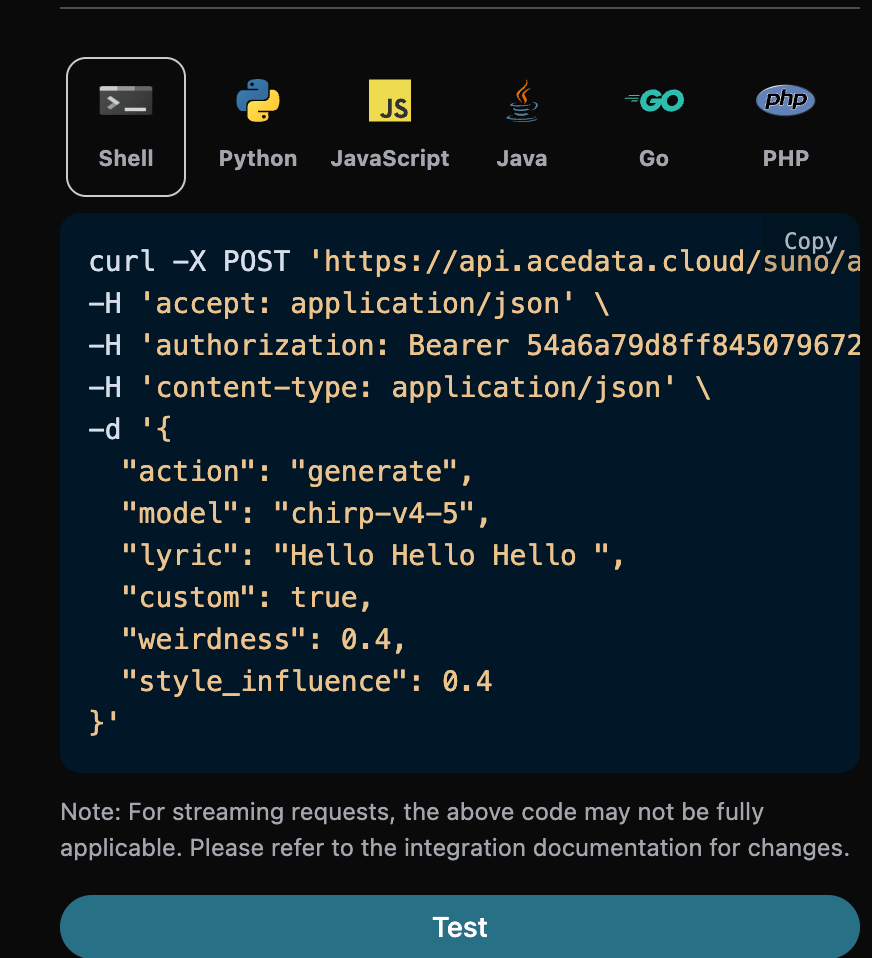
對應的 Python 程式碼:
```python theme={null}
import requests
url = "https://api.acedata.cloud/suno/audios"
headers = {
"accept": "application/json",
"authorization": "Bearer {token}",
"content-type": "application/json"
}
payload = {
"action": "generate",
"model": "chirp-v4-5",
"lyric": "Hello Hello Hello ",
"custom": True,
"weirdness": 0.4,
"style_influence": 0.4,
"audio_weight": 0.4
}
response = requests.post(url, json=payload, headers=headers)
print(response.text)
```
點擊執行,可以發現會得到一個結果,如下:
```json theme={null}
{
"success": true,
"task_id": "2f3aa682-e1a7-43a9-9fbb-ed0ce8668a4b",
"trace_id": "07408194-7deb-4a52-a36d-9a9a13143b5f",
"data": [
{
"id": "c66e2077-7580-43f2-9937-c67a8afcd8bd",
"title": "",
"image_url": "https://cdn.acedata.cloud/e724d7f13d.png?example=image-039",
"lyric": "Hello Hello Hello ",
"audio_url": "https://platform2.cdn.acedata.cloud/fish/5ade0339-5f11-487e-aacc-06a908271706.mp3",
"video_url": "",
"created_at": "2025-07-10T12:54:35.199Z",
"model": "chirp-auk",
"state": "succeeded",
"style": "",
"duration": 187.92
},
{
"id": "a922f97b-307c-4c4d-aae3-a47ba8202a10",
"title": "",
"image_url": "https://cdn.acedata.cloud/e724d7f13d.png?example=image-040",
"lyric": "Hello Hello Hello ",
"audio_url": "https://platform2.cdn.acedata.cloud/fish/5ade0339-5f11-487e-aacc-06a908271706.mp3",
"video_url": "",
"created_at": "2025-07-10T12:54:35.199Z",
"model": "chirp-auk",
"state": "succeeded",
"style": "",
"duration": 229.64
}
]
}
```
這樣就使用了進階參數來生成自訂歌曲,結果與上文類似。
## 控制歌曲時長
預設情況下生成的歌曲時長由模型自行決定,通常在 30 秒到 4 分鐘之間。如果需要更長或更短的成品,可以透過 `duration` 參數指定期望時長,單位是秒,取值為 10 到 360 之間的整數。
該參數用於自訂模式(`custom` 為 `true`)的歌曲生成。需要特別說明的是,`duration` 是一個**傾向性提示,而不是硬性約束**:模型在創作時會參考這個值,但不保證達到,實測中實際時長通常明顯短於期望值,同一次請求回傳的兩首歌曲時長也可能相差數倍。即使是完全相同的請求,多次提交得到的時長也可能有較大差異。因此不要把它當作精確的時長控制來使用,如果業務上需要固定時長,請在拿到成品後自行裁剪或重試。
對應的 Python 程式碼:
```python theme={null}
import requests
url = "https://api.acedata.cloud/suno/audios"
headers = {
"accept": "application/json",
"authorization": "Bearer {token}",
"content-type": "application/json"
}
payload = {
"action": "generate",
"model": "chirp-v5-5",
"custom": True,
"title": "Under the City Lights",
"style": "lo-fi piano",
"lyric": "[Verse]\nSunrise creepin\nGold on the floor\n[Chorus]\nUnder the city lights\n",
"duration": 330
}
response = requests.post(url, json=payload, headers=headers)
print(response.text)
```
需要注意的是,請求中的 `duration` 是**期望時長**,而回應 `data` 中每首歌曲的 `duration` 欄位是該首歌曲的**實際時長**。兩者名稱相同但含義不同,實際時長不保證等於期望值。歌詞長度是影響成品時長的主要因素之一,若需要較長的成品,建議同時提供更完整的歌詞。
介面不會對 `duration` 做額外驗證,參數會原樣傳遞給模型。如果傳入了目前模式或模型不支援的取值,可能表現為該值被忽略,建議先用一次請求確認效果再批次使用。
## Add Insterumental 功能
2025 年 8 月 Suno 新推出 Add Insterumental 功能,首先需要上傳一首清唱無配音的歌曲,讓 Suno 幫你配樂,首先可以先到 [Suno Upload API](https://platform.acedata.cloud/documents/suno-upload)上傳一首清唱無配樂的歌曲,對應如下的操作如下圖所示:
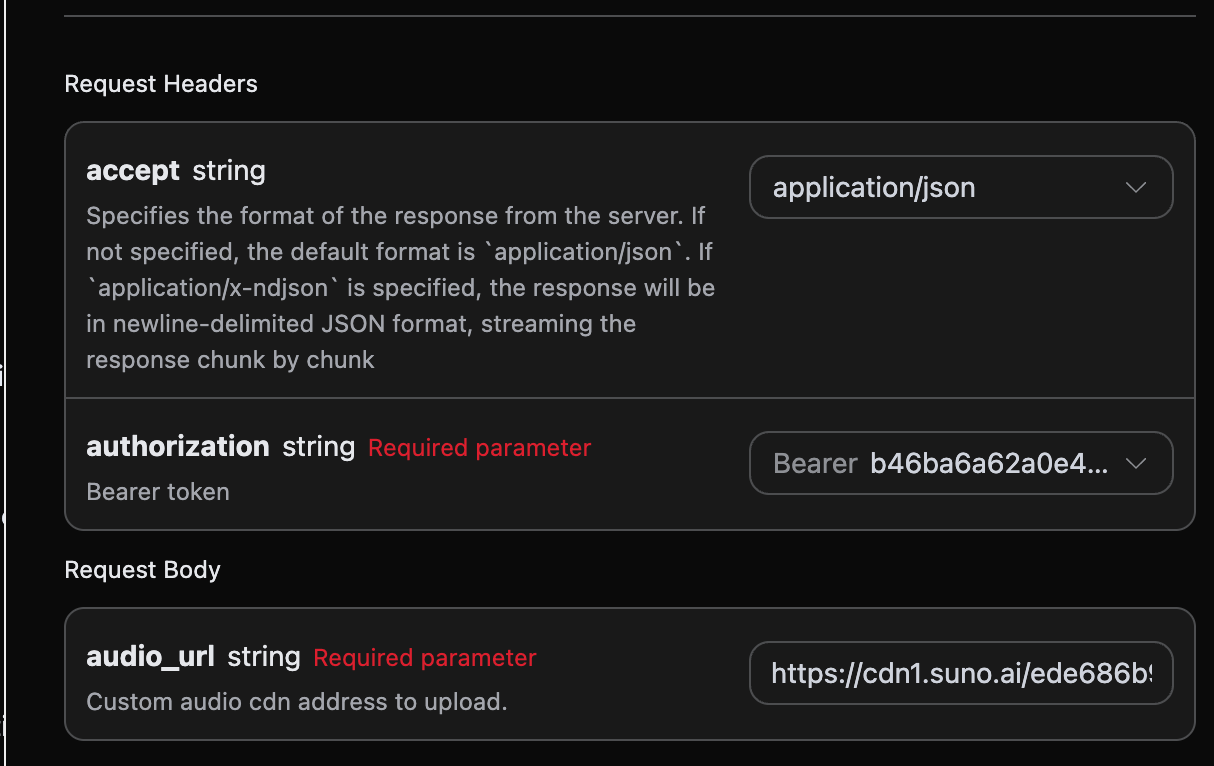
然後需要記錄上傳後的`audio_id`,具體的結果如下圖所示:
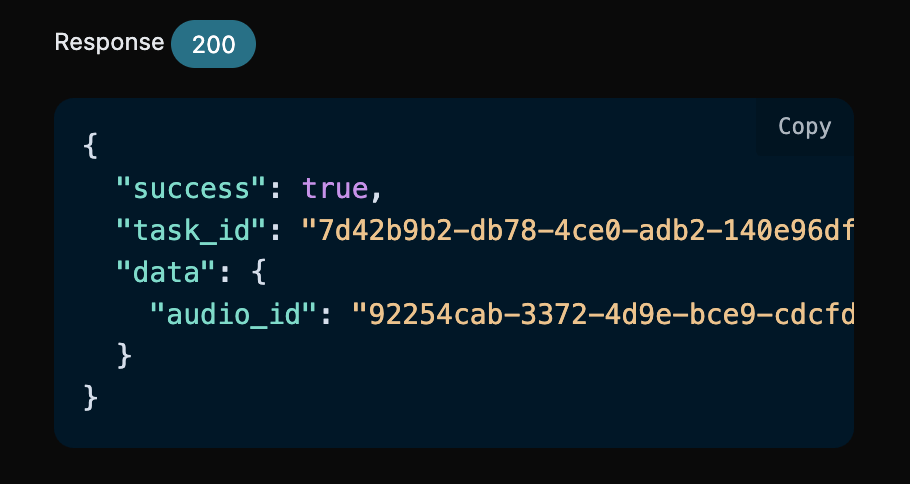
最後得到了一個`audio_id`:92254cab-3372-4d9e-bce9-cdcfdbc39070,然後我們還需要填寫如下參數:
* action:內容為 `underpainting`。
* underpainting\_start:對上傳的歌曲進行添加伴奏的起始時間,預設值是 0。
* underpainting\_end:對上傳的歌曲進行添加伴奏的終點時間,必須小於歌曲的總時長。
* audio\_id:上傳的清唱無配音歌曲 ID。
* style:伴奏的風格,最好是不使用歌詞,畢竟是配音。
填寫完畢之後自動生成了程式碼如下:
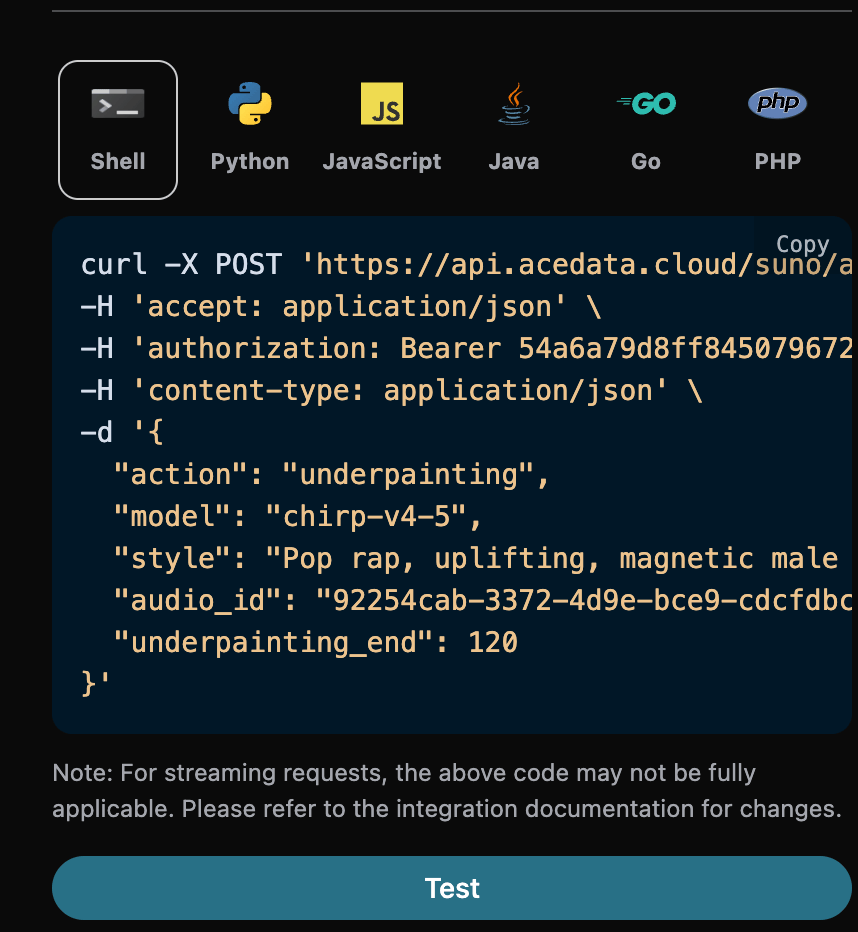
對應的 Python 程式碼:
```python theme={null}
import requests
url = "https://api.acedata.cloud/suno/audios"
headers = {
"accept": "application/json",
"authorization": "Bearer {token}",
"content-type": "application/json"
}
payload = {
"action": "underpainting",
"model": "chirp-v4-5",
"style": "Pop rap, uplifting, magnetic male vocals, piano, synth, electric guitar, driving bass, clear structure",
"audio_id": "92254cab-3372-4d9e-bce9-cdcfdbc39070",
"underpainting_end": 120
}
response = requests.post(url, json=payload, headers=headers)
print(response.text)
```
點擊執行,可以發現會得到一個結果,如下:
```json theme={null}
{
"success": true,
"task_id": "822d2e14-c535-4d48-a4e5-1b6ab00b04a7",
"trace_id": "257eac2c-8e4f-44d0-8454-5e215111eefa",
"data": [
{
"id": "2788cd21-bd84-422d-beb5-859c60fbf5b6",
"title": "",
"image_url": "https://cdn.acedata.cloud/e724d7f13d.png?example=image-041",
"lyric": "",
"audio_url": "https://platform2.cdn.acedata.cloud/fish/5ade0339-5f11-487e-aacc-06a908271706.mp3",
"video_url": "",
"created_at": "2025-08-27T15:25:42.548Z",
"model": "chirp-v4",
"state": "succeeded",
"style": "Pop rap, uplifting, magnetic male vocals, piano, synth, electric guitar, driving bass, clear structure",
"duration": 10.16
},
{
"id": "a4bb7220-e971-4cbf-a626-b86c648bcf55",
"title": "",
"image_url": "https://cdn.acedata.cloud/e724d7f13d.png?example=image-042",
"lyric": "",
"audio_url": "https://platform2.cdn.acedata.cloud/fish/5ade0339-5f11-487e-aacc-06a908271706.mp3",
"video_url": "",
"created_at": "2025-08-27T15:25:42.548Z",
"model": "chirp-v4",
"state": "succeeded",
"style": "Pop rap, uplifting, magnetic male vocals, piano, synth, electric guitar, driving bass, clear structure",
"duration": 2.52
}
]
}
```
這樣就完成了對上傳的清唱無配音歌曲進行配樂的操作,結果與上文類似。
## Add Vocals 功能
2025 年 8 月 suno 新推出 Add Vocals 功能,首先需要上傳一首純音樂,讓 suno 填詞、產出人聲演唱,首先可以先到 [Suno Upload API](https://platform.acedata.cloud/documents/suno-upload)上傳一首清唱無配樂的歌曲,對應的操作如下圖所示:
然後需要記錄上傳後的`audio_id`,具體的結果如下圖所示:
最後得到了一個`audio_id`:92254cab-3372-4d9e-bce9-cdcfdbc39070,然後我們還需要填寫如下參數:
* action:內容為 `overpainting`。
* overpainting\_start:對上傳的歌曲進行添加人聲的起始時間,預設值是 0。
* overpainting\_end:對上傳的歌曲進行添加人聲的終點時間,必須小於歌曲的總時長。
* audio\_id:上傳的清唱無配音歌曲 ID。
* custom:該模式下必須使用自訂模式填入歌詞。
* lyric:自訂模式下填寫的歌詞。
* style:伴奏的風格。
填寫完畢之後自動生成了程式碼如下:
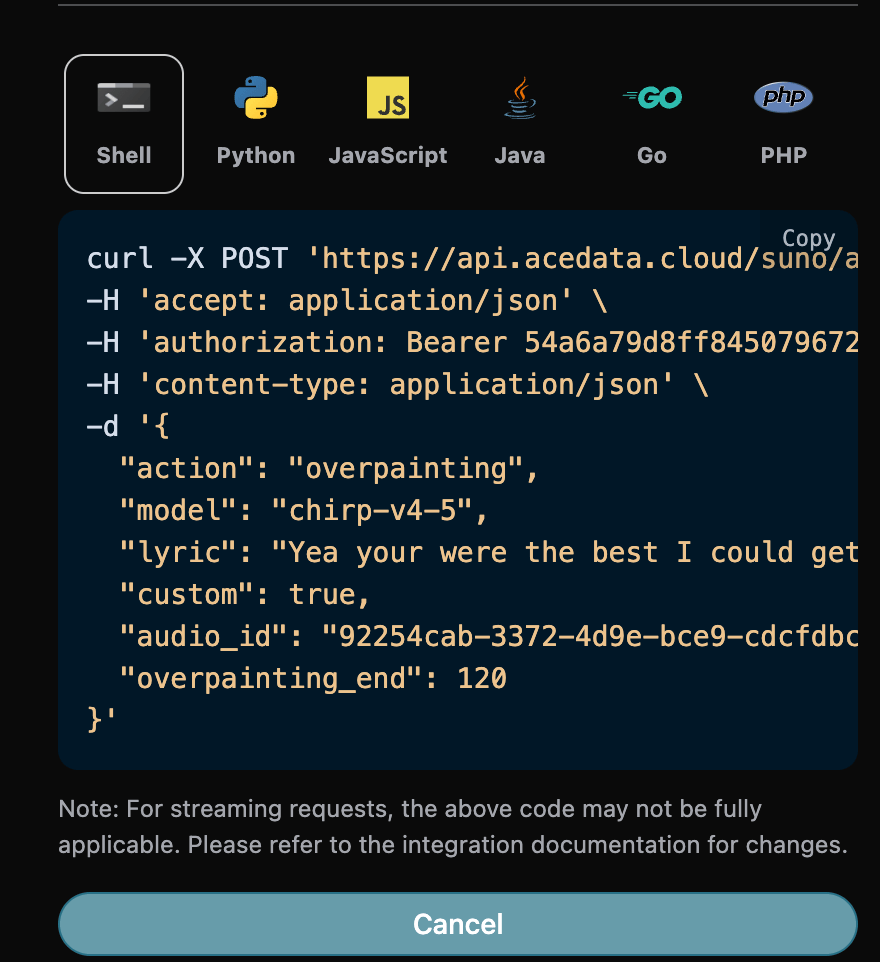
對應的 Python 程式碼:
```python theme={null}
import requests
url = "https://api.acedata.cloud/suno/audios"
headers = {
"accept": "application/json",
"authorization": "Bearer {token}",
"content-type": "application/json"
}
payload = {
"action": "overpainting",
"model": "chirp-v4-5",
"lyric": "Yea your were the best I could get \\nBut I knew that it couldn’t last \\nStayed down since we were friends \\nHad to leave those thoughts in the past \\nMade like 40k just last week \\nOn top of the 20 with my babe\\ndon’t care for what niggas say",
"custom": True,
"audio_id": "92254cab-3372-4d9e-bce9-cdcfdbc39070",
"overpainting_end": 120
}
response = requests.post(url, json=payload, headers=headers)
print(response.text)
```
點擊執行,可以發現會得到一個結果,如下:
```json theme={null}
{
"success": true,
"task_id": "31bb250e-6614-49ec-ac85-631f224daeba",
"trace_id": "efe8e7f3-9a65-4f13-a9f8-51e8478899df",
"data": [
{
"id": "a597f945-64df-4722-a631-d436450832bd",
"title": "",
"image_url": "https://cdn.acedata.cloud/e724d7f13d.png?example=image-043",
"lyric": "Yea your were the best I could get \\nBut I knew that it couldn’t last \\nStayed down since we were friends \\nHad to leave those thoughts in the past \\nMade like 40k just last week \\nOn top of the 20 with my babe\\ndon’t care for what niggas say",
"audio_url": "https://platform2.cdn.acedata.cloud/fish/5ade0339-5f11-487e-aacc-06a908271706.mp3",
"video_url": "",
"created_at": "2025-08-27T15:33:51.550Z",
"model": "chirp-v4",
"state": "succeeded",
"style": "",
"duration": 105.32
},
{
"id": "b41a8b91-3d88-4ebd-a6cf-732764b24954",
"title": "",
"image_url": "https://cdn.acedata.cloud/e724d7f13d.png?example=image-044",
"lyric": "Yea your were the best I could get \\nBut I knew that it couldn’t last \\nStayed down since we were friends \\nHad to leave those thoughts in the past \\nMade like 40k just last week \\nOn top of the 20 with my babe\\ndon’t care for what niggas say",
"audio_url": "https://platform2.cdn.acedata.cloud/fish/5ade0339-5f11-487e-aacc-06a908271706.mp3",
"video_url": "",
"created_at": "2025-08-27T15:33:51.550Z",
"model": "chirp-v4",
"state": "succeeded",
"style": "",
"duration": 148.16
}
]
}
```
這樣就完成了對上傳的清唱無配音歌曲進行配人聲的操作,結果與上文類似。
## Remaster 功能
2025 年 12 月 Suno 新推出 Remaster 功能,該功能可以重新生成歌曲,不可跨帳號,然後我們還需要填寫如下參數:
* action:內容為 `remaster`。
* audio\_id:需要重新生成的歌曲 ID。
* model:僅支援 v4.5+、v5。
* variation\_category:僅在 v5 以上版本支援,而且只有 3 個值 high normal subtle。
填寫完畢之後自動生成的程式碼如下:
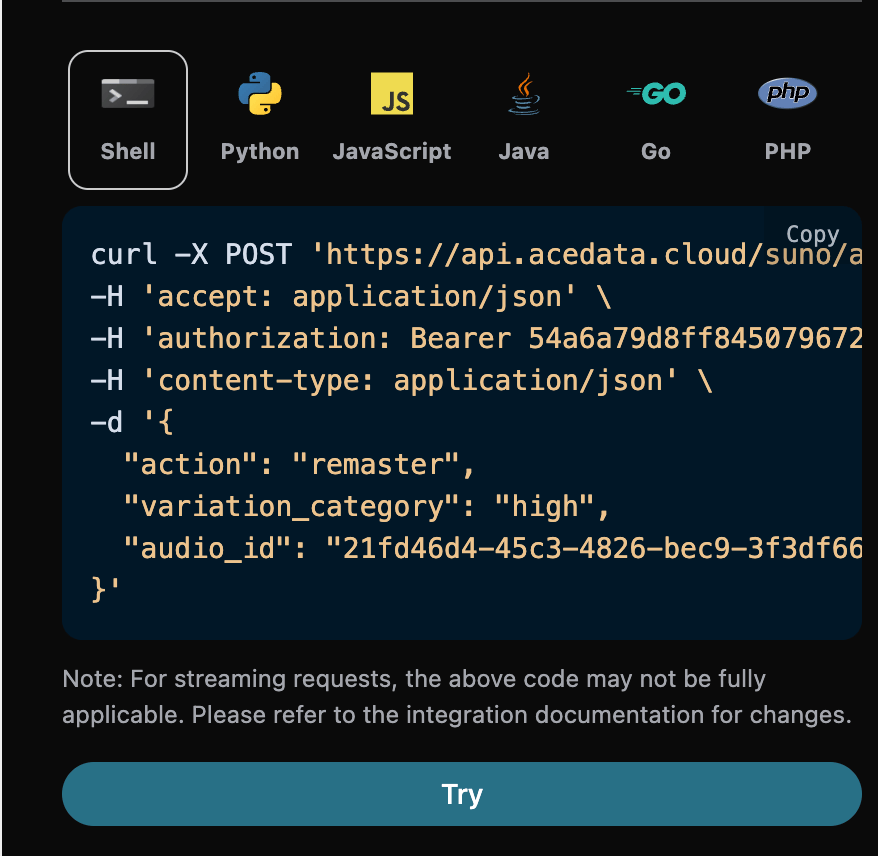
對應的 Python 程式碼:
```python theme={null}
import requests
url = "https://api.acedata.cloud/suno/audios"
headers = {
"accept": "application/json",
"authorization": "Bearer {token}",
"content-type": "application/json"
}
payload = {
"action": "remaster",
"variation_category": "high",
"audio_id": "21fd46d4-45c3-4826-bec9-3f3df667902e"
}
response = requests.post(url, json=payload, headers=headers)
print(response.text)
```
點擊執行,可以發現會得到一個結果,如下:
```json theme={null}
{
"success": true,
"task_id": "791ee74c-9363-4352-afe7-babb19b89899",
"trace_id": "77acda57-c3d4-4e11-a506-4f50e0609916",
"data": [
{
"id": "b0515cdf-9cb5-46cd-b0fe-10a239dc9274",
"title": "Navidad en costura (Remastered)",
"image_url": "https://cdn.acedata.cloud/e724d7f13d.png?example=image-045",
"image_large_url": "https://cdn.acedata.cloud/e724d7f13d.png?example=image-046",
"lyric": "En Teror las clases siguen,\nni en Navidad hay parón;\ncose el grupo entre villancicos\ny un buen trocito de turrón.\nLa Popular abre sus puertas,\ny el taller suena mejor;\nhilo, aguja y canto alegre\nlo pasaremos mejor\nSeguimos en las costuras,\ncon música y diversión;\nlos alumnos comeremos\nGolosinas un montón ",
"audio_url": "https://platform2.cdn.acedata.cloud/fish/5ade0339-5f11-487e-aacc-06a908271706.mp3",
"video_url": "",
"created_at": "2025-12-04T13:09:59.936Z",
"model": "chirp-v4",
"state": "succeeded",
"style": "Villancico",
"duration": 32.2
},
{
"id": "06edab94-a4f9-4c0c-abac-a2e8a97c76a8",
"title": "Navidad en costura (Remastered)",
"image_url": "https://cdn.acedata.cloud/e724d7f13d.png?example=image-047",
"image_large_url": "https://cdn.acedata.cloud/e724d7f13d.png?example=image-048",
"lyric": "En Teror las clases siguen,\nni en Navidad hay parón;\ncose el grupo entre villancicos\ny un buen trocito de turrón.\nLa Popular abre sus puertas,\ny el taller suena mejor;\nhilo, aguja y canto alegre\nlo pasaremos mejor\nSeguimos en las costuras,\ncon música y diversión;\nlos alumnos comeremos\nGolosinas un montón ",
"audio_url": "https://platform2.cdn.acedata.cloud/fish/5ade0339-5f11-487e-aacc-06a908271706.mp3",
"video_url": "",
"created_at": "2025-12-04T13:09:59.936Z",
"model": "chirp-v4",
"state": "succeeded",
"style": "Villancico",
"duration": 32.2
}
]
}
```
這樣就完成了對已生成歌曲重新生成的操作,結果與上文類似。
## Mashup 混曲生成功能
2025 年 12 月 Suno 新推出 Mashup 功能,該功能可以根據兩首參考歌曲生成歌曲,然後我們還需要填寫如下參數:
* action:內容為 `mashup`。
* mashup\_audio\_ids:兩首參考歌曲的 ID。
填寫完畢之後自動生成的程式碼如下:
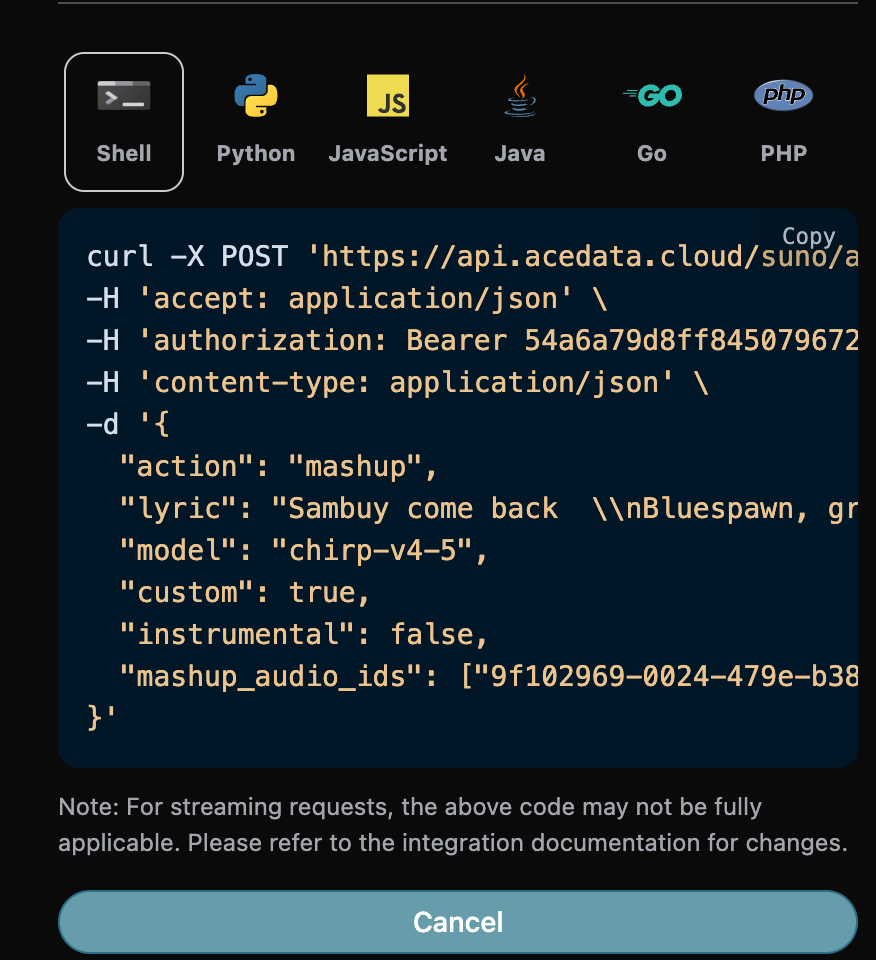
對應的 Python 程式碼:
```python theme={null}
import requests
url = "https://api.acedata.cloud/suno/audios"
headers = {
"accept": "application/json",
"authorization": "Bearer {token}",
"content-type": "application/json"
}
payload = {
"action": "mashup",
"lyric": "Sambuy come back \\nBluespawn, greenspawn are making you a spawn \\n\\nSambuy come \\nSambuy come back \\nBluespawn, greenspawn are making you a spawn \\n\\nSambuy come \\nSambuy come back \\nBluespawn, greenspawn are making you a spawn \\n\\nSambuy come \\nSambuy come back \\nSambuy come, Sambuy come back \\nBluespawn, greenspawn are making you a spawn \\n\\nSambuy come \\nSambuy come back \\nBluespawn, greenspawn are making you a spawn \\nSambuy come back",
"model": "chirp-v4-5",
"custom": True,
"instrumental": False,
"mashup_audio_ids": ["9f102969-0024-479e-b38f-c0c5db21383d","6aebb715-701c-433f-b976-a7ff5cf16255"]
}
response = requests.post(url, json=payload, headers=headers)
print(response.text)
```
點擊執行,可以發現會得到一個結果,如下:
```json theme={null}
{
"success": true,
"task_id": "3fe070eb-2ab1-4424-909c-acfe3ca761af",
"trace_id": "2b220382-7a84-4853-ae43-05cdcad233a9",
"data": [
{
"id": "5ff751dc-0e72-4de9-a54b-2cad50984b47",
"title": "",
"image_url": "https://cdn.acedata.cloud/e724d7f13d.png?example=image-049",
"image_large_url": "https://cdn.acedata.cloud/e724d7f13d.png?example=image-050",
"lyric": "Sambuy come back \\nBluespawn, greenspawn are making you a spawn \\n\\nSambuy come \\nSambuy come back \\nBluespawn, greenspawn are making you a spawn \\n\\nSambuy come \\nSambuy come back \\nBluespawn, greenspawn are making you a spawn \\n\\nSambuy come \\nSambuy come back \\nSambuy come, Sambuy come back \\nBluespawn, greenspawn are making you a spawn \\n\\nSambuy come \\nSambuy come back \\nBluespawn, greenspawn are making you a spawn \\nSambuy come back",
"audio_url": "https://platform2.cdn.acedata.cloud/fish/5ade0339-5f11-487e-aacc-06a908271706.mp3",
"video_url": "",
"created_at": "2026-01-25T15:13:30.181Z",
"model": "chirp-v4-5",
"state": "succeeded",
"style": "",
"duration": 219.08
},
{
"id": "19c515c4-d7b3-4a17-8ab0-dd1ebd4861b8",
"title": "",
"image_url": "https://cdn.acedata.cloud/e724d7f13d.png?example=image-051",
"image_large_url": "https://cdn.acedata.cloud/e724d7f13d.png?example=image-052",
"lyric": "Sambuy come back \\nBluespawn, greenspawn are making you a spawn \\n\\nSambuy come \\nSambuy come back \\nBluespawn, greenspawn are making you a spawn \\n\\nSambuy come \\nSambuy come back \\nBluespawn, greenspawn are making you a spawn \\n\\nSambuy come \\nSambuy come back \\nSambuy come, Sambuy come back \\nBluespawn, greenspawn are making you a spawn \\n\\nSambuy come \\nSambuy come back \\nBluespawn, greenspawn are making you a spawn \\nSambuy come back",
"audio_url": "https://platform2.cdn.acedata.cloud/fish/5ade0339-5f11-487e-aacc-06a908271706.mp3",
"video_url": "",
"created_at": "2026-01-25T15:13:30.181Z",
"model": "chirp-v4-5",
"state": "succeeded",
"style": "",
"duration": 163.12
}
]
}
```
這樣就完成了對參考歌曲進行混曲生成的操作,結果與上文類似。
## Samples 取樣生成歌曲
這裡的 `samples` 是單一音訊區間取樣:從一首已有音訊中選擇起止時間,將該片段作為取樣素材進行創作。它不同於下文使用 1 到 4 段完整參考音訊的 Inspo 靈感創作功能。需要填寫如下參數:
* action:內容為 `samples`。
* samples\_start:取樣開始時間。
* samples\_end:取樣結束時間。
* audio\_id:需要取樣的參考歌曲 ID。
填寫完畢之後自動生成的程式碼如下:
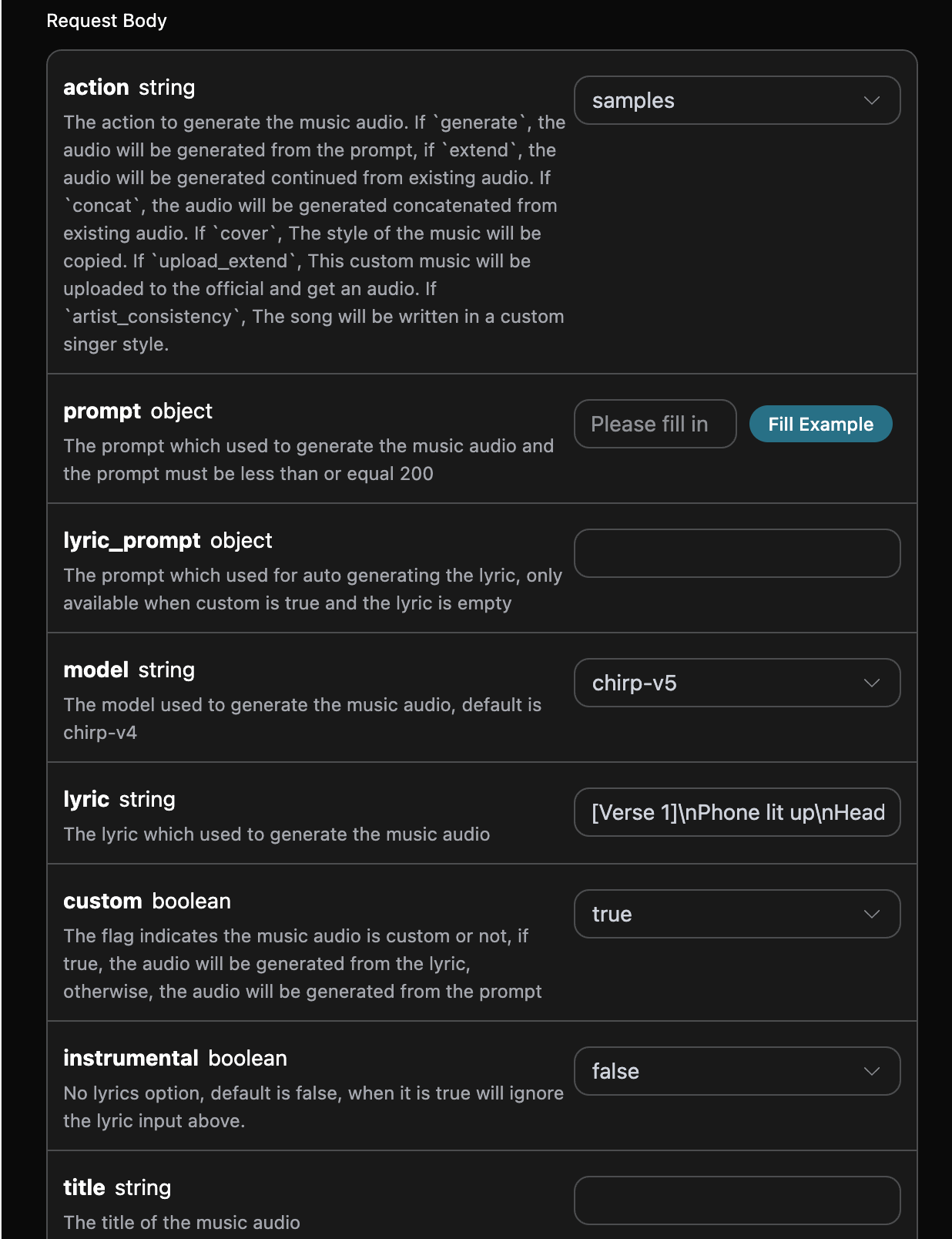
對應的 Python 程式碼:
```python theme={null}
import requests
url = "https://api.acedata.cloud/suno/audios"
headers = {
"accept": "application/json",
"authorization": "Bearer {token}",
"content-type": "application/json"
}
payload = {
"action": "samples",
"model": "chirp-v5",
"lyric": "[Verse 1]\\nPhone lit up\\nHeadline in my hand\\nFeels made up\\nStill says “you won’t understand”\\nYour name\\nMy name\\nSide by side in the scroll\\nCold black text\\nOn a story I used to hold\\n\\n[Chorus]\\nYou’re breaking news\\nAnd I’m just breaking\\nFront-page truth\\nHeart still shaking\\nEverybody reads\\nWhat we already knew\\nYou’re a story now\\nAnd I’m the one you broke it to\\n\\n[Verse 2]\\nNeighbors talk\\nThrough a half-closed door\\nCoffee cools\\nOn a cracked old floor\\nYour suitcase snaps\\nLike a camera flash\\nOne last quote\\nThen you cut to black\\n\\n[Chorus]\\nYou’re breaking news\\nAnd I’m just breaking\\nFront-page truth\\nHeart still shaking\\nEverybody reads\\nWhat we already knew\\nYou’re a story now\\nAnd I’m the one you broke it to\\n\\n[Bridge]\\nIs there a line\\nWhere we rewind\\nOr just a feed\\nThat leaves us behind\\nTell me\\nWho gets\\nThe final view\\nWhen I stop trending\\nWith you\\n\\n[Chorus]\\nYou’re breaking news\\nAnd I’m just breaking\\nFront-page truth\\nHeart still shaking\\nEverybody reads\\nWhat we already knew\\nYou’re a story now\\nAnd I’m the one you broke it to (yeah)",
"custom": True,
"instrumental": False,
"audio_id": "0fa07665-6b8e-4a8b-8bd3-7e0cfcdada88",
"samples_end": 102.16,
"samples_start": 59.88
}
response = requests.post(url, json=payload, headers=headers)
print(response.text)
```
點擊執行,可以發現會得到一個結果,如下:
```json theme={null}
{
"success": true,
"task_id": "12135a45-6384-4683-9bb1-64f19933915a",
"trace_id": "683e559d-340e-4c72-8fae-e683442ac7e9",
"data": [
{
"id": "9a0b680f-a9ea-4a36-8695-8ea777ab6ee7",
"title": "Whistle in the Wind",
"image_url": "https://cdn.acedata.cloud/e724d7f13d.png?example=image-053",
"image_large_url": "https://cdn.acedata.cloud/e724d7f13d.png?example=image-054",
"lyric": "[Verse 1]\nPhone lit up\nHeadline in my hand\nFeels made up\nStill says “you won’t understand”\nYour name\nMy name\nSide by side in the scroll\nCold black text\nOn a story I used to hold\n[Chorus]\nYou’re breaking news\nAnd I’m just breaking\nFront-page truth\nHeart still shaking\nEverybody reads\nWhat we already knew\nYou’re a story now\nAnd I’m the one you broke it to\n[Verse 2]\nNeighbors talk\nThrough a half-closed door\nCoffee cools\nOn a cracked old floor\nYour suitcase snaps\nLike a camera flash\nOne last quote\nThen you cut to black\n[Chorus]\nYou’re breaking news\nAnd I’m just breaking\nFront-page truth\nHeart still shaking\nEverybody reads\nWhat we already knew\nYou’re a story now\nAnd I’m the one you broke it to\n[Bridge]\nIs there a line\nWhere we rewind\nOr just a feed\nThat leaves us behind\nTell me\nWho gets\nThe final view\nWhen I stop trending\nWith you\n[Chorus]\nYou’re breaking news\nAnd I’m just breaking\nFront-page truth\nHeart still shaking\nEverybody reads\nWhat we already knew\nYou’re a story now\nAnd I’m the one you broke it to (yeah)",
"audio_url": "https://platform2.cdn.acedata.cloud/fish/5ade0339-5f11-487e-aacc-06a908271706.mp3",
"video_url": "",
"created_at": "2026-01-31T14:34:45.043Z",
"model": "chirp-v5",
"state": "succeeded",
"style": "acoustic with a hint of optimism,folk-pop,female vocals",
"duration": 176.92
},
{
"id": "66473dee-3aaf-43b2-80fd-76568b3abbb1",
"title": "Whistle in the Wind",
"image_url": "https://cdn.acedata.cloud/e724d7f13d.png?example=image-055",
"image_large_url": "https://cdn.acedata.cloud/e724d7f13d.png?example=image-056",
"lyric": "[Verse 1]\nPhone lit up\nHeadline in my hand\nFeels made up\nStill says “you won’t understand”\nYour name\nMy name\nSide by side in the scroll\nCold black text\nOn a story I used to hold\n[Chorus]\nYou’re breaking news\nAnd I’m just breaking\nFront-page truth\nHeart still shaking\nEverybody reads\nWhat we already knew\nYou’re a story now\nAnd I’m the one you broke it to\n[Verse 2]\nNeighbors talk\nThrough a half-closed door\nCoffee cools\nOn a cracked old floor\nYour suitcase snaps\nLike a camera flash\nOne last quote\nThen you cut to black\n[Chorus]\nYou’re breaking news\nAnd I’m just breaking\nFront-page truth\nHeart still shaking\nEverybody reads\nWhat we already knew\nYou’re a story now\nAnd I’m the one you broke it to\n[Bridge]\nIs there a line\nWhere we rewind\nOr just a feed\nThat leaves us behind\nTell me\nWho gets\nThe final view\nWhen I stop trending\nWith you\n[Chorus]\nYou’re breaking news\nAnd I’m just breaking\nFront-page truth\nHeart still shaking\nEverybody reads\nWhat we already knew\nYou’re a story now\nAnd I’m the one you broke it to (yeah)",
"audio_url": "https://platform2.cdn.acedata.cloud/fish/5ade0339-5f11-487e-aacc-06a908271706.mp3",
"video_url": "",
"created_at": "2026-01-31T14:34:45.043Z",
"model": "chirp-v5",
"state": "succeeded",
"style": "acoustic with a hint of optimism,folk-pop,female vocals",
"duration": 177.48
}
]
}
```
這樣就完成了取樣生成歌曲的操作,結果與上文類似。
## Inspo 靈感創作功能
Inspo 靈感創作功能可以根據 1 到 4 段完整參考音訊生成新的音樂,支援拖曳或上傳音訊作為靈感來源。API 使用現有 `inspo` action:用戶端提供公開可存取的音訊 URL,服務會自動完成參考音訊準備和創作,無需用戶端分別讀取歌詞、風格或時長再組裝請求。它不同於上文的區間取樣,也不同於複刻原曲風格的 Cover。使用時需要填寫如下參數:
* action:內容為 `inspo`。
* audio\_urls:參考音訊的 URL 列表,需提供 1 到 4 個公開可存取的音訊位址。
* model:使用的模型,推薦 `chirp-v6`。
* prompt:歌詞或創作提示詞(可選)。
> 說明:參考音訊需為公開可存取的音訊檔案。若參考音訊與平台曲庫中的已知錄音完全符合,Suno 可能會因版權校驗而拒絕生成,建議使用自有或由 Suno 生成的音訊作為靈感來源。
對應的 Python 程式碼:
```python theme={null}
import requests
url = "https://api.acedata.cloud/suno/audios"
headers = {
"accept": "application/json",
"authorization": "Bearer {token}",
"content-type": "application/json"
}
payload = {
"action": "inspo",
"model": "chirp-v6",
"audio_urls": [
"https://cdn.acedata.cloud/uploads/a0bc051f-42c2-4a46-aeb4-582dcc884ad2"
],
"prompt": "Rework these references as warm acoustic folk with soft vocals"
}
response = requests.post(url, json=payload, headers=headers)
print(response.text)
```
下面保留一份已驗證的歷史回應快照;快照使用當時的 `chirp-v5`,目前請求範例推薦 `chirp-v6`,回傳結構一致:
```json theme={null}
{
"success": true,
"task_id": "725e6b41-78d0-4adf-856c-05e81098c029",
"trace_id": "8c2f0b3e-2f6a-4738-8b1d-c58068ca3dab",
"data": [
{
"id": "20ca5628-86e0-4c32-8ae4-9f0c481e45f3",
"title": "Inspo Demo",
"image_url": "https://cdn.acedata.cloud/e724d7f13d.png?example=image-057",
"lyric": "",
"audio_url": "https://platform2.cdn.acedata.cloud/fish/5ade0339-5f11-487e-aacc-06a908271706.mp3",
"video_url": "",
"created_at": "2026-06-18T13:01:53.910Z",
"model": "chirp-v5",
"state": "succeeded",
"style": "acoustic, folk, warm",
"duration": 36.92
},
{
"id": "8744a796-9961-45af-868d-4f3bc1c44257",
"title": "Inspo Demo",
"image_url": "https://cdn.acedata.cloud/e724d7f13d.png?example=image-058",
"lyric": "",
"audio_url": "https://platform2.cdn.acedata.cloud/fish/5ade0339-5f11-487e-aacc-06a908271706.mp3",
"video_url": "",
"created_at": "2026-06-18T13:01:53.910Z",
"model": "chirp-v5",
"state": "succeeded",
"style": "acoustic, folk, warm",
"duration": 84.16
}
]
}
```
這樣就完成了靈感創作的操作,回傳結果與一般生成歌曲一致。
## 非同步回呼
由於 Suno 生成音樂的時間相對較長,大約需要 1-2 分鐘,如果 API 長時間無回應,HTTP 請求會一直保持連線,導致額外的系統資源消耗,所以本 API 也提供了非同步回呼的支援。
整體流程是:用戶端發起請求的時候,額外指定一個 `callback_url` 欄位,用戶端發起 API 請求之後,API 會立刻回傳一個結果,包含一個 `task_id` 的欄位資訊,代表目前的任務 ID。當任務完成之後,生成音樂的結果會透過 POST JSON 的形式傳送到用戶端指定的 `callback_url`,其中也包括了 `task_id` 欄位,這樣任務結果就可以透過 ID 關聯起來了。
下面我們透過範例來了解一下具體要怎樣操作。
首先,Webhook 回呼是一個可以接收 HTTP 請求的服務,開發者應該替換為自己建置的 HTTP 伺服器的 URL。此處為了方便示範,使用一個公開的 Webhook 範例網站 [https://webhook.site/,開啟該網站即可得到一個](https://webhook.site/,開啟該網站即可得到一個) Webhook URL,如圖所示:

將此 URL 複製下來,就可以作為 Webhook 來使用,此處的範例為 [https://webhook.site/03e60575-3d96-4132-b681-b713d78116e2。](https://webhook.site/03e60575-3d96-4132-b681-b713d78116e2。)
接下來,我們可以設定欄位 `callback_url` 為上述 Webhook URL,同時填入 `prompt`,如圖所示:
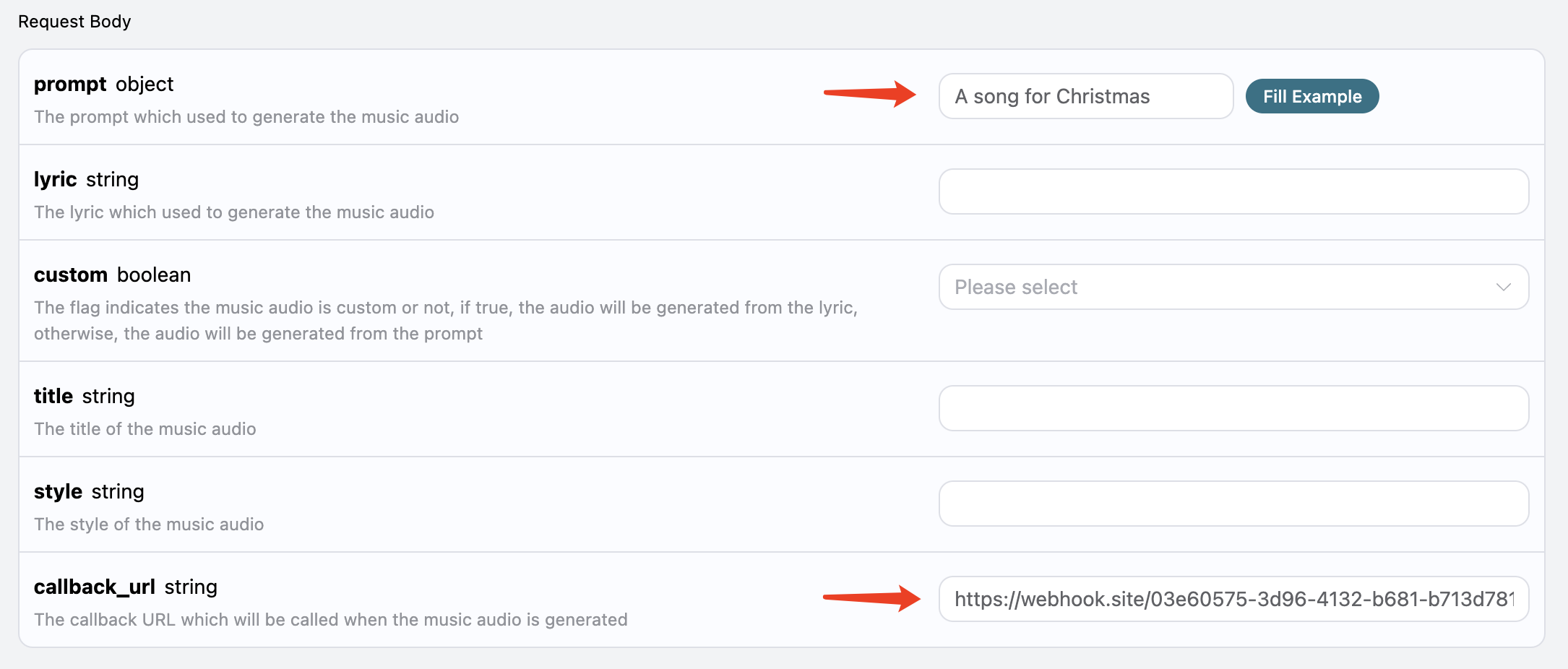
點擊執行,可以發現會立即得到一個結果,如下:
```
{
"task_id": "44472ab8-783b-4054-b861-5bf14e462f60"
}
```
稍等片刻,我們可以在 [https://webhook.site/03e60575-3d96-4132-b681-b713d78116e2](https://webhook.site/03e60575-3d96-4132-b681-b713d78116e2) 上觀察到生成歌曲的結果,如圖所示:
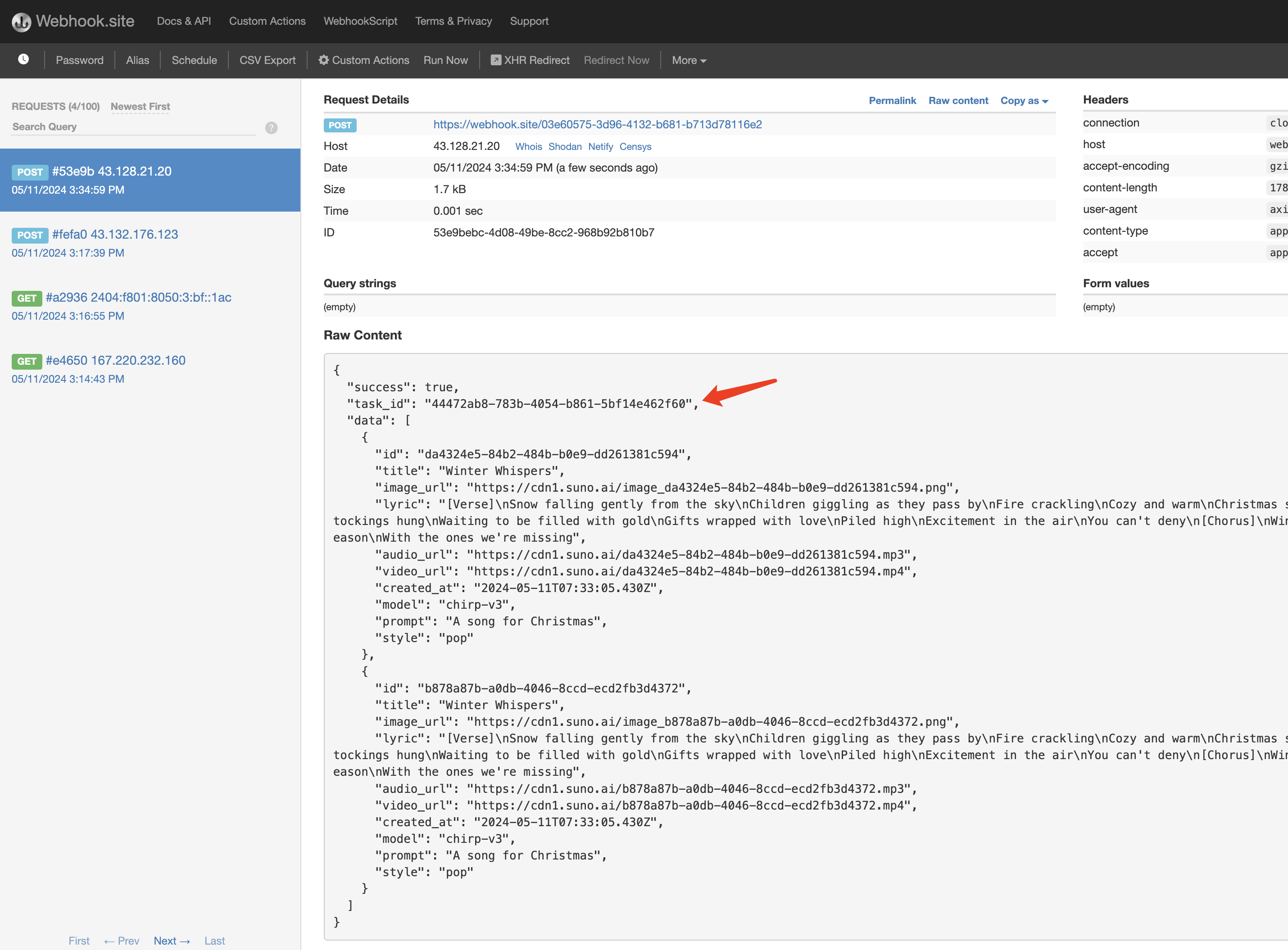
內容如下:
```json theme={null}
{
"success": true,
"task_id": "44472ab8-783b-4054-b861-5bf14e462f60",
"data": [
{
"id": "da4324e5-84b2-484b-b0e9-dd261381c594",
"title": "Winter Whispers",
"image_url": "https://cdn.acedata.cloud/e724d7f13d.png?example=image-059",
"lyric": "[Verse]\nSnow falling gently from the sky\nChildren giggling as they pass by\nFire crackling\nCozy and warm\nChristmas spirit begins to swarm\n[Verse 2]\nTwinkling lights\nA sight to behold\nStockings hung\nWaiting to be filled with gold\nGifts wrapped with love\nPiled high\nExcitement in the air\nYou can't deny\n[Chorus]\nWinter whispers in the wind\nJoy and love it brings\nLet's celebrate this season\nWith the ones we're missing",
"audio_url": "https://platform2.cdn.acedata.cloud/fish/5ade0339-5f11-487e-aacc-06a908271706.mp3",
"video_url": "https://platform2.cdn.acedata.cloud/gemini/04a043bd-6b23-4b4e-945c-ce48158c3eee.mp4?example=video-003",
"created_at": "2024-05-11T07:33:05.430Z",
"model": "chirp-v3",
"prompt": "A song for Christmas",
"style": "pop"
},
{
"id": "b878a87b-a0db-4046-8ccd-ecd2fb3d4372",
"title": "Winter Whispers",
"image_url": "https://cdn.acedata.cloud/e724d7f13d.png?example=image-060",
"lyric": "[Verse]\nSnow falling gently from the sky\nChildren giggling as they pass by\nFire crackling\nCozy and warm\nChristmas spirit begins to swarm\n[Verse 2]\nTwinkling lights\nA sight to behold\nStockings hung\nWaiting to be filled with gold\nGifts wrapped with love\nPiled high\nExcitement in the air\nYou can't deny\n[Chorus]\nWinter whispers in the wind\nJoy and love it brings\nLet's celebrate this season\nWith the ones we're missing",
"audio_url": "https://platform2.cdn.acedata.cloud/fish/5ade0339-5f11-487e-aacc-06a908271706.mp3",
"video_url": "https://platform2.cdn.acedata.cloud/gemini/04a043bd-6b23-4b4e-945c-ce48158c3eee.mp4?example=video-004",
"created_at": "2024-05-11T07:33:05.430Z",
"model": "chirp-v3",
"prompt": "A song for Christmas",
"style": "pop"
}
]
}
```
可以看到結果中有一個 `task_id` 欄位,其他的欄位都和上文類似,透過該欄位即可實現任務的關聯。
當然我們也可以透過串流呼叫來取得結果,我們只需要將請求標頭裡面的`accept`的值設定為`application/x-ndjson`即可,下面用一個範例輸入作為示範:
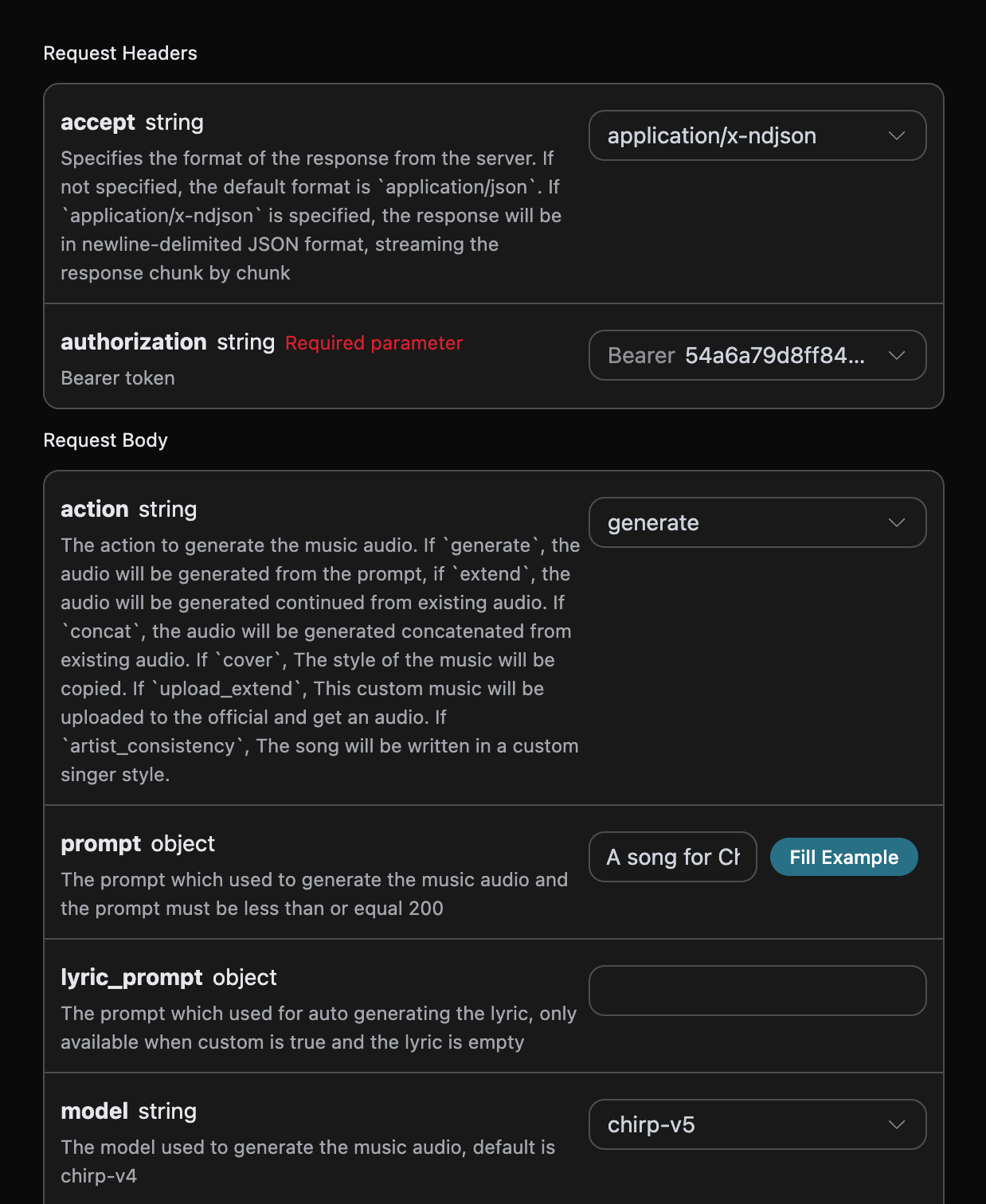
等待過程中我們可以得到以下輸出:
```json theme={null}
{"success":true,"task_id":"1af4b454-ce84-4512-a0a2-de3f8574ecd8","data":[{"id":"1f610752-f426-4fd5-89a8-ba2ad0370881","title":"雪花與槲寄生","lyric":"[主歌]\n燈飾又纏在樹上了\n貓咪撞倒了花圈\n餅乾也在烤箱裡烤焦了\n但我仍咬著牙微笑\n[前副歌]\n雪像天空中的亮粉般飄落\n我有種感覺,今年會飛逝而過\n[副歌]\n雪花與槲寄生\n無論我走到哪裡\n我知道\n愛是禮物\n那光芒\n雪花與槲寄生\n[主歌 2]\n奶奶唱歌有點走音\n孩子們笑得太大聲\n狗狗偷走了一隻火雞腿\n混亂就是聖誕節的人群\n[前副歌]\n但爐火劈啪作響\n溫暖又明亮\n而我的心今晚是一根蠟燭\n[副歌]\n雪花與槲寄生\n無論我走到哪裡\n我知道\n愛是禮物\n那光芒\n雪花與槲寄生","audio_url":"","video_url":"","created_at":"2025-12-13T11:29:25.101Z","model":"chirp-v5","state":"等待中","prompt":"一首聖誕節的歌曲","style":"振奮人心、管弦樂風格,搭配鈴鐺與木吉他"},{"id":"d1a3109d-799b-401e-b032-4b501bcf26f3","title":"雪花與槲寄生","lyric":"[主歌]\n燈飾又纏在樹上了\n貓咪撞倒了花圈\n餅乾也在烤箱裡烤焦了\n但我仍咬著牙微笑\n[前副歌]\n雪像天空中的亮粉般飄落\n我有種感覺,今年會飛逝而過\n[副歌]\n雪花與槲寄生\n無論我走到哪裡\n我知道\n愛是禮物\n那光芒\n雪花與槲寄生\n[主歌 2]\n奶奶唱歌有點走音\n孩子們笑得太大聲\n狗狗偷走了一隻火雞腿\n混亂就是聖誕節的人群\n[前副歌]\n但爐火劈啪作響\n溫暖又明亮\n而我的心今晚是一根蠟燭\n[副歌]\n雪花與槲寄生\n無論我走到哪裡\n我知道\n愛是禮物\n那光芒\n雪花與槲寄生","audio_url":"","video_url":"","created_at":"2025-12-13T11:29:25.101Z","model":"chirp-v5","state":"等待中","prompt":"一首聖誕節的歌曲","style":"振奮人心、管弦樂風格,搭配鈴鐺與木吉他"}]} {"success":true,"task_id":"1af4b454-ce84-4512-a0a2-de3f8574ecd8","data":[{"id":"1f610752-f426-4fd5-89a8-ba2ad0370881","title":"雪花與槲寄生","image_url": "https://cdn.acedata.cloud/e724d7f13d.png?example=image-061","image_large_url": "https://cdn.acedata.cloud/e724d7f13d.png?example=image-062","lyric":"[主歌]\n燈飾又纏在樹上了\n貓咪撞倒了花圈\n餅乾也在烤箱裡烤焦了\n但我仍咬著牙微笑\n[前副歌]\n雪像天空中的亮粉般飄落\n我有種感覺,今年會飛逝而過\n[副歌]\n雪花與槲寄生\n無論我走到哪裡\n我知道\n愛是禮物\n那光芒\n雪花與槲寄生\n[主歌 2]\n奶奶唱歌有點走音\n孩子們笑得太大聲\n狗狗偷走了一隻火雞腿\n混亂就是聖誕節的人群\n[前副歌]\n但爐火劈啪作響\n溫暖又明亮\n而我的心今晚是一根蠟燭\n[副歌]\n雪花與槲寄生\n無論我走到哪裡\n我知道\n愛是禮物\n那光芒\n雪花與槲寄生","audio_url":"https://platform2.cdn.acedata.cloud/fish/5ade0339-5f11-487e-aacc-06a908271706.mp3","video_url":"","created_at":"2025-12-13T11:29:25.101Z","model":"chirp-v5","state":"執行中","prompt":"一首聖誕節的歌曲","style":"振奮人心、管弦樂風格,搭配鈴鐺與木吉他"},{"id":"d1a3109d-799b-401e-b032-4b501bcf26f3","title":"雪花與槲寄生","image_url": "https://cdn.acedata.cloud/e724d7f13d.png?example=image-063","image_large_url": "https://cdn.acedata.cloud/e724d7f13d.png?example=image-064","lyric":"[主歌]\n燈飾又纏在樹上了\n貓咪撞倒了花圈\n餅乾也在烤箱裡烤焦了\n但我仍咬著牙微笑\n[前副歌]\n雪像天空中的亮粉般飄落\n我有種感覺,今年會飛逝而過\n[副歌]\n雪花與槲寄生\n無論我走到哪裡\n我知道\n愛是禮物\n那光芒\n雪花與槲寄生\n[主歌 2]\n奶奶唱歌有點走音\n孩子們笑得太大聲\n狗狗偷走了一隻火雞腿\n混亂就是聖誕節的人群\n[前副歌]\n但爐火劈啪作響\n溫暖又明亮\n而我的心今晚是一根蠟燭\n[副歌]\n雪花與槲寄生\n無論我走到哪裡\n我知道\n愛是禮物\n那光芒\n雪花與槲寄生","audio_url":"https://platform2.cdn.acedata.cloud/fish/5ade0339-5f11-487e-aacc-06a908271706.mp3","video_url":"","created_at":"2025-12-13T11:29:25.101Z","model":"chirp-v5","state":"執行中","prompt":"一首聖誕節的歌曲","style":"振奮人心、管弦樂風格,搭配鈴鐺與木吉他"}]}
{"success":true,"task_id":"1af4b454-ce84-4512-a0a2-de3f8574ecd8","data":[{"id":"1f610752-f426-4fd5-89a8-ba2ad0370881","title":"雪花與槲寄生","image_url": "https://cdn.acedata.cloud/e724d7f13d.png?example=image-065","image_large_url": "https://cdn.acedata.cloud/e724d7f13d.png?example=image-066","lyric":"[主歌]\n燈飾又纏在樹上了\n貓咪撞倒了花圈\n餅乾也在烤箱裡燒焦了\n但我仍咬著牙微笑\n[前副歌]\n雪像天空中的亮粉般飄落\n我有種感覺,今年會飛逝而過\n[副歌]\n雪花與槲寄生\n我所到之處\n我知道\n愛是禮物\n光芒\n雪花與槲寄生\n[主歌 2]\n奶奶唱得有點走音\n孩子們笑得太大聲\n狗偷走了一隻火雞腿\n混亂就是聖誕節的人群\n[前副歌]\n但壁爐劈啪作響\n溫暖又明亮\n而我的心今晚是一根蠟燭\n[副歌]\n雪花與槲寄生\n我所到之處\n我知道\n愛是禮物\n光芒\n雪花與槲寄生","audio_url":"https://platform2.cdn.acedata.cloud/fish/5ade0339-5f11-487e-aacc-06a908271706.mp3","video_url":"","created_at":"2025-12-13T11:29:25.101Z","model":"chirp-v5","state":"succeeded","prompt":"一首聖誕節歌曲","style":"振奮人心,管弦樂搭配鈴鐺與木吉他","duration":129.92},{"id":"d1a3109d-799b-401e-b032-4b501bcf26f3","title":"雪花與槲寄生","image_url": "https://cdn.acedata.cloud/e724d7f13d.png?example=image-067","image_large_url": "https://cdn.acedata.cloud/e724d7f13d.png?example=image-068","lyric":"[主歌]\n燈飾又纏在樹上了\n貓咪撞倒了花圈\n餅乾也在烤箱裡燒焦了\n但我仍咬著牙微笑\n[前副歌]\n雪像天空中的亮粉般飄落\n我有種感覺,今年會飛逝而過\n[副歌]\n雪花與槲寄生\n我所到之處\n我知道\n愛是禮物\n光芒\n雪花與槲寄生\n[主歌 2]\n奶奶唱得有點走音\n孩子們笑得太大聲\n狗偷走了一隻火雞腿\n混亂就是聖誕節的人群\n[前副歌]\n但壁爐劈啪作響\n溫暖又明亮\n而我的心今晚是一根蠟燭\n[副歌]\n雪花與槲寄生\n我所到之處\n我知道\n愛是禮物\n光芒\n雪花與槲寄生","audio_url":"https://platform2.cdn.acedata.cloud/fish/5ade0339-5f11-487e-aacc-06a908271706.mp3","video_url":"","created_at":"2025-12-13T11:29:25.101Z","model":"chirp-v5","state":"running","prompt":"一首聖誕節歌曲","style":"振奮人心,管弦樂搭配鈴鐺與木吉他"}]} {"success":true,"task_id":"1af4b454-ce84-4512-a0a2-de3f8574ecd8","data":[{"id":"1f610752-f426-4fd5-89a8-ba2ad0370881","title":"雪花與槲寄生","image_url": "https://cdn.acedata.cloud/e724d7f13d.png?example=image-069","image_large_url": "https://cdn.acedata.cloud/e724d7f13d.png?example=image-070","lyric":"[主歌]\n燈飾又纏在樹上了\n貓咪撞倒了花圈\n餅乾也在烤箱裡燒焦了\n但我仍咬著牙微笑\n[前副歌]\n雪像天空中的亮粉般飄落\n我有種感覺,今年會飛逝而過\n[副歌]\n雪花與槲寄生\n我所到之處\n我知道\n愛是禮物\n光芒\n雪花與槲寄生\n[主歌 2]\n奶奶唱得有點走音\n孩子們笑得太大聲\n狗偷走了一隻火雞腿\n混亂就是聖誕節的人群\n[前副歌]\n但壁爐劈啪作響\n溫暖又明亮\n而我的心今晚是一根蠟燭\n[副歌]\n雪花與槲寄生\n我所到之處\n我知道\n愛是禮物\n光芒\n雪花與槲寄生","audio_url":"https://platform2.cdn.acedata.cloud/fish/5ade0339-5f11-487e-aacc-06a908271706.mp3","video_url": "https://platform2.cdn.acedata.cloud/gemini/04a043bd-6b23-4b4e-945c-ce48158c3eee.mp4?example=video-005","created_at":"2025-12-13T11:29:25.101Z","model":"chirp-v5","state":"succeeded","prompt":"一首聖誕節歌曲","style":"振奮人心,管弦樂搭配鈴鐺與木吉他","duration":129.92},{"id":"d1a3109d-799b-401e-b032-4b501bcf26f3","title":"雪花與槲寄生","image_url": "https://cdn.acedata.cloud/e724d7f13d.png?example=image-071","image_large_url": "https://cdn.acedata.cloud/e724d7f13d.png?example=image-072","lyric":"[主歌]\n燈飾又纏在樹上了\n貓咪撞倒了花圈\n餅乾也在烤箱裡燒焦了\n但我仍咬著牙微笑\n[前副歌]\n雪像天空中的亮粉般飄落\n我有種感覺,今年會飛逝而過\n[副歌]\n雪花與槲寄生\n我所到之處\n我知道\n愛是禮物\n光芒\n雪花與槲寄生\n[主歌 2]\n奶奶唱得有點走音\n孩子們笑得太大聲\n狗偷走了一隻火雞腿\n混亂就是聖誕節的人群\n[前副歌]\n但壁爐劈啪作響\n溫暖又明亮\n而我的心今晚是一根蠟燭\n[副歌]\n雪花與槲寄生\n我所到之處\n我知道\n愛是禮物\n光芒\n雪花與槲寄生","audio_url":"https://platform2.cdn.acedata.cloud/fish/5ade0339-5f11-487e-aacc-06a908271706.mp3","video_url":"","created_at":"2025-12-13T11:29:25.101Z","model":"chirp-v5","state":"running","prompt":"一首聖誕節歌曲","style":"振奮人心,管弦樂搭配鈴鐺與木吉他"}]}
{"success":true,"task_id":"1af4b454-ce84-4512-a0a2-de3f8574ecd8","trace_id":"4440342a-41c4-4140-8bb1-3537a598ca2e","data":[{"id":"1f610752-f426-4fd5-89a8-ba2ad0370881","title":"雪花與槲寄生","image_url": "https://cdn.acedata.cloud/e724d7f13d.png?example=image-073","image_large_url": "https://cdn.acedata.cloud/e724d7f13d.png?example=image-074","lyric":"[主歌]\n燈飾又纏在樹上了\n貓咪撞倒了花圈\n餅乾也在烤箱裡烤焦了\n但我仍咧著嘴笑\n[前副歌]\n雪像天空中的亮粉般飄落\n我有種感覺,今年會飛逝而過\n[副歌]\n雪花與槲寄生\n我所到之處\n我知道\n愛就是禮物\n那光芒\n雪花與槲寄生\n[主歌 2]\n奶奶唱得有點走音\n孩子們笑得太大聲\n狗狗偷走了一隻火雞腿\n混亂就是聖誕節的人群\n[前副歌]\n但爐火劈啪作響\n溫暖又明亮\n而我的心今晚是一根蠟燭\n[副歌]\n雪花與槲寄生\n我所到之處\n我知道\n愛就是禮物\n那光芒\n雪花與槲寄生","audio_url":"https://platform2.cdn.acedata.cloud/fish/5ade0339-5f11-487e-aacc-06a908271706.mp3","video_url":"","created_at":"2025-12-13T11:29:25.101Z","model":"chirp-v5","state":"succeeded","prompt":"一首聖誕節歌曲","style":"振奮人心,管弦樂搭配鈴鐺與木吉他","duration":129.92},{"id":"d1a3109d-799b-401e-b032-4b501bcf26f3","title":"雪花與槲寄生","image_url": "https://cdn.acedata.cloud/e724d7f13d.png?example=image-075","image_large_url": "https://cdn.acedata.cloud/e724d7f13d.png?example=image-076","lyric":"[主歌]\n燈飾又纏在樹上了\n貓咪撞倒了花圈\n餅乾也在烤箱裡烤焦了\n但我仍咧著嘴笑\n[前副歌]\n雪像天空中的亮粉般飄落\n我有種感覺,今年會飛逝而過\n[副歌]\n雪花與槲寄生\n我所到之處\n我知道\n愛就是禮物\n那光芒\n雪花與槲寄生\n[主歌 2]\n奶奶唱得有點走音\n孩子們笑得太大聲\n狗狗偷走了一隻火雞腿\n混亂就是聖誕節的人群\n[前副歌]\n但爐火劈啪作響\n溫暖又明亮\n而我的心今晚是一根蠟燭\n[副歌]\n雪花與槲寄生\n我所到之處\n我知道\n愛就是禮物\n那光芒\n雪花與槲寄生","audio_url":"https://platform2.cdn.acedata.cloud/fish/5ade0339-5f11-487e-aacc-06a908271706.mp3","video_url":"","created_at":"2025-12-13T11:29:25.101Z","model":"chirp-v5","state":"succeeded","prompt":"一首聖誕節歌曲","style":"振奮人心,管弦樂搭配鈴鐺與木吉他","duration":127.16}]}
```
得到的結果跟基本呼叫類似,上面多個結果就實現了串流呼叫。
## 錯誤處理
如果發生錯誤,您將得到類似如下的錯誤資訊:
```json theme={null}
{
"success": false,
"error": {
"code": "forbidden",
"message": "Song Description contained artist name: eminem"
},
"trace_id": "9bb7c2f4-3b7b-4965-b50a-f663874b1b6f",
"task_id": "9bb3a2a6-c438-436d-a9f3-fa466abc077c"
}
```
下面是 HTTP Status Code、`error.code`、`error.message` 的列表:
> 說明:不同上游帳號的限額和錯誤文案可能存在差異。通常 `chirp-v3-5`/`chirp-v4` 的 `style` 限制更低(200),`chirp-v4-5` 及以上通常支援到 1000;當命中舊上游時,可能出現 `Tags too long.` 或 `style must be less than or equal 120` 等相容文案。
| Status Code | `error.code` | `error.message` |
| ----------- | ------------- | --------------------------------------------------------------- |
| 400 | `bad_request` | `The song id does not exist or has been taken offline.` |
| 400 | `bad_request` | `Prompt too long.` |
| 400 | `bad_request` | `Tags too long.` |
| 400 | `bad_request` | `Uploaded audio matches existing work of art.` |
| 400 | `bad_request` | `instrumental must be a boolean` |
| 400 | `bad_request` | `Title too long.` |
| 400 | `bad_request` | `Topic too long.` |
| 400 | `bad_request` | `style must be less than or equal 120` |
| 400 | `bad_request` | `custom must be a boolean` |
| 400 | `bad_request` | `audio_id is required when extend audio` |
| 400 | `bad_request` | `continue_at is required when extend audio` |
| 400 | `bad_request` | `continue_at must be a number greater than 0` |
| 400 | `bad_request` | `lyric is required when extend audio and instrumental is false` |
| 400 | `bad_request` | `prompt is required when generate audio` |
| 400 | `bad_request` | `lyric is required when generate custom audio` |
| 403 | `forbidden` | `Prompt likely malformed` |
| 403 | `forbidden` | `Prompt likely copyrighted` |
| 403 | `forbidden` | `Prompt contained inappropriate material` |
| 403 | `forbidden` | `Song Description flagged for moderation` |
| 403 | `forbidden` | `Song Description contained artist name` |
| 403 | `forbidden` | `Tags contained artist name` |
| 403 | `forbidden` | `Lyrics contained copyrighted material` |
| 403 | `forbidden` | `Song Description contained producer tag` |
| 403 | `forbidden` | `Generic openAI error` |
| 403 | `forbidden` | `Prompt flagged for moderation` |
| 500 | `api_error` | `Unable to generate lyrics from song description` |
| 500 | `api_error` | `job failed with unknown error` |
| 500 | `api_error` | `no available worker in system` |
| 500 | `api_error` | `service under maintenance, generation paused` |
| 504 | `timeout` | `timeout while waiting for audio generation` |