> ## Documentation Index
> Fetch the complete documentation index at: https://docs.acedata.cloud/llms.txt
> Use this file to discover all available pages before exploring further.
# hCaptcha 圖像識別 API 對接說明
> hCaptcha verification code recognition service 整合指南 - Ace Data Cloud
本文將介紹一種 hCaptcha 圖像識別 API 對接說明,它可以通過用戶輸入識別的內容和 hCaptcha 驗證碼圖像,最後返回需要點擊的小圖像的坐標,完成驗證。
## 申請流程
要使用 hCaptcha 圖像識別 API,首先到 [Ace Data Cloud 控制台](https://platform.acedata.cloud/console/applications) 獲取您的 API Token,留作備用。

如果你尚未登錄或註冊,會自動跳轉到登錄頁面邀請你註冊和登錄,完成後會自動返回當前頁面。
**一個 API Token 即可調用平台所有服務,無需為每個服務單獨申請。** 首次申請會贈送免費額度,可免費體驗;額度不足時可在 [控制台](https://platform.acedata.cloud/console/coin) 充值通用餘額。
> 📘 完整文檔:[hCaptcha 圖像識別 API →](https://platform.acedata.cloud/documents/recognition-hcaptcha-integration)
## 基本使用
首先先了解下基本的使用方式,就是輸入需要處理 hCaptcha 驗證碼圖像,便可獲得處理後的結果,首先需要簡單地傳遞一個 `queries` 字段,這個就是具體 hCaptcha 驗證碼圖像,我們需要去一個有 hCaptcha 驗證碼網站中截取這個驗證碼圖片,示例網站鏈接為: `https://democaptcha.com/demo-form-eng/hcaptcha.html`,點擊複選框即可顯示具體的完整驗證碼圖片,如下圖所示:
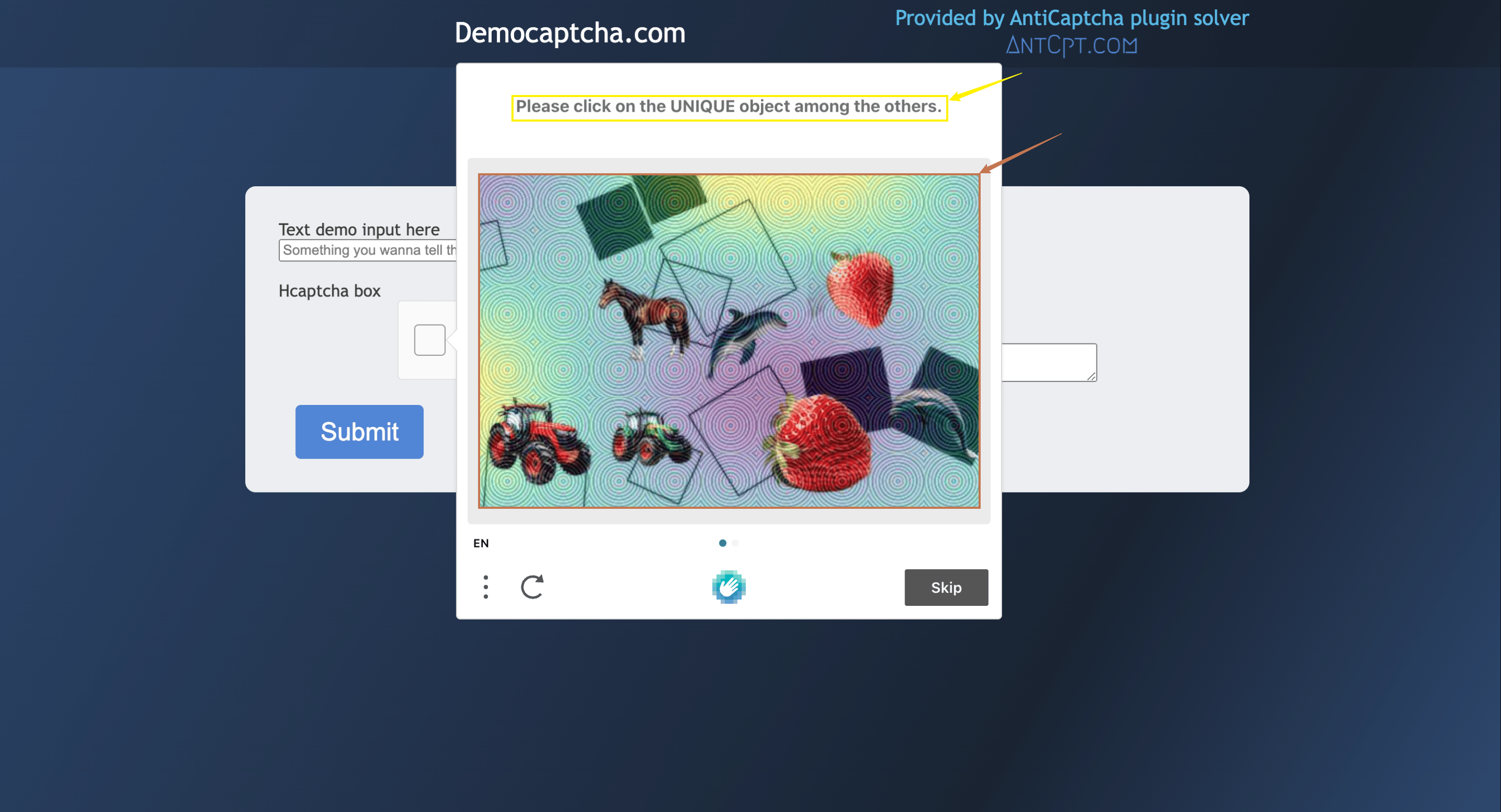
其中 `queries` 字段是上文中驗證碼圖像的截圖,圖片大小建議不要超過 100kb,還需要對上面圖片紅色箭頭指向的區域進行截圖,並且還需要你自行壓縮圖片大小,並且還需要將它轉換為 Base64 編碼,如下圖所示:

同時還需要輸入跟驗證碼圖像相關的識別內容參數 `question`,這個支持中英文翻譯,可以直接傳相關的識別內容,由上文網頁圖像中黃色箭頭執行的內容可以看出 `question` 輸入的應為 `Please click on the UNIQUE object among the others.`。具體的內容如下:
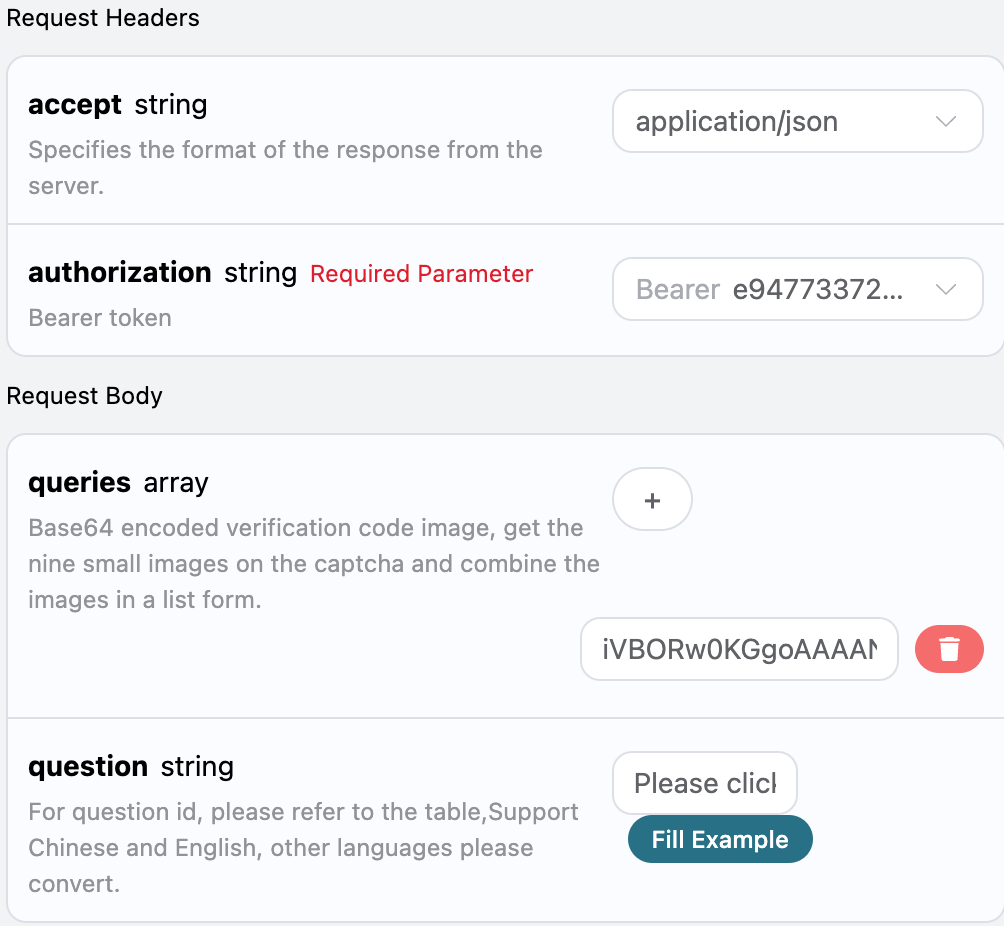
可以看到這裡我們設置了 Request Headers,包括:
* `accept`:想要接收怎樣格式的響應結果,這裡填寫為 `application/json`,即 JSON 格式。
* `authorization`:調用 API 的密鑰,申請之後可以直接下拉選擇。
另外設置了 Request Body,包括:
* `queries`:Base64 編碼的驗證碼圖像列表。
* `question`:驗證碼圖像相關的識別內容參數,支持直接輸入中英文。
選擇之後,可以發現右側也生成了對應代碼,如圖所示:
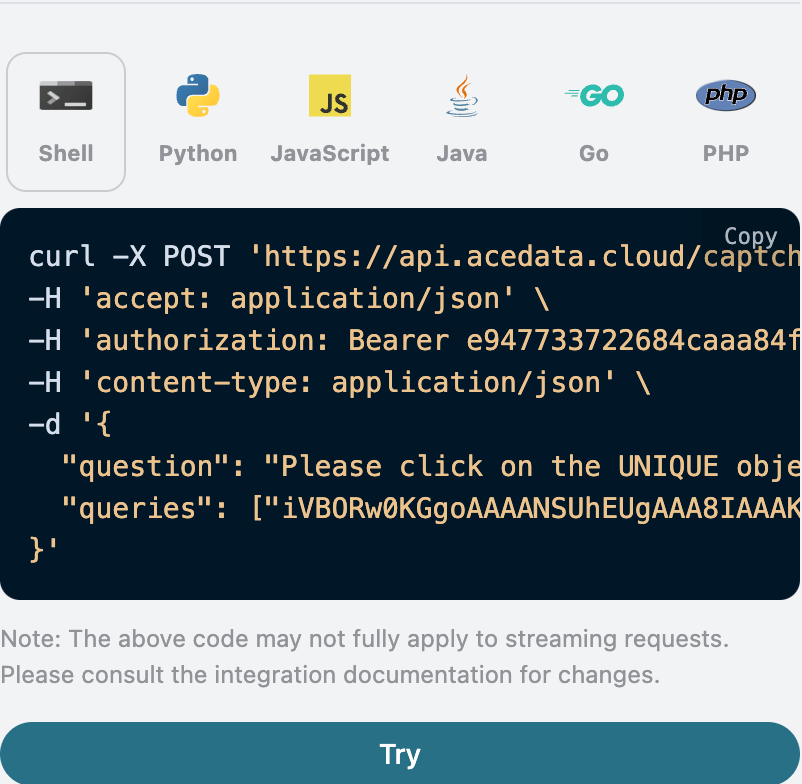
點擊「Try」按鈕即可進行測試,如上圖所示,這裡我們就得到了如下結果:
```json theme={null}
{
"solution": {
"label": "Please click on the UNIQUE object among the others",
"box": [
"360",
"276"
],
"confidences": 0.6354503631591797
}
}
```
返回結果一共有多個字段,介紹如下:
* `solution`,此次 hCaptcha 驗證碼圖像任務處理後驗證結果。
* `label`,hCaptcha 驗證碼圖像所識別的內容。
* `box`,hCaptcha 驗證碼圖像識別結果的位置信息,它是由圖像的坐標信息構成。
* `confidences`,hCaptcha 驗證碼圖像識別後滿足識別內容的的置信度。
* `started_at`、`finished_at`:本次請求開始處理與產出結果的時間,Unix 時間戳(秒,浮點)。
* `elapsed`:本次處理的總耗時(秒)。
可以看到我們得到了處理 hCaptcha 驗證碼圖像的驗證結果,我們只需要根據結果中 `box` 的位置坐標信息對該驗證碼圖像進行模擬點擊該區域便可通過驗證。
下面將介紹如何通過結果的 `box` 的位置信息如何來點擊,首先是針對上傳的驗證碼圖片進行建立直角坐標系,其中中心原點在圖像的左下角,360 是對應的橫坐標,276 是對應的縱坐標,我們只需要通過模擬點擊驗證碼對應的坐標進行點擊即可,具體的圖像信息如下圖所示:

另外如果想生成對應的對接代碼,可以直接複製生成,例如 CURL 的代碼如下:
```shell theme={null}
curl -X POST 'https://api.acedata.cloud/captcha/recognition/hcaptcha' \
-H 'accept: application/json' \
-H 'authorization: Bearer {token}' \
-H 'content-type: application/json' \
-d '{
"question": "Please click on the UNIQUE object among the others.",
"queries": ["iVBORw0KGgoAAAANSU.....eY+85KVlzKHav28uq/WLVhL2kHUlFMKUcZbL31S8bpd0pEPKxNllXAE2wgu3uEfj+BfAzOGelsQNFAAAAAElFTkSuQmCC"]
}'
}'
```
Python 的對接代碼如下:
```python theme={null}
import requests
url = "https://api.acedata.cloud/captcha/recognition/hcaptcha"
headers = {
"accept": "application/json",
"authorization": "Bearer {token}",
"content-type": "application/json"
}
payload = {
"question": "Please click on the UNIQUE object among the others.",
"queries": ["iVBORw0KGgoAAAANSU.....eY+85KVlzKHav28uq/WLVhL2kHUlFMKUcZbL31S8bpd0pEPKxNllXAE2wgu3uEfj+BfAzOGelsQNFAAAAAElFTkSuQmCC"]
}
response = requests.post(url, json=payload, headers=headers)
print(response.text)
```
## 非同步模式(async)
默認情況下 API 是同步阻塞的:一次請求會一直等待,直到識別結果處理完成才返回。如果你在做多打碼器輪換(multi-solver rotation),希望「提交任務後立即拿到 task\_id,先去調度其他打碼器,稍後再回來取結果」,可以在請求體中傳入 `async: true`。
傳入 `async: true` 後,接口會立即返回一個 `task_id`,而不會阻塞等待:
```shell theme={null}
curl -X POST 'https://api.acedata.cloud/captcha/recognition/hcaptcha' \
-H 'accept: application/json' \
-H 'authorization: Bearer {token}' \
-H 'content-type: application/json' \
-d '{
"question": "Please click on the UNIQUE object among the others.",
"queries": ["iVBORw0KGgoAAAANSU.....eY+85KVlzKHav28uq/WLVhL2kHUlFMKUcZbL31S8bpd0pEPKxNllXAE2wgu3uEfj+BfAzOGelsQNFAAAAAElFTkSuQmCC"],
"async": true
}'
```
```json theme={null}
{
"task_id": "61138bb6-19aa-11ec-a9c8-0242ac110002",
"trace_id": "2efa9340-b21b-4e26-9e14-4aac95f343ab"
}
```
隨後使用該 `task_id` 轮询 `POST /captcha/tasks`(建議每 3\~5 秒一次)來獲取結果:
```shell theme={null}
curl -X POST 'https://api.acedata.cloud/captcha/tasks' \
-H 'accept: application/json' \
-H 'authorization: Bearer {token}' \
-H 'content-type: application/json' \
-d '{
"task_id": "61138bb6-19aa-11ec-a9c8-0242ac110002"
}'
```
處理中會返回 `status: processing`:
```json theme={null}
{ "success": true, "task_id": "61138bb6-19aa-11ec-a9c8-0242ac110002", "status": "processing" }
```
處理完成會返回 `status: ready` 和識別結果 `solution`(字段結構與同步模式完全一致):
```json theme={null}
{
"success": true,
"task_id": "61138bb6-19aa-11ec-a9c8-0242ac110002",
"status": "ready",
"solution": {
"label": "Please click on the UNIQUE object among the others",
"box": ["360", "276"],
"confidences": 0.6354503631591797
}
}
```
計費說明:異步模式下,創建任務與輪詢「處理中」都不計費;**僅在成功取到識別結果時計費一次**(與同步模式的價格一致)。因此在輪換中取消尚未完成的任務不會產生費用。`/captcha/tasks` 對所有驗證碼接口(token 與 recognition 系列)通用,用同一個 `task_id` 輪詢即可。
## 錯誤處理
在調用 API 時,如果遇到錯誤,API 會返回相應的錯誤代碼和信息。例如:
* `400 token_mismatched`:錯誤請求,可能是由於缺少或無效的參數。
* `400 api_not_implemented`:錯誤請求,可能是由於缺少或無效的參數。
* `401 invalid_token`:未授權,無效或缺少授權令牌。
* `429 too_many_requests`:請求過多,您已超過速率限制。
* `500 api_error`:內部伺服器錯誤,伺服器出現問題。
### 錯誤響應示例
```json theme={null}
{
"success": false,
"error": {
"code": "api_error",
"message": "fetch failed"
},
"trace_id": "2cf86e86-22a4-46e1-ac2f-032c0f2a4e89"
}
```
## 結論
通過本文檔,您已經了解了如何使用 hCaptcha 圖像識別 API 讓用戶輸入識別的內容和 hCaptcha驗證碼圖像,最後返回需要點擊的小圖像的坐標,完成驗證。希望本文檔能幫助您更好地對接和使用該 API。如有任何問題,請隨時聯繫我們的技術支持團隊。