> ## Documentation Index
> Fetch the complete documentation index at: https://docs.acedata.cloud/llms.txt
> Use this file to discover all available pages before exploring further.
# OpenAI Responses API 申請及び使用
> OpenAI generation API guide - Ace Data Cloud
OpenAI は最近、モデル応答を生成するためのインターフェースを提供しました。テキストまたは画像の入力を提供して、テキストまたは画像の出力を生成します。モデルが独自のカスタムコードを呼び出したり、Web検索やファイル検索などの組み込みツールを使用して、独自のデータをモデル応答の入力として使用することができます。
この文書では、OpenAI Responses API 操作の使用プロセスについて主に説明します。これを利用することで、公式の OpenAI のモデル応答生成機能を簡単に使用できます。
## 申請プロセス
OpenAI Responses API を使用するには、まず [Ace Data Cloud コンソール](https://platform.acedata.cloud/console/applications) にアクセスして、API トークンを取得し、保管しておきます。

まだログインまたは登録していない場合は、自動的にログインページにリダイレクトされ、登録とログインを促されます。完了後、現在のページに自動的に戻ります。
**1つの API トークンでプラットフォームのすべてのサービスを呼び出すことができ、各サービスごとに個別に申請する必要はありません。** 初回申請時には無料のクレジットが付与され、無料で体験できます。クレジットが不足した場合は、[コンソール](https://platform.acedata.cloud/console/coin) で一般的な残高をチャージできます。
> 📘 完全な文書:[OpenAI Responses API →](https://platform.acedata.cloud/documents/openai-responses)
## 基本使用
次に、インターフェース上で対応する内容を入力します。以下の図のように:
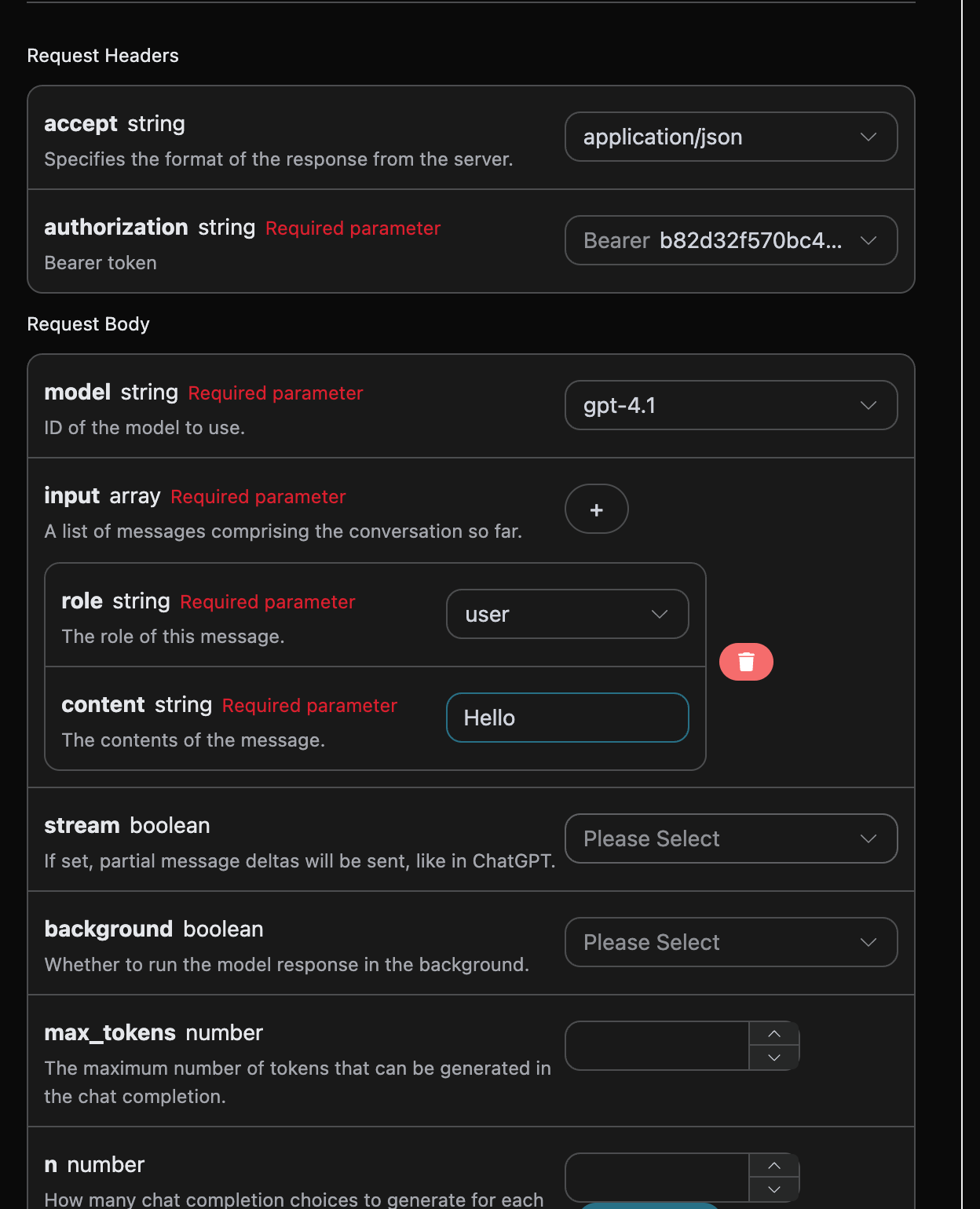
このインターフェースを初めて使用する際には、少なくとも3つの内容を入力する必要があります。1つは `authorization` で、ドロップダウンリストから直接選択できます。もう1つのパラメータは `model` で、`model` は OpenAI ChatGPT の公式モデルカテゴリを選択するものです。ここでは主に20種類のモデルがあり、詳細は提供されたモデルを参照できます。最後のパラメータは `input` で、`input` は私たちが入力する質問の配列です。これは配列で、複数の質問を同時にアップロードでき、各質問には `role` と `content` が含まれています。`role` は質問者の役割を示し、私たちは `user`、`assistant`、`system` の3つの役割を提供しています。もう1つの `content` は私たちの具体的な質問内容です。
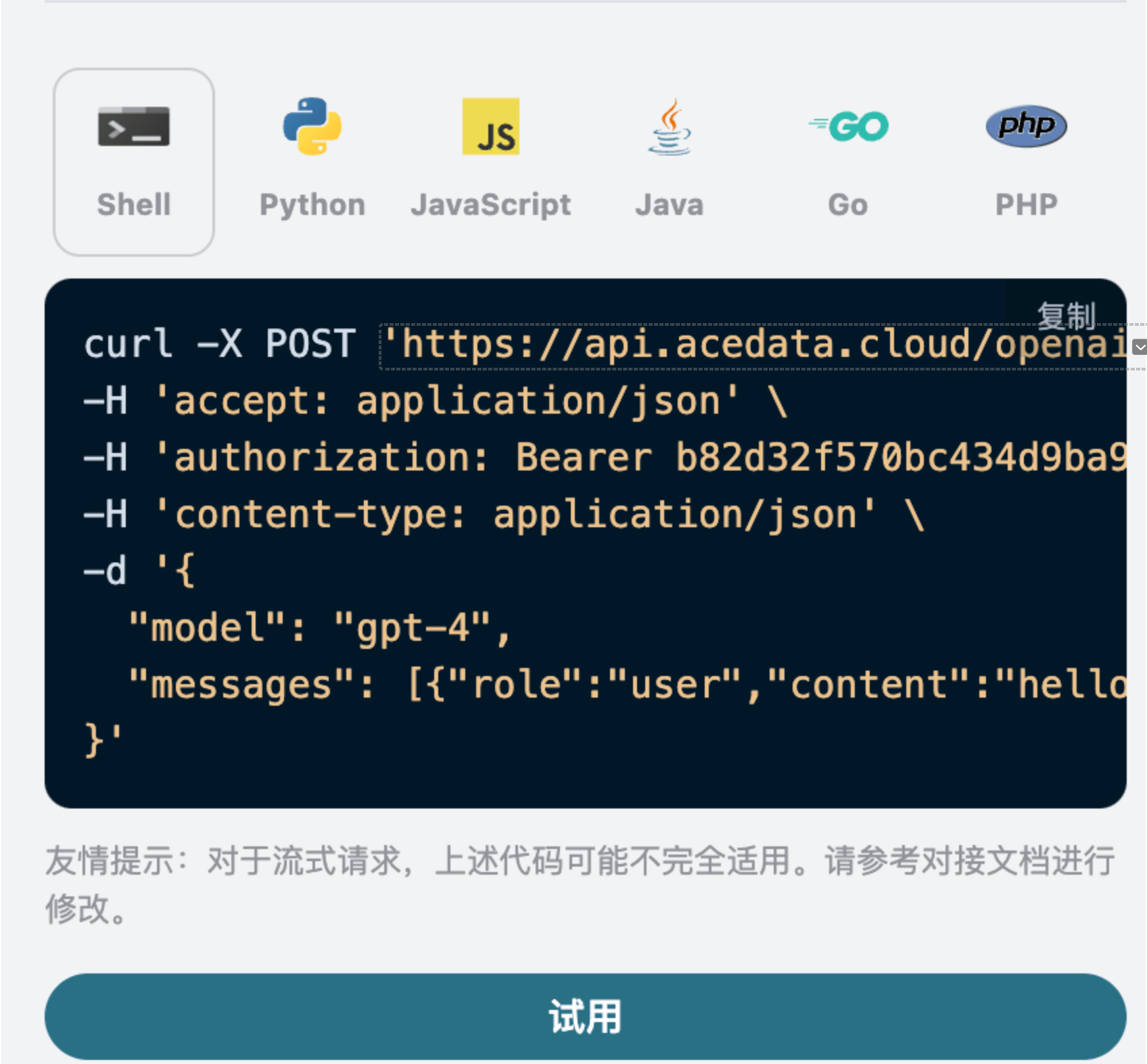
また、右側には対応する呼び出しコードが生成されていることに注意してください。コードをコピーして直接実行することも、直接「Try」ボタンをクリックしてテストすることもできます。
よく使われるオプションのパラメータ:
* `max_tokens`:単一の応答の最大トークン数を制限します。
* `temperature`:生成のランダム性、0-2の範囲で、値が大きいほど発散します。
* `n`:一度に生成する候補応答の数。
* `response_format`:返却フォーマットの設定。
* `tools`:関数/ツール呼び出しの定義。
* `background`:バックグラウンドで非同期に実行するかどうか。
呼び出し後、返された結果は以下の通りです:
```json theme={null}
{
"id": "resp_68a98322e3c88191a027de2711a02a490554cad0b36c0400",
"object": "response",
"created_at": 1755939618,
"status": "completed",
"background": false,
"content_filters": null,
"error": null,
"incomplete_details": null,
"instructions": null,
"max_output_tokens": null,
"max_tool_calls": null,
"model": "gpt-5.5",
"output": [
{
"id": "msg_68a98323422c8191a7f383eea48ba5160554cad0b36c0400",
"type": "message",
"status": "completed",
"content": [
{
"type": "output_text",
"annotations": [],
"text": "Hello! How can I assist you today?"
}
],
"role": "assistant"
}
],
"parallel_tool_calls": true,
"previous_response_id": null,
"prompt_cache_key": null,
"reasoning": {
"effort": null,
"summary": null
},
"safety_identifier": null,
"service_tier": "default",
"store": true,
"temperature": 1,
"text": {
"format": {
"type": "text"
}
},
"tool_choice": "auto",
"tools": [],
"top_p": 1,
"truncation": "disabled",
"usage": {
"input_tokens": 8,
"input_tokens_details": {
"cached_tokens": 0
},
"output_tokens": 10,
"output_tokens_details": {
"reasoning_tokens": 0
},
"total_tokens": 18
},
"user": null,
"metadata": {}
}
```
返された結果には複数のフィールドがあり、以下のように説明されます:
* `id`:今回の対話タスクを生成するための ID で、今回の対話タスクを一意に識別します。
* `model`:選択した OpenAI ChatGPT の公式モデル。
* `output`:ChatGPT が質問に対して提供した回答情報。
* `usage`:今回の問答に対するトークンの統計情報。
その中で `output` は ChatGPT の回答情報を含んでおり、その中の `output` は ChatGPT であることがわかります。
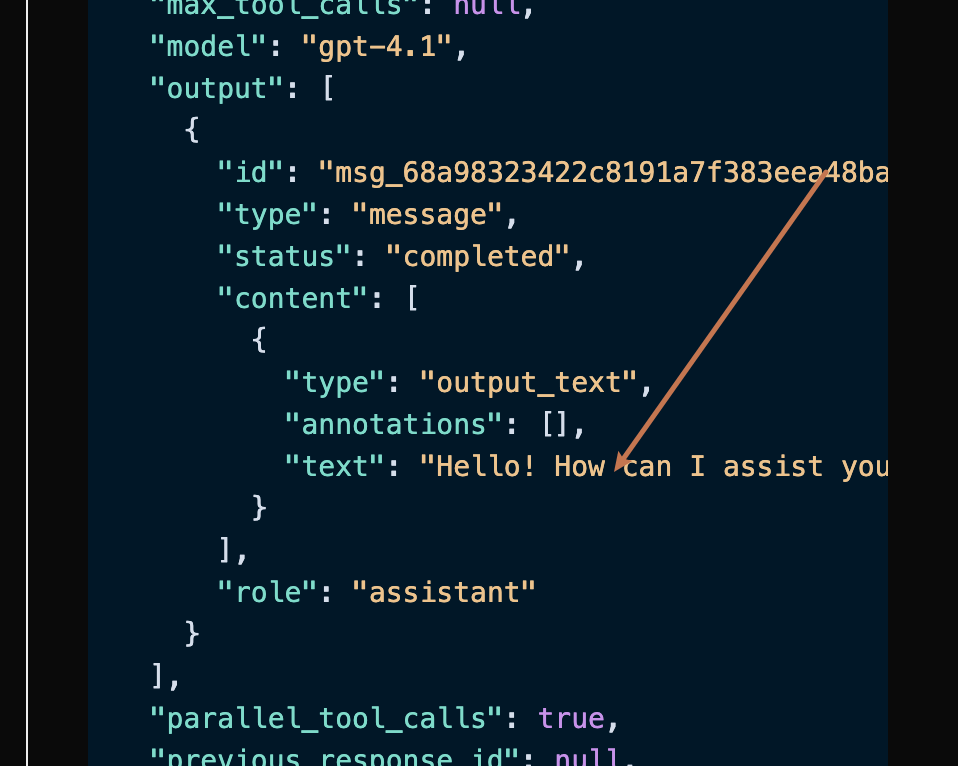
`output` の中の `content` フィールドには、ChatGPT の具体的な返信内容が含まれています。
## ストリーミング応答
このインターフェースはストリーミング応答もサポートしており、ウェブページとの接続に非常に便利で、ウェブページで逐次表示効果を実現できます。
ストリーミング応答を返したい場合は、リクエストヘッダー内の `stream` パラメータを `true` に変更します。
変更は以下の図のように行いますが、呼び出しコードにはストリーミング応答をサポートするための対応する変更が必要です。
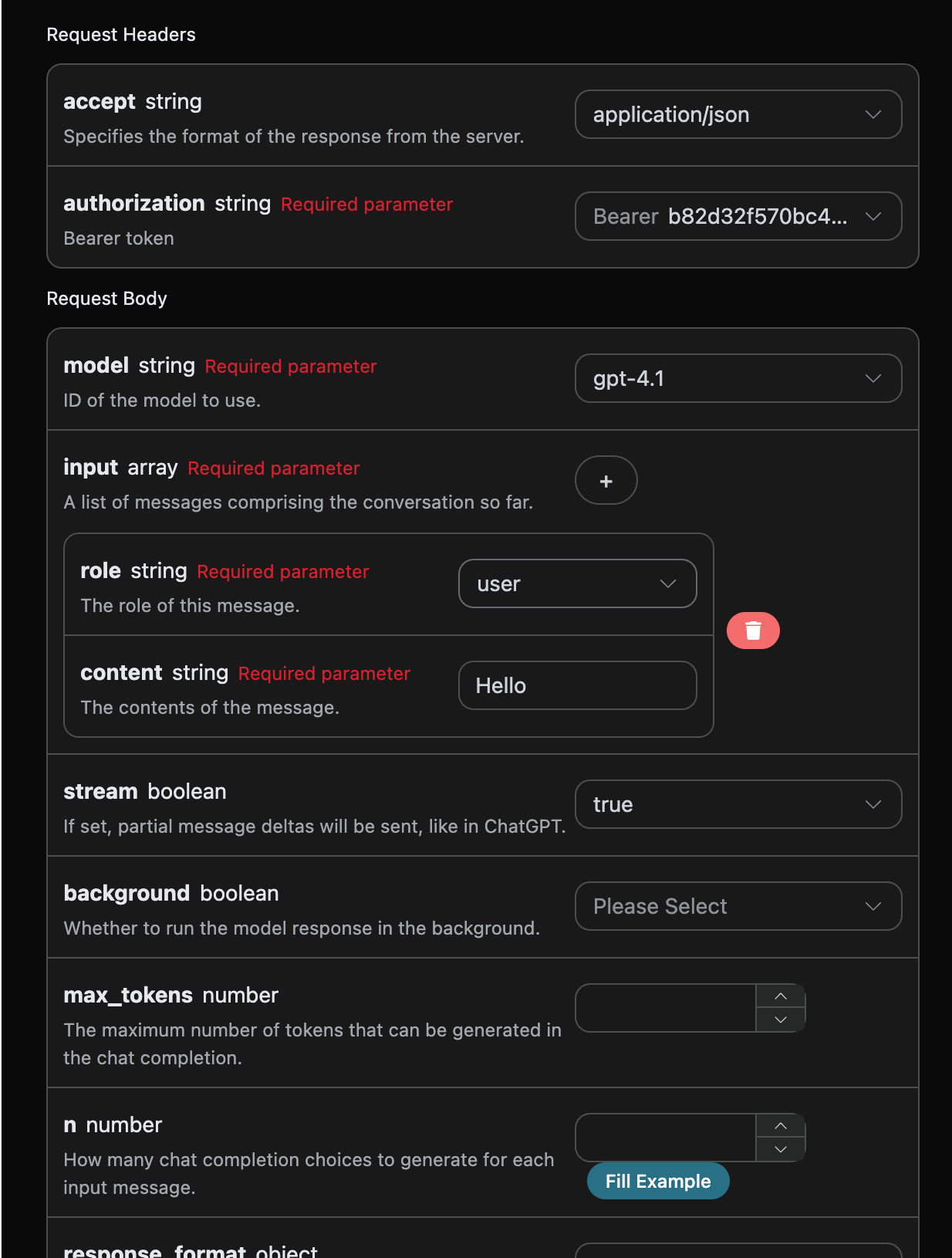
`stream` を `true` に変更すると、API は対応する JSON データを行ごとに返します。コードレベルで逐次結果を取得するために、相応の変更を行う必要があります。
Python のサンプル呼び出しコード:
```python theme={null}
import requests
url = "https://api.acedata.cloud/openai/responses"
headers = {
"accept": "application/json",
"authorization": "Bearer {token}",
"content-type": "application/json"
}
payload = {
"model": "gpt-4.1",
"input": [{"role":"user","content":"Hello"}],
"stream": True
}
response = requests.post(url, json=payload, headers=headers)
print(response.text)
```
出力結果は以下の通りです:
```json theme={null}
data: {"type": "response.created", "sequence_number": 0, "response":
{"id": "resp_68a9837bb9bc8190b403947311db6faa0721186e8fbb89d0", "object": "response", "created_at": 1755939707, "status": "in_progress", "background": false, "content_filters": null, "error": null, "incomplete_details": null, "instructions": null, "max_output_tokens": null, "max_tool_calls": null, "model": "gpt-4.1-data", "output": [], "parallel_tool_calls": true, "previous_response_id": null, "prompt_cache_key": null, "reasoning": {"effort": null, "summary": null}, "safety_identifier": null, "service_tier": "auto", "store": true, "temperature": 1.0, "text": {"format": {"type": "text"}}, "tool_choice": "auto", "tools": [], "top_p": 1.0, "truncation": "disabled", "usage": null, "user": null, "metadata": {}}, "model": "gpt-4.1"}
data: {"type": "response.in_progress", "sequence_number": 1, "response": {"id": "resp_68a9837bb9bc8190b403947311db6faa0721186e8fbb89d0", "object": "response", "created_at": 1755939707, "status": "in_progress", "background": false, "content_filters": null, "error": null, "incomplete_details": null, "instructions": null, "max_output_tokens": null, "max_tool_calls": null, "model": "gpt-4.1-data", "output": [], "parallel_tool_calls": true, "previous_response_id": null, "prompt_cache_key": null, "reasoning": {"effort": null, "summary": null}, "safety_identifier": null, "service_tier": "auto", "store": true, "temperature": 1.0, "text": {"format": {"type": "text"}}, "tool_choice": "auto", "tools": [], "top_p": 1.0, "truncation": "disabled", "usage": null, "user": null, "metadata": {}}, "model": "gpt-4.1"}
data: {"type": "response.output_item.added", "sequence_number": 2, "output_index": 0, "item": {"id": "msg_68a9837c49f081908f568bf9c6065c620721186e8fbb89d0", "type": "message", "status": "in_progress", "content": [], "role": "assistant"}, "model": "gpt-4.1"}
data: {"type": "response.content_part.added", "sequence_number": 3, "item_id": "msg_68a9837c49f081908f568bf9c6065c620721186e8fbb89d0", "output_index": 0, "content_index": 0, "part": {"type": "output_text", "annotations": [], "text": ""}, "model": "gpt-4.1"}
data: {"type": "response.output_text.delta", "sequence_number": 4, "item_id": "msg_68a9837c49f081908f568bf9c6065c620721186e8fbb89d0", "output_index": 0, "content_index": 0, "delta": "こんにちは", "model": "gpt-4.1"}
data: {"type": "response.output_text.delta", "sequence_number": 5, "item_id": "msg_68a9837c49f081908f568bf9c6065c620721186e8fbb89d0", "output_index": 0, "content_index": 0, "delta": "!", "model": "gpt-4.1"}
data: {"type": "response.output_text.delta", "sequence_number": 6, "item_id": "msg_68a9837c49f081908f568bf9c6065c620721186e8fbb89d0", "output_index": 0, "content_index": 0, "delta": " どう", "model": "gpt-4.1"}
data: {"type": "response.output_text.delta", "sequence_number": 7, "item_id": "msg_68a9837c49f081908f568bf9c6065c620721186e8fbb89d0", "output_index": 0, "content_index": 0, "delta": " 私は", "model": "gpt-4.1"}
data: {"type": "response.output_text.delta", "sequence_number": 8, "item_id": "msg_68a9837c49f081908f568bf9c6065c620721186e8fbb89d0", "output_index": 0, "content_index": 0, "delta": " あなたを", "model": "gpt-4.1"}
data: {"type": "response.output_text.delta", "sequence_number": 9, "item_id": "msg_68a9837c49f081908f568bf9c6065c620721186e8fbb89d0", "output_index": 0, "content_index": 0, "delta": " 手伝う", "model": "gpt-4.1"}
data: {"type": "response.output_text.delta", "sequence_number": 10, "item_id": "msg_68a9837c49f081908f568bf9c6065c620721186e8fbb89d0", "output_index": 0, "content_index": 0, "delta": " ことが", "model": "gpt-4.1"}
data: {"type": "response.output_text.delta", "sequence_number": 11, "item_id": "msg_68a9837c49f081908f568bf9c6065c620721186e8fbb89d0", "output_index": 0, "content_index": 0, "delta": " できますか", "model": "gpt-4.1"}
data: {"type": "response.output_text.delta", "sequence_number": 12, "item_id": "msg_68a9837c49f081908f568bf9c6065c620721186e8fbb89d0", "output_index": 0, "content_index": 0, "delta": " 今日", "model": "gpt-4.1"}
data: {"type": "response.output_text.delta", "sequence_number": 13, "item_id": "msg_68a9837c49f081908f568bf9c6065c620721186e8fbb89d0", "output_index": 0, "content_index": 0, "delta": "?", "model": "gpt-4.1"}
data: {"type": "response.output_text.delta", "sequence_number": 14, "item_id": "msg_68a9837c49f081908f568bf9c6065c620721186e8fbb89d0", "output_index": 0, "content_index": 0, "delta": " 😊", "model": "gpt-4.1"}
data: {"type": "response.output_text.done", "sequence_number": 15, "item_id": "msg_68a9837c49f081908f568bf9c6065c620721186e8fbb89d0", "output_index": 0, "content_index": 0, "text": "こんにちは!どう私はあなたを手伝うことができますか?😊", "model": "gpt-4.1"}
data: {"type": "response.content_part.done", "sequence_number": 16, "item_id": "msg_68a9837c49f081908f568bf9c6065c620721186e8fbb89d0", "output_index": 0, "content_index": 0, "part": {"type": "output_text", "annotations": [], "text": "こんにちは!どう私はあなたを手伝うことができますか?😊"}, "model": "gpt-4.1"}
data: {"type": "response.output_item.done", "sequence_number": 17, "output_index": 0, "item": {"id": "msg_68a9837c49f081908f568bf9c6065c620721186e8fbb89d0", "type": "message", "status": "completed", "content": [{"type": "output_text", "annotations": [], "text": "こんにちは!どう私はあなたを手伝うことができますか?😊"}], "role": "assistant"}, "model": "gpt-4.1"}
data: {"type": "response.completed", "sequence_number": 18, "response":
{"id": "resp_68a9837bb9bc8190b403947311db6faa0721186e8fbb89d0", "object": "response", "created_at": 1755939707, "status": "completed", "background": false, "content_filters": null, "error": null, "incomplete_details": null, "instructions": null, "max_output_tokens": null, "max_tool_calls": null, "model": "gpt-4.1-data", "output": [{"id": "msg_68a9837c49f081908f568bf9c6065c620721186e8fbb89d0", "type": "message", "status": "completed", "content": [{"type": "output_text", "annotations": [], "text": "こんにちは!今日はどのようにお手伝いできますか?😊"}], "role": "assistant"}], "parallel_tool_calls": true, "previous_response_id": null, "prompt_cache_key": null, "reasoning": {"effort": null, "summary": null}, "safety_identifier": null, "service_tier": "default", "store": true, "temperature": 1.0, "text": {"format": {"type": "text"}}, "tool_choice": "auto", "tools": [], "top_p": 1.0, "truncation": "disabled", "usage": {"input_tokens": 8, "input_tokens_details": {"cached_tokens": 0}, "output_tokens": 11, "output_tokens_details": {"reasoning_tokens": 0}, "total_tokens": 19}, "user": null, "metadata": {}}, "model": "gpt-4.1"}
```
レスポンスには多くの `data` が含まれており、`data` 内の `delta` が最新の回答内容であり、上記の内容と一致しています。`delta` は新たに追加された回答内容であり、結果に基づいてシステムに接続できます。また、ストリーミングレスポンスの終了は `data` の内容に基づいて判断され、`type` の内容が `response.completed` であれば、ストリーミングレスポンスの回答がすべて終了したことを示します。返される `data` 結果には複数のフィールドがあり、以下のように説明されます:
* `item_id` は、今回の対話タスクを生成するための ID であり、今回の対話タスクを一意に識別するために使用されます。
* `type` は、今回の対話 Responses タスクのタイプです。
* `model ` は、選択された OpenAI ChatGPT の公式モデルです。
* `delta` は、ChatGPT が質問に対して提供する回答情報です。
JavaScript もサポートされており、たとえば Node.js のストリーミング呼び出しコードは以下の通りです:
```javascript theme={null}
const options = {
method: "post",
headers: {
accept: "application/json",
authorization: "Bearer b82d32f570bc434d9ba9923aa0e7dce0",
"content-type": "application/json",
},
body: JSON.stringify({
model: "gpt-4.1",
input: [{ role: "user", content: "こんにちは" }],
stream: true,
}),
};
fetch("https://api.acedata.cloud/openai/responses", options)
.then((response) => response.json())
.then((response) => console.log(response))
.catch((err) => console.error(err));
```
Java のサンプルコード:
```java theme={null}
JSONObject jsonObject = new JSONObject();
jsonObject.put("model", "gpt-4.1");
jsonObject.put("input", [{"role":"user","content":"こんにちは"}]);
jsonObject.put("stream", true);
MediaType mediaType = "application/json; charset=utf-8".toMediaType();
RequestBody body = jsonObject.toString().toRequestBody(mediaType);
Request request = new Request.Builder()
.url("https://api.acedata.cloud/openai/responses")
.post(body)
.addHeader("accept", "application/json")
.addHeader("authorization", "Bearer b82d32f570bc434d9ba9923aa0e7dce0")
.addHeader("content-type", "application/json")
.build();
OkHttpClient client = new OkHttpClient();
Response response = client.newCall(request).execute();
System.out.print(response.body!!.string())
```
他の言語は別途自分で書き換えることができ、原理は同じです。
## 多輪対話
もし多輪対話機能を接続したい場合は、`input` フィールドに複数の質問をアップロードする必要があります。複数の質問の具体的な例は以下の画像の通りです:
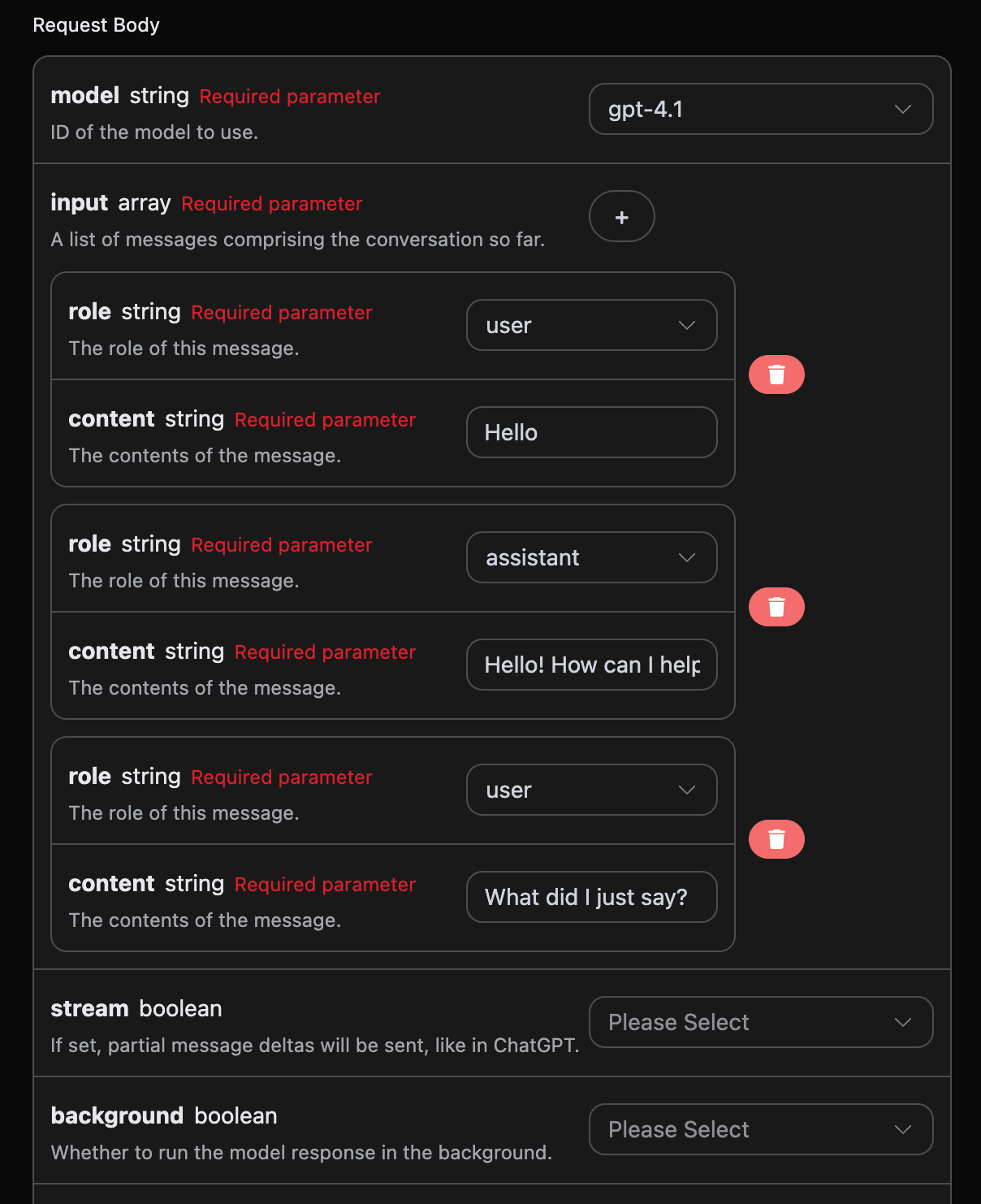
Python のサンプル呼び出しコード:
```python theme={null}
import requests
url = "https://api.acedata.cloud/openai/responses"
headers = {
"accept": "application/json",
"authorization": "Bearer {token}",
"content-type": "application/json"
}
payload = {
"model": "gpt-4.1",
"input": [{"role":"user","content":"こんにちは"},{"role":"assistant","content":"こんにちは!今日はどのようにお手伝いできますか?😊"},{"role":"user","content":"私が今言ったことは何ですか?"}]
}
response = requests.post(url, json=payload, headers=headers)
print(response.text)
```
複数の質問をアップロードすることで、多輪対話を簡単に実現でき、以下のような回答を得ることができます:
```json theme={null}
{
"id": "resp_68a989c03c508191a1dd82ce2e37e88a0932a4328c0a5d5b",
"object": "response",
"created_at": 1755941312,
"status": "completed",
"background": false,
"content_filters": null,
"error": null,
"incomplete_details": null,
"instructions": null,
"max_output_tokens": null,
"max_tool_calls": null,
"model": "gpt-4.1",
"output": [
{
"id": "msg_68a989c092e4819189821a9eb8247e1e0932a4328c0a5d5b",
"type": "message",
"status": "completed",
"content": [
{
"type": "output_text",
"annotations": [],
"text": "あなたは「こんにちは」と言いました。\n\n会話を続けるか、質問をしますか?"
}
],
"role": "assistant"
}
],
"parallel_tool_calls": true,
"previous_response_id": null,
"prompt_cache_key": null,
"reasoning": {
"effort": null,
"summary": null
},
"safety_identifier": null,
"service_tier": "default",
"store": true,
"temperature": 1,
"text": {
"format": {
"type": "text"
}
},
"tool_choice": "auto",
"tools": [],
"top_p": 1,
"truncation": "disabled",
"usage": {
"input_tokens": 32,
"input_tokens_details": {
"cached_tokens": 0
},
"output_tokens": 20,
"output_tokens_details": {
"reasoning_tokens": 0
},
"total_tokens": 52
},
"user": null,
"metadata": {}
}
```
`output` に含まれる情報は基本的な使用内容と一致しており、これは ChatGPT が複数の対話に対して返信する具体的な内容を含んでいます。これにより、複数の対話内容に基づいて対応する質問に答えることができます。
## 視覚モデル
gpt-4o は OpenAI が開発した多モーダル大型言語モデルで、GPT-4 の基盤に視覚理解能力を追加しています。このモデルは、テキストと画像の入力を同時に処理し、クロスモーダルの理解と生成を実現しています。
gpt-4o モデルのテキスト処理は、上記の基本的な使用内容と一致しており、以下にモデルの画像処理能力を使用する方法を簡単に紹介します。
gpt-4o モデルの画像処理能力を使用するには、元の `content` 内容に `type` フィールドを追加することで、アップロードされるのがテキストか画像かを知ることができ、gpt-4o モデルの画像処理能力を使用することができます。以下では、Curl と Python の2つの方法でこの機能を呼び出す方法を説明します。
* Curl スクリプト方式
```
curl -X POST 'https://api.acedata.cloud/openai/responses' \
-H 'accept: application/json' \
-H 'authorization: Bearer {token}' \
-H 'content-type: application/json' \
-d '{
"model": "gpt-4.1",
"input": [
{
"role": "user",
"content": [
{"type": "input_text", "text": "この画像には何が写っていますか?"},
{
"type": "input_image",
"image_url": "https://cdn.acedata.cloud/e724d7f13d.png"
}
]
}
]
}'
```
* Python スクリプト方式
```python theme={null}
import requests
url = "https://api.acedata.cloud/openai/chat/completions"
headers = {
"accept": "application/json",
"authorization": "Bearer {token}",
"content-type": "application/json"
}
payload = {
"model": "gpt-4.1",
"input": [
{
"role": "user",
"content": [
{"type": "input_text", "text": "この画像には何が写っていますか?"},
{
"type": "input_image",
"image_url": "https://cdn.acedata.cloud/e724d7f13d.png"
}
]
}
]
}
response = requests.post(url, json=payload, headers=headers)
print(response.text)
```
その後、以下の結果を得ることができ、結果のフィールド情報は上記と一致しています。具体的には以下の通りです:
```json theme={null}
{
"id": "resp_68a98c1bb784819e9b9f622007a2d37602483949012d2193",
"object": "response",
"created_at": 1755941915,
"status": "completed",
"background": false,
"content_filters": null,
"error": null,
"incomplete_details": null,
"instructions": null,
"max_output_tokens": null,
"max_tool_calls": null,
"model": "gpt-4.1",
"output": [
{
"id": "msg_68a98c1dd030819e97fb71e6ee33f5a902483949012d2193",
"type": "message",
"status": "completed",
"content": [
{
"type": "output_text",
"annotations": [],
"text": "この画像は、緑豊かな野原や草原を通る風光明媚な小道を示しています。空は明るい青で、白い雲がいくつかあり、背景には緑の木々や茂みがあります。公園、湿地、または草原のエリアにある穏やかな自然のシーンのように見えます。この画像は、静けさと自然の美しさを伝えています。"
}
],
"role": "assistant"
}
],
"parallel_tool_calls": true,
"previous_response_id": null,
"prompt_cache_key": null,
"reasoning": {
"effort": null,
"summary": null
},
"safety_identifier": null,
"service_tier": "default",
"store": true,
"temperature": 1,
"text": {
"format": {
"type": "text"
}
},
"tool_choice": "auto",
"tools": [],
"top_p": 1,
"truncation": "disabled",
"usage": {
"input_tokens": 1118,
"input_tokens_details": {
"cached_tokens": 0
},
"output_tokens": 75,
"output_tokens_details": {
"reasoning_tokens": 0
},
"total_tokens": 1193
},
"user": null,
"metadata": {}
}
```
回答の内容は画像に基づいているため、上記の2つの方法を使用することで、gpt-4.1モデルのテキストと画像処理能力を簡単に利用できます。
gpt-4.1の他に、より低コストのモデルであるgpt-4o-miniもあります。gpt-4o-miniはOpenAIが開発した最新世代の大規模言語モデルで、応答速度が速く、価格も安く、マルチモーダルもサポートしています。vision機能の使用については、上記のgpt-4.1モデルの使用内容を参照してください。
## ファイル処理モデルの作成
リクエストサンプル:
```json theme={null}
{
"model": "gpt-4.1",
"input": [
{
"role": "user",
"content": [
{ "type": "input_text", "text": "このファイルには何が含まれていますか?" },
{
"type": "input_file",
"file_url": "https://platform2.cdn.acedata.cloud/fish/64adc04b-c196-4a0f-9070-222ba101ce6c.wav"
}
]
}
]
}
```
サンプル結果:
```json theme={null}
{
"id": "resp_68a98d7bb57c819ba25424f5f50a29a300a1af2af822e88a",
"object": "response",
"created_at": 1755942267,
"status": "completed",
"background": false,
"content_filters": null,
"error": null,
"incomplete_details": null,
"instructions": null,
"max_output_tokens": null,
"max_tool_calls": null,
"model": "gpt-4.1",
"output": [
{
"id": "msg_68a98d7d9b80819b9b0f09b7bcd00bf900a1af2af822e88a",
"type": "message",
"status": "completed",
"content": [
{
"type": "output_text",
"annotations": [],
"text": "あなたが投稿したファイルには、**バークシャー・ハサウェイ社の2024年の株主への年次書簡**が含まれており、ボードの会長であるウォーレン・E・バフェットによって書かれています。この文書は、バークシャーの株主への年次報告書に通常含まれる包括的なコミュニケーションです。\n\n### ファイルの内容:\n\n#### 1. **株主への会長の手紙**\n - **序文と哲学:** ウォーレン・バフェットは年次報告書の目的、バークシャー・ハサウェイのコミュニケーションスタイル、成功と失敗の両方についての透明性と率直な議論の哲学について語ります。\n - **間違いについての議論:** 彼は資本配分や人事決定における間違いについて率直に話し、誤りを認め、迅速に修正することの重要性を強調します。\n - **後継者に関するコメント:** バフェットは自らの引退について言及し、グレッグ・エイベルがCEOおよびこれらの手紙の執筆者として彼を引き継ぐことを述べています。\n - **逸話的な話:** バークシャーに買収されたRVメーカーのフォレストリバーの創業者であるピート・リーグルの話が、経営哲学とビジネス意思決定を示すために語られます。\n\n#### 2. **2024年のビジネスおよび財務パフォーマンス**\n - **主要な結果:** 2024年と2023年のバークシャーの財務パフォーマンスの要約、保険、BNSF鉄道、エネルギーなどのビジネスセグメントごとの営業利益の内訳を含みます。\n - **保険ビジネス:** GEICOと損害保険部門は素晴らしい年を迎え、業界に関するコメントやバークシャーの保険リスク、価格設定、保険の「フロート」の投資へのアプローチについて述べられています。\n - **投資:** バークシャーが完全なビジネスと大企業(例:アップル、アメリカン・エキスプレス、コカ・コーラ)への部分的な持分(上場証券)を所有する戦略と、現金の運用についての議論があります。\n - **税金:** バークシャーが2024年に法人税の支払いで記録を破ったこと(IRSに268億ドル)に言及しています。\n\n#### 3. **長期的な哲学と資本主義に関するコメント**\n - **株式について:** バフェットは、バークシャーが現金や債券よりもビジネス(株式)の所有を優先する理由と、同社が長期的な投資を好む理由を説明します。\n - **資本主義について:** アメリカの成長、資本主義の役割、貯蓄、資本配分が国の成功において果たす役割についての考察があり、安定した通貨を維持する重要性にも言及されています。\n\n#### 4. **日本への投資**\n - **日本の持株に関する更新:** バークシャーの5つの日本の商社への投資の増加と、それらの経営とガバナンスに対する前向きな見解。\n\n#### 5. **バークシャー・ハサウェイ年次総会**\n - **年次集会の情報:** オマハでの年次総会に関する詳細、社交イベント、書籍販売、総会に関連する慈善活動について。\n - **個人的な話:** バフェットの家族(彼の姉バーティを含む)に関する個人的な逸話が手紙に人間味を加えています。\n\n#### 6. **パフォーマンステーブル**\n - **バークシャーとS&P 500(1965-2024):** バークシャーの株価の年次パーセンテージ変化とS&P 500の総リターン、長期的な複利および全体的な利益を示す2つの詳細なテーブル。\n\n---\n\n### 要約\n\nこのファイルは、主にウォーレン・バフェットによって書かれた**2024年のバークシャー・ハサウェイの株主への年次書簡**です。ビジネスパフォーマンス、経営哲学、投資戦略、収益と税金、保険業務、重要な持株、資本配分、後継者の更新などをカバーしています。テーブルは、ほぼ60年にわたるバークシャー・ハサウェイのS&P 500に対する顕著なパフォーマンスを示しており、手紙の中心的な誇りのポイントです。\n\n特定のセクションからの詳細が必要な場合は、お知らせください!"
}
],
"role": "assistant"
}
],
"parallel_tool_calls": true,
"previous_response_id": null,
"prompt_cache_key": null,
"reasoning": {
"effort": null,
"summary": null
},
"safety_identifier": null,
"service_tier": "default",
"store": true,
"temperature": 1,
"text": {
"format": {
"type": "text"
}
},
"tool_choice": "auto",
"tools": [],
"top_p": 1,
"truncation": "disabled",
"usage": {
"input_tokens": 8438,
"input_tokens_details": {
"cached_tokens": 0
},
"output_tokens": 731,
"output_tokens_details": {
"reasoning_tokens": 0
},
"total_tokens": 9169
},
"user": null,
"metadata": {}
}
```