> ## Documentation Index
> Fetch the complete documentation index at: https://docs.acedata.cloud/llms.txt
> Use this file to discover all available pages before exploring further.
# SeeDance Videos Generation API Integration Instructions
> ByteDance Seedance Video Generation integration guide - Ace Data Cloud
This document will introduce the SeeDance Videos Generation API integration instructions, which can generate official SeeDance videos by inputting custom parameters.
## Application Process
To use the SeeDance Videos Generation API, first go to the [Ace Data Cloud Console](https://platform.acedata.cloud/console/applications) to obtain your API Token for future use.

If you are not logged in or registered, you will be automatically redirected to the login page to invite you to register and log in, and after completion, you will be automatically returned to the current page.
**One API Token can call all services on the platform without needing to apply separately for each service.** The first application will grant a free quota for a trial experience; when the quota is insufficient, you can recharge the general balance in the [console](https://platform.acedata.cloud/console/coin).
> 📘 Complete documentation: [SeeDance Videos Generation API →](https://platform.acedata.cloud/documents/seedance-videos)
## Basic Usage
First, understand the basic usage method, which is to input the prompt `content.text`, type `content.type=text`, and model `model`, to obtain the processed result. The specific content is as follows:

Here we can see that we have set the Request Headers, including:
* `accept`: the format of the response result you want to receive, here filled in as `application/json`, which is JSON format.
* `authorization`: the key to call the API, which can be directly selected after application.
Additionally, the Request Body is set, including:
* `model`: the model for generating the video.
* **Seedance 1.x series**: `doubao-seedance-1-0-pro-250528`, `doubao-seedance-1-0-pro-fast-251015`, `doubao-seedance-1-5-pro-251215`, `doubao-seedance-1-0-lite-t2v-250428`, `doubao-seedance-1-0-lite-i2v-250428`.
* **Seedance 2.0 series** (supports multi-modal inputs such as face/character references): `doubao-seedance-2-0-260128` (standard), `doubao-seedance-2-0-fast-260128` (fast), `doubao-seedance-2-0-mini-260615` (lightweight). See the section "Face and Character References (Seedance 2.0)" below for details.
* `content`: input content array, `type` can be `text` (prompt), `image_url` (reference image), `audio_url` (reference audio, 2.0), `video_url` (reference video, 2.0). Images can specify usage through `role`: `first_frame` (first frame) / `last_frame` (last frame) / `reference_image` (face/character/subject reference).
* `resolution`: output resolution, optional `480p` / `720p` / `1080p` (the 2.0 standard model also supports `4k`; 2.0's `fast` / `mini` supports up to `720p`).
* `ratio`: aspect ratio, optional `16:9` / `4:3` / `1:1` / `3:4` / `9:16` / `21:9` / `adaptive`.
* `duration`: video duration (seconds), 1.x range 2–12, 2.0 range 2–15.
* `seed`: random seed, integer, -1 to 4294967295.
* `camerafixed`: whether to fix the camera, `true` / `false`.
* `watermark`: whether to add a watermark, `true` / `false`.
* `generate_audio`: whether to generate a video with sound, `true` / `false`, **only `doubao-seedance-1-5-pro-251215` supports**.
* `return_last_frame`: whether to return the last frame image URL in the result.
* `execution_expires_after`: task timeout duration (seconds), range 3600–259200.
* `callback_url`: asynchronous callback address, after setting, the API immediately returns `task_id`, and when the task is completed, it will POST the result to this address.
* `async`: optional, set to `true` for the interface to immediately return `task_id`, no need to provide `callback_url`, and then poll the corresponding task query interface to obtain results.
After selection, you can see that the corresponding code is generated on the right side, as shown in the figure:
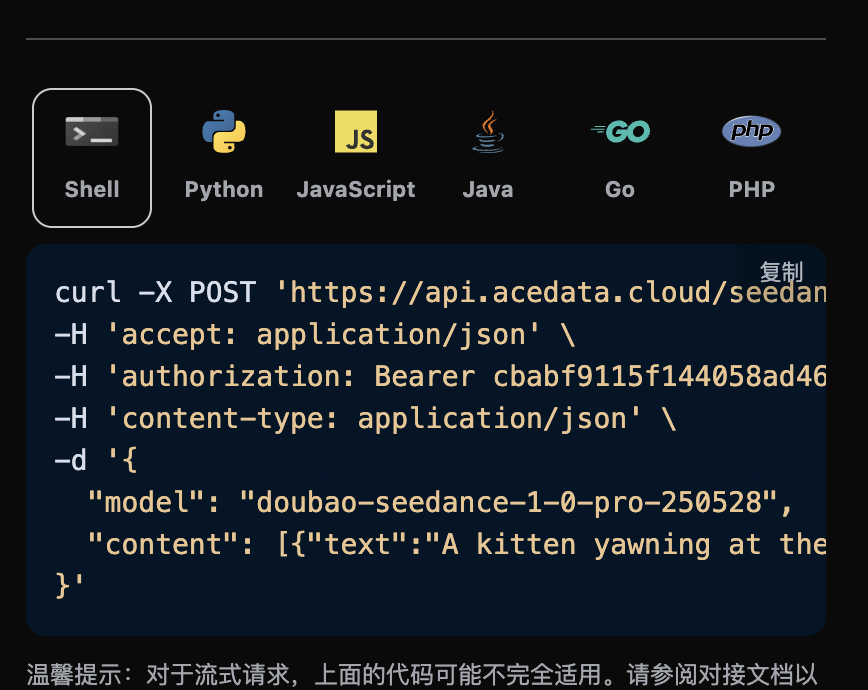
Click the "Try" button to test, as shown in the above figure, we obtained the following result:
```json theme={null}
{
"success": true,
"task_id": "9777f36b-4f44-47ff-962d-45cd2f7aeaa8",
"trace_id": "ce5da2ca-6695-4459-9d2c-2ef9f86db752",
"data": {
"task_id": "7e4e1773-510a-4a73-9ab4-98dd1a0b2a7f",
"status": "succeeded",
"model": "doubao-seedance-2-0-fast-260128",
"duration": 5,
"resolution": "720p",
"ratio": "16:9",
"video_url": "https://platform2.cdn.acedata.cloud/seedance/036f24ed-a9b1-49b3-92c4-30049a3bc152.mp4"
}
}
```
The returned result contains multiple fields, described as follows:
* `success`, the status of the video generation task at this time.
* `task_id`, the ID of the video generation task at this time.
* `trace_id`, the tracking ID of the video generation at this time.
* `data`, the result list of the video generation task at this time.
* `task_id`, the server-side ID of the video generation task at this time.
* `video_url`, the video link of the video generation task at this time.
* `status`, the status of the video generation task at this time.
* `model`, the model used to generate the video.
We can see that we have obtained satisfactory video information, and we only need to obtain the generated SeeDance video based on the video link address in `data` of the result.
Additionally, if you want to generate the corresponding integration code, you can directly copy the generated code, for example, the CURL code is as follows:
```shell theme={null}
curl -X POST 'https://api.acedata.cloud/seedance/videos' \
-H 'authorization: Bearer ${bearer_token}' \
-H 'accept: application/json' \
-H 'content-type: application/json' \
-d '{
"content": [{"type":"text","text":"A white ceramic coffee mug on a glossy marble countertop with soft morning window light. The camera slowly orbits 360 degrees around the mug, steam gently rising."}],
"model": "doubao-seedance-2-0-fast-260128",
"resolution": "720p",
"ratio": "16:9",
"duration": 5
}'
```
## Inline Parameter Description
At the end of the `content[].text` prompt, you can pass in generation parameters in the form of `--parameter value` (old method, weak validation, defaults will be used if filled incorrectly). The complete parameter list is as follows:
| Inline Parameter | Corresponding Field | Description | Value Range |
| ---------------- | ------------------- | ------------------------ | ------------------------------------------------------------- |
| `--rs` | `resolution` | Output Resolution | `480p` / `720p` / `1080p` |
| `--rt` | `ratio` | Aspect Ratio | `16:9` / `4:3` / `1:1` / `3:4` / `9:16` / `21:9` / `adaptive` |
| `--dur` | `duration` | Video Duration (seconds) | 2–12 |
| `--frames` | `frames` | Video Frame Count | Integer satisfying 25+4n in \[29, 289] |
| `--fps` | `framespersecond` | Frame Rate | Only supports `24` |
| `--seed` | `seed` | Random Seed | -1 to 4294967295 |
| `--cf` | `camerafixed` | Whether to Fix Camera | `true` / `false` |
| `--wm` | `watermark` | Whether to Add Watermark | `true` / `false` |
> **Recommended Practice**: Directly use the corresponding top-level fields (such as `resolution`, `ratio`, etc.) in the Request Body for strict validation mode. If the parameters are filled incorrectly, a clear error message will be returned, making it easier to troubleshoot issues.
## Generate Audio Video
`doubao-seedance-1-5-pro-251215` supports generating videos with audio through the `generate_audio` parameter:
```json theme={null}
{
"model": "doubao-seedance-1-5-pro-251215",
"content": [
{
"type": "text",
"text": "A girl holds a fox, the wind blows her hair, you can hear the sound of the wind"
}
],
"generate_audio": true,
"ratio": "16:9",
"duration": 5
}
```
Other models do not support this parameter, and it will be ignored if passed.
## Image to Video First Frame
If you want to create a video from an image, the `content` parameter must first include an item with `type` as `image_url`, and the `image_url` field must be in object format: `{"url": "https://..."}` or Base64 format `{"url": "data:image/png;base64,..."}`.
> **Note**: `image_url` does not support being passed in string format (e.g., `"image_url": "https://..."`), it must use object format `"image_url": {"url": "https://..."}`, otherwise a 400 error will be returned.
Corresponding code:
```python theme={null}
import requests
url = "https://api.acedata.cloud/seedance/videos"
headers = {
"accept": "application/json",
"authorization": "Bearer {token}",
"content-type": "application/json"
}
payload = {
"content": [
{
"type": "image_url",
"image_url": {
"url": "https://ark-project.tos-cn-beijing.volces.com/doc_image/i2v_foxrgirl.png"
}
},
{
"type": "text",
"text": "A girl holds a fox in her arms. She opens her eyes and gazes tenderly at the camera, while the fox affectionately holds her back. As the camera slowly pulls away, her hair is gently blown by the wind. --ratio adaptive --dur 5"
}
],
"model": "doubao-seedance-1-0-pro-250528"
}
response = requests.post(url, json=payload, headers=headers)
print(response.text)
```
Clicking run, you will immediately get a result as follows:
```
{
"success": true,
"task_id": "dc7cceb5-3c12-4de7-a5f4-abcbba3e8e39",
"trace_id": "b3b09de3-b7fa-4bb0-88b5-aad4b4a96fd4",
"data": {
"task_id": "cgt-20251222072003-x2259",
"status": "succeeded",
"video_url": "https://platform.cdn.acedata.cloud/seedance/6afb78b8-5ba8-424f-adcd-69423a700b50.mp4",
"model": "doubao-seedance-1-0-pro-250528"
}
}
```
You can see that the generated effect is an image-to-video, and the result is similar to the above.
## Image to Video First and Last Frame
If you want to create a video with first and last frames from images, the `content` parameter must first include an item of type `image_url`, and set `role` to `first_frame` and `last_frame`, allowing you to specify the following content:
* role: Specify first frame or last frame.
* image\_url
* url Image link
Additionally, `content` must also include an item of type `text` as a prompt.
Corresponding code:
```python theme={null}
import requests
url = "https://api.acedata.cloud/seedance/videos"
headers = {
"accept": "application/json",
"authorization": "Bearer {token}",
"content-type": "application/json"
}
payload = {
"model": "doubao-seedance-1-0-pro-250528",
"content": [
{
"type": "text",
"text": "360-degree shot"
},
{
"type": "image_url",
"image_url": {
"url": "https://ark-project.tos-cn-beijing.volces.com/doc_image/seepro_first_frame.jpeg"
},
"role": "first_frame"
},
{
"type": "image_url",
"image_url": {
"url": "https://ark-project.tos-cn-beijing.volces.com/doc_image/seepro_last_frame.jpeg"
},
"role": "last_frame"
}
]
}
response = requests.post(url, json=payload, headers=headers)
print(response.text)
```
Clicking run, you will immediately get a result as follows:
```
{
"success": true,
"task_id": "f7096c6c-9430-4392-8201-d259632d7afd",
"trace_id": "4a4a3721-00fb-43d2-aff2-3b516ac01a8a",
"data": {
"task_id": "cgt-20251222073134-54qcw",
"status": "succeeded",
"video_url": "https://platform.cdn.acedata.cloud/seedance/95f9f5f0-fc50-4c71-bc6f-e154582c141e.mp4",
"model": "doubao-seedance-1-0-pro-250528"
}
}
```
You can see that the generated effect is character-generated video, and the result is similar to the above.
## Face and Character Reference (Seedance 2.0)
**Seedance 2.0 Series** (`doubao-seedance-2-0-260128`, `doubao-seedance-2-0-fast-260128`, `doubao-seedance-2-0-mini-260615`) supports passing in reference materials of "real person / character": add an item in `content` with `type` as `image_url` and `role` as `reference_image`, using a person's photo as a reference. The model will **maintain the appearance features of that person** in the generated video, thus placing the same person into a brand new scene, action, or shot.
> 📌 Real person photos will be automatically registered as underlying materials by the platform before being used for generation. The entire process is completely transparent to the caller: **the request and response format remains unchanged**, and no additional parameters are required. Only the first generation will take a few extra seconds for material processing.
Usage points:
* Only the **Seedance 2.0 series** models support `reference_image`; for 1.x models, please use `first_frame` / `last_frame` (the first and last frames of the image-generated video).
* `reference_image` **cannot** be used in conjunction with `first_frame` / `last_frame`, only one can be chosen.
* The upper limit for the number of multimodal references: `image_url` can have a maximum of **9** images; 2.0 also supports `audio_url` (with `role` as `reference_audio`, up to 3 entries) and `video_url` (with `role` as `reference_video`, up to 3 entries).
* It is recommended to use **single, frontal, clear, unobstructed** photos for reference images; the clearer the face, the higher the similarity.
### Example 1: Close-up that maintains the character's appearance
Input a face photo and have the character smile and wave at the camera. The corresponding code:
```python theme={null}
import requests
url = "https://api.acedata.cloud/seedance/videos"
headers = {
"accept": "application/json",
"authorization": "Bearer {token}",
"content-type": "application/json"
}
payload = {
"model": "doubao-seedance-2-0-fast-260128",
"content": [
{
"type": "text",
"text": "The woman looks at the camera, gives a warm natural smile and waves her hand, soft studio lighting, gentle camera push-in."
},
{
"type": "image_url",
"role": "reference_image",
"image_url": {
"url": "https://platform2.cdn.acedata.cloud/nanobanana/8e075897-0f50-4443-8500-666751791c6c.jpg"
}
}
],
"resolution": "480p",
"ratio": "9:16",
"duration": 5
}
response = requests.post(url, json=payload, headers=headers)
print(response.text)
```
The response is as follows, and the character in the generated video remains consistent with the reference photo:
```json theme={null}
{
"success": true,
"task_id": "895eb5ea-bbe1-41a3-a9e9-48608e03f93a",
"trace_id": "83544791-7a84-44de-b8d2-afe171a1c0e4",
"data": {
"task_id": "458abf29-cc39-4fd0-bcea-24f89a70d8de",
"status": "succeeded",
"video_url": "https://platform2.cdn.acedata.cloud/seedance/e71d3cc5-27e7-4719-be34-1f0e254eccaf.mp4",
"model": "doubao-seedance-2-0-fast-260128",
"resolution": "480p",
"ratio": "9:16",
"duration": 5
}
}
```
### Example 2: Placing the same person in a brand new scene
The power of `reference_image` lies in: only retaining the **identity of the character**, while the scene, clothing, and actions are entirely determined by the prompt. Below, using the same face photo, the character is dressed in a beige coat walking in an autumn park:
```json theme={null}
{
"model": "doubao-seedance-2-0-fast-260128",
"content": [
{
"type": "text",
"text": "The same woman wearing a beige coat walks through a sunny autumn park, golden leaves falling around her, she smiles softly at the camera, cinematic tracking shot."
},
{
"type": "image_url",
"role": "reference_image",
"image_url": {
"url": "https://platform2.cdn.acedata.cloud/nanobanana/8e075897-0f50-4443-8500-666751791c6c.jpg"
}
}
],
"resolution": "720p",
"ratio": "9:16",
"duration": 5
}
```
The response is as follows, the character's appearance is preserved, while the scene has switched to an autumn park:
```json theme={null}
{
"success": true,
"task_id": "00872de7-16b7-431f-b4f7-6bf38ae86157",
"trace_id": "577a07c3-4f5f-4cc7-86fe-535bb8332614",
"data": {
"task_id": "32fe1537-ba3e-452a-8749-3ef8890d37fd",
"status": "succeeded",
"video_url": "https://platform2.cdn.acedata.cloud/seedance/44f47593-556b-4fda-afa5-7a71eefcd228.mp4",
"model": "doubao-seedance-2-0-fast-260128",
"resolution": "720p",
"ratio": "9:16",
"duration": 5
}
}
```
> 💡 If you want the character to accurately replicate the composition in the photo (rather than "the same person in a different scene"), you can switch to `first_frame` (the first frame of the image-generated video), allowing the video to start moving from this photo.
## Asynchronous Callback
Since the SeeDance Videos Generation API takes a longer time to generate (about 1-2 minutes), you can use the `callback_url` field to employ asynchronous mode, avoiding long HTTP connection occupancy.
Overall process: When the client initiates a request, specify the `callback_url`, and the API immediately returns a response containing the `task_id`; after the task is completed, the platform will send the generated result to the `callback_url` in POST JSON format, which also includes the `task_id` for association.
```json theme={null}
{
"task_id": "f7096c6c-9430-4392-8201-d259632d7afd"
}
```
When the task is completed, the content pushed to the `callback_url` by the platform is as follows:
```json theme={null}
{
"success": true,
"task_id": "f7096c6c-9430-4392-8201-d259632d7afd",
"trace_id": "4a4a3721-00fb-43d2-aff2-3b516ac01a8a",
"data": {
"task_id": "cgt-20251222073134-54qcw",
"status": "succeeded",
"video_url": "https://platform.cdn.acedata.cloud/seedance/95f9f5f0-fc50-4c71-bc6f-e154582c141e.mp4",
"model": "doubao-seedance-1-0-pro-250528"
}
}
```
The `task_id` field in the result is consistent with the one returned during the request, allowing for task association through this field.
## Error Handling
When calling the API, if an error occurs, the API will return the corresponding error code and message. For example:
* `400 token_mismatched`: Bad request, possibly due to missing or invalid parameters.
* `400 api_not_implemented`: Bad request, possibly due to missing or invalid parameters.
* `401 invalid_token`: Unauthorized, invalid or missing authorization token.
* `429 too_many_requests`: Too many requests, you have exceeded the rate limit.
* `500 api_error`: Internal server error, something went wrong on the server.
### Error Response Example
```json theme={null}
{
"success": false,
"error": {
"code": "api_error",
"message": "fetch failed"
},
"trace_id": "2cf86e86-22a4-46e1-ac2f-032c0f2a4e89"
}
```
## Conclusion
Through this document, you have learned how to use the SeeDance Videos Generation API to generate videos through prompts, reference images, and Seedance 2.0's face/character references. We hope this document helps you better integrate and use the API. If you have any questions, please feel free to contact our technical support team.