> ## Documentation Index
> Fetch the complete documentation index at: https://docs.acedata.cloud/llms.txt
> Use this file to discover all available pages before exploring further.
# MiniMax H3 Video Generation API Integration Guide
> Minimax integration guide - Ace Data Cloud
This article introduces the integration and use of the MiniMax H3 video generation API. This API supports text-to-video, first-and-last-frame control, and multimodal reference-based video generation, using a unified V2 multimodal `content` structure to create tasks.
## Application Process
To use the MiniMax H3 video generation API, first go to the [Ace Data Cloud Console](https://platform.acedata.cloud/console/applications) to obtain your API Token and keep it for later use.

If you have not logged in or registered yet, you will be automatically redirected to the login page and invited to register and log in. After completion, you will automatically return to the current page.
**One API Token can call all platform services; there is no need to apply separately for each service.** Your first application includes free credits for a free trial; when credits are insufficient, you can top up your general balance in the [Console](https://platform.acedata.cloud/console/coin).
> 📘 Full documentation: [MiniMax H3 Video Generation API →](https://platform.acedata.cloud/documents/minimax-videos-integration)
It is recommended to save the Token as an environment variable. Do not write it into source code or commit it to a version repository:
```bash theme={null}
export ACEDATACLOUD_API_KEY="YOUR_API_KEY"
```
## API Overview
* **Base URL**: `https://api.acedata.cloud`
* **Endpoint**: `POST /minimax/videos`
* **Authentication**: Include `authorization: Bearer {token}` in the HTTP Header
* **Request Headers**:
* `accept: application/json`
* `content-type: application/json`
* **Model (`model`)**: `MiniMax-H3`
* **Input Structure**: Pass text, images, videos, and audio uniformly through `content`
* **Output Mode**: By default, synchronously waits for generation to complete and returns the full `task`; when `async: true` or `callback_url` is passed, immediately returns `task_id` and `trace_id`
* **Result Query**: Obtain status and completed videos through the [MiniMax H3 Task Query API](https://platform.acedata.cloud/documents/minimax-tasks-integration)
* **Asynchronous Callback**: Optional; receive the final task result through `callback_url`
You do not need to pass `action` to select a generation mode. The API automatically determines the purpose based on the material types and `role` in `content`.
## Suitable Scenarios
| Scenario | Input Combination | Common Uses |
| - | - | - |
| Text-to-video | Text | Advertising creatives, storyboard previews, short videos, atmospheric shots |
| First-frame image-to-video | Text + first-frame image | Make product images, posters, character photos, or illustrations move naturally |
| Last-frame / first-and-last-frame video | Text + last frame, or text + first frame + last frame | Control openings and endings, transitions, growth changes, and before-and-after comparisons |
| Multimodal reference-based video generation | Text + reference images / videos / audio | Maintain character and product consistency, reproduce movements, camera motion, voice timbre, or editing rhythm |
## Calling Process
When `async` is not passed by default, `/minimax/videos` waits for generation to complete and directly returns the full `task`. When you need to release the connection immediately, pass `async: true` or `callback_url`:
1. Save the `task_id` and `trace_id` from the immediate response.
2. When no callback is configured, call `/minimax/tasks` approximately every 10 seconds for querying.
3. When `task.status` becomes `succeeded`, obtain the video from `task.content.url`.
4. When the status is `failed` or `cancelled`, stop polling and read `task.error`.
## Top-Level Request Parameters
| Parameter | Type | Required | Default | Description |
| - | - | - | - | - |
| `model` | string | Yes | - | Fixed as `MiniMax-H3` |
| `content` | object\[] | Yes | - | Multimodal content array; must contain one non-empty `text` item |
| `resolution` | string | Yes | - | `768P` or `2K` |
| `duration` | integer | Yes | - | Generation duration, an integer from 4–15 seconds |
| `ratio` | string | Conditionally required | `adaptive` | `adaptive`, `21:9`, `16:9`, `4:3`, `1:1`, `3:4`, `9:16` |
| `async` | boolean | No | `false` | When `true`, immediately returns task identifiers; obtain results through the task API |
| `callback_url` | string | No | - | A public callback URL that receives the final task result; automatically enables asynchronous mode after being provided |
The rules for `ratio` depend on the workflow:
* **Text-to-video**: Required and cannot be `adaptive`.
* **First-frame, last-frame, or first-and-last-frame video**: The aspect ratio is determined by the input image. It is recommended to omit it or pass `adaptive`.
* **Multimodal reference-based video generation**: Can be omitted, with the default being `adaptive`; a fixed ratio can also be explicitly specified.
The API does not accept legacy or compatibility fields, such as `prompt`, `image_urls`, `audio_urls`, `messages`, and `first_frame_image`. When receiving errors for such parameters, delete the legacy fields and migrate to `content`; for example, change `"prompt": "一只猫挥手"` to `"content": [{"type": "text", "text": "一只猫挥手"}]`. Do not send both the new and legacy formats at the same time.
## content Item Parameters
Each content item must have a `type`, and the remaining fields are determined by the type:
| `type` | Data Field | `role` | Description |
| - | - | - | - |
| `text` | `text` | Not passed | Each request must contain one non-empty text item, up to 7,000 characters |
| `image_url` | `image_url.url` | `first_frame` | First-frame image; when there is only one image and `role` is omitted, it is also treated as the first frame |
| `image_url` | `image_url.url` | `last_frame` | Last-frame image; can be used alone or together with `first_frame` to control the start and end points |
| `image_url` | `image_url.url` | `reference_image` | Reference subjects, characters, products, clothing, scenes, or styles |
| `video_url` | `video_url.url` | `reference_video` | Reference movements, camera motion, performances, or editing structures |
| `audio_url` | `audio_url.url` | `reference_audio` | Reference voice timbre, dialogue, music, or rhythm |
Media addresses support three formats:
* Publicly accessible HTTPS URLs, recommended for large files.
* `mm_file://{file_id}`, referencing files that have already been uploaded or existing results.
* Base64 data URIs for the corresponding media type. Base64 increases size by approximately one-third; please ensure the entire request body does not exceed 64 MB.
## Material Specifications and Quantity Limits
| Asset | Format | Single File Limit | Dimensions / Duration | Quantity Limit |
| - | - | - | - | - |
| Image | JPG, JPEG, PNG, WEBP, HEIC, HEIF | No more than 30 MB | Both width and height: 256-5760 px; aspect ratio: 0.4-2.5 | Up to 1 first frame, up to 1 last frame, up to 9 reference images |
| Video | MP4, MOV; H.264/AVC or H.265/HEVC; audio track AAC or MP3 | No more than 50 MB | Each clip: 2-15 seconds, total no more than 15 seconds; both width and height: 256-5760 px; aspect ratio: 0.4-2.5; 23.976-60 fps | Up to 3 reference videos |
| Audio | WAV, MP3 | No more than 15 MB | Each clip: 2-15 seconds, total no more than 15 seconds | Up to 3 reference audio clips |
Images, videos, and audio in multimodal reference scenarios total up to 12 files. The first/last frame scenario and the reference asset scenario are mutually exclusive: once `reference_image`, `reference_video`, or `reference_audio` is used, `first_frame` or `last_frame` can no longer be used, and vice versa.
## Production-Grade Capability Showcase
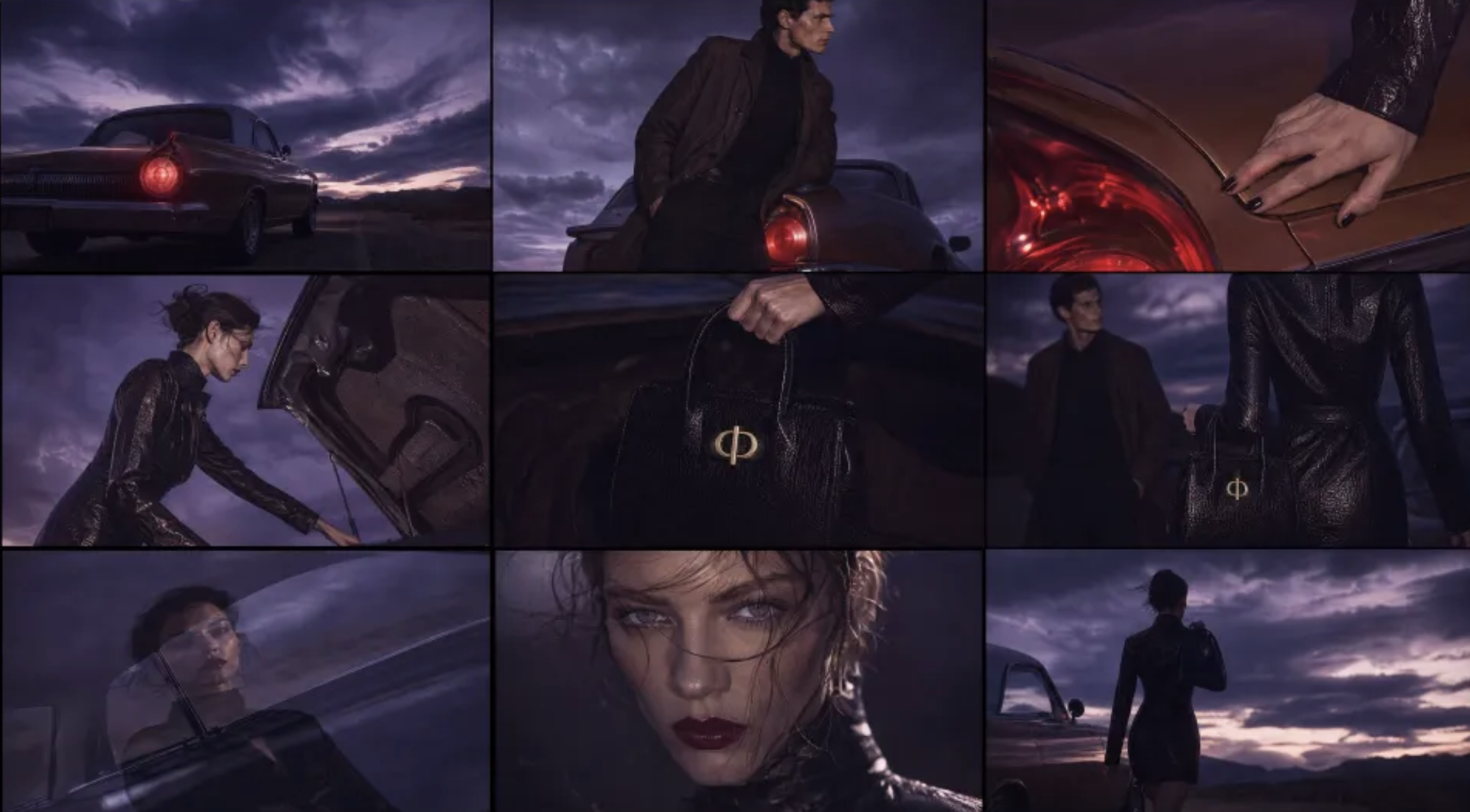
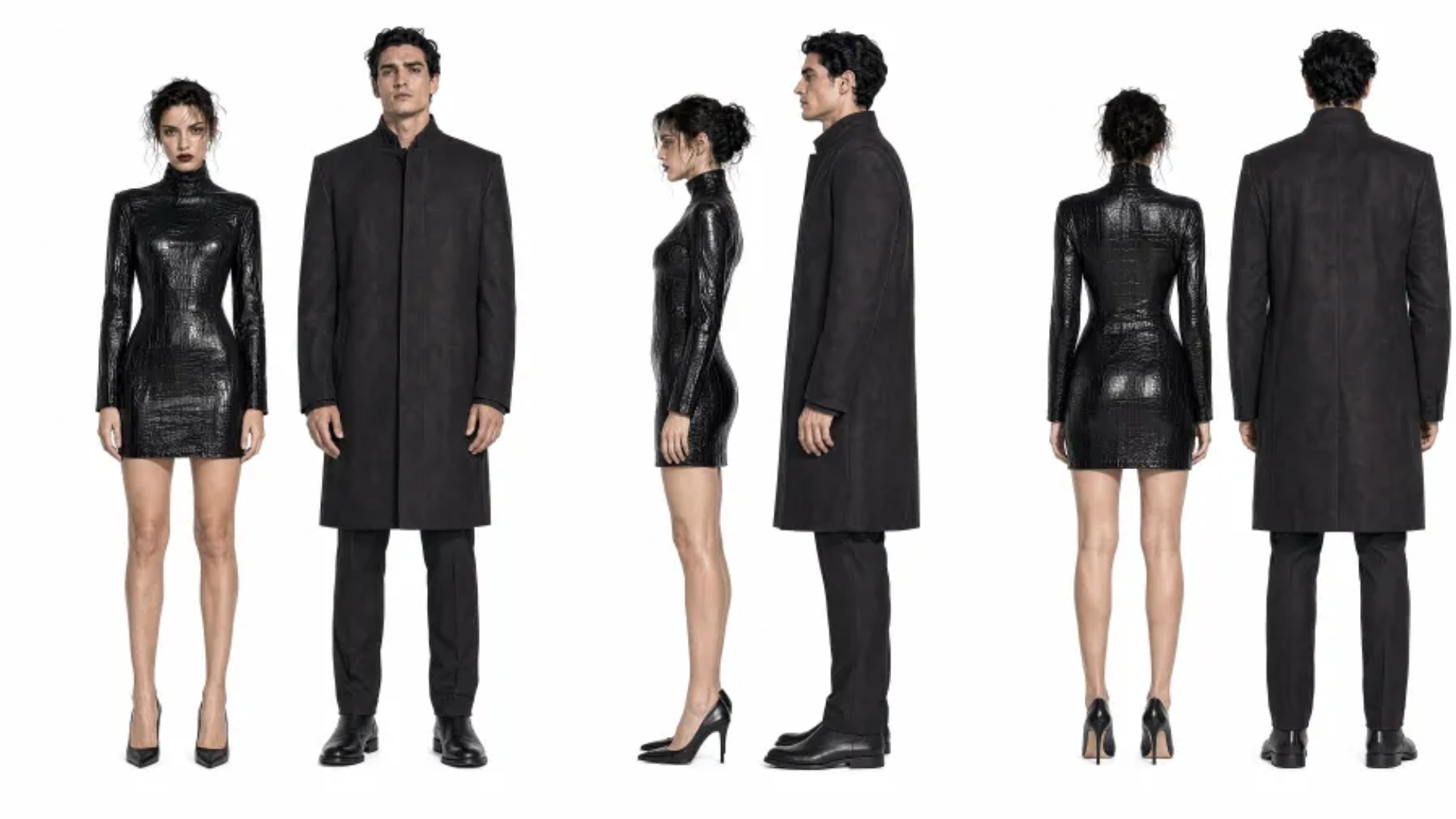
The following are not concept images or placeholder assets, but the actual reference inputs and video outputs from MiniMax H3’s official production-grade capability samples. The three sets of examples respectively cover brand films, live-action narratives, and fashion e-commerce, suitable for evaluating the model’s most critical capabilities in commercial production.
| Capability | Key Focus |
| - | - |
| Character and face consistency | Whether facial features, hairstyle, makeup, and character temperament remain stable after multi-shot transitions |
| Facial performance | Eye expressions, micro-expressions, emotional tension, and natural head movement in close-ups |
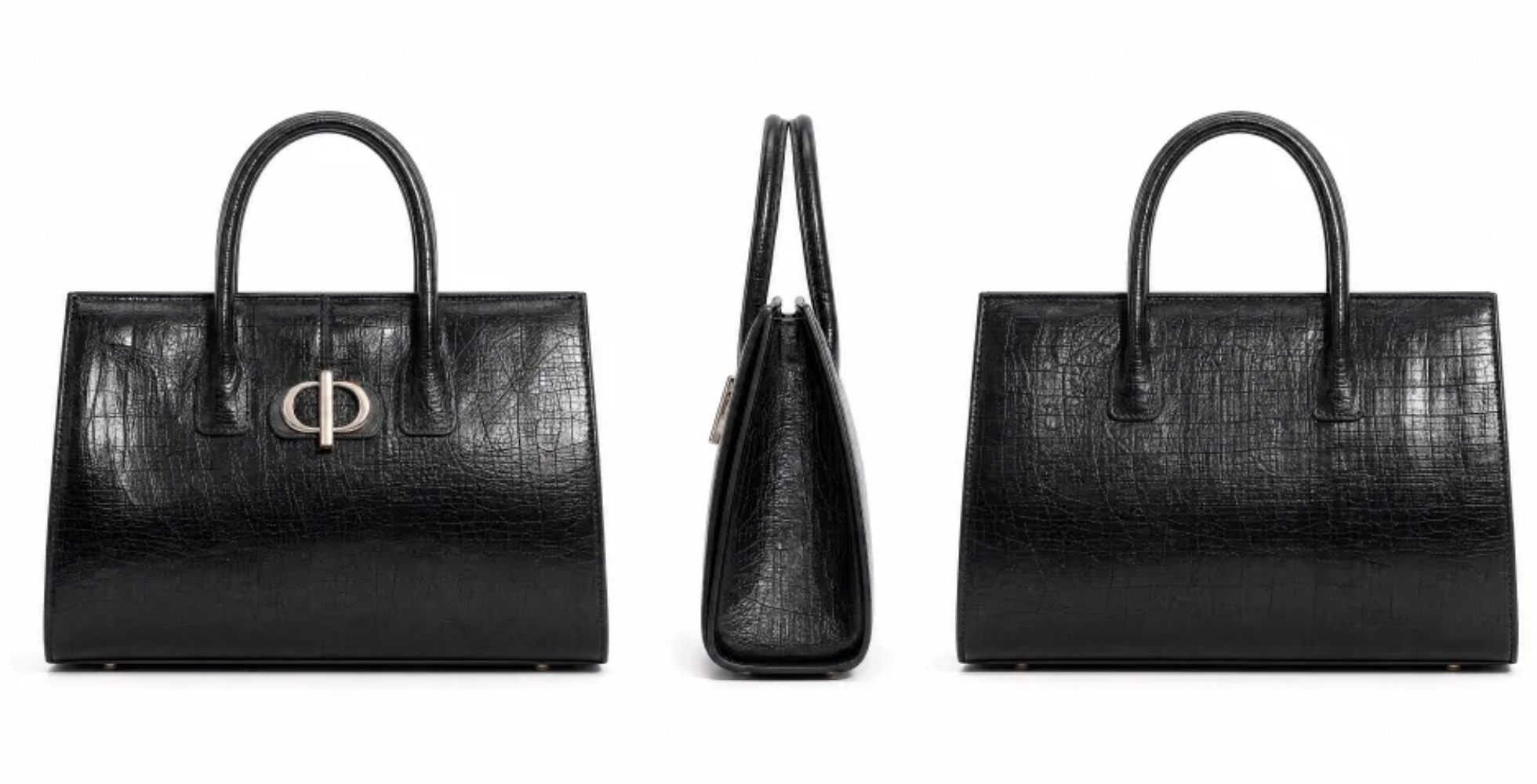
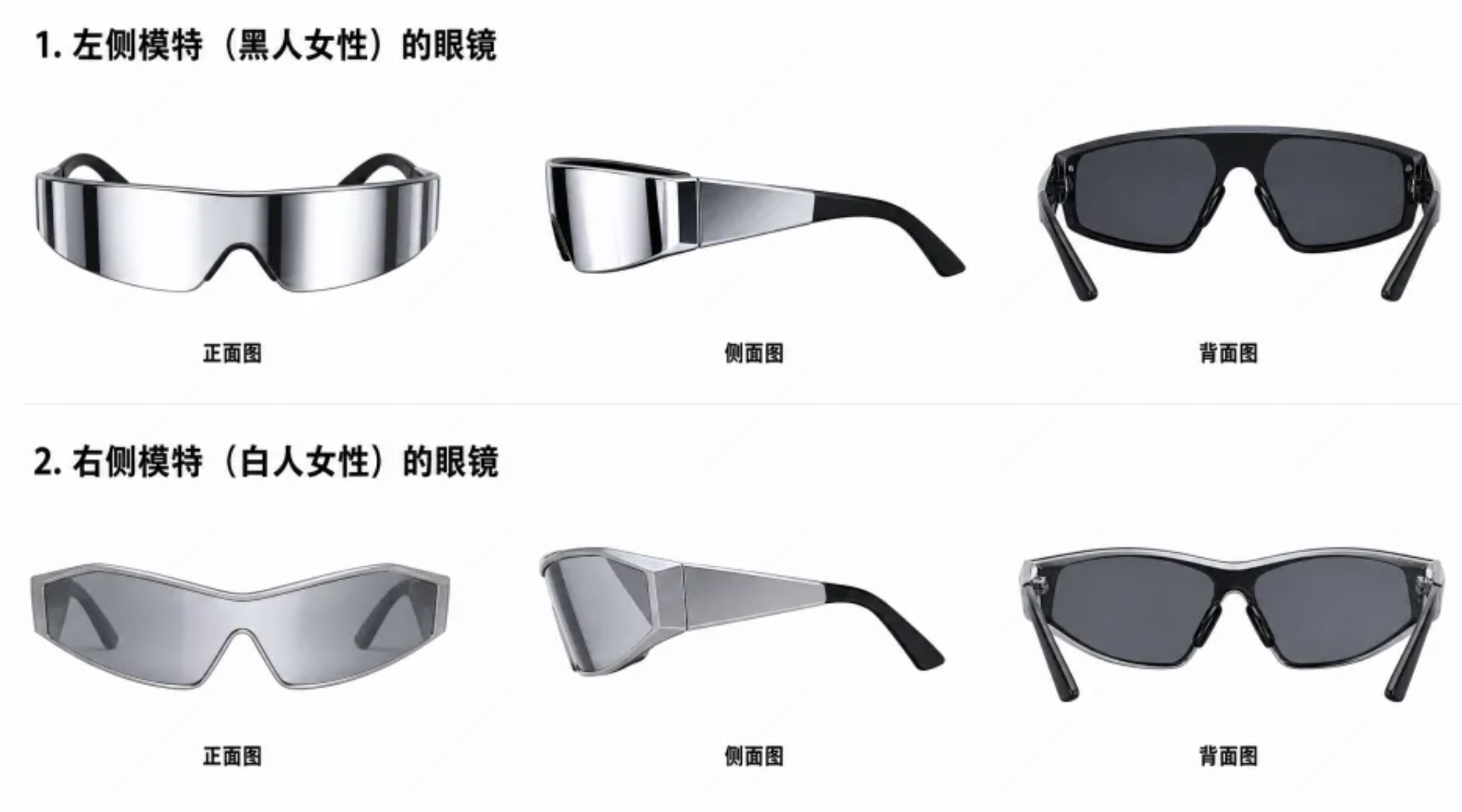
| Product structure preservation | The contours, materials, wearing relationships, and mirror reflections of products such as glasses and handbags |
| Brand visual execution | Whether scene atmosphere, film grain, color, Logo, and editing rhythm are unified |
| Cinematic narrative | Whether shot scale changes, character blocking, camera movement, rhythm, and sound can form a complete sequence |
Here, “face capability” refers to character appearance consistency, facial details, and performance control in video generation; it is not identity recognition, face comparison, or face-swapping interfaces.
### Premium Brand Film: Unifying Characters, Products, and Brand Assets
**Production Goal:** A 16:9 premium fashion brand film. Use a desert highway and a vintage car to establish a cool atmosphere, maintain the female protagonist’s appearance and the structure of the black handbag, and naturally incorporate the brand Logo into the ending. This example primarily tests cross-shot character consistency, product preservation, cinematic texture, and brand closure capabilities.
| Atmosphere and Scene Reference | Character Reference |
| - | - |
|  |
|  |
| Handbag Product Reference | Brand Logo Reference |
| - | - |
|
|
| Handbag Product Reference | Brand Logo Reference |
| - | - |
|  |
|  |
[Open or download the brand film directly](https://cdn.acedata.cloud/uploads/6845b11d-1a58-4478-afd8-29e7e117772a)
The corresponding `content` structure:
```json theme={null}
{
"model": "MiniMax-H3",
"content": [
{
"type": "text",
"text": "15-second, 16:9 premium fashion brand film. A vintage car is parked beside a desert highway; the female protagonist takes a black handbag from the trunk and leaves alone after briefly making eye contact with the male protagonist. Maintain consistency of the characters, handbag, and brand visuals; cool and premium, with film grain, crisp editing, and the brand Logo naturally presented at the end."
},
{
"type": "image_url",
"image_url": { "url": "https://cdn.acedata.cloud/uploads/6e65f865-f1c2-4f80-8b51-9a98d4d930b1" },
"role": "reference_image"
},
{
"type": "image_url",
"image_url": { "url": "https://cdn.acedata.cloud/uploads/88d89cc3-e6cb-42b4-ab4c-1bbbf6c9f7c8" },
"role": "reference_image"
},
{
"type": "image_url",
"image_url": { "url": "https://cdn.acedata.cloud/uploads/e91f7fff-f8e3-4da5-b882-87edbc3c9473" },
"role": "reference_image"
},
{
"type": "image_url",
"image_url": { "url": "https://cdn.acedata.cloud/uploads/b68dac43-fb14-42b5-bf8b-fd4d65506520" },
"role": "reference_image"
}
],
"resolution": "2K",
"duration": 15,
"ratio": "16:9"
}
```
### Live-Action Vertical Short Drama: Face Consistency and Emotional Performance
**Production Goal:** A 15-second, 9:16 dark romance short drama trailer. Use the reference images of the male and female leads to lock in character appearance, and use the castle reference image to constrain the space; use medium close-ups and facial close-ups to portray eye contact confrontation, fear, restraint, and a sense of danger. This case is suitable for observing the stability of realistic facial features, micro-expressions, gaze relationships, and continuous performance.
| Male and Female Lead References | Castle Scene Reference |
| - | - |
|
|
[Open or download the brand film directly](https://cdn.acedata.cloud/uploads/6845b11d-1a58-4478-afd8-29e7e117772a)
The corresponding `content` structure:
```json theme={null}
{
"model": "MiniMax-H3",
"content": [
{
"type": "text",
"text": "15-second, 16:9 premium fashion brand film. A vintage car is parked beside a desert highway; the female protagonist takes a black handbag from the trunk and leaves alone after briefly making eye contact with the male protagonist. Maintain consistency of the characters, handbag, and brand visuals; cool and premium, with film grain, crisp editing, and the brand Logo naturally presented at the end."
},
{
"type": "image_url",
"image_url": { "url": "https://cdn.acedata.cloud/uploads/6e65f865-f1c2-4f80-8b51-9a98d4d930b1" },
"role": "reference_image"
},
{
"type": "image_url",
"image_url": { "url": "https://cdn.acedata.cloud/uploads/88d89cc3-e6cb-42b4-ab4c-1bbbf6c9f7c8" },
"role": "reference_image"
},
{
"type": "image_url",
"image_url": { "url": "https://cdn.acedata.cloud/uploads/e91f7fff-f8e3-4da5-b882-87edbc3c9473" },
"role": "reference_image"
},
{
"type": "image_url",
"image_url": { "url": "https://cdn.acedata.cloud/uploads/b68dac43-fb14-42b5-bf8b-fd4d65506520" },
"role": "reference_image"
}
],
"resolution": "2K",
"duration": 15,
"ratio": "16:9"
}
```
### Live-Action Vertical Short Drama: Face Consistency and Emotional Performance
**Production Goal:** A 15-second, 9:16 dark romance short drama trailer. Use the reference images of the male and female leads to lock in character appearance, and use the castle reference image to constrain the space; use medium close-ups and facial close-ups to portray eye contact confrontation, fear, restraint, and a sense of danger. This case is suitable for observing the stability of realistic facial features, micro-expressions, gaze relationships, and continuous performance.
| Male and Female Lead References | Castle Scene Reference |
| - | - |
| 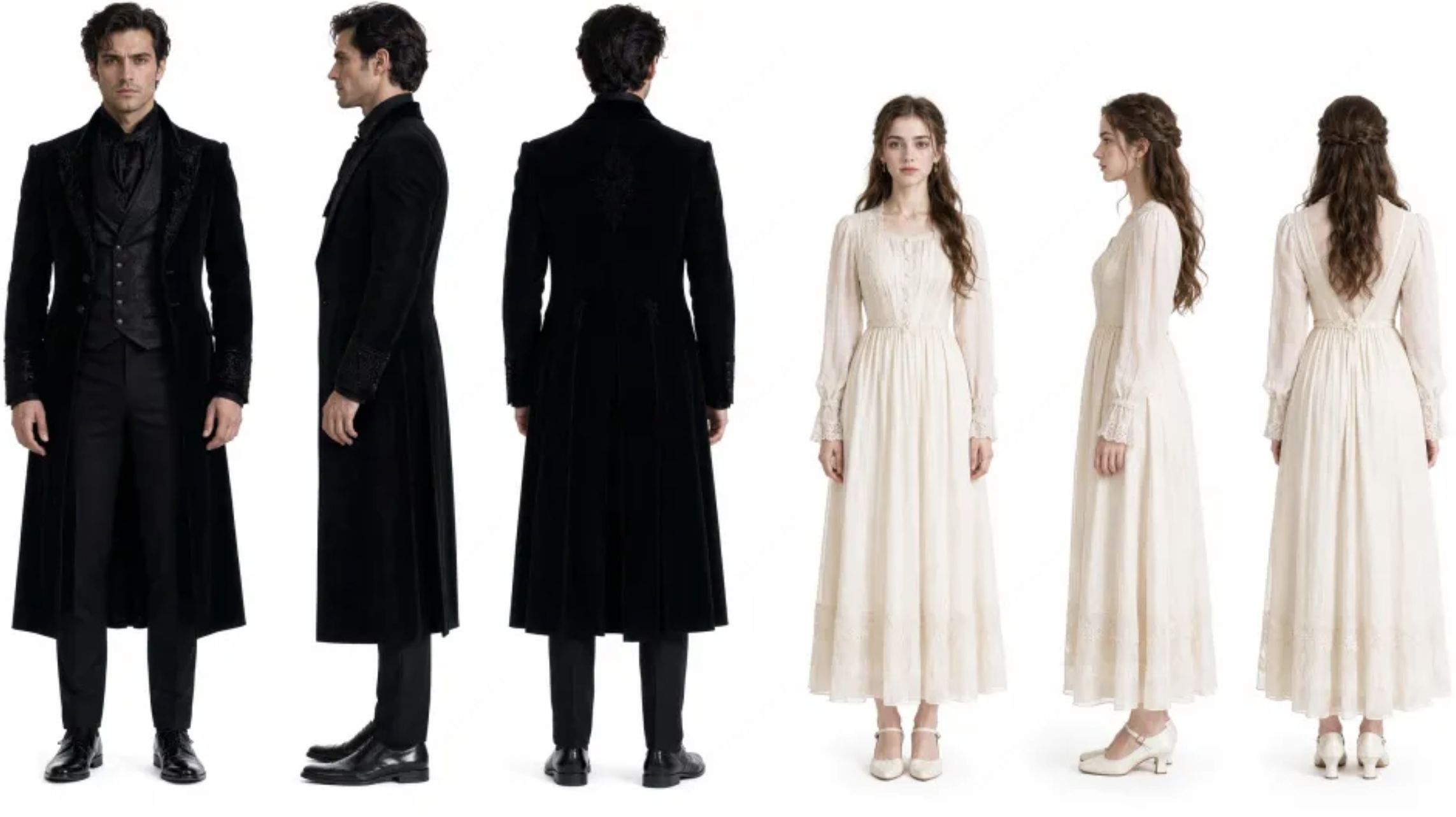 |
| 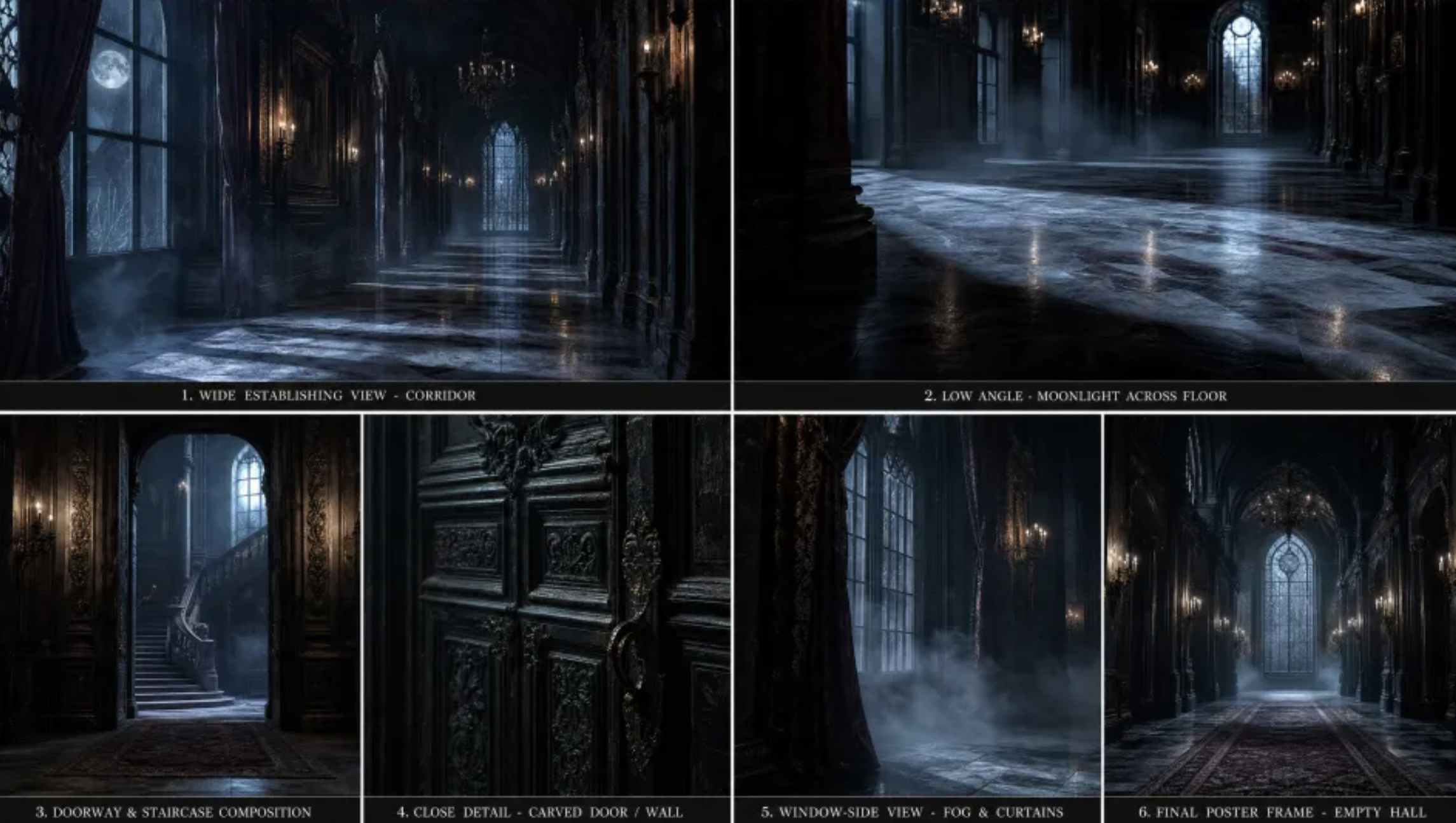 |
[Open or download the realistic short drama directly](https://cdn.acedata.cloud/uploads/0f3e9bf2-5073-46f4-9a2d-7d8d912391cf)
The prompt should clearly specify the character relationship, emotions, and shot scale, rather than merely describing a “dialogue between a man and a woman”:
```text theme={null}
15-second, 9:16 realistic dark romance short drama trailer. The heroine mistakenly enters a forbidden castle and awakens a sleeping vampire noble;
he approaches dangerously yet with restraint, while she is afraid but refuses to yield. Keep the facial features, hairstyles, and clothing of both characters consistent,
using medium close-ups and facial close-ups to portray eye contact confrontation and emotional tension, dark cinematic lighting, and a tight rhythm.
```
### Fashion Eyewear Advertisement: Maintaining Facial Details and Product Structure
**Production Goal:** A 9:16 premium fashion eyewear advertisement. The full-body character image is responsible for body shape and runway walk, the face reference image is responsible for facial features and makeup, and the product image is responsible for the curved contours, lens reflections, temples, and cat-eye silhouette. This case simultaneously tests facial close-ups, multi-person consistency, wearing relationships, and product geometric structure.
| Model and Styling Reference | Facial Detail Reference | Eyewear Product Reference |
| - | - | - |
|
|
[Open or download the realistic short drama directly](https://cdn.acedata.cloud/uploads/0f3e9bf2-5073-46f4-9a2d-7d8d912391cf)
The prompt should clearly specify the character relationship, emotions, and shot scale, rather than merely describing a “dialogue between a man and a woman”:
```text theme={null}
15-second, 9:16 realistic dark romance short drama trailer. The heroine mistakenly enters a forbidden castle and awakens a sleeping vampire noble;
he approaches dangerously yet with restraint, while she is afraid but refuses to yield. Keep the facial features, hairstyles, and clothing of both characters consistent,
using medium close-ups and facial close-ups to portray eye contact confrontation and emotional tension, dark cinematic lighting, and a tight rhythm.
```
### Fashion Eyewear Advertisement: Maintaining Facial Details and Product Structure
**Production Goal:** A 9:16 premium fashion eyewear advertisement. The full-body character image is responsible for body shape and runway walk, the face reference image is responsible for facial features and makeup, and the product image is responsible for the curved contours, lens reflections, temples, and cat-eye silhouette. This case simultaneously tests facial close-ups, multi-person consistency, wearing relationships, and product geometric structure.
| Model and Styling Reference | Facial Detail Reference | Eyewear Product Reference |
| - | - | - |
| 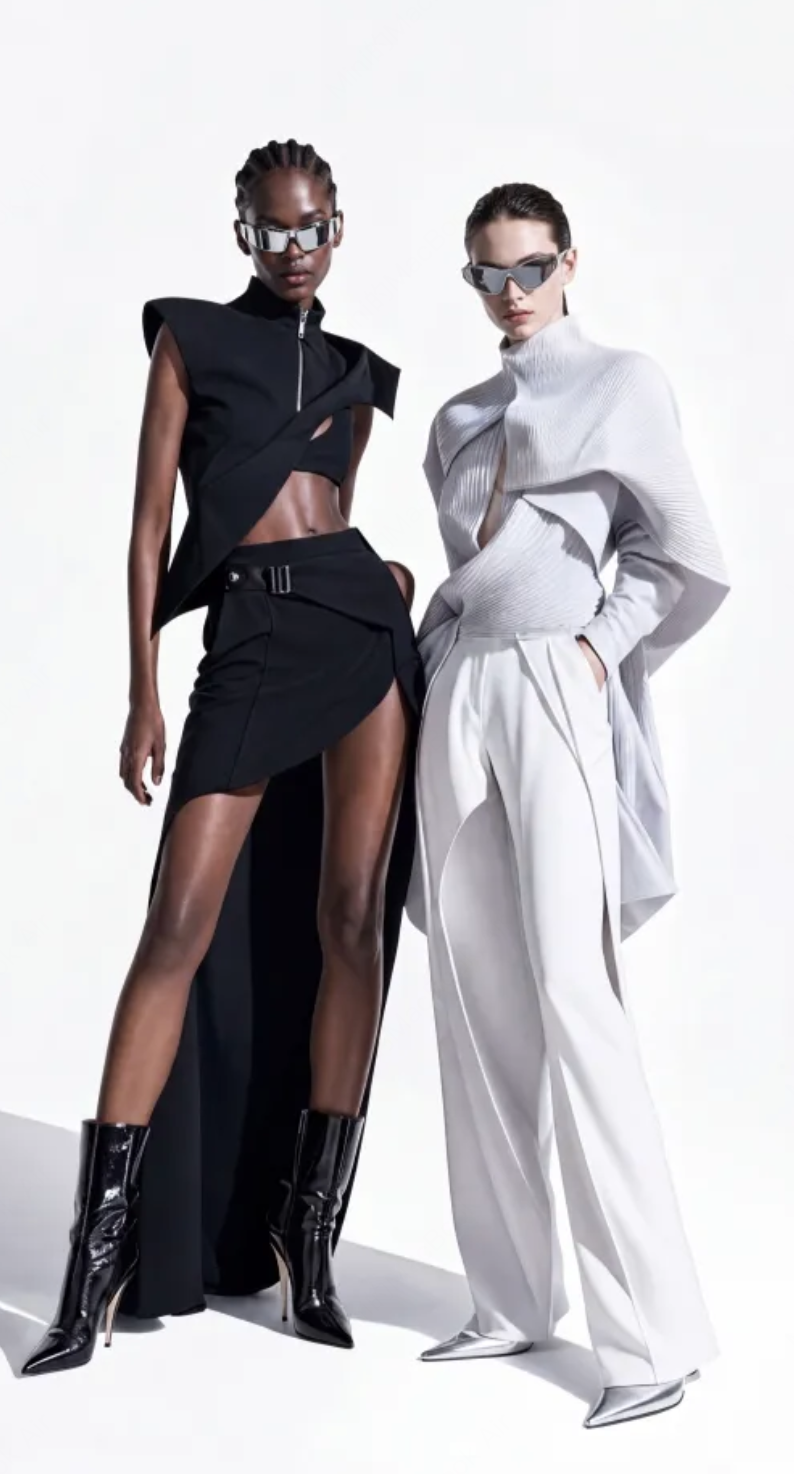 |
| 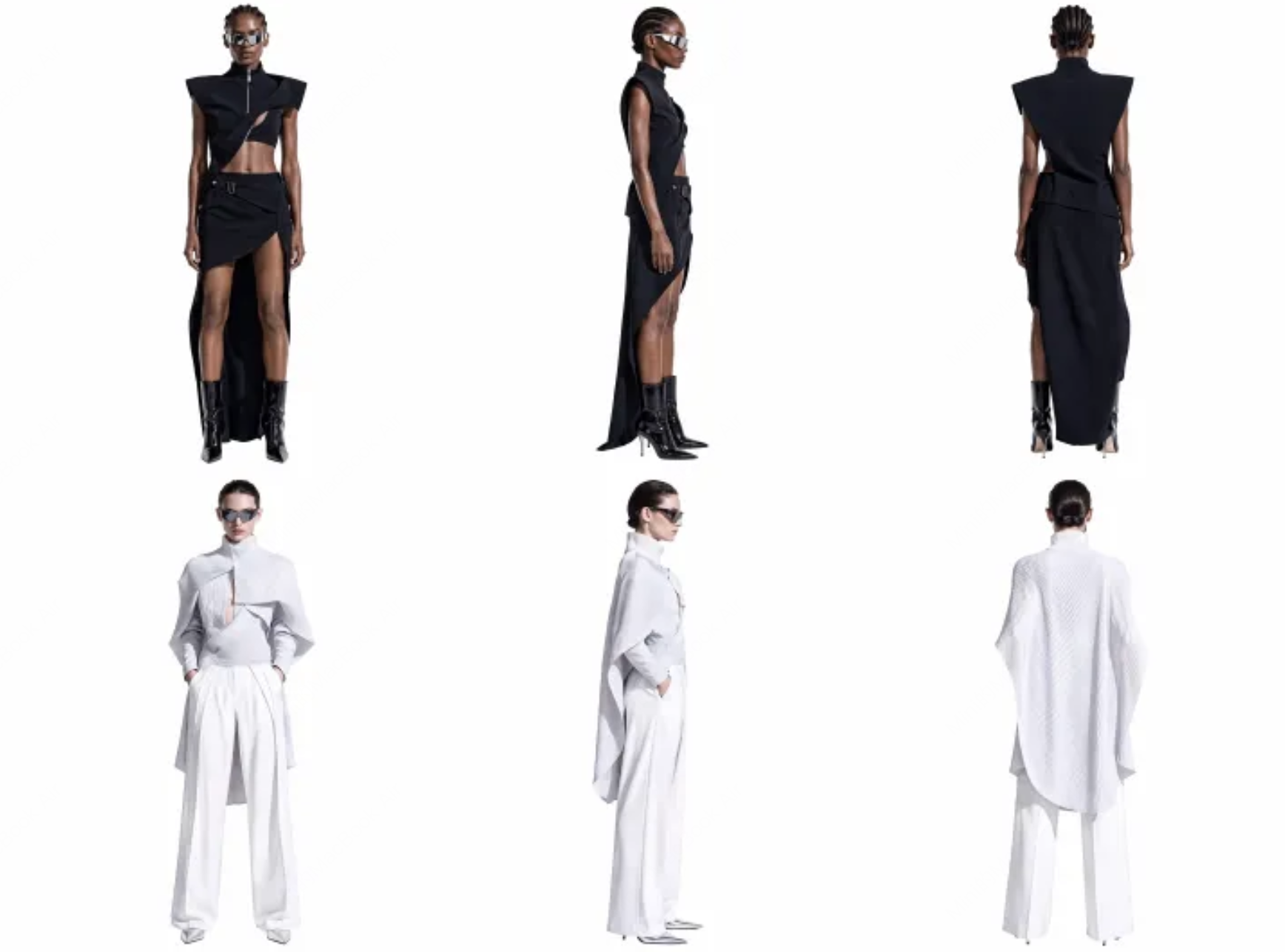 |
|  |
[Open or download the fashion eyewear advertisement directly](https://cdn.acedata.cloud/uploads/55715089-b6bd-4ef6-a3c2-e762a672f751)
In product advertisements, the responsibilities of character references and product references should be clearly written separately in the prompt: character materials constrain the face, makeup, body shape, and temperament; product materials constrain the contours, materials, reflections, and wearing position. This is more stable than broadly writing “generate an eyewear advertisement.”
## Text-to-Video
When there is only one text item, it is text-to-video. It is suitable for directly generating visuals from ideas, scripts, or shot descriptions. Prompts can be organized in the order of “subject + action + scene + camera + lighting + sound.”
```bash theme={null}
curl -X POST 'https://api.acedata.cloud/minimax/videos' \
-H "Authorization: Bearer $ACEDATACLOUD_API_KEY" \
-H 'Content-Type: application/json' \
-d '{
"model": "MiniMax-H3",
"content": [
{
"type": "text",
"text": "15-second cinematic perfume advertisement: on black reefs along the coast at dawn, a transparent perfume bottle is surrounded by mist and waves. A macro shot shows water droplets on the bottle and glass refractions, while the camera slowly rises from a product close-up to the vast sea; silver-blue tones, realistic natural light, premium and restrained, ending on a freeze frame of the product."
}
],
"resolution": "2K",
"duration": 15,
"ratio": "16:9"
}'
```
The default synchronous mode returns the complete task after generation is finished:
```json theme={null}
{
"task": {
"id": "f5977217-ed2c-40da-adbe-93d08235618f",
"model": "MiniMax-H3",
"status": "succeeded",
"content": { "url": "https://cdn.acedata.cloud/minimax/f5977217.mp4" },
"resolution": "2K",
"duration": 15,
"ratio": "16:9"
}
}
```
If `"async": true` is added to the request, the API returns immediately:
```json theme={null}
{
"task_id": "f5977217-ed2c-40da-adbe-93d08235618f",
"trace_id": "trace_7f8c2b1a"
}
```
## First-Frame Image-to-Video
Mark the image as `first_frame`, and the model will begin generation from that image. It is suitable for naturally bringing posters, product images, character design images, and photography works to life.
```json theme={null}
{
"model": "MiniMax-H3",
"content": [
{
"type": "text",
"text": "The character breathes naturally and looks out the window, the hem of the clothing moves in the breeze, and the camera slowly pushes in"
},
{
"type": "image_url",
"image_url": {
"url": "https://cdn.acedata.cloud/b1c82e4937.png"
},
"role": "first_frame"
}
],
"resolution": "2K",
"duration": 5,
"ratio": "adaptive"
}
```
## End-Frame and First-and-Last-Frame Video
Providing only `last_frame` allows the model to naturally generate up to the specified frame; providing both `first_frame` and `last_frame` enables explicit control over the start and end points. Suitable for transitions, shape changes, growth processes, or before-and-after product comparisons.
```json theme={null}
{
"model": "MiniMax-H3",
"content": [
{
"type": "text",
"text": "The girl naturally grows from childhood into youth, with the passage of time smooth, and the person always positioned in the center of the frame"
},
{
"type": "image_url",
"image_url": { "url": "YOUR_FIRST_FRAME_URL" },
"role": "first_frame"
},
{
"type": "image_url",
"image_url": { "url": "YOUR_LAST_FRAME_URL" },
"role": "last_frame"
}
],
"resolution": "2K",
"duration": 5,
"ratio": "adaptive"
}
```
The dimensions and aspect ratios of the first and last frames should be as consistent as possible, and differences in subject position, composition, and lighting should not be too large, making it easier to achieve a natural transition.
## Multimodal Reference Video Generation
Reference materials can be used in combination: reference images control the appearance of characters or products, reference videos control actions and camera movement, and reference audio controls dialogue voice, music, or editing rhythm. The prompt should clearly state what each type of material should control, avoiding uploading materials without specifying their relationship.
```json theme={null}
{
"model": "MiniMax-H3",
"content": [
{
"type": "text",
"text": "Keep the facial features, hairstyle, and clothing of the reference person consistent, and complete a fashion short film following the performance actions in the reference video; the camera rhythm follows the reference audio, with close-up shots highlighting natural facial expressions"
},
{
"type": "image_url",
"image_url": { "url": "YOUR_CHARACTER_IMAGE_URL" },
"role": "reference_image"
},
{
"type": "video_url",
"video_url": { "url": "YOUR_PERFORMANCE_VIDEO_URL" },
"role": "reference_video"
},
{
"type": "audio_url",
"audio_url": { "url": "YOUR_AUDIO_URL" },
"role": "reference_audio"
}
],
"resolution": "2K",
"duration": 5,
"ratio": "adaptive"
}
```
## Callback Notifications
Passing `callback_url` automatically enables asynchronous mode: the create API immediately returns `task_id` and `trace_id`, and POSTs the final result to that address after the task is completed, with the same structure as the task query response.
The final status in the callback will be `succeeded`, `failed`, or `cancelled`. Even when using callbacks, it is recommended to save `task_id` for actively querying tasks or compensating for missed notifications.
## Common Errors
| HTTP Status Code | Meaning | Handling Recommendation |
| - | - | - |
| `400` | Invalid parameters or invalid material combination | Check required fields, `role`, number of materials, and formats |
| `401` | Token missing or invalid | Check `Authorization: Bearer ...` |
| `402` | Insufficient balance or quota | Add general balance in the console |
| `422` | Failed content safety review | Adjust the prompt or materials and resubmit |
| `429` | Requests too frequent | Retry with exponential backoff; task polling is recommended at intervals of about 10 seconds |
| `500` | Service temporarily unavailable | Retain request information and retry later |
`task.status: succeeded` in a synchronous response indicates that the video has been generated; asynchronous confirmation only indicates that the task has entered the queue. Charges apply only when a task ultimately succeeds; querying tasks is free and does not result in duplicate charges.
### H3 Max
`MiniMax-H3-Max` supports 480P or 768P and integer durations of 5–15 seconds. Audio input is not charged additionally, the first 2 images are free, and each additional image is charged individually; reference videos are charged according to their actual input duration. This model does not support 2K.
This documentation is built and hosted on [Mintlify](https://mintlify.com), a developer documentation platform.
|
[Open or download the fashion eyewear advertisement directly](https://cdn.acedata.cloud/uploads/55715089-b6bd-4ef6-a3c2-e762a672f751)
In product advertisements, the responsibilities of character references and product references should be clearly written separately in the prompt: character materials constrain the face, makeup, body shape, and temperament; product materials constrain the contours, materials, reflections, and wearing position. This is more stable than broadly writing “generate an eyewear advertisement.”
## Text-to-Video
When there is only one text item, it is text-to-video. It is suitable for directly generating visuals from ideas, scripts, or shot descriptions. Prompts can be organized in the order of “subject + action + scene + camera + lighting + sound.”
```bash theme={null}
curl -X POST 'https://api.acedata.cloud/minimax/videos' \
-H "Authorization: Bearer $ACEDATACLOUD_API_KEY" \
-H 'Content-Type: application/json' \
-d '{
"model": "MiniMax-H3",
"content": [
{
"type": "text",
"text": "15-second cinematic perfume advertisement: on black reefs along the coast at dawn, a transparent perfume bottle is surrounded by mist and waves. A macro shot shows water droplets on the bottle and glass refractions, while the camera slowly rises from a product close-up to the vast sea; silver-blue tones, realistic natural light, premium and restrained, ending on a freeze frame of the product."
}
],
"resolution": "2K",
"duration": 15,
"ratio": "16:9"
}'
```
The default synchronous mode returns the complete task after generation is finished:
```json theme={null}
{
"task": {
"id": "f5977217-ed2c-40da-adbe-93d08235618f",
"model": "MiniMax-H3",
"status": "succeeded",
"content": { "url": "https://cdn.acedata.cloud/minimax/f5977217.mp4" },
"resolution": "2K",
"duration": 15,
"ratio": "16:9"
}
}
```
If `"async": true` is added to the request, the API returns immediately:
```json theme={null}
{
"task_id": "f5977217-ed2c-40da-adbe-93d08235618f",
"trace_id": "trace_7f8c2b1a"
}
```
## First-Frame Image-to-Video
Mark the image as `first_frame`, and the model will begin generation from that image. It is suitable for naturally bringing posters, product images, character design images, and photography works to life.
```json theme={null}
{
"model": "MiniMax-H3",
"content": [
{
"type": "text",
"text": "The character breathes naturally and looks out the window, the hem of the clothing moves in the breeze, and the camera slowly pushes in"
},
{
"type": "image_url",
"image_url": {
"url": "https://cdn.acedata.cloud/b1c82e4937.png"
},
"role": "first_frame"
}
],
"resolution": "2K",
"duration": 5,
"ratio": "adaptive"
}
```
## End-Frame and First-and-Last-Frame Video
Providing only `last_frame` allows the model to naturally generate up to the specified frame; providing both `first_frame` and `last_frame` enables explicit control over the start and end points. Suitable for transitions, shape changes, growth processes, or before-and-after product comparisons.
```json theme={null}
{
"model": "MiniMax-H3",
"content": [
{
"type": "text",
"text": "The girl naturally grows from childhood into youth, with the passage of time smooth, and the person always positioned in the center of the frame"
},
{
"type": "image_url",
"image_url": { "url": "YOUR_FIRST_FRAME_URL" },
"role": "first_frame"
},
{
"type": "image_url",
"image_url": { "url": "YOUR_LAST_FRAME_URL" },
"role": "last_frame"
}
],
"resolution": "2K",
"duration": 5,
"ratio": "adaptive"
}
```
The dimensions and aspect ratios of the first and last frames should be as consistent as possible, and differences in subject position, composition, and lighting should not be too large, making it easier to achieve a natural transition.
## Multimodal Reference Video Generation
Reference materials can be used in combination: reference images control the appearance of characters or products, reference videos control actions and camera movement, and reference audio controls dialogue voice, music, or editing rhythm. The prompt should clearly state what each type of material should control, avoiding uploading materials without specifying their relationship.
```json theme={null}
{
"model": "MiniMax-H3",
"content": [
{
"type": "text",
"text": "Keep the facial features, hairstyle, and clothing of the reference person consistent, and complete a fashion short film following the performance actions in the reference video; the camera rhythm follows the reference audio, with close-up shots highlighting natural facial expressions"
},
{
"type": "image_url",
"image_url": { "url": "YOUR_CHARACTER_IMAGE_URL" },
"role": "reference_image"
},
{
"type": "video_url",
"video_url": { "url": "YOUR_PERFORMANCE_VIDEO_URL" },
"role": "reference_video"
},
{
"type": "audio_url",
"audio_url": { "url": "YOUR_AUDIO_URL" },
"role": "reference_audio"
}
],
"resolution": "2K",
"duration": 5,
"ratio": "adaptive"
}
```
## Callback Notifications
Passing `callback_url` automatically enables asynchronous mode: the create API immediately returns `task_id` and `trace_id`, and POSTs the final result to that address after the task is completed, with the same structure as the task query response.
The final status in the callback will be `succeeded`, `failed`, or `cancelled`. Even when using callbacks, it is recommended to save `task_id` for actively querying tasks or compensating for missed notifications.
## Common Errors
| HTTP Status Code | Meaning | Handling Recommendation |
| - | - | - |
| `400` | Invalid parameters or invalid material combination | Check required fields, `role`, number of materials, and formats |
| `401` | Token missing or invalid | Check `Authorization: Bearer ...` |
| `402` | Insufficient balance or quota | Add general balance in the console |
| `422` | Failed content safety review | Adjust the prompt or materials and resubmit |
| `429` | Requests too frequent | Retry with exponential backoff; task polling is recommended at intervals of about 10 seconds |
| `500` | Service temporarily unavailable | Retain request information and retry later |
`task.status: succeeded` in a synchronous response indicates that the video has been generated; asynchronous confirmation only indicates that the task has entered the queue. Charges apply only when a task ultimately succeeds; querying tasks is free and does not result in duplicate charges.
### H3 Max
`MiniMax-H3-Max` supports 480P or 768P and integer durations of 5–15 seconds. Audio input is not charged additionally, the first 2 images are free, and each additional image is charged individually; reference videos are charged according to their actual input duration. This model does not support 2K.
This documentation is built and hosted on [Mintlify](https://mintlify.com), a developer documentation platform.