> ## Documentation Index
> Fetch the complete documentation index at: https://docs.acedata.cloud/llms.txt
> Use this file to discover all available pages before exploring further.
# Kimi Chat Completion API Application and Usage
> Kimi integration guide - Ace Data Cloud
Kimi is a series of AI models launched by the Dark Side of the Moon. The currently recommended `kimi-k3` is aimed at long-range programming, agents, complex reasoning, and knowledge work, and can be called via the OpenAI-compatible Chat Completions API.
This document mainly describes the usage process of the Kimi Chat Completion API, allowing us to easily utilize the official Kimi dialogue features.
## Application Process
To use the Kimi Chat Completion API, first go to the [Ace Data Cloud Console](https://platform.acedata.cloud/console/applications) to obtain your API Token for future use.

If you are not logged in or registered, you will be automatically redirected to the login page to invite you to register and log in, and will return to the current page automatically after completion.
**One API Token can call all services on the platform without needing to apply separately for each service.** The first application will grant a free quota for a trial experience; when the quota is insufficient, you can recharge the general balance in the [console](https://platform.acedata.cloud/console/coin).
> 📘 Complete Documentation: [Kimi Chat Completion API →](https://platform.acedata.cloud/documents/kimi-chat-completions)
## Basic Usage
Next, you can fill in the corresponding content on the interface, as shown in the figure:
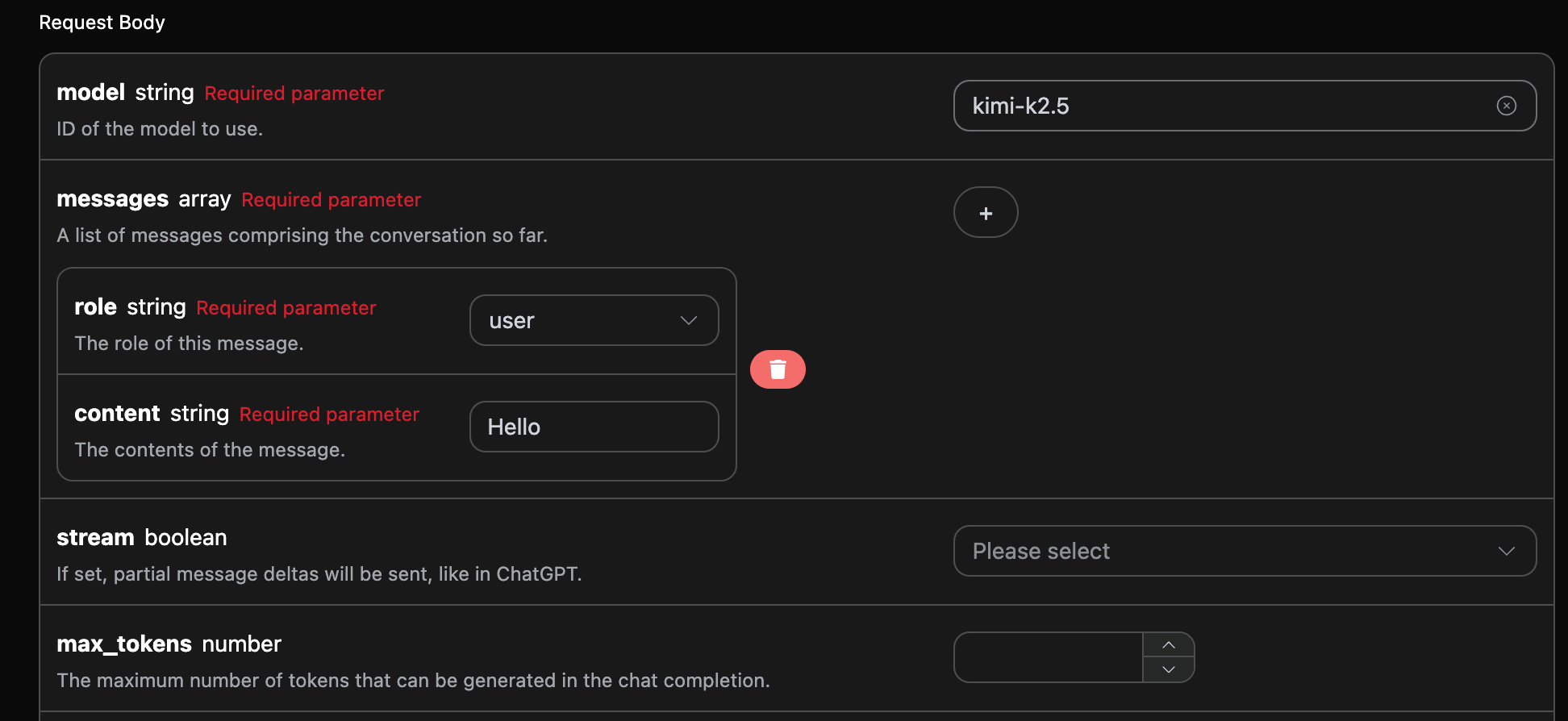
When using this interface for the first time, you need to fill in at least three pieces of content: `authorization` can be selected directly from the dropdown list; `model` is used to select the Kimi model, and it is recommended to use `kimi-k3`; `messages` is an array of dialogue messages, each message contains `role` and `content`, where `role` supports `user`, `assistant`, `system`, and `tool`.
You can also notice that there is corresponding code generation on the right side, which you can copy to run directly, or you can click the "Try" button for testing.
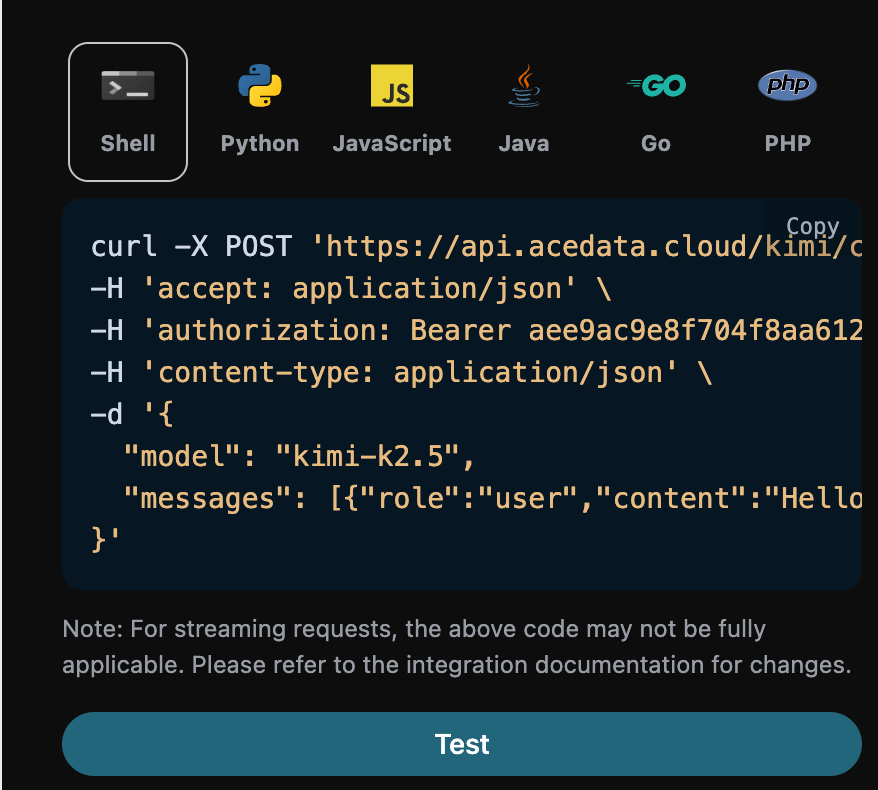
Below is a real K3 response obtained using `reasoning_effort: max` (unused extended fields are omitted):
```json theme={null}
{
"id": "msg_2D4Btbg1WgvkNE3tCYkR4xGA",
"object": "chat.completion",
"created": 1784466588,
"model": "kimi-k3",
"choices": [
{
"index": 0,
"message": {
"role": "assistant",
"content": "Hello! How can I help you today?"
},
"logprobs": null,
"finish_reason": "stop"
}
],
"usage": {
"prompt_tokens": 86,
"completion_tokens": 206,
"total_tokens": 292
}
}
```
The returned result contains multiple fields, described as follows:
* `id`, the ID generated for this dialogue task, used to uniquely identify this dialogue task.
* `model`, the selected Kimi official model.
* `choices`, the response information provided by Kimi for the query.
* `usage`: statistical information regarding tokens for this Q\&A pair.
Among them, `choices` contains Kimi's response information, and the `choices` inside it provides the specific information of Kimi's response, as can be seen in the figure.
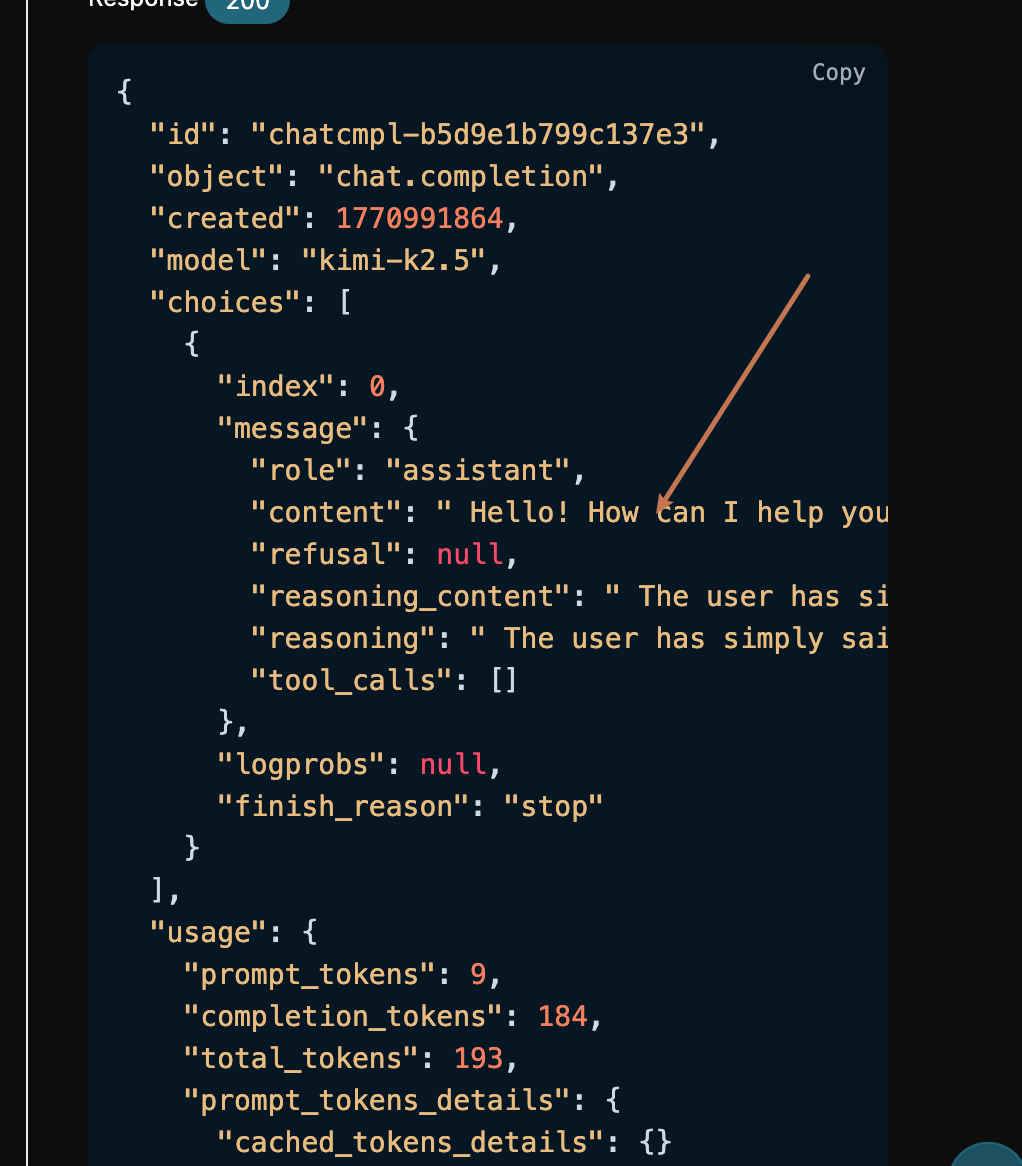
It can be seen that the `content` field inside `choices` contains the specific content of Kimi's reply; K3 may also return `reasoning_content`, which is used to represent the reasoning process.
## K3 Reasoning Intensity
`kimi-k3` always enables reasoning. The top-level request body supports the `reasoning_effort` field, and the currently supported value is `max`; omitting this field will also use `max`. `standard`, `high`, or other strings may be partially accepted by upstream compatibility but do not guarantee a change in reasoning behavior, so do not rely on them.
```bash theme={null}
curl https://api.acedata.cloud/kimi/chat/completions \
-H "Authorization: Bearer $ACEDATACLOUD_API_KEY" \
-H "Content-Type: application/json" \
-d '{
"model": "kimi-k3",
"messages": [{"role": "user", "content": "Review this code and provide a fix"}],
"reasoning_effort": "max"
}'
```
When using the OpenAI SDK, you can directly pass this field:
```python theme={null}
response = client.chat.completions.create(
model="kimi-k3",
messages=[{"role": "user", "content": "Design a reliable task queue"}],
reasoning_effort="max",
)
```
In multi-turn dialogues and tool calls, please return the complete assistant message from the previous round to `messages`, including `reasoning_content` and `tool_calls`.
### Official References
* [Thinking Effort](https://platform.kimi.ai/docs/guide/use-thinking-effort): Explains that Kimi K3 always enables reasoning, and the currently supported value for `reasoning_effort` is `max`.
* [Model Parameter Reference](https://platform.kimi.ai/docs/api/models-overview): Compares the reasoning parameters, context window, and tool call differences between K3 and K2 series.
* [Create Chat Completion](https://platform.kimi.ai/docs/api/chat): Official Moonshot Chat Completions request, response, and OpenAPI field definitions.
## Streaming Response
This interface also supports streaming responses, which is very useful for web integration, allowing the webpage to achieve a word-by-word display effect.
If you want to return responses in a streaming manner, you can change the `stream` parameter in the request header to `true`.
Modify as shown in the figure, but the calling code needs to have corresponding changes to support streaming responses.
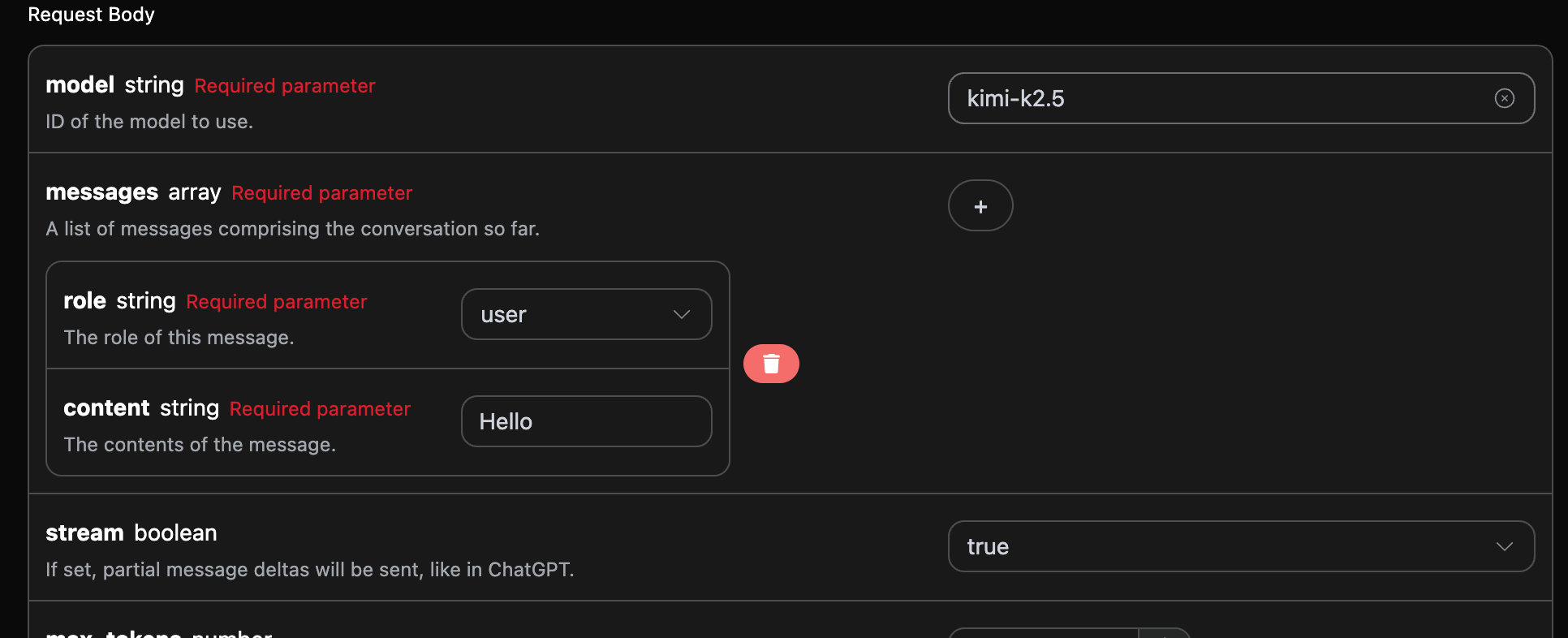
After changing `stream` to `true`, the API will return the corresponding JSON data line by line, and we need to make corresponding modifications in the code to obtain the line-by-line results.
Python sample calling code:
```python theme={null}
import requests
url = "https://api.acedata.cloud/kimi/chat/completions"
headers = {
"accept": "application/json",
"authorization": "Bearer {token}",
"content-type": "application/json"
}
payload = {
"model": "kimi-k3",
"messages": [{"role":"user","content":"Hello"}],
"reasoning_effort": "max",
"stream": True
}
response = requests.post(url, json=payload, headers=headers)
print(response.text)
```
Below is an excerpt from the starting, reasoning, body, ending, and usage data blocks of a real K3 Max streaming response:
```json theme={null}
data: {"id":"msg_er7WZjyv2kD3TG2yzbFPu5ZJ","object":"chat.completion.chunk","created":1784466598,"model":"kimi-k3","choices":[{"index":0,"delta":{"content":"","role":"assistant"},"finish_reason":null}],"usage":null}
data: {"id":"msg_er7WZjyv2kD3TG2yzbFPu5ZJ","object":"chat.completion.chunk","created":1784466598,"model":"kimi-k3","choices":[{"index":0,"delta":{"reasoning_content":"The"},"finish_reason":null}],"usage":null}
data: {"id":"msg_er7WZjyv2kD3TG2yzbFPu5ZJ","object":"chat.completion.chunk","created":1784466598,"model":"kimi-k3","choices":[{"index":0,"delta":{"content":"Hello"},"finish_reason":null}],"usage":null}
data: {"id":"msg_er7WZjyv2kD3TG2yzbFPu5ZJ","object":"chat.completion.chunk","created":1784466598,"model":"kimi-k3","choices":[{"index":0,"delta":{},"finish_reason":"stop"}],"usage":null}
data: {"id":"msg_er7WZjyv2kD3TG2yzbFPu5ZJ","object":"chat.completion.chunk","created":1784466598,"model":"kimi-k3","choices":[],"usage":{"prompt_tokens":172,"completion_tokens":168,"total_tokens":340}}
data: [DONE]
```
It can be seen that there are many `data` in the response, and the `choices` in `data` are the latest response content, consistent with the content introduced above. `choices` is the newly added response content, and you can interface it into your system based on the results. The end of the streaming response is determined by the content of `data`. If the content is `[DONE]`, it indicates that the streaming response has completely ended. The returned `data` result has multiple fields, which are described as follows:
* `id`, the ID generated for this dialogue task, used to uniquely identify this dialogue task.
* `model`, the selected Kimi official model.
* `choices`, the response information provided by Kimi for the query.
JavaScript is also supported, for example, the streaming call code for Node.js is as follows:
```javascript theme={null}
const options = {
method: "post",
headers: {
"accept": "application/json",
"authorization": "Bearer {token}",
"content-type": "application/json"
},
body: JSON.stringify({
"model": "kimi-k3",
"messages": [{"role":"user","content":"Hello"}],
"stream": true
})
};
fetch("https://api.acedata.cloud/kimi/chat/completions", options)
.then(response => response.json())
.then(response => console.log(response))
.catch(err => console.error(err));
```
Java sample code:
```java theme={null}
JSONObject jsonObject = new JSONObject();
jsonObject.put("model", "kimi-k3");
jsonObject.put("messages", [{"role":"user","content":"Hello"}]);
jsonObject.put("stream", true);
MediaType mediaType = "application/json; charset=utf-8".toMediaType();
RequestBody body = jsonObject.toString().toRequestBody(mediaType);
Request request = new Request.Builder()
.url("https://api.acedata.cloud/kimi/chat/completions")
.post(body)
.addHeader("accept", "application/json")
.addHeader("authorization", "Bearer {token}")
.addHeader("content-type", "application/json")
.build();
OkHttpClient client = new OkHttpClient();
Response response = client.newCall(request).execute();
System.out.print(response.body!!.string())
```
Other languages can be rewritten accordingly; the principle is the same.
## Multi-turn Dialogue
If you want to interface the multi-turn dialogue function, you need to upload multiple query words in the `messages` field. The specific examples of multiple query words are shown in the image below:
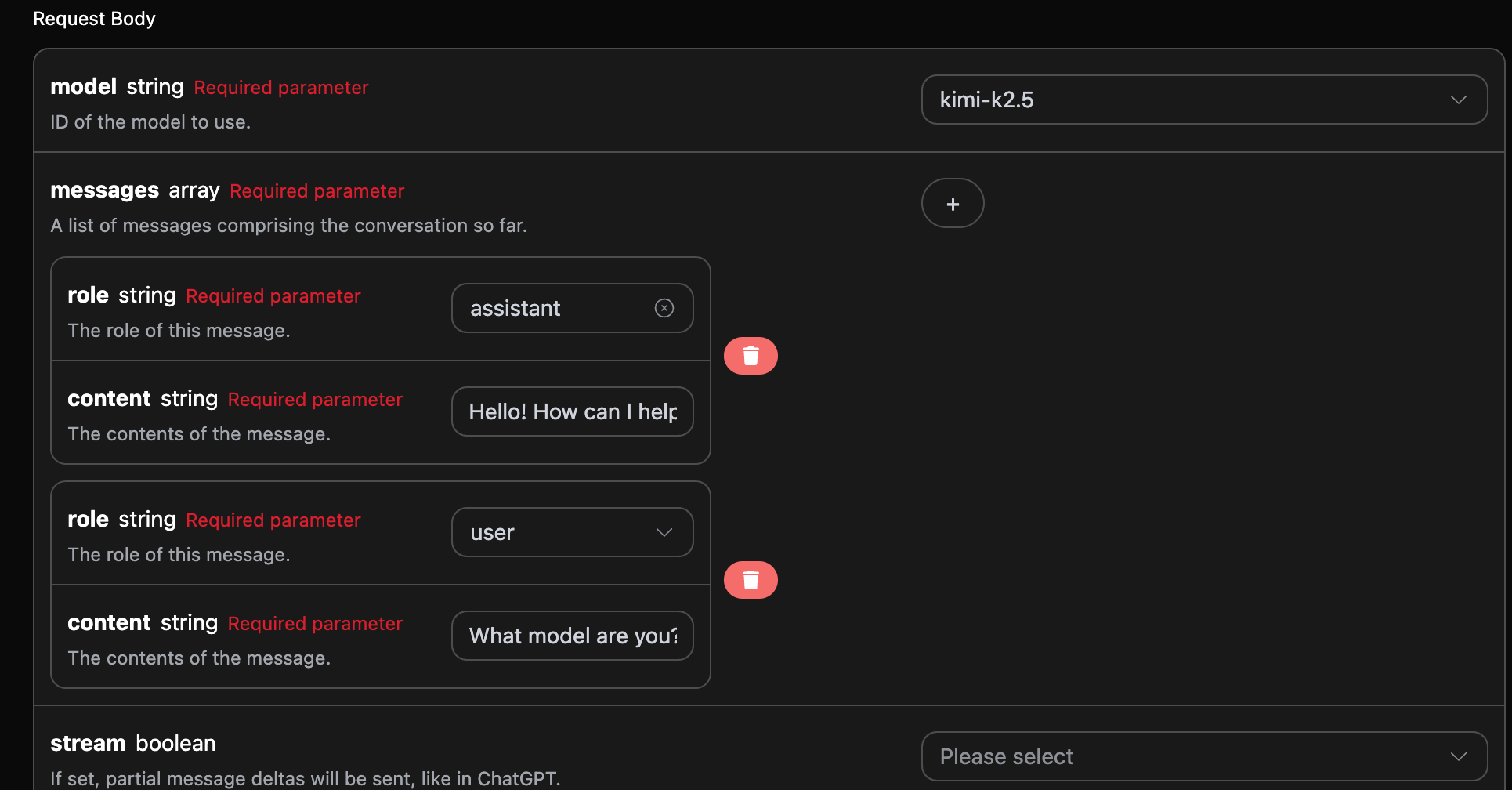
Python sample call code:
```python theme={null}
import requests
url = "https://api.acedata.cloud/kimi/chat/completions"
headers = {
"accept": "application/json",
"authorization": "Bearer {token}",
"content-type": "application/json"
}
payload = {
"model": "kimi-k3",
"messages": [{"role":"assistant","content":"Hello! How can I help you today?"},{"role":"user","content":"What model are you?"}],
"reasoning_effort": "max"
}
response = requests.post(url, json=payload, headers=headers)
print(response.text)
```
By uploading multiple query words, you can easily achieve multi-turn dialogue. Below is the actual K3 Max response obtained from this request (unused extended fields omitted):
```json theme={null}
{
"id": "msg_Rqp8nPGBDHWwBlL4VpxuafOp",
"object": "chat.completion",
"created": 1784466628,
"model": "kimi-k3",
"choices": [
{
"index": 0,
"message": {
"role": "assistant",
"content": "I’m Kimi, an AI assistant developed by Moonshot AI (月之暗面). I don’t have a specific public model version identifier to share from here."
},
"logprobs": null,
"finish_reason": "stop"
}
],
"usage": {
"prompt_tokens": 134,
"completion_tokens": 346,
"total_tokens": 480
}
}
```
It can be seen that the information contained in `choices` is consistent with the content used in basic usage, which includes the specific content of Kimi's responses to multiple dialogues, allowing for corresponding answers to questions based on multiple dialogue contents.
## Error Handling
When calling the API, if an error occurs, the API will return the corresponding error code and message. For example:
* `400 token_mismatched`: Bad request, possibly due to missing or invalid parameters.
* `400 api_not_implemented`: Bad request, possibly due to missing or invalid parameters.
* `401 invalid_token`: Unauthorized, invalid or missing authorization token.
* `429 too_many_requests`: Too many requests, you have exceeded the rate limit.
* `500 api_error`: Internal server error, something went wrong on the server.
### Error Response Example
```
{
"success": false,
"error": {
"code": "api_error",
"message": "fetch failed"
},
"trace_id": "2cf86e86-22a4-46e1-ac2f-032c0f2a4e89"
}
```
## Conclusion
Through this document, you have learned how to use the Kimi Chat Completion API to achieve ordinary conversations, streaming responses, multi-turn dialogues, and control the reasoning intensity of K3 through `reasoning_effort`.