> ## Documentation Index
> Fetch the complete documentation index at: https://docs.acedata.cloud/llms.txt
> Use this file to discover all available pages before exploring further.
# Producer Audios Generation API Integrationsanleitung
> Producer Music Generation API guide - Ace Data Cloud
Dieser Artikel beschreibt eine Integrationsanleitung für die Producer Audios Generation API, die es ermöglicht, durch Eingabe benutzerdefinierter Parameter die offizielle Musik von Producer zu generieren.
## Antragsprozess
Um die API zu nutzen, müssen Sie zunächst auf die entsprechende Seite der [Producer Audios Generation API](https://platform.acedata.cloud/documents/producer-audios) gehen und den entsprechenden Dienst beantragen. Nach dem Betreten der Seite klicken Sie auf die Schaltfläche „Acquire“, wie im Bild gezeigt:

Wenn Sie noch nicht angemeldet oder registriert sind, werden Sie automatisch zur Anmeldeseite weitergeleitet, um sich zu registrieren und anzumelden. Nach der Anmeldung werden Sie automatisch zur aktuellen Seite zurückgeleitet.
Bei der ersten Antragstellung gibt es ein kostenloses Kontingent, mit dem Sie die API kostenlos nutzen können.
## Grundlegende Nutzung
Wenn Sie an bestimmten Songs denken, können Sie beliebigen Text eingeben. Wenn ich zum Beispiel ein Lied über Weihnachten generieren möchte, kann ich `a song for Christmas` eingeben, wie im Bild gezeigt:
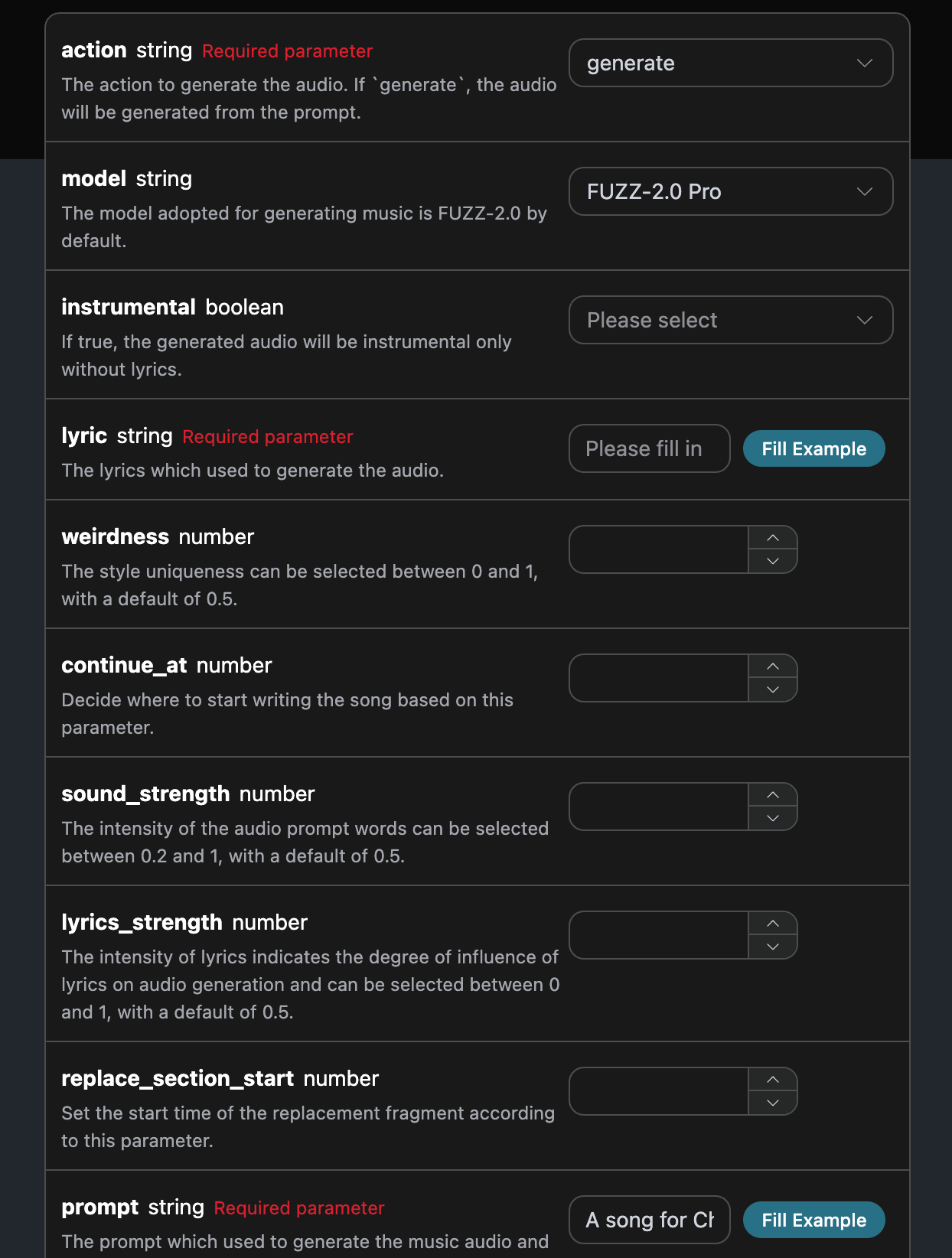
Hier haben wir die Request Headers festgelegt, einschließlich:
* `accept`: In welchem Format Sie die Antwort erhalten möchten, hier eingetragen als `application/json`, also im JSON-Format.
* `authorization`: Der Schlüssel zur Nutzung der API, den Sie nach der Beantragung direkt auswählen können.
Zusätzlich umfassen die Parameter des Request Body:
* `action`: Die Aktion dieser Musikgenerierungsaufgabe, um ein Lied zu generieren, ist `generate`.
* `model`: Das Modell, das zur Erstellung des Songs verwendet wird, derzeit hauptsächlich: **FUZZ-2.0 Pro**, **FUZZ-2.0**, **FUZZ-2.0 Raw**, **FUZZ-1.1 Pro**, **FUZZ-1.0 Pro**, **FUZZ-1.0**, **FUZZ-1.1**, **FUZZ-0.8**.
* `lyric`: Der Text des Liedes.
* `custom`: Ob die benutzerdefinierte Methode zur Generierung des Songs verwendet werden soll.
* `prompt`: Stichworte im Inspirationsmodus.
* `title`: Informationen zum Titel des Songs.
* `audio_id`: Referenz-Song-ID, die für Fortsetzungen/Remakes usw. verwendet wird.
* `continue_at`: Fortsetzung des Songs ab einer bestimmten Sekunde.
* `replace_section_start`/`replace_section_end`: Start- und Endzeit des zu ersetzenden Abschnitts, in Sekunden.
* `lyrics_strength`: Die Stärke der Lyrics, die den Einfluss der Lyrics auf die Audioerzeugung angibt, wählbar zwischen 0-1, Standardwert 0.7.
* `sound_strength`: Die Stärke der Audio-Stichworte, wählbar zwischen 0.2-1, Standardwert 0.7.
* `cover_strength`: Die Stärke des Covers, wählbar zwischen 0.2-1, Standardwert 1.
* `weirdness`: Der Grad der Stilbesonderheit, wählbar zwischen 0-1, Standardwert 0.5.
* `callback_url`: Die URL, an die die Ergebnisse zurückgegeben werden sollen.
* `instrumental`: Ob es sich um einen instrumentalen Modus ohne Lyrics handelt.
Nach der Auswahl können Sie sehen, dass auf der rechten Seite der entsprechende Code generiert wurde, wie im Bild gezeigt:
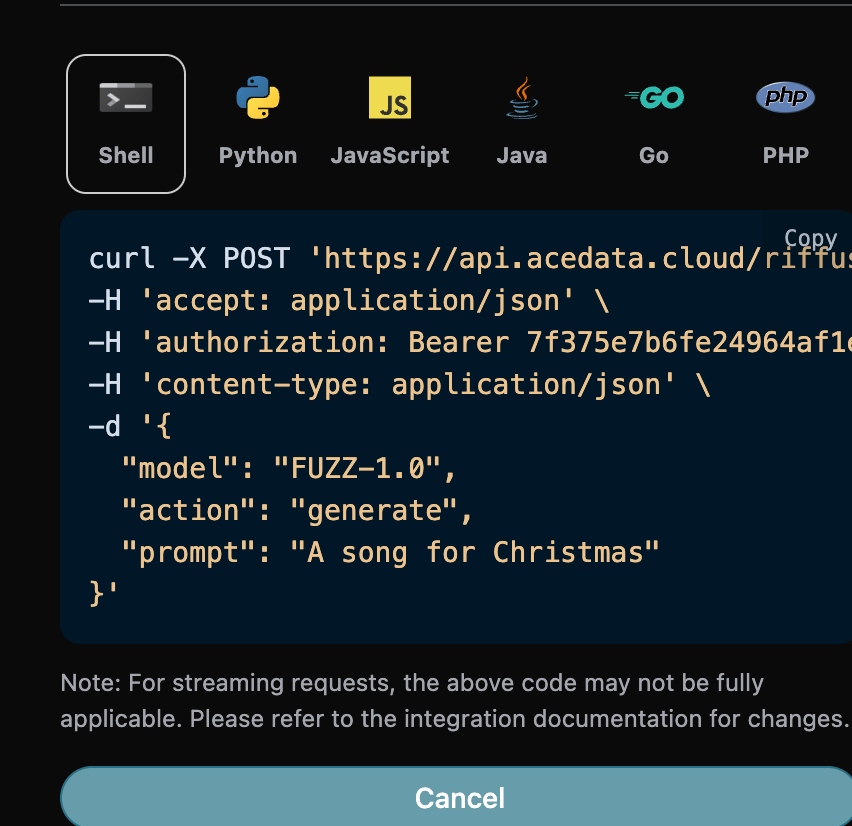
Klicken Sie auf die Schaltfläche „Try“, um einen Test durchzuführen. Wie im obigen Bild gezeigt, haben wir folgendes Ergebnis erhalten:
```json theme={null}
{
"success": true,
"task_id": "82fd443a-903a-4f18-8028-12d2f8a0a4be",
"trace_id": "d85839fa-0bb1-42da-a9fc-cd582c29027d",
"data": [
{
"id": "6c947f13-a3c5-4b9c-8609-5639c37cdc2d",
"title": "Untitled",
"image_url": "https://storage.googleapis.com/corpusant-app-public/riffs/a853673e-615c-42ae-bdff-16b1add94861/image/6c947f13-a3c5-4b9c-8609-5639c37cdc2d.jpg",
"lyric": "[Instrumental]",
"audio_url": "https://storage.googleapis.com/corpusant-app-public/riffs/a853673e-615c-42ae-bdff-16b1add94861/audio/6c947f13-a3c5-4b9c-8609-5639c37cdc2d.m4a",
"video_url": null,
"image_id": "6c947f13-a3c5-4b9c-8609-5639c37cdc2d",
"topic": null,
"seed": "2450882164",
"sound": "A song for Christmas",
"created_at": "2025-12-30T17:18:23.232911Z",
"model": "FUZZ-2.0 Pro",
"progress": "100%",
"state": "succeeded",
"duration": "181.3014058956916"
}
]
}
```
Die Rückgabe enthält mehrere Felder, die wie folgt beschrieben werden:
* `success`, der Status der Musikgenerierungsaufgabe zu diesem Zeitpunkt.
* `data`, das Ergebnis dieser Musikaufgabe
* `id`, die ID der Musikgenerierungsaufgabe zu diesem Zeitpunkt.
* `sound`, das Stichwort der Musikgenerierungsaufgabe zu diesem Zeitpunkt.
* `seed`, der Seed-Wert der Musikgenerierungsaufgabe zu diesem Zeitpunkt.
* `audio_url`, der Audio-Link der Musikgenerierungsaufgabe zu diesem Zeitpunkt.
* `image_url`, der Cover-Link der Musikgenerierungsaufgabe zu diesem Zeitpunkt.
* `image_id`, die Cover-ID der Musikgenerierungsaufgabe zu diesem Zeitpunkt.
* `state`, der Status der Musikgenerierungsaufgabe zu diesem Zeitpunkt.
* `duration`, die Dauer der Musik zu diesem Zeitpunkt.
* `progress`, der Fortschrittswert der Musikaufgabe zu diesem Zeitpunkt.
* `model`, die Modellinformationen, die für die Musikgenerierungsaufgabe verwendet werden.
* `lyric`, die Lyrics-Informationen der Musikgenerierungsaufgabe zu diesem Zeitpunkt.
Wir können sehen, dass wir die gewünschten Musikinformationen erhalten haben. Wir müssen nur die Musik-Links aus `data` verwenden, um die generierte Producer-Musik abzurufen.
Wenn Sie den entsprechenden Integrationscode generieren möchten, können Sie ihn direkt kopieren, zum Beispiel sieht der CURL-Code wie folgt aus:
```shell theme={null}
curl -X POST 'https://api.acedata.cloud/producer/audios' \
-H 'accept: application/json' \
-H 'authorization: Bearer {token}' \
-H 'content-type: application/json' \
-d '{
"action": "generate",
"model": "FUZZ-2.0 Pro",
"prompt": "A song for Christmas"
}'
```
## Benutzerdefinierte Generierung
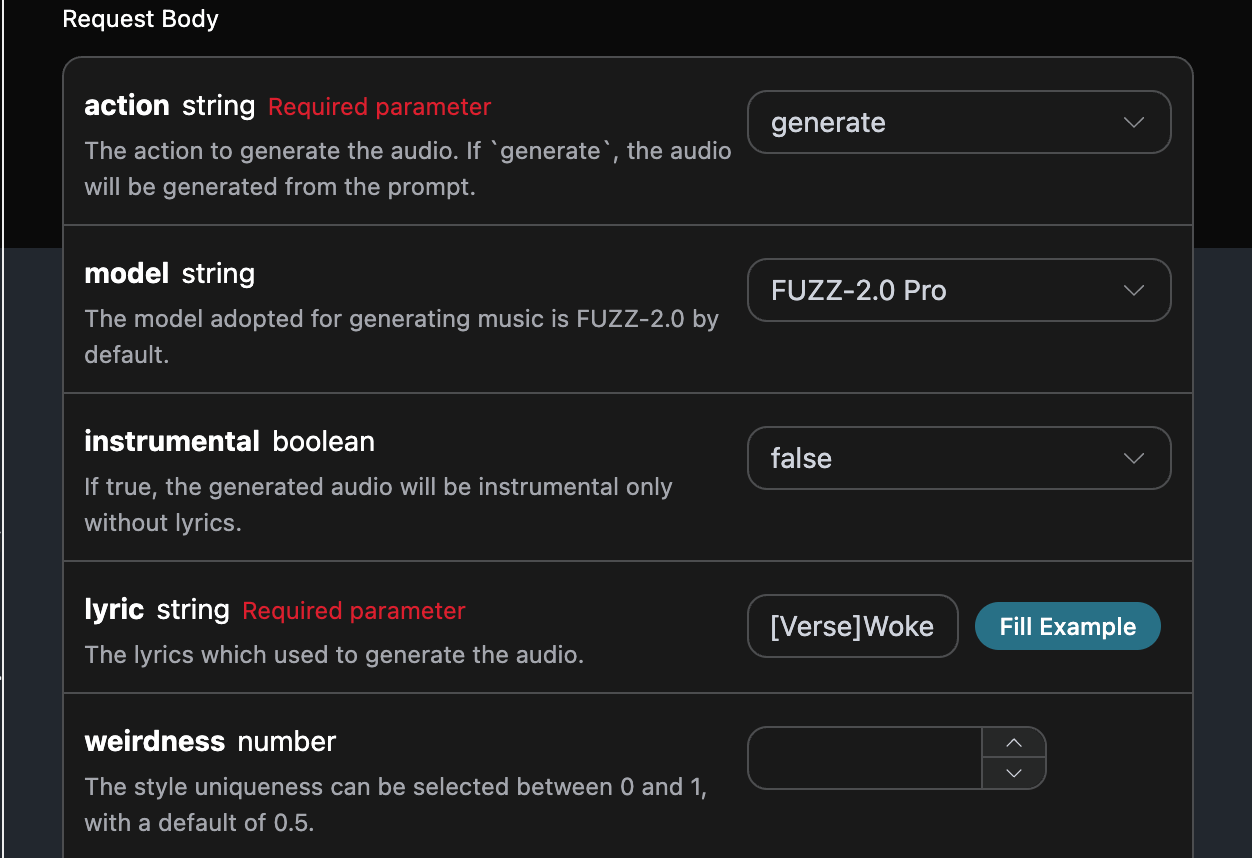
Wenn Sie benutzerdefinierte Lyrics generieren möchten, können Sie die Lyrics eingeben:
In diesem Fall kann das `lyric`-Feld Inhalte wie folgt übergeben:
```
[Verse]Woke up with the sun in my eyesNo clouds above just blue in the skiesShoes on my feet I’m ready to runEvery step feels like a loaded gun[Chorus]Happy days are rolling inLet the joy beneath my skinNo more shadows no more liesJust the truth that lifts me high[Verse 2]Dancing through the city streetsA rhythm pounding in my heartbeatStrangers smile it’s catching onThis world’s a stage we’re all a song[Chorus]Happy days are rolling inLet the joy beneath my skinNo more shadows no more liesJust the truth that lifts me high[Bridge]Throw your worries out the doorLet them sink to the ocean floorWe’re alive and it’s enoughLife is messy but it’s love[Chorus]Happy days are rolling inLet the joy beneath my skinNo more shadows no more liesJust the truth that lifts me high
```
Anschließend können wir basierend auf den Lyrics, dem Titel und dem Stil den Song benutzerdefiniert generieren, indem wir folgende Inhalte angeben:
* lyric: Text der Lyrics
* custom: auf `true` setzen, was bedeutet, dass eine benutzerdefinierte Generierung erfolgt. Dieser Parameter ist standardmäßig auf false gesetzt, was bedeutet, dass `prompt` verwendet wird.
* title: Der Titel des Songs.
填写样例如下:
填写完毕之后自动生成了代码如下:
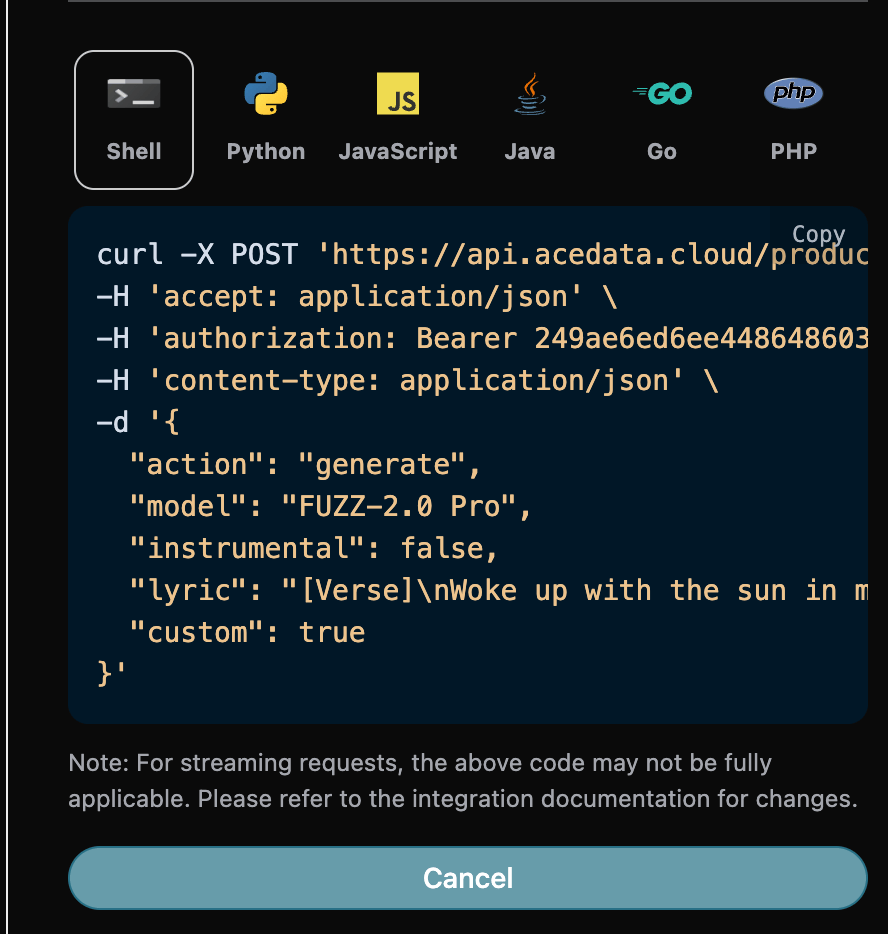
对应的代码:
```shell theme={null}
curl -X POST 'https://api.acedata.cloud/producer/audios' \
-H 'accept: application/json' \
-H 'authorization: Bearer {token}' \
-H 'content-type: application/json' \
-d '{
"action": "generate",
"model": "FUZZ-2.0 Pro",
"instrumental": false,
"lyric": "[Verse]\nWoke up with the sun in my eyes\nNo clouds above just blue in the skies\nShoes on my feet I’m ready to run\nEvery step feels like a loaded gun\n[Chorus]\nHappy days are rolling in\nLet the joy beneath my skin\nNo more shadows no more lies\nJust the truth that lifts me high\n[Verse 2]\nDancing through the city streets\nA rhythm pounding in my heartbeat\nStrangers smile it’s catching on\nThis world’s a stage we’re all a song\n[Chorus]\nHappy days are rolling in\nLet the joy beneath my skin\nNo more shadows no more lies\nJust the truth that lifts me high\n[Bridge]\nThrow your worries out the door\nLet them sink to the ocean floor\nWe’re alive and it’s enough\nLife is messy but it’s love\n[Chorus]\nHappy days are rolling in\nLet the joy beneath my skin\nNo more shadows no more lies\nJust the truth that lifts me high",
"custom": true
}'
```
测试允许, 生成的效果是类似的。
```json theme={null}
{
"success": true,
"task_id": "9f58bbd4-855a-4233-ac45-b63bf9168e02",
"trace_id": "145ad117-6ce7-42dd-af12-70751c5284fc",
"data": [
{
"id": "38d3b9e2-0dfb-4338-b2a7-15e45656ed32",
"title": "Woke up with the sun in my eyes",
"image_url": "https://storage.googleapis.com/corpusant-app-public/riffs/7ce2b11a-179f-4b87-b5ff-397613c62c93/image/38d3b9e2-0dfb-4338-b2a7-15e45656ed32.jpg",
"lyric": "[Verse]\nWoke up with the sun in my eyes\nNo clouds above just blue in the skies\nShoes on my feet I’m ready to run\nEvery step feels like a loaded gun\n[Chorus]\nHappy days are rolling in\nLet the joy beneath my skin\nNo more shadows no more lies\nJust the truth that lifts me high\n[Verse 2]\nDancing through the city streets\nA rhythm pounding in my heartbeat\nStrangers smile it’s catching on\nThis world’s a stage we’re all a song\n[Chorus]\nHappy days are rolling in\nLet the joy beneath my skin\nNo more shadows no more lies\nJust the truth that lifts me high\n[Bridge]\nThrow your worries out the door\nLet them sink to the ocean floor\nWe’re alive and it’s enough\nLife is messy but it’s love\n[Chorus]\nHappy days are rolling in\nLet the joy beneath my skin\nNo more shadows no more lies\nJust the truth that lifts me high",
"audio_url": "https://storage.googleapis.com/corpusant-app-public/riffs/7ce2b11a-179f-4b87-b5ff-397613c62c93/audio/38d3b9e2-0dfb-4338-b2a7-15e45656ed32.m4a",
"video_url": null,
"image_id": "38d3b9e2-0dfb-4338-b2a7-15e45656ed32",
"topic": null,
"seed": "3789209121",
"sound": "",
"created_at": "2025-12-30T17:26:46.357055Z",
"model": "FUZZ-2.0 Pro",
"progress": "100%",
"state": "succeeded",
"duration": "153.80897959183673"
}
]
}
```
## 翻唱歌曲
Wenn Sie die bereits generierte Musik covern möchten, können Sie den oben generierten Song eingeben, um ihn zu covern. Als nächstes müssen wir basierend auf den Lyrics und dem Titel einen Song anpassen.
Wenn Sie einen selbst hochgeladenen Song weiter covern möchten, können Sie den Parameter `action` auf `upload_cover` setzen und die ID des Songs eingeben, den Sie weiter covern möchten. Die Song-ID kann über die [Producer Upload API](https://platform.acedata.cloud/documents/producer-upload) abgerufen werden, wie im folgenden Bild gezeigt:
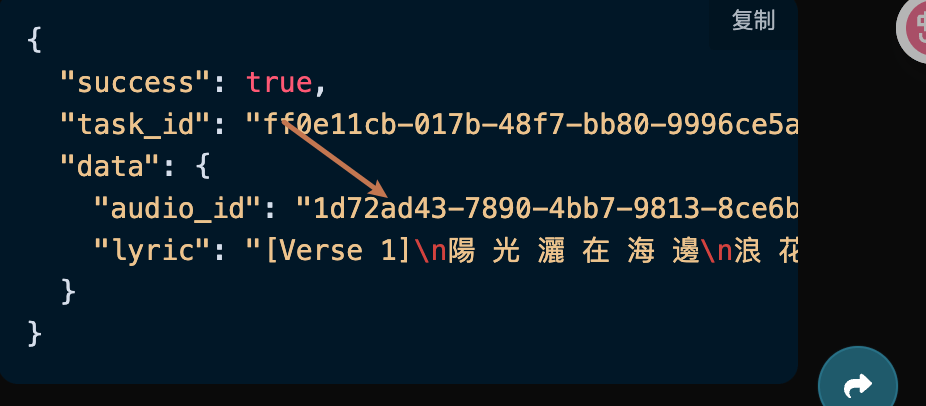
Sie können die folgenden Inhalte angeben:
* action: Die Aktion für diese Songaufgabe, derzeit unterstützt: generate, cover, extend, upload\_cover, upload\_extend, replace\_section, swap\_vocals, swap\_instrumentals, variation, für dieses Cover verwenden Sie den Parameter `cover`.
* lyric: Text der Lyrics
* title: Der Titel des Songs.
* custom: Ob der benutzerdefinierte Modus verwendet werden soll, standardmäßig ist es false.
* audio\_id: Die ID des Songs, den Sie covern möchten.
填写样例如下:

填写完毕之后自动生成了代码如下:

对应的代码:
```shell theme={null}
curl -X POST 'https://api.acedata.cloud/producer/audios' \
-H 'accept: application/json' \
-H 'authorization: Bearer {token}' \
-H 'content-type: application/json' \
-d '{
"action": "cover",
"model": "FUZZ-2.0 Pro",
"lyric": "[Verse]\nWoke up with the sun in my eyes\nNo clouds above just blue in the skies\nShoes on my feet I’m ready to run\nEvery step feels like a loaded gun\n[Chorus]\nHappy days are rolling in\nLet the joy beneath my skin\nNo more shadows no more lies\nJust the truth that lifts me high\n[Verse 2]\nDancing through the city streets\nA rhythm pounding in my heartbeat\nStrangers smile it’s catching on\nThis world’s a stage we’re all a song\n[Chorus]\nHappy days are rolling in\nLet the joy beneath my skin\nNo more shadows no more lies\nJust the truth that lifts me high\n[Bridge]\nThrow your worries out the door\nLet them sink to the ocean floor\nWe’re alive and it’s enough\nLife is messy but it’s love\n[Chorus]\nHappy days are rolling in\nLet the joy beneath my skin\nNo more shadows no more lies\nJust the truth that lifts me high",
"audio_id": "38d3b9e2-0dfb-4338-b2a7-15e45656ed32",
"instrumental": false,
"custom": true,
"title": "Cover"
}'
```
测试允许, 生成的效果是类似的。
```json theme={null}
{
"success": true,
"task_id": "dbca350e-6fb9-46ca-9c7e-4c1a9080806f",
"trace_id": "a39e0fff-ced8-4b31-ae23-aef3badd90fa",
"data": [
{
"id": "e52dd729-38b4-4c2f-9031-59eb7953c593",
"title": "Cover",
"image_url": "https://storage.googleapis.com/corpusant-app-public/riffs/7ce2b11a-179f-4b87-b5ff-397613c62c93/image/e52dd729-38b4-4c2f-9031-59eb7953c593.jpg",
"lyric": "[Strophe]\nWachte mit der Sonne in meinen Augen auf\nKeine Wolken darüber, nur Blau am Himmel\nSchuhe an meinen Füßen, ich bin bereit zu rennen\nJeder Schritt fühlt sich an wie eine geladene Waffe\n[Refrain]\nGlückliche Tage rollen herein\nLass die Freude unter meiner Haut\nKeine Schatten mehr, keine Lügen mehr\nNur die Wahrheit, die mich hoch hebt\n[Strophe 2]\nTanze durch die Straßen der Stadt\nEin Rhythmus, der in meinem Herzschlag pocht\nFremde lächeln, es ist ansteckend\nDiese Welt ist eine Bühne, wir sind alle ein Lied\n[Refrain]\nGlückliche Tage rollen herein\nLass die Freude unter meiner Haut\nKeine Schatten mehr, keine Lügen mehr\nNur die Wahrheit, die mich hoch hebt\n[Bridge]\nWirf deine Sorgen aus der Tür\nLass sie zum Meeresboden sinken\nWir leben und das ist genug\nDas Leben ist chaotisch, aber es ist Liebe\n[Refrain]\nGlückliche Tage rollen herein\nLass die Freude unter meiner Haut\nKeine Schatten mehr, keine Lügen mehr\nNur die Wahrheit, die mich hoch hebt",
"audio_url": "https://storage.googleapis.com/corpusant-app-public/riffs/7ce2b11a-179f-4b87-b5ff-397613c62c93/audio/e52dd729-38b4-4c2f-9031-59eb7953c593.m4a",
"video_url": null,
"image_id": "e52dd729-38b4-4c2f-9031-59eb7953c593",
"topic": null,
"seed": "358803418",
"sound": "",
"created_at": "2025-12-30T17:32:32.951948Z",
"model": "FUZZ-2.0 Pro",
"progress": "100%",
"state": "succeeded",
"duration": "153.0659410430839"
}
]
}
```
## Fortsetzung des Songs
Wenn Sie den Song fortsetzen möchten, müssen wir den `action`-Parameterwert auf: `extend` setzen, und dann müssen wir basierend auf den Texten, dem Titel und dem Stil den Song anpassen.
Wenn Sie den von Ihnen hochgeladenen Song fortsetzen möchten, können Sie den Parameter `action` auf `upload_extend` setzen und die ID des Songs eingeben, den Sie fortsetzen möchten. Die Song-ID kann mit der [Producer Upload API](https://platform.acedata.cloud/documents/producer-upload) abgerufen werden, wie im folgenden Bild gezeigt:
Das Beispiel zum Ausfüllen sieht wie folgt aus:
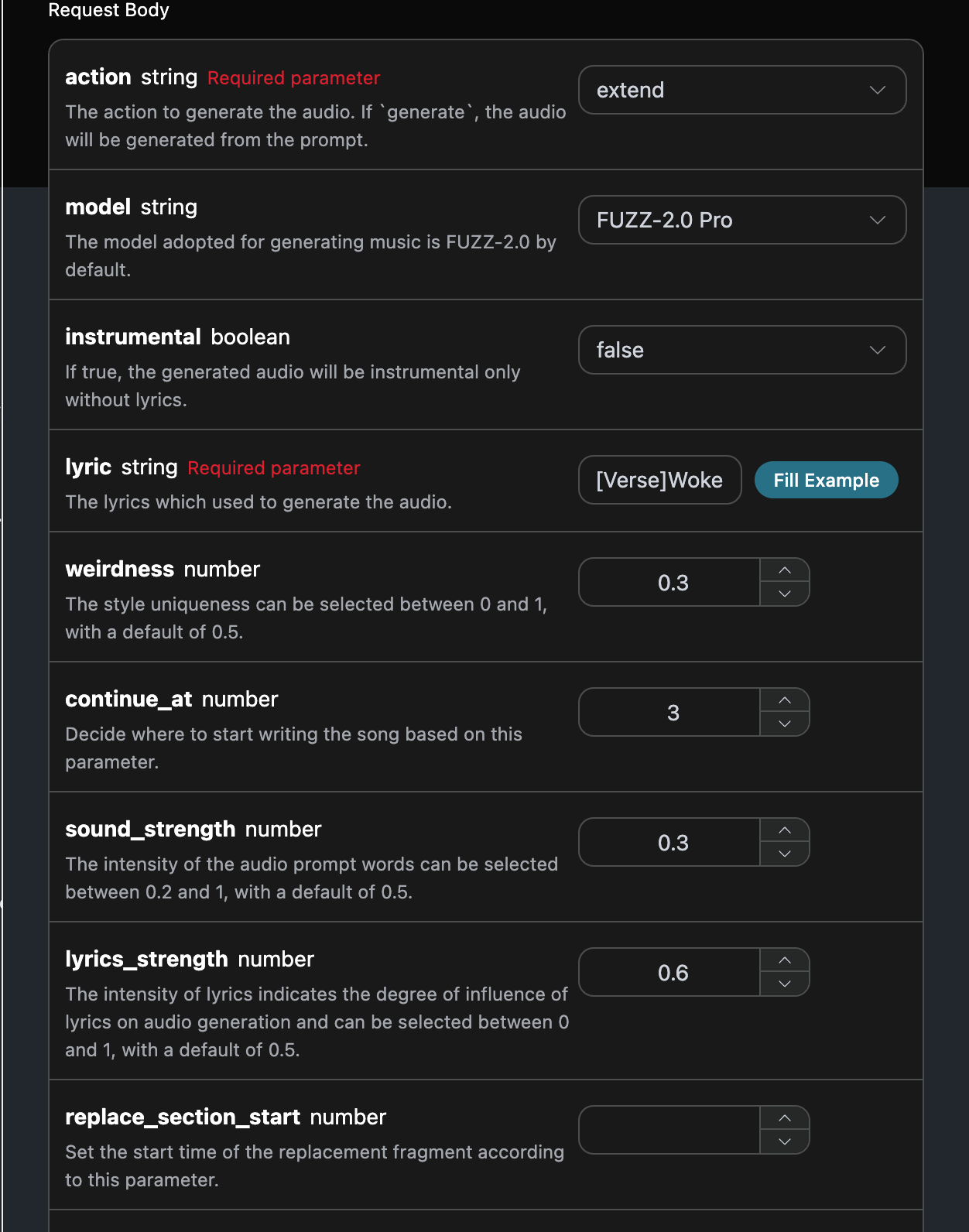
Nachdem Sie das Formular ausgefüllt haben, wird automatisch der folgende Code generiert:

Der entsprechende Code:
```shell theme={null}
curl -X POST 'https://api.acedata.cloud/producer/audios' \
-H 'accept: application/json' \
-H 'authorization: Bearer {token}' \
-H 'content-type: application/json' \
-d '{
"action": "extend",
"model": "FUZZ-2.0 Pro",
"instrumental": false,
"lyric": "[Strophe]\nWachte mit der Sonne in meinen Augen auf\nKeine Wolken darüber, nur Blau am Himmel\nSchuhe an meinen Füßen, ich bin bereit zu rennen\nJeder Schritt fühlt sich an wie eine geladene Waffe\n[Refrain]\nGlückliche Tage rollen herein\nLass die Freude unter meiner Haut\nKeine Schatten mehr, keine Lügen mehr\nNur die Wahrheit, die mich hoch hebt\n[Strophe 2]\nTanze durch die Straßen der Stadt\nEin Rhythmus, der in meinem Herzschlag pocht\nFremde lächeln, es ist ansteckend\nDiese Welt ist eine Bühne, wir sind alle ein Lied\n[Refrain]\nGlückliche Tage rollen herein\nLass die Freude unter meiner Haut\nKeine Schatten mehr, keine Lügen mehr\nNur die Wahrheit, die mich hoch hebt\n[Bridge]\nWirf deine Sorgen aus der Tür\nLass sie zum Meeresboden sinken\nWir leben und das ist genug\nDas Leben ist chaotisch, aber es ist Liebe\n[Refrain]\nGlückliche Tage rollen herein\nLass die Freude unter meiner Haut\nKeine Schatten mehr, keine Lügen mehr\nNur die Wahrheit, die mich hoch hebt",
"continue_at": 3,
"audio_id": "38d3b9e2-0dfb-4338-b2a7-15e45656ed32",
"custom": true,
"title": "Extend",
"weirdness": 0.3,
"sound_strength": 0.3,
"lyrics_strength": 0.6
}'
```
Testen erlaubt, der generierte Effekt ist ähnlich.
```json theme={null}
{
"success": true,
"task_id": "834983cb-d62d-4750-b1aa-461da137e51f",
"trace_id": "6923eee2-7403-432c-8bd1-e471086385b0",
"data": [
{
"id": "d9ebc609-fb65-4a23-b914-c074747af6a4",
"title": "Extend",
"image_url": "https://storage.googleapis.com/corpusant-app-public/riffs/7ce2b11a-179f-4b87-b5ff-397613c62c93/image/d9ebc609-fb65-4a23-b914-c074747af6a4.jpg",
"lyric": "[Strophe]\n[Strophe]\nWachte mit der Sonne in meinen Augen auf\nKeine Wolken darüber, nur Blau am Himmel\nSchuhe an meinen Füßen, ich bin bereit zu rennen\nJeder Schritt fühlt sich an wie eine geladene Waffe\n[Refrain]\nGlückliche Tage rollen herein\nLass die Freude unter meiner Haut\nKeine Schatten mehr, keine Lügen mehr\nNur die Wahrheit, die mich hoch hebt\n[Strophe 2]\nTanze durch die Straßen der Stadt\nEin Rhythmus, der in meinem Herzschlag pocht\nFremde lächeln, es ist ansteckend\nDiese Welt ist eine Bühne, wir sind alle ein Lied\n[Refrain]\nGlückliche Tage rollen herein\nLass die Freude unter meiner Haut\nKeine Schatten mehr, keine Lügen mehr\nNur die Wahrheit, die mich hoch hebt\n[Bridge]\nWirf deine Sorgen aus der Tür\nLass sie zum Meeresboden sinken\nWir leben und das ist genug\nDas Leben ist chaotisch, aber es ist Liebe\n[Refrain]\nGlückliche Tage rollen herein\nLass die Freude unter meiner Haut\nKeine Schatten mehr, keine Lügen mehr\nNur die Wahrheit, die mich hoch hebt",
"audio_url": "https://storage.googleapis.com/corpusant-app-public/riffs/7ce2b11a-179f-4b87-b5ff-397613c62c93/audio/d9ebc609-fb65-4a23-b914-c074747af6a4.m4a",
"video_url": null,
"image_id": "d9ebc609-fb65-4a23-b914-c074747af6a4",
"topic": null,
"seed": "4294469624",
"sound": "",
"created_at": "2025-12-30T17:36:14.520928Z",
"model": "FUZZ-2.0 Pro",
"progress": "100%",
"state": "succeeded",
"duration": "173.87102040816328"
}
]
}
```
## Musikvariation
Wenn Sie basierend auf dem Seed-Wert des vorherigen Songs eine neue Musik mit ähnlichem Effekt generieren möchten, müssen wir den `action`-Parameterwert auf: `variation` setzen, und dann können wir eine neue Musik mit ähnlichem Effekt anpassen.
Das Beispiel zum Ausfüllen sieht wie folgt aus:
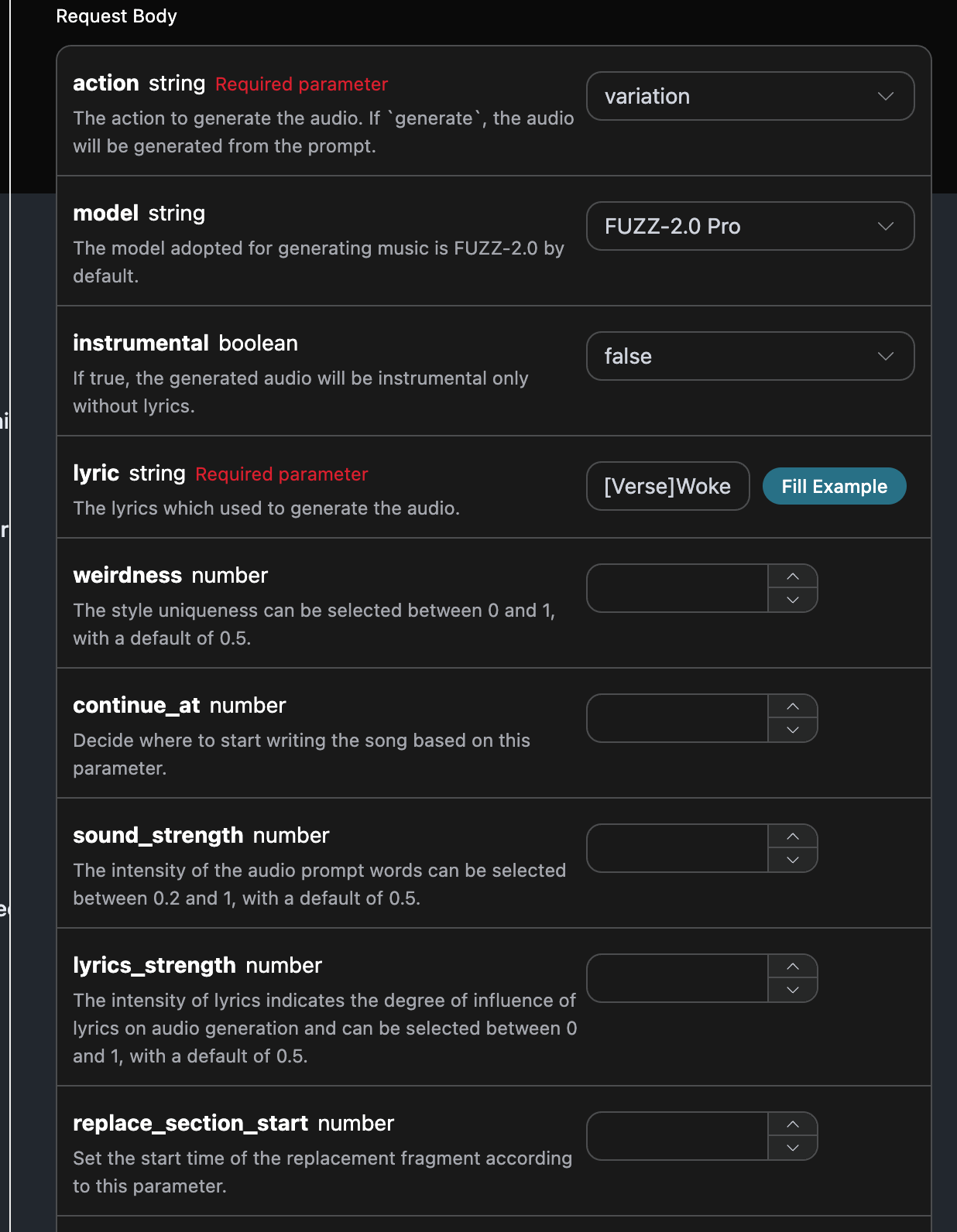
填写完毕之后 automatisch generierte der Code wie folgt:
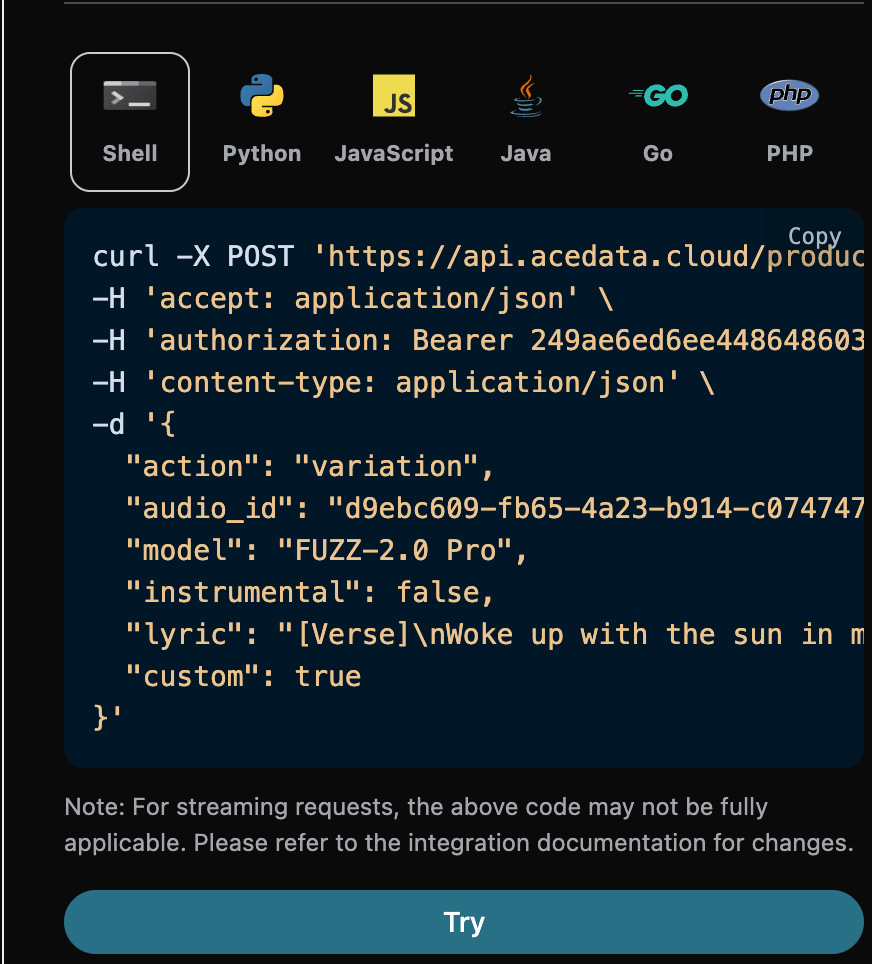
Entsprechender Code:
```shell theme={null}
curl -X POST 'https://api.acedata.cloud/producer/audios' \
-H 'accept: application/json' \
-H 'authorization: Bearer {token}' \
-H 'content-type: application/json' \
-d '{
"action": "variation",
"audio_id": "d9ebc609-fb65-4a23-b914-c074747af6a4",
"model": "FUZZ-2.0 Pro",
"instrumental": false,
"lyric": "[Verse]\nWoke up with the sun in my eyes\nNo clouds above just blue in the skies\nShoes on my feet I’m ready to run\nEvery step feels like a loaded gun\n[Chorus]\nHappy days are rolling in\nLet the joy beneath my skin\nNo more shadows no more lies\nJust the truth that lifts me high\n[Verse 2]\nDancing through the city streets\nA rhythm pounding in my heartbeat\nStrangers smile it’s catching on\nThis world’s a stage we’re all a song\n[Chorus]\nHappy days are rolling in\nLet the joy beneath my skin\nNo more shadows no more lies\nJust the truth that lifts me high\n[Bridge]\nThrow your worries out the door\nLet them sink to the ocean floor\nWe’re alive and it’s enough\nLife is messy but it’s love\n[Chorus]\nHappy days are rolling in\nLet the joy beneath my skin\nNo more shadows no more lies\nJust the truth that lifts me high",
"custom": true
}'
```
Testen erlaubt, der generierte Effekt ist ähnlich.
```json theme={null}
{
"success": true,
"task_id": "3a74da6d-a37d-4b5d-b116-821f455bce39",
"trace_id": "8e28cce0-0400-4bfd-83db-6d27f97422c7",
"data": [
{
"id": "c14ca458-cd5a-4700-83d4-5249e15f2707",
"title": "Woke up with the sun in my eyes",
"image_url": "https://storage.googleapis.com/corpusant-app-public/riffs/7ce2b11a-179f-4b87-b5ff-397613c62c93/image/c14ca458-cd5a-4700-83d4-5249e15f2707.jpg",
"lyric": "[Verse]\nWoke up with the sun in my eyes\nNo clouds above just blue in the skies\nShoes on my feet I’m ready to run\nEvery step feels like a loaded gun\n[Chorus]\nHappy days are rolling in\nLet the joy beneath my skin\nNo more shadows no more lies\nJust the truth that lifts me high\n[Verse 2]\nDancing through the city streets\nA rhythm pounding in my heartbeat\nStrangers smile it’s catching on\nThis world’s a stage we’re all a song\n[Chorus]\nHappy days are rolling in\nLet the joy beneath my skin\nNo more shadows no more lies\nJust the truth that lifts me high\n[Bridge]\nThrow your worries out the door\nLet them sink to the ocean floor\nWe’re alive and it’s enough\nLife is messy but it’s love\n[Chorus]\nHappy days are rolling in\nLet the joy beneath my skin\nNo more shadows no more lies\nJust the truth that lifts me high",
"audio_url": "https://storage.googleapis.com/corpusant-app-public/riffs/7ce2b11a-179f-4b87-b5ff-397613c62c93/audio/c14ca458-cd5a-4700-83d4-5249e15f2707.m4a",
"video_url": null,
"image_id": "c14ca458-cd5a-4700-83d4-5249e15f2707",
"topic": null,
"seed": "2082104582",
"sound": "",
"created_at": "2025-12-30T17:48:40.135187Z",
"model": "FUZZ-2.0",
"progress": "100%",
"state": "succeeded",
"duration": "173.12798185941043"
}
]
}
```
## Ersetzen von Abschnitten
Wenn Sie einen Abschnitt des Songs ersetzen möchten, müssen wir den Parameter `action` mit dem Wert: `replace_section` übergeben, anschließend müssen wir basierend auf den Lyrics und dem Titel den Song anpassen.
Wenn Sie einen von Ihnen hochgeladenen Song weiterhin ersetzen möchten, können Sie den Parameter `action` auf `upload_replace_section` setzen und die ID des Songs eingeben, den Sie weiter anpassen möchten. Die Song-ID kann über die [Producer Upload API](https://platform.acedata.cloud/documents/producer-upload) abgerufen werden, wie im folgenden Bild gezeigt:
Beispiel für die Eingabe:
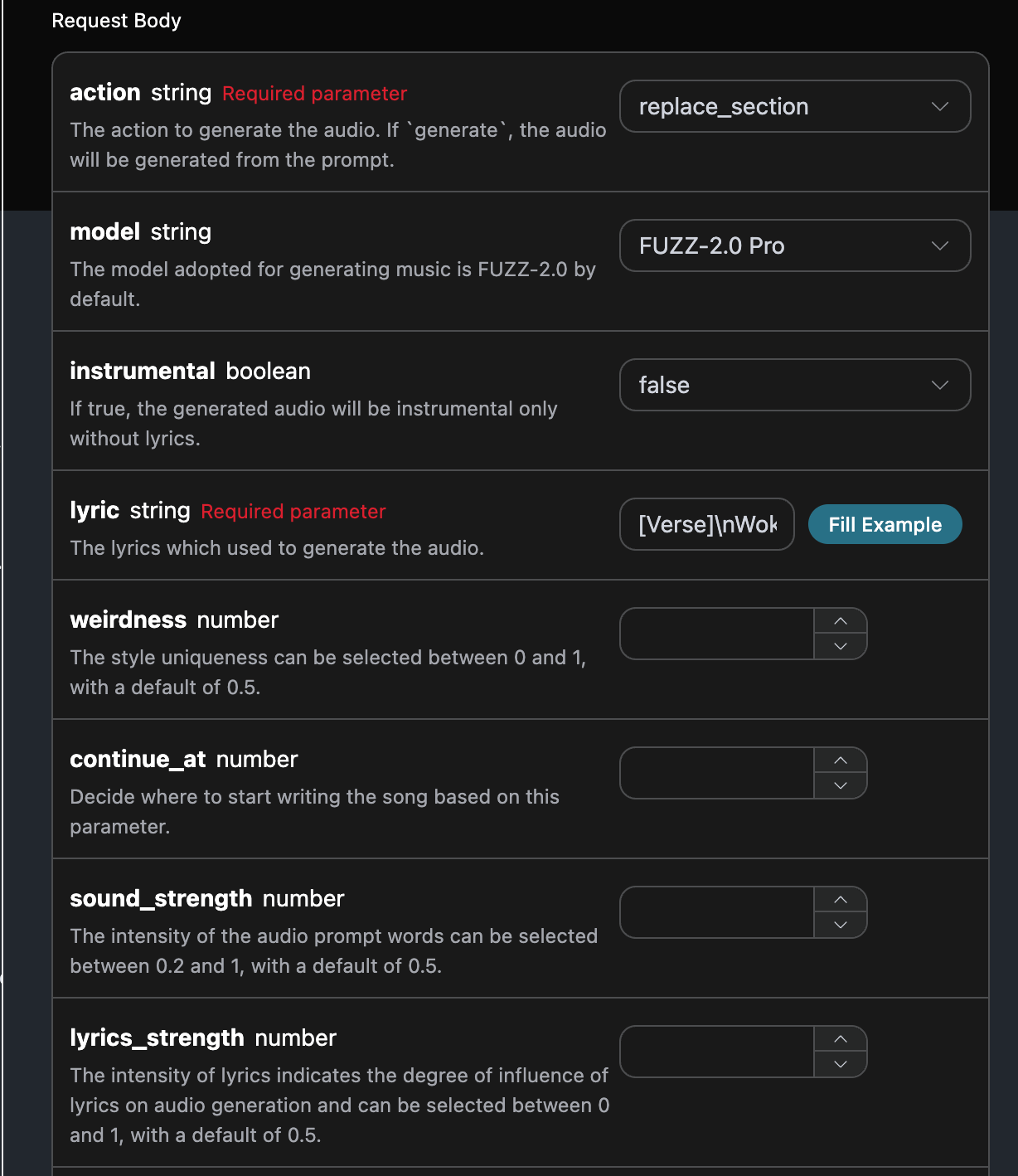
Fertig ausgefüllt, generierte der Code wie folgt:

Entsprechender Code:
```shell theme={null}
curl -X POST 'https://api.acedata.cloud/producer/audios' \
-H 'accept: application/json' \
-H 'authorization: Bearer {token}' \
-H 'content-type: application/json' \
-d '{
"action": "replace_section",
"model": "FUZZ-2.0 Pro",
"instrumental": false,
"lyric": "[Verse]\\nWoke up with the sun in my eyes\\nNo clouds above just blue in the skies\\nShoes on my feet I’m ready to run\\nEvery step feels like a loaded gun\\n[Chorus]\\nHappy days are rolling in\\nLet the joy beneath my skin\\nNo more shadows no more lies\\nJust the truth that lifts me high\\n[Verse 2]\\nDancing through the city streets\\nA rhythm pounding in my heartbeat\\nStrangers smile it’s catching on\\nThis world’s a stage we’re all a song\\n[Chorus]\\nHappy days are rolling in\\nLet the joy beneath my skin\\nNo more shadows no more lies\\nJust the truth that lifts me high\\n[Bridge]\\nThrow your worries out the door\\nLet them sink to the ocean floor\\nWe’re alive and it’s enough\\nLife is messy but it’s love\\n[Chorus]\\nHappy days are rolling in\\nLet the joy beneath my skin\\nNo more shadows no more lies\\nJust the truth that lifts me high",
"audio_id": "d9ebc609-fb65-4a23-b914-c074747af6a4",
"replace_section_start": 3,
"replace_section_end": 70,
"custom": true
}'
```
Testen erlaubt, der generierte Effekt ist ähnlich.
```json theme={null}
{
"success": true,
"task_id": "3cb5ae96-01b0-4a37-afb0-e582608af56f",
"trace_id": "3ebc6f63-5093-4499-bf9b-95c239e0da4f",
"data": [
{
"id": "a54609c6-13e2-4176-be0f-4d7eebc68e1f",
"title": "Wachte mit der Sonne in meinen Augen auf",
"image_url": "https://storage.googleapis.com/corpusant-app-public/riffs/7ce2b11a-179f-4b87-b5ff-397613c62c93/image/a54609c6-13e2-4176-be0f-4d7eebc68e1f.jpg",
"lyric": "[Strophe]\\nWachte mit der Sonne in meinen Augen auf\\nKeine Wolken darüber, nur Blau am Himmel\\nSchuhe an meinen Füßen, ich bin bereit zu rennen\\nJeder Schritt fühlt sich an wie eine geladene Waffe\\n[Refrain]\\nGlückliche Tage rollen herein\\nLass die Freude unter meiner Haut\\nKeine Schatten mehr, keine Lügen mehr\\nNur die Wahrheit, die mich hochhebt\\n[Strophe 2]\\nTanzend durch die Straßen der Stadt\\nEin Rhythmus, der in meinem Herzschlag pocht\\nFremde lächeln, es ist ansteckend\\nDiese Welt ist eine Bühne, wir sind alle ein Lied\\n[Refrain]\\nGlückliche Tage rollen herein\\nLass die Freude unter meiner Haut\\nKeine Schatten mehr, keine Lügen mehr\\nNur die Wahrheit, die mich hochhebt\\n[Bridge]\\nWirf deine Sorgen aus der Tür\\nLass sie zum Meeresboden sinken\\nWir leben und das ist genug\\nDas Leben ist chaotisch, aber es ist Liebe\\n[Refrain]\\nGlückliche Tage rollen herein\\nLass die Freude unter meiner Haut\\nKeine Schatten mehr, keine Lügen mehr\\nNur die Wahrheit, die mich hochhebt",
"audio_url": "https://storage.googleapis.com/corpusant-app-public/riffs/7ce2b11a-179f-4b87-b5ff-397613c62c93/audio/a54609c6-13e2-4176-be0f-4d7eebc68e1f.m4a",
"video_url": null,
"image_id": "a54609c6-13e2-4176-be0f-4d7eebc68e1f",
"topic": null,
"seed": "14887454",
"sound": "",
"created_at": "2025-12-30T18:01:19.907443Z",
"model": "FUZZ-2.0 Pro",
"progress": "100%",
"state": "succeeded",
"duration": "174.6140589569161"
}
]
}
```
## Begleitmusik-Umwandlung
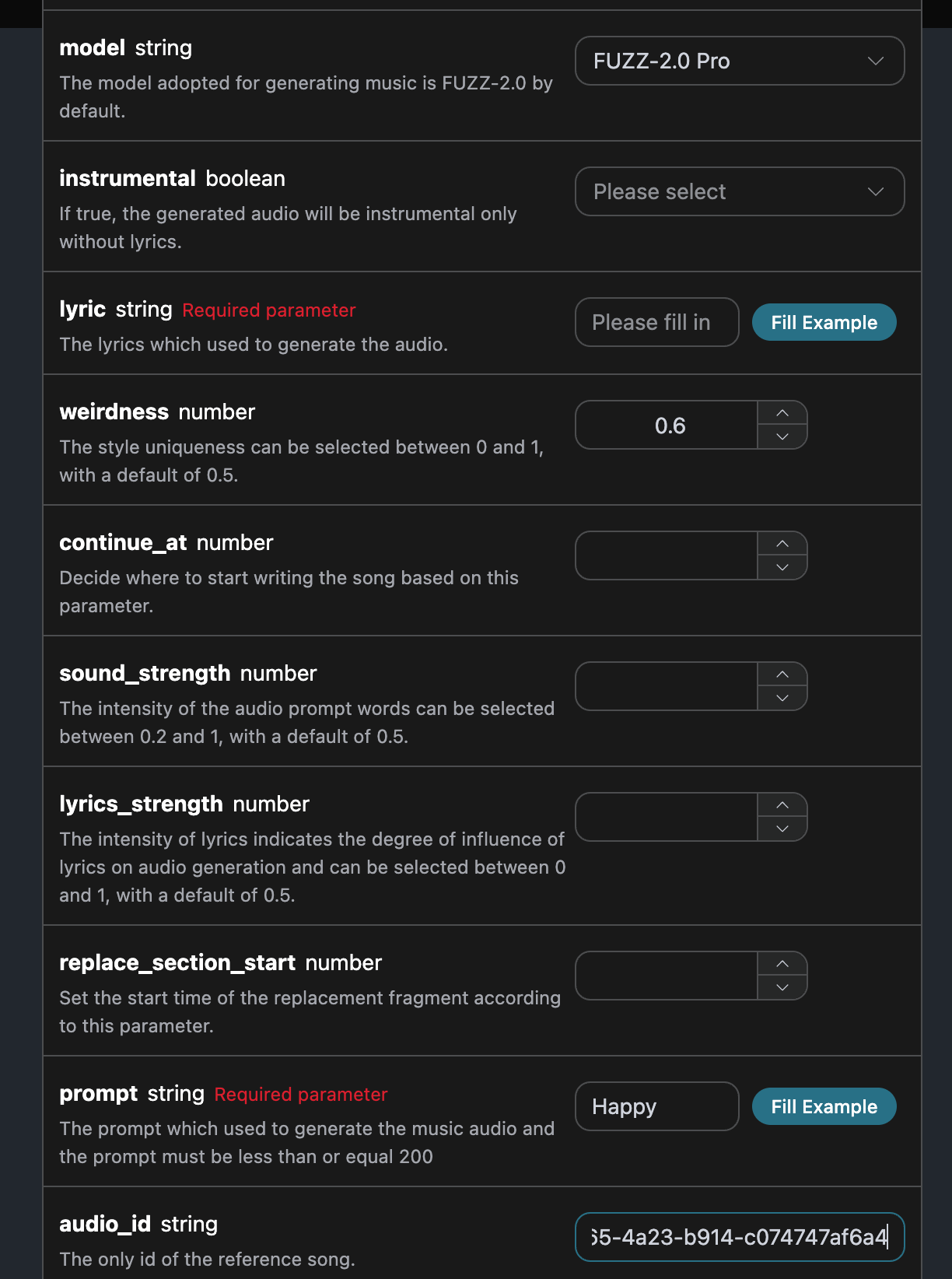
Wenn Sie die offizielle Begleitmusik-Umwandlung verwenden möchten, können Sie den Wert des `action`-Parameters auf `swap_instrumentals` setzen, und dann werden wir basierend auf den Texten und dem Titel ein Lied generieren.
Das ausgefüllte Beispiel sieht wie folgt aus:
Nach dem Ausfüllen wird automatisch der folgende Code generiert:
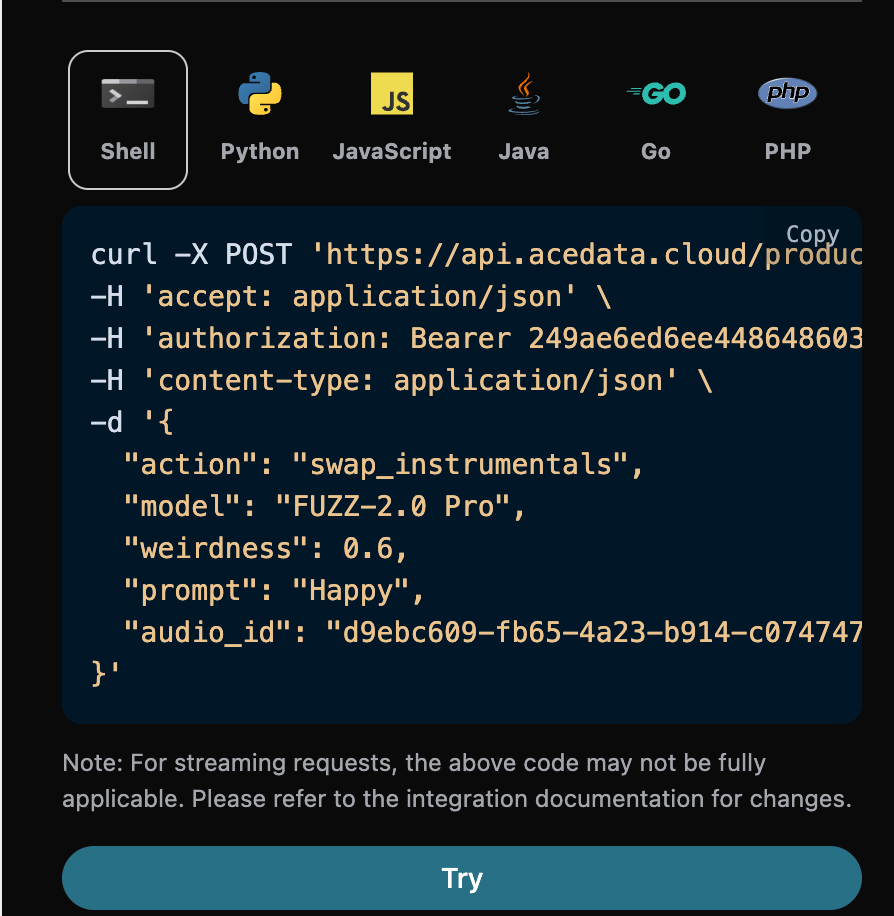
Der entsprechende Code:
```shell theme={null}
curl -X POST 'https://api.acedata.cloud/producer/audios' \
-H 'accept: application/json' \
-H 'authorization: Bearer {token}' \
-H 'content-type: application/json' \
-d '{
"action": "swap_instrumentals",
"model": "FUZZ-2.0 Pro",
"weirdness": 0.6,
"prompt": "Happy",
"audio_id": "d9ebc609-fb65-4a23-b914-c074747af6a4"
}'
```
Testen erlaubt, der generierte Effekt ist ähnlich.
```json theme={null}
{
"success": true,
"task_id": "d17d8376-3a58-451d-a976-404719bac11d",
"trace_id": "ab596807-910a-4e30-bae2-4647895f7d0b",
"data": [
{
"id": "22d7d75c-9e0a-47a8-b22b-eea55eaa0c4b",
"title": "Erweitern (Soundwechsel)",
"image_url": "https://storage.googleapis.com/corpusant-app-public/riffs/7ce2b11a-179f-4b87-b5ff-397613c62c93/image/22d7d75c-9e0a-47a8-b22b-eea55eaa0c4b.jpg",
"lyric": "[Strophe]\nWachte mit der Sonne in meinen Augen auf\nKeine Wolken darüber, nur Blau am Himmel\nSchuhe an meinen Füßen, ich bin bereit zu rennen\nJeder Schritt fühlt sich an wie eine geladene Waffe\n[Refrain]\nGlückliche Tage rollen herein\nLass die Freude unter meiner Haut\nKeine Schatten mehr, keine Lügen mehr\nNur die Wahrheit, die mich hochhebt\n[Strophe 2]\nTanzend durch die Straßen der Stadt\nEin Rhythmus, der in meinem Herzschlag pocht\nFremde lächeln, es ist ansteckend\nDiese Welt ist eine Bühne, wir sind alle ein Lied\n[Refrain]\nGlückliche Tage rollen herein\nLass die Freude unter meiner Haut\nKeine Schatten mehr, keine Lügen mehr\nNur die Wahrheit, die mich hochhebt\n[Bridge]\nWirf deine Sorgen aus der Tür\nLass sie zum Meeresboden sinken\nWir leben und das ist genug\nDas Leben ist chaotisch, aber es ist Liebe\n[Refrain]\nGlückliche Tage rollen herein\nLass die Freude unter meiner Haut\nKeine Schatten mehr, keine Lügen mehr\nNur die Wahrheit, die mich hochhebt",
"audio_url": "https://storage.googleapis.com/corpusant-app-public/riffs/7ce2b11a-179f-4b87-b5ff-397613c62c93/audio/22d7d75c-9e0a-47a8-b22b-eea55eaa0c4b.m4a",
"video_url": null,
"image_id": "22d7d75c-9e0a-47a8-b22b-eea55eaa0c4b",
"topic": null,
"seed": "2157878068",
"sound": "Happy",
"created_at": "2025-12-30T18:09:49.594800Z",
"model": "FUZZ-2.0 Pro",
"progress": "100%",
"state": "succeeded",
"duration": "172.3849433106576"
}
]
}
```
## Gesangsumwandlung
Wenn Sie die offizielle Gesangsumwandlung verwenden möchten, können Sie den Wert des `action`-Parameters auf `swap_vocals` setzen, und dann werden wir basierend auf den Texten, dem Titel und dem Stil ein Lied generieren.
Das ausgefüllte Beispiel sieht wie folgt aus:
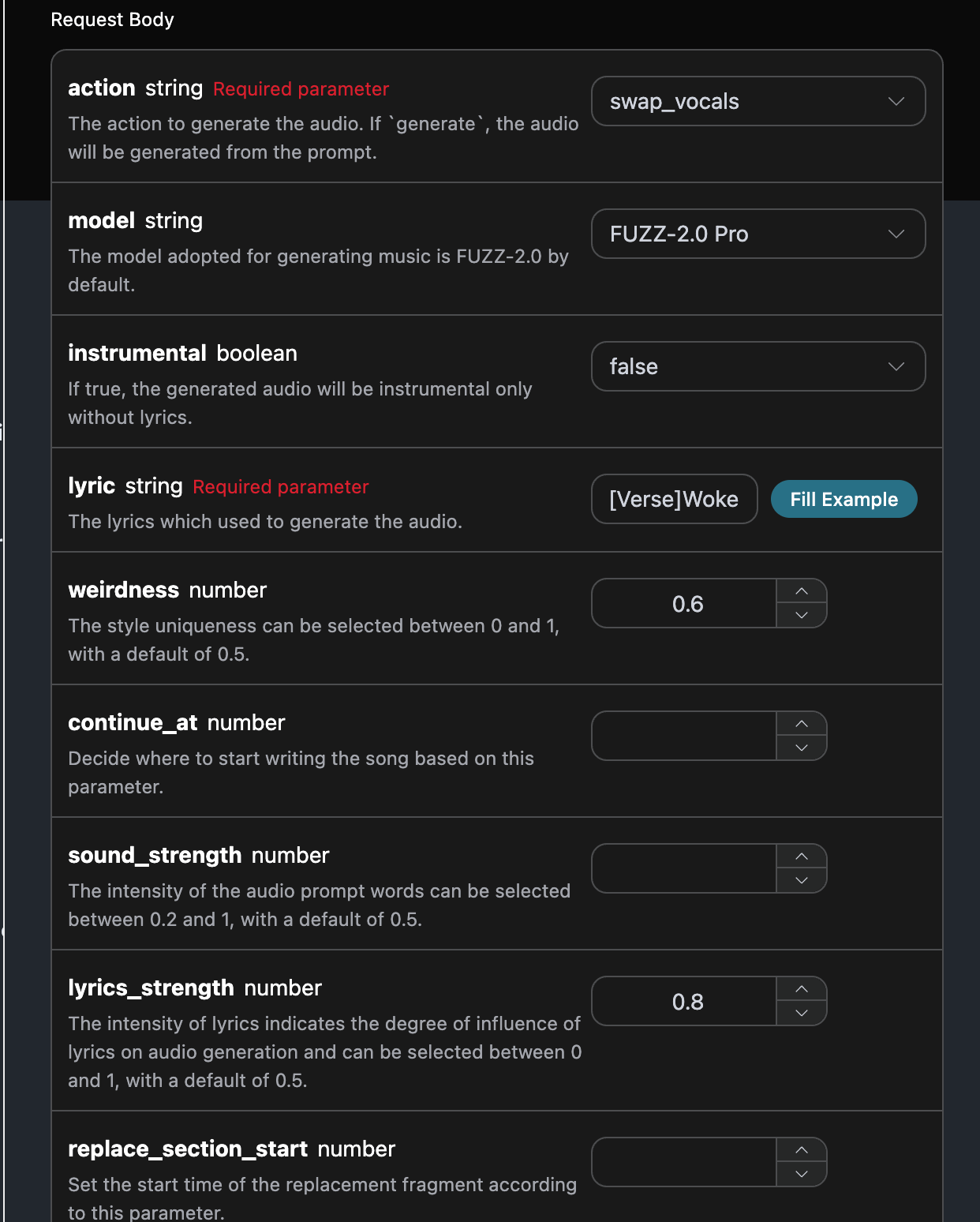
Nach dem Ausfüllen wird automatisch der folgende Code generiert:

Der entsprechende Code:
```shell theme={null}
curl -X POST 'https://api.acedata.cloud/producer/audios' \
-H 'accept: application/json' \
-H 'authorization: Bearer {token}' \
-H 'content-type: application/json' \
-d '{
"action": "swap_vocals",
"model": "FUZZ-2.0 Pro",
"instrumental": false,
"lyric": "[Verse]\nWachte mit der Sonne in meinen Augen auf\nKeine Wolken darüber, nur Blau am Himmel\nSchuhe an meinen Füßen, ich bin bereit zu rennen\nJeder Schritt fühlt sich an wie eine geladene Waffe\n[Chorus]\nGlückliche Tage rollen herein\nLass die Freude unter meiner Haut\nKeine Schatten mehr, keine Lügen mehr\nNur die Wahrheit, die mich hochhebt\n[Verse 2]\nTanzend durch die Straßen der Stadt\nEin Rhythmus, der in meinem Herzschlag pocht\nFremde lächeln, es ist ansteckend\nDiese Welt ist eine Bühne, wir sind alle ein Lied\n[Chorus]\nGlückliche Tage rollen herein\nLass die Freude unter meiner Haut\nKeine Schatten mehr, keine Lügen mehr\nNur die Wahrheit, die mich hochhebt\n[Bridge]\nWirf deine Sorgen aus der Tür\nLass sie zum Meeresboden sinken\nWir leben und das ist genug\nDas Leben ist chaotisch, aber es ist Liebe\n[Chorus]\nGlückliche Tage rollen herein\nLass die Freude unter meiner Haut\nKeine Schatten mehr, keine Lügen mehr\nNur die Wahrheit, die mich hochhebt",
"weirdness": 0.6,
"lyrics_strength": 0.8,
"audio_id": "d9ebc609-fb65-4a23-b914-c074747af6a4",
"custom": true
}'
```
测试允许,生成的效果是类似的。
```json theme={null}
{
"success": true,
"task_id": "a903ac38-f129-4f85-9181-b1dc5579bd32",
"trace_id": "9953af52-45e0-4808-bf13-88f0b21262c1",
"data": [
{
"id": "7b2d653b-aaaa-41b0-b737-aee4c4c5693b",
"title": "Wachte mit der Sonne in meinen Augen auf",
"image_url": "https://storage.googleapis.com/corpusant-app-public/riffs/7ce2b11a-179f-4b87-b5ff-397613c62c93/image/7b2d653b-aaaa-41b0-b737-aee4c4c5693b.jpg",
"lyric": "[Verse]\nWachte mit der Sonne in meinen Augen auf\nKeine Wolken darüber, nur Blau am Himmel\nSchuhe an meinen Füßen, ich bin bereit zu rennen\nJeder Schritt fühlt sich an wie eine geladene Waffe\n[Chorus]\nGlückliche Tage rollen herein\nLass die Freude unter meiner Haut\nKeine Schatten mehr, keine Lügen mehr\nNur die Wahrheit, die mich hochhebt\n[Verse 2]\nTanzend durch die Straßen der Stadt\nEin Rhythmus, der in meinem Herzschlag pocht\nFremde lächeln, es ist ansteckend\nDiese Welt ist eine Bühne, wir sind alle ein Lied\n[Chorus]\nGlückliche Tage rollen herein\nLass die Freude unter meiner Haut\nKeine Schatten mehr, keine Lügen mehr\nNur die Wahrheit, die mich hochhebt\n[Bridge]\nWirf deine Sorgen aus der Tür\nLass sie zum Meeresboden sinken\nWir leben und das ist genug\nDas Leben ist chaotisch, aber es ist Liebe\n[Chorus]\nGlückliche Tage rollen herein\nLass die Freude unter meiner Haut\nKeine Schatten mehr, keine Lügen mehr\nNur die Wahrheit, die mich hochhebt",
"audio_url": "https://storage.googleapis.com/corpusant-app-public/riffs/7ce2b11a-179f-4b87-b5ff-397613c62c93/audio/7b2d653b-aaaa-41b0-b737-aee4c4c5693b.m4a",
"video_url": null,
"image_id": "7b2d653b-aaaa-41b0-b737-aee4c4c5693b",
"topic": null,
"seed": "2484735707",
"sound": "",
"created_at": "2025-12-30T18:13:01.349875Z",
"model": "FUZZ-2.0 Pro",
"progress": "100%",
"state": "succeeded",
"duration": "173.12798185941043"
}
]
}
```
## Wort- und Musiktrennung
Wenn Sie die offizielle Wort- und Musiktrennung verwenden möchten, können Sie den Wert des Parameters `action` auf: `stems` setzen, und dann müssen wir die Wort- und Musiktrennung basierend auf der Song-ID durchführen.
Das Beispiel ist wie folgt:
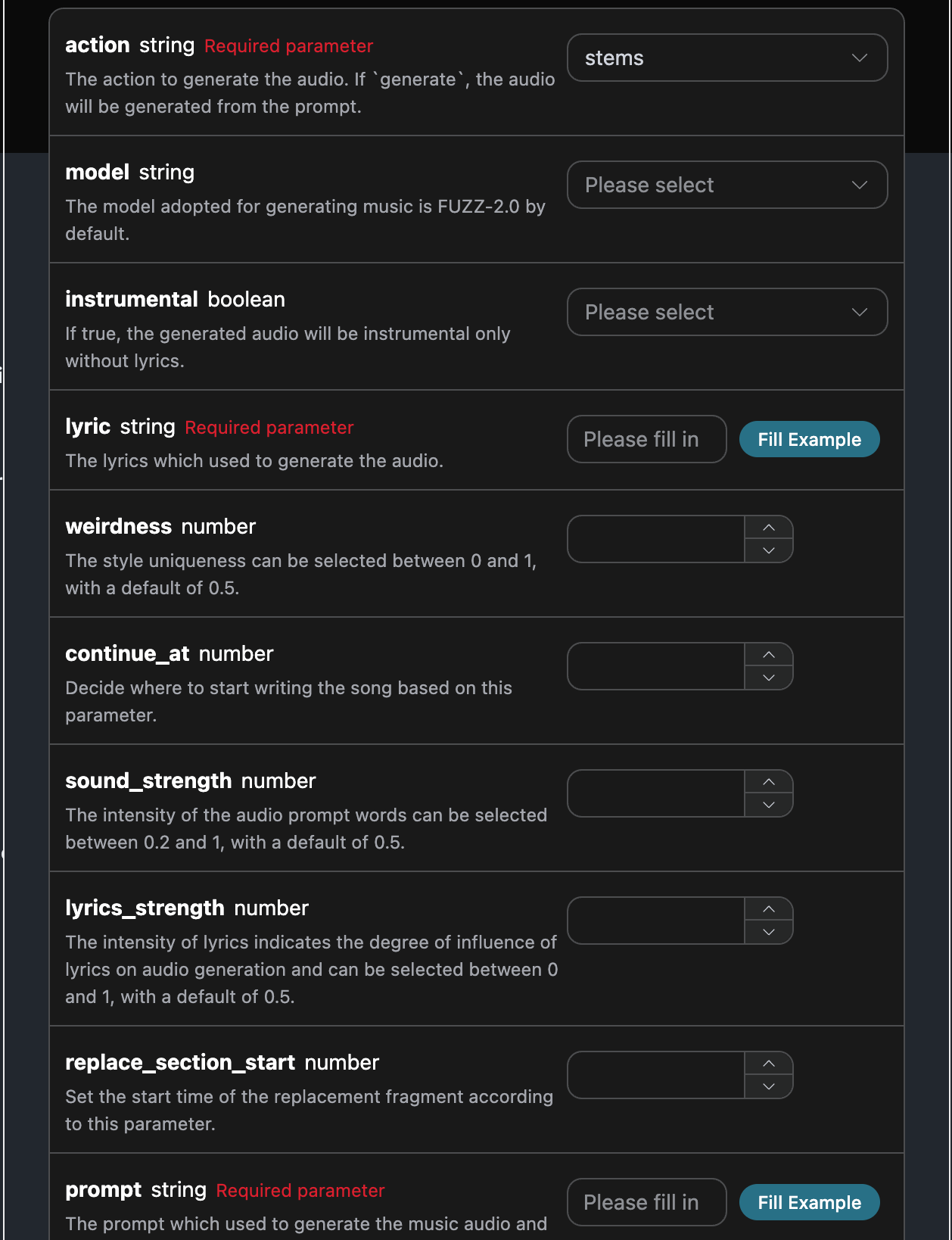
Nachdem Sie das ausgefüllt haben, wird automatisch der folgende Code generiert:
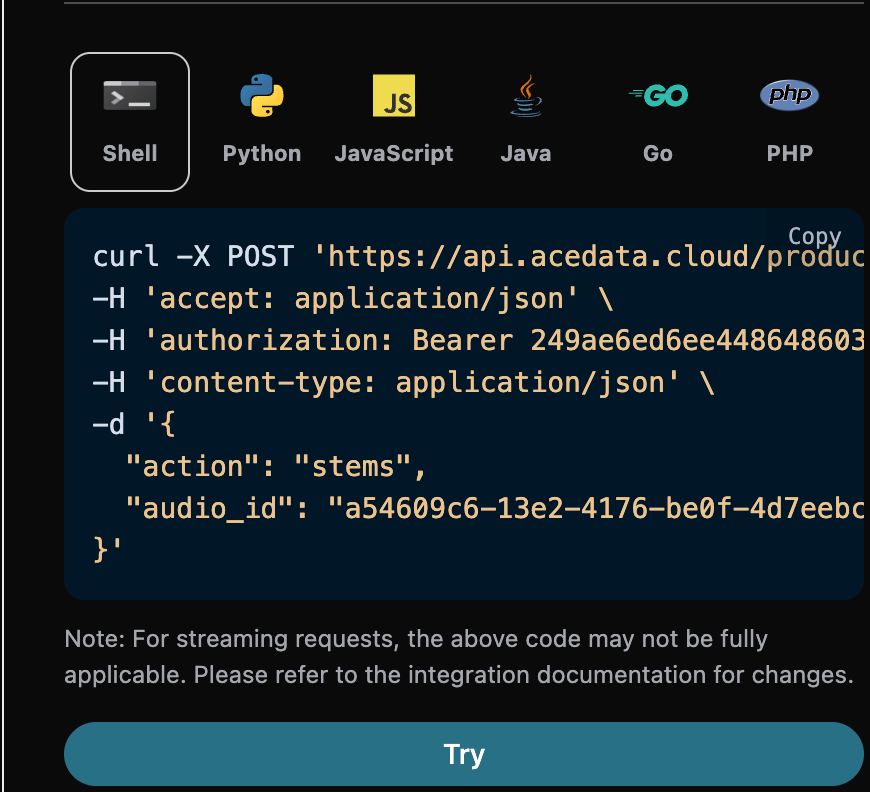
Der entsprechende Code:
```shell theme={null}
curl -X POST 'https://api.acedata.cloud/producer/audios' \
-H 'accept: application/json' \
-H 'authorization: Bearer {token}' \
-H 'content-type: application/json' \
-d '{
"action": "stems",
"audio_id": "a54609c6-13e2-4176-be0f-4d7eebc68e1f"
}'
```
测试允许,生成的效果是类似的。
```json theme={null}
{
"success": true,
"task_id": "561ac695-b4aa-47cf-978d-fb7be2b9ebfc",
"trace_id": "66d0d397-2987-4bde-84fb-a60d0023b217",
"data": [
{
"title": "Wachte mit der Sonne in meinen Augen auf",
"lyric": "",
"stems_url": "https://platform.cdn.acedata.cloud/producer/561ac695-b4aa-47cf-978d-fb7be2b9ebfc.zip",
"model": "",
"progress": "100%",
"state": "succeeded"
}
]
}
```
## Asynchrone Rückrufe
Da die von der Producer Audios Generation API erzeugte Zeit manchmal relativ lang sein kann, wird die HTTP-Anfrage bei langer Nichtreaktion der API die Verbindung aufrechterhalten, was zu einem zusätzlichen Systemressourcenverbrauch führt. Daher bietet diese API auch Unterstützung für asynchrone Rückrufe.
Der gesamte Prozess ist: Wenn der Client die Anfrage stellt, gibt er zusätzlich ein Feld `callback_url` an. Nachdem der Client die API-Anfrage gestellt hat, gibt die API sofort ein Ergebnis zurück, das ein Feld `task_id` enthält, das die aktuelle Aufgaben-ID darstellt. Wenn die Aufgabe abgeschlossen ist, wird das Ergebnis der Generierung der Aufgabe in Form von POST JSON an die vom Client angegebene `callback_url` gesendet, wobei auch das Feld `task_id` enthalten ist, sodass das Aufgabenergebnis über die ID verknüpft werden kann.
Lassen Sie uns anhand eines Beispiels verstehen, wie dies konkret funktioniert.
Zunächst ist der Webhook-Rückruf ein Dienst, der HTTP-Anfragen empfangen kann. Entwickler sollten ihn durch die URL ihres eigenen HTTP-Servers ersetzen. Hier zur Veranschaulichung verwenden wir eine öffentliche Webhook-Beispielwebsite [https://webhook.site/](https://webhook.site/), die beim Öffnen der Website eine Webhook-URL bereitstellt, wie im Bild gezeigt:

Kopieren Sie diese URL, um sie als Webhook zu verwenden. Das Beispiel hier ist [https://webhook.site/#!/view/0d73431d-f833-4be4-9276-b6e1690d55c1](https://webhook.site/#!/view/0d73431d-f833-4be4-9276-b6e1690d55c1).
Als nächstes können wir das Feld `callback_url` auf die oben genannte Webhook-URL setzen und die entsprechenden Parameter ausfüllen, wie im Bild gezeigt:
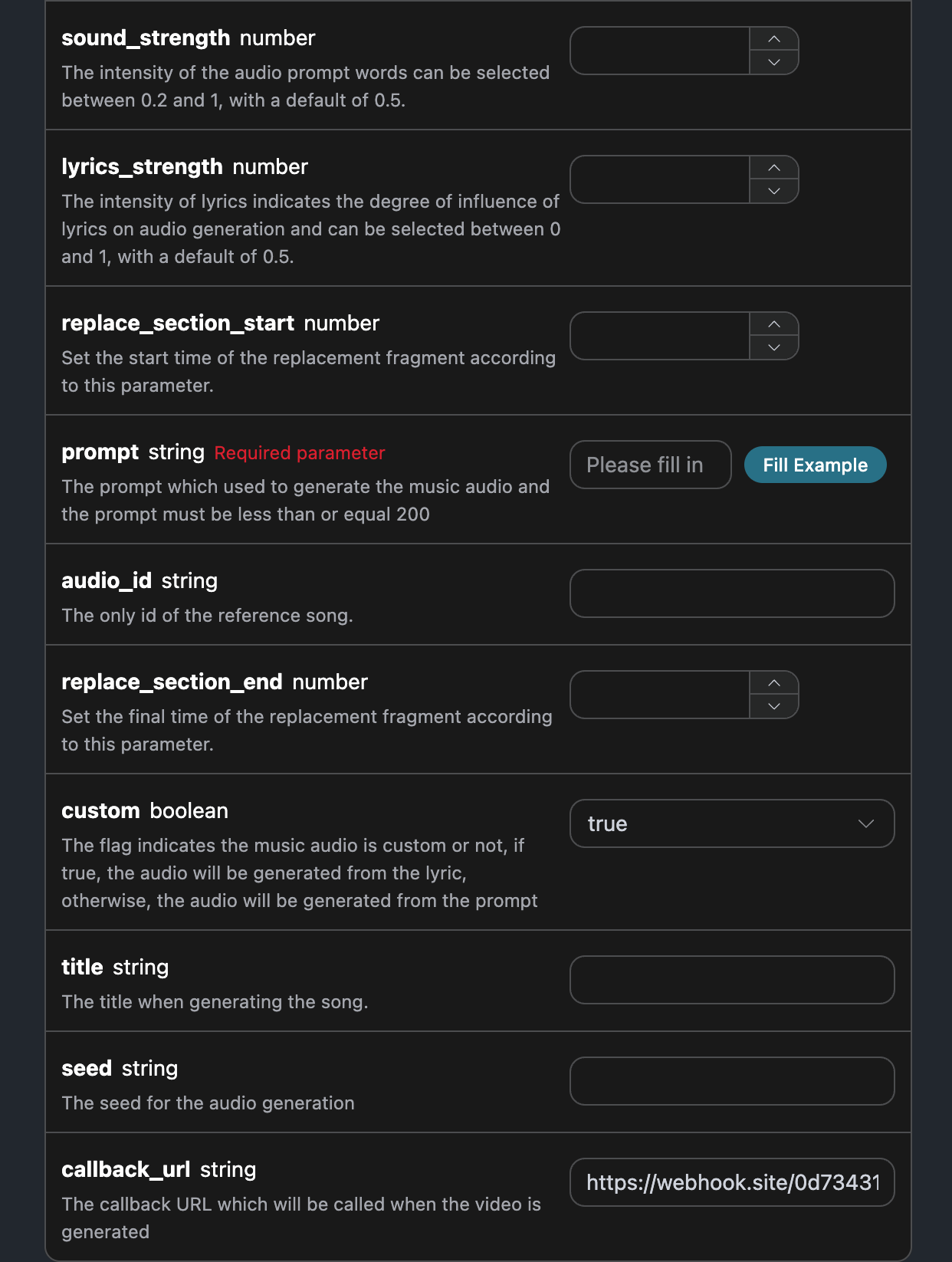
Klicken Sie auf Ausführen, und Sie werden sofort ein Ergebnis erhalten, wie folgt:
```
{
"task_id": "1a6ac2ad-10f2-4e2b-b500-66ec27fe82ad"
}
```
Bitte einen Moment Geduld, wir können die Ergebnisse der Generierungsaufgabe unter [https://webhook.site/#!/view/0d73431d-f833-4be4-9276-b6e1690d55c1](https://webhook.site/#!/view/0d73431d-f833-4be4-9276-b6e1690d55c1) beobachten, wie im Bild gezeigt:
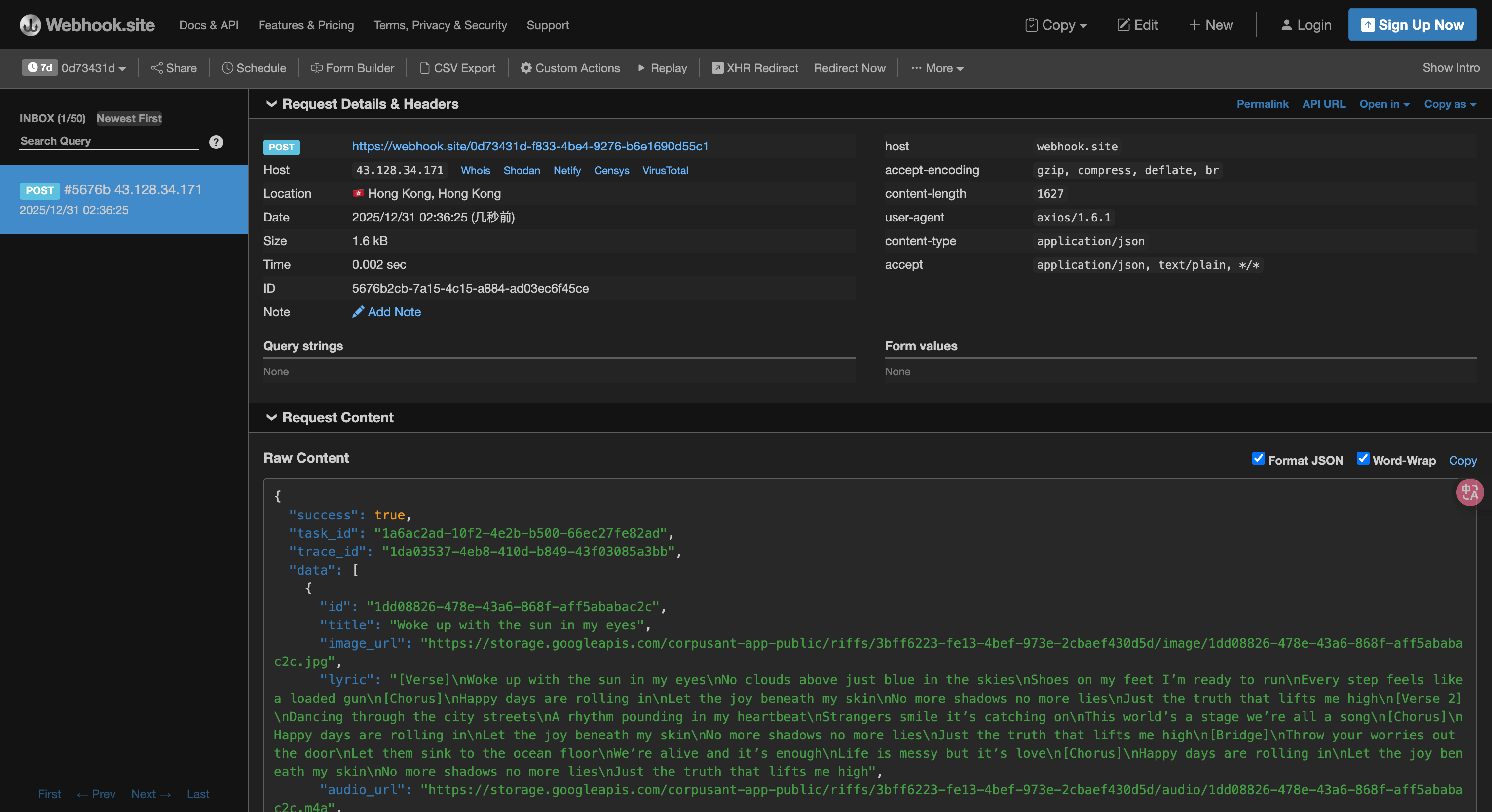
Der Inhalt ist wie folgt:
```json theme={null}
{
"success": true,
"task_id": "1a6ac2ad-10f2-4e2b-b500-66ec27fe82ad",
"trace_id": "1da03537-4eb8-410d-b849-43f03085a3bb",
"data": [
{
"id": "1dd08826-478e-43a6-868f-aff5ababac2c",
"title": "Wachte mit der Sonne in meinen Augen auf",
"image_url": "https://storage.googleapis.com/corpusant-app-public/riffs/3bff6223-fe13-4bef-973e-2cbaef430d5d/image/1dd08826-478e-43a6-868f-aff5ababac2c.jpg",
"lyric": "[Strophe]\nWachte mit der Sonne in meinen Augen auf\nKeine Wolken darüber, nur Blau am Himmel\nSchuhe an meinen Füßen, ich bin bereit zu rennen\nJeder Schritt fühlt sich an wie eine geladene Waffe\n[Refrain]\nGlückliche Tage rollen herein\nLass die Freude unter meiner Haut\nKeine Schatten mehr, keine Lügen mehr\nNur die Wahrheit, die mich hochhebt\n[Strophe 2]\nTanze durch die Straßen der Stadt\nEin Rhythmus, der in meinem Herzschlag pocht\nFremde lächeln, es ist ansteckend\nDiese Welt ist eine Bühne, wir sind alle ein Lied\n[Refrain]\nGlückliche Tage rollen herein\nLass die Freude unter meiner Haut\nKeine Schatten mehr, keine Lügen mehr\nNur die Wahrheit, die mich hochhebt\n[Bridge]\nWirf deine Sorgen aus der Tür\nLass sie auf den Meeresboden sinken\nWir leben und das ist genug\nDas Leben ist chaotisch, aber es ist Liebe\n[Refrain]\nGlückliche Tage rollen herein\nLass die Freude unter meiner Haut\nKeine Schatten mehr, keine Lügen mehr\nNur die Wahrheit, die mich hochhebt",
"audio_url": "https://storage.googleapis.com/corpusant-app-public/riffs/3bff6223-fe13-4bef-973e-2cbaef430d5d/audio/1dd08826-478e-43a6-868f-aff5ababac2c.m4a",
"video_url": null,
"image_id": "1dd08826-478e-43a6-868f-aff5ababac2c",
"topic": null,
"seed": "1490770667",
"sound": "",
"created_at": "2025-12-30T18:36:00.994141Z",
"model": "FUZZ-2.0 Pro",
"progress": "100%",
"state": "succeeded",
"duration": "135.2330158730159"
}
]
}
```
Es ist zu sehen, dass das Ergebnis ein `task_id`-Feld enthält, die anderen Felder sind ähnlich wie oben erwähnt, und über dieses Feld kann die Aufgabe zugeordnet werden.
## Fehlerbehandlung
Beim Aufruf der API, wenn ein Fehler auftritt, gibt die API den entsprechenden Fehlercode und die Informationen zurück. Zum Beispiel:
* `400 token_mismatched`: Ungültige Anfrage, möglicherweise aufgrund fehlender oder ungültiger Parameter.
* `400 api_not_implemented`: Ungültige Anfrage, möglicherweise aufgrund fehlender oder ungültiger Parameter.
* `401 invalid_token`: Unbefugt, ungültiger oder fehlender Autorisierungstoken.
* `429 too_many_requests`: Zu viele Anfragen, Sie haben das Kontingent überschritten.
* `500 api_error`: Interner Serverfehler, etwas ist auf dem Server schiefgelaufen.
### Beispiel für eine Fehlerantwort
```json theme={null}
{
"success": false,
"error": {
"code": "api_error",
"message": "Abruf fehlgeschlagen"
},
"trace_id": "2cf86e86-22a4-46e1-ac2f-032c0f2a4e89"
}
```
## Fazit
Durch dieses Dokument haben Sie gelernt, wie Sie die Producer Audios Generation API verwenden können, um Musik durch Eingabe von Stichwörtern zu generieren. Wir hoffen, dass dieses Dokument Ihnen hilft, die API besser zu integrieren und zu nutzen. Bei Fragen wenden Sie sich bitte jederzeit an unser technisches Support-Team.